Conversational AI is transforming customer support. It allows businesses to handle inquiries across multiple channels like chat, voice, SMS, and social media - offering faster, more efficient, and round-the-clock service. Here’s what you need to know:
- Why it matters: AI-powered support reduces costs (as low as $0.25 per interaction vs. $3–$8 for human agents), improves response times (under 10 seconds), and resolves up to 85% of inquiries without human involvement.
- Key benefits: 24/7 availability, scalability (handling thousands of chats simultaneously), and personalized customer journeys.
- Success stories: Companies like Unity saved $1.3M, TaskRabbit handled 158,000 tickets monthly, and Curology cut support costs by 65% using conversational AI.
- How it works: Combines natural language processing (NLP), machine learning (ML), and real-time data to understand customer intent and resolve issues like order tracking, refunds, and FAQs.
- Getting started: Focus on automating common inquiries first, ensure smooth handoffs to human agents, and regularly update the AI’s knowledge base.
The bottom line: Conversational AI isn’t just a tool - it’s a necessity for businesses looking to scale support, cut costs, and improve customer satisfaction. Platforms like ChatSpark make implementation easy with affordable pricing and flexible plans.
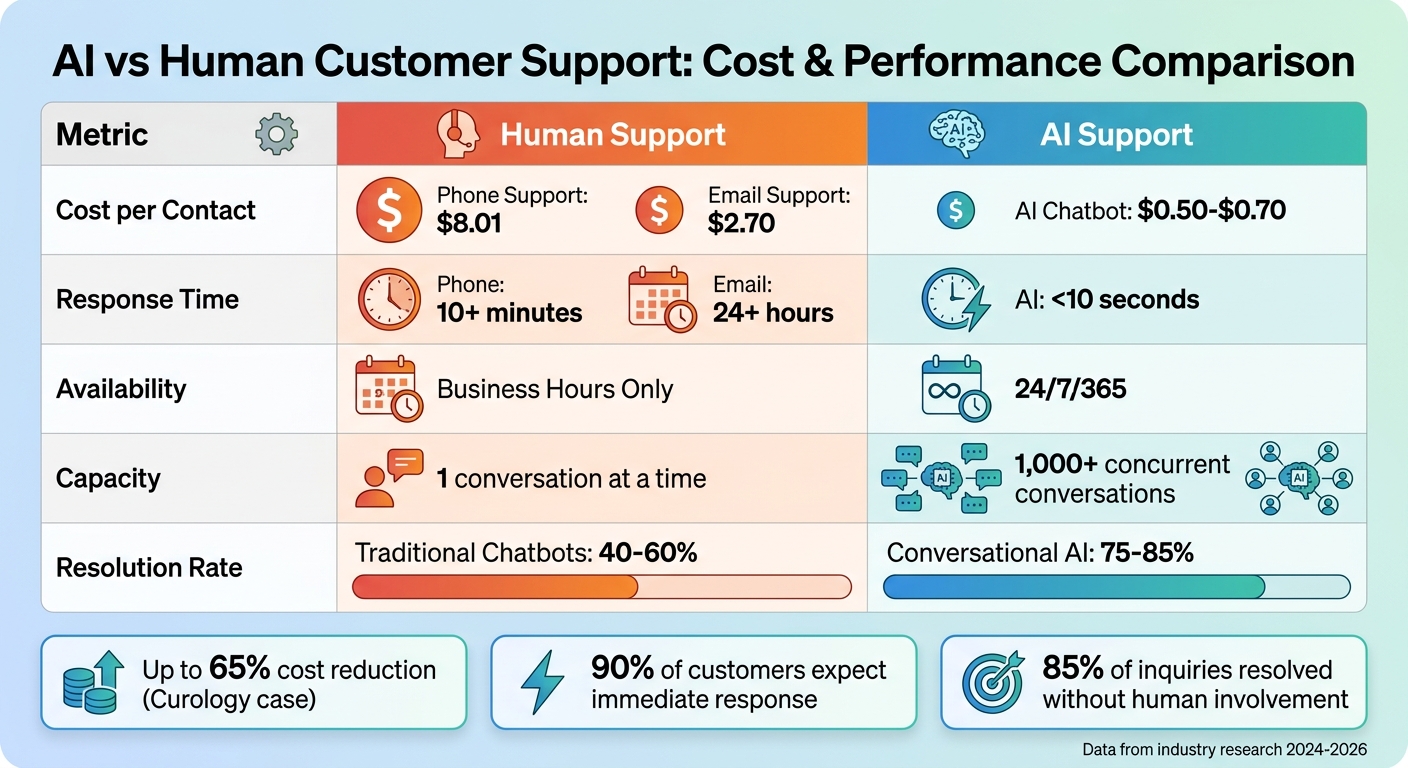
Cost and Performance Comparison: AI vs Human Customer Support
What is Conversational AI for Customer Support?
Conversational AI combines natural language processing (NLP) and machine learning (ML) to handle customer inquiries in real time - without human involvement. Unlike rule-based bots vs AI chatbots where the former rely on rigid decision trees, conversational AI focuses on understanding the intent behind a message. For example, whether a customer says, "I can't log in" or "authentication is failing", the system identifies both as the same issue and responds appropriately.
Here's a key difference: while rule-based chatbots can resolve only 40–60% of inquiries, conversational AI achieves resolution rates of 85% or higher (achieved through intent understanding and semantic search) [5]. This is because it learns and improves with every interaction, continuously fine-tuning its ability to provide accurate and helpful responses.
"Conversational AI understands meaning instead of just matching keywords." - Quiq [2]
This technology doesn’t just handle inquiries; it resolves them completely. AI agents can take actions like processing refunds, updating customer records, or tracking orders - all without human intervention. The benefits are undeniable: companies using AI-powered customer service have seen operational costs drop by 50% [6], and nearly 90% of service professionals report faster self-service resolutions thanks to conversational AI [7].
To get started, it's smart to focus on the most common issues - like order status, returns, or password resets - that make up the majority of customer inquiries. Once these are handled effectively, you can expand to other areas [5][4]. And don’t forget to design a safety net: always include a clear "talk to a human" option and ensure the full conversation history transfers to live agents. This avoids frustrating customers by making them repeat their issues [5][4].
Core Components of Conversational AI
Four key technologies power conversational AI:
- Natural Language Understanding (NLU): This component deciphers customer input, identifying intent and extracting key details like dates, names, or order numbers. It helps the system understand problem types and urgency [6].
- Dialogue Management: This ensures conversations flow naturally by selecting the next action based on context and keeping the interaction logical.
- Machine Learning (ML): With every interaction, machine learning refines the system's ability to predict intent and improve accuracy.
- Natural Language Generation (NLG): This creates responses that sound natural and align with your brand’s tone, making the AI feel more human-like [6].
To avoid "hallucinations" - plausible but incorrect responses - it's crucial to ground the AI in verified resources like official documentation and help articles. Regular audits and a tone-of-voice guide also ensure the AI reflects your brand’s personality and maintains consistency in communication.
These components work together to deliver smooth, accurate interactions, setting the stage for omnichannel support.
Omnichannel Support Capabilities
One of the standout features of conversational AI is its ability to maintain conversation continuity across channels. Whether a customer starts a conversation on your website, continues via SMS, or follows up on social media, the system retains the full history. This ensures customers don’t have to repeat themselves, creating a seamless experience.
Additionally, advanced platforms can handle multiple languages. They detect a customer’s language from the initial input and translate the entire conversation in real time. This eliminates the need for localized teams and allows businesses to provide global support effortlessly.
For instance, Tatcha leveraged conversational AI to drive 11.4% of total site revenue by using generative AI agents [5]. This highlights the power of meeting customers on their preferred channels while maintaining context throughout every interaction.
Key Benefits of Conversational AI for Businesses
Conversational AI offers businesses three key advantages: round-the-clock availability, cost efficiency, and personalized customer experiences at scale. These benefits aren't just theoretical; companies across various industries are turning these advantages into tangible financial gains and higher customer satisfaction scores.
24/7 Availability and Scalability
One of the standout features of conversational AI is its ability to operate non-stop, unlike human teams limited by business hours. For instance, 35% of customer requests come in after regular hours, which AI handles seamlessly [10]. This eliminates the need for costly night shifts or complex staffing models that require teams across multiple time zones.
Scalability is another game-changer. While human agents can juggle only 3–5 chats at a time, AI solutions can manage over 1,000 simultaneous conversations without breaking a sweat [9]. This capability is particularly useful during high-demand periods, like Black Friday, when businesses experience massive spikes in customer inquiries.
Real-world examples highlight this impact. In February 2024, Klarna reported that its AI assistant managed two-thirds of its customer service chats - about 2.3 million conversations in just one month. This workload equated to the output of 700 full-time agents and is expected to boost annual profits by $40 million [13]. Similarly, TaskRabbit handled a 60% increase in ticket volume (158,000 monthly) by launching an AI agent that automates all first contacts and deflects 28% of tickets [1].
"Customer support is the silent margin killer for solo founders... AI customer support eliminates this bottleneck by handling 80% of inbound requests autonomously." - Digital Applied [12]
Speed is another area where AI shines. With response times of under 10 seconds, AI meets the expectations of the 90% of customers who demand an "immediate" response [10]. Unsurprisingly, 62% of consumers now prefer chatbots over waiting for human agents [10].
Cost Savings and Operational Efficiency
Conversational AI significantly reduces operational costs. On average, AI-powered interactions cost just $0.50 to $0.70 per contact, compared to $8.01 for phone support and $2.70 for email support [9][10]. Multiply these savings across thousands of interactions, and the financial impact becomes substantial.
For example, Curology, a skincare company, cut its customer support costs by 65% by using AI to handle routine queries [3]. HelloSugar, a salon chain, automated 66% of its inquiries, saving $14,000 monthly and enabling expansion without increasing staff [10]. Meanwhile, NIB Health Insurance saved $22 million by deploying AI assistants, slashing customer service costs by 60% while improving accuracy [10].
AI also enhances efficiency by managing 70–80% of repetitive, low-complexity tasks like order tracking, password resets, and billing inquiries [8][10]. This frees up human agents to tackle more nuanced problems that require creativity and empathy.
| Metric | Human (Phone) | Human (Email) | AI Chatbot |
|---|---|---|---|
| Cost per Contact | $8.01 [9] | $2.70 [9] | $0.50–$0.70 [9][10] |
| Response Time | 10+ minutes [9] | 24+ hours [9] | <10 seconds [9][10] |
| Capacity | 1 conversation | N/A | 1,000+ concurrent [9] |
| Availability | Business Hours | Business Hours | 24/7/365 [9] |
"The question is no longer 'if' but 'how quickly' you can implement AI-powered automation to reduce support costs while improving customer experience." - Ravi Kinha, Technology Developer, Swiftflutter [9]
Personalization and Customer Experience
Beyond cost and efficiency, conversational AI is transforming how businesses engage with customers by delivering tailored interactions.
AI integrates with CRM and ERP systems to access customer data, enabling it to provide personalized order updates, product recommendations, and account details - all without customers needing to repeat themselves.
For example, Accor Plus, a hospitality network, achieved a 20% boost in customer satisfaction and a 220% increase in resolution speed by implementing AI agents [1]. Similarly, Unity, a 3D development platform, deflected 8,000 tickets using AI, saving $1.3 million and improving first response times by 83% [11][1].
Language customization is another strength. Advanced AI systems can detect and switch between over 100 languages mid-conversation [10]. This eliminates the need for localized support teams and meets the expectations of the 67% of consumers who now expect personalized service [11].
AI chatbots also achieve 75–85% resolution rates for routine queries, compared to the 40–50% success rate of human agents in similar situations [9]. This higher resolution rate reduces customer frustration and effort, which are critical for satisfaction and retention. In fact, better customer satisfaction through AI can result in a 3% to 7% increase in revenue due to improved retention [9].
"AI resolves more issues through automation, enhances agent productivity, and delivers more accurate, personalized service." - Tom Eggemeier, CEO, Zendesk [11]
ChatSpark: Features and Advantages for Customer Support
ChatSpark provides round-the-clock, cost-effective, and tailored AI support for businesses of all sizes. Between October 2025 and February 2026, a global construction products company using ChatSpark handled 10,754 messages, captured 153 leads, and achieved an impressive 98% resolution rate - all while saving $47,880 on a $4,000 investment [14]. These results highlight how conversational AI can transform customer support, and ChatSpark's features take this even further.
Core Features of ChatSpark
ChatSpark's AI chatbots leverage natural language processing to deliver responses in seconds, not minutes [16]. The platform seamlessly integrates across various channels, including websites, mobile apps, Messenger, WhatsApp, email, and even voice platforms [15].
With support for over 50 languages and real-time translation, ChatSpark empowers U.S.-based businesses to serve global customers without needing additional multilingual agents. Studies show this capability can boost engagement by 30–40% in non-English-speaking markets [16]. Its analytics dashboards track over 15 metrics, such as resolution time, CSAT scores, deflection rates, and sentiment analysis. These insights help businesses pinpoint inefficiencies and refine their customer support strategies, potentially increasing efficiency by up to 25% [15].
The platform's no-code drag-and-drop interface ensures deployment in under two weeks, making it accessible for teams without technical expertise. It also prioritizes security, adhering to GDPR and SOC 2 standards to protect customer data. Users have reported a 50% reduction in support tickets, with some enterprise implementations achieving resolution rates as high as 98% [14].
Pricing Plans and Scalability
ChatSpark's pricing is designed to grow with your business, offering four flexible tiers, all billed in U.S. dollars and including a 14-day free trial:
| Plan | Price (Monthly) | Messages/Month | Training Pages | Key Features | Best For |
|---|---|---|---|---|---|
| Basic | $19 | 100 | 25 | 1 AI agent, basic analytics, website deployment, multiple data sources | Solo entrepreneurs testing AI support |
| Plus | $59 | 250 | 50 | 5 AI Actions, ChatSpark CoPilot, REST API access, multi-channel deployment | Growing businesses expanding channels |
| Pro | $129 | 2,000 | 500 | 40 AI Actions, omnichannel deployment, GA4 tracking, ROI reports, unbranded widgets | Mature operations needing advanced analytics |
| Enterprise | Custom | Unlimited | Custom | Unlimited AI Actions, role-based access, 2FA, dedicated account manager, 99.9% uptime SLA | Large-scale deployments requiring custom solutions |
ChatSpark is built to handle thousands of simultaneous conversations without increasing staff requirements [15]. Lower-tier plans include pay-as-you-go overages at $0.05 per conversation, while the Enterprise plan offers unlimited scalability. Its auto-scaling cloud infrastructure supports growth from 100 to over 100,000 daily users without downtime [15]. This flexibility allows small and medium-sized U.S. businesses to start affordably with the Basic plan and upgrade as their needs grow.
How to Implement Conversational AI with ChatSpark
Analyzing Customer Support Needs
Start by reviewing your support ticket history from the past 3–6 months. Look for patterns in customer inquiries and group them into two categories: simple questions (like business hours or password resets) that ChatSpark can fully automate, and complex issues (like technical troubleshooting or billing disputes) where ChatSpark can assist by gathering initial details before handing the ticket to a human agent.
Next, calculate your current support costs. Factor in the average number of tickets, the time agents spend on each, and their hourly rate. This baseline will help you measure the impact of ChatSpark. For example, in early 2026, ITW, a global leader in construction products, implemented ChatSpark for one of its flagship brands. Over four months, the platform managed 10,754 messages with an impressive 98% AI resolution rate. This initiative, led by Lorri G., Customer Service & Technical Support Manager, generated 153 new leads, saved over 66 days of agent time, and reduced costs by $47,880 - all from a $4,000 investment [17][18][19].
Once you’ve assessed your needs, you’ll be ready to follow a guide to AI customer support implementation to integrate ChatSpark into your workflow.
Setting Up and Integrating ChatSpark
Deploying ChatSpark is straightforward, thanks to its no-code interface. Begin by uploading your existing support materials - FAQs, help articles, product manuals, and troubleshooting guides - directly into the platform. ChatSpark’s AI will process this data to create a robust knowledge base.
For a seamless experience, connect ChatSpark to your existing tools using its REST API (available with Plus plans and higher) or native integrations. For example, linking your CRM allows the chatbot to access customer order histories, account details, and past interactions, making conversations more personalized. You can then deploy the chatbot across your preferred channels, such as your website, WhatsApp, Facebook Messenger, or email, using the platform’s drag-and-drop interface.
Before launching, test the chatbot thoroughly. Run 20–30 common support scenarios to ensure it provides accurate responses. Fine-tune its tone and style to match your brand voice. With these steps, you’ll set the stage for ChatSpark to deliver more engaging customer interactions.
Monitoring and Optimizing Performance
Once ChatSpark is live, regular monitoring is key to maintaining its effectiveness.
In the first month, track the AI Resolution Rate weekly. A good target is between 70% and 85% [20]. If results fall short, use the "Top Unanswered Questions" dashboard to identify gaps in the AI’s training [20]. Also, keep an eye on the Knowledge Coverage score - it should stay above 80%. If it dips below 70%, focus on adding relevant documentation [20].
To improve over time, add two to three new training items each week based on unanswered questions. This ongoing effort will lead to steady performance gains [20]. Regular reviews ensure the system continues to meet your needs.
Finally, conduct a monthly ROI audit. Compare current metrics - ticket volume, resolution times, and customer satisfaction scores - to your initial baseline. These insights will help you decide whether to expand ChatSpark to additional channels or upgrade your plan as your business grows [20].
Real Use Cases of ChatSpark in Customer Support
Order Tracking and Status Updates
E-commerce businesses often deal with a flood of "Where's my order?" questions, which can overwhelm support teams. ChatSpark steps in by automating these inquiries, pulling real-time shipping updates directly from your order system. Whether it's the tracking number, carrier details, or an estimated delivery date, ChatSpark delivers the information instantly - no human needed.
Take ATK, a gaming gear retailer, as an example. In 2025, they implemented ChatSpark to handle customer queries during off-hours when their support team wasn’t available. The results? The bot managed 1,963 conversations and contributed $8,163.99 in assisted revenue by engaging customers who might have otherwise left their carts behind[21].
Troubleshooting and FAQs
ChatSpark isn’t just about tracking orders; it’s also a pro at tackling technical issues and answering FAQs. Using Retrieval-Augmented Generation (RAG), the AI pulls responses from your specific data sources - like website pages, PDFs, Google Docs, or even YouTube transcripts. This ensures that customers get accurate answers in seconds through a streamlined 4-step process.
In October 2025, Decathlon trained ChatSpark with data from a catalog of 10,000 products. Within just a week, it handled over 500 customer conversations with a resolution rate of 98.47% - a clear win for efficiency[23]. Similarly, ITW relied on ChatSpark to support two major product lines, with the AI managing an average of 1,831 chats per month.
"ChatSpark has been managing two of our largest product lines over the past year. It currently handles an average of 1,831 chats per month without any human intervention. Since implementing it on our website, we've realized measurable savings of $119,225." - Lorri G., Customer Service & Technical Support Manager, ITW[24]
Lead Capture and Conversion Assistance
ChatSpark doesn’t just stop at support - it also helps turn inquiries into sales. If a visitor asks about product features or pricing, the AI can collect their contact details, schedule demos, or even send high-intent leads directly to your sales team.
For businesses looking to expand their reach, ChatSpark’s Pro plan ($129/month) offers omnichannel deployment across platforms like WhatsApp, Instagram, and Facebook. It also includes ROI reports to track how many leads successfully convert into paying customers. For larger operations, the Enterprise plan adds unlimited AI Actions and custom CRM integration, ensuring every lead is seamlessly integrated into your existing systems. By blending support with sales, ChatSpark not only saves time but also boosts revenue.
Best Practices for Conversational AI in Customer Support
Getting the most out of AI in customer support means focusing on key areas like intent recognition, seamless handoffs to human agents, and tracking performance metrics effectively.
Mapping Intents for Effective Automation
Intent mapping is all about teaching your AI to understand and respond to what customers actually want. The process starts with analyzing real-world data - like call transcripts, support tickets, and agent notes - to pinpoint the top 10–20 reasons why customers reach out. This isn’t guesswork; it’s about identifying patterns in your existing support interactions [21][22].
Once you’ve identified these intents, create 10–15 sample phrases for each one. These should reflect how customers naturally speak. For example, instead of "password reset", customers might say, "I forgot my login" or "I can’t get in." Your AI should be trained to recognize synonyms, abbreviations, and indirect phrasing [21]. Group these intents into categories like billing, scheduling, or account management, and set confidence thresholds based on the level of risk involved.
Confidence thresholds are critical. For high-stakes actions - like processing payments - your AI should only proceed with 95% confidence. For general inquiries, if confidence falls between 75% and 89%, have the AI ask the customer to confirm. If it’s between 60% and 74%, the AI should immediately hand off to a human agent [23].
"Intent mapping gives you a voice agent that helps customers, rather than one that loops them back to the main menu because it doesn't know what's happening" - Maria Ortiz, Rasa [21]
Regularly review your intent map - monthly or quarterly. Look at conversations the AI couldn’t handle, update sample phrases for new features, and address any gaps in its knowledge [21][22]. Once your intents are well-defined, the next step is ensuring smooth human handoffs.
Managing Human Handoffs
Customers value the ability to talk to a human. In fact, 86% want the option to transfer to an agent when interacting with a chatbot, and 40% will abandon the chat altogether if they can’t find that option [24]. Make sure the "talk to an agent" button is easy to find. Just having it visible can reduce customer frustration, even if it’s rarely used [24][25].
When a handoff happens, make it seamless. Give human agents a 10–15 second window to review a summary of the AI conversation before they connect with the customer. This prevents customers from having to repeat themselves and helps resolve issues faster. Use escalation triggers to route high-priority keywords - like "lawsuit", "breach", or "cancel" - to specialized teams immediately, while less urgent technical issues follow the standard queue. Many AI implementation failures are due to poor escalation processes rather than flaws in the technology itself. Set clear rules for when the AI should hand off, such as detecting negative sentiment, repeated failed attempts, or explicit customer requests [23].
Measure the quality of these handoffs with a Handoff Quality Score (HQS), which tracks how much useful information is transferred from the bot to the human agent [24]. Once your escalation processes are solid, the final piece is tracking and improving performance metrics.
Measuring and Improving Success Metrics
Traditional metrics like "cost per call" don’t give the full picture. Instead, focus on the cost per resolved issue. This metric factors in AI infrastructure, escalation costs, and human agent time, divided by the total number of resolved issues [26].
It’s also important to track how well your AI handles escalations. Is it handing off too soon, or is it failing to escalate complex issues? Review questions the AI couldn’t answer and update your documentation to fill those gaps [27]. For example, in 2025, HelloSugar automated 66% of customer queries, saving $14,000 per month while expanding operations without increasing support staff [10]. Similarly, TaskRabbit managed a 60% spike in ticket volume - reaching 158,000 per month - by automating initial interactions and deflecting 28% of total tickets [1].
Analyze which knowledge base articles lead to higher resolution rates and identify underperforming ones. Today’s AI chatbots can resolve 80–90% of issues, a big jump from the 60–70% rate of traditional support systems. Plus, they’ve cut first response times from hours to under 10 seconds [10]. Review these metrics quarterly to spot trends and refine your AI’s training data for even better results.
Conclusion: The Future of Customer Support with Conversational AI
Conversational AI has become a game-changer for businesses aiming to stay ahead. The stats are hard to ignore: 51% of consumers prefer bots for quick service [1], and these systems drastically reduce response times from minutes to mere seconds, all while managing customer queries effectively.
The cost benefits are equally striking. Traditional phone support costs $8.00–$15.00 per call, but AI-powered automation slashes that to just $1.00–$3.00. For chat and messaging, the difference is even more dramatic - manual support costs $3.00–$8.00, compared to only $0.25–$1.00 with AI.
ChatSpark provides a straightforward way to bring AI into your customer support system. It offers 24/7 availability, supports over 85 languages, and works seamlessly across platforms like websites, Instagram, Facebook, WhatsApp, Telegram, and Slack. By automating routine tasks, ChatSpark frees up your team to handle complex issues that need a personal touch. Pricing starts at $19 per month for solo entrepreneurs, who can follow a customer service automation checklist with scalable plans for larger teams.
The goal isn't to replace human agents but to enhance their capabilities. AI handles repetitive tasks, delivers instant answers, and escalates challenging cases with all the necessary context. As we've seen, this approach boosts both efficiency and customer satisfaction. Businesses that embrace conversational AI are positioning themselves to thrive in an increasingly competitive landscape.
FAQs
What should we automate first with conversational AI?
Automating repetitive, high-volume tasks is a smart first step. Focus on areas like FAQ responses, order status updates, password resets, and simple policy inquiries - these types of issues often make up 40–65% of support tickets. By using AI-powered chatbots to handle these requests, you can cut costs by as much as 50–60% without compromising service quality.
Once these basics are covered, you can gradually move on to automating more complex interactions. Just make sure there's always a clear path for escalating edge cases to human support when needed. This balanced approach ensures efficiency while keeping customer satisfaction intact.
How do we prevent wrong or made-up AI answers?
To ensure AI provides accurate and reliable answers, one effective approach is Retrieval-Augmented Generation (RAG). This method works by pulling verified information directly from your company’s resources before crafting responses. It’s like giving AI access to a trusted library of facts, so it doesn’t rely on guesswork.
Here’s how to keep your AI accurate:
- Keep the Knowledge Base Updated: Regular updates ensure the AI has access to the most current and relevant information.
- Monitor Interactions: Regularly review AI responses to identify and correct any inaccuracies.
- Leverage Advanced Natural Language Understanding (NLU): Enhanced NLU capabilities improve the AI’s ability to interpret and respond to questions accurately.
By combining these strategies, you can deliver responses that customers can trust, ultimately leading to a better overall experience.
What metrics prove conversational AI ROI?
When evaluating the return on investment (ROI) of conversational AI, three standout metrics come into play: cost savings, customer retention, and operational efficiency.
Here’s the deal: AI-driven solutions can slash support costs significantly - between 30% and 70%. Why? AI interactions typically cost between $0.99 and $2.00 per interaction, while human-handled tickets range from $6 to $12 each. That’s a big difference.
Another key metric to watch is the Resolved on Automation Rate (ROAR). Initially, AI systems can handle about 20% to 40% of customer inquiries without human intervention. Over time - usually within 6 to 12 months - this figure climbs to over 60%, thanks to continuous learning and optimization. This not only drives operational efficiency but also enhances customer loyalty by providing faster, more consistent support.