AI is transforming customer support by automating repetitive tasks, improving response times, and cutting costs. With tools like ChatSpark, businesses can manage up to 80% of routine queries, reduce costs by 68%, and deliver 24/7 support across multiple platforms. However, successful implementation requires careful planning, strong data organization, and ongoing optimization.
Key Takeaways:
- AI handles FAQs, order tracking, and basic troubleshooting, freeing human agents for complex cases.
- Integration with CRMs and backend systems enables AI to perform tasks like refunds and account updates.
- Metrics like resolution rates, customer satisfaction (CSAT), and cost per interaction help measure success.
- ChatSpark offers omnichannel support, customizable branding, and integrations starting at $19/month.
Steps to Implement AI Customer Support:
- Identify Goals: Focus on automating high-volume, simple tasks like password resets or FAQs.
- Prepare Data: Consolidate knowledge bases and ensure compliance with privacy standards.
- Set Metrics: Track resolution rates, response times, and customer sentiment.
- Pilot Launch: Start with a small percentage of queries to test and refine the system.
- Optimize Regularly: Update knowledge bases weekly and address recurring issues.
AI support is not a "set it and forget it" solution. With consistent updates and human-AI collaboration, businesses can improve efficiency, reduce costs, and deliver better customer experiences.
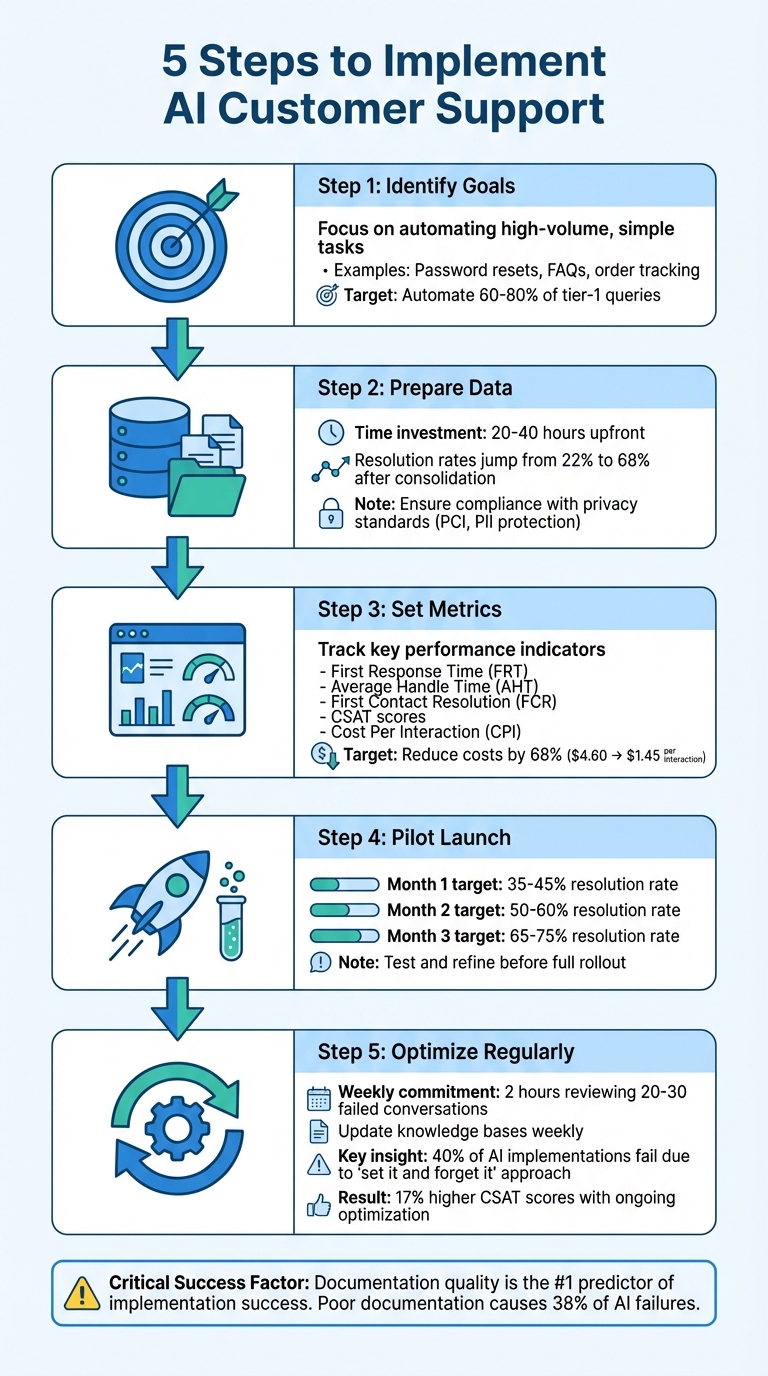
5-Step AI Customer Support Implementation Process
Planning Your AI Customer Support Implementation
To fully harness the efficiency and cost benefits of AI in customer support, you need a well-thought-out plan. A clear strategy is critical before launching AI-driven support. According to McKinsey, contact centers are no longer just cost centers - they’re becoming competitive assets [7]. However, 40% of AI implementations fail within the first 90 days due to poor planning [3]. The difference between success and failure often boils down to three key steps: identifying the right use cases, ensuring robust data infrastructure, and setting realistic performance benchmarks.
Identifying Business Goals and Use Cases
Begin by conducting a friction audit to identify pain points in your current support operations. Analyze support transcripts, customer surveys, and NPS feedback to uncover where customers face delays or frustration [6]. The most impactful AI use cases typically fall into three categories:
- Repetitive queries like password resets, order tracking, or FAQs
- Data-heavy tasks prone to human error
- Scenarios requiring 24/7 availability across time zones [5][6]
Define measurable goals. Instead of vague aims like "improve customer service", set specific targets such as "deflect 20% of routine inquiries" or "reduce average handle time by 15%" [5]. Research shows that AI can automate 60-80% of tier-1 queries when implemented thoughtfully [3]. Start by automating high-volume, low-complexity tasks - such as appointment scheduling or shipping updates - to achieve quick wins. For more sensitive issues, like fraud reports or legal complaints, keep human agents in the loop [3].
Once your goals are clear, shift your focus to building a strong data foundation.
Data Requirements and Compliance
AI thrives on accurate, unified data. For example, a B2B SaaS company initially struggled with a 22% resolution rate because their documentation was scattered across four platforms. After consolidating their knowledge base into a single, consistent source, their resolution rate jumped to 68% in just three weeks [3]. Plan to spend 20-40 hours upfront consolidating and organizing your documentation [3].
For U.S. businesses, compliance is non-negotiable. Always inform customers when they’re interacting with an automated system, especially in regulated industries like healthcare or finance [7]. Configure escalation triggers for high-risk keywords such as "lawyer", "legal", "BBB", or "complaint" to ensure sensitive issues are promptly routed to human agents [3]. In 2024, a FinTech startup faced a PR crisis after failing to set up these triggers for fraud complaints, costing them $8,500 in damage control and a six-week delay [3].
Additionally, ensure your data governance framework adheres to PCI standards for handling payment information and outlines clear rules for collecting, storing, and accessing customer data [7].
With your data and compliance in place, it’s time to define metrics that will track your progress.
Setting Success Metrics
Once your goals and data are aligned, monitor success through measurable performance indicators. Key metrics include:
- First Response Time (FRT), Average Handle Time (AHT), and First Contact Resolution (FCR) for efficiency
- CSAT scores for customer satisfaction, specifically for AI interactions
- Sentiment analysis to detect frustration early [4][5][8][9]
On the financial side, track Cost Per Interaction (CPI). AI-hybrid models can reduce costs by 68%, averaging $1.45 per interaction compared to $4.60 for human-only support [3].
Set incremental targets for the first 90 days: aim for a 35-45% resolution rate in Month 1, 50-60% in Month 2, and 65-75% by Month 3 [3]. While some vendors promise 90%+ resolution rates, real-world performance generally peaks at 70-75%, even with advanced AI [3].
Here’s a quick look at how AI technology has evolved:
| AI Technology Generation | Average Resolution Rate |
|---|---|
| 2023 Legacy Rule-Based Chatbots | 25% [3] |
| 2024 Early Generative AI (GPT-3.5) | 52% [3] |
| 2025 Advanced AI (GPT-4/Claude 3) | 71% [3] |
| Human-Only Baseline (Control) | 73% [3] |
When calculating ROI, don’t overlook hidden costs like weekly optimization. Plan for 8-12 hours per week in the first 90 days to refine responses and update your knowledge base [3]. For startups, the average first-90-day investment is around $3,180, factoring in platform subscriptions, usage charges, and labor for training [3].
Building Your Technology Stack
Once your strategic planning is in place, the next step is assembling a technology stack that delivers results. The right tools can transform a simple FAQ bot into a smart system capable of managing complex tasks. This infrastructure is the backbone of fast, accurate, and actionable customer support.
Core Components of Conversational AI
Modern AI-driven customer support relies on several essential layers working in harmony. At the heart of this is Natural Language Processing (NLP), which interprets different ways users phrase similar questions. For example, whether someone asks "Where is my order?" or "What’s the status of my shipment?", NLP goes beyond basic keyword matching to understand both context and intent [10][1].
Next is knowledge retrieval, the AI's "brain." This involves consolidating information from FAQs, technical manuals, CRMs, and internal wikis into a unified knowledge base. Without this single source of truth, you risk delivering inconsistent answers across different channels [12].
Workflow orchestration elevates AI from a simple responder to an action-oriented system. Instead of merely answering questions, it executes tasks by integrating with your backend systems via APIs. This allows the AI to perform actions like updating account details or processing refunds [11][12].
Two more layers complete the stack: agent assistance tools and governance features. Agent assistance tools provide real-time suggestions, helping human agents work more efficiently - boosting productivity by 13.8% [11]. Governance features ensure compliance with policies, protect sensitive data like PII, and maintain your brand's tone and guidelines [12]. Together, these elements create a strong foundation for omnichannel deployment.
Omnichannel Deployment with ChatSpark
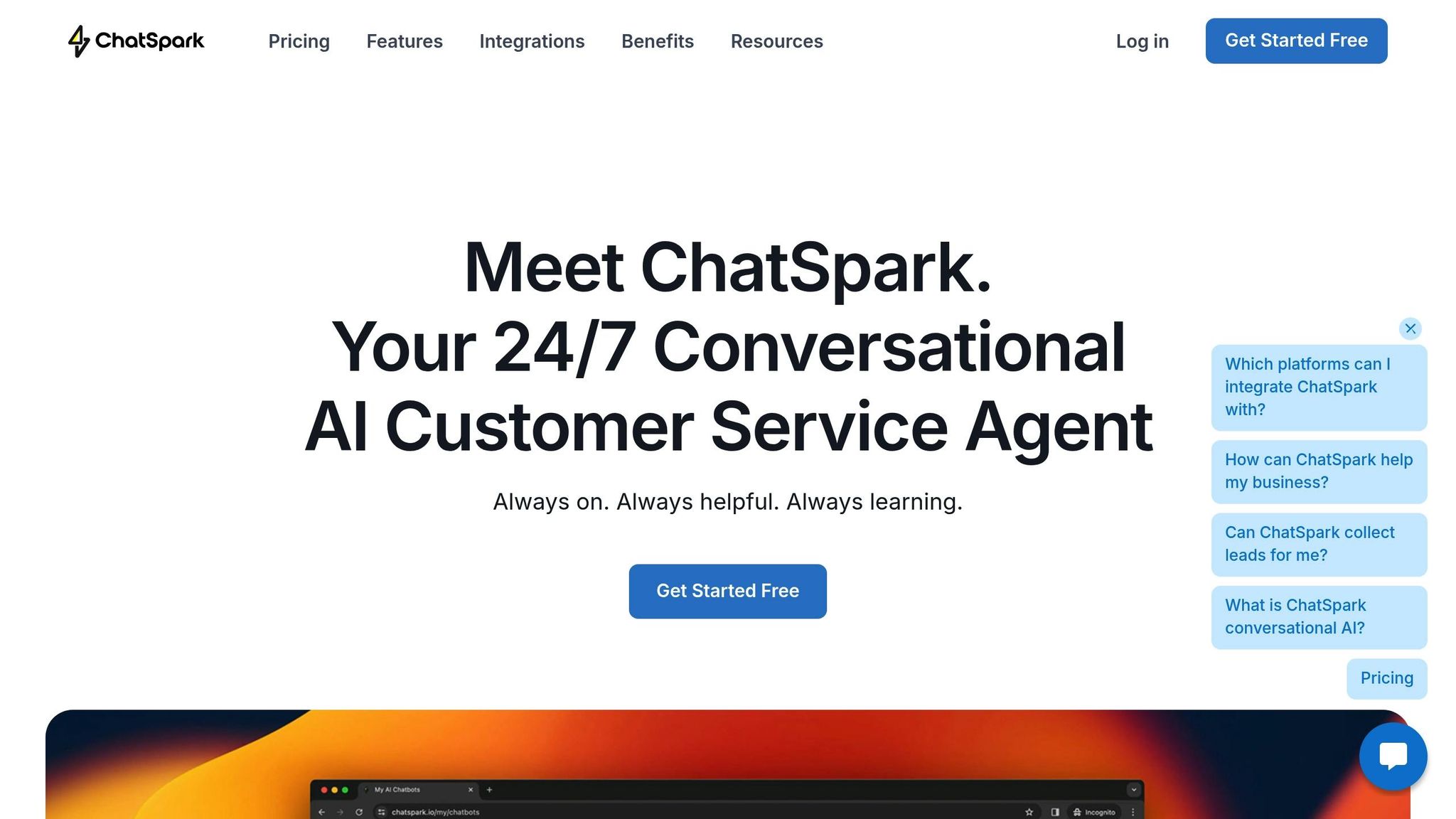
Your customers interact across various platforms, so your AI needs to meet them wherever they are. ChatSpark makes this possible by deploying on websites, Instagram, Facebook, WhatsApp, Telegram, and Slack, all while maintaining conversation continuity. For instance, if a customer starts a chat on your website and later follows up via Instagram DM, ChatSpark keeps the conversation history intact [12][10].
ChatSpark also supports 85+ languages and allows for customization of the AI's tone and branding across all channels. This ensures a consistent voice, whether a customer reaches out on Slack or Facebook. The system excels in handling high volumes of repetitive queries, while sensitive issues are seamlessly escalated to human agents, complete with full context.
| Channel | Best Use Cases | Key Metrics |
|---|---|---|
| Web / Live Chat | FAQs, billing, troubleshooting, appointments | First Response Time, CSAT |
| SMS / Messaging | Status updates, proactive alerts, reminders | Deflection Rate, Opt-outs |
| Auto-triage, ticket enrichment | Average Handle Time, SLA Hit Rate | |
| Social Media | Quick responses, brand engagement | Containment, Response Time |
Integrating with Existing Systems
To maximize the potential of your AI stack, it must integrate seamlessly with your existing tools. By connecting to CRMs, help desks, and payment systems, the AI can handle tasks like issuing refunds, updating subscriptions, resetting passwords, and scheduling appointments through backend integrations [10][12].
For U.S. businesses, security and compliance should be a top priority. Look for features like SOC-2 compliance, strong data encryption (both in transit and at rest), and PII redaction to protect customer information during system-to-system transfers [12][10]. ChatSpark’s advanced plans offer integrations with a wide range of business tools without requiring custom development.
Start by mapping your most common support workflows. For example, if a large number of inquiries involve order status updates, ensure your AI can directly query your shipping system's API. Similarly, if password resets frequently tie up your agents, integrate the AI with your authentication system to automate the process. Don’t forget to allocate time for setting up automated ticketing and routing. This allows your AI to categorize requests, merge duplicate tickets, and apply routing rules based on complexity or customer priority [10]. With these integrations in place, your AI stack will be ready to deliver measurable improvements in support efficiency.
Step-by-Step Implementation Process
Now that your technology stack is ready, it’s time to move from planning to execution. This phase is where your AI support system either becomes a game-changer or runs into avoidable hurdles. Careful preparation, clear expectations, and ongoing adjustments are key. Here’s a step-by-step guide to turning your vision into a live, efficient AI support system.
Design and Discovery Phase
Start by forming a cross-functional team that brings together a project lead (often your Head of Customer Service or CX), seasoned support agents, a CRM administrator, and integration engineers [4]. This team will handle the discovery phase, ensuring no detail is missed.
First, identify the types of inquiries your AI will handle. Analyze your help desk reports to find high-volume, repetitive questions - like order status updates, password resets, account changes, and simple troubleshooting [4][5]. Establish clear goals, whether it's improving resolution rates or expanding availability, to keep your team focused.
Next, conduct a knowledge audit. This involves gathering help center articles, support tickets, and training materials into one centralized source - a process that typically takes 20–40 hours. This step ensures your AI has a solid foundation to learn from. Why is this important? Poor documentation is responsible for 38% of AI implementation failures [3].
Consolidate resources from platforms like Notion, Google Docs, or internal wikis into a single knowledge base. During this process, remove outdated or conflicting information - 30–40% of existing content is often no longer relevant - and address gaps by reviewing recent support tickets [3]. Organize everything with clear headers, bullet points, and numbered steps, as structured content helps AI perform 2–3x better compared to dense paragraphs [3].
Finally, define escalation boundaries. Create a list of issues your AI should never handle, such as billing disputes, account cancellations, legal matters, or fraud reports [3]. Set up keyword triggers to route these cases directly to human agents when customers use terms like "lawyer", "refund", or "manager." Set realistic expectations: aim for a 35–45% resolution rate in the first month, increasing to 65–75% by month three as the system improves [3].
Configuring ChatSpark
Once the design is in place, the next step is configuring the AI tool to fit your brand and operational needs. This phase turns your prepared knowledge into an active AI agent. Start by connecting your knowledge sources to ChatSpark. Upload your consolidated documentation, link your help center, and integrate historical support data - such as past tickets and saved replies - to ensure the AI provides authentic responses [13].
Next, customize brand voice alignment. Use ChatSpark’s persona settings to define your tone - whether playful or formal - and set preferences for message length, emoji use, and guidelines like asking for clarification when a query is unclear [13]. This ensures consistency across channels like web chat, Instagram, Facebook, WhatsApp, Telegram, and Slack.
Configure confidence thresholds and escalation rules to ensure ChatSpark only responds when it’s highly confident. Otherwise, it should route the conversation to a human agent or request more context [13]. Additionally, set sentiment triggers to escalate conversations when customer sentiment drops below -0.6, helping you address frustration quickly [3].
| Configuration Task | Time Investment | Key Objective |
|---|---|---|
| Knowledge Consolidation | 8–12 Hours | Centralize all documentation |
| Contradiction Audit | 6–10 Hours | Remove outdated or conflicting content |
| Gap Filling | 8–15 Hours | Create 30–50 articles for common cases |
| Escalation Rule Design | 2–4 Hours | Define "no-touch" zones and triggers |
| Persona/Tone Setup | 1–2 Hours | Align AI responses with brand identity |
Plan a pilot launch by directing only 10–20% of customer traffic to ChatSpark initially [3]. This controlled rollout allows you to monitor responses and identify areas for improvement without affecting your entire customer base.
As Nicholas Walters from Groove explains, "AI isn't just for FAQs or email tasks. It can fulfill gaps in customer support beyond 'basic' replies to customer queries" [13].
Testing and Refining
With design and configuration complete, testing ensures your AI system performs as expected. Start by piloting the system with high-frequency, low-complexity inquiries like order status updates or FAQs [5]. Measure key metrics such as resolution rates, handling times, customer satisfaction (CSAT) scores, and escalation frequency [2]. Analyze conversation patterns to identify commonly used keywords and workflows [1]. Real-time sentiment monitoring can also flag frustrated customers, helping you prioritize urgent cases [2].
Set up a weekly review process by dedicating two hours each week to review failed or escalated conversations. Use these insights to update your knowledge base and refine workflows [3].
As IBM Think highlights, "AI should enhance, not replace, human support. It's best used for routine tasks, while complex, emotional, or sensitive cases use human interaction from agents who can provide nuance and empathy" [2].
Be upfront with customers by clearly stating when they’re interacting with AI, and make sure your escalation process allows them to easily reach a human agent when necessary [2][5]. Companies that invest in consistent testing and updates report 17% higher CSAT scores and a 38% reduction in average inbound call handling time [2]. These results come from ongoing refinement - not a “set it and forget it” approach.
Optimizing and Scaling AI Support
Your AI support system is up and running, but the real game starts with ongoing optimization. Regular tweaks can significantly boost your resolution rate. On the flip side, companies that treat AI as a "set it and forget it" tool often see 40% of their implementations fail within the first 90 days - mostly due to poor-quality documentation [3]. The ones that thrive are those that consistently refine their systems, week after week.
Continuous Improvement Strategies
Set aside two hours each week to review 20–30 failed or escalated conversations [3]. Look for recurring issues: Are customers asking questions that your knowledge base doesn’t address? Is your AI misinterpreting specific phrases? Are outdated articles causing confusion?
ChatSpark’s analytics dashboard can be your best friend here. Use it to pinpoint topics with the lowest resolution rates - these are your knowledge gaps. Fill them by creating new articles or updating existing ones. Schedule quarterly audits to keep your content fresh. Remove references to outdated features, include new scenarios from recent support cases, and structure your documentation with clear headers, bullet points, and numbered steps. Structured content isn’t just easier for humans to follow - it helps your AI perform 2–3 times better compared to dense, unstructured paragraphs [3].
Set realistic goals and track your progress incrementally. While vendors might promise resolution rates of 90% or higher, in practice, the best systems typically cap at 70–75% [3]. Focus on steady improvements and celebrate each milestone. These small, consistent upgrades make integration with ChatSpark’s tools smoother and more effective.
Human-AI Collaboration
When used correctly, AI can boost support team productivity by 14% [2]. The key is striking the right balance - let AI handle repetitive, high-volume inquiries while reserving complex, emotional, or sensitive cases for your human agents.
"AI should enhance, not replace, human support. It's best used for routine tasks, while complex, emotional or sensitive cases use human interaction from agents who can provide nuance and empathy." - IBM Think [2]
To achieve this, configure your system to escalate conversations when needed. For example, set sentiment triggers to flag interactions where the customer’s sentiment score dips below -0.6 (on a scale from -1 to +1). Create instant handoff mechanisms for high-risk keywords like "lawyer", "BBB", "refund", or "manager." Also, give customers the option to connect with a human agent at any time through a visible, one-click button [3].
Leverage your most experienced agents as "AI Builders." These team members can oversee content updates and monitor post-launch performance. Their frontline experience is invaluable for fine-tuning the system and ensuring it aligns with real-world customer needs.
Measuring ROI and Performance
Once your AI support system is running smoothly, it’s time to evaluate its impact. Keep an eye on both financial and operational metrics to measure long-term success. A well-implemented AI system can reduce the cost per interaction by 68%, dropping from $4.60 (human-only) to $1.45 (AI-hybrid) [3]. Most companies see a return on investment within 4.7 months [3].
| Metric Category | Key KPI | What It Tells You |
|---|---|---|
| Financial | Cost per Interaction | Compare against your $4.60 human-only baseline to measure savings [3] |
| Efficiency | Resolution Rate | Highlights areas in your knowledge base that need updates [3] |
| Speed | First Response Time (FRT) | Assesses the value of 24/7 AI availability [4] |
| Quality | CSAT / Sentiment | Flags interactions for manual review or agent coaching [2] |
| Operational | Escalation Rate | Helps refine handoff triggers and identify "AI-must-never-touch" cases [3] |
Beyond cost savings, monitor metrics like containment rate (the percentage of queries resolved entirely by AI) and customer satisfaction scores specifically tied to AI interactions [5][4]. Companies that fine-tune their AI systems report a 17% higher customer satisfaction rate [2], and those with mature implementations see a 38% reduction in average inbound call handling time [2]. ChatSpark’s performance dashboards make it easy to track these metrics in real time, helping you identify trends and make informed adjustments to your strategy.
Conclusion
Adopting AI for customer support is more than just a technological upgrade - it's a commitment to smarter, more efficient operations. The key to success lies in treating AI as a tool that demands thoughtful planning, top-notch documentation, and constant improvement. As Ehab AlDissi, Managing Partner at Gotha Capital, wisely states:
"Documentation quality is the #1 predictor of implementation success" [3].
This principle underpins every stage of the process outlined earlier.
With a solid strategy and the right technology, platforms like ChatSpark empower U.S. businesses to expand their support capabilities without inflating costs. Offering 24/7 availability across web, mobile, WhatsApp, Facebook, Instagram, Telegram, and Slack, ChatSpark ensures customers get instant responses on their preferred channels. It takes care of routine tasks - like password resets, order tracking, and simple FAQs - allowing human agents to focus on more complex, high-impact issues.
The financial upside is clear. Companies that integrate AI-hybrid support models report their cost per interaction dropping from $4.60 to just $1.45, slashing operational costs by 68%. Most businesses achieve a return on their investment within 4.7 months [3].
Beyond cost savings, ChatSpark offers tools that maintain a seamless human-AI collaboration. Features like its analytics dashboard, built-in escalation triggers, and integrations with platforms such as Zapier, Freshchat, and Calendly ensure a smooth workflow. Whether you're a solo entrepreneur starting with the $19/month Basic plan or a large enterprise needing tailored solutions, ChatSpark scales to fit your needs while keeping your brand voice consistent across every interaction.
As highlighted throughout this guide, success starts with documenting your processes, assembling the right team, and setting measurable goals. With these steps, you can create 24/7 support that not only meets customer expectations but also drives meaningful business growth.
FAQs
What mistakes should I avoid when implementing AI for customer support?
When using AI in customer support, there are a few pitfalls that businesses should avoid to ensure a smooth and effective implementation:
- Prioritizing cost-cutting over strategy: If AI is seen purely as a way to save money without rethinking how support workflows function, it can lead to poorly executed automation. AI should improve the overall support experience, not just replicate existing inefficiencies.
- Ignoring data quality: AI relies heavily on accurate and accessible data. If your data is messy, incomplete, or stuck in silos, the AI may produce unreliable responses. Keeping your data clean and well-organized is essential for success.
- Lack of governance and planning: Treating AI as a casual experiment often results in stalled or abandoned projects. To avoid this, define clear objectives, assign responsibility, and set up systems for ongoing monitoring and updates.
- Underestimating risks: Problems like biased models or incorrect responses can damage customer trust. To address this, ensure there’s human oversight and conduct thorough testing to catch and resolve potential issues.
By steering clear of these mistakes, you can create an AI-powered customer support system that truly improves the customer experience and delivers meaningful outcomes.
How can businesses stay compliant with data privacy laws when using AI for customer support?
To comply with data privacy laws, begin by establishing a solid governance framework. Assemble a team with key roles such as a project lead, AI implementation experts, a CRM administrator, and, if necessary, a custom integration engineer. This group will oversee how customer data is collected, stored, and accessed, ensuring adherence to U.S. regulations like CCPA or HIPAA, depending on your industry. Right from the start, integrate consent management and data minimization practices into your processes.
Equip your AI tools with strong security features, including encryption, access logging, and regular audits, to protect sensitive data. These systems should align with your overall data protection strategy, supported by continuous monitoring and periodic privacy evaluations. Additionally, provide staff training on proper data handling to ensure compliance and maintain customer trust while utilizing AI-powered support tools effectively.
How can I optimize the performance of my AI customer support after implementation?
To ensure your AI customer support continues to deliver top-notch performance, focus on tracking critical metrics like response accuracy, resolution time, and customer satisfaction scores. Regularly analyze performance data to uncover trends, such as rising fallback rates or misrouted requests, and tackle these issues as soon as they arise. Leveraging real-time analytics can also help you detect intent mismatches, shifts in customer sentiment, or unexpected surges in query volume.
Keep your AI sharp by updating its training data frequently. Use anonymized transcripts from both successful and unsuccessful interactions to refine its understanding. Add new phrases, synonyms, and edge-case scenarios, and aim to retrain the model every 2–4 weeks to keep pace with changing customer expectations. Don’t forget to maintain your knowledge base - ensure FAQs, troubleshooting guides, and escalation pathways are current and relevant. Testing small tweaks, like updated prompts or routing adjustments, can further enhance performance. With consistent monitoring, updates, and experimentation, your AI will stay accurate, efficient, and ready to meet customer needs.