When customer inquiries pile up, slow response times and overwhelmed teams can hurt your business. The good news? AI-powered tools can tackle repetitive tasks, speed up responses, and free up your team for complex issues. Here's a quick breakdown:
- Challenges: Rising customer expectations, slow response times, and high agent stress.
- AI Benefits: Automates routine tasks (e.g., password resets), reduces response times by 37%, and saves agents 2+ hours daily.
- Steps to Improve:
- Assess your current support setup: Identify high-volume channels, repetitive questions, and performance metrics like First Response Time (FRT) and Customer Satisfaction (CSAT).
- Use tools like ChatSpark to manage inquiries across platforms, automate FAQs, and maintain consistent customer interactions.
- Set up escalation rules for complex issues requiring human agents.
- Monitor key metrics like deflection rates and adjust as needed to scale efficiently.
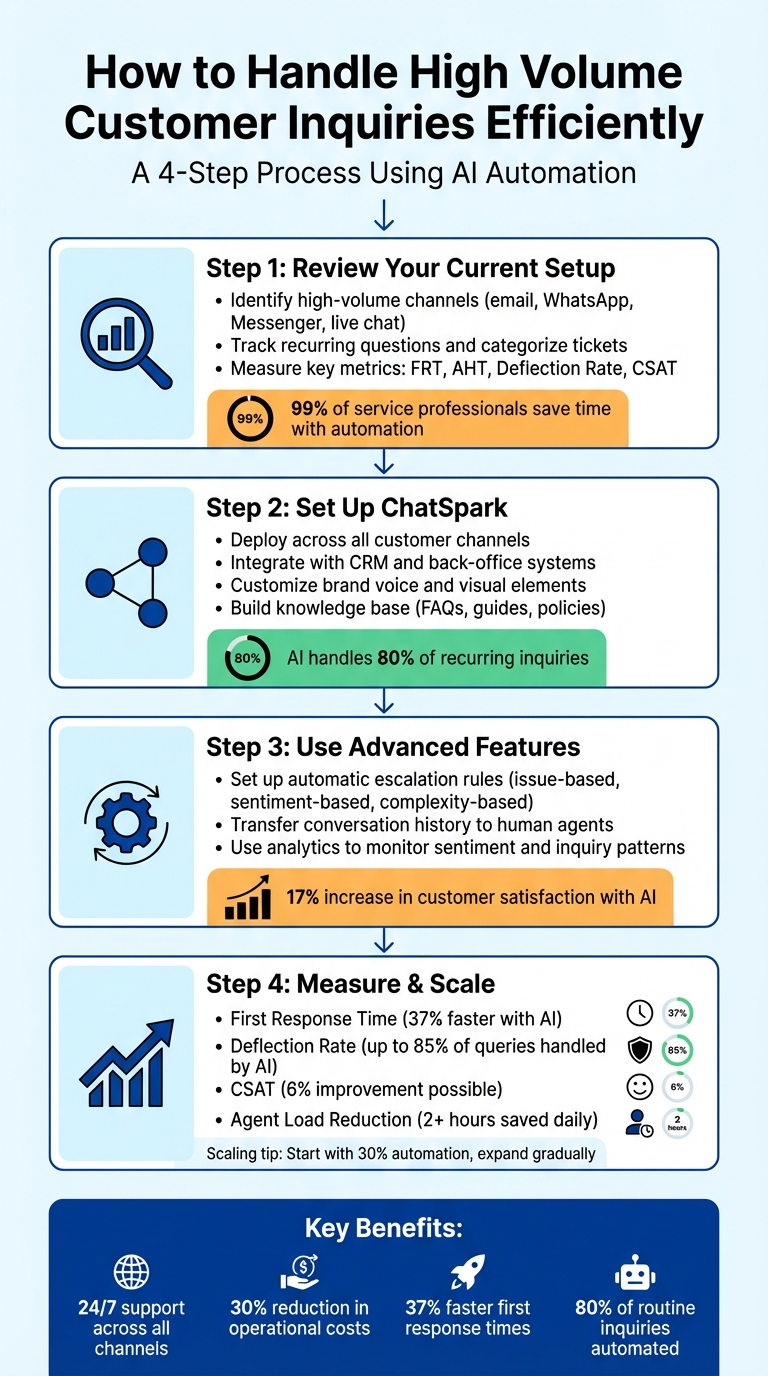
4-Step Process to Handle High Volume Customer Inquiries with AI
How To Automate Customer Service With AI Agents (Multimodal Chatbots & Evaluation)
Step 1: Review Your Current Customer Support Setup
Before making any changes to your support operations, it’s important to take a step back and evaluate your current system. This involves identifying which channels are overwhelmed with inquiries, spotting recurring questions, and understanding where your team spends most of their time. The goal here is to uncover patterns and pinpoint areas that need attention.
Identify High-Volume Channels and Recurring Questions
Start by mapping out the channels your customers use to reach you - email, social media platforms like WhatsApp or Messenger, website live chat, mobile apps, and IVR systems [2]. Use data from your CRM or ticketing system to detect trends and categorize tickets into groups like Billing, Technical Support, or Orders [1]. Pay close attention to repetitive tasks, such as password resets or order status updates, as these are ideal candidates for automation.
It’s also helpful to track when inquiries peak, such as Mondays or during holiday seasons [6]. By understanding these patterns, you can better allocate resources and fine-tune your processes to handle surges more effectively.
Measure Response Times and Support Quality
To understand how well your team is performing, focus on key metrics like First Response Time (FRT) and Average Handling Time (AHT) [7][8]. These numbers give you a snapshot of how quickly and efficiently your team addresses customer issues. To gauge the quality of your support, use tools like CSAT (Customer Satisfaction Score) and NPS (Net Promoter Score), which can be gathered through automated surveys after interactions [2][8].
Another critical metric is your deflection rate - the percentage of inquiries resolved without human involvement. If this number is low, it could signal that your self-service tools or knowledge base need improvement [7]. For example, if 60% of customers abandon their inquiries after waiting two minutes on hold, it’s a clear sign that your system needs adjustments [3].
On a positive note, 99% of service professionals report that automation allows them to save time and focus on more complex tasks [8]. These metrics not only highlight areas for improvement but also serve as a baseline for measuring the impact of future changes.
| Metric | What It Measures | Why It Matters |
|---|---|---|
| First Response Time (FRT) | Time until the first reply (human or bot) | High FRT can point to intake or triage delays [7] |
| Average Handling Time (AHT) | Total time spent on a single interaction | High AHT may indicate agents lack proper tools [8] |
| Deflection Rate | Percentage of inquiries resolved without a human | Low rates suggest self-service tools aren’t effective [7] |
| Customer Satisfaction (CSAT) | Feedback on customer interactions | Low scores reveal specific pain points [2] |
Step 2: Set Up ChatSpark to Streamline Customer Support
Deploy ChatSpark across all your customer channels. This platform integrates seamlessly with websites, mobile apps (Android, iOS, Unity), and social channels like WhatsApp, Facebook Messenger, Instagram, and Slack. The beauty of this approach is that it allows your customers to reach you on their preferred platform, while you manage every interaction from a single, unified dashboard. By leveraging the insights from your support analysis, ChatSpark can help you simplify and scale your customer support operations.
Configure ChatSpark for Multiple Platforms
Start by connecting ChatSpark to your existing communication channels and integrating it with key back-office systems, such as your CRM, e-commerce platform, or payment processor. This enables the AI to fetch real-time data, like order statuses or account details, ensuring seamless and accurate responses.
For example, if a customer asks about their order status on Instagram, ChatSpark can instantly pull the relevant details from your order management system. This eliminates the need for customers to repeat themselves and spares your team from manually searching for information. With everything synchronized, customer history and workflows remain consistent across all interactions, creating a smoother experience for everyone.
Customize ChatSpark for Your Brand Voice
Once all channels are integrated, it's time to make ChatSpark reflect your brand's identity. Begin by defining the assistant’s role and providing clear instructions to ensure its responses align with your brand’s tone. Whether your style is casual and approachable or more formal and professional, you can tailor the bot’s conversation style accordingly.
Next, personalize the visual elements. Rename the bot, upload your company logo or a custom avatar, and tweak the interface colors - yes, even dark mode - to match your branding. You can also set up messaging rules, including pre-written scripts for common scenarios and fallback messages for when the AI doesn’t have an answer. Research shows that AI chatbots can handle up to 80% of recurring customer inquiries, cut response times by 60%, and save over 10 hours per week for each human agent [9].
"Great 24/7 support isn't about having bots that talk, it's about building AI that understands, assists, resolves, and knows when to hand off." - Crisp [9]
Build Your ChatSpark Knowledge Base
A strong knowledge base is the backbone of any effective AI assistant. Upload resources like FAQs, how-to guides, troubleshooting tips, glossaries, and even video tutorials. ChatSpark supports a variety of data formats, including PDFs, PowerPoint presentations, website URLs, and live sources like Notion pages or Google Docs. This ensures the AI pulls information from your approved materials, rather than generating responses on its own.
To get started, export your most common customer inquiries and group them by volume and complexity. Focus on high-impact, repetitive questions - like password resets or shipping policies - that can help deflect up to 30% of cases [10]. It’s worth noting that 61% of customers prefer self-service for simple issues, so giving your AI organized, accurate information can lead to quicker resolutions and happier customers [10].
Step 3: Use Advanced Features to Improve Efficiency
Once ChatSpark handles routine inquiries, it's time to focus on features that address more complex issues. These advanced tools ensure inquiries are routed correctly and that your system continues to run smoothly and effectively.
Set Up Automatic Escalation to Human Agents
To handle situations that require a human touch, configure ChatSpark to identify and escalate issues seamlessly. Escalation triggers can be based on several factors:
- Issue-based triggers: Examples include billing disputes, cancellations, or legal questions.
- Sentiment-based triggers: Look for frustrated customers using phrases like "I want a manager."
- Complexity-based triggers: For instance, multi-product technical issues that require detailed troubleshooting.
- Explicit requests: When customers type something like "speak to a person" [1].
When an escalation occurs, ChatSpark transfers the full conversation history, relevant tags, and CRM data to your human agents. This way, customers don’t have to repeat themselves - a small but impactful detail [1][4][9]. The handoff process is integrated directly into ChatSpark’s unified dashboard, ensuring no queries fall through the cracks.
Before transferring, ChatSpark can collect key details like order numbers or account emails, streamlining the interaction once it reaches a human agent [11][1]. Additionally, configure operating hour checks to confirm that your team is available for live transfers. If no agents are online, ChatSpark can reroute the inquiry to email or create a support ticket instead [11].
For email-based support, set up automation thresholds to limit the number of back-and-forth exchanges the AI attempts before flagging the ticket for human review. This avoids endless loops and ensures timely resolutions [11][15]. By streamlining escalation processes, you can rely on analytics to fine-tune your support system further.
Use Analytics to Improve Performance
ChatSpark’s analytics tools provide valuable insights to refine your system and ensure top-tier performance. By analyzing ongoing interactions, you can monitor metrics like inquiry volume, team performance, and sentiment trends. For example, identifying frustrated customers through sentiment analysis allows you to prioritize urgent cases and adjust staffing during peak times [12].
One standout feature is automated inquiry classification. Using natural language processing, ChatSpark categorizes incoming requests - such as pricing questions, technical support needs, or claims. This helps you identify recurring issues and update your knowledge base to address them proactively [13].
Companies leveraging AI in customer service have reported a 17% increase in customer satisfaction and a 14% boost in productivity when AI assistants are part of their workflow [13]. Analytics also allow you to track sentiment trends, monitor inquiry patterns, and adjust staffing levels before problems arise [13][14]. Regularly auditing tagging data not only helps refine your system but also provides leadership with clear ROI metrics.
Step 4: Measure Results and Scale Your Support Operations
Keep an Eye on These Key Metrics
To fine-tune and grow your AI-powered customer support system, tracking the right metrics is essential. Here’s what you should focus on:
- First Response Time (FRT): This measures how quickly customers get their initial reply. Companies using AI automation report a 37% faster FRT compared to those without it [1]. Aiming for an FRT under 30 seconds during overnight hours is an excellent benchmark [9].
- Deflection Rate: This indicates the percentage of inquiries resolved entirely by AI without human help. AI chatbots can handle up to 85% of customer queries on their own [16]. Don’t forget to monitor Average Time to Resolution (TTR) - AI can reduce resolution times by as much as 38% when used effectively [16].
- Customer Satisfaction (CSAT): Post-interaction surveys provide direct feedback on customer experiences. Generative AI tools have been shown to improve CSAT by up to 6% [16]. Pay close attention to the "CSAT Gap", which compares satisfaction scores during human-led daytime support and AI-led nighttime support. A gap of less than 5 points suggests your 24/7 automation is performing well [9].
- Agent Load Reduction (ALR): This metric measures how much time AI saves for your team. On average, service professionals using generative AI save over 2 hours daily [1]. Also, analyze which topics are frequently escalated to human agents - this can pinpoint areas where your knowledge base needs improvement [9].
By keeping tabs on these metrics, you’ll have a clear roadmap for scaling your operations.
Scale ChatSpark as Your Needs Grow
Once your metrics show consistent improvement, it’s time to expand ChatSpark to handle higher volumes of customer inquiries. A good approach is the 30/70 rule: let AI manage 30% of repetitive, straightforward tickets, while human agents focus on the remaining 70% that require more nuanced judgment and empathy [9]. Start small by automating responses for 1–5 high-impact topics, then gradually tackle more complex scenarios [9].
As your inquiry volume increases, consider upgrading your ChatSpark plan. Options include:
- Basic Plan: $19/month for 100 messages
- Plus Plan: $59/month for 250 messages
- Pro Plan: $129/month for up to 2,000 messages, including advanced integrations like Zapier and Freshchat
You can also set escalation triggers based on factors like sentiment, complexity, or high-stakes topics. Automation can help streamline ticket management, such as updating ticket status after 10 minutes of inactivity [6][9]. Even small teams can automate up to 80% of recurring questions and cut response times by threefold with proper implementation [9].
Case Study: A Success Story with ChatSpark
Let’s look at how a mid-sized e-commerce business transformed their support operations using ChatSpark. Facing over 500 customer inquiries daily, they introduced ChatSpark across their website and WhatsApp channels. They started by automating answers to their five most common questions: order tracking, return policies, shipping costs, product availability, and account password resets.
In just one month, their deflection rate hit 72%, overnight FRT dropped to 28 seconds, and morning backlogs were reduced by 30% [9]. They also achieved a CSAT gap of only 3 points between day and night support, proving that customers received consistent service no matter when they reached out. These results highlight the impact of improved FRT, deflection rates, and CSAT scores discussed earlier.
Conclusion
Main Benefits of Using ChatSpark
ChatSpark is designed to handle high volumes of customer inquiries without requiring you to grow your team or compromise on quality. It provides 24/7 support across all your channels, ensuring your customers get immediate assistance no matter where they are. By eliminating the need for multiple shifts, businesses can cut operational costs by up to 30% [5].
The platform manages up to 80% of routine inquiries - like order tracking and password resets - on its own. This frees up your human agents to focus on more complex issues that demand critical thinking and a personal touch [5][17]. Companies using AI automation have seen a 37% reduction in first response times and a 17% increase in customer satisfaction [1][17]. Plus, teams save over two hours each day [1], reducing burnout and enabling consistent, on-brand responses in more than 85 languages.
ChatSpark also provides valuable insights through its analytics, helping you identify customer pain points and behavior trends. Whether you're managing 100 messages a month with the Basic plan ($19/month) or scaling to 2,000+ messages with the Pro plan ($129/month), ChatSpark adapts to meet your business needs.
How to Get Started with ChatSpark
Ready to take advantage of ChatSpark's features? Getting started is simple. Choose a plan that matches your inquiry volume: the Basic plan is perfect for solo entrepreneurs, while the Plus or Pro plans are ideal for growing businesses. From there, connect ChatSpark to your existing platforms, upload your FAQs, policies, and product details, and fine-tune the tone to reflect your brand's voice.
Begin by automating responses to your top three to five most common questions, then expand as you see results. Be sure to set up clear escalation rules so that more complex issues are seamlessly passed on to human agents. Within just a few weeks, you'll likely see faster response times, higher customer satisfaction, and a more focused, efficient support team. Visit ChatSpark today to explore its features, request a demo, or find the plan that suits your needs best.
FAQs
How can ChatSpark seamlessly connect with my current customer support tools?
ChatSpark works seamlessly with your current customer support tools, making it easy to enhance your operations without disruption. It integrates with widely used platforms like CRM solutions, ticketing systems, and live chat software, helping you manage all customer interactions from a single hub and simplify your workflows.
With a straightforward setup process, ChatSpark lets you sync data, automate replies, and ensure consistent communication across every channel. This way, your team can prioritize delivering top-notch support while cutting down response times and boosting efficiency.
What metrics should I track to measure the effectiveness of AI in customer support?
To understand how well AI is performing in your customer support operations, keep an eye on a few important metrics. Start with first-response time, average resolution time, and customer satisfaction scores (CSAT or NPS). These numbers reveal how quickly and effectively customer issues are being resolved.
You should also track AI-driven cost savings, like reductions in ticket volume through deflection and lower cost-per-contact. On top of that, measure agent productivity improvements to see how AI is helping streamline workflows and cut down on manual tasks. When combined, these metrics give you a solid understanding of how AI is boosting efficiency and enhancing the customer experience.
How can businesses ensure complex customer inquiries are directed to human agents when using ChatSpark?
To make sure complex or sensitive issues are addressed by human agents, businesses can implement an escalation process within ChatSpark. Start by identifying specific triggers for escalation - things like multi-step problem-solving, regulatory matters, or high-value transactions. ChatSpark’s tools can then be set to automatically pass these cases to human agents when such criteria are detected.
You can also set automation thresholds to strike a balance between efficiency and agent availability. For instance, let the AI handle inquiries up to a certain confidence level, but transfer the conversation to a live agent if the confidence level drops or if the same issue arises repeatedly. Sync these processes with your team’s schedule to prevent delays during off-hours.
Keep an eye on metrics like the percentage of escalated cases and average wait times. Adjust thresholds as necessary to maintain a smooth balance between AI-driven efficiency and the personal touch of human support, ensuring customers get the help they need for more complicated issues.