Want to save time and money on customer support? Automation is the answer.
Here’s why:
- 72% of U.S. consumers expect responses within an hour, but hiring full-time staff costs $35,000–$45,000 annually.
- AI tools can handle 60%–83% of inquiries, cutting response times to seconds and freeing your team to solve complex issues.
- Small businesses like Wonolo and Learn It Live reduced support tickets by 40% and saved hours weekly using automation.
This guide walks you through setting up ChatSpark, an AI tool for automating customer service on multiple platforms like websites, Facebook, and WhatsApp. Steps include:
- Define goals: Identify frequent inquiries (e.g., order tracking) and set metrics like response time and CSAT.
- Organize content: Build a knowledge base with FAQs and clean up customer data.
- Set up ChatSpark: Choose a plan starting at $19/month, integrate with tools like CRM, and design conversation flows.
- Test and improve: Track key metrics (e.g., deflection rate, response time) and refine workflows.
With automation, you can save 20–30 hours weekly, cut costs, and provide 24/7 support without hiring extra staff.
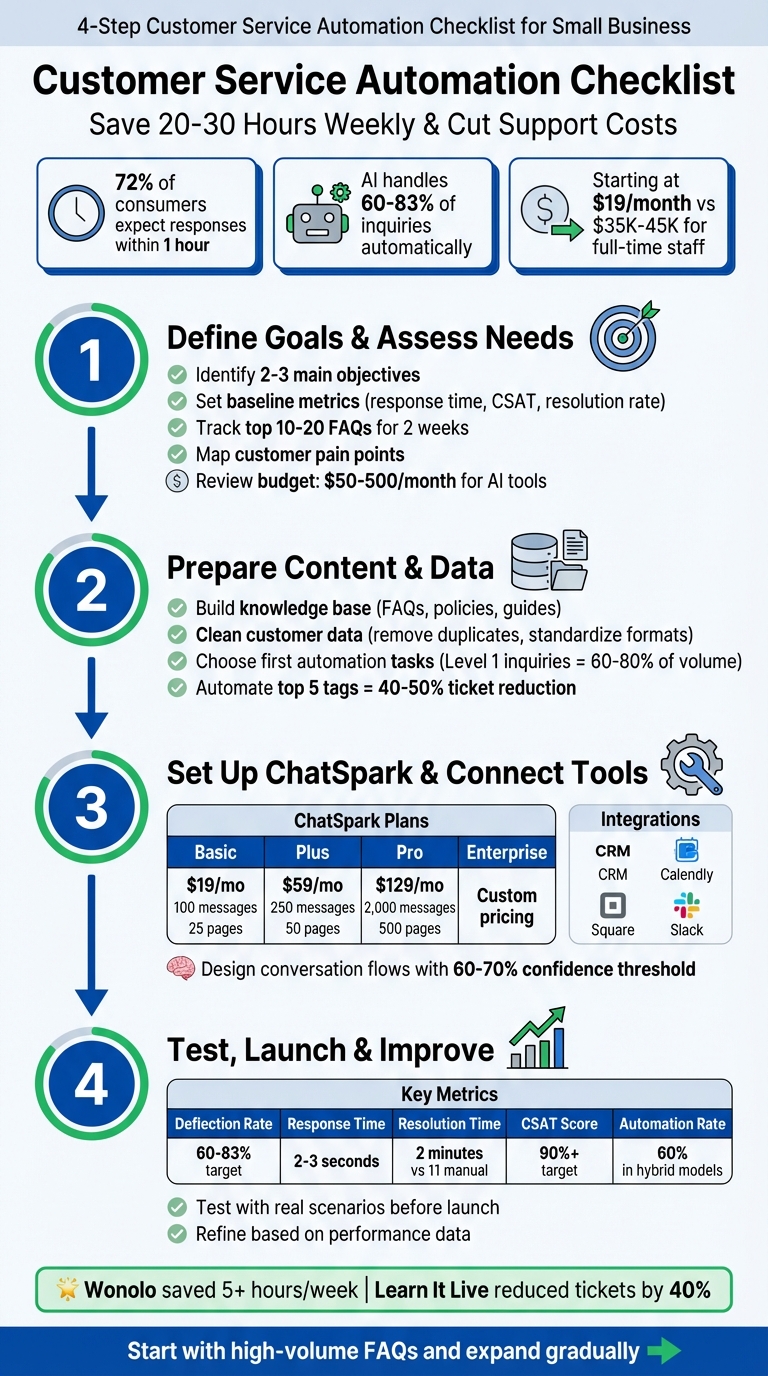
4-Step Customer Service Automation Setup Guide for Small Businesses
I Built an AI Agent that Automates Customer Support (No-Code)
Step 1: Define Your Goals and Assess Your Needs
Before diving into automation, take a close look at your customer service operations to pinpoint key challenges. This step ensures your automation efforts address real problems rather than complicating your processes. With these challenges in mind, set clear goals to tackle your service gaps effectively.
Set Your Customer Service Automation Goals
Start by identifying 2–3 main objectives for automation. These might include cutting down response times, providing support outside regular business hours, or easing your team’s workload. For instance, 67% of customers report feeling frustrated when their issues aren’t resolved immediately[7]. This suggests that one of your primary goals should be to deliver instant answers to common questions, like store hours or order updates.
Before implementing automation, establish baseline metrics to measure success later. Track your current average response time, resolution rate, customer satisfaction (CSAT) scores, and the volume of after-hours inquiries[6]. If reducing costs is a priority, calculate how much time your team spends on repetitive tasks versus handling more complex issues. These initial benchmarks will help you gauge the impact of tools like ChatSpark as you roll them out.
Map Your Customer Journeys and Pain Points
Spend two weeks tracking your top 10–20 frequently asked questions[2]. Look for patterns in common inquiries, such as password resets, return policies, or appointment scheduling. These types of "Level 1" tasks often make up 60% to 80% of your support volume and can consume a lot of staff time[2].
Talk to your team to identify tasks that cause frustration or burnout[4]. Their firsthand experience often reveals the best areas to automate. Also, pay attention to points where customers are asked to repeat information or where wait times are longest. With 70% of customers expecting same-day responses to service issues[6], reducing these delays can make a big difference in customer satisfaction. This analysis will help you decide which automation workflows to prioritize first.
Review Your Budget, Team, and Current Tools
Figure out how much you’re willing to spend on automation. AI platforms typically range from $50 to $500 per month[1], which is far less than hiring a full-time employee at $35,000 to $45,000 annually[1]. Don’t forget to include setup fees, integration costs, and the time needed for training in your budget calculations.
Take inventory of your current tools, like your CRM, email system, QuickBooks, or ticketing platforms. Check whether these systems offer APIs or native integrations, as seamless connections can save you hours of manual data entry[8]. Lastly, assign one person to lead the automation project. Having a dedicated project owner ensures someone is accountable for testing, tracking performance, and making adjustments as you roll out ChatSpark. This approach keeps the process on track and sets the stage for your next steps.
Step 2: Prepare Your Content and Data
Getting your content and data in order is essential. Without clean and organized input, even the most advanced automation tools won’t perform effectively. This step ensures ChatSpark has all the resources it needs to manage customer inquiries seamlessly. Start by building a well-structured knowledge base.
Build and Organize Your Knowledge Base
Gather all the critical information your customers might need. This includes FAQs, troubleshooting guides, product specs, return policies, shipping details, and privacy policies. If your business has been running for a while, review at least a year’s worth of your most accessed support articles and tickets. This will help you pinpoint the topics customers ask about most frequently.
Don’t forget technical documentation. Insights from bug-tracking systems or product release notes can help you anticipate technical questions. Make sure everything is organized with consistent formatting and clear headings. This makes it easier for ChatSpark to pull content directly from your website or PDFs.
You can also use AI-powered auto-tagging to categorize your content by keywords, customer intent, and sentiment. This step helps identify which topics are ideal for full automation and which might still need human involvement. For instance, automating your top five most common customer tags could reduce 40% to 50% of your support tickets [9]. Maintaining consistent formatting across all your documentation is key.
Clean and Validate Your Customer Data
Before linking your CRM data to automation tools, take the time to audit your customer records. Eliminate duplicates, correct formatting errors in emails or phone numbers, and ensure dates follow the MM/DD/YYYY format. Standardize currency to USD and format phone numbers consistently (e.g., (555) 123-4567). Tag recurring customer issues in your CRM so they can be mapped directly to automation workflows later.
If some contact details are incomplete, use data enrichment tools to fill in the gaps. Set up validation rules in your CRM to enforce mandatory fields and prevent future errors. Assign a team to perform regular data maintenance to keep your customer information accurate and up to date.
Choose Your First Automation Tasks
Start by automating repetitive, high-volume tasks with predictable patterns. Level 1 inquiries - like order tracking, store hours, return policies, and basic account information - typically make up 60%–80% of support volume [2]. Instead of trying to automate everything at once, focus on one or two of these tasks to begin with.
Analyze your workflows to find out which ones take up the most time. Prioritize automating tasks that are daily time-drains [10]. For example, a case study showed that integrating an AI chatbot as a dynamic knowledge base led to a 40% drop in support tickets, significantly reducing interruptions for the team [2].
You might also look at automating internal processes like ticket routing, prioritizing requests by urgency, or lead qualification. These can save time and improve efficiency. Whatever tasks you choose, make sure there’s a clear escalation path for complex or sensitive issues so customers can always connect with a human agent when needed.
Step 3: Set Up ChatSpark and Connect Your Tools
Now that your content and data are ready, it’s time to configure ChatSpark to automate customer inquiries around the clock. Here’s how to set it up and integrate it with your existing systems to turn all that preparation into actionable automation.
Choose Your ChatSpark Plan
Start by analyzing the last two weeks of customer interactions to estimate your inquiry volume[2]. This will help you choose the right ChatSpark plan for your needs:
- Basic Plan ($19/month): Perfect for solo entrepreneurs just starting with automation. It includes 100 messages, one agent, and support for training on up to 25 pages of content.
- Plus Plan ($59/month): Designed for small teams managing 200–250 monthly conversations. It offers 250 messages, 50 training pages, and is suitable for moderate inquiry volumes.
- Pro Plan ($129/month): Ideal for established businesses. This plan supports 2,000 messages, 500 training pages, and integrations with tools like Zapier, Calendly, and Square. It also removes ChatSpark branding from your widget.
- Enterprise Plan (Custom Pricing): Tailored for large operations with specific needs. It includes dedicated account management, priority support, and customized solutions.
| Plan | Monthly Price | Messages | Training Pages | Best For |
|---|---|---|---|---|
| Basic | $19 | 100 | 25 | Solo entrepreneurs starting with automation |
| Plus | $59 | 250 | 50 | Small teams handling moderate inquiry volume |
| Pro | $129 | 2,000 | 500 | Established businesses needing integrations |
| Enterprise | Custom | Custom | Custom | Large operations requiring tailored solutions |
Connect ChatSpark to Your Existing Systems
To make the most of ChatSpark, integrate it with the tools you already use. For example:
- Calendly: Allow customers to book appointments directly through the chat, eliminating the need for back-and-forth emails[2].
- CRM Systems: Connect platforms like Salesforce, HubSpot, or Zoho so ChatSpark can pull customer history and personalize responses.
- Square: Enable customers to complete transactions within the chat interface.
- Slack or Microsoft Teams: Set up notifications to alert your team when complex issues need human intervention.
You can also use conditional logic to automate workflows. For instance, when ChatSpark captures a new lead, it can automatically add the contact to your email marketing list and create a follow-up task. This kind of seamless integration is why 78% of businesses use automation to cut down on manual tasks[3].
Create and Optimize Your Conversation Flows
ChatSpark’s visual interface makes it easy to design and refine chatbot flows. Start by identifying your most common customer inquiries - like order status updates, return policy questions, or technical support issues - and build decision trees that guide users to solutions quickly[11].
Here are some tips to keep your flows efficient and user-friendly:
- Use buttons instead of open text fields whenever possible to keep conversations focused.
- Set the confidence threshold between 60% and 70%. This ensures ChatSpark escalates inquiries to a human agent when it’s unsure of the correct response[2].
- Always include a seamless handoff option. When transferring to a human agent, ensure ChatSpark passes along the full conversation history so customers don’t have to repeat themselves.
Finally, test your flows with real customer scenarios to fine-tune responses before going live. This step ensures your chatbot is ready to handle inquiries effectively from day one.
Step 4: Test, Launch, and Improve
Before rolling out your ChatSpark setup, it's crucial to test it thoroughly. This ensures it works as intended and provides effective customer support.
Test Your Automation with Real Scenarios
Put ChatSpark through its paces by simulating real customer interactions. Have your team act as customers, covering scenarios from simple FAQs to more complex issues that require escalation to a human representative. Test how ChatSpark handles different phrasings - like "where's my stuff" versus "order status" - as well as typos and casual language. Make sure it pulls accurate information from your knowledge base and that its conversations feel natural. Check that handoffs to human agents include the full conversation history and that integrations with tools like CRM, scheduling, and payment systems work smoothly on both mobile and desktop platforms [2].
For example, one startup tested their chatbot internally to assess its accuracy in a controlled, low-risk setting before allowing customer interactions [2].
Once you're confident in ChatSpark's reliability, shift your focus to tracking performance metrics.
Monitor Key Metrics and Performance
After launching your automation, keep a close eye on these important metrics:
| Metric | What It Measures | Target Benchmark |
|---|---|---|
| Deflection Rate | Percentage of issues resolved without human help | 60%–83% |
| Response Time | Speed of the initial reply | 2–3 seconds (automated) |
| Resolution Time | Time taken to fully resolve an issue | 2 minutes (compared to 11 minutes manually) |
| CSAT Score | Customer satisfaction rating | 90%+ |
| Automation Rate | Volume of inquiries handled by AI | 60% in hybrid models |
Take Wonolo, a workforce management platform based in Oregon, as an example. After introducing AI-powered chat responses for their 11-agent team, they tracked these metrics and saw impressive results. By cutting the typing time for routine questions from 10 seconds to just 3 seconds, they reduced average handling time by 20%, saving over five hours of staff time each week [2].
Use these insights to refine your automation strategy.
Refine and Expand Your Automation Over Time
Performance data is your best tool for spotting gaps in service. Analyze conversation transcripts to identify areas where customers disengage or where ChatSpark struggles to provide helpful answers. Update your knowledge base to address these shortcomings [12][5]. Once you've nailed down high-volume, straightforward tasks like answering FAQs, think about expanding your automation capabilities. This could include appointment scheduling, order processing, or even proactive follow-ups after purchases [12][2].
Consider the case of Learn It Live, which integrated an AI chatbot with their knowledge base. By continuously fine-tuning its responses to repetitive questions, they managed to cut support tickets by 40% [2].
Conclusion
Automating customer service doesn't have to be overwhelming. By taking a step-by-step approach - setting clear goals, preparing a solid knowledge base, carefully selecting tools, and fine-tuning based on real-world results - you can make the process smooth and effective. Many small businesses find success by starting with high-volume, straightforward tasks like FAQs, order tracking, or appointment scheduling. These areas often deliver quick and measurable improvements.
The numbers speak for themselves: AI-powered automation can handle 60% to 83% of customer inquiries without human involvement, saving small businesses 20 to 30+ hours per week on repetitive tasks [2]. But automation isn’t just about saving time - it’s about meeting modern customer expectations and staying ahead in a competitive market.
ChatSpark simplifies this journey. With plans starting at just $19 per month, ChatSpark offers an affordable solution for solo entrepreneurs and scalable options for growing teams. It works around the clock to manage routine inquiries, integrates seamlessly with existing tools, and supports over 85 languages. This allows your team to focus on more complex issues that require human insight and empathy.
That said, automation isn’t a one-and-done process. The best results come from consistently tracking key metrics like deflection rates, response times, and customer satisfaction. Keeping your knowledge base updated and refining conversation flows ensures your system remains effective as your business grows.
Start small, test thoroughly, and expand as you go. By following this approach and tapping into ChatSpark’s features, you can offer faster, more reliable customer service, cut costs, and give your team more time to build genuine connections with your customers.
FAQs
How does ChatSpark help small businesses enhance customer satisfaction?
ChatSpark leverages AI-powered chatbots to deliver quick, personalized responses to your customers, ensuring they receive the support they need without enduring long wait times. For more intricate issues, the chatbot smoothly hands off the conversation to a human agent, keeping the process efficient and hassle-free.
By handling routine questions and simplifying workflows, ChatSpark allows your small business to save time, cut expenses, and concentrate on providing top-notch service. The payoff? Satisfied customers and a boosted reputation for your business.
How do I get started with ChatSpark to automate customer service for my small business?
To get started with ChatSpark for automating customer service, here’s what you need to do:
- Define your goals: Think about the specific tasks you want your chatbot to manage. Whether it’s answering FAQs, sharing order updates, or scheduling appointments, having clear objectives will guide your setup and help track success.
- Create an account: Head to the ChatSpark platform to sign up. During onboarding, name your bot and set up the basic preferences that fit your needs.
- Integrate communication channels: Connect your website chat widget, email, and social media messaging apps. This ensures all customer inquiries are routed to the bot without any hiccups.
- Train your bot: Upload essential resources like product guides, FAQs, and company policies. This equips ChatSpark’s AI with the knowledge it needs to deliver accurate responses from day one.
- Test and tweak: Launch a pilot run to assess the bot’s performance. Monitor how it handles interactions and make adjustments until it’s ready for a full rollout.
By following these steps, you’ll have ChatSpark up and running smoothly, giving your customer service a much-needed boost.
How can I track the success of customer service automation with ChatSpark?
To gauge how well ChatSpark is working for your customer service automation, keep an eye on important metrics like average response time, ticket resolution time, customer satisfaction scores (CSAT), and cost per interaction. These indicators can reveal whether automation is streamlining processes, cutting costs, and enhancing the customer experience.
It’s also crucial to track the number of tickets handled and the accuracy of responses. This ensures the system aligns with your business objectives. By consistently analyzing these metrics, you’ll uncover valuable insights about your automation strategy and identify opportunities to fine-tune its performance.