In a world where customer expectations are higher than ever, businesses are turning to automation to deliver faster, around-the-clock support. But here's the challenge: how do you automate without sacrificing the personal touch customers value?
Here’s the answer: smart automation strategies. Tools like ChatSpark help businesses handle repetitive tasks - like password resets or order tracking - while leaving complex, human-centric issues to support agents. This approach saves time, reduces response times by 37%, and maintains service quality.
Key Takeaways:
- Start with a plan: Map out your support process to identify tasks fit for automation.
- Focus on simple tasks: Automate FAQs, order tracking, and shipping info.
- Set escalation rules: Ensure complex issues are routed to human agents immediately.
- Personalize interactions: Use customer data to make responses feel tailored.
- Monitor and refine: Track metrics like response time and satisfaction to improve over time.
By combining automation with human oversight, you can meet customer demands without losing the personal touch.
Customer Support Automation Statistics and Benefits
How to Automate Customer Service with AI: A Success Story with TeamSystem
Map Your Support Process Before Automating
Start by documenting every step of your support process and reviewing the top customer inquiries from the past 3–6 months. Focus on identifying high-volume, low-complexity tasks that are ideal for automation [7]. Break down your support requests into three main categories: FAQs (straightforward questions like "What are your business hours?"), transactional flows (actions such as checking an order status or resetting a password), and escalated workflows (more complex issues that require human intervention) [7]. It's also helpful to analyze how your agents are spending their time. If a large portion of their day is spent answering repetitive questions, those tasks are excellent candidates for automation. This groundwork helps pinpoint where automation can take over routine tasks effectively.
Find Repetitive, Simple Customer Questions
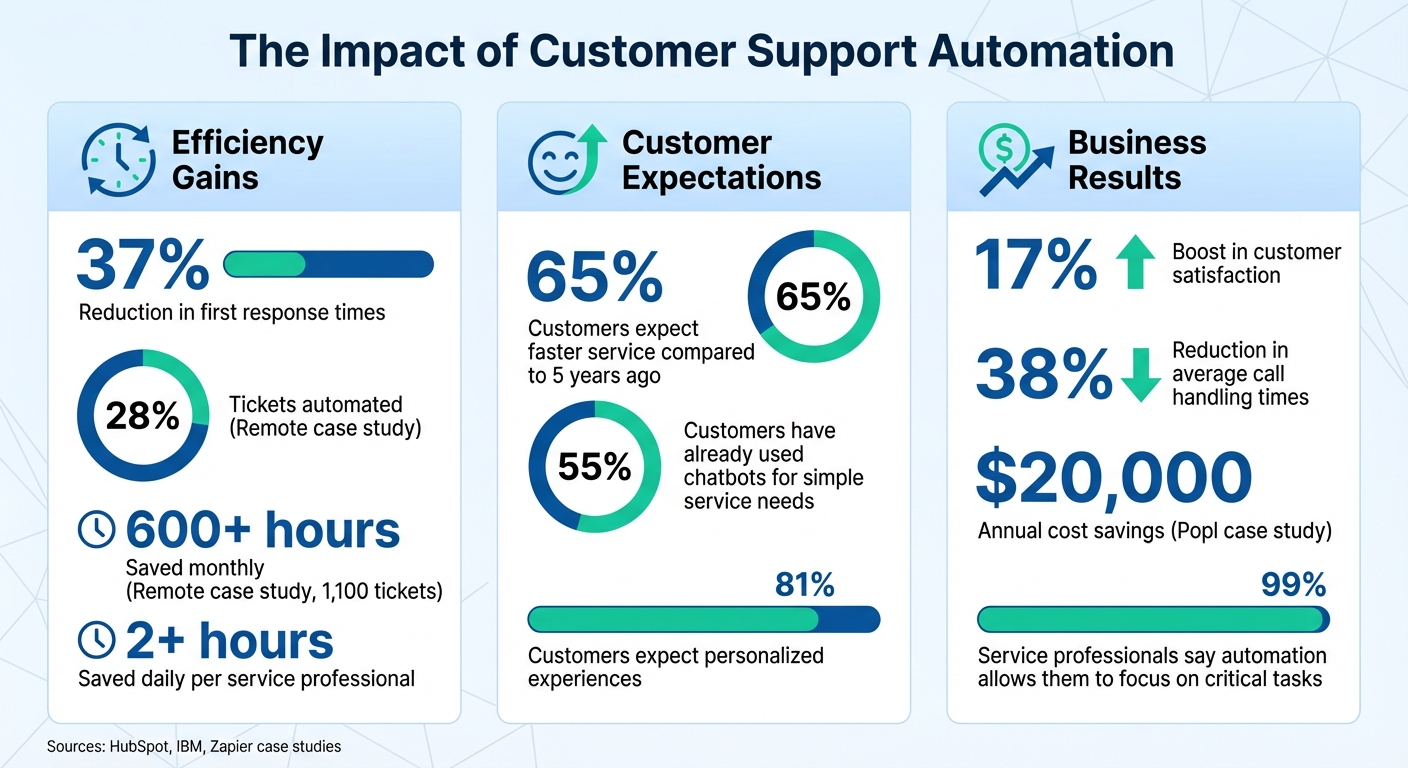
The easiest tasks to automate are repetitive questions that don’t require emotional intelligence or nuanced judgment. Examples include inquiries about order tracking, password resets, shipping timelines, and return policies. For customers in the U.S., you can automate responses like "Your package will arrive in 3–5 business days" or "Shipping is free on orders over $50.00 within the continental United States." Research shows that 55% of customers have already used chatbots for simple service needs, and 99% of service professionals say automation allows them to focus on more critical tasks [4]. For instance, if your e-commerce business ships across the U.S., automating answers about delivery zones (based on distance from your warehouse) or weight-based shipping fees (calculated in pounds) can significantly cut down on the number of manual responses your team handles.
Set Clear Rules for Human Agent Involvement
Define specific triggers that route complex issues to human agents. These might include billing disputes, cancellations, refund exceptions, legal questions, or data privacy concerns [1][7]. You can also set triggers based on customer sentiment - signs of frustration or anger, such as phrases like "I want a manager" or "This is unacceptable", should prompt immediate escalation [1][7]. Complexity triggers are another key area: if the issue involves multiple products, repeated failed attempts by the AI, or questions outside your knowledge base, a human should step in [1]. Always provide an "escape hatch" for customers who type something like "speak to a human" or "I need a person" - these requests should instantly connect them to an agent [1][7]. To make the transition seamless, configure your automation to gather essential details beforehand, such as account numbers, order IDs, or error codes, so the agent can quickly pick up where the system left off [6]. These measures ensure that critical issues are handled with the care they deserve while maintaining a smooth handoff between AI and human agents.
Use U.S. Formats for Dates, Currency, and Measurements
When serving U.S. customers, it's important to format information in a way they’re familiar with. Use dates in MM/DD/YYYY format, display currency as $X,XXX.XX, and present measurements in imperial units like miles, pounds, and Fahrenheit. For example, if a chatbot informs a customer in Phoenix that their package weighs 2.5 pounds, will travel 850 miles, and is expected to arrive by 04/10/2025, that level of clarity builds trust and reduces follow-up questions. Testing your chatbot for formatting errors, confusing wording, or dead-end loops before launch ensures a smoother customer experience. This attention to detail helps prevent misunderstandings and boosts customer confidence in your automated systems.
Build Natural Conversational AI Interactions
The difference between a chatbot that frustrates and one that impresses lies in how natural the conversation feels. Your AI should come across as a helpful team member, not a robotic script. Start by defining your bot's persona - will it be casual and friendly, or more formal and professional? This decision shapes every interaction and influences how U.S. customers perceive your brand [6]. Consistency is key: if your website uses a warm, conversational tone, your chatbot shouldn’t suddenly switch to stiff, corporate language.
While modern AI can handle complex conversations, it needs the right setup. Use Retrieval-Augmented Generation (RAG) to connect your chatbot to a verified knowledge base. This ensures the bot retrieves accurate answers from your FAQs, policies, or help documents instead of generating unreliable responses [1][8]. By grounding its replies in your business data, you reduce the risk of the bot "hallucinating" incorrect information. For added trust, the chatbot should cite specific sources, allowing customers to verify the information themselves [1].
"AI search and article suggestions are like having your most experienced co-worker built into your help desk." - Rami El-Abidin, HubSpot [1]
Personalization takes interactions to the next level. By integrating your AI with your CRM, the bot can greet customers by name and reference their past purchases or subscriptions [1][8]. For instance, instead of saying, "How can I help you?" the bot could say, "Hi Sarah, I see you ordered blue running shoes on 12/15/2024. Are you checking on your delivery?" This level of detail shows customers you value them and understand their needs. In fact, 81% of customers now expect this kind of personalized touch more than ever [10].
Write Clear, Empathetic Chatbot Responses
When crafting chatbot responses with ChatSpark, aim for natural language that matches how real Americans speak. Avoid stiff, formal phrases like "Your inquiry has been received." Instead, use conversational alternatives like "Got it - let me check on that for you." Empathy is essential too. If a customer reports a delayed package, the bot should say, "I'm sorry your order is running late. Let me check the tracking details for you", rather than jumping straight into logistics.
Human-in-the-loop review can help fine-tune these responses. Let the AI draft replies, but have human agents review them for tone and empathy before they go live [1]. This process helps catch awkward wording and ensures sensitive situations are handled with care.
To guide interactions, use menu-driven options with clear buttons instead of open-ended questions. For example, replace "What do you need help with today?" with specific choices like "Track an order", "Start a return", or "Update my account." This structured approach reduces confusion and keeps conversations on track [8]. When asking for details, be precise. Instead of a vague "What’s your order number?" say, "Please provide your 8-digit order number starting with 'US,' which you’ll find in your confirmation email." Clear instructions save time and minimize frustration.
Connect AI to Your Knowledge Base
Beyond tone, accuracy is vital. ChatSpark ensures every response is grounded in real-time data by pulling directly from your help documents, FAQs, and policy pages. Consistency in U.S.-specific terminology and formatting is also important. For example, if a customer in Dallas asks about shipping costs, ChatSpark can provide a precise answer like, "Shipping is free on orders over $50.00 within the continental United States. Orders under $50.00 have a flat rate of $7.95." This level of detail eliminates guesswork and reduces follow-up questions.
Intent detection powered by Natural Language Processing (NLP) allows ChatSpark to understand the meaning behind different phrasings. Whether a customer asks, "Where’s my package?" or says, "I haven’t received my order yet", the AI identifies the intent and retrieves the same tracking information [1][11]. To make instructions even clearer, enhance your knowledge base with visual aids like screenshots or step-by-step guides. These resources help the AI provide better guidance for tasks like resetting passwords or updating accounts [7]. Regularly auditing your knowledge base ensures the bot doesn’t serve outdated information, which can quickly erode trust [7].
Transfer Conversations Smoothly to Human Agents
Even the most advanced AI needs to know when to step aside. Set up escalation triggers to route complex issues to human agents automatically. Phrases like "I need a manager" or "This is unacceptable" can signal the need for a handoff [1]. Sentiment-based escalation is another powerful tool - it detects frustration in real-time and connects customers to a live agent before the situation escalates further [1]. This prevents customers from feeling trapped in an unhelpful loop with the bot.
When transferring a conversation, ensure the handoff is seamless. ChatSpark passes the full chat transcript and linked CRM record to the human agent, so they can pick up right where the bot left off [1]. Customers shouldn’t have to repeat their order number or re-explain their issue. A smooth handoff might look like this: the bot says, "I’m connecting you with a specialist who can help with your billing question. They’ll have all the details from our conversation", while the agent sees the entire chat history and customer account details on their screen. Companies using this approach report a 37% reduction in first response times compared to those without automation [1].
Set Up ChatSpark for Your Business
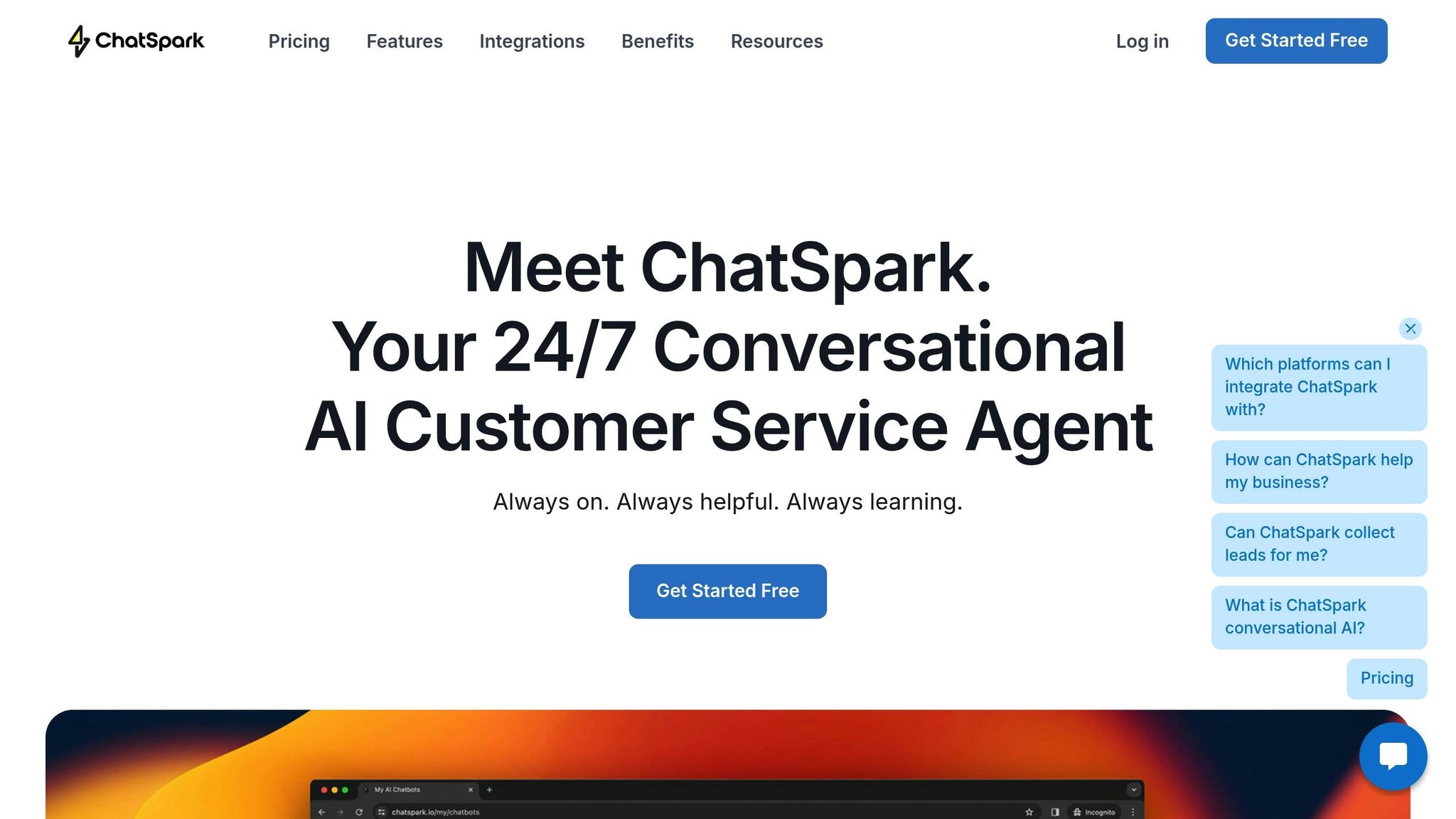
After mapping out your support process and crafting natural conversations, it’s time to deploy ChatSpark across your communication channels. This step is straightforward, but paying attention to the finer details can make the difference between a chatbot that feels generic and one that truly enhances customer interactions. Once you're ready, integrate ChatSpark with the platforms your customers already use.
Connect ChatSpark to Your Communication Channels
ChatSpark works seamlessly with popular platforms like your website, Instagram, Facebook, WhatsApp, Telegram, and Slack. To get started, embed the chatbot on your website or share a public link for real-time customer inquiries [9]. For social media, connect ChatSpark to handle messages on Instagram, Facebook, and WhatsApp, ensuring your business is available to customers 24/7 [6][7].
If your team uses Slack for internal communication, you can integrate ChatSpark to receive notifications when new tickets are created or live chats begin. This way, human agents can step in whenever necessary [12].
This omnichannel setup ensures a unified experience for your customers. For example, a customer can start a conversation on Instagram, follow up via email, and complete the interaction on your website - all without having to repeat their issue.
Match ChatSpark's Voice to Your Brand
Once your channels are connected, the next step is to personalize ChatSpark so it reflects your brand’s personality. With ChatSpark’s "Directives" feature, you can define the AI’s role, objectives, and tone. For instance, you could set it up as a "senior customer support representative" tasked with providing quick, friendly, and engaging responses [9]. You can also adjust the creativity scale to strike the right balance between unique and professional replies [9].
"I want it to sound professional and predictable. So I've put it a little bit here in the middle [of the creativity scale], so each customer will still get a unique response, but it'll still sound professional." - Sam Ogborn, Founder, Autonomy [9]
To make the chatbot even more effective, upload your existing resources like FAQs, help articles, or Google Docs. This helps train ChatSpark on your company’s specific policies and terminology [9][7]. You can also ensure consistency by setting it to use U.S. formats for dates (e.g., 12/28/2025), currency (e.g., $49.99), and measurements (e.g., 5 lbs, 72°F). Additionally, you can establish style rules to prevent the bot from veering off-topic or providing inaccurate information [9][10].
Integrate ChatSpark with Your Business Tools
To streamline your operations, integrate ChatSpark with the tools your team already relies on. ChatSpark connects with platforms like Zapier, Freshchat, Square, and Calendly, enabling automation for tasks like ticket creation, payment processing, and appointment scheduling. Through Zapier, you can link ChatSpark to over 8,000 apps, including Salesforce, HubSpot, and Gmail, giving the bot access to perform actions across your entire tech stack [13].
For example, if a customer asks about an order, ChatSpark can automatically retrieve tracking details or process refunds without needing a human agent [7].
In 2025, the IT team at Remote used Zapier and AI to manage 1,100 monthly tickets for 1,800 employees. By integrating with Okta for user data and Notion for record-keeping, they automated 28% of their tickets, saving over 600 hours each month [13]. Similarly, Popl connected HubSpot and Salesforce with OpenAI via Zapier to handle hundreds of daily demo requests, cutting costs by $20,000 annually [13].
For e-commerce businesses, ChatSpark can integrate with payment platforms to handle refunds, cancellations, and order lookups seamlessly [7]. If your business involves appointments, connect ChatSpark with Calendly to let customers book or reschedule directly within the chat [7]. For custom tools, webhooks provide a simple way to link ChatSpark to your unique systems [12].
Track Performance and Improve Over Time
Once ChatSpark is up and running, the job isn’t over. To ensure it continues to deliver value, you’ll need to monitor its performance and refine it based on customer interactions. Keep an eye on both the numbers and the feedback from users to gauge how well the automation is working [14]. A solid setup is just the beginning - ongoing analysis and adjustments are key to maintaining and improving service quality over time.
Monitor Customer Support Metrics
The best way to evaluate automation’s impact is by tracking customer support metrics that focus on the user experience. For example, Customer Satisfaction (CSAT) scores from post-interaction surveys can reveal how customers feel about their support experience. Ideally, ChatSpark should improve these scores by offering quicker responses and 24/7 availability [14][16].
Another essential metric is the Containment (or Deflection) Rate, which measures how many inquiries are resolved without needing human assistance. A higher containment rate means ChatSpark is handling a larger share of issues, reducing the workload for agents and cutting operational costs [1][15].
First Response Time (FRT) is especially critical in the U.S., where 65% of customers expect faster service compared to five years ago [1]. Companies using AI tools like ChatSpark often see a 37% reduction in response times compared to those without automation [1]. Additionally, keep an eye on the Escalation Rate - the percentage of sessions transferred to a human agent. High escalation rates might indicate gaps in ChatSpark’s training or your knowledge base [1].
Agent Load Reduction (ALR) is another useful metric, showing how much time automation saves by allowing agents to focus on more complex or empathetic tasks [1]. To fine-tune ChatSpark’s accuracy, implement rating features for both customers and agents. Pay attention to where users drop off during automated interactions - if customers abandon the chatbot before getting a response, it’s a clear sign that adjustments are needed [15]. Regularly testing the chatbot yourself can also help uncover areas for improvement [15].
Update AI Responses Based on Real Conversations
Metrics provide the data, but refining ChatSpark requires action. Regularly review chatbot transcripts to spot recurring issues or gaps in the knowledge base [15]. ChatSpark can even identify missing content by analyzing tickets where no relevant help articles exist, suggesting new topics for documentation [3][1]. If you notice the same questions coming up repeatedly, update your FAQ or knowledge base to ensure the chatbot has the answers users need.
Adjust escalation rules as necessary. For example, if transcripts show frequent negative sentiment - such as phrases like "I want a manager" - configure ChatSpark to hand off to a human agent sooner [1]. Set clear criteria for escalations, whether based on sentiment (like frustration), complexity (multi-product issues), or specific keywords (e.g., billing disputes or refunds over $500) [1]. When analyzing CSAT scores, segment the results by the specific automation tool to identify underperforming areas [15].
Compare Results Before and After Automation
To measure ChatSpark’s impact, start by establishing a baseline. Track key metrics like response times and CSAT scores before deploying the tool [15]. Then, compare these numbers after implementation to calculate improvements in efficiency and customer satisfaction. This not only highlights the value of automation but also helps identify areas where further tweaks might be needed.
Manage Automation Boundaries and Compliance
Following our earlier look at integrating ChatSpark for smoother support operations, it’s important to understand the boundaries of automation. Automation works best when paired with clear human oversight. By focusing on repetitive tasks, automation can protect customer privacy while allowing human agents to tackle more complex situations. As IBM explains:
"AI should enhance, not replace, human support. It's best used for routine tasks, while complex, emotional or sensitive cases use human interaction" [5].
Choosing Between Automation and Human Agents
To strike the right balance, define which tasks are best suited for ChatSpark and which require human expertise. For example, automate straightforward requests like password resets or order tracking. On the other hand, use triggers - like phrases signaling frustration, such as "I want a manager" - to escalate conversations to a human agent [1]. Similarly, situations that go beyond the knowledge base or require creativity should also be routed to human support [1]. This approach ensures automation and human agents work together seamlessly without compromising service quality.
Safeguarding Customer Privacy and Data
California Senate Bill 243 (SB 243), set to take effect on January 1, 2026, will require businesses to notify customers when they’re interacting with AI instead of a human [17][18]. It also introduces specific safeguards for minors, such as mandatory break reminders every three hours and strict limits on explicit content [17][18].
To maintain data integrity, consider using Retrieval-Augmented Generation (RAG). This ensures ChatSpark pulls information only from your verified internal knowledge base, reducing the risk of inaccurate advice on legal or policy matters [1][2]. While ChatSpark can handle initial data privacy requests, human agents should finalize compliance tasks [1][5]. Additionally, ensure strict access controls and maintain audit trails, as starting July 1, 2027, AI operators will need to file annual reports on crisis-related interactions [17][18].
Elevating Human Agents to Strategic Roles
Automating routine tasks creates opportunities for human agents to focus on more complex and rewarding work. Automation can save service professionals over two hours daily, allowing them to handle nuanced cases and contribute to ChatSpark’s ongoing improvement [1][4]. Instead of repeatedly answering the same questions, agents can dedicate their time to tasks requiring empathy, creativity, and negotiation [1][2].
This shift redefines their roles, enabling them to train ChatSpark, review automated responses for accuracy, and refine the knowledge base. AI copilots can assist by summarizing lengthy conversations and drafting responses, speeding up the resolution of complex issues while preserving the human touch [1][5]. Companies that embrace this model have seen a 17% boost in customer satisfaction and a 38% reduction in average call handling times [5]. By aligning automation with human expertise, you can enhance efficiency and deliver a better overall customer experience.
Conclusion
Scaling customer support doesn’t mean sacrificing quality - it’s about working smarter and letting automation handle repetitive tasks. Tools like ChatSpark make this possible by automating tasks such as password resets and order tracking, freeing up human agents to focus on more complex, empathy-driven conversations. When you map out your support process, design AI interactions that feel natural, and consistently monitor performance, automation becomes a way to complement - not replace - the human touch.
Businesses using ChatSpark have reported up to a 37% reduction in response times, along with significant time savings [1][3][5]. These improvements are made possible by features like CRM integration to maintain context, verified responses for accurate answers, and sentiment detection that ensures seamless handoffs to human agents when needed [1][19]. This approach ensures customers feel supported, not like they’re stuck talking to a robot when personal interaction is required.
The secret lies in setting clear boundaries. Let automation handle routine inquiries, ensure customer privacy with robust data controls, and empower your human agents to tackle higher-value tasks that call for creativity and empathy. This thoughtful balance enables faster, more personalized support while maintaining the quality your customers expect. By treating automation as a partner rather than a replacement, you can provide outstanding service and build stronger customer relationships.
Start small, track your results, and keep refining. With ChatSpark managing the repetitive work, your team can focus on what truly matters - creating loyal, satisfied customers.
FAQs
How can I automate customer support while keeping it personal?
To maintain a personal touch in customer support while leveraging automation, consider using AI tools that align with your brand's unique tone and communication style. It's crucial that these systems retain complete customer context, enabling them to deliver responses that feel tailored and relevant. For situations that require more in-depth assistance, ensure there's a seamless transition to a live agent. Be transparent with customers about when they're engaging with automation versus a real person. This strategy strikes a balance between operational efficiency and a more human-centered experience.
What customer support tasks should you automate first to improve efficiency and quality?
Start by automating repetitive, straightforward tasks that tend to slow things down for both your team and your customers. Think about processes like ticket triage and routing. For example, when a customer asks, “Where’s my order?” or “How do I cancel?”, automation can classify these queries and direct them to the right team or agent without delay. Tasks like tracking orders, providing shipping updates, handling returns, resetting passwords, or basic troubleshooting can be managed instantly through conversational AI or chatbots. This not only cuts down on wait times but also allows your agents to concentrate on solving more complex issues.
To take automation a step further, look into tools that assist agents with routine tasks. For instance, these tools can draft initial responses or fill in standard details like order numbers or account IDs. Automating follow-ups, managing voice-based interactions for common inquiries, and creating self-service options can also significantly reduce manual workloads. These strategies help maintain a human touch while improving efficiency. By starting here, businesses can speed up response times, encourage customers to use self-service options, and ensure top-notch support remains a priority.
How can I seamlessly integrate ChatSpark with my current business tools?
If you're looking to integrate ChatSpark with your existing business tools, detailed instructions aren't currently available. However, if you have specific requirements or documentation related to your tools, sharing that information could help in creating customized guidance.
In general, many platforms allow integration through APIs or third-party services. It's a good idea to check if ChatSpark supports these options. For more help or specific resources, you can always contact the ChatSpark support team.