If your support team is handling more tickets without more staff, AI customer service software is one of the main ways to close that gap. I’d boil it down like this: it answers common questions, sorts tickets, helps agents reply, and keeps support running 24/7.
Here’s the short version:
- AI can handle simple support work on its own, like order status, return questions, and billing basics.
- It can route tickets automatically based on topic, urgency, and customer details.
- It can help agents during live chats or email replies by drafting responses, pulling help articles, and summarizing threads.
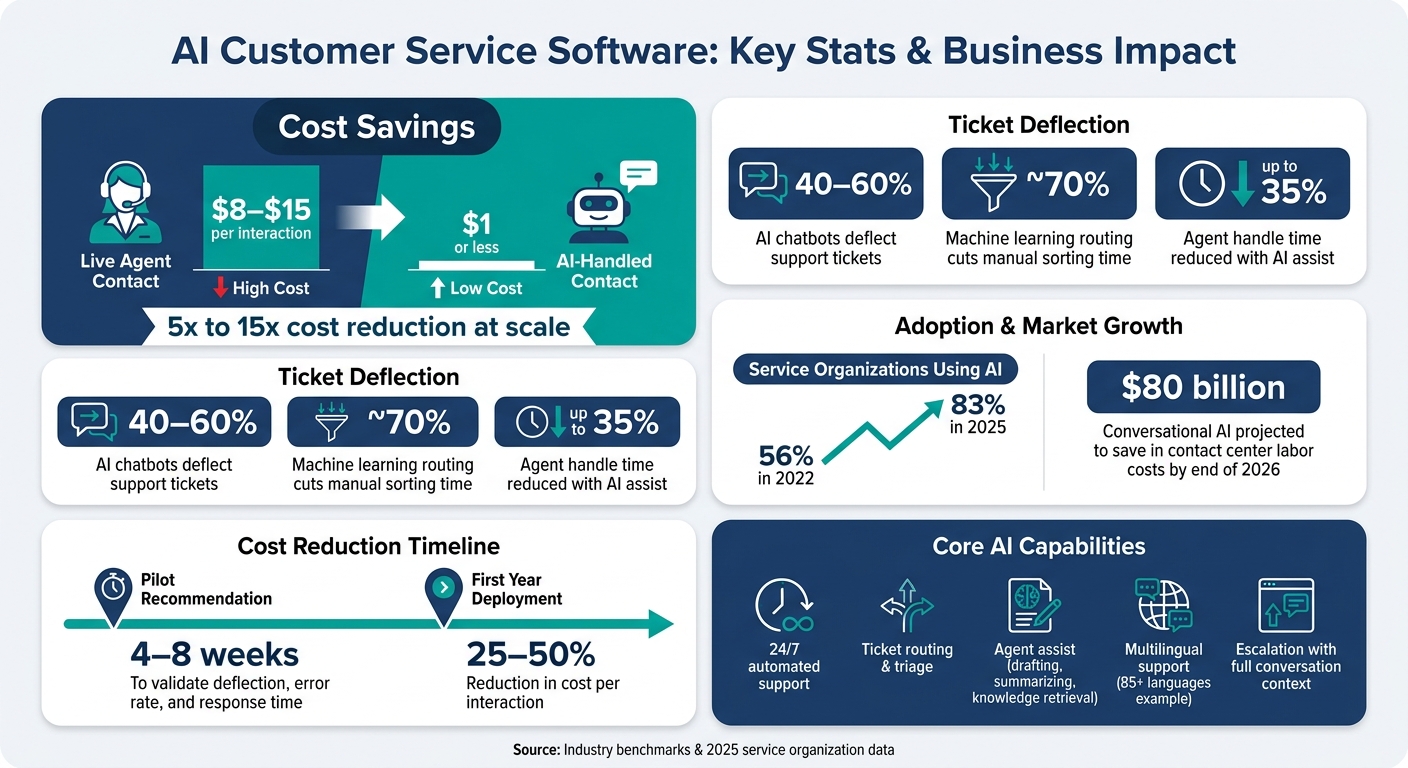
- It can lower support costs from about $8 to $15 per live contact to $1 or less for many AI-handled contacts.
- It can cut ticket volume for human agents, with chatbots often deflecting 40% to 60% of requests.
- It can improve consistency, because answers come from one approved knowledge source instead of each agent wording things their own way.
- It still needs human backup, especially for low-confidence answers, refunds, disputes, and sensitive cases.
I’d also keep these buying points in mind from the start:
- Check channel coverage
- Check CRM and help desk integrations
- Check knowledge accuracy
- Check human handoff quality
- Check analytics and compliance
- Check language support in your top customer languages
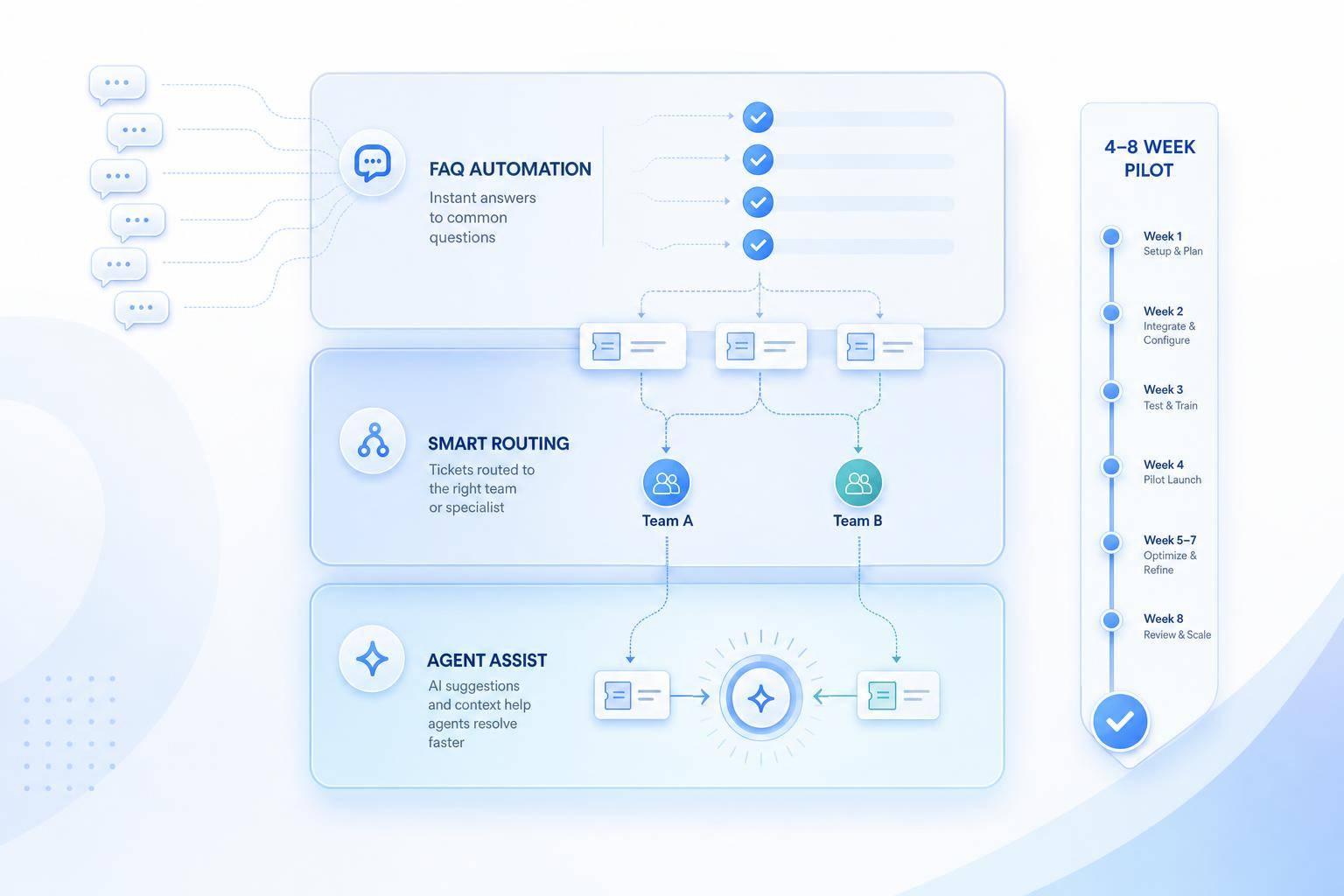
A short AI customer support implementation pilot is usually the best test. In most cases, 4 to 8 weeks is enough to see whether the tool cuts response time, lowers ticket load, and keeps errors low.
| Area | What the software does | Why it matters |
|---|---|---|
| Customer chat | Answers FAQs and routine questions | Lowers ticket load and gives 24/7 coverage |
| Ticket triage | Sorts and sends requests to the right queue | Cuts manual sorting time |
| Agent assist | Drafts replies and summarizes cases | Saves agent time |
| Knowledge retrieval | Pulls answers from approved docs | Keeps replies consistent |
| Multilingual support | Detects and replies in other languages | Helps teams serve more customers |
| Escalation | Passes the full conversation to an agent | Cuts repeat explanations |
Bottom line: I see AI customer service software as a support tool built to handle volume, lower cost, and keep replies more consistent. The best setups don’t try to replace every agent. They take care of repetitive work and send the hard cases to people with the right context.
AI Customer Service Software: Key Stats & Business Impact
What AI customer service software is and how it works
AI customer service software uses AI to answer questions, route requests, or help support teams without a person handling every single step. That can be as simple as a chatbot on a company’s website or as layered as a help desk system that sorts and prioritizes incoming tickets on its own.
This category includes both customer-facing automation and agent assist.
Customer-facing automation is the part customers interact with directly. It can answer questions, handle tasks like order tracking, and hand the conversation to a human when needed.
Agent assist happens behind the scenes. It helps support teams draft replies, summarize long ticket threads, and pull up the right help article during a live conversation.
The goal is pretty simple: cut handling cost by automating easy cases and save agent time on routine work.
In day-to-day use, each request usually moves through a basic path from intake to resolution.
What counts as AI customer service software
The main types include chatbots, virtual assistants, help desk automation, and AI knowledge systems. Modern tools use NLP and NLU to understand meaning, not just match keywords.
How a request moves from message to resolution
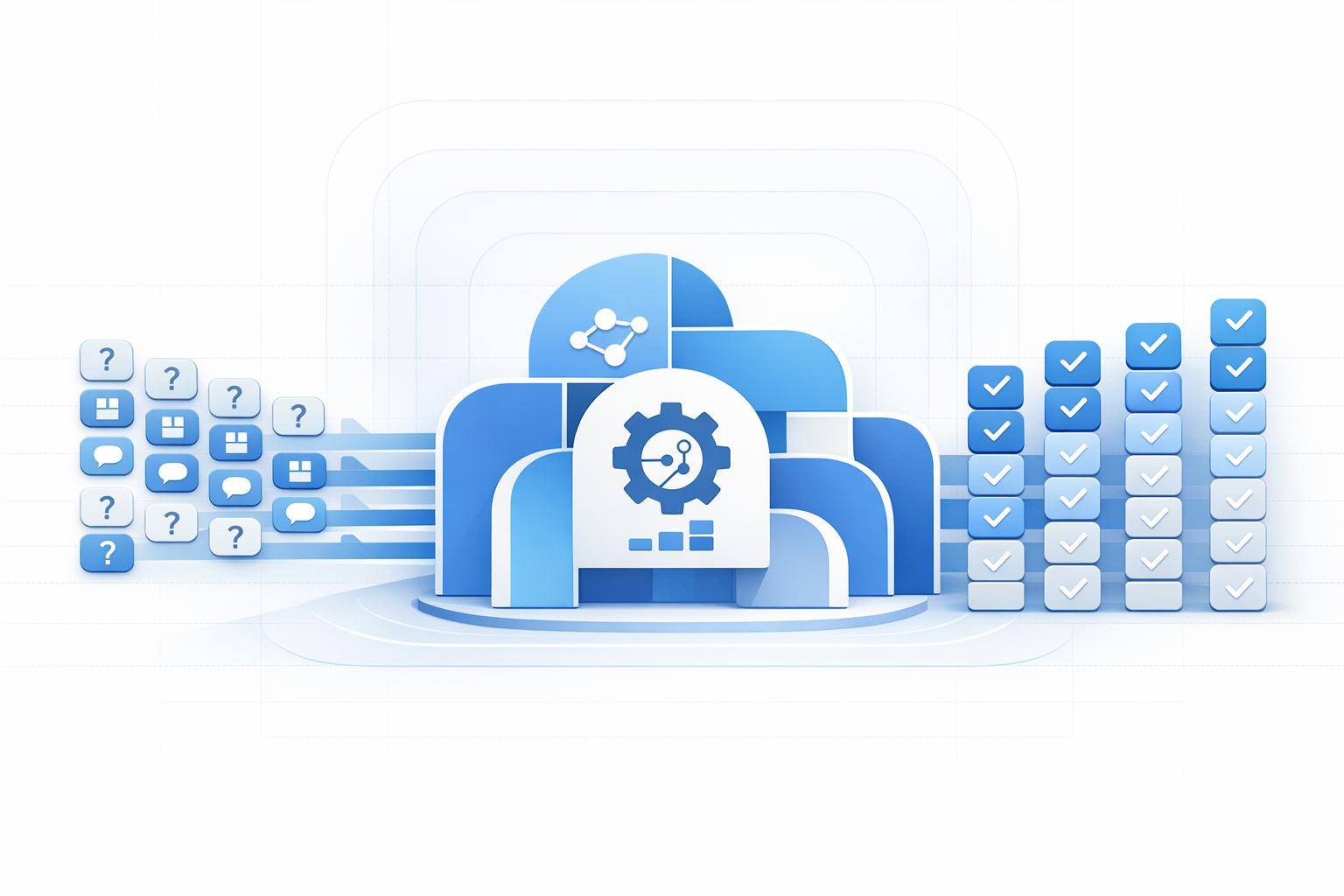
When a customer sends a message, the system reads the text and figures out what the request is about. It identifies intent and assigns a confidence score. Then it looks through approved sources such as FAQs, help docs, policy pages, and internal articles to generate a response based on that material.
This method is called retrieval-augmented generation (RAG). It helps keep answers accurate and aligned with approved content.
If the system is confident enough, it can reply on its own or trigger an automated workflow. That might mean pulling order-tracking details or starting a refund. If confidence is low, or the issue is sensitive, the request goes to a human agent instead.
The best platforms also pass the full thread to the agent, so the customer doesn’t have to repeat themselves. That small detail makes a big difference when someone is already frustrated.
Those are the mechanics behind the core support functions teams use most often.
Core functions businesses use most in AI customer service software
Built on that request flow, support teams usually start with the jobs that eat up the most time and cause the most friction.
Answering common questions and providing 24/7 chat support
Customers don’t stop asking questions when the workday ends. Order status, return policies, billing details, appointment times, and account access all come up at every hour, even when the support team is offline.
That’s where AI often steps in first. It handles repetitive, high-volume questions automatically, day or night. If someone asks, “Where’s my package?” at 11:00 p.m., the system can give an immediate answer using approved order data. During busy stretches like Black Friday or the holiday shipping season, that around-the-clock coverage helps stop ticket queues from piling up.
Industry benchmarks show AI chatbots can deflect 40–60% of tickets, and that number can go even higher for repetitive requests like order tracking and basic FAQs.[5] That gives human agents more time for the cases that need judgment, context, or a calmer touch.
Once the system handles the common stuff, the next job is figuring out where the rest of the requests should go.
Ticket routing, triage, and multilingual conversations
Every new request needs to get to the right place fast. Without AI, classification is a manual step, and manual steps tend to slow things down and create uneven results. With AI-powered triage, that sorting happens right away.
The system looks at the topic, urgency, and customer context, then sends the ticket to the right queue, whether that’s billing, technical support, retention, or another team, without an agent touching it first. Machine learning-based routing can cut manual sorting time by around 70% while improving first-contact resolution by matching tickets with agents who have the right expertise.[4]
For US businesses with mixed customer bases, multilingual support is now a core part of the setup. AI can detect the language, reply in that language, or route the conversation to the right queue without forcing companies to build separate language teams for every supported language.[3][6]
How AI assists agents during live support conversations
When a case gets messy, AI doesn’t have to take over to be useful. Billing disputes, cancellation requests, and heated complaints still need a person. But the agent doesn’t have to do all the lifting alone.
Agent-assist tools work in the background during live conversations. As the customer explains the issue, the system pulls up the most relevant knowledge base article, drafts a suggested reply based on company policy and tone guidelines, and flags any compliance issues inside the agent’s current workspace. When the conversation ends, it creates a summary with the key actions and next steps. That cuts down on manual notes and makes handoffs much cleaner.
The productivity impact shows up in the numbers. AI agent-assist tools can reduce handle time by up to 35% while improving consistency across agents and shifts.[7] For newer agents, suggested replies and real-time content retrieval can shorten ramp-up time. In sensitive cases, though, the final call still stays with the agent.
Main software types and why businesses need them
These functions map to different tools, and each one handles a different part of support. Once a request enters the system, one tool may answer it, another may route it, and another may help the agent finish the job.
Chatbots, virtual assistants, help desk automation, and AI knowledge systems
When you know what each type does, it gets a lot easier to see what your team should start with.
| Software Type | Primary Use | Best Fit | Operational Value |
|---|---|---|---|
| Chatbots | Instant FAQ responses | High-volume, simple queries | 24/7 availability; lower first-response time |
| Virtual Assistants | Multi-step tasks | Troubleshooting & account actions | High resolution rate; reduced agent workload |
| Help Desk Automation | Triage & agent assistance | Large teams with complex routing | Improved agent productivity; faster resolution |
| AI Knowledge Systems | Fast information retrieval | Technical or policy-heavy teams | Service consistency; reduced training time |
Live chat and AI chatbots handle FAQs and other simple requests. They work well when customers need fast answers and the questions come up again and again.
Virtual assistants go a step further. They can manage multi-step tasks like refunds or account updates, which makes them a better fit for workflows that need a few actions instead of a single reply.
Help desk automation works behind the scenes. It routes tickets, escalates urgent cases, and helps agents reply faster, which is often a big deal for larger teams dealing with heavier routing needs.
AI knowledge systems focus on finding the right answer fast. They pull approved information from PDFs, manuals, and web pages, so teams can give more consistent responses without digging through files by hand.
Why support teams are adopting AI
Support volume keeps climbing, labor costs keep going up, and long wait times make it harder to keep pace without adding matching headcount. That math gets painful fast.
Organizations deploying AI agents can see a 25–50% reduction in cost per interaction within the first year [8]. That means teams can lower cost per interaction, manage demand spikes, and grow support capacity without adding staff at the same rate.
Those differences matter most when you're picking the setup that fits your team.
How to choose the right setup for your support operation
The right AI customer service setup isn’t the one with the longest feature list. It’s the one that fits the way your team already works, is simple to roll out, and leads to results you can track.
At this point, the core functions are pretty well understood. So the buying choice usually comes down to three things: fit, control, and measurable outcomes.
The evaluation criteria that matter most
Start with your baseline metrics. Then compare vendors based on channel coverage, integrations, knowledge quality, escalation handling, analytics, compliance, and multilingual support.
| Criteria | What to Check |
|---|---|
| Channel coverage | Can one setup handle every active channel? |
| Integrations | Are there native connectors for common CRM and help desk systems such as Salesforce, Zendesk, HubSpot, and Freshdesk? |
| Knowledge quality | Can it ingest PDFs, FAQs, and policy docs - and retrieve accurate answers using semantic search? |
| Escalation handling | Does it pass full context to the agent? |
| Analytics | Can you track deflection rate, resolution time, and CSAT impact by channel? |
| Compliance | Does it meet SOC 2 Type II, ISO 27001, CCPA, and HIPAA where relevant? |
| Multilingual support | Can it handle your top non-English support scenarios accurately? |
If you have to pick one area to watch closely, make it escalation design. When a case moves to a human agent, the setup should pass along the full conversation context and customer details. Without that, handoff gets messy fast, and customers end up repeating themselves.
A short pilot will tell you more than a polished demo ever will. Run a 4–8 week pilot on one or two high-volume use cases across at least two channels. Set clear targets for deflection, error rate, and response time so you can judge performance based on data, not sales talk.
What to look for in a platform: a practical example using ChatSpark
Use the criteria above to test each feature against your own support scenarios. That’s the key. A platform can look great on paper and still fall short once it hits your actual queue.
| ChatSpark Capability | Evaluation Lens | Key Question to Ask |
|---|---|---|
| 24/7 automated support | Deflection & availability | What is the uptime SLA? |
| Omnichannel deployment | Channel coverage | Can one setup cover all channels? |
| Customizable tone | CX alignment | How quickly can non-technical staff edit tone? |
| AI knowledge retrieval | Knowledge quality | Does it cite sources? |
| Analytics & reporting | ROI measurement | Can it track deflection, resolution time, and CSAT? |
| Multilingual support | Multilingual readiness | Does it perform well in real conversations? |
| CRM/help desk integrations | Workflow fit | Are Salesforce and Zendesk connectors native? |
ChatSpark supports 85+ languages [9][10][11], but that doesn’t mean you should assume every language will perform the same way for your use case. Test the languages your customers actually use before rolling anything out at scale.
Conclusion: The business case for AI customer service software
Put all of this together, and the business case is hard to ignore. In 2025, 83% of service organizations were already using AI, up from 56% in 2022 [2]. And by the end of 2026, conversational AI is projected to save businesses $80 billion in contact center labor costs [12][1].
AI customer service software helps fix three stubborn support problems: volume, cost, and consistency. It does that by automating repetitive work, routing requests to the right place, and helping agents handle conversations more effectively.
You can see the payoff in both service quality and unit economics. A live agent interaction usually costs between $8 and $15 per contact. An AI-handled interaction can cut that to $1 or less. At scale, that works out to a 5x to 15x reduction [1][13].
The bigger change is this: support can grow without headcount rising at the same pace. When AI takes on common questions, routes tickets, assists agents in live conversations, and handles multilingual support, teams can respond faster, lower cost per contact, and deliver steadier service without adding people in direct proportion. That’s why AI customer service software is becoming a core part of support infrastructure.
FAQs
How do I know which support tasks AI should handle first?
Start by reviewing 3 to 6 months of support data across every channel. Group inquiries by topic, volume, and time of day so you can see where automation makes the most sense.
Focus first on high-volume, low-complexity tasks like order status, shipping questions, password resets, and basic billing. A simple rule of thumb: if a new agent could handle it with a single help article, it’s probably a strong fit for automation.
What happens when the AI gives a wrong or low-confidence answer?
If the AI gives a wrong answer, or just isn’t confident, it can use escalation logic to pass the conversation to a human agent.
It can spot its own limits, like policy edge cases, hard troubleshooting issues, or negative customer sentiment. Then it routes the case to a person and includes the full conversation history plus the right context, so the customer doesn’t have to repeat themselves.
How can I measure ROI from AI customer service software?
Measure ROI by adding up your upfront spend and ongoing costs, then subtracting the money you save through automation and better efficiency.
Focus on a few core KPIs:
- Cost per ticket: Human-handled tickets usually cost $6 to $25, while AI-automated tickets often land between $0.50 and $2.00.
- Automation rate: A solid target is 50% to 70% of Tier 1 tickets handled automatically.
- First response time: Aim for under 60 seconds.
- CSAT: Watch customer satisfaction closely to see how the experience changes.
Set your benchmarks before deployment. Then compare performance again at 30 days and 90 days. That gives you a clear before-and-after view instead of relying on gut feel.