You can cut customer support costs by up to 60% and handle 2–5× more inquiries without hiring additional staff. Here's how:
- AI tools like ChatSpark can automate 60–80% of repetitive tasks like password resets, order tracking, and FAQs.
- AI-powered responses cost $0.50–$2.00 per ticket versus $5.00–$15.00 for manual handling.
- Small businesses can save $6,000+ annually, while larger companies report 40–60% cost reductions.
Steps to get started:
- Analyze your support tickets to identify high-volume, simple tasks.
- Use tools like ChatSpark to automate these tasks across platforms (e.g., website, WhatsApp).
- Follow a guide to AI customer support implementation to build a strong knowledge base and track performance.
AI doesn't replace human agents but lets them focus on complex issues requiring empathy, saving time and money while improving response times.
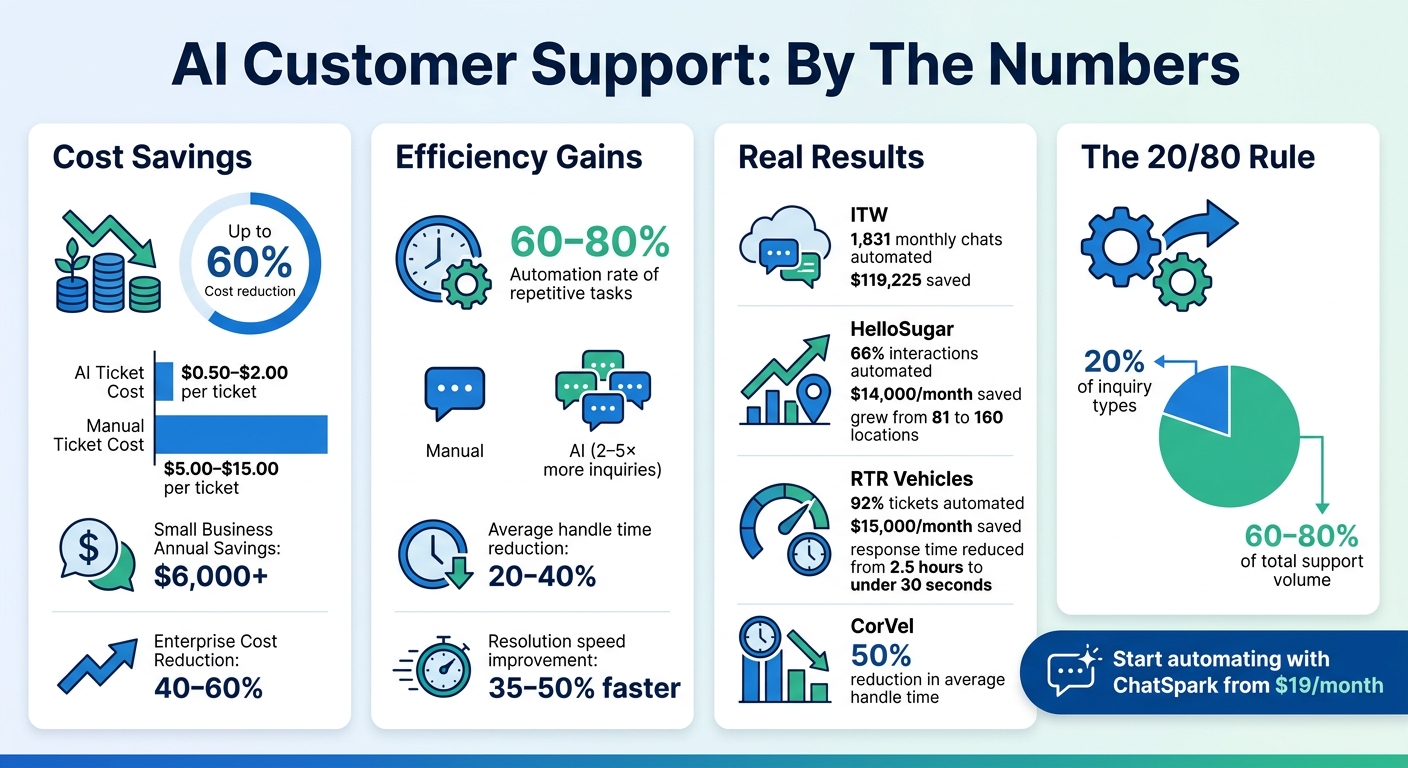
AI Customer Support Cost Savings and Automation Statistics
Review Your Current Customer Support Operations
Before diving into AI implementation, take a close look at your current customer support operations. Start by pulling 90 days of ticket data from your help desk system. Break down the inquiries by topic, complexity, and resolution method [6]. This analysis helps you uncover patterns and pinpoint areas where automation could have the most impact.
A key principle to apply here is the 20/80 rule: typically, 20% of your inquiry types make up 60–80% of your total support volume [6]. These high-frequency issues - like password resets, order tracking, or basic product questions - are ideal for automation. For instance, CorVel used AI agents to handle First Notice of Loss (FNOL) workflows, cutting average handle time by 50% for those interactions [4].
This foundational analysis sets you up to identify which areas are ripe for automation.
Review Past Customer Questions and Problems
Take a closer look at customer inquiries from the past month [5]. Export your support tickets and group them into categories such as billing, troubleshooting, account management, or shipping. Look for recurring themes where responses tend to be similar.
Pay special attention to escalation triggers, which are moments when tickets move from automated systems or junior agents to senior staff. These often involve more complex issues like billing disputes, cancellation requests, or messages where customers express frustration or anger [3, 12]. Recognizing these patterns allows you to establish clear handoff rules when configuring your AI system.
Find Tasks That Work Well with Automation
Once you’ve mapped out common issues and escalation points, identify tasks that are a good fit for automation.
Focus on high-volume, low-complexity tasks that don’t require much subjective judgment [8, 13]. Examples include order status updates, password resets, basic troubleshooting, appointment scheduling, and frequently asked questions about pricing or features. Administrative tasks - such as collecting leads, handling form submissions, or managing data privacy requests (e.g., GDPR inquiries) - are also excellent candidates for AI [3, 11, 12].
To stay organized, categorize your product knowledge into 10 major areas (e.g., Pricing, Troubleshooting, Onboarding, Billing) and list 10 common questions for each [3]. This 100-question framework becomes a valuable resource for your AI system. Compare it with your existing knowledge base to spot any gaps you’ll need to address before rolling out automation [6].
Use ChatSpark for AI-Powered Customer Support
When managing high-volume customer interactions, finding a scalable solution is key. Once you've pinpointed tasks to automate, you'll need a platform that can handle the workload without requiring extensive development. Enter ChatSpark, a conversational AI tool designed to streamline customer support across multiple channels. Whether it’s your website, WhatsApp, Instagram, Facebook Messenger, Telegram, or Slack, ChatSpark can seamlessly handle customer inquiries, helping you decide between live chat vs AI chatbots for your specific needs. On average, it resolves 80% of queries automatically, with some enterprises achieving up to 98% resolution rates.
But ChatSpark isn’t just about answering questions. Its AI Actions layer takes automation to the next level, performing over 140 actions across 40+ platforms. It can check Shopify orders, book appointments via Calendly or Square, and update Salesforce or HubSpot records - all without human involvement. For internal teams, the ChatSpark CoPilot feature integrates with tools like Gmail, Outlook, Zendesk, and Salesforce, helping agents draft responses and access critical data. This can save team members up to two hours every day.
These capabilities translate into measurable cost savings. For example, in 2025, ITW used ChatSpark to manage 1,831 monthly chats, saving $119,225. Lorri G., Customer Service & Technical Support Manager at ITW, shared:
"ChatSpark has been managing two of our largest product lines over the past year. It currently handles an average of 1,831 chats per month without any human intervention. Since implementing it on our website, we've realized measurable savings of $119,225."
Similarly, Grand Casino Baden (Jackpots.ch) adopted ChatSpark in 2024 with Zendesk integration, enabling 24/7 multilingual support in English, German, French, and Italian. Under Customer Service Manager Urs Klingler, the company saved hundreds of thousands of dollars in hiring costs.
What ChatSpark Offers
ChatSpark supports six major channels - your website, WhatsApp, Instagram, Facebook Messenger, Telegram, and Slack - ensuring customers can reach you wherever they prefer. The platform supports over 85 languages, making it ideal for businesses scaling multilingual customer support for international audiences.
Customization is another standout feature. You can tailor the AI’s branding, tone, and personality to align with your company’s voice. The platform’s knowledge base accepts a variety of data sources, including website URLs, PDFs, CSVs, Google Docs, and YouTube transcripts. By using Retrieval-Augmented Generation (RAG), ChatSpark ensures responses are based on verified company data. This flexibility helps businesses scale support without needing to expand their team. Additionally, built-in lead capture forms push customer details to your CRM or email lists via Zapier, turning support interactions into sales opportunities.
ChatSpark also integrates with tools like Freshchat, Square, Calendly, Salesforce, HubSpot, Jira, and SharePoint. This eliminates the need to switch between systems or manually transfer data. For teams handling high volumes, the ChatSpark CoPilot feature allows employees to query business data across platforms without leaving their workspace.
ChatSpark Pricing Options
ChatSpark offers a tiered pricing structure, allowing businesses to scale their automation efforts based on their needs. Here’s a breakdown of the plans:
| Plan | Monthly Price | Messages | Training Pages | Key Features |
|---|---|---|---|---|
| Basic | $19 | 100 | 25 | Basic analytics, website deployment |
| Plus | $59 | 250 | 50 | 5 AI Actions, CoPilot, REST API |
| Pro | $129 | 2,000 | 500 | 40 AI Actions, Omnichannel, GA4 tracking, Unbranded widgets |
| Enterprise | Custom | Custom | Custom | Unlimited AI Actions, SOC 2 compliance, Priority Support |
The Basic plan is perfect for solo entrepreneurs or small teams starting with AI support, offering 100 messages and basic analytics for $19/month. The Plus plan ($59/month) is ideal for growing businesses, with increased capacity and access to CoPilot and REST API integration. For mature operations, the Pro plan ($129/month) provides robust omnichannel support, 2,000 messages, and 40 AI Actions. Finally, larger organizations can opt for the Enterprise plan, which offers custom message limits, unlimited AI Actions, SOC 2 compliance, and dedicated support at a tailored price.
Annual billing offers a 14% discount, effectively giving you two months free. Most businesses lean toward the Pro plan for its balance of features and scalability, allowing them to automate effectively without the overhead of additional staff.
Configure and Deploy ChatSpark
Setting up ChatSpark is straightforward. Start by creating an agent and choosing the AI Agent Type that suits your needs - options include Website, CoPilot, Slack, Facebook, Instagram, WhatsApp, or Telegram. Give your agent both an internal and public name, then customize its appearance with a color scheme, avatar, and personality that aligns with your brand [8]. Once your agent is ready, focus on building a strong knowledge base to ensure accurate and reliable responses.
Build Your Knowledge Base and Agent Settings
Most support tickets stem from repeated questions, so having a well-organized knowledge base is key to effective automation. Train your agent using various sources: upload files like PDFs, Word documents, or CSVs; crawl your website; or manually input common Q&A entries [7]. If you already use a helpdesk, ChatSpark can import resolved tickets and conversations directly from platforms like Zendesk, Freshdesk, Salesforce, HappyFox, Freshchat, and Intercom [7].
To structure your knowledge base effectively, try the 100-Question Framework: divide your content into 10 categories, each with 10 essential questions [3]. Be specific in your answers - details like "full refund within 14 days" are much clearer than vague statements [3]. Whenever there’s a policy or product update, retraining your agent takes just 1–5 minutes [7].
Here’s a practical timeline to guide your setup:
| Configuration Task | Time Investment | Key Objective |
|---|---|---|
| Knowledge Consolidation | 8–12 Hours | Gather and centralize all documentation |
| Contradiction Audit | 6–10 Hours | Eliminate outdated or conflicting content |
| Gap Filling | 8–15 Hours | Create 30–50 articles for common issues |
| Escalation Rule Design | 2–4 Hours | Define areas requiring human intervention |
| Persona/Tone Setup | 1–2 Hours | Match the AI’s tone to your brand |
Connect ChatSpark to Your Platforms
Once your agent and knowledge base are ready, connect ChatSpark to your communication channels. For website deployment, simply add your domain in ChatSpark settings and paste the provided embed script into your site’s code. If you’re managing multiple channels, create separate agents that share the same training data [9].
ChatSpark also integrates with third-party tools via Zapier. For example:
- Link helpdesks like Zendesk, Freshdesk, or HubSpot to automatically create tickets from leads.
- Connect booking tools like Calendly, Google Calendar, or Square Appointments so customers can schedule meetings directly within the chat [9].
It’s best to start with the website widget before expanding to other channels like social media [9].
Add Data and Track Results
Upload your support content in supported formats such as PDFs, Word documents, CSVs, or text files [7]. For structured data like product catalogs, CSVs are ideal [7].
After deployment, use ChatSpark’s analytics dashboard to track metrics like response times, resolution rates, and customer satisfaction. Pay close attention to the questions that get escalated to human agents - these highlight areas where your knowledge base needs improvement.
Track Performance and Make Improvements
Once ChatSpark is up and running across your channels, the real work begins: tracking its impact and fine-tuning its performance. Deployment is just the start of an ongoing process to optimize results. Before rolling out ChatSpark, take time to establish baseline metrics over a 30–60 day period. Record key data points like your customer satisfaction score (CSAT), first response time (FRT), and cost per ticket [10][11]. These benchmarks are essential for understanding whether your AI is driving progress or simply redistributing the workload.
Review Analytics and Metrics
ChatSpark’s analytics dashboard gives you a centralized view of customer interactions across platforms, whether it’s your website, WhatsApp, Instagram, Facebook, Telegram, or Slack [10]. Pay close attention to three key metrics:
- Response Time: Aim for under 30 seconds to keep interactions fast and efficient.
- Resolution Rate: Focus on tickets that are fully resolved, not just deflected. This metric highlights quality over quantity.
- Customer Satisfaction Scores: Gauge how well your AI is meeting customer expectations.
Also, keep an eye on escalated queries. These can reveal gaps in your AI’s knowledge base and point to areas that need improvement. By leveraging these insights, you can make data-driven adjustments to enhance ChatSpark’s effectiveness.
Update Responses Based on Data
Set aside time each week for a quality assurance (QA) review. Sample 50–100 AI interactions and grade them on accuracy, completeness, and tone using a 1–5 scale [11]. When human agents successfully resolve complex issues, flag those cases as "bot-learnable" and incorporate the solutions into your AI’s knowledge base [12]. This process ensures your AI continues to learn and improve over time.
AI tools often deliver impressive efficiency gains. For example, they can reduce Average Handle Time (AHT) by 20–40%, and companies using AI-generated response drafts resolve tickets 35–50% faster [11][1]. A standout case is HelloSugar, a salon chain that, in 2025, automated 66% of customer interactions with an AI FAQ assistant. This move saved the company around $14,000 per month and allowed it to grow from 81 to 160 locations in just one year [2].
To maintain quality as you scale, prioritize tracking your "Resolution Rate" over "Deflection Rate." This ensures that your AI is delivering real value to customers while supporting your business goals [12].
Conclusion
Transform your customer support with AI - no need for a huge budget or a team of developers. Start by assessing your operations, pinpointing repetitive tasks, and implementing ChatSpark to simplify inquiries while maintaining support quality. Build a solid knowledge base, link your platforms, and use data to fine-tune performance over time.
Take RTR Vehicles as an example: between 2025 and 2026, they reduced their customer service team from four full-time employees to just one part-time worker. Their AI solution handled 92% of support tickets, including tasks like order tracking and product compatibility. This shift saved them $15,000 every month and slashed response times from 2.5 hours to under 30 seconds [13]. It’s a clear demonstration of how ChatSpark can drive both cost savings and efficiency.
ChatSpark offers 24/7 support across platforms like websites, WhatsApp, Instagram, Facebook, Telegram, and Slack. And with plans starting at just $19/month, it’s accessible for businesses of any size looking to scale their support.
Still, AI isn’t about replacing human agents - it’s about working alongside them. As IBM Think puts it, "AI should enhance, not replace, human support. It's best used for routine tasks, while complex, emotional or sensitive cases use human interaction" [3]. Automate the repetitive questions and workflows, and let your team focus on situations that require empathy and critical thinking.
To maximize the impact of AI, keep tracking your performance metrics and updating your knowledge base. This ensures your AI stays effective while keeping costs under control.
FAQs
How do I decide what to automate first?
To begin, pinpoint tasks that are repetitive and eat up valuable time. These might include answering FAQs, directing inquiries to the right department, or sharing order updates. Areas like company policies or troubleshooting guides are common customer concerns that can be automated effectively. By using AI to handle these tasks, you can speed up response times, lighten the load on your human agents, and free them up to tackle more nuanced, empathy-driven issues. This approach not only delivers faster results but also simplifies your customer support workflow.
How do I stop the AI from giving wrong answers?
To minimize errors in AI responses, make sure the system is trained using only your verified business data, such as product catalogs and company policies. Keep its knowledge base current by updating it regularly, and actively monitor its performance to identify and resolve any problems. Incorporating hybrid AI-human models can be especially helpful for managing complex inquiries, allowing for greater accuracy and reliability over time. These practices ensure the AI provides dependable and precise support.
When should the AI hand off to a human agent?
When dealing with customer queries, there are moments when AI should step aside and let a human agent take over. These situations often arise when the issue is complex, emotionally charged, or involves high-stakes decisions.
For example, if a customer is visibly frustrated or upset - something that can be detected through sentiment analysis - a human touch is essential to de-escalate the situation. Similarly, when the issue at hand carries significant value or risk, such as financial disputes or critical account changes, transferring to a person ensures the conversation is handled with care and expertise.
This escalation process helps maintain service quality and ensures customer satisfaction by addressing sensitive matters appropriately.