AI customer support tools are reshaping how businesses interact with customers. They streamline processes, reduce costs, and improve satisfaction by resolving routine issues quickly. However, choosing the right platform and following a complete guide to AI customer support implementation is critical to avoid inefficiencies and poor customer experiences.
Key features to prioritize:
- Natural Language Processing (NLP): Enables human-like, context-aware conversations.
- Multilingual Support: Communicate in over 85 languages to serve global customers.
- Omnichannel Integration: Seamlessly manage interactions across platforms like WhatsApp, Instagram, and email.
- Knowledge Retrieval (RAG): Delivers accurate answers by pulling data from your support content.
- Sentiment Analysis: Detects customer emotions and prioritizes issues.
- Customizable Branding: Matches the tool’s tone and visuals to your brand identity.
These tools can handle 80% of interactions autonomously, cut call times by 38%, and boost agent productivity by 60%. Platforms like ChatSpark offer tiered pricing, starting at $19/month, with advanced options for omnichannel support and analytics.
Investing in AI-powered customer support can improve efficiency, reduce costs, and enhance customer satisfaction.
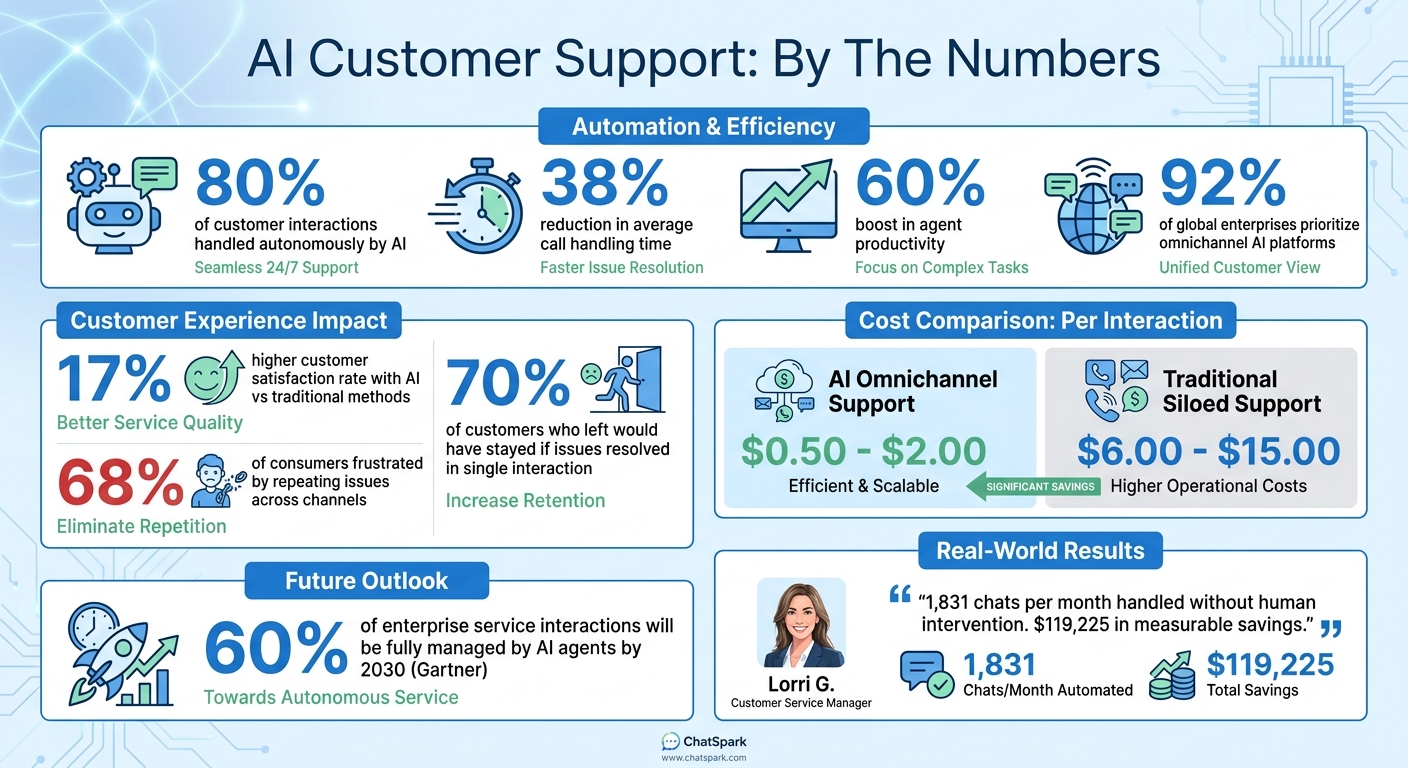
AI Customer Support Impact: Key Statistics and ROI Metrics
Core Features to Consider in AI Customer Support Software
When selecting AI support software, focus on features that directly improve customer service and align with your business needs. These features not only address customer pain points but also help your support system grow alongside your company.
Natural Language Processing for Human-Like Conversations
Natural language processing (NLP) enables AI to grasp the intent behind customer queries, not just the exact words used. For instance, if a customer asks, "How do I get my money back?" the AI understands they're asking about refunds, even if your documentation refers to it as a "return policy."
Modern NLP systems use verified data retrieval to ensure responses are grounded in your company’s actual information, minimizing the risk of inaccurate answers. This approach has become essential for maintaining reliability [2][8].
You can also set up confidence thresholds, allowing the system to escalate conversations to human agents when it’s uncertain about a response. For sensitive topics like billing or legal issues, these systems can draft suggestions for human review instead of replying directly [2][7].
| Feature | Rule-Based Chatbots | NLP-Driven AI Agents |
|---|---|---|
| Logic Foundation | Scripted decision trees | Large Language Models (LLMs) |
| Comprehension | Keyword matching | Intent and context recognition |
| Conversation Flow | Linear and rigid | Dynamic and conversational |
| Handling Ambiguity | Often leads to "dead ends" | Handles complex or vague queries |
| Maintenance | Requires manual updates | Learns from data and feedback |
Multilingual Support Across 85+ Languages
Multilingual capabilities let you assist customers in their preferred languages without needing specialized staff for each one. Platforms like ChatSpark support over 85 languages, ensuring seamless communication for diverse audiences.
Omnichannel Integration for Consistent Communication
Today, 92% of global enterprises prioritize AI platforms that unify communication across multiple channels [4]. Customers expect to seamlessly switch between platforms - like starting a conversation on Instagram, continuing it via email, and completing it on your website - without repeating their issue. Omnichannel integration consolidates communication across more than 30 channels, including WhatsApp, TikTok, Instagram, email, and SMS, into one dashboard [4].
A key feature is context retention. With 68% of consumers expressing frustration over having to repeat their issues across different channels or agents, omnichannel systems solve this by maintaining a complete conversation history, no matter where the interaction happens [4].
"60% of enterprise service interactions will be fully managed by AI agents by 2030. This doesn't eliminate human agents - it focuses them on the 40% of interactions requiring genuine human judgment, empathy, and complex problem-solving."
– Gartner Research [9]
When choosing a platform, consider one that integrates with your existing tools instead of requiring a complete overhaul. This reduces risks during implementation and preserves your current workflows [2]. Additionally, audit customer preferences - e-commerce businesses may prioritize WhatsApp, while SaaS companies might focus on in-app messaging [4].
| Feature | AI Omnichannel Support | Traditional Siloed Support |
|---|---|---|
| Context Retention | Full history across all channels [4] | Customer must repeat info [4] |
| Availability | 24/7 across all time zones [9] | Limited by human shifts [10] |
| Cost per Interaction | $0.50 – $2.00 [9] | $6.00 – $15.00 [9] |
| Scalability | Instantly handles peaks [4] | Requires hiring and onboarding [10] |
Customizable Branding and Tone
Beyond technical efficiency, aligning your AI system with your brand identity strengthens trust. Customization options allow you to match chat widget visuals and tone to your brand’s voice. For example, ChatSpark lets businesses set a conversational style - whether professional, casual, or technical - ensuring every interaction reflects your brand’s personality.
AI-Powered Knowledge Retrieval and Analytics
Effective AI systems rely on robust knowledge retrieval tools. These tools pull data from your documentation, FAQs, and help articles to answer customer questions accurately. Using RAG (retrieval-augmented generation) architecture, the AI ensures responses are based only on verified sources, keeping all information consistent across channels [2].
Analytics play a key role in improving customer support. By analyzing interaction data, you can identify common questions, pinpoint knowledge gaps, and track resolution rates. This continuous feedback loop allows you to refine both the AI’s performance and the overall customer experience.
How AI Customer Support Features Benefit Your Business
AI-powered customer support tools bring measurable improvements in customer satisfaction, operational efficiency, and cost savings. Companies adopting these technologies often see tangible results. For example, businesses using advanced AI report a 17% higher customer satisfaction rate compared to those relying on traditional methods [1]. AI also helps reduce the average handling time for inbound calls by 38% [1]. Additionally, 70% of customers who left a company said they would have stayed if their issues had been resolved in a single interaction [6]. These benefits highlight how AI can transform customer support operations.
24/7 Automated Support with Instant Responses
AI provides instant solutions to routine queries and ensures availability around the clock, making it possible for customers in any time zone to get assistance whenever they need it. AI agents can independently handle over 80% of customer interactions, allowing human teams to focus on complex cases that require a personal touch [12].
Human Escalation with Context Retention
For issues that require human intervention, AI ensures a smooth handoff by transferring the full conversation history, intent summary, and relevant sources to the human agent [2][5]. This eliminates the frustration of customers needing to repeat themselves.
This hybrid approach works well - AI manages high-volume, repetitive tasks, while human agents handle emotionally sensitive or high-stakes cases [13][1]. AI also supports agents, particularly newer ones, by enabling them to resolve more cases per hour without compromising quality. With seamless handoffs in place, AI can further enhance service through sentiment analysis.
Sentiment Analysis and Predictive Suggestions
AI takes customer interactions a step further by analyzing sentiment in real time. By evaluating word choice and tone, AI detects emotions like frustration or anger and can prioritize tickets or route them to specialized teams [11][12]. This ensures that customers facing challenges receive faster and more empathetic responses [14][5].
Predictive suggestions further assist agents by offering real-time drafts, actionable advice, and relevant knowledge articles. This reduces the time agents spend searching for information and improves overall productivity [1][3][15]. Keira Hayter, Sales Team Manager at Woolacombe Bay Holiday Parks, shared:
"I had team members who weren't comfortable at all with emails. With Freddy AI, they've gained so much confidence, and the quality of emails they're sending now is remarkable" [3].
| Feature | Benefit to Customer Experience | Benefit to Operational Efficiency |
|---|---|---|
| Sentiment Analysis | Personalized tone; faster resolution for frustrated users | Automated triage; prioritization of at-risk accounts |
| Predictive Suggestions | Quick, accurate answers; reduced wait times | 15% average agent time savings; faster responses |
| Anomaly Detection | Proactive alerts to prevent service disruptions | Early detection of volume spikes or product issues |
| AI Writing Aids | Clear, professional communication in multiple languages | Streamlined review process; consistent branding |
ChatSpark Pricing and Features Comparison
ChatSpark uses a flat monthly pricing model, making costs predictable as your AI operations grow [17]. The platform offers four pricing tiers, catering to everyone from solo entrepreneurs to large enterprises. Opting for annual billing saves 14%, which is like getting almost two months free [16]. Each plan starts with a 14-day free trial on the Basic tier, so you can try the system risk-free before committing [16]. However, refunds aren't available since AI infrastructure and training are provisioned immediately [16].
This pricing approach ensures businesses can scale without unexpected cost hikes.
ChatSpark Pricing Plan Details
| Feature | Basic | Plus | Pro | Enterprise |
|---|---|---|---|---|
| Monthly Price | $19 | $59 | $129 | Custom |
| Messages / Month | 100 | 250 | 2,000 | Bespoke |
| AI Agents | 1 | 1 | 1 | Bespoke |
| Pages per Agent | 25 | 50 | 500 | Bespoke |
| AI Actions | None | 5 | 40 | Unlimited |
| Integrations | Website | Website, API | Omnichannel* | Bespoke |
| Team Members | 1 | 1 | 2 | Unlimited |
| Support | Priority & Dedicated |
*Omnichannel includes WhatsApp, Facebook Messenger, Instagram, Telegram, and Slack [16].
The Basic plan ($19/month) is perfect for solo entrepreneurs just starting with AI automation. The Plus plan ($59/month) introduces AI Actions and the CoPilot browser extension, boosting team productivity [16]. For businesses requiring omnichannel support across platforms like WhatsApp, Instagram, or Slack, the Pro plan ($129/month) is a great fit [16]. If your business operates on a larger scale with multiple Pro plans, the Enterprise plan offers unlimited AI Actions and dedicated account management - contact ChatSpark for custom pricing [16].
One customer shared their experience:
"ChatSpark has been managing two of our largest product lines over the past year. It currently handles an average of 1,831 chats per month without any human intervention. Since implementing it on our website, we've realized measurable savings of $119,225." – Lorri G., Customer Service & Technical Support Manager [16].
For standard replies, 1 message credit is used, while advanced AI responses on Pro or Enterprise plans consume 20 message credits each. Higher-tier plans also include additional AI agent slots and expanded message and page limits [16].
Conclusion and Next Steps
Choosing the right AI customer support software is all about matching its capabilities to your business needs. Features like natural language processing make interactions feel more conversational, while multilingual support ensures you can connect with a global audience. Omnichannel integration helps maintain a consistent brand voice across platforms. Tools such as sentiment analysis and knowledge gap reports go beyond automation - they provide insights that can enhance your entire support strategy. These tools don't just simplify processes; they can also contribute to measurable business growth.
The rise of vertical AI agents allows businesses to implement support tools that understand their workflows from the start. This shift transforms customer service from a cost-heavy function into a key driver of growth [19]. Many modern platforms now track revenue attribution, showing how support interactions directly impact your sales pipeline [18].
ChatSpark offers flexible pricing, making it easy to scale as your business grows. Opting for annual billing can save you 14%, and every plan includes a 14-day free trial on the Basic tier. For more details, check the pricing section above.
When evaluating your options, focus on features that match your support volume and customer touchpoints. For example, omnichannel integration is vital if you're managing inquiries across multiple platforms, while auto-language detection in over 85 languages is essential for international customer bases. Use the ChatSpark trial to see how its RAG architecture reduces manual verification and how sentiment triggers handle frustrated customers before escalation. By aligning these features with your specific needs, you can set the stage for ongoing improvement.
Once you've chosen a solution, focus on implementation, impact tracking, and strategy refinement. Use reports to uncover documentation gaps, improve workflows, and measure ROI. Your AI support system should grow with your business, adapting to your needs rather than limiting them.
FAQs
How do I connect AI support to my existing help center and policies?
Integrate AI tools such as natural language processing (NLP) and automation into your existing support system to streamline operations. Use APIs or built-in integrations to connect the AI platform directly to your helpdesk software, ensuring it aligns with your organization's policies.
Set up features like ticket triage, routing, and automated responses, and run tests on sample conversations to verify everything works as intended. Make sure the system complies with escalation protocols, data security requirements, and communication standards before rolling it out fully.
What’s the safest way to handle AI escalation to a human agent?
Clear escalation paths are key to safely managing AI escalations. When the AI encounters low-confidence situations or out-of-scope queries, it should smoothly hand over the interaction to a human agent. To prevent delays and confusion, ensure the agent receives all relevant context and the conversation history. This minimizes misunderstandings, maintains customer trust, and ensures a seamless transition from AI to human support.
How can I calculate ROI before rolling out AI support?
Before rolling out AI support, it's important to get a clear picture of its potential return on investment (ROI). Start by tracking key metrics such as:
- First response time: How quickly your team currently responds to customer inquiries.
- Resolution time: The average time it takes to fully resolve customer issues.
- Customer satisfaction: Feedback scores or ratings that reflect how happy customers are with your support.
- Internal time savings: The amount of time your team could save on repetitive tasks.
Once you have these benchmarks, set specific goals for what you want AI to achieve. Then, test AI responses using sample conversations to ensure they are accurate and align with your expectations. By monitoring these metrics, you'll have a clear understanding of how AI could improve efficiency and enhance customer experience. This will give you a solid foundation for evaluating ROI before committing to a full-scale deployment.