AI customer service in 2026 is all about automation that feels human. Businesses are using advanced tools like chatbots, voice assistants, and omnichannel systems to handle inquiries efficiently. With large language models (LLMs), AI can now understand intent, manage multi-step workflows, and even process refunds or schedule follow-ups - all without human involvement.
Here’s why 2026 is a turning point:
- Faster responses: AI cuts wait times from minutes to seconds.
- Cost savings: AI resolutions cost $0.99–$2.00 per ticket vs. $6.00–$12.00 for human agents.
- Better scalability: Small businesses can now access AI tools starting at $19/month.
But AI isn’t perfect. It struggles with emotional intelligence, complex disputes, and sometimes generates incorrect answers (“hallucinations”). The best systems combine AI for routine tasks with humans for nuanced issues, ensuring efficiency without losing the personal touch.
AI is evolving with tools like Natural Language Processing (NLP), machine learning, and predictive analytics. Features like multilingual support, voice AI for phone calls, and real-time agent assistance are becoming standard. Businesses implementing AI strategically see an average ROI of 340% in the first year.
Want to get started? Focus on automating simple, repetitive tasks, ensure your knowledge base is up-to-date, and track metrics like resolution rates and customer satisfaction. Remember, AI works best when paired with human expertise.
Core Technologies Behind AI Customer Service
Key Technologies Explained
The foundation of 2026's automated customer support systems lies in a few key technologies that work together to create smarter, more adaptive interactions. At the heart of this ecosystem are tools like Natural Language Processing (NLP) for understanding language, Natural Language Understanding (NLU) for grasping meaning, and Natural Language Generation (NLG) for crafting human-like responses. These technologies allow AI to interpret customer intent and respond in a way that feels natural, moving beyond rigid, pre-programmed scripts.
Generative AI takes this a step further. By leveraging large language models, it generates responses tailored to the specific context of a conversation [2]. This means customers get personalized replies, even if their questions are phrased in unconventional ways.
Behind the scenes, machine learning ensures that AI systems improve over time by learning from every interaction through a human-in-the-loop learning engine. Meanwhile, predictive analytics uses historical data to anticipate customer needs. For instance, it can detect patterns that suggest a customer might cancel a service and proactively offer solutions to retain them.
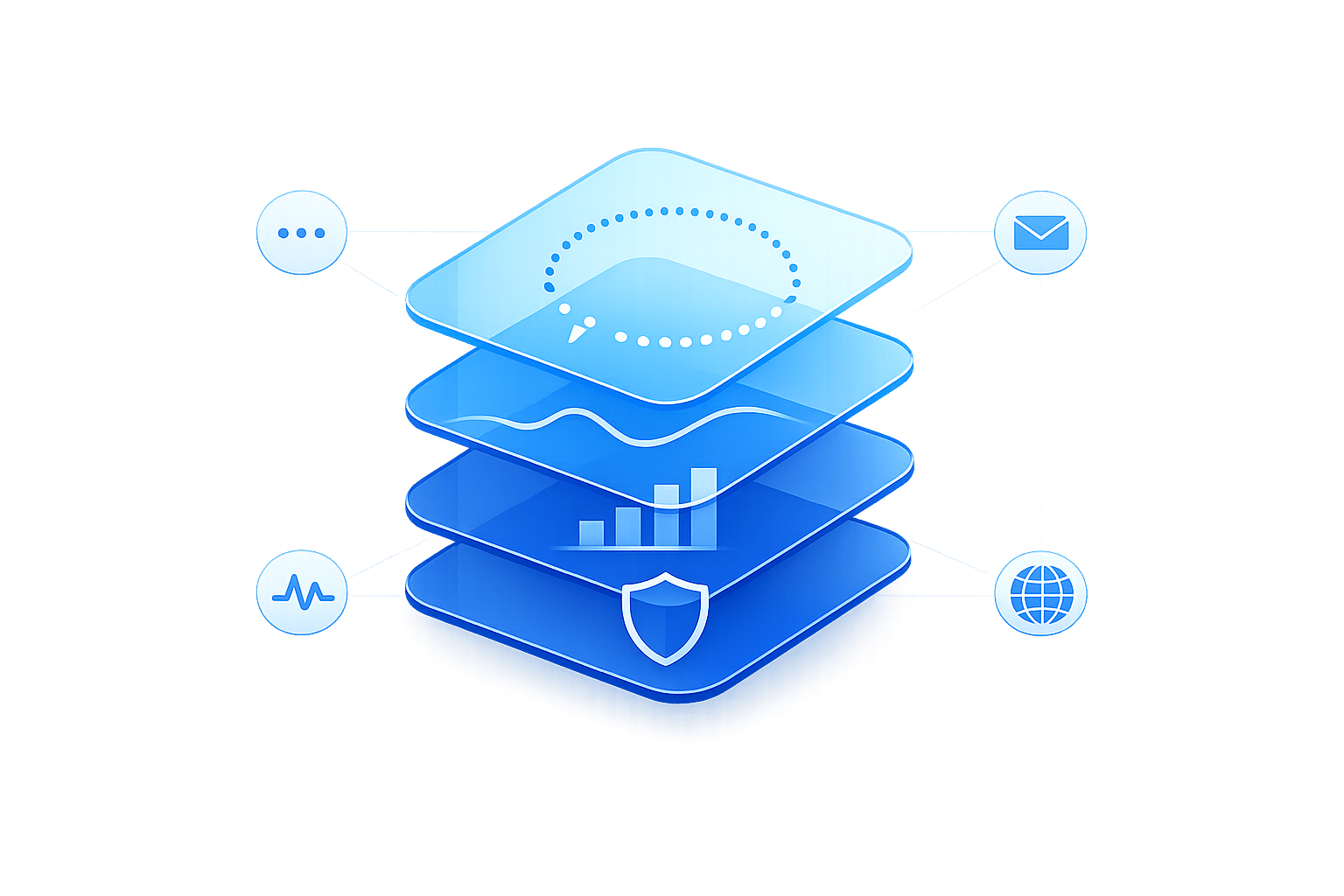
A standout development in 2026 is the orchestration layer. Unlike older systems that react to keywords, this layer manages the entire conversation's context and determines the best next step based on the overall flow [1]. This shift from keyword-based responses to goal-oriented dialogue is what sets modern AI agents apart from traditional chatbots.
Next, we'll explore AI's limitations and where human expertise still plays a vital role.
What AI Can and Cannot Do in 2026
AI shines in handling routine tasks like answering FAQs, tracking orders, processing returns, resetting passwords, and routing support tickets. Advanced systems can even integrate with help desks to automate ticket creation and status checks. These are predictable, well-structured interactions where AI consistently delivers.
But AI has its limits. It struggles with tasks requiring nuanced reasoning or emotional intelligence. For example, resolving disputes involving sensitive personal circumstances or addressing interconnected issues often requires the kind of judgment and empathy that AI lacks [2]. Another challenge is "hallucinations", where AI generates responses that sound confident but are factually incorrect. While RAG-based systems reduce error rates compared to standard models (which have a 15–20% error rate), mistakes still occur [4]. Essentially, AI excels in structured, repetitive tasks but falls short in open-ended, emotionally complex, or entirely new situations. These are areas where human agents remain indispensable.
Understanding these limitations highlights the need for seamless collaboration between AI and human support.
How to Combine AI with Human Support
The best customer service systems assign routine tasks to AI while reserving complex issues for human agents. When transferring cases, AI provides structured summaries that include the issue, customer sentiment, and any actions already taken. This ensures the customer doesn’t have to repeat themselves, and the agent can jump in with all the necessary context [1].
"The most significant opportunity in agentic AI is not replacing human agents - it is enabling human agents to operate at a level of strategic value they have never been able to reach before." - IPscape [5]
This approach allows human agents to focus on high-value interactions, where their expertise and empathy make the biggest difference. By combining AI's efficiency with human insight, businesses can achieve better scalability, improved customer satisfaction, and a more effective support system overall.
Building a Business Case for AI Customer Support
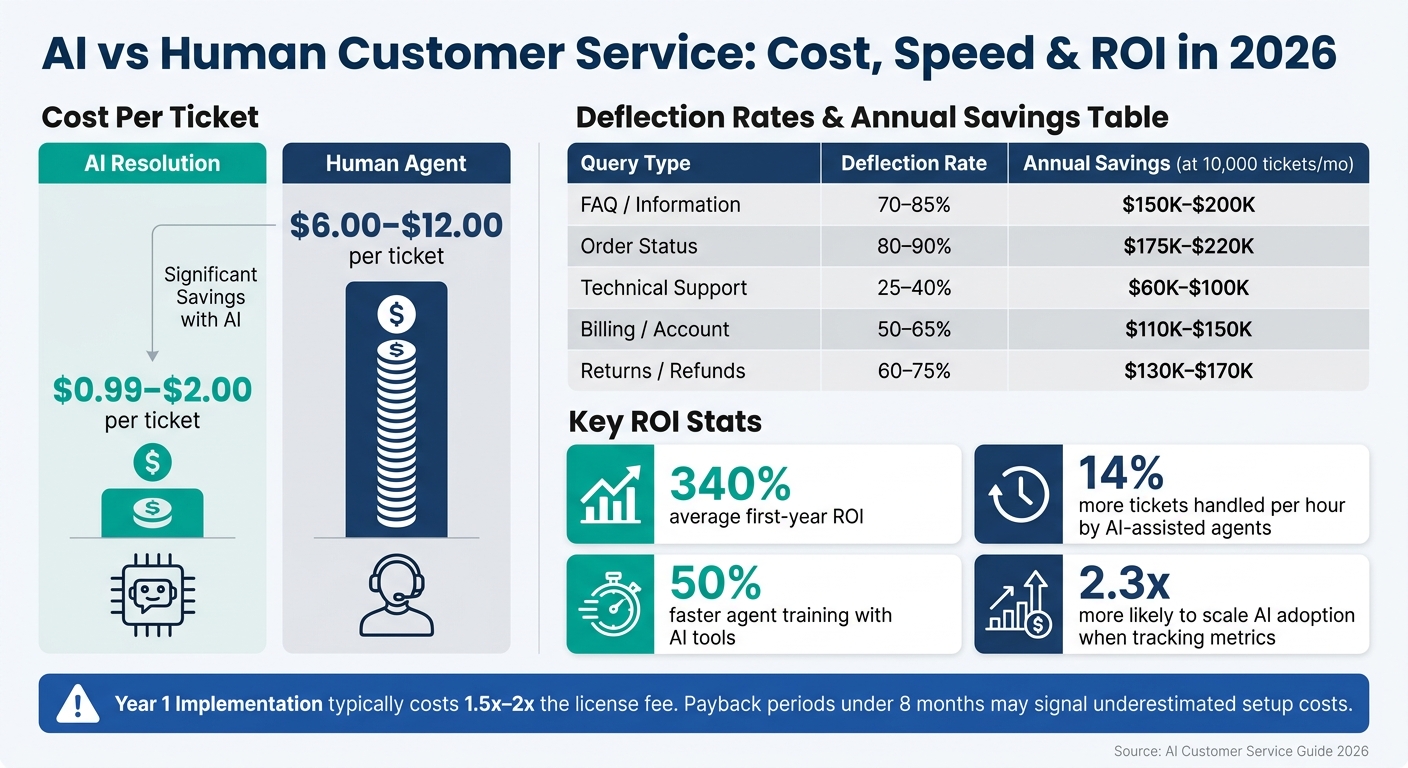
AI vs Human Customer Service: Cost, Speed & ROI in 2026
To make AI work in customer support, you need a strategy that ties measurable ROI directly to customer needs. This ensures automation delivers real value.
How to Measure ROI and Efficiency Gains
The financial benefits of AI in customer support are clear once you know what to track. Here's the formula to calculate ROI: ROI (%) = (Total Annual Value − Total Annual Investment) ÷ Total Annual Investment × 100% [6][7].
- Total Annual Value includes savings from fewer tickets handled by humans, faster resolution times, and coverage outside normal working hours. It also factors in revenue growth from lead generation, upselling, and reducing churn.
- Total Annual Investment covers platform fees, setup costs, ongoing maintenance, and the cost of escalations that require human intervention.
The numbers speak for themselves. By 2026, AI resolutions are projected to cost between $0.99 and $2.00 per ticket, compared to the $6.00–$12.00 range for human agents [1]. When paired with AI tools, human agents can handle 14% more tickets per hour and complete training 50% faster [8]. Companies that track these metrics are 2.3x more likely to scale AI adoption and 1.8x more likely to achieve above-average profitability [6].
However, measuring success requires more than just looking at containment rates. A bot that "closes" a ticket isn't necessarily resolving the issue. Instead, use metrics like ROAR (Resolved on Automation Rate) or True Deflection Rate, which only count tickets that customers don’t reopen within 5–7 days [8][9][10]. Also, break down ROI by query type, as deflection rates vary widely:
| Query Type | Deflection Rate | Annual Savings (at 10,000 tickets/mo) |
|---|---|---|
| FAQ / Information | 70–85% | $150K–$200K |
| Order Status | 80–90% | $175K–$220K |
| Technical Support | 25–40% | $60K–$100K |
| Billing / Account | 50–65% | $110K–$150K |
| Returns / Refunds | 60–75% | $130K–$170K |
"Deflection rate without ticket-archetype context is a number, not a forecast." - Digital Applied [10]
Budgeting for the first year is critical. Implementation often costs 1.5x to 2x the license fee [10]. If the payback period seems too short (under eight months), it might mean setup costs are underestimated or deflection rates are overestimated [10].
These insights set the stage for aligning AI strategies with what customers actually want.
Matching Automation to Customer Expectations
By 2026, consumers are more accustomed to AI but still expect human support for complex issues. In fact, 70% of consumers can now differentiate between companies that use AI effectively and those that don’t [12]. That gap is growing.
The takeaway? Start by automating high-volume, predictable tasks. Analyzing your last 1,000 tickets will often reveal that five categories account for 60–80% of your total volume [11]. Focus on these areas first. Before launching, make sure your knowledge base is up-to-date to maintain trust [11].
AI systems in industries like e-commerce and SaaS achieve 75–90% containment rates, but success hinges on one key element: always provide an option to contact a human. Customers are much more likely to try AI if they know they can reach a person when needed.
With these expectations in mind, it’s time to prepare for deployment.
Readiness Checklist Before You Start
Preparation is everything. Poor planning is a major reason why 40% of AI implementations fail within the first 90 days. Here’s what you need to have in place before launching:
- Support data: Export at least 90 days of ticket history. Use the 80/20 rule to identify the 20% of ticket types driving 80% of your volume.
- Knowledge base quality: Consolidate scattered documentation (Notion, Google Docs, internal wikis) into one centralized source. Well-structured content with headers and bullet points improves AI performance by 2–3 times compared to dense paragraphs [1].
- Technical integrations: Ensure your middleware connects AI with core systems like CRM, order management, and billing. Without these links, your AI can only provide answers, not take action.
- Compliance: If you handle sensitive data, secure agreements like a Business Associate Agreement (BAA) for HIPAA compliance [11]. Make sure your tech stack meets AES-256 encryption, GDPR, and SOC 2 Type II standards.
- Baseline metrics: Record your current cost per ticket and churn rate before deploying AI. Without a baseline, proving ROI later becomes impossible [9][10].
"Documentation quality is the #1 predictor of implementation success." - Ehab AlDissi, Managing Partner, Gotha Capital [1]
Once you’ve checked these boxes, start with shadow mode. This means running the AI for 2–4 weeks where it drafts responses for human review instead of responding directly. Set confidence thresholds so the AI only acts autonomously when its accuracy exceeds 90%; anything lower should trigger a human handoff [1]. This phased approach ensures a smooth rollout while protecting the customer experience.
How to Implement AI-Powered Customer Service
Implementing AI-powered customer support takes more than just technology - it requires careful planning, thoughtful design, and ongoing evaluation to ensure success. Here’s how to get started.
Choosing the Right Use Cases to Automate First
Start by automating tasks that are straightforward, repetitive, and low-risk. Think of things like password resets, checking order statuses, or answering return policy questions. These are predictable processes with clear outcomes. On the flip side, steer clear of automating complex or sensitive issues, such as legal complaints or billing disputes, where human empathy and judgment are critical.
Before diving into automation, define what "resolved" means for your team. Is it when a ticket is closed without agent involvement? Or when average handle time drops by a set number of minutes? Having a clear success metric upfront keeps everyone aligned and helps demonstrate the value of AI later.
Once you’ve identified the right use cases, the next step is creating effective, user-friendly AI interactions.
Best Practices for Designing AI Conversations
AI responses should feel natural and easy to follow - not like reading a dense manual. Keep responses short and clear, ideally just 1 to 3 sentences, and always include a next step, such as a button, link, or follow-up question.
Your AI also needs a personality. Define it explicitly in your platform settings. For example, you might describe it as "professional and friendly, focused on solutions, and free of technical jargon." This ensures consistency across channels, whether customers contact you via website chat or messaging apps like WhatsApp.
Here are some key principles to guide your AI conversation design:
- Summarize before acting. Before taking action, the AI should confirm it understands the customer’s request. This reduces mistakes and customer frustration caused by misinterpreted intent.
- Plan for escalation. For high-stakes issues like billing disputes or emotionally charged topics, create clear paths for escalating to a human agent quickly and seamlessly.
- Keep your knowledge base up to date. Regularly review and clean your source material to remove outdated information, internal jargon, and irrelevant marketing language. This ensures the AI delivers accurate, on-brand responses.
By 2026, Retrieval-Augmented Generation (RAG) is expected to become the go-to method for grounding AI responses in real documentation. This approach reduces the risk of the AI giving incorrect or fabricated answers - an essential safeguard for customer-facing tools.
Once your AI is up and running, tracking performance metrics will help you refine and improve it over time.
Metrics to Track and How to Improve Over Time
Monitoring the right metrics is essential to measure your AI’s success and identify areas for improvement. These metrics fall into three main categories: operational efficiency, technical accuracy, and customer experience.
For operational performance, track metrics like AI Resolution Rate, Deflection Rate, and Cost Per Resolution. On the technical side, focus on Knowledge Base Hit Rate, Hallucination Rate (how often the AI provides incorrect answers), and Human Override Rate. A high override rate might signal that agents don’t fully trust the AI’s recommendations. For customer experience, monitor CSAT (Customer Satisfaction Score), NPS (Net Promoter Score), and the CSAT Delta, which highlights the difference in satisfaction between AI-handled and human-handled cases.
Real-world examples illustrate the power of these metrics. In early 2026, Unity used AI agents to handle 8,000 tickets, cutting $1.3 million in operational costs while maintaining an impressive 93% CSAT score [3]. Similarly, fintech startup Esusu leveraged AI to summarize and route 10,000 monthly tickets, achieving an 80% one-touch response rate and slashing first reply time by 64% [3].
To keep improving, create a "Golden Dataset" of 100 to 200 actual customer inquiries with verified correct answers. Test every model update against this dataset before deploying it. Additionally, review cases where the AI failed to provide a solution on a weekly basis. These gaps offer a clear roadmap for future enhancements.
Omnichannel, Multilingual, and Voice AI Strategies
Delivering Consistent Support Across Channels
Once you've mastered support on one platform, the next step is extending that same quality of service across all your customer touchpoints - whether it's your website, WhatsApp, Instagram, or Facebook Messenger. Here's why it matters: omnichannel support boosts CSAT to 67%, compared to just 28% for disconnected multichannel setups [13]. Customers notice when their experience feels seamless, and consistency is key to making them feel supported.
The game-changer in 2026? Unified omnichannel AI. Instead of separate bots on each platform that don’t share information, AI agents now function as a single, connected system. This means the context of a conversation follows the customer wherever they go. For example, if someone starts chatting on your website and later continues on WhatsApp, they won’t have to repeat themselves - the AI already knows their issue. This approach ensures every interaction feels smooth and effortless.
| Feature | Legacy Multichannel | Omnichannel (2026 Standard) |
|---|---|---|
| Data Sharing | Siloed; context doesn’t transfer between platforms | Real-time context retention across all channels |
| AI Capability | Separate bots with no memory sharing | Unified AI agents with shared context across platforms |
Platforms like ChatSpark make this possible by deploying a single AI agent across channels like websites, Instagram, Facebook, WhatsApp, Telegram, and Slack. This ensures a consistent tone and branding, no matter where the customer interacts with your business.
Supporting Customers in Multiple Languages
Once your omnichannel strategy is solid, the next step is breaking down language barriers. For U.S. businesses serving global markets - or even diverse domestic audiences - multilingual AI support is no longer a luxury. Thankfully, setting it up has become much easier.
In the past, companies had to create separate bots for each language, complete with unique scripts and high maintenance costs. Today, single-agent architecture has simplified everything. With this approach, you train one AI (usually in English), and it automatically detects and responds in the customer’s preferred language [14]. Updates to policies or workflows apply across all languages instantly, eliminating the need for managing multiple versions.
Consider this: traditional multilingual setups cost $30,000–$50,000 per month for just 10 languages. Modern AI solutions now cover 95+ languages for as little as $19–$129 per month, with response times under two seconds [14]. For example, ChatSpark supports over 85 languages across all its plans, making multilingual support more accessible than ever.
Another breakthrough is real-time translation during escalations. When AI hands off a conversation to a human agent, the platform translates live, allowing an English-speaking agent to assist a customer who speaks Spanish, Mandarin, or any other language. This eliminates one of the last hurdles to providing smooth multilingual support [14].
Using Voice AI for Phone Support
While text-based channels are essential, phone support remains a critical (and often costly) customer service avenue. Voice AI is reshaping this space by handling routine calls, modernizing outdated IVR systems, and even assisting human agents in real time.
Nobody loves navigating traditional IVR menus. Voice AI replaces them with natural, conversational interactions. For example, a caller can simply say, "I want to update my shipping address," and the AI will understand, confirm, and process the request - no need to press buttons or listen to endless menu options. For straightforward issues, the call may never even need to involve a human agent.
Voice AI also shines during live calls with real-time transcription and agent assist. While the call unfolds, the AI transcribes the conversation and provides agents with instant guidance, helping to resolve issues faster and more accurately. This keeps the human element intact for complex or sensitive calls, while still leveraging AI to enhance efficiency and customer satisfaction.
AI Governance, Ethics, and What Comes Next
Responsible AI Practices for Customer Support
Using AI in customer service isn’t just about technology - it’s also about making ethical choices. To do this right, you need to keep a close eye on bias, data privacy, and transparency.
Transparency is key. Customers should always know when they’re talking to an AI. Make this clear upfront using simple, jargon-free language. Between 2024 and 2025, EU data protection authorities issued €450 million in fines for AI-related transparency violations [15]. This shows how closely regulators are watching. For U.S. businesses, staying ahead of potential federal regulations by addressing transparency now is a smart move.
Regular audits of training data are essential. Review your AI’s data monthly to remove outdated information and address any demographic gaps. Tools like IBM’s AI Fairness 360 or Google’s Fairness Indicators can help identify and correct disparities in how different customer groups are treated. On the privacy side, platforms handling customer data must meet high standards like AES-256 encryption, GDPR compliance, and SOC 2 Type II certification [16].
For sensitive tasks - like processing large refunds, closing accounts, or handling complaints - consider a Human-in-the-Loop (HITL) approach. Here, AI can suggest actions, but a human reviews and approves them before they’re executed. This keeps automation efficient while reducing the risk of errors in critical situations.
AI governance isn’t something you set up once and forget; it's a critical part of a customer service automation checklist. It’s an ongoing process that spans every stage of the AI pipeline, from data intake to automated decisions [16]. A five-layer framework can help manage this:
| Control Layer | Primary Owner | Core Responsibilities |
|---|---|---|
| Data Layer | Data/Platform Team | Overseeing data minimization, retention policies, and access control |
| Decision Layer | AI/Product Team | Setting rules for routing and deciding when to escalate to humans |
| Output Layer | AI + Compliance | Ensuring outputs meet safety, privacy, and accuracy standards |
| Action Layer | Engineering + Security | Managing API access and preventing unauthorized actions |
| Audit Layer | Risk/Compliance | Maintaining logs and meeting regulatory reporting requirements |
Make sure your AI’s decisions are traceable. For example, if a customer is routed into a refund process, your system should document what data led to that decision. This kind of transparency helps resolve issues quickly.
In the U.S., there’s no single federal AI law. Instead, businesses must navigate a patchwork of state regulations from places like California, Colorado, New York City, Illinois, and Texas [4]. To stay compliant, review AI policies quarterly and involve your legal team as part of your compliance strategy.
"It's not about personality in the marketing sense; it's about character in the systems sense." - Yvonne Gando, Senior Director of UI/UX, Salesforce [15]
This quote highlights an important idea: a well-managed AI system defines its values, behaviors, and boundaries clearly.
With these practices in place, AI is evolving from simple chatbots to systems capable of handling much more complex tasks.
Emerging Trends in AI Customer Support
As ethical frameworks take shape, AI is moving toward greater sophistication in customer support.
AI is no longer limited to reactive chatbots. Modern AI agents now handle multi-step workflows, such as checking account details, diagnosing issues, processing returns, and updating CRM systems [4]. This shift marks a big leap from the single-task bots of the past.
Proactive support is another growing trend. Instead of waiting for customers to report problems, AI can monitor for signs like abandoned shopping carts, late shipments, or failed payments. It then reaches out to resolve these issues before they escalate.
AI CoPilots are also transforming how support teams work. By integrating directly into tools like Salesforce and Zendesk, these assistants provide real-time suggestions, draft responses, and offer relevant customer context. This reduces the time agents spend switching between systems and eases mental workload, leading to faster resolutions.
How ChatSpark is Preparing for What's Next
These trends are shaping how ChatSpark develops its AI solutions. Its AI Actions feature - available on the Pro plan for $129/month - enables businesses to automate tasks like booking appointments, processing requests, and connecting with external systems via APIs. This is a practical example of agentic AI in action.
For businesses needing more oversight, the Enterprise plan offers advanced governance tools like audit logs, role-based access, and webhooks. As state regulations continue to evolve in the U.S., having these controls in place can help companies stay ahead of compliance challenges.
ChatSpark also offers a CoPilot browser extension that supports human agents by generating real-time context and draft responses within existing platforms. Combined with omnichannel deployment across WhatsApp, Instagram, Facebook, Slack, and Telegram, ChatSpark provides a flexible solution that adapts as business needs and regulatory landscapes change.
Conclusion: Key Takeaways for Automating Customer Support in 2026
AI-driven customer support has reached a level where it’s delivering measurable results. Companies implementing it strategically - using clear objectives, ethical guidelines, and multi-channel integration - are reaping rewards like an average first-year ROI of 340% and a 15–25% boost in revenue per customer through AI-powered upselling during support interactions [3]. These numbers highlight just how transformative AI has become in customer service.
The main takeaway here? AI isn’t a standalone fix - it’s part of a larger system. Success comes from combining conversational AI with human escalation options, ensuring governance across all processes, and refining strategies using real-world performance data. The partnership between AI and human agents remains critical for delivering effective support. This ties back to the idea of shifting from static AI setups to dynamic, evolving systems. Businesses that treat AI as a continuous journey, rather than a one-time implementation, are the ones staying ahead.
FAQs
How do I pick the first support tasks to automate with AI?
Take a close look at support data from the past 90 days. Begin by organizing tickets into categories, such as type of issue, resolution method, and response time. This will help you identify patterns and recurring themes.
Pay special attention to tasks that are both frequent and simple to resolve. Common examples include:
- Password resets
- Order updates
- Basic troubleshooting
- FAQs
These are the kinds of issues that are perfect for streamlining.
Apply the 80/20 rule here - focus on the tasks that make up the bulk of your support volume but require minimal effort to address. Before rolling out any automation, make sure to document your workflows thoroughly. Define clear triggers (what starts the process) and specific outcomes (the result you want). This step ensures smooth implementation and effective automation.
What should I do when the AI gives a wrong answer?
If the AI gives an incorrect or less-than-ideal response, it can automatically escalate the issue to a human agent. When this happens, the full interaction history is transferred, so the customer doesn’t have to repeat themselves. You can also configure triggers - like specific keywords that indicate frustration or particularly complex requests - to flag these cases for priority handling. This human-in-the-loop approach guarantees precise and considerate support when automation falls short.
What integrations do I need for AI to take actions like refunds?
To let AI handle refunds and similar tasks, it’s crucial to connect your support platform with essential systems like your CRM, billing software, and order management tools. Tools like ChatSpark make this easy by offering over 140 pre-built integrations, including popular platforms like Shopify, Salesforce, and Zendesk. For custom systems, there’s also a REST API Connector.
These integrations enable AI to perform real-time actions, such as verifying refunds and updating order details, ensuring a seamless and efficient process.