If you want to cut support workload, start with where the work begins. I’d put it this way: conversational AI lowers ticket volume, while help desk software lowers ticket chaos. If your team keeps answering the same questions, AI usually does more to reduce workload. If your team already has a pile of human-only cases, a help desk helps keep that pile under control.
Here’s the short version:
- Conversational AI handles repeat questions before they become tickets
- Help desk software routes, tracks, and organizes tickets after they exist
- AI can auto-resolve 60% to 80% of routine requests, and some teams report 85% to 92% ticket resolution rates
- AI-handled conversations can cost about $0.50 to $2.00 each, versus $6.00 to $15.00+ for human-handled support
- Help desks do not lower incoming volume, but they help with SLA tracking, ownership, and handoffs
- Many teams get the best result from using both: AI customer support implementation up front, help desk for escalations
If I had to simplify it even more:
- Use AI for FAQs, order status, password resets, and basic troubleshooting
- Use a help desk for specialist review, approvals, billing issues, and cases that need a person
- Use both when you need ticket deflection and structured human follow-up
Quick Comparison
| Criteria | Conversational AI | Help Desk Software |
|---|---|---|
| Main job | Reduce incoming requests | Organize human support work |
| When it helps | Before a ticket is created | After a ticket is created |
| Best for | High-volume, repeat questions | Complex cases and team coordination |
| Effect on volume | Can cut volume by 60% to 92% | No direct change in volume |
| Human involvement | Low for routine cases | High |
| Common features | Auto-replies, intent detection, multilingual support, 24/7 coverage, system actions | Queues, routing, SLAs, notes, reporting |
| Cost per interaction | About $0.50 to $2.00 | Usually tied to human labor costs |
| Best setup for many teams | Front-line automation | Back-end case control |
So if you’re asking which one actually reduces support workload more, my answer is simple: conversational AI usually wins when repeat demand is the problem; help desk software wins when process control is the problem.
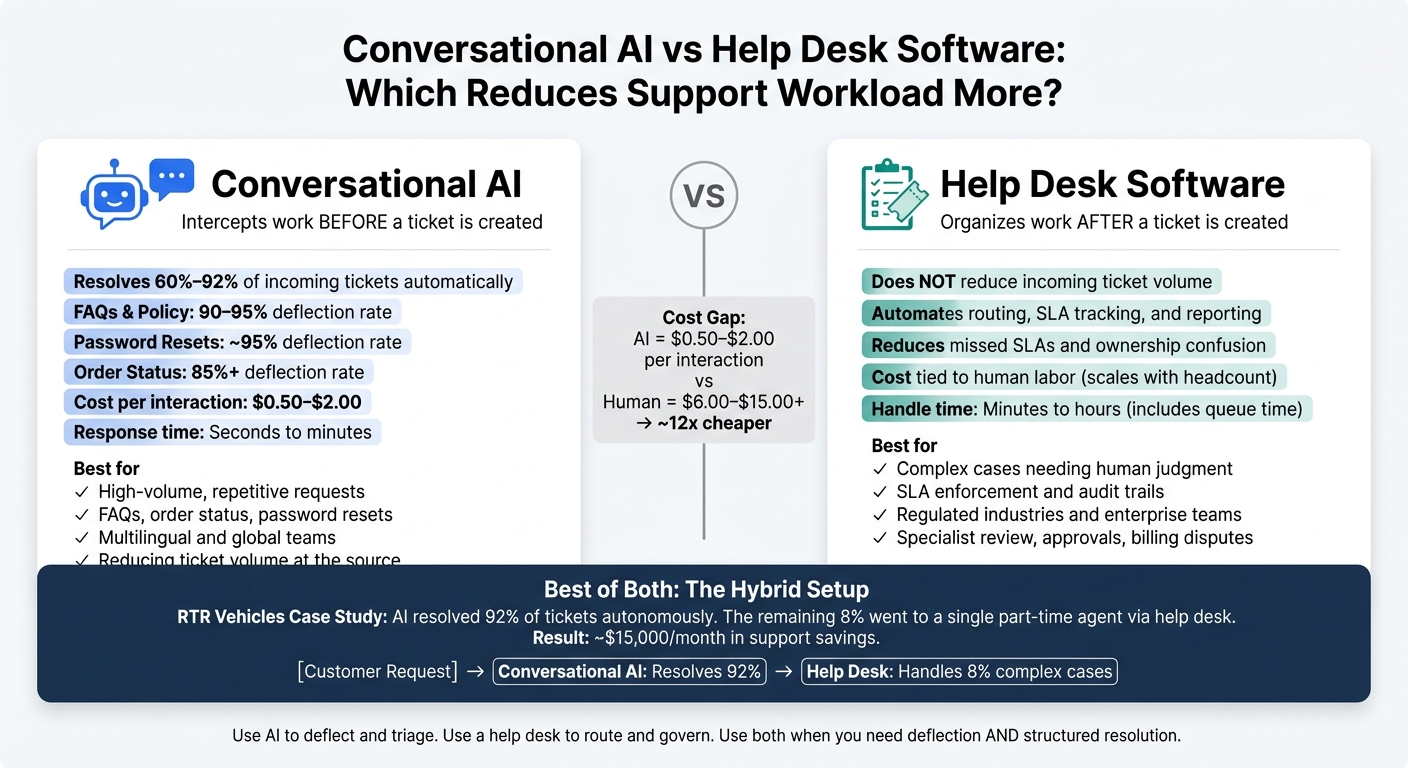
Conversational AI vs Help Desk Software: Workload Reduction Comparison
2. How Each Option Reduces Support Workload
How conversational AI cuts repetitive ticket volume
Conversational AI cuts workload before the queue fills up. Instead of waiting for an agent to step in, it handles repeat requests on its own - order status, policy questions, password resets, and basic troubleshooting.
That matters because AI chatbots resolve 60% to 80% of routine customer inquiries automatically [2][3]. In plain English, a big chunk of support demand never becomes a ticket in the first place.
Speed changes too. A password reset takes about 2 minutes with AI, compared with about 132 minutes in a standard ticketing flow once queue time and assignment are factored in [4]. That’s not a small gap. It’s the difference between a quick fix and a customer sitting around waiting.
When an issue is too messy for full automation, the AI can still do useful prep work. It can tag intent, read sentiment, flag urgency, and pass the whole conversation to a human agent. So the customer doesn’t have to start over. The agent picks up with context instead of staring at a blank ticket, which cuts handle time on escalated cases.
That’s the main point: conversational AI doesn’t just help agents work faster. It removes a large share of low-level work at the source.
| Task Type | AI Role | Deflection Rate | Impact on Agent Utilization |
|---|---|---|---|
| FAQs & Policy | Full Resolution | 90–95% [2][3] | Eliminates repetitive manual replies |
| Order Status / Tracking | Full Resolution | 85%+ [2][3] | Frees agents from data-lookup tasks |
| Password Resets | Full Resolution | ~95% [4] | Frees agents from low-value security tasks |
| Basic Troubleshooting | Resolution or Triage | 60–70% [2][3] | Filters simple fixes before human contact |
| Billing Disputes | Triage & Sentiment Flagging | Low | Prioritizes urgent or frustrated customers |
How help desk software reduces coordination work
Help desk software tackles a different problem. It usually does not reduce ticket volume. What it does is make ticket handling less messy.
Without it, support teams often deal with scattered inboxes, missed messages across channels, and constant confusion over who owns which case. Help desk software fixes that by pulling channels into one shared inbox and automating sorting.
A few places where this shows up fast:
- Automated routing sends tickets to the right agent or team based on skill, language, or category.
- SLA tracking flags tickets that are close to missing a deadline.
- Internal notes keep case details in one place, so agents don’t have to chase context through email or Slack.
- Reporting dashboards give managers a direct view into team performance instead of forcing them to piece data together in spreadsheets.
There’s still a clear limit, though. Help desk software makes the workflow smoother, but it still relies on people to read each ticket, look into the issue, and write the reply.
So the gap between these tools is pretty simple: conversational AI reduces incoming volume, while help desk software keeps human work under control once tickets exist.
| Feature | Workload Area | What It Replaces |
|---|---|---|
| Automated Routing | Triage & Assignment | Manual inbox sorting |
| Skill-Based Routing | Queue Control | Internal transfers between departments |
| SLA Management | Management Oversight | Manual deadline tracking |
| Internal Notes | Agent Collaboration | Back-and-forth emails and Slack threads |
| Handoff Coordination | Escalation Management | Unstructured agent-to-agent handoffs |
| Unified Reporting | Process Optimization | Spreadsheet-based performance tracking |
3. Direct Comparison: Which One Lowers Workload More?
High-volume simple requests vs. lower-volume complex cases
Now that deflection and coordination are clear, the main question is simple: which one takes more work off your team in day-to-day support?
It depends on where the pressure starts. Conversational AI cuts off repeat tickets before they hit the queue. Help desk software makes things smoother after those tickets already exist. So if the same questions keep showing up, deflection is the bigger lever. If your problem is managing open cases, you need control. AI support agents can resolve 85% to 92% of incoming tickets [1], which means most repeat work never lands with an agent in the first place.
Help desk software doesn't shrink incoming volume. It's built for cases that need human judgment: technical troubleshooting, multi-step approvals, specialist review, or emotionally charged situations. In those cases, routing rules and SLA enforcement matter a lot. But if most of your ticket load comes from repeat requests, a cleaner system doesn't change the core issue. Your team is still doing the same work, just in a better-organized inbox.
In 2025, RTR Vehicles put this into practice with a hybrid setup. AI handled 92% of support tickets autonomously, while the other 8% of more complex cases went through their help desk to a single part-time human agent. The result: about $15,000 per month in support savings [1].
That makes volume the first question. Process control comes after that.
Automation depth and control
The gap also shows up in how far each system can go on its own. Conversational AI can answer questions, reply across channels, trigger actions in connected systems, and support multiple languages without a human stepping in. For U.S. teams serving customers across time zones, that means 24/7 coverage without paying for overnight staffing. While you can automate customer support for routine tasks, help desk automation is more limited. It can reassign tickets, send alerts, and apply SLA rules. Reporting also helps managers spend less time chasing updates and more time fixing bottlenecks. But someone still has to work the ticket.
Cost makes the contrast even sharper. An AI-handled interaction costs about $0.50 to $2.00, while a human-handled interaction costs $6.00 to $15.00+. That's about a 12x gap per conversation [2]. And there’s another piece to it: help desk costs often grow with headcount, while AI costs usually rise more slowly as ticket volume grows.
This is where the day-to-day difference becomes plain:
| Conversational AI | Help Desk Software | |
|---|---|---|
| Primary Workload Lever | Deflection - resolves before ticket creation | Organization - streamlines existing tickets |
| Best-Fit Request Types | FAQs, order status, resets, lead qualification | Troubleshooting, approvals, specialist review |
| Impact on Ticket Volume | Reduces incoming volume by 60–92% [1] | No impact; manages existing volume |
| Average Handle Time | Seconds to minutes | Minutes to hours (includes queue time) |
| SLA Adherence | Instant response; no queue delays | Built-in enforcement and deadline tracking |
| Typical Team Scenarios | High-volume, repetitive, global/remote | Specialized roles, complex B2B, regulated industries |
4. When to Choose ChatSpark, Help Desk Software, or Both
Once the difference is clear, the choice comes down to where support work begins: repeated requests, ticket management, or both.
Choose conversational AI first when repetitive demand is the main problem
If the same requests keep filling your queue - order status, password resets, store hours, returns - start with conversational AI. ChatSpark can reply across major website and messaging channels and handle multiple languages without adding staff in each region. That fixed AI layer cuts the tie between ticket volume and team size.
Choose help desk software first when process control is the main problem
Some support issues have little to do with volume. Start with help desk software when the main risk is missed SLAs, weak audit trails, or unclear ownership across teams. This matters most for enterprise teams, regulated industries, and organizations where email is still the main support channel [2]. If a missed SLA can trigger financial penalties, or your industry needs a strict record of every interaction, a help desk is the better first buy.
Use both when you need deflection and structured resolution
Sometimes one tool just isn't enough. In that case, use both.
ChatSpark handles the front line: self-service answers, lead qualification, triage, and multilingual replies. When an issue needs a person, it moves into the help desk with the full backstory attached. The agent starts with context, not an empty ticket.
RTR Vehicles used this exact setup, with AI resolving 92% of tickets on its own while the remaining 8% of harder cases went to a single part-time agent through their help desk [1]. The result was major support savings - not because the help desk went away, but because the team needed it far less often.
Here’s a quick way to match your setup to your support load:
| Support Volume | Simple Requests | Mixed Requests | Complex Requests |
|---|---|---|---|
| Low (<200/mo) | Manual or free tools | Manual or help desk | Help desk first |
| Medium (200–1,000/mo) | Conversational AI first | Combined setup | Help desk first |
| High (>1,000/mo) | Conversational AI first | Combined setup | Combined setup |
That leaves one last question: which tool should take the first pass at the workload?
5. Conclusion: Match the Tool to Where Workload Starts
The main difference comes down to where the work gets intercepted.
Conversational AI steps in before a ticket exists. It stops repeat questions before they ever hit your team. Help desk software steps in after a ticket shows up. It helps your team route, track, and close that ticket on time.
Those are two different jobs. And neither tool handles both equally well.
When repetitive requests are the main issue, conversational AI usually cuts workload more. Why? Because it removes work at the source instead of helping your team process the same request over and over.
Support demand often grows faster than headcount. So the tool that removes work before it turns into a ticket usually has the biggest impact on workload.
If your team is drowning in the same questions every day, AI deflection is the faster fix. That’s where the biggest workload savings usually appear.
If the problem is missed SLAs, fuzzy ownership, or tickets falling through the cracks, help desk software is the better place to start.
A simple way to think about it:
- Use AI to deflect and triage
- Use a help desk to route and govern
- Use both when you need deflection and structured resolution
The best starting point is where your workload begins, not where it ends up.
FAQs
How do I know if AI or a help desk should come first?
Start with your biggest support bottleneck.
Pick a help desk first if your main problem is organization: missed tickets, weak accountability, or messy, hard-to-track conversations. Pick AI first if the bigger issue is volume: too many repeat questions and wait times that keep dragging on.
A lot of businesses end up using both. AI takes the simple questions up front, and the help desk takes over when a case needs a human touch or gets more complex.
Can conversational AI handle complex support issues?
Not usually.
Conversational AI tends to work best for repeat questions and simple support flows, like FAQs, triage, and status updates. But it can struggle when an issue gets messy, emotional, or just plain human. That’s where judgment, patience, and empathy matter most.
In most support setups, AI handles the routine questions first. Then help desk software passes tougher cases to human agents, along with the context they need to sort things out without making the customer start from scratch.
When does it make sense to use both together?
Using both conversational AI and help desk software starts to make sense once your organization hits about 500 tickets per month.
Here’s the basic idea: AI handles the routine, repetitive questions first. Then it passes complex, emotional, or exception-based issues to the help desk. Your team ends up working from a tighter, more focused queue, with the full conversation history right in front of them.
That gives you a solid mix of 24/7 efficiency and human judgment where it matters most.