AI chatbots are transforming customer support by automating inquiries, reducing costs, and improving response times. Here's what you need to know:
- Why AI Chatbots Matter: Customers expect instant responses, with 90% wanting answers in seconds. AI chatbots handle 70%-90% of queries automatically, compared to 40%-60% for older bots.
- Key Benefits:
- 24/7 Availability: Respond to inquiries anytime, even outside business hours.
- Cost Savings: Cut support costs by 30%-70%, with AI solutions costing as little as $40,000 annually compared to over $750,000 for human teams.
- Scalability: Manage 1,000+ conversations simultaneously, unlike human agents who handle 3-5 chats at once.
- Personalization: Offer tailored experiences by understanding customer intent and context.
- Real-World Success: Businesses like HelloSugar save $14,000 monthly, and Atomberg achieves an 86% resolution rate with AI chatbots.
- Features to Look For:
- Natural Language Processing (NLP) for better understanding and multilingual support.
- Omnichannel support to unify customer interactions across platforms.
- Seamless human handovers for complex issues.
AI chatbots are reshaping customer service, offering faster, more efficient, and cost-effective solutions while enhancing customer satisfaction. Whether you're a small business or a large enterprise, implementing AI customer support can streamline operations and improve your bottom line.
Benefits of AI Chatbots for Customer Support
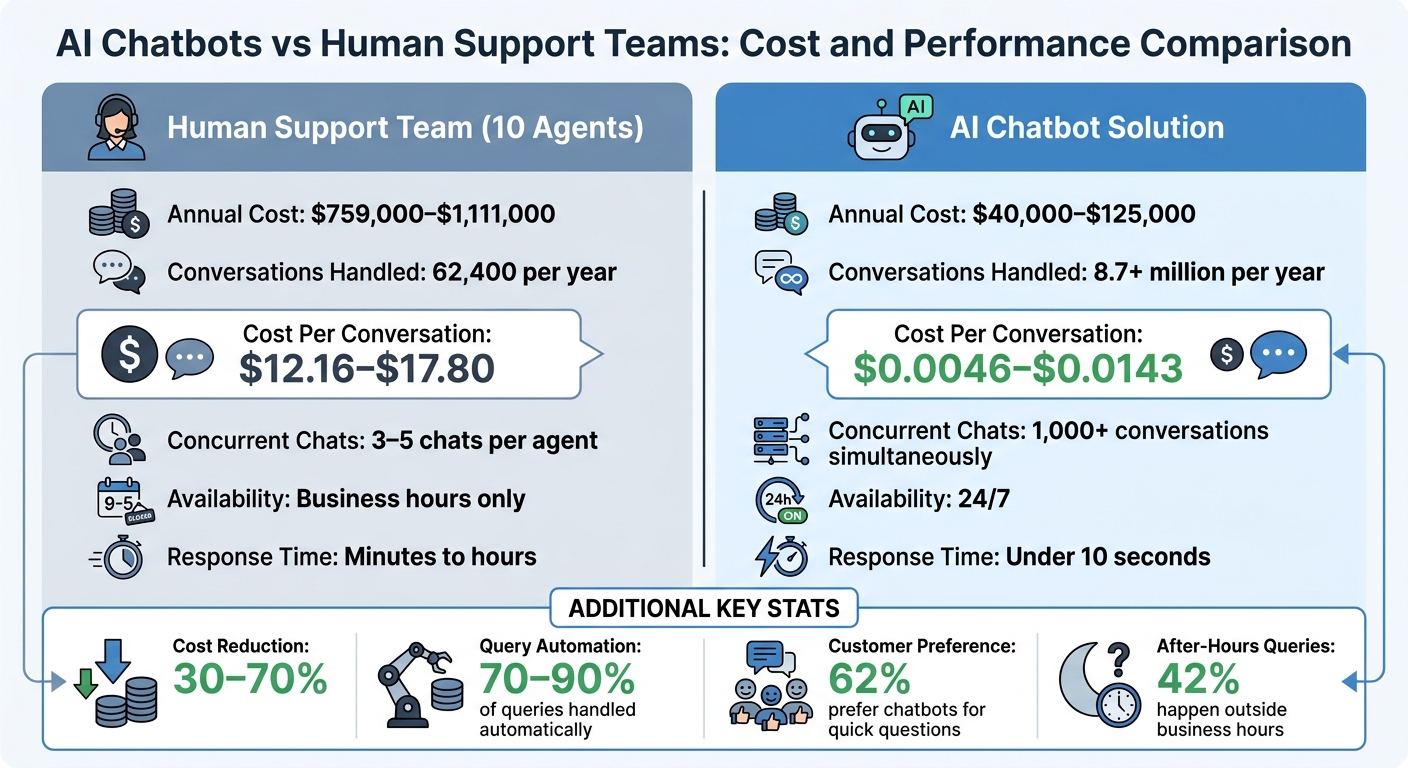
AI Chatbots vs Human Support Teams: Cost and Performance Comparison
24/7 Availability and Faster Response Times
Did you know 90% of customers expect an "immediate" response to their support questions? At the same time, 42% of customer service inquiries happen outside regular business hours [4][6]. This creates a tough challenge for traditional support teams. AI chatbots solve this problem by offering round-the-clock availability - and they do it without the added costs of night shifts or overtime [6].
The speed difference is also hard to ignore. AI chatbots respond in under 10 seconds [1], while human agents often take minutes - or even hours. Even during peak times, AI chatbots can manage 1,000+ conversations at once, eliminating frustrating wait times [7]. For example, in 2025, Camping World's virtual assistant "Arvee" cut wait times by 67% and boosted customer engagement by 40% [3].
Modern AI chatbots go beyond just answering questions. They can handle complex, multi-step tasks like processing refunds or updating account details, thanks to integrations with APIs [3].
Cost Savings and Scalability
The financial benefits of AI chatbots are huge. Companies often see a 30–70% reduction in customer support costs [7]. Take NIB Health Insurance, for instance - they saved $22 million by using AI-powered digital assistants, cutting their service costs by 60% [1].
Let’s break it down: A human support team of 10 agents typically costs around $759,000–$1,111,000 per year and handles about 62,400 conversations annually. In contrast, an AI chatbot solution costs only $40,000–$125,000 per year and can handle over 8.7 million conversations. That drops the cost per conversation from $12.16–$17.80 to as little as $0.0046–$0.0143 [7].
AI also eliminates the headaches of scaling during busy times. Unlike human agents, who can manage just 3–5 chats at once, AI handles 1,000+ conversations simultaneously [7]. This means businesses can effortlessly handle demand spikes without hiring extra staff.
Better Customer Experience Through Personalization
62% of consumers prefer chatbots for quick, factual questions over waiting for a human agent [2]. Why? Because speed and accuracy often matter more than human interaction for routine inquiries.
AI chatbots excel at personalization. They don’t just match keywords - they understand intent and context [1]. For example, they can greet returning customers by name, remind them about abandoned shopping carts, or notify them when an item they’ve browsed is running low on stock [8]. This kind of proactive engagement feels seamless and attentive.
By handling routine questions, AI chatbots also free up human agents to focus on more complex issues. This shift leads to 20% faster response times overall and allows human agents to bring empathy and detail to situations where it really counts [1].
These advantages set the stage for the deeper dive into ChatSpark's capabilities and implementation strategies in the next sections.
Features of Effective AI Customer Support Chatbots
Not all AI chatbots are created equal. The difference between a bot that leaves customers stuck in endless loops and one that genuinely resolves issues boils down to a few key features. Here’s what sets the best apart.
Natural Language Processing and Multilingual Support
A chatbot’s ability to understand and respond effectively hinges on Natural Language Processing (NLP). This technology enables bots to grasp the meaning behind customer queries, even when phrased differently. For instance, "Where is my package?" and "shipping status?" may use different words, but a well-built bot identifies the shared intent.
NLP also accounts for typos, slang, and varied expressions. Through entity extraction, it can pick out important details like order numbers or product names. On top of that, sentiment analysis detects emotional cues, allowing the bot to adjust its tone or escalate the issue when necessary.
Modern chatbots can handle over 100 languages automatically, eliminating the need for region-specific human staff. This makes supporting a global customer base far more scalable and efficient.
Omnichannel Support for Unified Communication
Today’s customers interact across multiple platforms - starting on a website, following up on social media, and finishing on messaging apps. Omnichannel support ensures the chatbot delivers a consistent experience across all these touchpoints by retaining conversation history. This means customers don’t have to repeat themselves, which is a common frustration. In fact, 75% of customers expect a seamless experience across channels [3]. For e-commerce brands, this kind of continuity can lead to conversion rates up to four times higher [1].
Unlike older multi-channel setups where data remains siloed, omnichannel systems unify information. This creates a smooth, human-like interaction and works seamlessly with escalation protocols for more complex issues.
Human Handover and Escalation Mechanisms
Even the smartest AI chatbot has its limits. That’s where human handovers come in. The best bots know when a query is too complicated and transfer it to a human agent. To make this transition seamless, they provide a full transcript and an AI-generated summary, so the agent is up to speed. This spares customers the frustration of re-explaining their issue.
Sentiment analysis plays a crucial role here, too. If the bot detects signs of customer frustration, it can trigger an immediate escalation. The aim isn’t to replace human agents but to let them focus on complex or emotionally sensitive cases where empathy and creativity are essential. As Brian Solis, VP of Global Innovation at Salesforce, puts it:
"Empathy doesn't disappear in automation - it gets scaled" [5].
How ChatSpark Powers AI Customer Support Chatbots
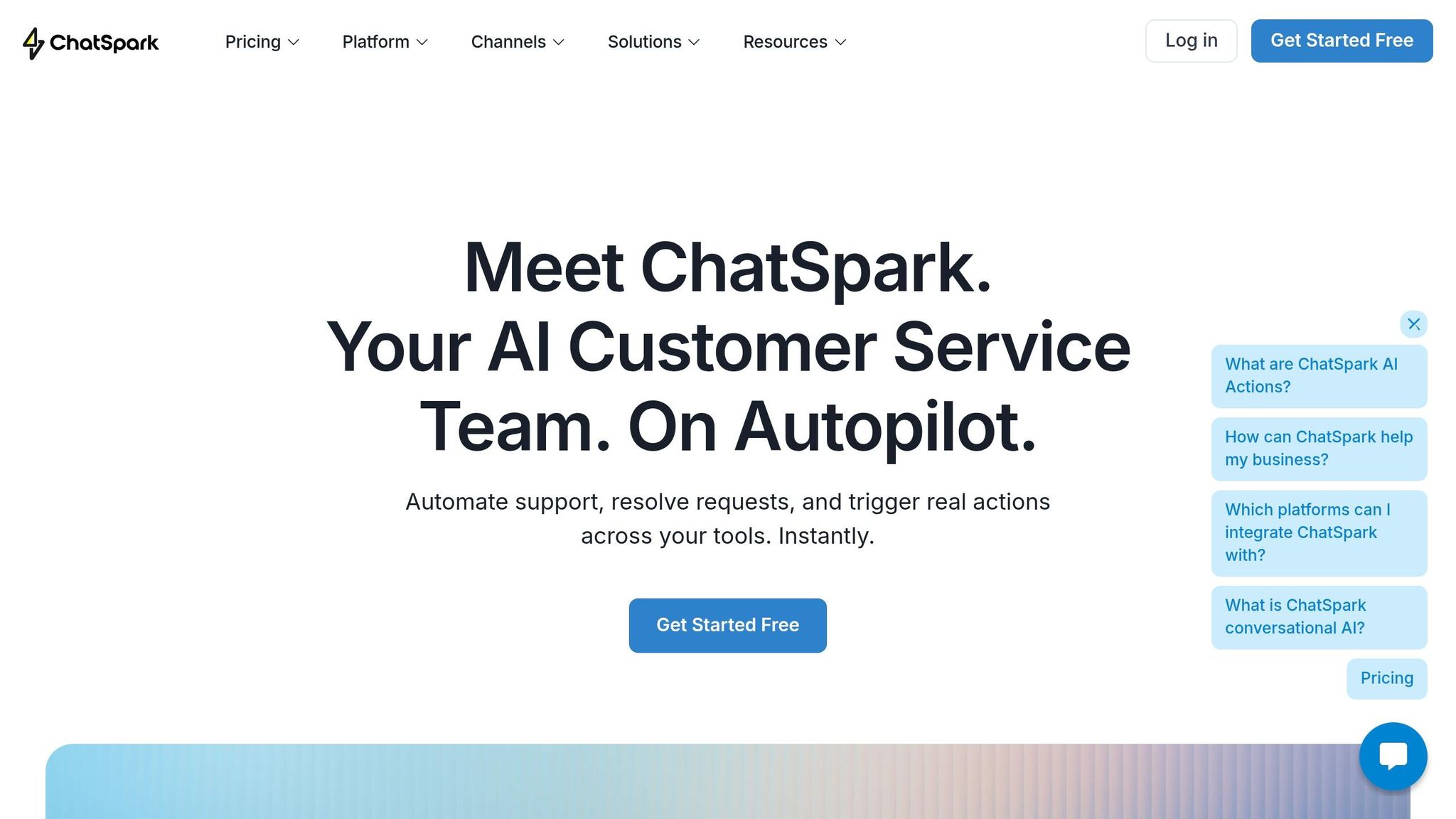
ChatSpark enables automated, round-the-clock customer interactions across various platforms while ensuring conversations remain accurate and contextually relevant. This approach not only boosts reliability and reduces costs but also delivers a tailored customer experience. Impressively, the platform resolves over 80% of customer inquiries automatically, allowing human agents to focus on more intricate, high-priority issues. Here’s a closer look at what sets ChatSpark apart from other AI solutions.
Core Features of ChatSpark
One standout feature is its AI-powered knowledge retrieval, which pulls information directly from your company’s resources, such as documentation, FAQs, and integrated systems. Training a chatbot is quick - just connect your website pages, help center articles, or CRM records, and you’re ready to go in about five minutes. ChatSpark also supports over 85 languages, with automatic language detection and the ability to switch seamlessly during a conversation.
Its omnichannel deployment ensures consistent performance across platforms like websites, Instagram, Facebook, WhatsApp, Telegram, and Slack, all while maintaining a unified conversation history. For escalations, the platform integrates with tools like Zapier (connecting to over 5,000 apps), Freshchat, and Intercom, enabling smooth human handoffs by transferring full conversation context.
Customization is another strong point. You can tailor the agent’s personality to align with your brand’s tone and provide specific behavior guidelines. Additional features include lead capture forms, advanced GA4 analytics, and REST API access for custom integrations, offering businesses more control and insights.
Pricing Plans and Scalability
ChatSpark’s pricing is designed to grow with your business, offering plans that adapt to different support needs:
| Plan | Price (Monthly) | Messages/Month | AI Agents | Training Pages | Key Features |
|---|---|---|---|---|---|
| Basic | $19 | 100 | 1 | 25 | Basic analytics; website deployment; multiple data sources |
| Plus | $59 | 250 | 1 | 50 | 5 AI Actions; ChatSpark CoPilot; REST API; advanced analytics |
| Pro | $129 | 2,000 | 1 | 500 | 40 AI Actions; omnichannel deployment; GA4 tracking; unbranded widgets |
| Enterprise | Custom | Custom | Custom | Custom | Unlimited AI Actions; dedicated account manager; priority support |
- The Basic plan is ideal for small businesses or solo entrepreneurs dipping their toes into AI customer support.
- The Plus plan adds automation through AI Actions and API access, making it a great fit for growing teams.
- For businesses handling high conversation volumes, the Pro plan offers full omnichannel support and removes ChatSpark branding.
- Large organizations with extensive customer interactions can opt for the Enterprise plan, which includes unlimited scalability, multiple agents, and dedicated support.
The next section will walk you through the step-by-step process of implementing these powerful features.
How to Implement AI Chatbots: Step-by-Step Guide
Setting up an AI chatbot has become much simpler, even for those without technical expertise. Thanks to Retrieval-Augmented Generation (RAG), chatbots can now fetch answers directly from your existing documentation instead of requiring costly retraining. Think of it like an open-book exam:
"In a RAG system, you are asking the model to respond to a question by browsing through the content in a book", explains Luis Lastras from IBM Research [10].
Here’s a step-by-step guide to ensure your chatbot is effective and provides a seamless user experience.
Training Chatbots with Company Knowledge
Start by reviewing your existing content - FAQs, help guides, product manuals, and even past support tickets. Remove outdated or inconsistent information, and make sure terminology is standardized. When it comes to training a chatbot, quality trumps quantity. A small set of clear, accurate articles is far more useful than a large collection of messy, conflicting documents [9].
To make the content more user-friendly, structure articles with question-based titles that reflect the way customers typically phrase their queries (e.g., "How do I reset my password?") [10]. The system will then break these documents into smaller, coherent sections to retain context, which is far more effective than random splits [9][11].
Next, define your bot's personality and tone with a system prompt. This prompt should set boundaries, instructing the bot to admit when it doesn’t know an answer rather than making one up [9][11]. This approach minimizes errors and builds trust with users.
Finally, design workflows that guide conversations and ensure smooth transitions when escalation is needed.
Designing Prompts, Workflows, and Escalation Logic
Your chatbot should respond with relevance and context. If a customer is browsing your pricing page, for example, the bot should acknowledge that right away. Avoid generic greetings and limit clarifying questions to one before providing useful information. Always prioritize the most important details first, and use numbered steps for clarity when explaining processes [12].
Set up escalation triggers to handle complex or sensitive situations. For instance, if the bot’s confidence level drops below 40%, it should immediately transfer the conversation to a human agent. Similarly, if the bot detects frustration - like ALL CAPS or repeated questions - or if the customer directly asks for an agent, the handoff should be automatic [12]. Some issues, like billing disputes or security concerns, should always be routed to specialized human teams.
| Escalation Trigger | Recommended Action |
|---|---|
| Confidence < 40% | Immediate Human Handoff |
| Negative Sentiment (2x) | Transfer to Senior Agent |
| Direct Request ("Agent") | Immediate Transfer |
| Billing/Refund Dispute | Route to Finance Team |
Organize actions by risk level. Tier 1 tasks like password resets can be automated. Tier 2 tasks such as plan changes require customer confirmation. Tier 3 tasks like account deletions should involve a human for final approval [12].
Once workflows and escalation logic are in place, it’s time to test and refine your chatbot.
Testing, Iterating, and Launching
Before launching, create a thorough test plan. This should include common questions, edge cases with typos or slang, and scenarios designed to check for hallucinations or vulnerabilities like prompt injections [11]. A well-trained chatbot should aim for a resolution rate of 60–80% and a Customer Satisfaction (CSAT) score above 4.0 out of 5 [11].
Deploy your chatbot in stages. Start small by introducing it on a low-traffic page during the first week. Gradually expand its presence - add it as a passive widget on your main site in Week 2, activate proactive triggers in Week 3, and complete the rollout by Week 4 [13]. During the initial 10–14 days, run the bot in "shadow mode", where it drafts responses for human agents to review before handling conversations independently [12].
Weekly reviews of escalations and low-confidence interactions are essential. Use these insights to refine your knowledge base and prompts [13][11]. This ongoing fine-tuning process ensures your chatbot continues to improve and adapt over time, providing better support with each interaction.
Use Cases for AI Chatbots in Customer Support
AI chatbots are doing more than just answering questions - they’re reshaping how businesses handle customer support. By automating repetitive tasks, keeping customers engaged, and breaking down language barriers, these tools are helping companies tackle common challenges while improving the overall experience.
Handling High Volumes of FAQs
Chatbots shine when it comes to managing a flood of frequently asked questions. They provide instant answers, freeing up human agents and slashing wait times. Considering that 90% of customers value immediate responses [4], and 62% would rather interact with a chatbot than wait for a human (see our live chat vs AI chatbot comparison) [1], automating FAQs is a no-brainer.
For example, during busy hours or late at night - when about 35% of customer queries come in while support centers are closed [1] - chatbots can handle questions like "Where’s my order?" or "How do I reset my password?" without delay. This instant assistance not only keeps customers happy but also ensures smooth operations during peak times.
But chatbots aren’t just about answering questions - they can also step in to keep customers engaged.
Proactive Customer Engagement and Retention
Chatbots can actively guide customers, helping them make better decisions or discover products they didn’t even know they needed. Take Garten-Freunde.de, a German gardening retailer, for instance. They introduced an AI bot named Kira to help users navigate a complex product catalog, resulting in a 7× higher conversion rate and a 45% click-through rate on product suggestions [14].
Another example is Signed, a decorative signs company. They used a chatbot named Alex to automate 70% of customer inquiries on social platforms like Instagram and TikTok. The results? An 18× return on investment and a 30% increase in upselling [14]. These aren’t just cost-saving measures - they’re revenue drivers. Companies using conversational AI have reported 4× higher conversion rates and 47% faster purchase processes [1].
Even Tiger of Sweden found success by allowing its chatbot to handle over a third of customer inquiries. This freed up their human agents to focus on more complex issues, boosting their Customer Satisfaction (CSAT) score from 73% to an impressive 96% [5]. As Dharmesh Shah, CTO of HubSpot, aptly said:
"The question isn't whether you need an AI chatbot. It's whether your customers will tolerate not having one" [5].
And for businesses with global aspirations, chatbots offer another major advantage.
Multilingual Support for Global Audiences
Breaking language barriers is no small feat, and hiring native speakers for every market can be costly and impractical. AI chatbots simplify this by supporting over 100 languages automatically [1]. Unlike rule-based bots vs AI chatbots that need manual tweaks for each language, modern chatbots can switch seamlessly between languages, whether serving customers in Tokyo, São Paulo, or Berlin.
The cost savings are huge. Businesses can cut support expenses per query by 70–90% [1]. Instead of choosing between hiring multilingual teams or neglecting non–English-speaking customers, companies can deploy a single chatbot capable of adapting to customer preferences. This is especially useful for digital-first businesses with no geographical limits on their market reach.
These examples highlight how AI chatbots are transforming customer support into a more efficient, engaging, and global operation.
Conclusion
AI chatbots have become a game-changer for businesses aiming to meet today’s customer demands. With 62% of consumers preferring chatbots over waiting for a live agent [2][1], and the AI customer service market expected to grow from $12.06 billion in 2024 to $47.82 billion by 2030 [1], it’s clear this technology is reshaping customer support.
The advantages speak for themselves: round-the-clock availability, instant replies, and support in over 100 languages - all without needing a multilingual team. Whether it’s managing thousands of FAQs, proactively engaging customers, or scaling support globally, AI chatbots handle tasks efficiently in ways traditional methods simply can’t.
Getting started doesn’t have to be complicated. ChatSpark offers an easy entry point with plans starting at $19/month and tailored enterprise solutions. Begin by automating the 20% of queries that account for 80% of your support volume [1][15]. Load your company’s knowledge into the chatbot, test its functionality, and let it automate repetitive tasks without losing quality while your team addresses more complex issues. The payoff can be substantial - just look at HelloSugar, which automated 66% of its queries and saved $14,000 monthly [1].
FAQs
What issues should my chatbot always hand off to a human agent?
When your chatbot encounters a situation it can't handle - like low confidence in its responses, a customer requesting escalation, or an issue needing nuanced judgment or tailored support - it’s time to hand things over to a human agent. Doing so helps maintain customer satisfaction, avoids unnecessary frustration, and reinforces trust in your support system.
How do I prevent an AI chatbot from making up answers?
To minimize the chances of an AI chatbot providing incorrect answers, it's essential to build its foundation on a well-organized knowledge base and verified information. Set up protocols that allow the bot to flag uncertain questions, ensuring these are escalated or redirected to human agents for accurate handling.
Additionally, keep a close eye on the chatbot's performance by regularly reviewing its resolution rate. This helps pinpoint inaccuracies and refine its responses over time. A focus on maintaining a solid knowledge structure and ongoing improvements will ensure the bot delivers reliable and accurate interactions.
What should I track to know if my chatbot is working?
To measure how well your chatbot is performing, keep an eye on several important metrics. Start with response accuracy to ensure the bot is providing correct and helpful answers. Next, check the automation rate - a good target is between 70% and 85% - to see how much of the workload the chatbot is handling on its own. Response times are also crucial; aim for replies in under 10 seconds to keep users engaged.
Beyond these, monitor customer satisfaction scores to gauge user experience, and track ticket resolution rates to see how effectively the bot resolves issues. Don’t forget engagement metrics like conversation volume and sentiment analysis, which can reveal how users feel about their interactions. Reviewing these metrics regularly will help you pinpoint what’s working and where there’s room to improve.