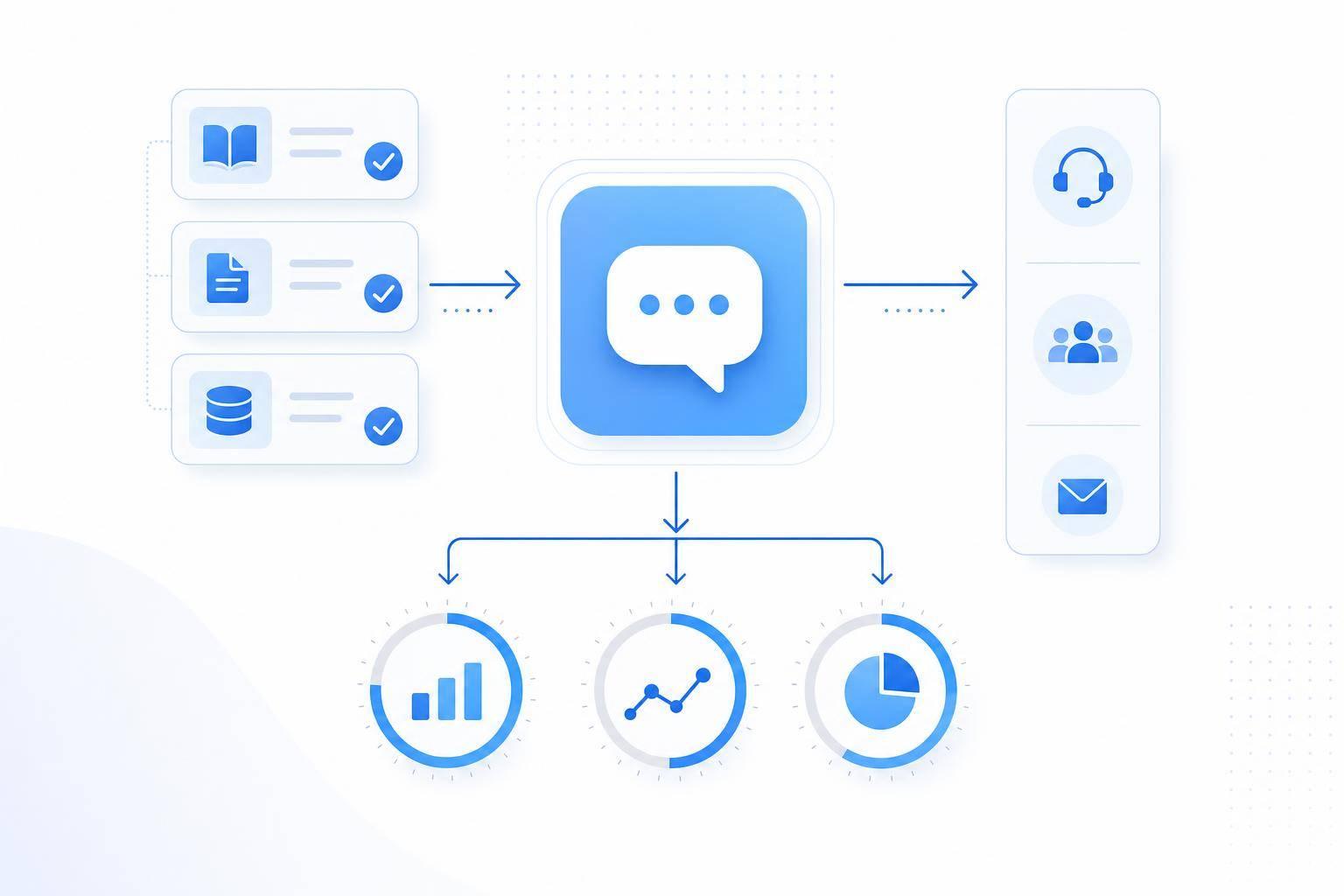
If I want AI customer service on my website to work, I need to start small, use clean support content, set firm handoff rules, and track a few numbers that show if the bot is helping or getting in the way.
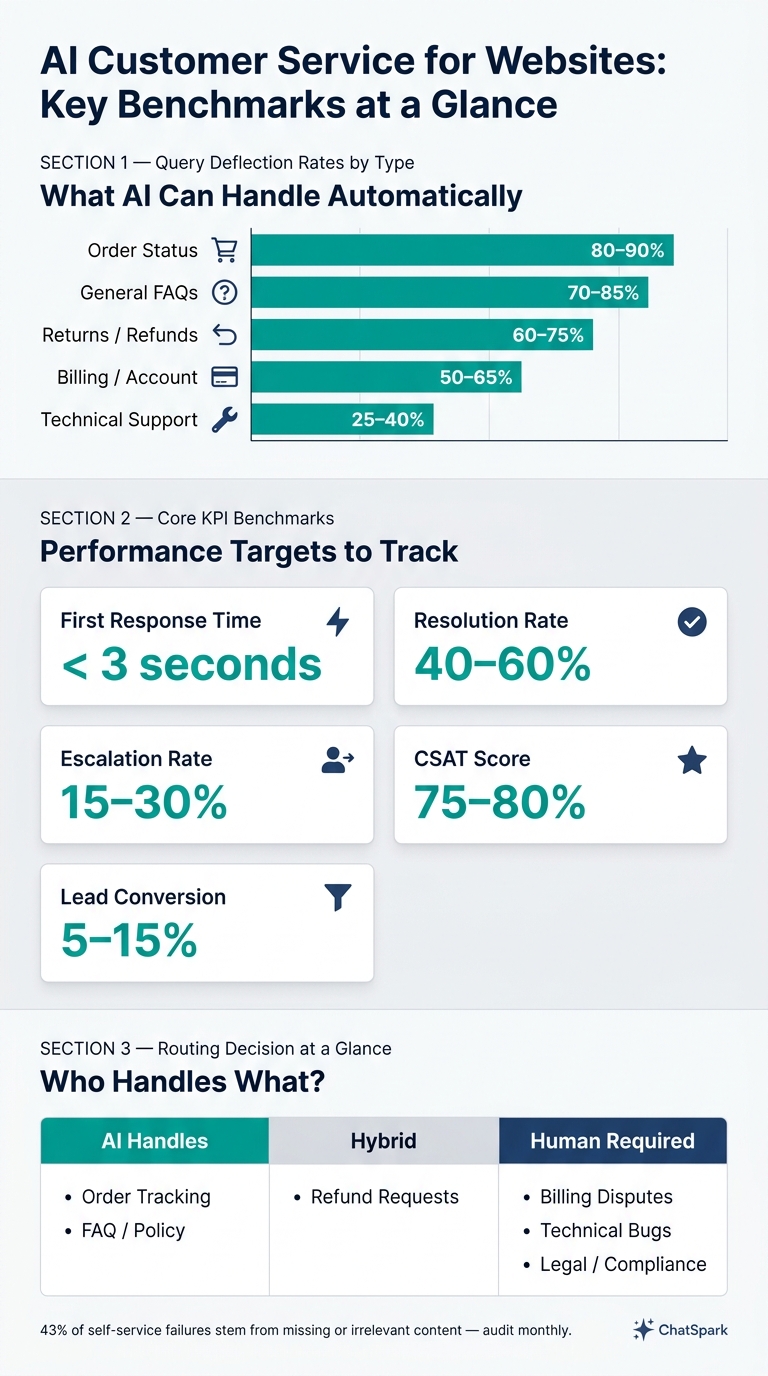
In plain terms, website AI works best when I use it for repeat questions first, like order status, FAQs, returns, and account help. I also need to give it approved source material, set rules for privacy, send billing or legal issues to a person, and watch core numbers like first response time under 3 seconds, resolution rate at 40%–60%, escalation rate at 15%–30%, and lead conversion at 5%–15%.
Here’s the short version:
- I start with high-volume, low-risk questions
- I load the bot with FAQs, policies, and help docs
- I set hard-stop terms like “lawsuit” or “data breach”
- I use short chat flows: answer, next step, or handoff
- I trigger chats on key pages and connect tools like Slack, Calendly, Square, and Zapier
- I use page context, language detection, and channel handoff to keep chats useful
- I review missed questions and fallback replies each month to fix content gaps
A few numbers stand out right away: order-status chats can often be handled at 80%–90%, general FAQs at 70%–85%, while technical support is much lower at 25%–40%. That tells me where to begin.
If I were setting this up today, I’d treat the bot like a front line for simple requests - not a replacement for support staff.
AI Customer Service KPIs & Deflection Rates at a Glance
Define your website support goals and prepare your content
Before launch, get clear on what the assistant should handle. Then pull together the content it needs so it can answer with accuracy.
Choose which problems to automate first
Start with your support inbox threads, live chat logs, and help center traffic. You're looking for the same kinds of questions popping up again and again, especially the ones with clear, standard answers.
Common first picks include:
- Order status
- General FAQs
- Returns / refunds
- Billing / account
- Technical support
| Query Type | Deflection Rate |
|---|---|
| Order Status | 80–90% |
| General FAQs | 70–85% |
| Returns / Refunds | 60–75% |
| Billing / Account | 50–65% |
| Technical Support | 25–40% |
Order status and general FAQs are often the smartest place to begin. They usually bring high volume and lower risk, which makes them a solid testing ground. Use this list to map out which content the assistant needs first.
Organize FAQs, policies, and help articles for AI use
Pull your return and shipping policies, account help pages, troubleshooting steps, and automated lead capture prompts into one source the AI can reference. Think of this as the assistant's working playbook.
A little metadata goes a long way here:
| Metadata Field | Purpose | Example Value |
|---|---|---|
doc_type |
Identifies the content format | troubleshooting_guide, policy, faq |
risk_level |
Determines escalation triggers | high (requires human review) |
last_updated |
Tracks content freshness | 2026-05-20 |
This content becomes the base for answers, routing, and escalation rules.
Set rules for privacy, compliance, and human escalation
For US businesses, tell visitors they're talking to AI. Keep personal data to a minimum. Redact PII before it reaches third-party models, and delete logs on a fixed schedule. Those steps help avoid risky replies, cut down on repeat issues, and make handoffs cleaner.
Set escalation rules before you go live. Hard triggers should include billing disputes, account cancellations, legal threats, and direct requests for a human. Hard-stop keywords include "lawsuit", "hacked", and "data breach."
Soft triggers can include:
- Low confidence scores
- Negative sentiment
- Repeated unresolved questions
If the assistant misses the same issue three times, send the chat to a human. When that handoff happens, pass along the full transcript and a short summary so the customer doesn't have to repeat themselves.
With scope, content, and guardrails in place, the assistant can be set up with less risk.
Select and set up ChatSpark for website automation
Match ChatSpark plans to your company size and support volume
With your goals, content, and escalation rules in place, the next step is to connect ChatSpark and launch your first workflows.
The best plan comes down to three things: how much traffic your site gets, how many conversations you expect each month, and whether you need website-only support or help across more channels. Start with the smallest plan that covers your current volume. Then move up as message demand and routing needs grow.
| Feature | Basic ($19) | Plus ($59) | Pro ($129) | Enterprise (Custom) |
|---|---|---|---|---|
| Monthly Messages | 100 | 250 | 2,000 | Custom |
| Training Pages | 25 | 50 | 500 | Custom |
| Team Seats | 1 | 1 | 2 | Unlimited |
| AI Actions | None | 5 | 40 | Unlimited |
| Channels | Website only | Website only | All 6 channels | All 6 channels |
| Branding | ChatSpark branded | ChatSpark branded | Unbranded | Unbranded |
Here’s the simple way to think about it:
- Basic works for light traffic
- Plus works for growing teams
- Pro works for higher volume and omnichannel support
Install the website widget and connect your knowledge sources
Once your content is organized, load it into the assistant and line it up with your brand voice.
Start by adding the ChatSpark website widget to your site. Then connect the knowledge base you prepared earlier. This is the approved content that powers answers, routing, and lead capture. After that, set the brand voice and test your top intents against the published content.
If answers feel off, don’t just tweak the prompt and hope for the best. Go back to the source content and fix it there. That usually solves the problem at the root.
Set up proactive chat triggers and key integrations
After the core assistant is live, add proactive prompts to catch more high-intent visits.
These triggers can help recover stalled visits and bring likely buyers into the chat before they leave. A good starting setup looks like this:
- Trigger chats after 25–40 seconds on pricing or service pages
- Trigger at 60% scroll depth on long pages
- Trigger on exit intent
Then connect the tools you already use. ChatSpark works with Zapier, Calendly, Square, and Slack for handoffs, scheduling, payments, and escalation. You should also turn on Lead Capture with trigger words like "contact", "email", or "call" so the assistant can collect visitor info [2].
Design conversations that resolve common issues and route complex ones
Once the assistant is live, the next job is simple: help people get the right answer fast.
Write clear welcome messages and guided support flows
Start with a short welcome message that says what the assistant can do. Then give people quick-reply buttons for common tasks like:
- Order tracking
- Password resets
- FAQs
That small bit of direction matters. It gives visitors an easy starting point and moves them toward the next step instead of leaving the chat wide open.
Automate top website FAQs with structured follow-up paths
For common questions, use a simple pattern: one direct answer, one follow-up option, and one next step.
Say someone asks about a refund. The assistant should explain the policy, then ask if that answered the question. If the answer is no, it can offer a related help article or route the person to a human agent.
The same setup works for order tracking and password resets. Answer the immediate question, then give the visitor one more step that helps them solve the issue.
Route billing disputes and sensitive cases to human agents
Use the same pattern across every path: answer, next step, or handoff.
| Issue Category | Handled By |
|---|---|
| Order Tracking | AI |
| FAQ/Policy | AI |
| Refund Requests | Hybrid |
| Billing Disputes | Human |
| Technical Bugs | Human |
| Legal/Compliance Issues | Human |
Billing disputes, fraud concerns, complaints, and legal/compliance issues should go to a human right away. If no one is available after hours, show a short acknowledgment and tell the visitor when they can expect a follow-up.
Increase engagement with personalization, multilingual support, and omnichannel continuity
Once your core FAQs and escalations are in place, the assistant should do more than answer questions. It should help people take the next step: buy, book, or escalate.
Personalize responses without overcomplicating the experience
Start simple. The easiest kind of personalization is page context.
Someone on your pricing page usually wants something different from someone reading your help center. So your assistant should recognize the page and adjust its opening message to match. A line like "Have questions about our plans?" fits a pricing page much better than a generic "How can I help?"
Use page context and on-page behavior to shape personalized customer interactions through both the prompt and the CTA.
If your CRM can pass in a customer name or past conversation history, use that info. Just keep it light. One relevant detail is enough, then move the conversation along.
Use multilingual support to serve diverse US audiences
After the assistant responds based on page context, make it just as easy to use in the visitor's preferred language.
Many U.S. visitors prefer English or Spanish, so multilingual support helps more people get what they need. Turn on automatic language detection so replies show up in the visitor's language without making them choose it by hand.
If the issue needs a human agent, the handoff works the same way. The conversation history moves with it, so the agent gets the full context.
Connect website conversations to other channels and next steps
When a website chat ends, keep the same thread going in the next channel.
A conversation that starts on your website can continue somewhere else without losing context. Use WhatsApp for post-purchase updates, Slack for internal alerts, and other channels only when they help move the conversation forward. Pass the page, intent, and history along with the thread so visitors don't have to start over.
Measure results and keep improving
Once chats start moving across channels, you need metrics to spot where website automation still falls short. After launch, track whether the assistant solves issues, passes people to a human at the right moment, and helps turn chats into leads or sales. Resolution rate tells you if the issue was fully solved [3]. Escalation rate tells you how often the AI sends the chat to a human agent [3].
Track response time, resolution rate, and lead conversion
Start with a small KPI set that shows both support performance and business results.
| Metric | Definition | Target Benchmark |
|---|---|---|
| First Response Time | Median time from visitor message to AI reply | < 3 seconds [3] |
| Resolution Rate | % of chats where the issue is fully resolved | 40%–60% [3] |
| Escalation Rate | % of chats handed off to a human agent | 15%–30% [3] |
| CSAT | % of users rating the interaction as positive | 75%–80% [4] |
| Lead Conversion | % of chats resulting in a captured lead | 5%–15% [3] |
| Revenue Impact | Labor savings + lead value − AI costs | Positive ROI [4] |
Revenue impact is the ROI gut check. It adds support labor savings to the value of captured leads, then subtracts AI costs [4].
Review missed intents, handoffs, and content gaps each month
If the numbers dip, go straight to the conversations behind them. A monthly audit helps you look at failed answers, repeat escalations, and pages that need better source material. Review 10–20 chats a week to catch confusing wording and missing answers that raw metrics won't show [3].
Pay close attention to repeated fallback replies. They often show up early when your knowledge base has holes [3][4]. Research found that 43% of self-service failures come from missing or irrelevant content [4]. So when an intent is missed, don't treat it as just a bot error. Treat it like a knowledge-base problem.
When the same unanswered questions keep coming up, group them by frequency and add the missing information to your sources [3].
Set a 0.6 confidence floor. If the score falls below that, ask a clarifying question or hand the chat to a human [1].
FAQs
How do I know which support tasks to automate first?
Look back at your last 90 to 200 support interactions and find the questions that show up again and again. A good place to start is with FAQs, order status checks, password resets, return policy questions, and billing issues.
The 80/20 rule applies here: about 20% of ticket categories often account for 80% of your volume. When you automate these low-complexity Tier 1 tasks, your team gets more time for the issues that need a human touch.
When should AI hand a chat off to a human?
AI should pass the conversation to a human when a visitor clearly asks for one, gets frustrated through negative language or by asking the same thing in different ways, or brings up an issue that’s complex or high-stakes.
That also applies to billing disputes, refunds, legal issues, account recovery, and any situation where the AI’s confidence is too low to give an accurate, helpful answer.
What metrics show if website AI is actually working?
Track the metrics that show results, not just busywork.
Look at three areas:
- Efficiency: resolution or containment rate, fallback rate, and average handling time
- Customer experience: CSAT, conversation depth, and return visitor rate
- Business impact: lead capture rate and cost savings
A good benchmark is a 40% to 60% resolution rate, more than 85% response accuracy, and less than 15% fallback.
Numbers tell part of the story. Regular conversation audits help you check that the AI is accurate and helpful in actual chats, not just on a dashboard.