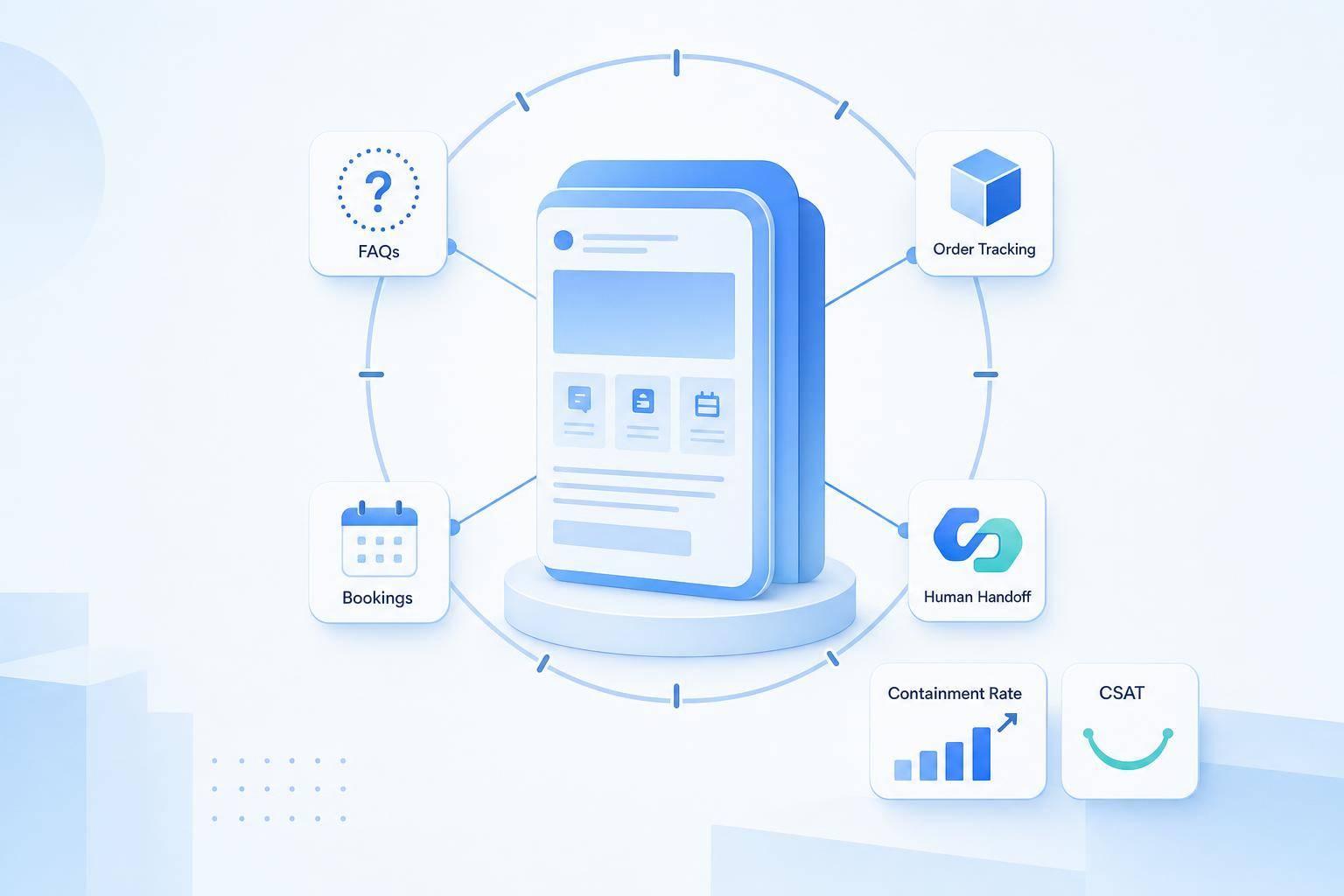
If your website can answer common questions, check order status, book appointments, and send hard cases to a human, it can work as a support channel all day and all night.
I’d keep the setup simple:
- Pick one clear goal first, like fewer support tickets or more after-hours leads
- Start with high-volume, low-complexity tasks
- Feed the bot only approved site content
- Connect it to tools that let it do the task, not just talk about it
- Set handoff rules for billing, fraud, legal, and failed chats
- Track results like containment rate, response time, and CSAT
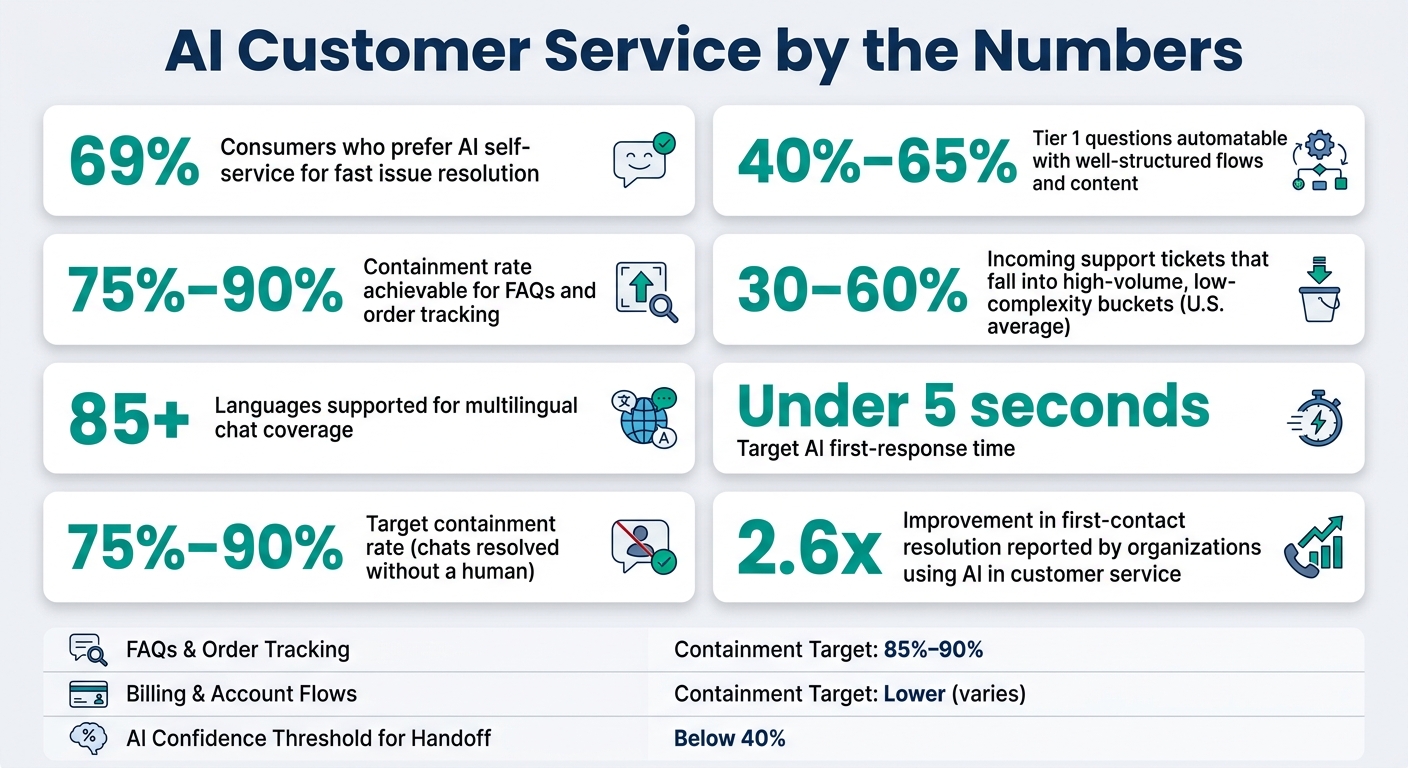
A few numbers stand out. 69% of consumers prefer AI self-service for fast issue resolution, and many teams can automate 40%–65% of Tier 1 questions when flows and content are set up well. For simple tasks like FAQs and order tracking, containment can reach 75%–90%.
Here’s the short version of what I’d focus on first:
| Area | What I’d do |
|---|---|
| Goal | Tie chat to one job and a few metrics |
| First tasks | FAQs, order tracking, returns, booking |
| Content | Use one approved source for each answer |
| Website placement | Add chat on homepage, pricing, checkout, contact, and support pages |
| Actions | Connect chat to CRM, booking, shipping, and help desk tools |
| Handoff | Route risky or failed chats to a human with full context |
| Measurement | Watch containment, first-response time, handoff rate, and CSAT |
This comes down to one idea: start small, keep answers tied to current content, and improve the flow with data instead of guesses.
AI Customer Service by the Numbers: Key Metrics & Benchmarks
Choose Which Website Support Tasks to Automate First
Once the goal is clear, sort requests by volume and fit for automation. Start with the requests that deliver the most upside: the ones that show up all the time, have clear answers, and follow a set path.
Pull 30–90 days of support data from chat, email, and forms. Tag each conversation by topic, then rank those topics by volume. In the U.S., 30–60% of incoming support tickets usually land in high-volume, low-complexity buckets, which makes them the best first picks for automation.[3][7]
Start with FAQs, Order Status, Booking, and Return Questions
The best early targets are usually FAQs, order tracking, appointment booking, and returns. These workflows tend to be easier to map, easier to test, and easier to hand off when something falls outside the normal path.
| Task Type | Complexity | Why It Works for Early Automation |
|---|---|---|
| FAQs | Low | Clear, static answers; very high volume |
| Order status | Low–Medium | System data; frequent post-purchase inquiries |
| Returns/refunds | Medium (rule-based) | Policy-driven; costly to handle manually |
| Appointment booking/rescheduling | Low–Medium | Clear workflows; strong impact on convenience and revenue |
For each task, define the happy path first. That means the clean, step-by-step flow that works for most customers. For order tracking, for example, ask for the email and order number, check both in your order system, then return the order status, tracking details, and delivery date.
After that, add fallback rules for edge cases. If the order is older than 30 days, or the request falls outside the normal flow, send it to a human agent.[2][4]
When these workflows are structured well and tied to a current knowledge base, AI can fully resolve 40–65% of incoming Tier 1 queries without human help.[4]
Add Multilingual Support and Lead Capture Where They Affect Revenue
Once the core support flows are working, expand chat into revenue-focused tasks. Two of the strongest options are multilingual support and lead capture.
Add the language that shows up most often in your customer base after English. Use traffic and support data to make that call. If your analytics show heavy traffic from ZIP codes with large non-English-speaking populations, or your support logs keep showing the same questions in another language, that’s a strong sign. ChatSpark supports 85+ languages, so you can extend your current English-language knowledge base to help multilingual visitors without building separate bots for each language.[5][8]
Lead capture also fits neatly into the same chat flow. On pricing or consultation pages, use a short qualification sequence: ask 2–4 qualifying questions, then collect contact details before sending the lead to your sales team.[6][9] ChatSpark can sync those sales-ready leads into your CRM and attach a conversation summary, so sales reps have the context they need before they follow up. Keep these flows limited to high-intent pages.
Next, connect those workflows to the content and systems that supply the answers.
Connect Your Knowledge Base and Website Content to the AI
Once you pick the first workflows, feed the AI only approved website content. If you point it to old policies or messy product pages, it will give people bad answers. That’s why each topic needs one clear source of truth. It keeps the channel dependable.
Pull Answers from FAQs, Help Articles, and Policy Pages
Start by mapping where your customer-facing knowledge lives. This usually includes help center articles, pricing pages, shipping and return policies, terms of service, privacy pages, and troubleshooting guides.
For each topic, pick one official source. That means one returns policy page, one shipping FAQ, and one pricing table. Then set up the AI to pull from those sources only.
Sync those approved sources into the AI’s knowledge store so site updates stay current. For each document, add simple metadata like:
- content type
- intended audience
- topic tags
last_updated
This helps the system ignore archived or draft content and show only what’s current.
Formatting matters too. Clear headings, bullet points for eligibility rules, and tables for pricing tiers and shipping timelines make it easier for the AI to find the right passage and answer with precision.
After the source list is in place, define how the AI should use it.
Set Rules for Tone, Accuracy, and Content Updates
Source control comes first. Tone and accuracy rules are what keep those sources dependable.
Start with a short tone guide. Spell out the voice you want, include a few sample responses that match it, and add those expectations as system instructions in your AI setup. For U.S.-facing customers, that also means using dates in MM/DD/YYYY, currency in USD, and measurements in imperial units when they apply.
Accuracy rules matter just as much. Set the assistant to answer only from connected sources. If the answer isn’t in the knowledge base, send it to a human agent.
Some topics need tighter guardrails. For billing, refunds, legal, and eligibility questions, keep a do-not-answer list so the AI routes those requests to a human instead of guessing.
To keep content current, assign one owner to each content area, set a monthly or quarterly review schedule, and run a short batch of regression test questions after every update. That way, you can check that the AI’s answers still match the published content.
Build the Website Chat Experience and Automate Common Workflows
Once your approved content is connected, the next step is simple: put chat where people need help most and map out what each conversation should do.
Place Chat on Key Pages and Write Clear Conversation Flows
Start on pages where intent is strongest. That’s where chat can do the most work with the least friction.
| Page | Chatbot Goal | Greeting Approach | Suggested Prompts |
|---|---|---|---|
| Homepage | Segment and route visitors | Hi there! I'm your virtual assistant. I can help with product questions, pricing, or order status - what do you need today? | Compare plans, Check my order, Talk to sales |
| Pricing | Qualify leads and book demos | Need help choosing a plan? Tell me about your business and I'll recommend the best option. | Explain differences between plans, Estimate monthly cost |
| Checkout | Reduce cart abandonment | Questions about shipping, returns, or payment? Ask me before you place your order. | What are my shipping options?, Is my payment secure? |
| Contact | Offer faster help than a form | You can fill out the form or chat with me now for quicker help. | Schedule a call, Get support, Ask about billing |
| Support/Help Center | Surface self-service content first | Describe your issue and I'll guide you step-by-step. | Track my order, Start a return, Talk to a person |
These prompts should move visitors from a question to an action in a single step.
Keep the chat copy in U.S. English, use 12-hour time, and show prices in USD. For each flow, sketch the same basic path:
- intent
- one clarifying question
- answer
- next step
That structure keeps the experience tight. The same chat should guide, solve, and finish tasks based on what the visitor is trying to do on that page.
Automate Order Tracking, Appointment Booking, and Status Checks
For order tracking, the bot should collect the order number, email, and ZIP code, check that the format is correct, call the order management or shipping API, and reply with a message like this:
Your order #12345 shipped via UPS Ground and is expected to arrive Wednesday, 07/15/2026.
If the lookup fails or the customer is upset, hand the conversation to a person with the full context attached.
For appointment booking, the flow should gather the preferred date, time, and time zone, check open slots, and offer clear choices:
I found three openings on Thursday, 07/16: 10:00 AM PT, 1:30 PM PT, or 3:00 PM PT - which works best?
After the visitor picks a slot, confirm the booking and send the calendar invite automatically.
Use this table to connect each task to the right data source and define when a human should step in:
| Support Task | Required Data Source | Handoff Trigger |
|---|---|---|
| Order tracking | E-commerce platform / shipping carrier API | Missing order, delivery exception, user dissatisfaction |
| Appointment booking | Calendly / Square Appointments / CRM | Payment failure, no available slots, VIP custom request |
| Return-policy help | Knowledge base / policy page / RMA system | Refund dispute, damaged item, high-value order exception |
| Account or case status | CRM / help desk ticketing system | Overdue case, complaint about resolution, regulated topic |
| Multilingual support | Translation API + core systems above | Low translation confidence, user requests a human in their language |
Use ChatSpark Integrations to Complete Actions, Not Just Answer Questions
Answers alone won’t cut it. The bot should finish the task.
Use ChatSpark integrations to confirm bookings, send payment requests, create CRM records, and route support cases with the full conversation history.
ChatSpark connects with tools like Calendly, Square, Zapier, Freshchat, and Slack, so a chat can trigger real actions. If a visitor books an appointment, ChatSpark can confirm the slot in Calendly, process payment through Square if needed, and trigger a Zapier workflow that sends a confirmation email and SMS, all inside the same chat window.
The same idea applies to sales and support. When a sales-qualified lead comes in, the bot can send that contact into a CRM record and notify the right rep in Slack. For support, a Freshchat integration lets the human agent pick up an open ticket with the full conversation already attached. That means the customer doesn’t have to repeat the whole story.
Before you build anything, map each workflow to a specific integration. Then test the full action from start to finish, not just the bot’s reply. Once the bot can complete these tasks, the next step is setting handoff rules and tracking performance.
Set Human Handoff Rules, Track Results, and Improve Over Time
Once website chat starts handling FAQs, orders, and bookings, handoff and measurement determine whether it keeps helping or starts getting in the way. The next step is simple: route edge cases to people before the bot gives a bad answer.
Escalate Complex or Sensitive Cases with Full Conversation History
Set clear automatic triggers and warning triggers. Automatic triggers should send the chat to a human right away, with no exceptions. That includes billing disputes, suspected fraud, account lockouts, legal threats, and security-related complaints. Warning triggers should prompt the bot to offer a transfer to a human. Common examples are AI confidence scores below 40%, detected frustration or negative sentiment, or the bot failing to solve the same question twice in a row [1].
When a handoff happens, send the agent the full transcript, a short AI summary, customer details, the related order or account ID, and what the bot already tried. Handoffs often lose context, forcing customers to repeat themselves [1]. Pre-filling the agent ticket with that data helps avoid that mess.
Tell customers they’re being connected to a specialist who already has the full conversation and account context. If no agents are available, collect the customer’s email and give a specific follow-up time.
Once the rules are live, check whether they cut friction or create new gaps.
Measure Response Speed, Resolution Rate, and Support Efficiency
Containment rate is the clearest signal. If 1,000 chats happen in a day and 750 are solved without human help, containment is 75% [10]. For FAQs and order tracking, aim for 85% to 90%. For billing or account-specific flows, a lower target is more realistic [10].
Track first-response time too. AI replies should feel near-instant, ideally under 3 to 5 seconds. Then look at CSAT per intent so you can spot which flows customers like and which ones need work.
Review unanswered questions every week. If the same issue keeps leading to escalation, that’s a sign the content or flow needs fixing.
| Metric | What It Measures | Target |
|---|---|---|
| Containment rate | % of chats resolved without a human | 75%–90% (varies by use case) |
| First-response time (AI) | Time from message sent to bot reply | Under 5 seconds |
| Handoff rate | % of chats escalated to a human | Track by reason, not just total |
| Resolution rate | % of chats closed without follow-up | Benchmark against human-only baseline |
| CSAT per intent | Customer satisfaction by flow type | Identify weak flows for redesign |
Conclusion: Start Small, Ground Answers in Real Content, and Improve with Data
With routing and measurement in place, the next move is to keep refining flows based on live data. Treat AI support as a program, not a one-time setup. Industry data shows that organizations using AI in customer service report a 2.6x improvement in first-contact resolution [11], and that kind of result comes from iteration.
FAQs
How long does setup usually take?
Setup with ChatSpark usually takes about 10 minutes.
The first AI agent setup often takes less than 5 minutes. Indexing a standard help center takes about another 5 minutes.
Deployment is built to be simple on most websites. You can use basic script tags or dedicated plugins, including WordPress.
What data does the AI need to work well?
For ChatSpark to work well, it needs a clean, well-structured knowledge base.
That knowledge base can include FAQs, product specs, pricing details, company policies, and content pulled from PDFs, Word docs, PPTs, CSVs, plain text files, or website crawls.
Metadata tags such as doc_type and last_updated also help with retrieval. They give the system more context, which makes it easier to pull the right answer at the right time.
It also helps to review at least 90 days of support logs. That step can surface the questions customers ask most often, spot gaps or conflicts in your content, and shape prompts and guardrails so responses stay accurate and handoff to a human happens when it should.
How do I know when to hand off to a human?
Hand off to a human when the issue goes past automation or the customer asks for help.
Trigger a handoff when:
- the AI confidence score drops below 0.75
- the system can’t resolve the inquiry after two attempts
Escalate right away for:
- billing disputes
- legal or medical concerns
- account security issues
- frustrated language
And if a customer directly asks to speak with an agent, always honor that request.