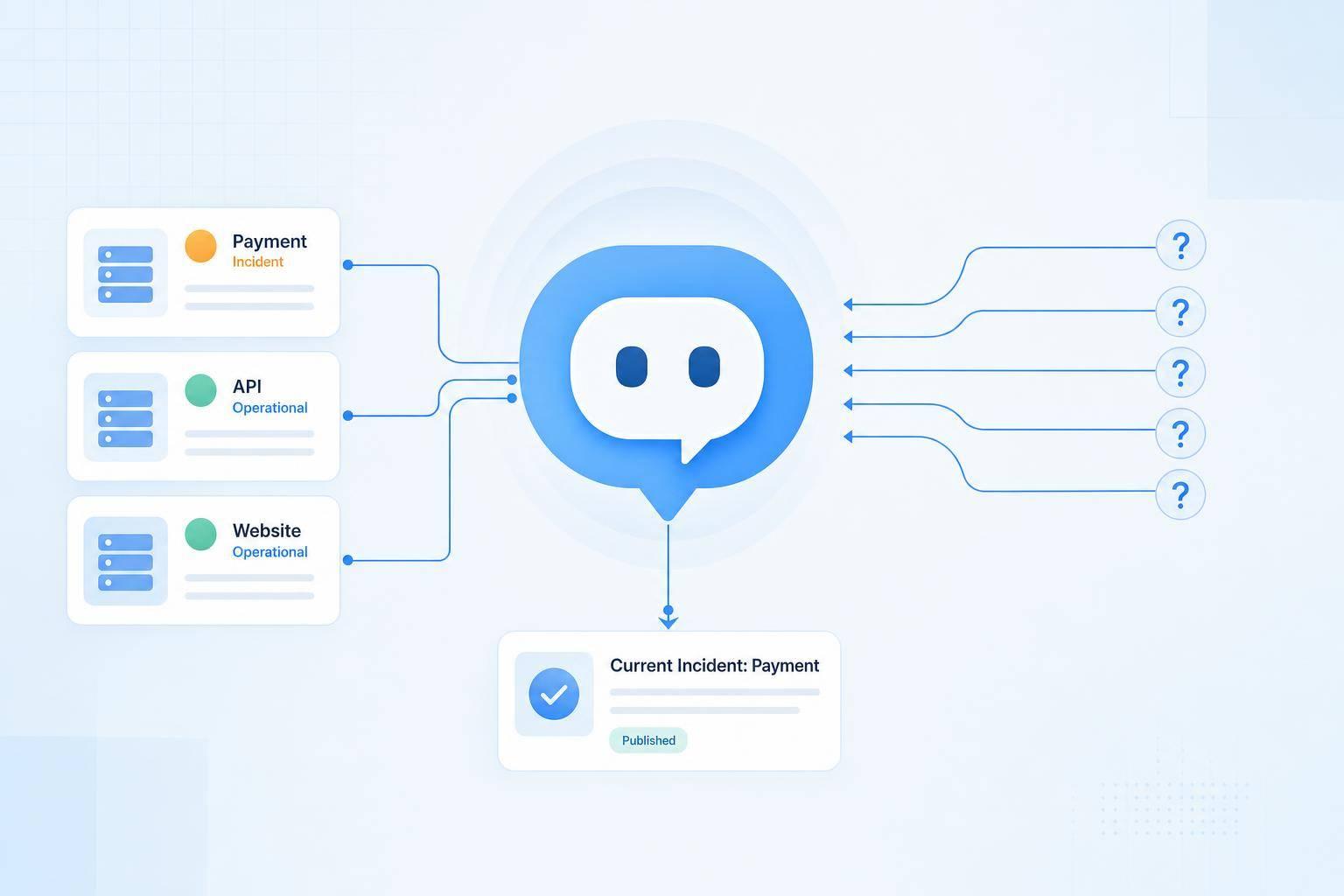
If customers ask support before they check your status page, your bot should answer with the same incident update they would have found there.
I’d set it up this way: detect outage-related questions, match them to the right service or component, pull live Statuspage data, send a short approved reply, and hand off edge cases to an agent. That matters because incident posts can cut downtime tickets by 24%, and teams reported 55% faster incident communication when updates were shared early.
Here’s the whole playbook in plain English:
- Answer incident questions inside chat, not just on the status page
- Map customer wording to components like Authentication, Payments, or API
- Check live incident data and maintenance notices before replying
- Use the published status message, not a rewritten version
- Escalate account-specific issues, security concerns, billing disputes, stale status data, and post-resolution complaints
- Track false deflection by checking whether the customer opens a ticket within 48 hours
- Watch core metrics like automated resolution (65%–90% target), escalation (15%–30%), fallback (under 10%), and CSAT (over 80%)
What I like about this approach is that it keeps one source of truth while cutting repeat tickets. The bot handles the common “is it down?” questions, and agents step in when the case needs account review or the published incident data doesn’t fit the customer’s symptoms.
A simple way to think about it:
| Step | What I’d do | Why it matters |
|---|---|---|
| Detect intent | Spot outage, slowdown, login, payment, and maintenance questions | Stops generic replies |
| Match service | Map user terms like “sign-in” to the right component | Cuts wrong incident matches |
| Check Statuspage | Pull incident state, affected parts, timestamp, workaround, and link | Keeps replies tied to published facts |
| Reply | Share what’s affected, what the team is doing, what the customer should do, and when to expect another update | Answers the main question fast |
| Escalate | Route unclear, risky, or account-level cases to support | Avoids bad bot guesses |
| Measure | Track deflection, fallback, stale-data cases, and agent rewrites | Shows whether the bot is saving time |
If I were starting today, I’d begin with just three intents: “is it down,” “I can’t log in,” and “when will this be fixed?” Then I’d connect chat, Intercom, and Zendesk to the same Statuspage incident record so every channel says the same thing.
How a Statuspage AI chatbot handles 'Is it down?' questions
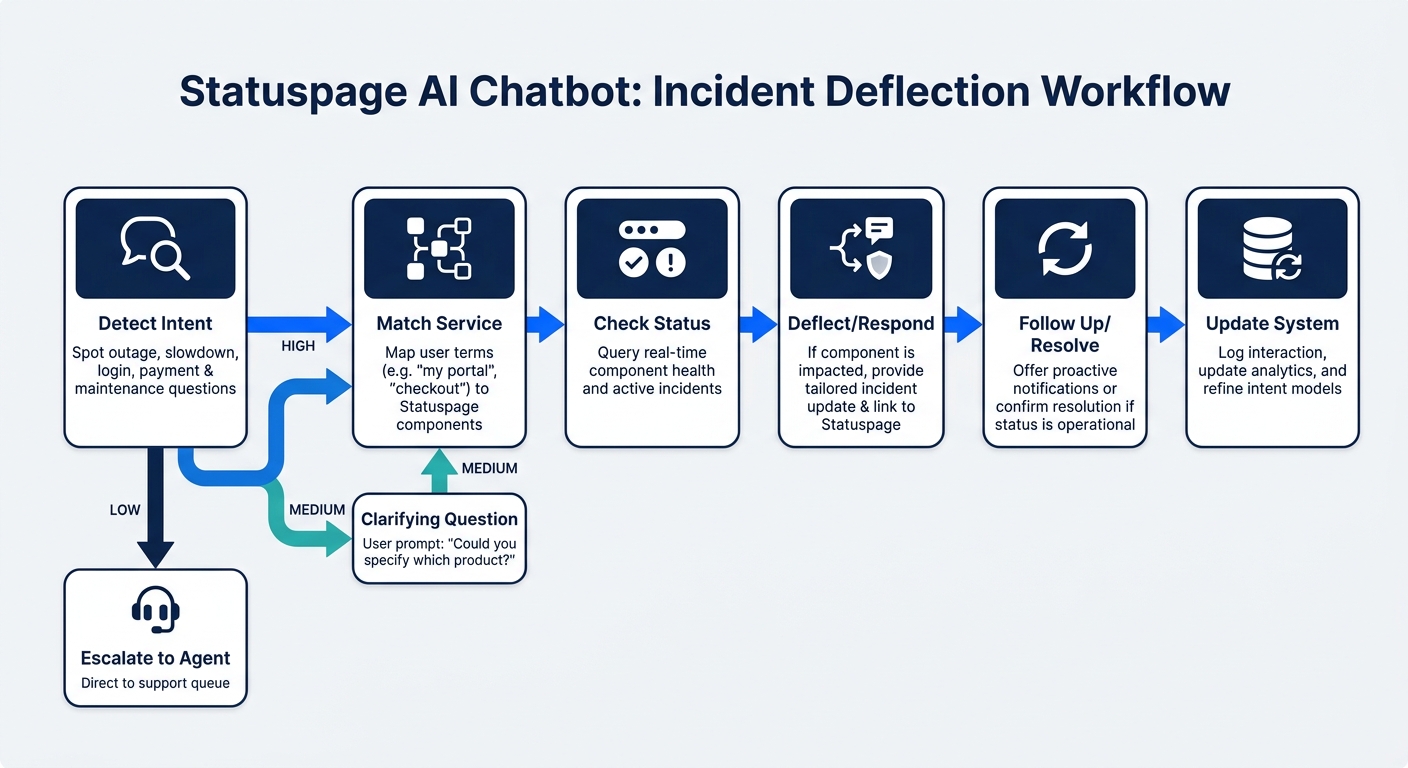
Statuspage AI Chatbot Workflow: How to Deflect 'Is It Down?' Tickets
This workflow should follow the same path every time: classify the message, identify the service involved, check the latest Statuspage data, build a reply from approved incident content, and decide whether to escalate. Skip a step, and you risk gaps that push people to support anyway.
Detect incident-related intent and match it to the right service issue
The intent model has to catch both direct outage language and symptom-based wording. “Is the site down?” is simple. “Uploads are stuck” or “the API keeps timing out” is harder, because the bot has to infer the symptom and map it to the right component. For each message, it should pull these entities: product area, component, symptom, region, and device or channel.
Once the bot detects intent, a confidence threshold determines the next move. A high-confidence match - for example, “payments keep failing” mapped to the Payments component - can get an automated status reply. A medium-confidence match should trigger a clarifying question. A low-confidence match, or a message that looks account-specific, should go straight to support. That keeps the bot from guessing and sending the wrong incident update.
A lot of teams miss the hard part: component mapping. You need a component catalog with aliases so terms like “login,” “sign-in,” and “authentication code” all map to the Authentication component. That’s what makes matching hold up at scale. The bot should also check both unresolved incidents and active scheduled maintenance before saying there’s no known issue, because Statuspage stores these separately.[3]
Pull live status updates and reply with clear next steps
Before the bot responds, it should retrieve at least the incident title, current state (investigating, identified, monitoring, or resolved), affected components, latest update message, update timestamp, workaround if one exists, and the incident page URL.[4] Component status also matters on its own. A service can look operational overall while one component is still in a partial outage.[3]
A useful automated reply answers four things: What is affected? What is the company doing? What should the customer do now? When is the next update? For example, the bot might say it is investigating elevated login failures affecting the U.S. web application, that the Authentication component is showing degraded performance, and that customers should wait a few minutes before trying again. It should also include the latest update time in U.S. format, such as “September 29, 2026, 2:30 PM ET,” plus the expected time of the next update.[4]
The bot should never make up an estimated resolution time or expose internal incident notes. If the Statuspage API is unavailable, or if cached data is older than the set freshness threshold, the bot should say it can’t confirm live status and offer human support instead of claiming systems are operational.
When to escalate and when to let automation handle it
Automation works well for the common case. Escalation is for everything that falls outside it: account-specific failures, billing or payment disputes, data loss or data-access concerns, security reports, privacy issues, VIP accounts, unclear or conflicting symptoms, low-confidence matches, and cases where a customer still has trouble after an incident is marked resolved. The bot should also escalate if the customer asks for an agent, or if incident data is unavailable, stale, contradictory, or missing a clear customer-facing explanation.
A resolved incident should never mean the customer’s case is closed by default. The bot should acknowledge the resolution and ask whether the issue is still happening. If it is, the bot should gather diagnostic details like the account or workspace ID, affected feature, approximate start time, error message, browser or app version, and region, then pass everything along with full context.
The table below maps each scenario to the right action:
| Chatbot action | Data source | Customer-facing output | Escalation condition |
|---|---|---|---|
| Confirm an active major outage | Statuspage incident and affected components | State the affected service, current incident state, latest update, and next step | Customer reports data loss, security impact, or an account-specific failure |
| Explain degraded performance | Statuspage component status and incident update | Describe the limited impact and suggest the approved workaround | Symptoms do not match the affected component or continue after resolution |
| Explain scheduled maintenance | Statuspage maintenance window and affected service | Provide the maintenance dates, expected impact, and alternative path if available | Customer needs an exception, refund, billing help, or urgent access |
| Report no known incident | Current component status and recent incidents | Say that no matching public incident is listed and gather diagnostic details | Repeated failures, high-value account, or suspected private/regional issue |
| Handle a regional issue | Incident scope, component metadata, and customer-provided region | Explain whether the customer's region is affected and provide relevant guidance | Region cannot be determined or symptoms conflict with published scope |
| Handle a post-resolution complaint | Resolved incident and latest component status | Confirm resolution time, ask whether the issue persists, and collect evidence | Customer confirms continued impact or reports a new symptom |
How to connect Statuspage with chat and support workflows
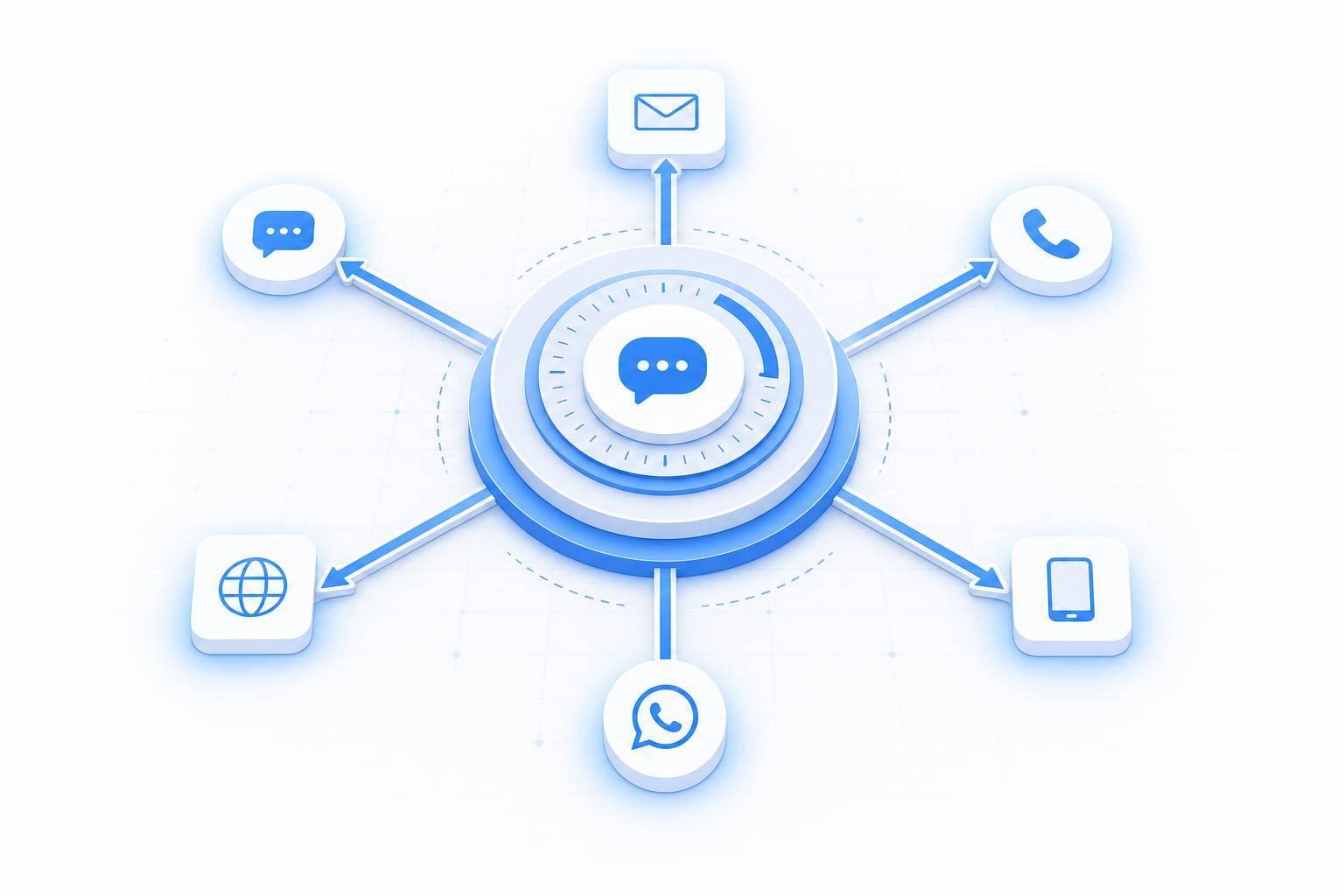
After your bot matches an incident, send that same live update into chat, Intercom, and Zendesk. The idea is simple: one live incident update should show up across every support channel.
Each tool has a clear job. Monitoring and incident management spot the issue. Statuspage publishes the approved update. Chat handles routine questions. Intercom shows status inside live support conversations. Zendesk keeps ticket context in place. Agents step in for edge cases.
Define each system's role across incident publishing, chat, and ticket handling
Give each system one job. When ownership overlaps, incident updates drift, and that’s when customers start seeing mixed messages. A shared record keeps every channel lined up without constant manual edits.
Atlassian positions Statuspage integrations with Zendesk and Intercom as a way to show service status where customers are already asking for help and cut duplicate support tickets at the source.[7][6] Statuspage webhooks send incident updates to chat and support tools automatically.[5]
| System | Workflow role |
|---|---|
| Statuspage | Official incident publishing: active incidents, component status, maintenance notices, timestamps, and approved update text |
| ChatSpark | AI-powered customer responses that pull live Statuspage data to answer incident-related questions and share the approved update |
| Intercom | Live chat support; shows known incidents during customer conversations to help stop duplicate tickets |
| Zendesk Support | Ticket and agent context; shows active incidents to agents while they work tickets and keeps incident context for escalations [8][9] |
| Webhooks/API | Sync layer; sends incident creation and updates from Statuspage into chat and support tools [6][5] |
Translate the approved Statuspage update, not a rewritten version. That keeps status, timestamps, product names, and actions the same everywhere.
Use one approved incident message across every customer channel
Once all channels share one incident record, the next rule is simple: keep the message the same everywhere. If each channel writes its own take on the incident, customers get different answers and open more tickets.
Use the latest published Statuspage update as the single source of truth. Every channel - web chat, Intercom conversations, Zendesk macros, support forms, and agent replies - should reflect the same five elements:
- the affected service
- current impact
- latest known status
- next customer action
- a link to the status page
Chatbots can shorten the message for chat. But they shouldn’t change the incident state, promise a resolution time that Statuspage hasn’t published, or turn a regional issue into a full outage.
Tag every incident contact with the incident ID, component, region, and channel. Send new-symptom, refund, or mismatch tickets to a dedicated incident queue.
Rules that keep automated incident answers accurate
Once the bot finds a matching incident, the next job is simple: stick to what Statuspage has actually published. That means no guessing about the cause, no made-up ETA, and no assumptions about who is affected.
Response rules for active incidents, maintenance notices, and no-match cases
Before an automated reply goes out, it needs five checked facts:
- the affected component, using the exact Statuspage name
- its current status, in plain English
- the published symptom
- the timestamp of the latest update
- a direct reference to the incident
The bot also needs to check both the incident status and the component status before replying. Those two fields don't always say the same thing. A component can show Major Outage while the incident itself is still marked Investigating. That matters, because it keeps the bot from telling people things are fine when the service is still degraded.
The next trap is advice the team never approved. The bot should share a workaround only if it appears in the incident update or in an authorized knowledge source. If nothing has been published, it should say that plainly.
For scheduled maintenance, the bot should make it clear that the event is planned and include the start and end times with a time zone. For example, the Billing Portal is scheduled for maintenance on October 8 from 11:00 PM to 1:00 AM ET.[10]
If there’s no match, the bot should not jump to an “all clear” reply. It should say that no public incident is published, note the last time it checked the status page, and ask for the error message, start time, region, and account or request ID. That extra detail helps stop the same back-and-forth from happening again.
Decision table for outages, maintenance, regional issues, and post-resolution complaints
A useful safety rule here is data freshness. If the status feed has not refreshed within 5 minutes during an active incident, the bot should stop giving firm answers and send the customer to the live status page instead. When an incident is changing fast, stale data can do more harm than silence.
These rules are easier to use when mapped to common support cases.
| Situation | Bot response | Required source data | Escalate when |
|---|---|---|---|
| Active outage | Confirm the incident, name the affected component, describe confirmed symptoms, and share the latest update time | Incident state, component status, published symptom, approved workaround, update timestamp, incident reference | Symptom doesn't match the published incident; feed is stale; issue is account-specific or involves security |
| Scheduled maintenance | Label the event as planned; provide start/end times with time zone and expected impact | Published start/end time, time zone, affected component, expected customer impact, maintenance reference | Customer reports impact outside the published window or to a component not listed |
| Regional issue | Name the affected region and component only if the published incident explicitly identifies them | Published region, affected service, current status, incident reference | Customer's region is unknown, unconfirmed, or symptoms fall outside the affected area |
| No matching incident | State that no matching incident is published; gather diagnostics | Status page check time, component result, approved troubleshooting steps | Problem persists, appears account-specific, or involves a service not represented on the status page |
| Resolved incident, problem continues | Acknowledge the resolved incident and escalate to a human agent | Resolved incident reference, resolution timestamp, conversation history, customer-provided diagnostics | Always route to a human agent; attach full conversation history and the incident reference |
If the incident is marked resolved but the customer is still stuck, the bot should hand off the full picture. Pass along the transcript, incident ID, component, region, and any troubleshooting already tried so the agent doesn’t have to start from scratch.
How to measure ticket deflection and what to do next
Metrics to track deflection, escalation, data freshness, and customer outcomes
Once the bot is live, the job isn't done. You need to see if it's cutting ticket volume or just pushing the same work over to agents.
The main number to watch is simple: did the bot actually deflect the ticket? A reply from the bot isn't enough on its own. If a customer submits a ticket within 48 hours after a bot interaction, treat that as a false deflection.
A few baseline targets can help you judge performance: 65%–90% automated resolution, 15%–30% escalation, below 10% fallback, and above 80% CSAT [1].
These metrics help you tell the difference between a true save and a case the bot only seemed to solve.
| Metric | What it measures | Target | Warning sign |
|---|---|---|---|
| Automated resolution rate | Bot resolved without human handoff | 65–90% | Below 40% |
| Escalation rate | Cases routed to a human agent | 15–30% | Above 40% |
| Fallback rate | Bot could not classify the intent | Below 10% | Above 20% |
| Freshness lag | Whether the bot is using the latest incident updates | Uses live Statuspage data | Replies based on stale incident data |
| CSAT | Customer satisfaction after bot interaction | Above 80% | Below 60% |
Keep a close eye on fallback rate. If it goes above 20%, that's a sign the bot is missing intent patterns, and those gaps need to be added.
Human override rate matters too. If agents are often rewriting bot replies, the bot isn't saving much time. Try to keep human override at 8% or lower [2]. And if the bot detects frustration or urgency, route those cases to a human with sentiment-triggered escalation. That way, high-risk conversations don't get counted as deflected when they're still unresolved.
You can also estimate savings in a direct way: multiply automated resolutions by your average agent cost.
Conclusion: What support and operations teams should do first
Start small and stay focused. Pick the incident intent patterns that drive the most inbound volume. In many teams, that means some version of "is it down", "I can't log in", and "when will this be fixed." Build the bot's reply rules around those first.
Then connect the bot to live Statuspage data and make sure one approved incident message moves through every channel. That's how you avoid mixed signals when customers are already on edge.
After each major incident, review the conversation logs. Look for:
- missed intent patterns
- stale or mismatched answers
- replies agents had to rewrite
If you're making bigger changes, test them in shadow mode before a full rollout. Weekly fallback audits of the top 10 unhandled topics can cut fallback rates by 30% to 50% per cycle [1].
FAQs
How long does setup usually take?
Setup is usually quick once you have the credentials you need. Generate a Statuspage API key, find your Statuspage page ID, then add both in ChatSpark and save.
Once that’s done, test the chatbot in your agent widget to make sure everything works as expected. If you want a safer rollout, run the AI in "shadow mode" for 2–4 weeks before going live.
What happens if Statuspage data is wrong or delayed?
If Statuspage data is wrong or delayed, the AI can report the wrong incident status. For example, it might say an outage is fixed when it isn’t, or claim the issue hasn’t started yet.
To cut down that risk, make sure your Statuspage components are published so they show up in API responses. Then add governance rules and confidence-based fallbacks. That way, when the system isn’t confident or the data looks unreliable, the case goes to a human instead of showing a hard “it’s down” message.
Can the bot handle multilingual incident questions?
Yes. In the Statuspage incident workflow, the bot answers “Is it down?” questions by pulling live incident updates and component status from your Statuspage.
ChatSpark also supports multilingual conversations. Its AI can detect the customer’s language and respond in that same language, even if the customer switches languages in the middle of the chat. That works across 85+ languages.