AI chatbots are transforming customer support by handling up to 80% of inquiries, slashing costs, and improving customer satisfaction. Here’s how they make it happen:
- Cost Savings: Routine tickets, like order tracking or password resets, cost $7–$15 each. AI chatbots resolve these for pennies.
- Speed: Bots respond in under 2 seconds, compared to 12+ hours for email support.
- 24/7 Availability: 42% of queries occur after hours, and chatbots ensure no backlog builds overnight.
- Reduced Workload: Businesses like RTR Vehicles cut support staff by 75%, saving $180,000 annually while maintaining service quality.
- Customer Satisfaction: Faster resolutions and instant answers lead to satisfaction rates of 90%+.
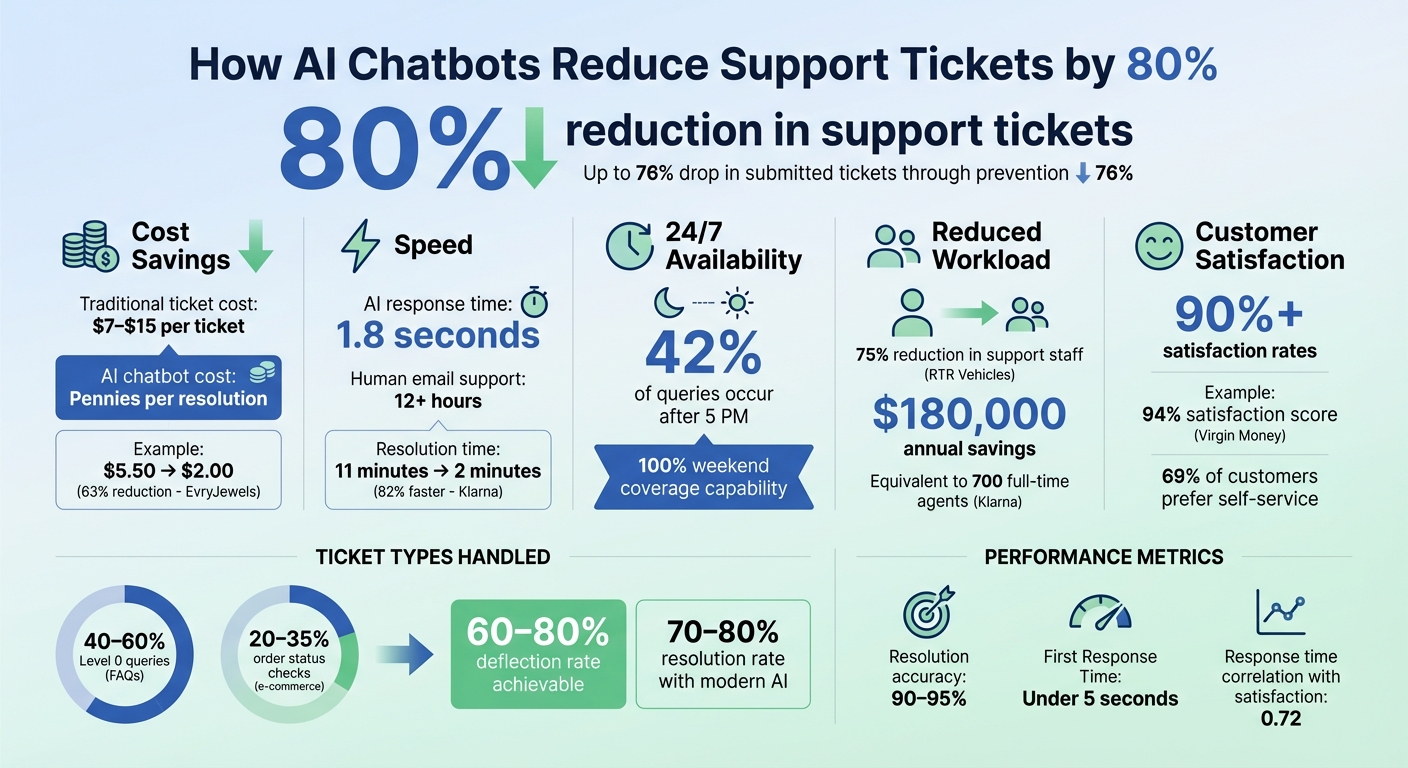
How AI Chatbots Reduce Support Tickets: Key Statistics and Benefits
How AI Chatbots Prevent Support Tickets
The best way to handle a support ticket? Stop it from being created in the first place. AI chatbots step in right when customers have questions, resolving issues instantly before they escalate. This approach can lead to as much as a 76% drop in submitted tickets, significantly easing the workload on support teams [2]. Let’s dive into how intent-based responses make this process even smoother.
How Intent-Based Responses Work
Modern AI chatbots leverage Natural Language Processing (NLP) to understand customer intent. For instance, they recognize that "Where is my package?" and "Track my shipment" are essentially asking the same thing [3][7]. This allows the bot to provide accurate answers, no matter how the question is phrased.
Here’s how it works behind the scenes: AI uses Retrieval-Augmented Generation (RAG) to comb through your business’s knowledge base, help articles, and internal documents in real-time [1][10]. Instead of offering vague or generic replies, the chatbot pulls exact, company-specific information. For example, if a customer asks about your return policy, the bot fetches the precise details from your documentation and delivers a clear, factual response - no guesswork involved.
Some advanced chatbots go even further with "agentic" AI. These bots connect directly to your business systems via APIs. Let’s say a customer asks, "What’s the status of order #4521?" - the chatbot can query your Order Management System in real time and provide live tracking information within seconds [1][2][8]. It can even handle tasks like processing refunds, eliminating the need for human intervention. Emma App, a fintech company, implemented this feature in 2026. Their AI now manages 100% of weekend conversations while accommodating a 127% increase in message volume - from 3,500 to 7,200 monthly messages - without hiring additional staff [8].
Instant Responses and 24/7 Availability
Speed matters in customer support, and AI chatbots deliver. On average, they respond within 1.8 seconds, compared to the over 2-minute wait time typical of human agents [9]. That quick response time reduces frustration and discourages customers from opening unnecessary tickets.
Availability is another game-changer. With 42% of chatbot conversations happening after 5 PM, when most support teams are offline, AI ensures customers aren’t left waiting [9]. Without a chatbot, these inquiries might pile up overnight, turning into a backlog of tickets. By being available 24/7, chatbots resolve issues immediately, no matter the time or day. Virgin Money’s AI assistant, "Redi", reduced resolution times for common queries to under 90 seconds during peak hours, earning a 94% customer satisfaction score [2].
"It's not about replacing support. It's about keeping customers cared for - even when offline." - Geoffrey Safar, Head of Operations, Emma App [8]
Types of Support Tickets AI Chatbots Handle Best
AI chatbots are a powerful tool for managing support tickets, especially when it comes to automating routine tasks. Let’s explore the specific types of inquiries these bots handle most effectively.
Repetitive and FAQ-Based Questions
A significant portion of support tickets - about 40–60% in SaaS companies - falls under Level 0 queries. These include routine questions like order status checks (20–35% in e-commerce), password resets, billing inquiries, and product details such as dimensions or color options [5][1].
Take Moen, for example. They introduced an AI-powered customer service agent to manage repetitive questions about product compatibility and installation. This chatbot, connected to their product database, could instantly provide accurate answers that previously required manual input from a support agent. The result? Over 1,200 support hours saved each month and a 94% satisfaction rate [3].
While FAQs are a major focus, chatbots also excel at walking users through more complex tasks.
Guiding Customers Through Processes
AI chatbots shine when it comes to guiding customers through multi-step procedures like setting up accounts, troubleshooting technical issues, or tracking orders. For instance, when integrated with an Order Management System, a chatbot can immediately provide real-time updates on tracking numbers and delivery dates in response to a simple, "Where's my package?"
For troubleshooting, chatbots rely on existing documentation to deliver step-by-step instructions. If a customer reports an error code, the bot can quickly search manuals or help articles to suggest the right fix. This approach works particularly well for common problems, such as connectivity issues or account access errors.
Pre-Sales and Basic Support Questions
AI chatbots also play a crucial role in pre-sales support. Potential customers often ask about pricing, features, shipping, or promotions before making a purchase. Chatbots can answer these questions instantly, reducing cart abandonment and capturing leads. For example, in March 2026, a fashion store in Chisinau used a GPT-4o-powered Telegram bot trained on 45 pages of FAQs and product catalogs. The bot handled 82% of inquiries about stock, pricing, and sizing, saving the business $1,200 in labor costs [11].
With 69% of customers preferring to resolve simple issues on their own [3], offering an AI-driven self-service option not only boosts satisfaction but also keeps your support ticket queue under control. These capabilities demonstrate how effectively AI chatbots can streamline customer interactions and support workflows.
How to Set Up AI Chatbots for Your Business
Getting an AI chatbot up and running is simpler than you might think. It boils down to three main steps: training the bot, deploying it where your customers are, and refining its performance over time. These steps are crucial for leveraging AI chatbots to cut down on support tickets and reduce operational costs, as highlighted earlier.
Preparing and Training Your Chatbot
The success of your chatbot relies heavily on the quality of the data it's trained on. Start by ensuring your data is well-organized and up-to-date. Outdated product info or policies can lead to inaccurate responses, so clean up your resources before you begin [13]. Gather all relevant materials, like support documents, FAQs, product catalogs, and past ticket resolutions. Modern chatbots can process various formats, including PDFs, website sitemaps, and even Zendesk histories.
A smart way to begin is by focusing on the most common issues your customers face. Often, 20% of ticket types account for 80% of your total volume - things like password resets or order tracking are prime candidates [4]. For instance, in December 2025, Decathlon launched its Chatty AI agent, which managed over 10,000 technical products. Within just seven days, it handled 2,000 conversations with a 96.6% accuracy rate, generating $10,964 in revenue driven by AI [13].
Training isn’t a one-and-done process. You’ll need to review conversation logs weekly to identify gaps and update your knowledge base monthly to reflect new products or policy changes [12][13]. This ongoing effort can help evolve your chatbot from handling 30% of tickets to managing as much as 80%.
Once your chatbot is trained and fine-tuned, the next step is to strategically place it where it can make the most impact.
Where to Deploy Your Chatbot
Your chatbot should be available wherever your customers are most active. A great starting point is a website widget, especially on high-traffic pages like billing, shipping policies, or checkout sections. Quick answers in these areas can help reduce cart abandonment [4][16]. For e-commerce businesses, integrating the bot with platforms like Shopify or WooCommerce provides real-time access to product data and order history [14][13].
To expand your reach, consider deploying the bot on popular messaging apps like WhatsApp, Facebook Messenger, and Instagram. These platforms allow you to provide 24/7 support, which 64% of internet users say is the most valuable feature of a chatbot [16]. As an example, Sony's NURO Hikari telecommunications service used DocsBot across multiple channels, managing over 30,000 customer inquiries in a single month with an 80% resolution rate [15].
Don’t forget internal use. Integrating the chatbot with tools like Zendesk or Freshdesk can help it handle Tier 1 inquiries while assisting human agents with smarter suggestions for more complex Tier 2 issues [4][15]. Always include an option to escalate to a human agent to avoid frustrating customers when the bot can’t resolve an issue [14][15].
Monitoring and Improving Performance
Once your chatbot is live, monitoring its performance is essential. Focus on tracking resolution rates rather than just ticket deflection [17]. Set a minimum confidence score - say, 90% - so that if the bot isn’t confident in its response, it hands the query off to a human agent seamlessly.
Use analytics to identify recurring problems or unanswered questions. Additionally, create a tone guide for your chatbot to ensure it aligns with your brand’s voice, whether casual or formal, with or without emojis [17].
Modern systems can automatically analyze failed resolutions weekly and suggest updates to improve response templates [17]. You can also run the bot in "shadow mode", where it suggests answers to agents without going live, allowing you to test and refine its performance risk-free. Over time, this iterative process can transform your chatbot into a tool capable of reducing support tickets by as much as 80%.
Measuring the Impact of AI Chatbots on Support Operations
Once your chatbot is up and running, keeping a close eye on the right metrics is essential to gauge its actual impact. The ultimate goal isn’t just to cut down on support tickets - it’s about solving customer issues effectively, reducing costs, and boosting satisfaction. By focusing on metrics that highlight both operational improvements and customer experience, you can clearly see the benefits of your AI chatbot.
Key Metrics to Track
Start by tracking the deflection rate (how many inquiries the chatbot handles without human intervention) and the resolution rate (how often the chatbot successfully resolves issues). Modern AI chatbots, which use advanced retrieval techniques, boast resolution rates of 70–80%, far outpacing the 40–50% seen with older, rule-based systems [9]. Ideally, aim for a deflection rate of 60–80% with an accuracy score of 90–95% by training your AI agent with proven data [19].
Response time is another critical factor. Studies show it has a 0.72 correlation with customer satisfaction - nearly double the impact of human involvement (0.08 correlation) [9]. AI chatbots can dramatically cut response times, from an average of 15 minutes to just 23 seconds - a staggering 97% improvement [20]. Keep tabs on metrics like First Response Time (FRT) and Average Resolution Time (ART), with a goal of keeping FRT under 5 seconds.
Financial metrics also provide a clear picture of the chatbot’s value. Compare your cost-per-ticket before and after deployment. AI interactions typically cost just a few cents, compared to $6–$15 for human agents [20]. For instance, in July 2025, Rebrandly slashed support tickets by 50% using Zapier Chatbots integrated with their help documentation. The bot resolved over 16,000 conversations with 90–95% accuracy. Daniel Breslin, Rebrandly’s Director of Customer Experience, shared:
"Customers get instant help, and our agents can focus on higher-level support" [19].
Don’t forget about after-hours performance. A significant 42% of chatbot conversations occur after 5 PM, when human support is limited [9]. Keep an eye on satisfaction scores during these times - you might discover that customers appreciate the immediate assistance even more during evenings and weekends.
Examples of Businesses That Reduced Support Tickets
Let’s look at how some companies have successfully leveraged AI chatbots to transform their support operations.
In February 2026, Canadian jewelry brand EvryJewels faced a surge in support tickets, skyrocketing from 18,000 to 150,000 during peak season. Under the direction of Alejandro Reyes, their Customer Service Director, they introduced Yuma AI. The results were impressive: an 89% automation rate, a drop in cost-per-ticket from $5.50 to $2.00 (a 63% reduction), and response times shrinking from one week to under one minute. Reyes explained:
"Yuma's AI Agents handled a staggering number of inquiries, equivalent to the workload of nearly 50 human agents. Without them, we'd have faced days of backlog, frustrated customers, and lost sales" [21].
Klarna’s experience shows the potential at an enterprise level. Their AI assistant manages two-thirds of all customer service chats, effectively replacing the workload of 700 full-time agents. Resolution times fell from 11 minutes to just 2 minutes - an 82% improvement - while customer satisfaction rose from 75% to 90%. Financially, this translated to an estimated $14.7 million in annual profit gains [20].
Even smaller businesses have seen dramatic results. In April 2025, BizBots implemented a Dashly AI chatbot, which now resolves 40% of chat inquiries independently. This reduced human-processed questions from 10,000 to 6,000, while the bot maintained a stellar 4.85/5 satisfaction rating. The company saved approximately $40,000 annually by avoiding the need to hire two additional agents [18].
Conclusion
AI chatbots are reshaping customer support by significantly reducing ticket volumes while maintaining customer satisfaction and controlling costs. Businesses across various industries are now seeing deflection rates of 60–80% and response times plummeting from hours to mere seconds. This isn’t just a small improvement - it’s a game-changer in how online businesses approach customer service.
The secret to getting started? Focus on the essentials. Prioritize the top 20% of ticket types that account for 80% of your volume, keep your knowledge base up-to-date, and ensure smooth handoffs to human agents when needed [4][22]. These steps lay the foundation for a more efficient, customer-first support system. With 86% of customer service leaders anticipating AI to revolutionize customer experience within three years [6], the real question is: How soon can you implement it effectively?
ChatSpark makes this transition easy and affordable, with plans starting at just $19/month. Supporting over 85 languages and integrating with platforms like websites, Instagram, Facebook, WhatsApp, Telegram, and Slack, it’s designed to scale - whether you’re a small business managing 100 messages a month or a large enterprise handling thousands. Plus, it requires no technical expertise to get started.
Businesses adopting this technology are seeing real results. They’re saving thousands of dollars every month, cutting response times to seconds, and freeing up their teams to tackle more complex challenges that demand human insight. If your team is bogged down by repetitive questions or your customers are stuck waiting too long for answers, the solution is ready and within reach.
FAQs
How do I know which tickets to automate first?
Identifying the repetitive questions that flood your support team is a great starting point. Think about common topics like password resets, order status updates, billing concerns, or basic product details. These are the kinds of inquiries that AI chatbots can handle effortlessly. By automating these routine, high-volume tasks, your team can dedicate their energy to solving more complicated customer issues. This approach not only lightens the workload but also speeds up response times, keeping customers happier.
What should my chatbot connect to (orders, refunds, accounts)?
Your chatbot should seamlessly connect with systems that handle orders, refunds, and customer accounts. This integration enables it to automate responses to common questions, delivering instant support and streamlining processes. By managing these tasks, the chatbot can lower the number of support tickets while making interactions smoother and more efficient for customers.
How do I measure chatbot ROI and accuracy?
When assessing the return on investment (ROI) for a chatbot, focus on key metrics that highlight cost savings and performance improvements. For example, chatbots can significantly cut support costs per interaction - dropping from a range of $15–$60 to just $0.50–$0.70. Additionally, they can reduce ticket volumes by as much as 80%, which directly impacts operational efficiency.
To ensure accuracy, keep an eye on critical performance indicators like resolution rates for routine queries (aiming for 80%), escalation rates, and customer satisfaction scores. Regularly reviewing these metrics helps confirm that the chatbot is achieving its goals of cost-effectiveness and delivering strong results.