AI chatbots help you reply in seconds, stay live 24/7, and cut support load at the same time. That matters because 82% of customers expect a response within 10 minutes, while many teams still take much longer. In simple terms: bots handle common questions, support more channels and languages, send tough cases to agents with context, and help teams track results like FRT, resolution time, CSAT, and cost per contact.
If I had to sum up the article in a few points, it would be this:
- Fast replies matter: slow first responses hurt sales, trust, and satisfaction.
- Bots handle repeat work: many inbound questions are the same FAQs.
- 24/7 support closes gaps: nights, weekends, and peak periods no longer mean silence.
- Better context improves chats: replies can use customer history, channel, and language.
- Routing saves time: the bot can send billing, tech, and sales issues to the right team.
- Lead flows work inside chat: qualification and meeting booking can happen on the spot.
- Results should be measured: look at first response time, resolution time, deflection, CSAT, and lead conversion.
Here’s the core idea: I’d use AI chatbots to take care of routine questions right away, keep support open after hours, and give agents the details they need before they join. That means less waiting, fewer repeated questions, and more time for human agents to handle the cases that need care and judgment.
A few numbers from the article stand out:
- 30%–60% of inbound contacts are repeat FAQs
- AI can deflect 45%+ of queries, and in some cases 60%–80%
- AI-based support tools can cut first response time from 15 minutes to 23 seconds
- Wait time can lower satisfaction by 2–3 CSAT points per extra minute
- In pre-sales chat, a 30-second delay can cut conversion by 7%
The article also makes one point that’s easy to miss: speed alone is not enough. If the bot gives the wrong answer, customers still leave unhappy. So the goal is not just automation. It’s fast, correct, and well-routed support.
| What AI chatbots do | What that changes |
|---|---|
| Answer FAQs at once | Lower first response time |
| Stay on 24/7 | No after-hours backlog |
| Support many channels and languages | Fewer drop-offs and repeated questions |
| Route by issue type and urgency | Shorter queue time |
| Qualify leads and book meetings | More sales chances while interest is high |
| Track support metrics | Clear before-and-after results |
If you want the shortest possible takeaway, it’s this: AI chatbots improve customer engagement by making support faster, more consistent, and easier to scale without adding the same level of staff cost.
AI Chatbots vs. Manual Support: Key Stats & Impact Numbers
The customer support responsiveness problem
Most support teams run into the same snags: manual triage, limited hours, and disconnected channels. The result is simple but painful. Responses slow down, and customers get annoyed before they even talk to an agent.
Slow first responses reduce satisfaction and conversions
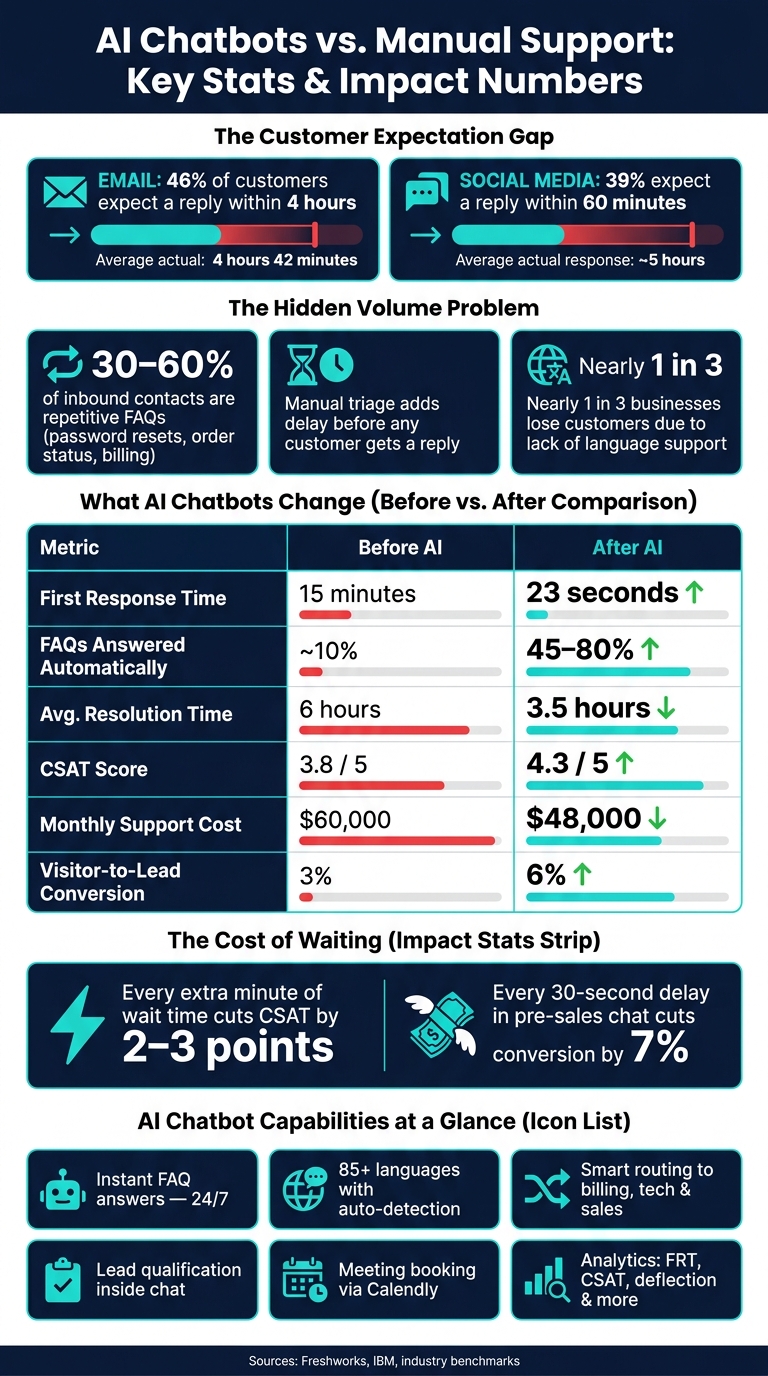
Speed matters more than many teams think. 46% of customers expect an email reply within 4 hours, yet the average first response time in 2023 was 4 hours and 42 minutes[9][11].
Social media is even less forgiving. 39% of users expect a response within 60 minutes, but the average business takes about 5 hours to reply[10]. On live chat, customers expect help in under a minute, so even a short wait can feel long when they need an answer right now[8].
On social channels, delays don't happen in private. They happen in public. Slow replies can cost sales, demo requests, trust, and CSAT.
Limited hours and manual triage create avoidable backlogs
Support that only runs during business hours creates a predictable mess. If a question comes in after hours, it waits until the next business day. Stretch that over a weekend, and Monday turns into more than just a new workday. It becomes backlog cleanup.
During peak periods like Black Friday or a product launch, that pileup can get out of hand fast[5].
A lot of those tickets don't even need a specialist. Research suggests 30–60% of inbound contacts are repetitive FAQs - password resets, order status, return policies, and basic billing questions[7]. But those low-complexity requests land in the same queue as urgent issues like fraud alerts, service outages, or payment failures.
That slows resolution for everyone.
And manual triage adds another layer of drag. Someone has to open, read, tag, and route every single ticket before the customer gets any answer at all.
Language and channel gaps make engagement inconsistent
When support is spread across a website, Instagram, Facebook, WhatsApp, and email without shared history, customers feel the friction. They have to repeat themselves, and agents lose time piecing the story back together[3][4].
That extra work pushes up Average Handle Time (AHT), frustrates customers, and leads to different answers depending on the channel they use.
Language gaps make it worse. Nearly one-third of businesses report losing customers due to a lack of language support[6]. If people can't get help in their own language, many simply leave. The damage often shows up later in retention data, without being clearly tied to the reason.
Supporting every channel and language helps keep engagement steady and cuts down on drop-off.
AI chatbots remove these bottlenecks by answering right away, staying available after hours, and keeping conversations on the right channel. Following a structured AI customer support implementation ensures these tools integrate seamlessly with your existing workflows.
Instant, always-on support that cuts response times
AI chatbots reply the second a customer sends a message. That means no waiting in a queue and no slow manual triage before someone even looks at the issue.
AI answers FAQs immediately across support channels
A lot of support volume comes from the same handful of questions: order status, returns, pricing, password resets, and subscription changes. Those are usually simple to automate because the answers live in structured sources like policy docs, product catalogs, and CRM data. In many cases, no human agent needs to step in.
Research shows AI can deflect more than 45% of customer queries before a ticket is created, with some deployments reaching 60%–80% for common self-service requests.[12][13][20][18] That kind of instant reply does two things at once: it solves the issue faster, and it keeps people from dropping off when the conversation goes quiet.
Consistency matters just as much as speed. When one knowledge base powers your website chat widget, Facebook Messenger, and WhatsApp, customers get the same answer everywhere. No mixed messages. No channel-by-channel drift.
24/7 coverage keeps conversations moving after hours
Many U.S. support teams are only staffed during normal business hours. So when a customer reaches out at night, on the weekend, or during a holiday, the conversation can stall before an agent is even online. Always-on coverage keeps that from happening and helps entrepreneurs and support teams serve people across time zones.
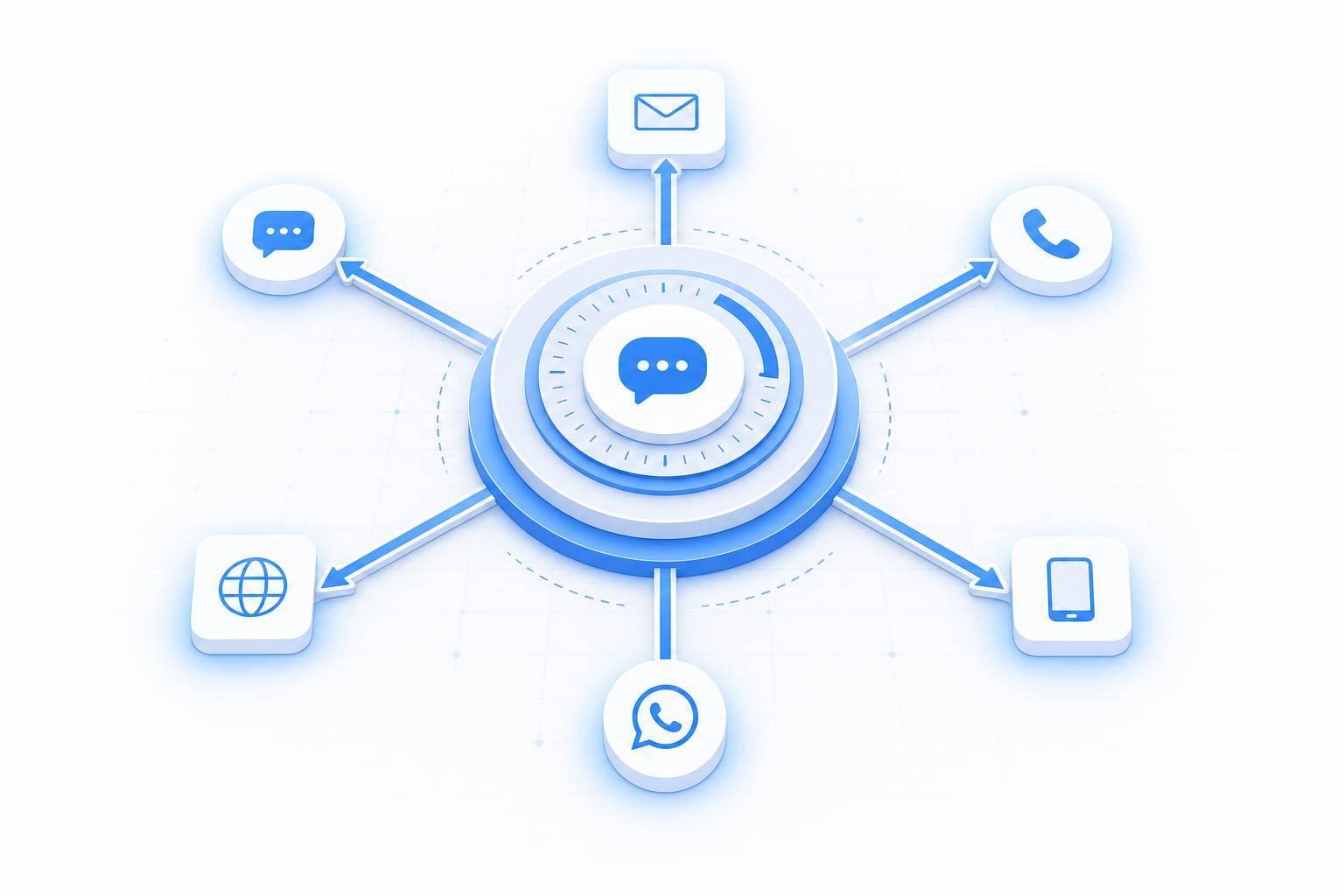
ChatSpark runs all day and all night across websites, Instagram, Facebook, WhatsApp, Telegram, and Slack, so a customer messaging at 11:30 p.m. gets the same level of help as one messaging at noon.[19][14] And when the issue is more involved, the chatbot can gather the needed details first and pass the case along with context.
The effect on response time is hard to ignore. A Freshworks-based analysis found AI support platforms can cut first response times from 15 minutes to 23 seconds.[17] IBM reports chatbots can reduce average response times by up to 99% in cases where customers used to wait hours for a reply.[16][19]
Comparison table: Manual support vs. AI-augmented support
The gap shows up fast in wait time, team workload, and answer quality.
| Dimension | Manual Support | AI-Augmented Support |
|---|---|---|
| First response time | Minutes to hours | Seconds |
| Support hours | Standard business hours | 24/7 |
| Routine questions automated | Near 0% | 45%–80% resolved without an agent |
| Agent workload | High - repetitive FAQs dominate queues | Focused on complex, high-value cases |
| Customer wait experience | Queues and backlogs | Instant replies with clear escalation paths |
Every extra minute of wait time cuts customer satisfaction by 2–3 CSAT points.[2][1] In pre-sales conversations, every 30-second delay in response cuts conversion probability by 7%.[2][15] Speed helps on its own, but paired with consistent answers, it gives teams a much better starting point for more personal conversations.
Personalized and multilingual conversations that improve engagement
Speed gets customers into a conversation. Personalization is what keeps them there. Once reply time drops, context starts to matter more than almost anything else. That’s often the gap between a casual chat and a completed action.
Context-aware replies keep customers moving toward resolution
Scripted bots tend to lose the thread. AI can keep the conversation going based on what the customer already asked, clicked, or added to their cart. For example, a shopper asking about trail use can get an answer tied to the exact product already in the cart. A SaaS user can get the next onboarding step without being forced to repeat what they’ve already done. That helps move each person toward the next action, whether that’s checkout, setup, or form submission. [21]
The result is simple: customers feel understood, and issues get resolved faster. [22]
Multilingual support reduces drop-offs and expands reach
U.S. customers speak many languages, and if support isn’t there in the language they prefer, they often leave. Multilingual chatbots help businesses serve those customers without spinning up separate language queues or hiring a full team for each one. ChatSpark supports more than 85 languages with automatic language detection, so someone can start a conversation in Spanish and get a response in Spanish. Businesses can also set brand-aligned tone and localized messaging, so the experience feels like part of the brand instead of a plain machine translation of English copy. [23][24]
That matters because multilingual support is tied to better customer results. It can improve CSAT, help increase conversion, and support retention. People are more likely to finish a purchase and come back when they can interact in the language they prefer. [24][25]
Pros and cons table: Multilingual chatbot deployment
| Aspect | Pros | Cons / Considerations |
|---|---|---|
| Reach & Accessibility | Serves customers in 85+ languages without separate queues | Requires identifying priority languages to avoid overextension |
| Response Speed | Instant answers in multiple languages, 24/7 | Weak training data can produce fast but inaccurate responses |
| Consistency & Quality | Standardizes tone, policies, and messaging across languages | Cultural nuance may still require human review per language |
| Operational Efficiency | Lowers cost per contact vs. staffing full multilingual teams | Adds complexity in routing, escalation logic, and localization management |
| Brand & Compliance | Enables localized campaigns and compliant messaging for U.S. audiences | Requires governance, glossaries, and legal review to keep languages current |
When a human needs to step in, the handoff should include the full conversation history, the customer’s language, and any key customer details. That context should carry straight into routing and human escalation.
Routing, lead qualification, and human escalation for faster resolution
Once the bot knows what the customer wants and what language they prefer, routing becomes the next big step. It decides whether the issue gets to the right person fast or just sits in line. With that context already gathered, the system can move the conversation where it needs to go.
Intelligent routing shortens queue time and sends issues to the right team
AI can read message intent, urgency, and support needs before an agent joins the chat. So a billing problem goes to billing. An outage goes to technical support. That cuts out manual sorting and saves time.
AI-enabled routing has been shown to reduce customer service costs by lowering wait times and improving satisfaction by 25% compared with manual transfers [27]. Urgent cases get to the right specialist sooner, while low-priority requests can stay with the bot and never enter a human queue at all.
Lead qualification captures demand while interest is high
That same intake flow can also qualify leads. If a visitor lands on a pricing page or asks a detailed product question, a chatbot can kick off a short qualification flow right away. In a few quick questions, it can gather company size, role, use case, timeline, and budget.
ChatSpark works with tools like Zapier and Calendly to connect the whole process. Once a visitor qualifies, Zapier can create a new lead record in the CRM and alert the right sales rep through Slack or email, with no manual data entry. The chatbot can also show open meeting times inside the chat through Calendly, so the prospect can book a call in their local time zone without leaving the conversation. That matters because interest is often highest in the moment.
Workflow comparison table: Manual triage vs. AI-enabled routing and escalation
When a case does need a human, the handoff is just as important as routing speed. Good escalation logic watches for repeated clarification requests, strong negative sentiment, or high-value account flags. When those signals appear, the conversation moves to a specialist with the full transcript, tags, and customer details already attached. The agent can see what the customer asked, what the bot already said, and what still needs to be fixed.
| Workflow Step | Manual Triage | AI-Enabled Routing & Escalation | Impact |
|---|---|---|---|
| Intake | Customer waits in queue; agent asks basic questions | Instant greeting; bot collects issue type, account ID, and urgency automatically | Eliminates intake delay |
| Routing | Supervisor or agent reads and forwards tickets to the right team | Automated intent detection routes to billing, technical, or sales queue instantly | Reduces queue time |
| Qualification | Sales rep gathers lead details via form or discovery call | Chatbot asks about company size, role, use case, and timeline; structured data passed to CRM automatically | Captures leads at peak intent |
| Follow-up | Manual email outreach, often delayed hours or days | Zapier triggers CRM record creation; Calendly books meetings inside the chat | More booked meetings, less admin |
| Escalation | Ad hoc handoff; agent starts with little or no context | Rule-based escalation with full transcript, tags, and customer metadata preserved | Shorter handle time, fewer repeats [28][29] |
In practice, 30% to 50% of chatbot conversations escalate to humans [26]. The point isn't total automation. It's faster, cleaner handoffs when a person needs to step in.
These routing gains should show up in FRT, handle time, and booked-meeting rates.
Measuring business impact with ChatSpark analytics
Analytics tells you if faster replies and cleaner handoffs are doing more than looking good on paper. It shows whether support is getting better in ways that customers and teams can feel day to day.
The clearest signs are pretty simple: faster replies, fewer repeat tickets, and smoother handoffs over time.
The core metrics that show whether chatbot support is working
To see if chatbot support is pulling its weight, focus on the numbers tied to speed, resolution, satisfaction, and conversion. Those metrics show both sides of the story: what customers experience and how much work the support team is carrying.
- First Response Time (FRT): Time from first message to first reply.
- Average Resolution Time (ART): Time to close an issue from start to finish.
- Ticket Deflection Rate: Share of conversations resolved without an agent.
- CSAT: Post-chat satisfaction score; speed alone won't lift CSAT if the answers are off.
- Lead Conversion Rate: Share of chats that turn into qualified leads or booked actions.
- Agent Workload: Tickets per agent and time spent per conversation.
ChatSpark analytics tracks these metrics by channel, automation rate, volume by time of day, and 30- and 90-day before-and-after comparisons. Those side-by-side views make it much easier to show stakeholders what changed and where the gains came from.
Metrics snapshot table: Example before-and-after chatbot results
If the bot is handling FAQs, routing chats better, and helping capture leads, the numbers should reflect that. The figures below are sample results, and results vary based on industry, ticket mix, and bot training.
| Metric | Before ChatSpark | After ChatSpark |
|---|---|---|
| Avg. first response time | 2 min (chat) / 45 min (email) | 8 sec (chat) / 40 sec (email triage) |
| FAQs answered automatically | 10% | 65% |
| Avg. resolution time | 6 hours | 3.5 hours |
| CSAT score (1–5 scale) | 3.8 | 4.3 |
| Monthly support cost (USD) | $60,000 | $48,000 |
| Visitor-to-lead conversion | 3% | 6% |
Deflection rate on its own can paint too rosy a picture. A bot can end chats without fixing the issue. That’s why it helps to pair deflection with verified resolution metrics and a 72-hour recontact rate to confirm customers were actually helped.[30]
Conclusion: Faster service, stronger engagement, and more efficient support
AI-powered customer service can create clear business value: higher satisfaction scores, more leads captured at peak intent, and lower support overhead without matching headcount growth. They cut response times through FAQ handling, routing, and escalation. They also make support faster, more consistent, and easier to scale.
ChatSpark gives teams automation, integrations, and analytics to improve speed and service.
FAQs
How do AI chatbots know when to hand off to a human agent?
AI chatbots hand off to a human agent by monitoring intent, sentiment, and confidence levels.
Put simply: the bot keeps checking whether it understands the request well enough to keep going.
If confidence drops below a set threshold, or the chatbot detects frustration, urgency, or phrases like "talk to a human", it escalates the conversation.
Companies can also pre-configure certain topics to go straight to human agents. Common examples include billing disputes or legal concerns.
When that handoff happens, the conversation history stays intact, so the human agent can pick up where the chatbot left off.
What should I measure first after launching a chatbot?
First, set baseline metrics using the last 3 to 6 months of support data across channels. Track Cost Per Ticket, average handle time, CSAT, and first-response time so you have a clear benchmark.
After launch, shift your focus to automation rate, resolution time, and how well the bot handles high-volume, routine inquiries compared with your service-level goals.
How can I keep chatbot answers accurate across channels and languages?
Centralize your support content in one knowledge base so your chatbot uses the same FAQs, product guides, and support articles across your website, social media, and messaging apps.
For better accuracy, use RAG to ground replies in your documentation. Then re-crawl your content on a regular basis and review unanswered questions to spot gaps and cut down on hallucinations.