AI works best when it takes the repeat work and leaves people to handle the hard stuff. That is the main point here.
If you run support, the problem usually is not staffing alone. It is ticket volume, repeated questions, slow routing, disconnected channels, and too much manual work. This article shows how conversational AI helps with those issues without removing your team from the process.
Here’s the short version:
- AI handles routine requests like order status, password resets, billing lookups, and basic FAQs.
- Human agents handle cases that need judgment like disputes, churn risk, fraud concerns, and upset customers.
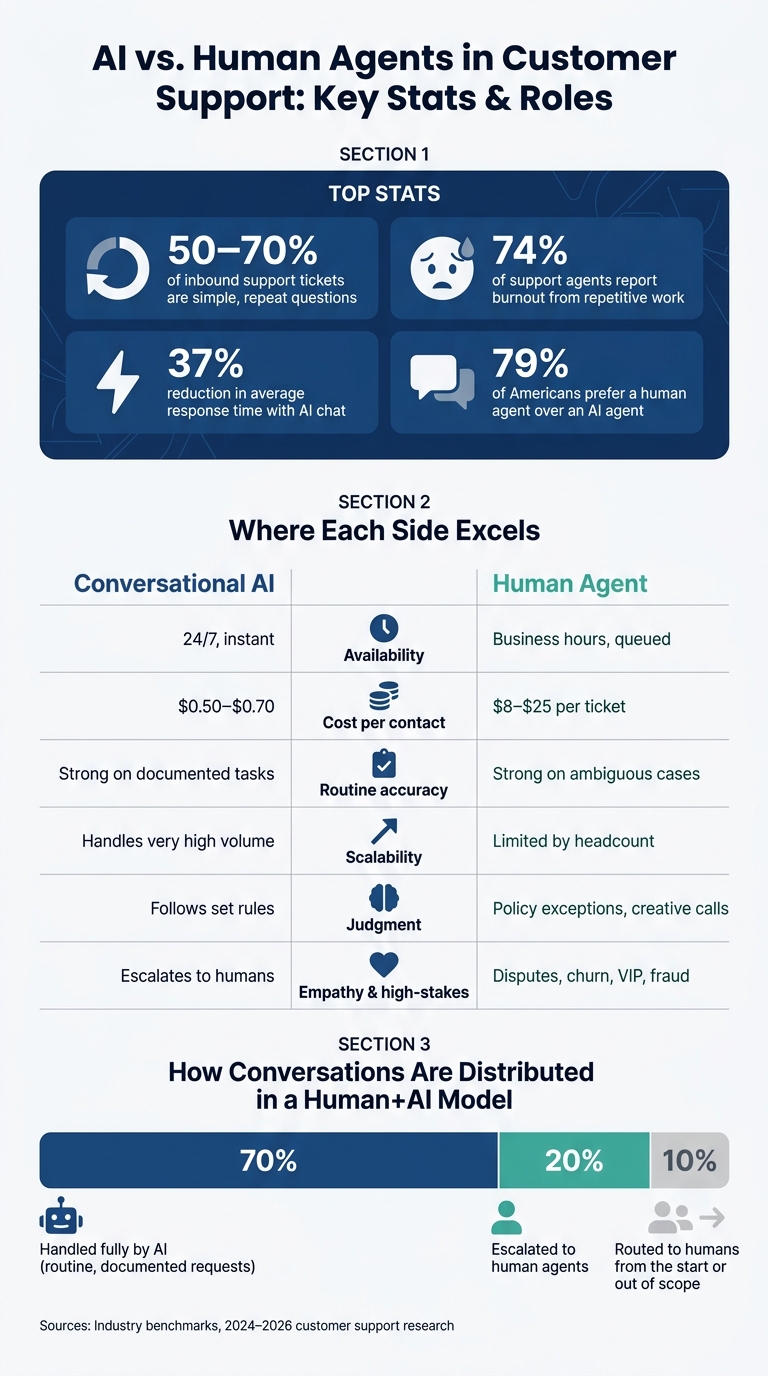
- Customers still want people. 79% of Americans strongly prefer a human agent over an AI agent.
- AI is strong on simple tasks but less reliable on emotional or high-risk cases.
- Support teams can use AI in three places: customer-facing chat, agent assist inside the help desk, and back-end workflow actions.
- Good rollout starts small with clear handoff rules, human review, and weekly transcript checks.
- The goal is not deflection for its own sake. The goal is lower workload, shorter response times, and better service.
A few numbers stand out:
- 50% to 70% of inbound support volume is made up of simple, repeat questions.
- 74% of support agents report burnout.
- AI chats can cut average response time by about 37%.
- A simple AI-handled interaction can cost about $0.50 to $0.70, while a human-handled support ticket can cost much more.
This article also explains where a tool like ChatSpark fits: it covers frontline conversations, supports agents with context, works across channels, and passes full conversation history to people when a handoff is needed.
Bottom line: if you want faster support without cutting your team out, use AI as a first layer, not as the whole support model.
AI vs. Human Agents in Customer Support: Key Stats & Roles
The support problems AI is built to solve
High-volume questions that drain agent time
Most support queues are stuffed with the same few questions over and over: password resets, order tracking, refund status, billing lookups, and returns. About 50% to 70% of total inbound support volume falls into this bucket: simple requests that don’t need specialist judgment [5].
Password resets are a huge part of that load. They make up 20% to 50% of all IT help desk tickets [5]. Order-tracking questions don’t let up either. 70% of consumers contact support when tracking information isn’t clear [5]. Each request may be easy on its own. But at scale, they eat up hours and wear teams down. That strain shows up in the numbers: 74% of customer-facing support agents report burnout, and repetitive work is a big reason why [5].
Manual routing, fragmented channels, and language gaps
Volume is only part of the mess. The other part is what happens after a ticket comes in.
When tickets land in a general queue, someone usually has to triage and route each one by hand before any real work starts. That takes time, and it leaves room for mistakes [1]. A routine question can end up sitting right next to an urgent escalation. So the urgent issue waits while an agent works through simpler tasks.
Disconnected channels make this worse. A customer might start on website chat, follow up by email, then send a message on social media, with none of that context carrying over. Instead of fixing the issue, the agent has to piece the story back together. The customer has to repeat themselves. It’s frustrating, and it slows everything down.
Language coverage adds another delay. If a team can’t reply with steady coverage across languages, response times slip. These are the kinds of jobs conversational AI can handle early by routing, answering, and deflecting tickets before an agent ever touches them.
How these issues affect response time, CSAT, and agent workload
These bottlenecks don’t stay in one corner of the support team. They spill into the metrics leaders watch most.
Clogged queues push up first-response times. Agents stuck doing repetitive work all day are more likely to burn out, and 77% say their workload has become heavier and more complex compared to a year ago [5]. When agents begin more complex tickets already behind, mistakes go up and escalations happen sooner.
The cost to the business is hard to ignore. A human-handled Tier 1 ticket costs $20 to $25 to resolve, while an AI interaction for the same request costs $0.50 to $0.70 [5]. When those simple requests are handled on their own, agents get time back for the work that needs a human touch.
How conversational AI supports agents instead of replacing them
The human-plus-AI model for better service
Support teams now split work between AI and people based on what each side handles best. In many cases, that looks like a 70/20/10 model: about 70% of conversations are handled by AI because they’re routine or already documented, about 20% get escalated to human agents, and about 10% are routed to humans from the start or marked out of scope [3].
The idea is pretty simple. Let AI take the repeatable work, and let agents spend their time on conversations that call for judgment. That usually starts with routine support, then moves into routing, drafting replies, and helping move issues toward resolution.
What AI can automate right now
AI is already good at handling repeatable support work at scale. That includes:
- Triaging and routing tickets by intent
- Running 24/7 chat coverage
- Replying in multiple languages
- Drafting responses for agents to review
- Retrieving relevant knowledge base articles
- Completing workflow actions like updating order or shipping status and scheduling appointments
That work has a direct effect on support performance: faster first responses, cleaner routing, and less repetitive work for agents.
Use AI for repeatable tasks; route emotional, ambiguous, or novel cases to people.
Title’s AI agent now resolves 65% of its 40,000 monthly tickets from start to finish, which frees human agents to deal with refunds and exceptions [4].
Where AI adds value and where human agents are still needed
You can see the split more clearly when you compare the jobs AI and human agents handle best:
| Area | AI | Human Agent |
|---|---|---|
| Availability | 24/7, instant response | Business hours, queued |
| Cost per contact | More cost-efficient | More expensive |
| Routine accuracy | Strong on documented tasks | Strong on ambiguous or novel cases |
| Scalability | Handles very high volume | Constrained by headcount |
| Judgment | Follows set rules; escalate to humans | Makes policy exceptions, creative calls |
| Complex troubleshooting | Limited to documented paths | Navigates multi-step, cross-system issues |
| High-stakes interactions | Escalate to humans | VIP accounts, legal disputes, churn threats |
The handoff to people matters most when the outcome depends on judgment or empathy. Think cancellation threats, billing disputes with legal risk, or sensitive VIP complaints. In those moments, AI shouldn’t keep pushing forward and hope for the best. It should spot the situation and hand it off fast, with context intact.
There’s also a simple design rule that helps a lot: don’t hide the option to reach a human. When customers can see a clear handoff path, they feel less trapped and less anxious. It also cuts down on the classic bot loop, where someone keeps getting the same dead-end reply.
Where AI fits in your support stack and how ChatSpark applies it
Frontline support, agent assist, and workflow automation
Once you've decided what AI should handle, the next step is figuring out where it belongs. The best setup puts conversational AI inside the support stack, not off to the side. It should sit between your customers, your help desk, and your team so it strengthens the whole operation instead of acting like a separate tool.
A simple way to look at it is through three layers.
- Frontline layer: This is the part customers interact with. A virtual agent answers common questions, gathers key details, and resolves routine requests in real time.
- Agent assist layer: This works inside the help desk. It helps agents move faster by surfacing ticket summaries and suggested replies automatically.
- Workflow automation layer: This runs in the background, routing tickets and triggering follow-up actions without manual effort.
These layers build on each other and connect straight to the article's main promise: faster support, lower workload, same human team. Studies have found that AI chatbots can reduce average response time by around 37% [7], while giving agents more time for work that actually needs human attention.
How ChatSpark handles omnichannel and multilingual service
Fragmented channels are a common headache for U.S. support teams. When agents only see part of the story, service slows down and customers get frustrated. ChatSpark deals with that by keeping the full conversation history in one place across websites, Instagram, Facebook, WhatsApp, Telegram, and Slack. So if a customer switches channels, they don't have to start over or repeat the same issue again.
The multilingual piece matters more than many teams expect. ChatSpark delivers on-brand responses in 85+ languages, which means a business doesn't need a separate setup for every language group.
Still, some issues should go straight to a person. Billing disputes, fraud disputes, accessibility concerns, and escalations that involve policy judgment need a human agent who speaks the customer's language fluently. AI can handle volume. People handle the gray areas.
Defining roles across AI, the help desk, and human agents
The easiest way to avoid confusion is to give each part of the stack a clear job.
- Conversational AI (ChatSpark): Frontline automation, intent detection, auto-responses, routing, and Tier 1 resolution. It hands off when confidence is low, sentiment turns negative, or the request falls outside its scope.
- Help desk: Case management and system of record. It manages ticket storage, SLAs, reporting, and workflow rules.
- Human agents: Complex problem-solving, empathy, and judgment. They own escalations, retention conversations, and sensitive issues.
The part that makes this work is continuity. When ChatSpark hands a conversation to a human agent, the full context goes with it: what the customer asked, what the AI replied, and any data already collected. Agents get context. Customers get continuity. And the handoff feels smooth instead of messy.
That setup also makes rollout simpler because each layer knows its role.
How to roll out AI without disrupting your team
Start with a narrow use case and set escalation rules
Start small. Pick one tight workflow, like FAQs, order status, or password resets, and get that working before you expand your AI customer support implementation. That gives your team some breathing room while AI takes repetitive tickets off the queue.
A safer setup is to have AI draft replies first, with agents reviewing and sending them. Then, once the system is doing well, move into full automation. If you switch everything on at once, edge cases show up fast, and customers usually feel that first.
When you do automate, escalation rules need to be crystal clear. No gray area. Set triggers like these:
- Explicit human request: If a customer types "agent" or "human", escalate right away.
- Low confidence: If the AI's confidence score drops below 0.75, send it to a human agent.
- Negative sentiment: If the tone turns negative, route it automatically.
- Always-escalate categories: Legal threats, billing disputes, cancellations, and potential fraud go straight to a human agent - no exceptions. [3][6][9]
Track the right metrics to measure and improve performance
Once those escalation rules are live, the next step is simple: check if they're doing the job. Are handoffs going down? Are replies getting out faster? The numbers that matter most tie back to speed, workload, and CSAT.
Watch containment rate to see how much the AI handles on its own. Track first response time to confirm the speed lift. And keep an eye on cost per resolution to show the business side of the story. AI interactions usually cost $0.50–$0.70 each, compared with $8–$15 for a human-handled ticket. [2]
One more thing: don't confuse deflection with success. If AI redirects a lot of conversations but doesn't solve them, customers are just running into a wall.
Review transcripts every week, especially chats where the AI flagged low confidence. That's usually where the cracks show. In many cases, those conversations point straight to missing help center content or routing rules that need to be tightened. [2][8]
| Metric | What It Measures | 2026 Benchmark |
|---|---|---|
| Containment Rate | % of issues resolved by AI alone | 25%–40% (mature deployment) [6] |
| First Response Time | Time to first reply | Under 1 minute (AI) [8] |
| Cost per Resolution | Cost to resolve one ticket | $0.50–$0.70 (AI) vs. $8–$15 (human) [2] |
After the first month, use that data to tighten routing, update content, and expand only the parts that are working. The point isn't just to report numbers. It's to remove friction.
Conclusion: Faster support, lower workload, same human team
Conversational AI works best as a support layer, not a replacement plan. It takes repetitive work off your team's plate, keeps reply times short day and night, and gives agents more time for the conversations that call for human judgment.
ChatSpark fits that setup well. It handles frontline volume, helps agents with context-rich handoffs, and lets support teams scale without replacing the people already doing the work. The team stays the same. The workload gets lighter. Customers get faster, more consistent service.
FAQs
How do I know which tickets AI should handle?
Classify support tickets by complexity, emotional intensity, and business impact.
AI works best for Tier 1 work: repetitive, rules-based, data-dependent tasks like FAQs, order status checks, password resets, and standard policy questions.
A simple intent-risk-emotion matrix can help route each ticket to the right place. Low-risk, low-emotion cases with clear decision trees are good candidates for automation. High-stakes, sensitive, or ambiguous issues should stay with human agents.
What happens when a customer asks for a human?
When a customer asks for a human, the system should hand things off right away. No extra steps. No back-and-forth. That helps keep trust intact and stops frustration from building.
The AI passes the full conversation history to the agent, so they can pick up exactly where the bot stopped. The customer doesn’t need to repeat the problem, which makes the switch feel smooth and respectful.
If no agent is free at that moment, the customer goes into the standard support queue for human follow-up.
How long does it take to roll out AI support?
AI support usually rolls out in a 30-day phased approach.
Days 1–5 focus on discovery and spotting high-volume intent patterns. Days 6–15 shift to building a deflection layer with the existing knowledge base and internal content.
Days 16–25 add action-based tools for tasks like order lookups or status updates. The final 5 days expand to full traffic and measure results against the original baseline.
That said, not every setup takes a full month. Some focused hybrid deployments can be ready in under 30 minutes.