I’d choose based on the task - not the label. For answers, check the system’s approved sources. For actions, check its tools, permissions, and proof that the task was completed.
These 4 terms overlap. Here’s how I tell them apart:
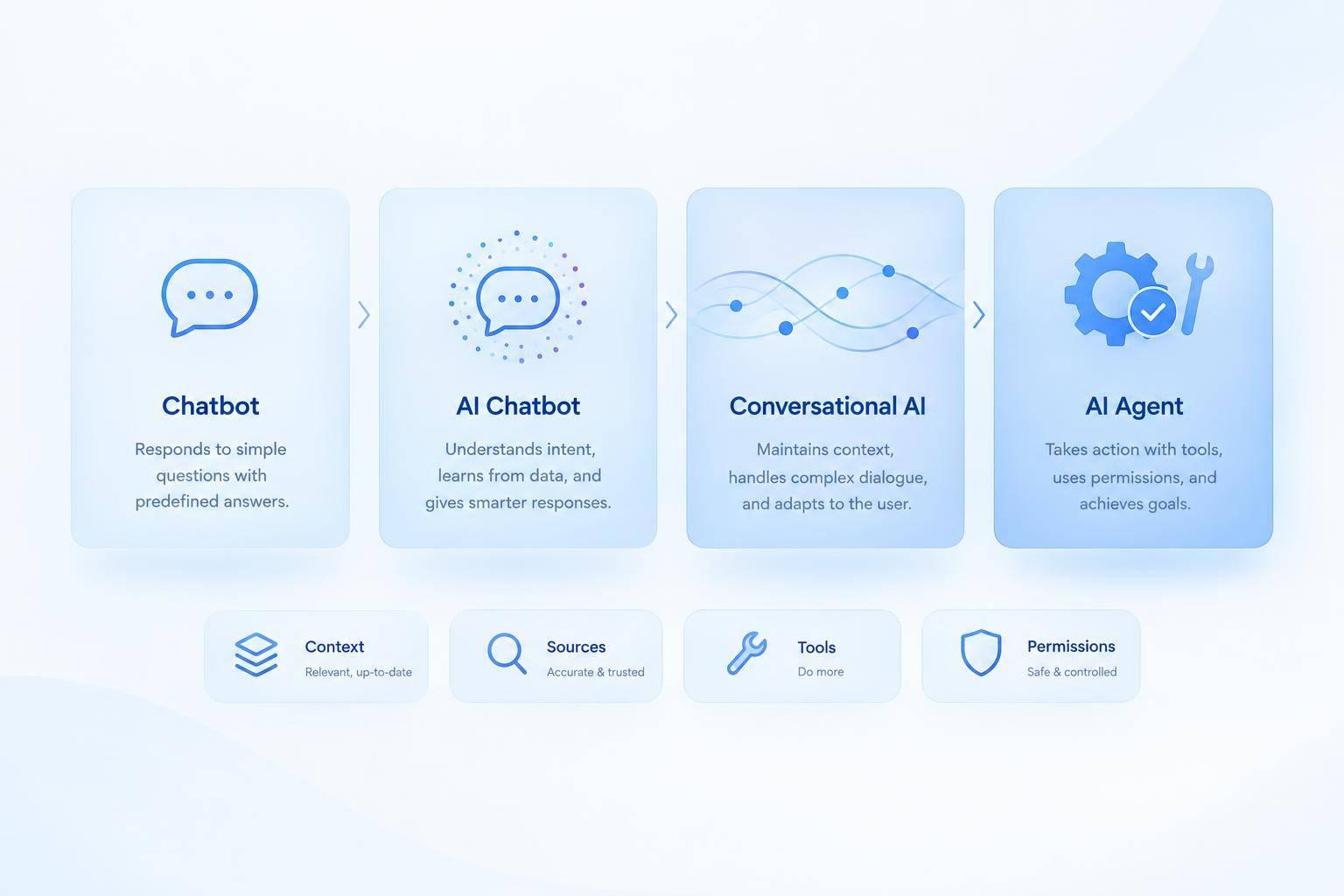
- Chatbot: The chat or voice interface. It can use fixed scripts or AI.
- AI chatbot: Uses AI to handle varied questions and provide answers.
- Conversational AI: Powers natural dialogue, including intent recognition and context across follow-up questions.
- AI agent: Plans steps, uses connected tools, and checks results while working toward an approved goal.
Quick Comparison
| Term | Main role | What I’d check |
|---|---|---|
| Chatbot | Provides the interface | Script coverage and human handoff |
| AI chatbot | Answers using AI | Accuracy and approved knowledge sources |
| Conversational AI | Handles natural dialogue | Context, language, and channel support |
| AI agent | Completes permitted tasks | Tool access, permissions, and audit logs |
One system can use all four. But explaining a refund is not issuing one.
I’d start with a narrow, low-risk task, then test answers, handoffs, and completed actions separately. A fluent reply doesn’t prove the customer’s issue is solved.
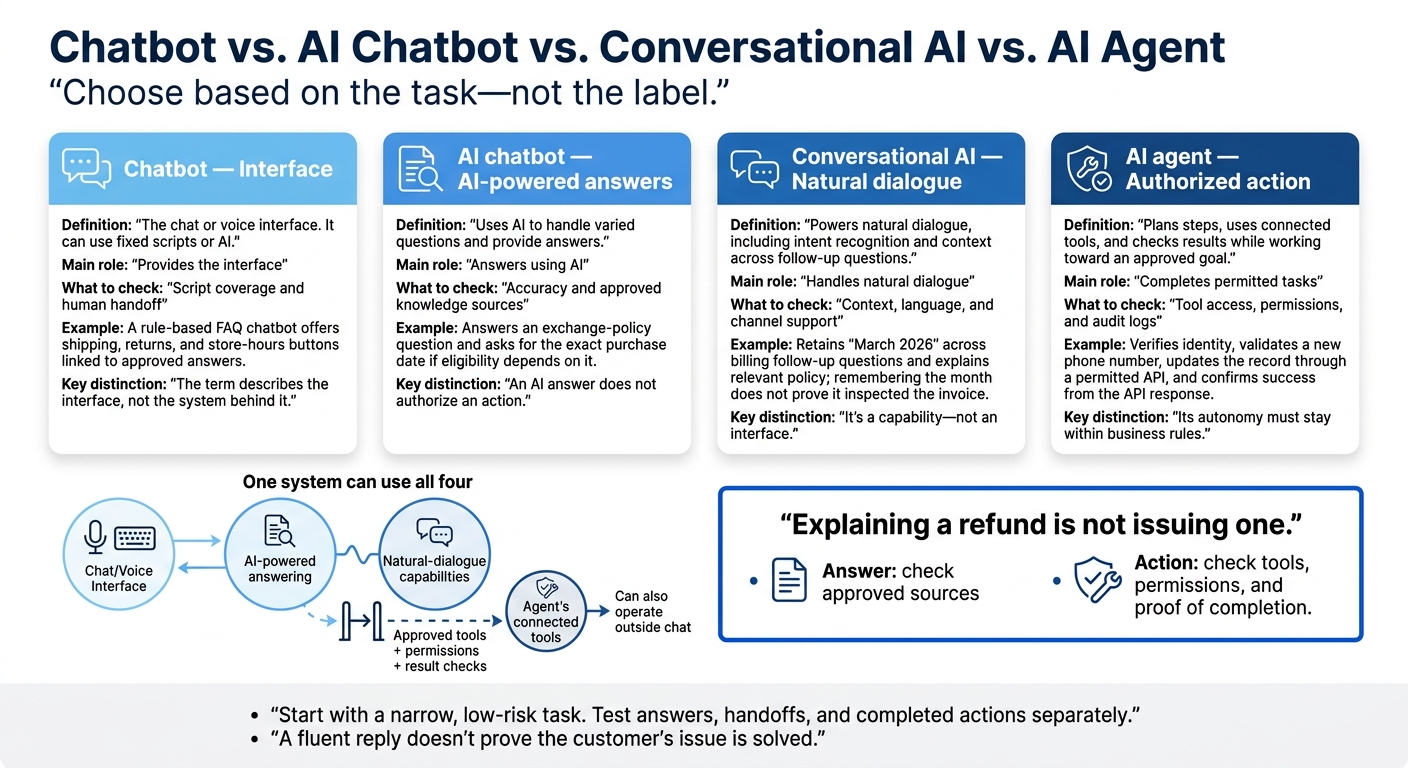
Chatbot vs. AI Chatbot vs. Conversational AI vs. AI Agent
Chatbot: A Conversational Interface
A chatbot is the customer-facing chat or voice layer. It can answer questions, collect details, or walk users through a task without menus or webpages.[1] The term describes the interface, not the system behind it. The same interface can run on rules or AI.[8] A chat interface alone doesn’t mean the system understands varied language or learns from conversations.
How a Rule-Based FAQ Chatbot Works
A retailer’s rule-based FAQ chatbot can show shipping, returns, and store-hours buttons. Each choice maps to an approved answer; keyword matching can route typed requests to the same responses, and a decision tree follows predefined branches.[8][9]
The bot can also collect an order number, ZIP Code, and callback time for a support rep. Those fields and their sequence are configured in advance. Collecting useful details does not require the bot to understand the customer’s broader goal or independently choose what to do about it.[10]
Scripted Answers and Their Limits
Scripted wording gives teams control. They can approve policy language before customers see it. That makes narrow FAQ flows useful for predictable questions whose answers rarely change. These flows are often simple to configure, but teams need to update scripts when shipping policies, return windows, or holiday hours change.[7][9]
The bot’s coverage stops where its configured paths stop. Unexpected wording, spelling variations, and follow-up questions can leave it without a match.[9][11] Give users a visible restart option and a way to reach a human. Then review unmatched inputs to find missing paths. A scripted bot follows assigned steps; it doesn’t choose actions to work toward a goal.
When users ask the same thing in different ways, the next step is AI that can interpret varied phrasing.
AI Chatbot: AI-Powered Questions and Answers
An AI chatbot uses NLP, machine learning, or generative AI to answer support questions, even when customers phrase them differently.[1][13] Some bots identify intent and choose an approved answer. Others write a response using available information. An AI answer does not authorize an action, such as issuing a refund or changing a record.
Understanding Different Ways to Ask a Question
If a customer asks whether shoes bought last month can be exchanged without original packaging, the bot should pull the exchange policy and ask for the exact purchase date if eligibility depends on it.
The bot can use context to answer follow-up questions about receipts or sale items without asking the customer to repeat the request. Test it with paraphrases, misspellings, and incomplete questions. Check that it tells an exchange from a refund and asks for clarification when the difference isn't clear. Its ability to handle different wording still depends on approved policy content.
Keeping Answers Accurate and Within Scope
Understanding the question is just the first step. Generative AI can give confident answers that aren't supported by the facts.[14] Connect the bot to approved policy documents rather than relying only on general training. Conversation history helps it understand what the customer means. Retrieved policy content tells it what the business allows. This process relies on semantic search and intent understanding to ensure the bot finds the right information. Neither verifies an order unless the bot has access to order data.
Give each policy source an owner, record its effective date, and archive replaced versions. Test answers after policy changes. Offer live chat vs AI chatbot handoffs when sources conflict, an exception needs approval, or the request remains unresolved.[14] Send the conversation and relevant sources with the handoff so the customer doesn't have to start over.
Explaining an exchange is not processing one. Completing it requires connected tools, permission, and a separate workflow.
When the system also tracks intent and context throughout the conversation, it uses conversational AI.
Conversational AI: Technology for Natural Dialogue
Conversational AI brings language understanding and memory to support conversations. It powers chatbots and agents, but it’s a capability - not an interface. A scripted chatbot may use buttons and fixed paths instead. Conversational AI serves as the dialogue layer between scripted chat and task execution, rather than a separate category.[1][3][16]
Intent, Context, Knowledge, and Languages
Intent recognition identifies what the customer wants. Context tracking keeps key details across turns, while knowledge retrieval pulls approved information for replies in each supported language. What the system can do depends on how it’s built, not its label. Define what it remembers, when it clears that memory, and which sources it can use. Test dates, currency, and escalation separately in each language.[16]
Supporting several channels doesn’t mean sharing memory between them. Moving a conversation between website chat, SMS, and voice requires linked identity, shared conversation storage, consent, and access controls. Voice also needs speech-recognition testing. When the system can use tools to complete authorized work, it moves beyond dialogue into agent behavior.[3][16]
Explaining a Billing Issue Without Changing Records
A customer reports an unfamiliar charge, identifies the invoice as “March 2026,” and asks a follow-up question; the system retains that month and explains the billing policy relevant to the charge. It can explain the policy and offer billing support, but without inspecting the invoice, it cannot confirm the charge itself or change the account.[4][16]
Remembering the invoice month doesn’t prove the system inspected the invoice. Verify the customer’s identity before showing private billing details. Refunds and account changes require separate authorization and controls. Disputed charges or suspected fraud may need escalation to a human.[5][6]
To move from explanation to action, the system needs agent-level permissions and connected tools. Natural dialogue can improve understanding, but it doesn’t grant permission to update records or trigger workflows.
AI Agent: Taking Authorized Actions Toward a Goal
When a conversation calls for action, an AI agent can take over. An AI agent plans steps toward a defined goal and uses approved tools within set permissions. It checks the results, then decides whether to continue or escalate. Unlike fixed automation, it can change its next step based on the information available.
Updating a Customer Record With Connected Tools
For a contact-info update, define the goal narrowly: update the customer’s phone number after verification. The agent verifies identity, validates the new number, and updates the record through the permitted API. Confirm success only from the API response, not from the generated reply.
If information is missing, ask for clarification; if verification fails, stop and route the request to approved support or account recovery. Other bounded tasks include updating tickets, scheduling appointments in available slots, and initiating returns after checking eligibility.
Controlling Actions With Permissions and Audit Logs
Before deployment, set the goal, required inputs, approved actions, connected APIs, and success criteria. Give the agent its own identity and least-privilege access.
For example, permit phone-number updates, not full customer-record access.
Enforce authentication, account boundaries, and authorization in the app or API - not just through model instructions. Require human approval for sensitive tasks, such as changing payment details or deleting records.
Audit logs should connect the request, agent identity, authorization result, tool calls, target record, timestamps, outcome, and any approval or escalation. Keep sensitive data in those logs to a minimum.
Monitor failures and unusual activity, and provide a way to revoke access. An agent can run in chat, an internal app, an API, or a scheduled process, but its autonomy must stay within business rules.
Next, compare the terms by interface, dialogue, and actions.
Compare the Terms and Choose the Capabilities You Need
These terms overlap, but each describes a different role: a chatbot provides the interface, conversational AI adds natural dialogue, and an AI agent adds authorized action.[15][12]
Comparison Table: Interfaces, Dialogue, and Actions
Capabilities depend on the implementation. A label alone does not guarantee context retention, knowledge retrieval, tool use, or multi-step work.
| Term | Primary meaning | Input handling | Response style | Context retention | Knowledge retrieval | Tool use | Multi-step tasks | Best for | Key limit |
|---|---|---|---|---|---|---|---|---|---|
| Chatbot | Conversational interface | Buttons, keywords, menus, or scripted patterns | Scripted or AI-powered replies | Varies; scripted bots usually track the current path | Predefined answers or connected sources | Optional | Configured flows | FAQs, triage, routing | Scripted versions cannot reliably answer questions outside their paths |
| AI chatbot | AI-powered conversational interface | Natural-language questions and varied phrasing | Generated or retrieved answers | May retain conversation context | May retrieve approved documents | May call tools | Requires workflows or agent capabilities | Varied customer questions | Can give inaccurate or out-of-scope answers |
| Conversational AI | Technology for natural dialogue | Natural language and follow-up turns | Context-aware replies | Tracks intent and context; depth varies | May retrieve knowledge and business data | May support tool calls | Possible, not required | Explanations, voice, multilingual support | Dialogue does not grant permission to change systems |
| AI agent | System that plans and carries out approved actions toward a goal | Goals, events, or structured requests | Status updates and action results | Typically retains task state and relevant context | May retrieve policies and records | Uses approved connected tools | Plans and checks task steps | Authorized record updates and workflows | Requires secure integrations, permissions, and monitoring |
The first table compares capabilities. The next matches them to support tasks.
Selection Table: Match the System to the Support Task
Choose the simplest capability that meets the task. Setup effort and operating costs depend on scope - not how advanced the label sounds.
| Support task | Best-fit capability | Integrations | Human handoff | Cost per resolved inquiry | Success measure |
|---|---|---|---|---|---|
| Stable FAQs, hours, locations, and basic policies | Rule-based chatbot | Minimal or none | Simple escalation path | Usually lowest for repetitive questions | FAQ containment and answer accuracy |
| Varied questions requiring informational answers | AI chatbot | Optional knowledge-base connection | Uncertainty, complaints, or exceptions | Depends on model and volume | First-contact or automated resolution rate |
| Natural-language support conversations with follow-up turns | Conversational AI | Knowledge, channel, and speech connections as needed | Customer request, unclear intent, or unresolved issue | Depends on implementation | Resolution rate, handoff quality, context retention, and satisfaction |
| Authorized multi-step work such as updating records, booking, or ticket creation | AI agent | Required connections to task systems | Exceptions, failed tools, or high-risk actions | Higher setup cost may reduce handling cost at scale | Verified task completion, error rate, and auditability |
Cost per resolved inquiry = (operating cost + human follow-up cost) ÷ verified resolutions.
Automated resolution rate tracks inquiries completed without human involvement. First-contact resolution tracks issues solved on the first attempt without follow-up contact.[17]
Test answer accuracy, paraphrase handling, context retention, and completed actions separately. A fluent reply is not proof that an issue was resolved.
Where ChatSpark Fits
ChatSpark fits the conversational AI platform category. Before treating a workflow as agentic, verify exactly what it does and confirm its channels, integrations, workflow permissions, and auditability. Conversation alone does not mean the platform can take action.
Conclusion: Check What the System Can Say and Do
These overlapping terms describe different capabilities: a conversational interface (chatbot), AI-based understanding or responses (AI chatbot), natural dialogue (conversational AI), and goal-directed actions through connected tools with approved permissions (AI agent).[1][2][3]
Use these definitions as a checklist. Define the task first, then check language coverage, approved knowledge sources, integrations, read/write permissions, and escalation paths. Ask for proof that actions were completed, not just a message claiming they were. The difference isn't the chat box - it's what the system can understand and do.
Once the system fits the task, begin with a narrow, low-risk test. Measure answer accuracy, repeat contacts, handoff success, and actions taken without permission before expanding access.
FAQs
When should I upgrade a scripted chatbot to AI?
Consider upgrading when your support needs go beyond simple, repetitive FAQs - especially if more than 40% to 50% of tickets require access to a CRM, billing platform, or order database.
Other signs include multi-step workflows, like processing refunds or updating customer records, scripts that take too much time to maintain, or large volumes of questions that require context and careful judgment. AI can help your team handle more requests, work more efficiently, and resolve a higher share of tickets.
Can I add agent capabilities to my existing chatbot?
Yes, you can give your existing chatbot agent capabilities by connecting it to business systems through APIs. API-driven workflows let it read and write data in your CRM, helpdesk, or e-commerce platforms.
That means it can do more than answer FAQs. With permission, it can carry out tasks on its own, such as processing refunds, updating customer records, or scheduling appointments.
Many businesses add these capabilities in phases, starting with simple routing before letting the chatbot take action.
How can I prevent duplicate actions if an agent retries?
Require human approval before critical tasks, such as refunds or CRM updates, to help prevent duplicate actions when an agent retries [1]. Use APIs to keep your system in sync with your CRM and backend databases and maintain data integrity [1][2].
Set clear workflows and define what counts as a successful resolution. This helps you control agent actions and prevent unintended repetitions [1].