Conversational AI is transforming customer support by improving speed, accuracy, and availability - all while cutting costs by up to 30%. From handling routine inquiries to offering multilingual support, this technology ensures businesses can meet rising customer expectations for 24/7 service. By integrating tools like CRM systems and leveraging natural language processing, conversational AI delivers personalized, efficient interactions across platforms like web chat, SMS, and social media.
Key Benefits:
- Cost Savings: Reduces support costs by automating tasks.
- 24/7 Availability: Handles inquiries anytime without delays.
- Multilingual Support: Addresses diverse language needs in the U.S.
- Scalability: Manages high-demand periods like Black Friday seamlessly.
- Improved Metrics: Boosts customer satisfaction (CSAT) and first-contact resolution rates (FCR).
Common Use Cases:
- Order Tracking: Instant updates on shipping and delivery.
- Returns & Refunds: Streamlined workflows for faster resolutions.
- Billing Questions: Quick answers to account or payment queries.
- Account Management: Self-service for tasks like password resets.
- Tier 1 Troubleshooting: Guides customers through simple fixes.
Takeaway: Businesses adopting conversational AI gain a competitive edge by delivering faster, smarter, and more consistent support. Tools like ChatSpark make implementation straightforward, starting at $19/month with scalable plans to suit growing needs.
Core Components of Conversational AI
Key Technologies Behind Conversational AI
Conversational AI depends on several interconnected technologies to deliver effective customer support. At its core, Natural Language Understanding (NLU) helps the AI grasp the intent behind customer messages. For example, when a customer says, "my package hasn't shown up", NLU identifies this as a delivery-related inquiry. Retrieval-Augmented Generation (RAG) ensures responses are rooted in accurate, up-to-date company information, such as FAQs, product guides, or website content. This keeps responses aligned with the brand and relevant to the customer's needs. Finally, Natural Language Generation (NLG) transforms these insights into clear, conversational language that feels natural to the customer.
Additionally, API integrations with platforms like CRM systems or Shopify and identity resolution - which connects customer profiles across channels - help streamline interactions. These technologies ensure customers don’t have to repeat themselves, making the support experience smoother.
| Technology Component | Function in Customer Support | Key Benefit |
|---|---|---|
| NLU | Identifies the intent behind messages | Enables accurate routing and prioritization |
| RAG | Pulls data from internal knowledge sources | Delivers fact-based, brand-aligned answers |
| NLG | Converts data into conversational language | Creates natural, human-like interactions |
| API Integrations | Connects to systems like CRM or Shopify | Automates task resolution |
| Identity Resolution | Links customer profiles across channels | Avoids repetitive input from customers |
These technologies are adaptable across a variety of communication channels, each tailored to different customer preferences.
Common Deployment Channels
Businesses in the U.S. leverage conversational AI across multiple channels to meet their customers where they are. Web chat is a popular starting point, often embedded into product pages, checkout processes, or help centers. Mobile apps take it a step further by offering personalized support through real-time account data. For asynchronous communication, SMS is a go-to option, ideal for proactive updates like shipping notifications, appointment reminders, or post-purchase follow-ups. Meanwhile, social messaging platforms like Facebook Messenger and Instagram DMs are gaining traction, especially among younger demographics, for quick and casual interactions.
The best channel mix depends on your audience. For instance, a B2B SaaS company might prioritize in-app chat and email for support, while a retail brand could see more activity through SMS and social platforms.
Data Sources and Integrations
The success of conversational AI hinges on high-quality data and system integrations. RAG ensures AI responses are grounded in accurate company-specific resources, such as FAQs, product manuals, PDFs, and website pages, minimizing the risk of irrelevant or off-brand answers.
Integrating with tools like Salesforce, Zendesk, or Shopify allows the AI to handle tasks autonomously. This means it can process refunds, update shipping details, or check order statuses without human involvement. These integrations not only reduce costs per contact but also improve first-contact resolution rates. CRM integrations provide a full view of the customer’s history, maintaining seamless conversation flow, while real-time data syncs through REST APIs and webhooks keep information updated, boosting both customer satisfaction and operational efficiency.
To maximize performance, it’s essential to keep your source data well-organized and up-to-date. Regularly auditing your knowledge base and CRM data can significantly enhance the accuracy and reliability of your AI-driven support system.
Business Benefits and Use Cases
Key Business Benefits
Conversational AI offers more than just cost savings - it ensures consistent service delivery. While AI interactions cost significantly less than live agent calls, the real advantage lies in efficiency. AI can tackle routine inquiries instantly, 24/7, without making customers wait. This around-the-clock availability directly improves CSAT scores because customers get help when they need it, not just during business hours.
Another standout benefit is scalability. During high-demand periods like Black Friday, product launches, or billing cycles, support volumes can skyrocket. A human-only team often struggles to keep up, either by hiring temporary staff or letting wait times spiral. With an AI-hybrid model, businesses can handle these spikes seamlessly. AI absorbs the extra load, keeping response times steady no matter how busy it gets. This reliability helps maintain NPS, avoiding the frustration that often drives customers away during peak times.
High-Impact Use Cases
These business benefits translate into practical, high-value applications. Conversational AI shines in areas such as:
- Order tracking: AI retrieves live data in seconds, providing customers with quick, accurate updates on their orders.
- Returns and refunds: Structured workflows allow AI to guide users through the entire process, from initiating the return to confirming the refund - no human intervention needed.
- Billing questions: Whether it’s explaining charges, updating payment methods, or answering account queries, AI delivers precise, fast responses.
- Account management: Tasks like resetting passwords or updating profile details are handled efficiently, offering self-service options at scale.
- Tier 1 troubleshooting: Common issues like connectivity problems or app errors can be resolved through diagnostic flows, reducing the need for escalation to live agents.
Here’s a quick breakdown of how AI supports these scenarios:
| Support Scenario | What AI Does | Business Benefit |
|---|---|---|
| Order tracking | Pulls real-time order data | Instant, agent-free resolution |
| Returns & refunds | Executes refund workflows autonomously | Faster processing, lower handling cost |
| Billing questions | Retrieves account and payment details | Accurate answers without wait time |
| Account help | Resets credentials, updates profile data | Self-service at scale |
| Tier 1 troubleshooting | Runs diagnostic flows, delivers fix steps | Reduces escalation rate |
Multilingual and Accessibility Support
Beyond efficiency and cost savings, conversational AI also excels in multilingual and accessibility support. In the United States, where over 41 million people speak Spanish as their first language, limiting support to English leaves a significant gap. AI with multilingual capabilities can identify a customer’s preferred language and respond appropriately - without needing to route the query to a specialized team. This feature not only improves satisfaction but also enhances retention among non-English-speaking customers.
Accessibility is another critical area. AI platforms often include features like screen reader compatibility, keyboard-only navigation, and text alternatives, ensuring inclusivity for users with disabilities. These tools go beyond meeting compliance requirements; they demonstrate a commitment to serving every customer, regardless of how they interact with your business.
Implementing Conversational AI with ChatSpark
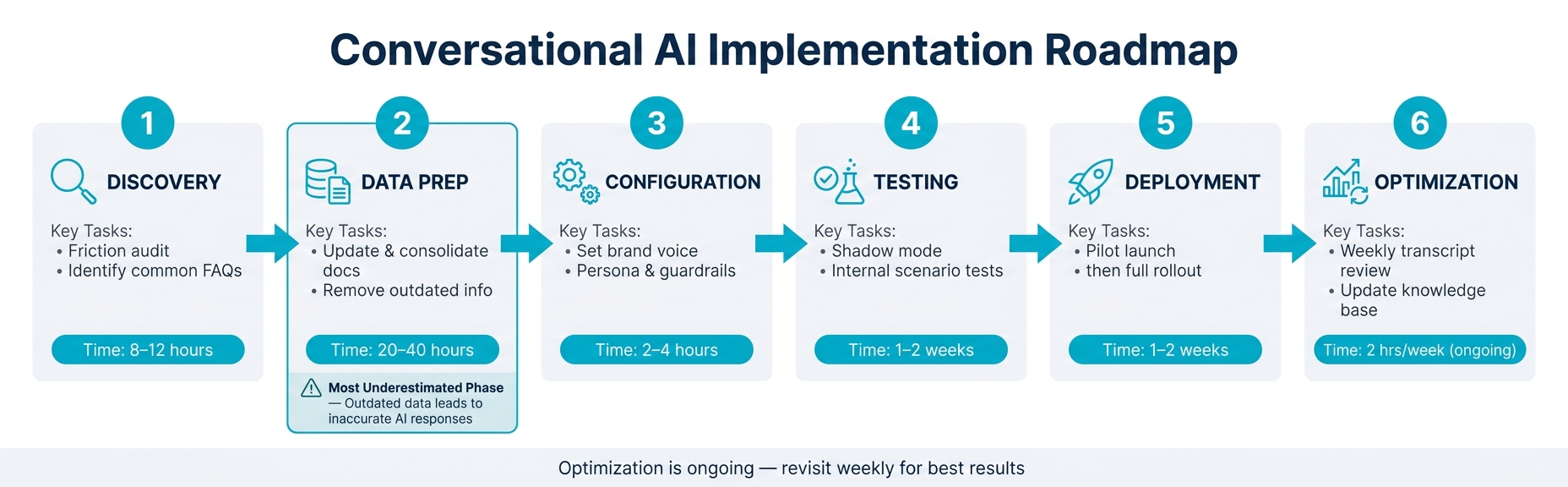
How to Implement Conversational AI for Customer Support: 6-Phase Roadmap
Here's a step-by-step guide to implementing conversational AI using ChatSpark, building on the benefits and technologies we've touched on earlier.
Defining Goals and Requirements
Before diving into setup, it's essential to outline clear goals. Without them, you risk creating a system that delivers inaccurate responses and leaves customers frustrated.
Start by conducting a friction audit of your support tickets to identify the most common inquiry categories. If a large portion of tickets falls into just a few categories, those should be your initial focus. From there, set measurable targets - specific metrics help you gauge whether the implementation is working effectively.
Next, establish your technical requirements. Ask yourself:
- Which communication channels do your customers prefer?
- Do you need integration with your CRM or other tools?
- Are there specific compliance rules for handling customer data?
Answering these questions early can save you time and effort down the road. These foundational steps will help you make the most of ChatSpark's capabilities.
ChatSpark's Key Features
ChatSpark is designed to tackle challenges like high ticket volumes, inconsistent responses, and restricted availability. Its 24/7 automated support ensures customers always receive timely and reliable answers.
Out of the box, ChatSpark supports six major channels:
- Website
- WhatsApp Business
- Facebook Messenger
- Instagram DMs
- Telegram
- Slack
It also offers robust multilingual support, making it easier to engage with customers across the globe. Plus, its AI-powered knowledge retrieval pulls information directly from your existing documentation, ensuring responses stay accurate and aligned with your brand's tone.
For businesses looking to automate workflows even further, the Pro plan ($129/month) includes integrations with tools like Zapier, Freshchat, Square, and Calendly. It also enables Google Analytics 4 tracking, so you can connect support data to your broader business metrics.
Implementation Phases
Once you've defined your goals and explored ChatSpark's features, the next step is a structured rollout. Rushing through any phase - especially testing - can lead to poor customer experiences.
| Phase | Key Tasks | Time Investment |
|---|---|---|
| Discovery | Conduct a friction audit and identify common FAQs | 8–12 hours |
| Data Prep | Update and consolidate documents; remove outdated info | 20–40 hours |
| Configuration | Set up brand voice, persona, and guardrails | 2–4 hours |
| Testing | Use shadow mode and run internal scenario tests | 1–2 weeks |
| Deployment | Start with a pilot launch, then scale to full rollout | 1–2 weeks |
| Optimization | Review transcripts weekly and update the knowledge base | 2 hours/week |
The Data Prep phase is critical but often underestimated. Feeding the AI with outdated or conflicting information can result in incorrect answers, so take the time to ensure your knowledge base is up-to-date before training the model.
Finally, the Optimization phase is ongoing. Regularly reviewing transcripts can help you spot gaps in coverage and identify new FAQs before they become recurring issues.
Best Practices and Future Trends
Refining your AI customer support strategies involves not just following established methods but also adapting to emerging practices and trends that can enhance functionality and customer trust.
Designing Effective AI Conversations
When crafting AI-driven conversations, focus on utility rather than trying to replicate human speech. Responses should be concise - no more than 1–3 sentences. Always guide users toward a clear next step, such as providing a button, a link, or an option to connect with a live agent. For unclear queries, briefly rephrase the issue to confirm understanding before offering a solution. This minimizes unnecessary back-and-forth and quickly builds trust.
To ensure smooth escalation, set a confidence threshold of 60% for triggering human intervention. When a handoff happens, preserve the conversation context to avoid frustrating the customer with repetitive explanations. A seamless transition is far superior to a "cold" transfer where users have to start over.
These principles should be paired with rigorous quality assurance processes to maintain high standards in customer interactions.
Quality Assurance and Compliance
Protecting customer data is non-negotiable. A significant 93% of customers are likely to abandon a brand if they suspect mishandling of their personal data. At a minimum, ensure that personally identifiable information (PII) - like passwords, raw payment data, and phone numbers - is removed before storing any data. Use AES-256 encryption for data at rest and implement OAuth 2.0 or JWT tokens for secure integrations.
From a compliance perspective, businesses in the U.S. must adhere to regulations such as California AB 2013, which mandates transparency in AI decision-making processes. For organizations operating in the EU, GDPR applies, with potential penalties of up to €20 million or 4% of global annual revenue. Maintaining detailed audit trails that document every AI decision and update is not just a good practice - it’s becoming legally essential.
"Trust can't survive on good intentions. It's built when companies publish standards, show evidence, and make failure survivable." - Rebekah Carter, CX Today
One proactive step is creating a "Trust Page" - a public document outlining your AI's behavior, data handling policies, and human oversight measures. This kind of transparency reassures customers and demonstrates accountability even before they raise concerns.
Future Trends in Conversational AI
As AI evolves, new trends are shaping its future. Transparent AI systems, which clearly explain their reasoning to both customers and regulators, are becoming the standard. Unlike opaque black-box models, these systems improve accountability and trust. When combined with immutable logging technologies, such as blockchain-based audit trails, they set a new benchmark for enterprise-level deployments. These advancements are not just optional - they’re quickly becoming baseline expectations in the industry.
Conclusion
Conversational AI is becoming a cornerstone for businesses managing large volumes of customer inquiries, fundamentally reshaping how support operations function. This guide has covered everything - from the technologies powering these systems and their deployment channels to implementation steps, multilingual capabilities, and the compliance measures that safeguard both your customers and your business.
The key takeaway? AI-driven support thrives on speed, intelligence, and consistency. Whether it's resolving a billing issue at 2 a.m., routing a complex problem with full context, or communicating in a customer's preferred language, conversational AI takes care of the repetitive tasks, freeing your team to focus on challenges that require human expertise.
ChatSpark brings this vision to life. Starting at $19/month, it’s perfect for solo operators, while scalable enterprise plans offer unlimited AI actions and dedicated support. The Pro plan at $129/month is ideal for growing businesses, offering omnichannel deployment across platforms like WhatsApp and Instagram, support for 85+ languages, and up to 2,000 messages per month.
To get started, define your support objectives, choose a plan, train your AI with your knowledge base, and refine it using real-world interactions. With a focus on transparency, data security, and seamless human escalation, you can turn a basic chatbot into a reliable support system.
Businesses that act now will gain a clear advantage. Those who delay risk falling behind. Now’s the time to adopt conversational AI, elevate your customer support, and secure your place ahead of the competition.
FAQs
What should I automate first with conversational AI?
Start with automating tasks that are repetitive and straightforward, such as FAQs and transactional self-service options like order tracking, shipping updates, password resets, and return or refund policies. These types of tasks are perfect for achieving quick and efficient results.
At the same time, set up clear escalation processes for more complex or sensitive issues - like billing disputes or legal concerns. This ensures the AI can smoothly transfer these cases to a human agent, providing them with all the necessary context to handle the situation effectively.
How do I keep AI answers accurate and on-brand over time?
To keep AI responses accurate and aligned with your brand, make it a habit to update your knowledge base frequently. Use the ChatSpark dashboard to upload resources like FAQs, manuals, or support documents in formats such as PDFs. You can even automate the process by enabling website crawling. For quick adjustments, the rich text editor allows real-time updates.
Ensure your brand voice remains consistent by establishing clear guidelines and using few-shot prompting techniques. Regularly review analytics to identify unanswered questions and address them. Don’t forget to incorporate customer feedback - it’s an invaluable way to fill in any knowledge gaps and continuously improve your AI's performance.
When should the AI hand off to a live agent?
When an AI system struggles to resolve a query after two attempts or when a customer explicitly asks for human help, it’s time to transfer to a live agent. Some situations, like billing disputes, account security issues, or legal matters, also require immediate escalation due to their complexity.
The system should also keep an eye on customer sentiment and confidence levels. Signs of frustration, such as repeated rephrasing or a noticeable shift in tone, should trigger a handoff to a human before the situation worsens. This proactive approach can help maintain customer satisfaction and trust.