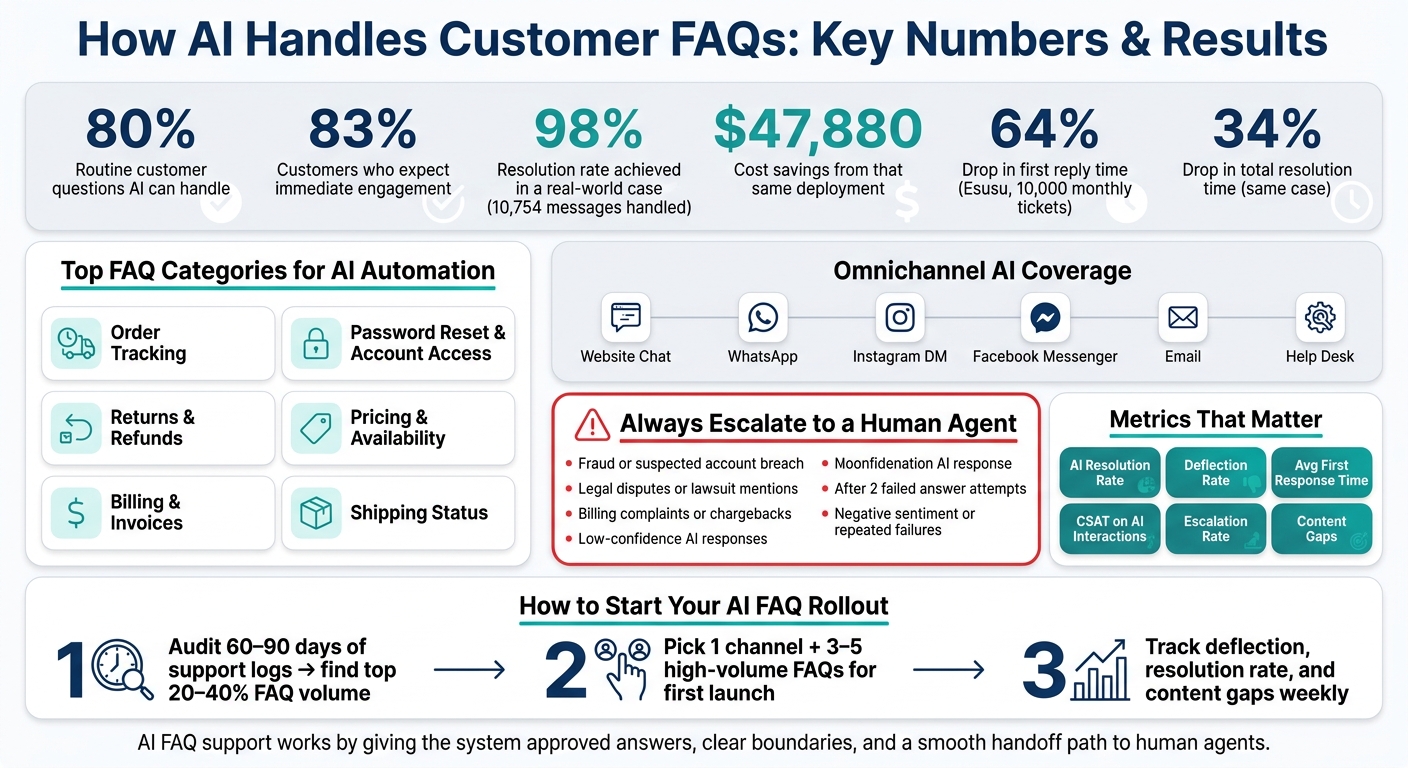
AI is now one of the fastest ways I can cut repeat support work, give customers instant answers, and keep replies the same across chat, email, and messaging apps. In many cases, AI can handle up to 80% of routine questions, and customers now expect near-instant replies, with 83% saying they want immediate engagement.
If I were to boil this down, it comes to five things:
- AI works best on repeat questions like order tracking, returns, billing basics, and password reset help
- One knowledge base matters most because it keeps answers the same across web chat, WhatsApp, Instagram, and help desks
- Good setup matters more than the bot itself: clean docs, fixed rules, confidence limits, and clear agent handoff
- Not every case should stay with AI: fraud, disputes, legal issues, complaints, and low-confidence cases should go to a person
- Results depend on tracking the right numbers like deflection, AI resolution rate, first response time, CSAT, escalations, and content gaps
Here’s the plain-English version: AI FAQ support is less about “smart chat” and more about giving the system approved answers, clear boundaries, and a way to pass hard cases to humans. That’s how teams cut wait times, cover after-hours support, and avoid mixed answers.
A few numbers stand out:
- 10,754 messages handled in one case with a 98% resolution rate and $47,880 in cost savings
- 10,000 monthly tickets managed in another case with a 64% drop in first reply time and a 34% drop in total resolution time
- Many teams start by automating FAQ groups that make up 20%–40% of incoming contacts
If you want the short answer, it’s this: AI handles the easy, repeatable questions first, uses one approved source for answers, and sends risky or messy cases to agents with the full conversation attached.
That’s the model this article explains.
AI FAQ Support: Key Stats, Use Cases & Metrics at a Glance
Where AI Handles FAQs in Daily Support Operations
AI is well suited for repetitive FAQ work. It takes care of the same questions that come up all day, which gives human agents more time for the messy stuff: edge cases, complaints, and issues that need judgment.
Website chatbots for instant self-service
Website chatbots handle questions about pricing, availability, returns, and bookings right in the browser. If a customer asks, "What's my return window?" they get a steady answer pulled from approved policy content instead of waiting in line for an agent.
The setup matters. Connect approved help articles, product pages, and policy docs. Then limit answers to those sources. If someone has a billing dispute, a complaint, or a case the bot can't solve, send it to an agent. And when that handoff happens, keep the conversation history attached so customers don't have to start over.
Once those questions leave your site, the same rules should follow them into social and messaging channels.
Omnichannel AI across social and messaging apps
Customers don't just ask for help on your website. They send DMs on Instagram, message on WhatsApp, and reach out through Facebook Messenger. If a business only automates website chat, a big chunk of repeat questions still piles up in social inboxes.
Use one AI layer across customer messaging channels like Instagram, Facebook Messenger, WhatsApp Business, and Telegram, all pulling from approved sources. That way, a customer asking "Where's my order?" on WhatsApp gets the same answer a website visitor would get: carrier name, estimated delivery date, and tracking link pulled straight from the order system. One knowledge base keeps answers aligned across channels.
That is the job of a central FAQ layer: one source, many channels, one escalation path.
Using ChatSpark as a central FAQ support layer
ChatSpark follows this model across web and messaging channels from one control layer. A visitor lands on your site, sees the widget, chooses a quick-reply topic like pricing, shipping, or returns, and gets an answer from approved sources. Across each channel, the bot sticks to those same sources and the same handoff rules, sending unresolved cases to agents without making customers repeat themselves.
ChatSpark also fits teams based on message volume and integration depth, with plans that scale from early-stage businesses to large organizations that need custom configurations.
How AI Delivers Accurate and Consistent Answers
Once AI is live across channels, answer quality comes from the content, rules, and routing behind it, not the chatbot interface itself.
Building an AI-ready knowledge base
Before AI can answer questions you can trust, the source content needs cleanup. That usually means reviewing help center articles, policies, and product docs, removing old information, merging duplicate articles, and using the same terms across every source.
Terminology matters more than most teams think. If one return policy article says "30-day window" and another says "one month," the AI can end up giving mixed answers. Keeping language consistent across help articles helps keep responses tight and on-brand.
Generating answers from documentation with safeguards
Once the content is cleaned up, AI can read from it and draft answers that match what the customer asked. But it still needs guardrails. Set a high-confidence threshold, and send uncertain answers to human review.
Some topics shouldn't go through AI at all. Legal disputes, fraud reports, billing complaints, and mentions of terms like "lawsuit", "hacked", "data breach," or "complaint" should go straight to a person.
Low-confidence, user-requested, negative-sentiment, repeated-failure, and high-risk cases should also route to agents.
A global construction products company used ChatSpark to handle 10,754 messages. The AI reached a 98% resolution rate and saved $47,880 in costs. Escalation rules helped send complex cases to the right people.
AI suggestions inside help desks
AI doesn't need to replace agents to pull its weight. During busy periods, it can support them by:
- Drafting replies from ticket history and internal docs
- Summarizing long email threads so agents get context in seconds
- Surfacing relevant knowledge base articles without leaving the help desk
These suggestions help keep policy answers consistent across agents and shifts. That's hard to do by hand when different people interpret the same policy in slightly different ways.
In January 2026, fintech startup Esusu used AI-powered macro suggestions and summarization tools to manage 10,000 monthly tickets. The result was a 64% reduction in first reply time and a 34% decrease in overall resolution time.
Those same controls also make multilingual FAQ support easier to scale.
Multilingual FAQ Support and US Localization
Serving multilingual customers without separate support teams
The same source-control rules that keep English answers accurate can also keep translated replies in sync. For U.S. businesses, that matters a lot. Customers ask FAQ-style questions in Spanish, Chinese, French, and other languages about orders, shipping, returns, account access, and product stock. Building a separate support team for each language gets expensive fast, and it’s tough to automate customer support without losing quality at scale.
AI helps cut that load by letting you build one U.S. English knowledge base around your actual policies and FAQs. From there, the system can detect the customer’s language, match the question to the right FAQ, and answer in that same language. So a message like "rastrear mi pedido" can map to a "track my order" intent and return a Spanish reply, without needing a separate Spanish-speaking team for routine FAQ requests.[6]
Keeping answers accurate for US policies and formats
Translation by itself doesn’t solve the whole problem. Customers still need replies that follow U.S. norms: USD pricing, MM/DD/YYYY dates, imperial units when needed, and shipping terms that line up with U.S. policies.[3][4][5]
That’s what localization does. The AI doesn’t just switch languages; it also applies U.S. rules inside the reply. A customer reading in French or Chinese should still see prices in U.S. dollars, dates in MM/DD/YYYY format, and units like lbs, inches, or °F when those details matter. In regulated fields, this gets even more serious. Approved legal or compliance wording should stay fixed, while the AI adjusts the text around it.
Configure these core localization rules:
| Localization Element | US Standard | AI Configuration Action |
|---|---|---|
| Currency | USD ($1,299.95) | Lock monetary fields to USD formatting |
| Date Format | MM/DD/YYYY | Configure regional date settings |
| Time Zones | ET, CT, MT, PT | Use explicit zone labels in responses |
| Units | Imperial (lbs, inches, °F) | Set unit defaults in answer templates |
| Regulated language | Approved legal or compliance wording | Lock regulated snippets to approved text |
Using ChatSpark for multilingual FAQ handling
This is where multilingual FAQ automation starts to feel like one system, not a pile of separate language queues. ChatSpark supports more than 85 languages, including right-to-left scripts such as Arabic.[6]
If a customer writes in German or Portuguese, ChatSpark can answer in that language while still keeping USD prices, dates, and approved product names intact. So if your English source gets a policy update, like a new return window, that change can flow across all supported languages without hand-editing separate localized pages.
For regulated or high-risk content, human review still matters. Teams should tag knowledge base entries by risk level and send AI-suggested edits on sensitive topics through legal or compliance review before publishing. After those rules are in place, track results by language the same way you’d track any other FAQ workflow. For a broader look at setting up these systems, see our guide to AI customer support implementation.
How to Set Up AI for FAQs and Track Results
Once your FAQ content and language rules are set, the next step is simple: turn the workflow on and see what it actually solves.
Audit FAQ volume, channels, and automation readiness
Start with the last 60–90 days of support logs across every channel. Tag each contact by topic, then rank those topics by volume, handling time, and resolution rate.[8]
You're looking for the kind of questions AI can answer cleanly: one correct answer, clear business rules, and lots of repeat volume. Many teams use this step to find an early FAQ group that makes up about 20–40% of incoming contacts.[8] Then they trim that list down to the easiest, highest-volume items for the first launch.
A simple way to sort requests:
- Simple FAQs
- Transactional requests
- Complex issues
Only the first two should be part of an early AI rollout.[12][7]
For channel priority, begin where volume is highest and where people already expect a fast reply. In most cases, that means website chat or in-app chat. After that, you can expand to email, web forms, and social messaging once the first setup is steady.[1]
Set up the first AI workflow and escalation path
Keep the first launch narrow. Pick one channel and 3–5 high-volume FAQs like order status, return policy, or password reset help. Then connect an approved FAQ knowledge base that covers those topics. Prices, dates, and units should stay locked to the same U.S. formats your support team already uses.[14][16]
Before launch, set the basics of tone and behavior: greeting style, level of formality, and phrases the system should avoid. Then map out escalation before anything goes live.
The AI should pass the case to a human when confidence is low, when the issue involves policy exceptions, billing disputes, complaints, fraud, or legal matters, or after two failed answer attempts.[13][18]
Just as important, make the handoff smooth. Use clear transition messaging, and keep the full conversation history attached so the customer doesn't have to start over.[13][18]
Match ChatSpark to your message volume, integration needs, and security rules. Before launch, check data protections like encryption, role-based access, and compliance with U.S. privacy regulations.[1]
Track deflection rates, response times, and content gaps
After launch, don't drown in dashboards. Focus on a small set of metrics that tells you whether the system is doing its job.
Track these six metrics on a steady basis: AI resolution rate, deflection rate, average first response time, CSAT on AI interactions, escalation rate, and content gaps.[2][8][9] Deflection tells you how many contacts AI handled without a human. Resolution tells you how many it answered correctly.[10][11]
Content gaps usually tell the clearest story. Repeated unanswered questions, low-confidence intents, and topics that pull negative feedback are signs that the FAQ library is missing something or that an article is out of date.[8][15][17]
| Use Case | Benefits | Limitations | Escalation Rule | Metrics to Watch |
|---|---|---|---|---|
| Order Tracking | 24/7 instant updates; reduces agent workload | Requires real-time API integration | Escalate on lost or delayed packages | Deflection rate; first response time |
| Returns | Consistent policy answers; basic label generation | Can't handle high-value exceptions | Escalate on exceptions or orders above threshold | CSAT; refund processing time |
| Billing FAQs | Handles invoice lookups and pricing questions | Can't process disputes or chargebacks | Escalate on overcharge, refund, or suspected fraud | AI resolution rate; escalation rate |
| Troubleshooting and access issues | Immediate resolution from documentation; high volume reduction | May miss edge cases; requires identity verification safeguards | Escalate on low confidence or after 2 failed attempts | Content gaps; deflection rate |
It also helps to schedule quarterly reviews with support, product, and compliance. Use those check-ins to review performance, decide what to automate next, and make sure escalation logic still fits current policy and busy seasonal swings like holiday order spikes.[1][8]
FAQs
How do I know which FAQs to automate first?
Review support data from the last 90 days across email, chat, and phone. Start with high-volume, low-complexity questions that show up again and again, like order status, shipping details, business hours, and password resets.
A simple rule to use here is the 80/20 rule: about 20% of ticket categories often account for 80% of total volume. That makes it easier to cut agent workload without handing off complex or sensitive issues that still need a human touch.
When should AI hand a customer over to a human agent?
AI should pass the conversation to a human agent when the issue is high-stakes or hard to sort out on its own.
That usually means the situation calls for human empathy, nuance, or judgment. In plain English: when the answer isn't just about finding the right info, but about handling the moment well.
Common handoff triggers include:
- Refund disputes
- Policy exceptions
- Cross-department tasks
- Sensitive legal or contract questions
- Low confidence, such as below 0.75
- Signs of customer frustration or urgency
If a customer is upset, pressed for time, or dealing with something with money, legal terms, or special-case decisions, a human should step in.
How can AI answer accurately in multiple languages?
ChatSpark goes past basic, word-for-word translation. It detects a customer’s language from the very first message and keeps the chat in that language, even if the customer switches languages in the middle of the conversation.
It also uses a Retrieval-Augmented Generation approach to pull the right information from your centralized knowledge base. The result is responses that feel native, match regional phrasing, and use the right level of formality for the customer.