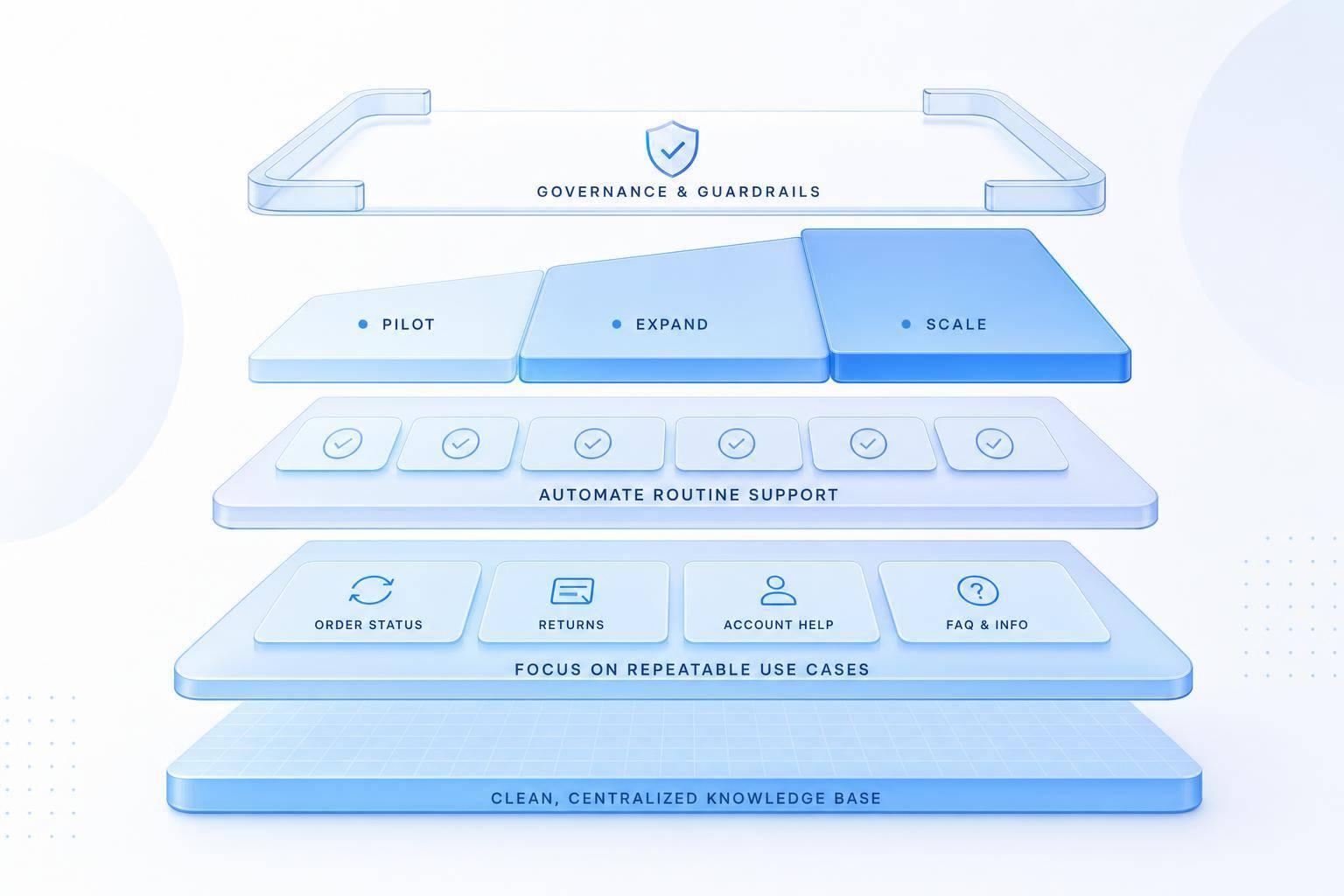
If support volume is going up, adding agents one by one gets expensive fast. I’d build an AI customer service plan around five things: clear goals, the right first use cases, a clean knowledge base, phased rollout, and firm rules for quality and handoffs.
Here’s the short version:
- I’d start by checking the last 30 to 90 days of tickets to find repeat questions and weak coverage hours.
- I’d set targets for response time, cost per ticket, self-service rate, and CSAT before picking tools.
- I’d use AI first for simple, high-volume work like order status, password resets, returns, and scheduling.
- I’d make sure the knowledge base is current, easy to search, and reviewed every 90 days.
- I’d send low-confidence, sensitive, or failed cases to a human with the full conversation and account context.
- I’d launch on one use case and one channel first, then expand only if the numbers hold.
- I’d add review rules, privacy controls, and a named owner so quality does not slip as volume grows.
A few numbers show why this matters:
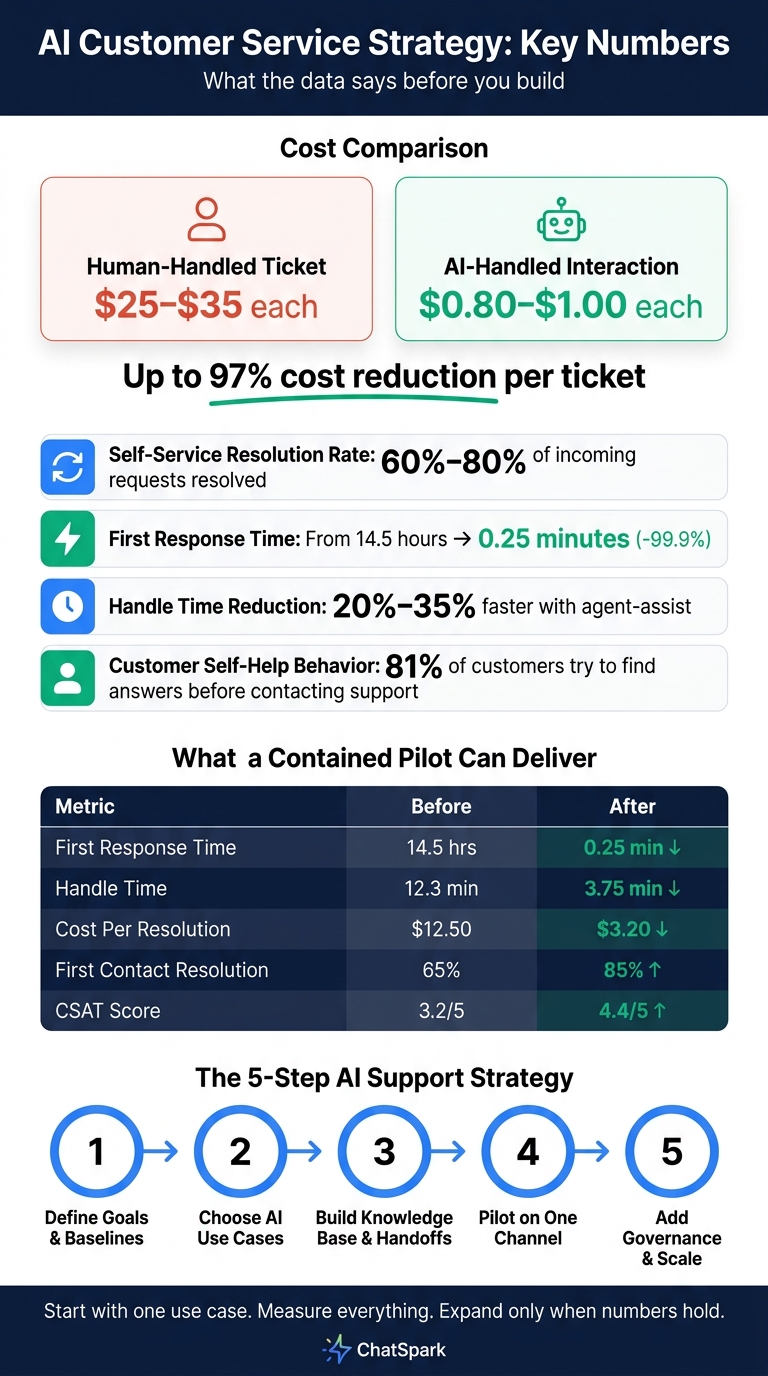
- Human-handled tickets can cost $25 to $35 each.
- AI-handled interactions can land around $0.80 to $1.00 each.
- Strong self-service flows can resolve 60% to 80% of incoming requests.
- Agent-assist can cut handle time by 20% to 35%.
- A pilot can move first response time from 14.5 hours to 0.25 minutes when the setup is done well.
AI vs Human Customer Service: Cost, Speed & Performance Benchmarks
Quick comparison
| Area | What I’d focus on |
|---|---|
| Goals | Baseline metrics, cost, response time, coverage gaps |
| First AI use cases | Repetitive, low-risk tickets |
| Setup | Knowledge base, workflow rules, human handoff triggers |
| Rollout | Small pilot, before-and-after measurement |
| Control | Review process, privacy rules, ownership, incident plan |
In simple terms, the article says this: use AI to take routine work off the queue, keep humans on harder cases, and expand in small steps with close measurement.
1. Define your support goals, baseline metrics, and growth needs
Before you choose AI tools, map how support demand grows across ticket volume, channels, and coverage gaps. That way, each choice connects to clear, measurable gains.
Map current workflows and ticket patterns
Start with the last 30 to 90 days of support tickets from every active channel - chat, email, phone, SMS, and social. Then group them into 5 to 8 categories [3][6].
In most teams, a small set of request types drives the bulk of volume. That usually includes order status, returns, product questions, and billing [3].
Next, score each category on two things:
- Repeatability
- Data availability
When a category scores high on both, it’s usually a strong fit for automation [3]. Password resets, order tracking, and shipping questions are often the best places to begin [6][10].
You should also flag your coverage gaps. These are the hours when response times keep missing your targets. After-hours support, weekends, and seasonal spikes tend to be the biggest trouble spots [3][4].
Set business goals and customer experience guardrails
Once you have the ticket data, set specific targets that match your growth plans. Keep them concrete:
- Reduce tickets reaching humans by 60% to 70%.
- Keep AI response times under 1 minute.
- Cut cost per ticket by 50% or more. [10]
At the same time, put limits in place to protect answer quality and escalation quality as volume climbs. Set a confidence threshold for human escalation, and send low-confidence cases to a human with full context [7][8].
Document your current baseline metrics across average first response time, resolution time, cost per ticket, CSAT/NPS, and tickets per agent per day [3][8].
| Metric | Current Baseline | AI Target |
|---|---|---|
| First Response Time | 18+ hours | <15 seconds [9] |
| Cost Per Ticket | $6.50–$12.00 | $0.20–$2.50 [8][9] |
| Self-Service Resolution Rate | current rate | 60%–80% [6][9] |
| Coverage | Shift-based | 24/7 [4] |
Use these baselines to decide which AI workflows and features should come first as your support operation grows.
2. Choose AI use cases and platform features that can scale
Use your baseline metrics to decide which workflows AI should handle first. The smart move is to begin with the ones that show up again and again.
Start with use cases that have fast, clear impact
A strong place to start is with workflows that are repetitive, high-volume, and low-judgment. Think order status, returns, password resets, and scheduling. These tasks clog support queues, but they usually don’t need a person to sort them out. When AI handles that front-line load, human agents can spend their time on escalations, complaints, and more complex account problems.
81% of customers attempt to find answers themselves before contacting support[1]. That lines up with how people already behave. They want the answer fast, and they often try to get it on their own before reaching out.
Agent-assist tools help in a different way. Instead of replacing the agent, they pull up relevant answers and suggested replies in real time. That can speed up response handling without taking the human out of the conversation. As ticket volume climbs, you can add more workflow support, like:
- Routing
- Tagging
- Follow-ups
- Multilingual support
From there, match those use cases to the channels and integrations your team needs.
Match ChatSpark plans, channels, and integrations to your growth stage
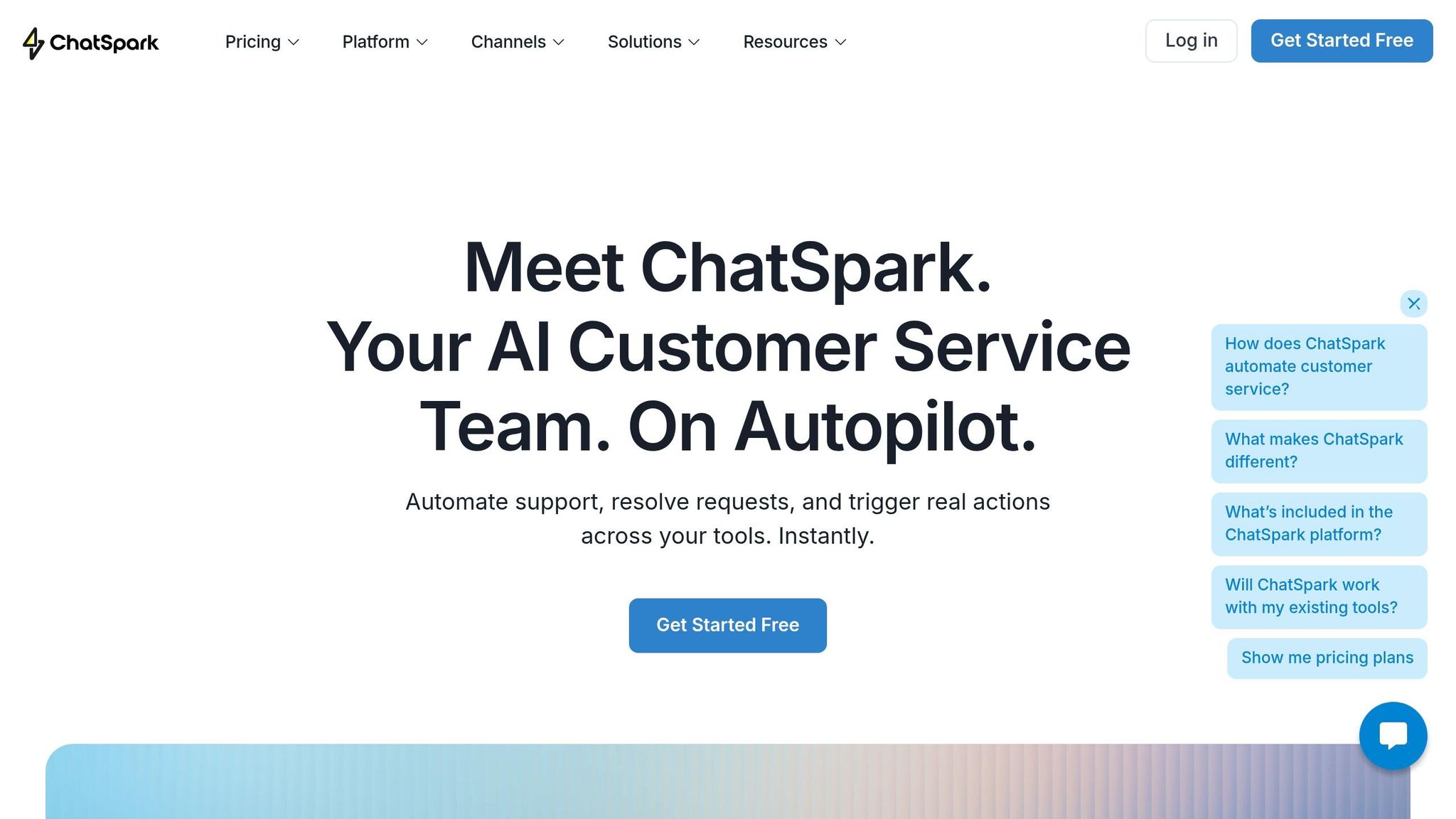
Not every business needs omnichannel AI on day one. ChatSpark’s plans map to different stages of growth, so you can start small and expand as demand increases.
| Growth Stage | Monthly Tickets | Team Size | ChatSpark Plan | Key Capabilities |
|---|---|---|---|---|
| Startup / Testing | 50–300 | 1–2 people | Basic ($19/month) | Web chat, FAQ automation, 100 messages/month, 25 training pages, analytics, multiple data sources |
| Small Business | 300–2,000 | 2–5 people | Plus ($59/month) | Web chat, 250 messages/month, 50 training pages, 5 AI actions, analytics, multiple data sources |
| Growing / Omnichannel | 2,000–15,000 | 5–20 people | Pro ($129/month) | All 6 channels: website, WhatsApp, Instagram, Facebook, Telegram, and Slack; 2,000 messages/month, 500 training pages, analytics, Zapier, Freshchat, Square, and Calendly integrations, unbranded widgets |
| Enterprise | 15,000+ | 20–100+ people | Enterprise (Custom) | Custom message limits, custom pages, custom integrations, priority support, dedicated account management |
The Pro plan opens up support across six channels and adds deeper integrations. That starts to matter once customers reach out in more than one place and your team has to keep up across each touchpoint.
If your team uses tiered support, ChatSpark can fit that model without much friction. Tier 1 routine requests can go to automated workflows. Tier 2 technical requests can go to AI-assisted agents. Tier 3 complex or sensitive cases can stay human-only. Pick the model that fits your team today, then choose a plan that leaves room for more volume later.
Once the use cases are in place, the next step is building the knowledge base and handoff rules that keep answers accurate as volume grows.
3. Build the knowledge base, workflows, and handoffs that hold up at higher volume
This is the point where your support setup starts to work at scale: the knowledge base, the workflows, and the handoff rules that help AI stay accurate as ticket volume climbs. If section 2 set the scope for automation, this section is about keeping that automation reliable and easy to pass to a human when needed.
Organize your knowledge base and automate common service paths
Think of your knowledge base as the material your AI reads from when it answers customers.
Start with your highest-volume ticket categories. If you cover those well, you can deflect 30–40% of incoming tickets before building much else [1][11].
When you write knowledge base articles, put the answer first, then explain it. That format gives retrieval systems a cleaner signal and cuts the odds of the AI returning something vague or half-finished [2]. It also helps to group content by topic or policy rule, so the AI pulls the full answer instead of a stray snippet [12][11].
Tag each article with its product area, plan, and review date [12][11]. Then set a rule to flag anything older than 90 days for review. If the knowledge base falls behind product or policy updates, AI accuracy can slip by 5–8% per month [11].
Use that same structure for any high-volume workflow tied to clear policy rules or status data. When retrieval is structured, AI hallucination rates drop to below 3%, compared with 15–20% without a structured knowledge base [11].
Define human handoffs and agent-assist support
Good content helps you handle volume. Clear handoffs protect the cases AI shouldn't own.
Not every conversation belongs with AI from start to finish. Set your system to escalate when any of these situations show up:
- Confidence drops below 70–78% on a retrieved answer [12][11]
- Customer sentiment turns negative [11][2]
- The customer explicitly asks for a human agent
- Sensitive topics come up, such as legal threats, safety concerns, billing disputes, or data issues [12][11][2]
- The AI fails to resolve the same issue after 3–4 attempts [2][14]
When that handoff happens, pass along the full transcript, what the AI already tried, the account context, and the next step [12][11]. Leave out any of that, and the customer has to repeat the story from scratch. That's one of the fastest ways to lose trust.
Agent-assist keeps a person in control while AI pulls up relevant articles and drafts replies in the background. That can cut average handle time (AHT) by 20–35% without taking the human out of the exchange [2].
Once those workflows and handoffs are set, test them on a narrow ticket set first.
Compare fully automated and hybrid support models
Full automation works best for repeatable tasks. Hybrid support fits cases that call for judgment. Put simply, some support paths can run end to end with AI, and some shouldn't.
| Factor | Fully Automated | Hybrid (AI + Human) |
|---|---|---|
| Best for | Order tracking, FAQs, password resets | Billing disputes, technical issues, plan changes |
| Speed | Instant (under 10 seconds) [2] | Moderate - AI drafts, human reviews the draft |
| Accuracy | High for simple, rule-based tasks | Highest - human verifies AI suggestions |
| Customer trust | High for simple, transactional tasks | High for complex or emotionally sensitive issues |
| Reduce customer service costs per resolution | $0.12–$1.00 [13][6] | Lower than a fully manual workflow, since AI can reduce human handle time by 20–35% [2] |
Once these rules are in place, pilot the flow on a small ticket set and expand only after the metrics hold.
4. Roll out in phases, measure results, and expand as demand grows
Start with one use case on one channel. That gives you room to spot weak points and fix them before they spread. It also makes the first rollout much easier to measure.
Run a pilot and track before-and-after performance
Begin with one or two high-volume, low-risk use cases. Launch on a single high-volume channel, usually live chat vs AI chatbots on your website, before you branch into email or social media [11][2][15].
In the 30 days before launch, audit your docs for stale, unclear, or conflicting answers. At the same time, track baseline metrics for at least 30 days so you have a clean before-and-after comparison [16][10].
Here’s what a contained rollout can look like when you compare pilot results against the starting point [8][10]:
| Metric | Before pilot | After pilot | Impact |
|---|---|---|---|
| First Response Time (FRT) | 14.50 hours | 0.25 minutes | -99.9% |
| Average Handle Time (AHT) | 12.30 minutes | 3.75 minutes | -69.5% |
| Cost Per Resolution | $12.50 | $3.20 | -74.4% |
| First Contact Resolution (FCR) | 65.0% | 85.0% | +30.7% |
| Customer Satisfaction (CSAT) | 3.20 / 5.00 | 4.40 / 5.00 | +37.5% |
| Re-Contact Rate (48-hour) | Baseline | Target: declining | Signals unresolved deflection |
One number deserves close attention: re-contact rate. This tracks how many people who spoke with the AI came back and opened a new ticket within 48 hours. If that number stays high, customers likely didn’t get their issue solved the first time [8][10].
Those pilot results should guide what you expand next.
Use analytics to improve coverage and move to higher plans as needs grow
Once the pilot is live, dig into the conversation logs. Look for the spots where the AI loses confidence, the questions that keep getting escalated, and the intents your knowledge base doesn’t cover yet.
Focus your review on:
- Low-confidence replies
- Unresolved cases
- Missing knowledge articles
That gives you a clear view of the next gap to fix.
The same analytics can tell you when it’s time to expand capacity. If response times climb by more than 20%, if support starts taking more than 10 hours per week of leadership or support-owner time, or if ticket volume goes past 50 to 100 per day, it’s time to move up to a larger plan [5]. ChatSpark's Pro and Enterprise tiers add more message capacity, integrations, and dedicated support as demand increases.
When pilot metrics stay steady, put rules in place for accuracy, oversight, and transparency before you expand any further. Once the numbers level out, the next step is governance for accuracy and oversight.
5. Set governance and trust standards as AI support expands
Once the pilot shows clear value, governance is what keeps AI dependable as volume grows. Put simply: when AI starts handling a steady stream of customer conversations, you need guardrails to keep it accurate, compliant, and trusted.
Set rules for accuracy, oversight, and customer transparency
Give AI governance to one named owner, not a committee [17]. That person keeps policies up to date and handles review cycles and incident response as the system changes.
Oversight should grow in step with volume. During a pilot, start in review mode for 2–4 weeks, with humans approving every response before it goes to the customer [20]. Once you move into production, shift to statistical sampling of about 5–10% of conversations, add automated quality scoring, and use direct customer feedback loops [17][18]. At enterprise scale, system-wide analysis can spot drift before it spreads across channels [18].
Set automation rules based on risk. That way, low-risk work doesn't get stuck in a slow process by automating customer support without losing quality, and high-risk cases don't end up in AI-only handling.
| Action Risk Level | Automation Strategy | Example Task |
|---|---|---|
| Low Risk | Fully autonomous | Password resets, order status, FAQ [21] |
| Medium Risk | Rules-based / logged | Refunds <$50, subscription changes [21] |
| High Risk | Human sign-off required | Refunds >$50, account closures, legal threats [21] |
Be upfront about AI use, and make it simple for customers to reach a human when they need one. On the privacy side, remove personally identifiable information like credit card numbers, Social Security numbers, and addresses before messages reach the model. Also set strict retention limits and role-based access for conversation logs so your setup lines up with CCPA and SOC 2 expectations [21][22].
Write your incident-response process before you need it. Spell out who gets notified when AI starts giving wrong answers at scale, what rollback looks like, and how fast the team can switch to manual support [17][18]. If risk starts climbing, move into contain mode, where AI gathers information and triages issues instead of resolving them [19].
Conclusion: Build for today's volume and tomorrow's complexity
A scalable AI customer service strategy starts with honest baselines and clear goals. From there, you add the right use cases, put strong workflows in place, and make handoffs clean and predictable.
Then you roll things out in phases, measure what changes, and expand only when the numbers back it up. Scale doesn't come from automation alone. It comes from control, and governance is what keeps every earlier step on track as complexity grows.
FAQs
How do I know if my support team is ready for AI?
Start with an honest audit of your support operations. Look at your share of single-touch, low-toil tickets. If that number is below 20%, AI may not pay off right away.
Set baseline metrics before you make any changes. Track:
- Response time
- Resolution time
- Ticket volume
- Cost per ticket
- CSAT by category
You should also review your internal documentation and team stability. AI works best when your knowledge base is accurate and up to date. It also makes more sense to add automation when response times are steady and agent turnover is under control.
What should I automate first in customer service?
Start with high-volume, repeatable tasks that don’t need human judgment or emotional sensitivity. Good early use cases include self-service requests like order tracking, return policy questions, and password resets.
Then move into agent-assist tools, where AI drafts replies and a human reviews them before sending. After that, you can expand to autonomous AI actions like processing refunds or updating account information.
The key is to focus on resolution, not just deflection.
How do I keep AI support accurate as volume grows?
Treat your knowledge base like a product that grows with your business. It shouldn’t sit still. As your company changes, your content needs to change with it.
Write in a clear Q&A format using the same language your customers use. Keep each article focused on one topic only. That makes it easier for your system to pull the right answer instead of mixing nearby ideas together.
It also helps to check your content on a set schedule. Audit articles for accuracy, and review support tickets every month to spot missing topics, weak answers, or repeat questions that keep popping up. Those patterns usually tell you where the gaps are.
Then connect the knowledge base straight to your AI layer. That way, both human agents and AI agents can pull from the same source and give grounded, consistent answers at scale.