AI is transforming customer support, making it faster, cheaper, and more efficient. By 2026, 90% of enterprise buyers expect instant, 24/7 responses. Companies like Dell and Bank of America have already shown how AI-driven systems can handle millions of interactions daily, cutting costs by up to 75% per interaction while improving customer satisfaction.
Here’s what you need to know:
- AI systems handle routine tasks like refunds, order tracking, and password resets, reducing costs to $0.50–$1.00 per interaction compared to human agents' $15–$25.
- Core technologies include Natural Language Understanding (NLU), Retrieval-Augmented Generation (RAG), and Machine Learning, enabling AI to resolve 60–85% of inquiries automatically.
- Hybrid human-AI models ensure complex queries are seamlessly escalated to human agents, with full context provided.
- Businesses save time and money while offering 24/7 availability, meeting rising customer expectations for speed and convenience.
Whether you’re a small business or a large enterprise, AI can help streamline support, reduce costs, and improve customer experiences. Start by automating simple, high-volume tasks, and expand as you see results.
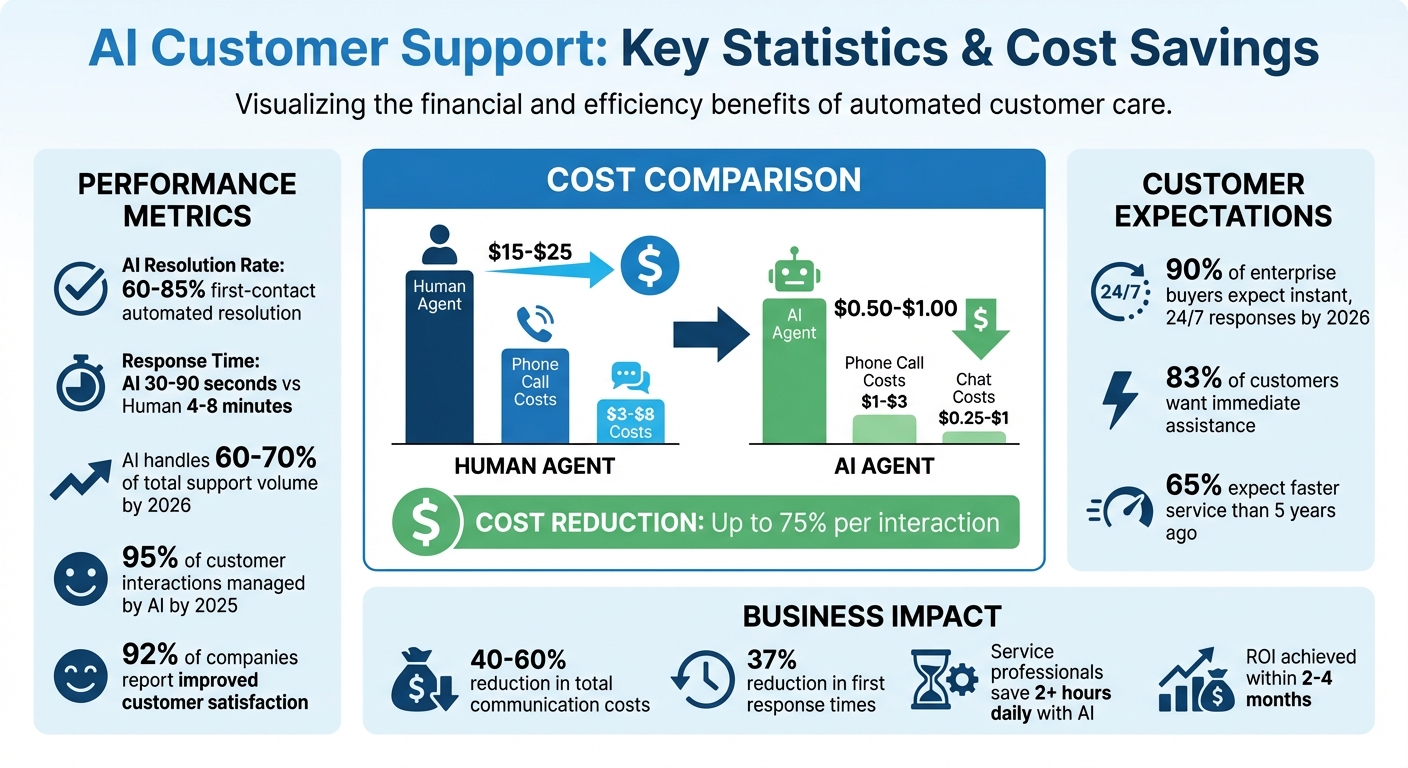
AI Customer Support Cost Savings and Performance Metrics
What is AI Customer Support Automation?
AI customer support automation leverages artificial intelligence to handle customer inquiries independently while also assisting human agents across various channels. Using technologies like Natural Language Understanding (NLU), Retrieval-Augmented Generation (RAG), and machine learning, these systems can process inquiries with precision and speed [1][8]. This combination allows for quicker, more accurate responses that transform how you implement AI customer support.
Modern AI systems go beyond simply answering questions - they grasp context, intent, and even sentiment in real time [1]. Acting as "Autonomous Resolution Engines", they can perform tasks like processing refunds, updating customer relationship management (CRM) records, and checking order statuses via APIs, all without human involvement [1][3]. Current RAG systems achieve an impressive 60–85% first-contact automated resolution rate [1].
AI also shifts customer support from being reactive to proactive by predicting potential issues and addressing them before customers even reach out [1][7]. As Tom Eggemeier, CEO of Zendesk, forecasts:
"80% of all inquiries will be resolved without the help of a human agent" [9].
By 2025, it’s estimated that AI will manage about 95% of all customer interactions [7].
How AI Handles Customer Inquiries
When a customer contacts support, the AI system immediately analyzes the message to determine intent, extract key details, and assess emotional tone [1][11]. For instance, if a customer says, "I'm furious - my package still hasn't arrived", the system identifies both the need to track a shipment and the urgency of the situation.
These systems don’t just respond - they act. If a refund is requested, the AI verifies eligibility, processes the transaction, updates the order system, and confirms everything with the customer [1][11]. They can even handle multimedia inputs. For example, if a customer uploads a photo of a defective product, the AI can detect the issue and initiate a replacement process [1].
Machine learning ensures that these systems continuously improve. By analyzing what leads to successful resolutions, the AI refines its responses over time [10]. When the system can’t resolve an issue, it seamlessly escalates the matter to a human agent, providing all relevant context so the customer doesn’t have to repeat themselves [3][4].
Core Technologies Powering AI Support
The capabilities of AI customer support rely on four main technologies:
- Advanced Language Processing: Interprets intent and sentiment in customer messages for accurate responses.
- Retrieval-Augmented Generation (RAG): Uses a company’s knowledge base, policies, and procedures to ensure responses are grounded in accurate information, avoiding errors or misleading answers.
- Machine Learning (ML): Continuously enhances the system by learning from past interactions to improve future outcomes.
- Workflow Orchestration and Robotic Process Automation (RPA): Handles back-end tasks like updating subscriptions, sending follow-up emails, or processing returns.
These technologies enable AI to provide consistent support across multiple channels, including chat, email, and voice [11][12]. Companies report that AI chatbots can manage up to 80% of routine tasks, with automation leading to a 37% reduction in first response times [10][13]. Additionally, service professionals using generative AI save over two hours of work each day on average [13].
Benefits of Automating Customer Support with AI
Using AI to automate customer support can turn what’s often seen as a cost burden into a competitive edge. Companies implementing AI across voice and messaging channels report cutting 40% to 60% off their total communication costs [14][16]. Beyond cutting labor expenses, addressing the 30%–45% annual turnover rate - which costs $10,000 to $15,000 per new hire - can significantly boost returns [14]. With salaries and benefits accounting for 60% to 70% of most support budgets, automation offers one of the quickest ways to achieve measurable savings [14].
Better Efficiency and Lower Costs
AI-powered systems handle routine queries in 30–90 seconds, far faster than the 4–8 minutes it typically takes human agents [16]. The cost difference is just as striking: human phone calls cost between $8–$15 per interaction, while AI voice agents cost only $1–$3. Similarly, chat interactions drop from $3–$8 with humans to just $0.25–$1 with AI [14].
AI excels at managing repetitive tasks like password resets, tracking orders, and billing questions [14][15][1]. This allows human agents to concentrate on complex problems that require empathy and creative thinking. By 2026, many companies using a hybrid approach will see AI handle 60% to 70% of their overall support volume, leaving the remaining 30% to 40% for human agents to address more nuanced cases [16].
Another advantage? AI works around the clock - no breaks, sick days, or shift changes. This 24/7 availability aligns with modern customer expectations: 83% of customers want immediate assistance, and 65% expect faster service than they did five years ago [17][13]. Additionally, AI eliminates the lengthy training times required for new hires. Updating an AI system typically takes just minutes, while onboarding new team members can take weeks [18].
Better Customer Experiences
While speed and availability are crucial, consistency is what keeps customers satisfied. AI ensures every customer gets the same accurate response, no matter the time or inquiry volume. It’s no wonder that 92% of companies report improved customer satisfaction scores after adopting hybrid support models that combine AI with human escalation options [17].
AI doesn’t just answer questions faster; it tailors responses based on a customer’s history, previous interactions, and purchase behavior. Advanced systems even analyze sentiment in real time, flagging frustration or urgency so human agents can step in immediately when needed [1][4]. This ensures that 69% of customers who prefer self-service for simple issues get quick resolutions, while more complex problems are routed to skilled agents without delay [4].
Additionally, AI eliminates one of the biggest customer frustrations: repeating the same information. When a case is escalated, AI passes the entire conversation history to the human agent, enabling a seamless transition [4][13]. This continuity transforms support from a series of disjointed exchanges into a smooth, cohesive experience. As businesses grow, these enhanced experiences make scaling support much easier.
Scaling Support for Growing Businesses
Traditional customer support models often struggle to scale efficiently. More customers typically require more agents, more training, and higher costs. AI, on the other hand, can handle sudden spikes in demand without the need for additional staff [1][14]. For businesses dealing with seasonal surges or rapid growth, AI ensures consistent service levels while keeping costs stable.
The cost advantage becomes even clearer when comparing pricing structures. Automated resolutions typically cost $0.50 to $1.00 each, compared to $15 to $25 for human-handled tickets [1]. This means that as customer inquiries increase, the cost per interaction actually decreases instead of scaling up.
Getting started with AI involves identifying high-volume, low-complexity tasks - think order status updates or password resets [16]. Focusing on these areas often delivers returns within 2 to 4 months [16]. Success depends on organizing knowledge bases with clear headings and metadata, as the quality of training data directly impacts AI performance [1][4]. Once operational efficiency and customer satisfaction are secured, the next step is selecting the right conversational AI platform to fully capitalize on these benefits.
What to Look for in Conversational AI Platforms
When selecting a conversational AI platform, the goal is to turn the potential of AI-powered automation into measurable business results. The features discussed below are essential for creating an efficient, scalable, and customer-focused support system.
Platforms that achieve automation rates between 70–90% typically include key features that set them apart from older, rule-based systems [6].
Start by assessing the platform's model flexibility. Avoid being locked into a single proprietary AI model. Instead, look for platforms that support multiple models, such as GPT-5, Claude 4.6, or Gemini. This allows you to choose the model that best aligns with your business needs and data [4][20]. As AI technology evolves, this flexibility becomes even more critical.
Another important feature is intelligent human handover. The AI should know when it’s reached its limits, such as handling complex queries or detecting customer frustration through sentiment analysis. At that point, it should seamlessly transfer the conversation to a human agent, complete with the full chat history [4][20][22]. This ensures smooth transitions and better customer experiences.
Beyond answering questions, consider platforms with action-oriented automation. These systems can handle tasks like processing refunds, updating order statuses, or scheduling appointments via API integrations [4][21]. This can dramatically reduce costs, with automated interactions costing $0.50–$1.00 compared to $15–$25 for human-handled tickets [1].
Omnichannel and Multilingual Capabilities
Modern AI platforms should provide a consistent experience across all communication channels. Omnichannel support ensures that conversation history is preserved, whether customers interact via chat, email, SMS, or social media [6][22]. This continuity prevents customers from having to repeat themselves when switching channels.
Multilingual capabilities are another game-changer for businesses looking to expand globally. Advanced AI platforms can handle over 95 languages, enabling you to serve international markets without hiring additional native-speaking staff [23]. However, the best systems go beyond basic translation by adapting to regional norms, dialects, and local formats for dates and currencies [23][24].
This can directly impact your business. For instance, 75% of consumers are more likely to purchase from websites that provide information in their native language [24]. Some platforms can even manage mixed-language conversations, detecting and responding appropriately when customers switch languages mid-chat [23][24]. This means a single AI agent can effectively serve a diverse global audience.
Custom Branding and Analytics
A generic AI experience can hurt your brand. Customers notice when chatbots feel impersonal. With custom branding, you can tailor the AI's tone and appearance to align with your company’s identity. For example, ChatSpark offers customizable widgets starting at $129/month [25].
Analytics and reporting are equally crucial. They transform the AI from an opaque tool into a valuable asset by tracking resolution rates, identifying gaps in your knowledge base, and monitoring sentiment trends. These insights can guide you in conducting a friction audit, where you analyze 12–24 months of support tickets to identify high-volume, low-complexity queries that are ideal for automation [1][6]. For example, if password resets account for 15% of tickets and take six minutes per agent, automating this task could yield significant savings. Analytics can also show improvements in Customer Satisfaction (CSAT) scores, often ranging between 15–25% after deploying AI chatbots [6].
Integration with Business Tools
To maximize the benefits of your AI platform, it must integrate seamlessly with your existing business tools. This includes CRMs like Salesforce or HubSpot, help desks such as Zendesk or Freshdesk, and systems for billing or inventory management [1][19]. Such integrations give the AI a complete view of the customer, enabling it to provide personalized assistance.
With this context, the AI can go beyond answering questions to perform tasks. For example, it can access your order management system to retrieve tracking numbers or process refunds in real time - all without human intervention [1][21]. These integrations can push automation rates as high as 70–90% [6].
Look for platforms that connect easily with tools like Zapier, Freshchat, Square, and Calendly to enable workflows across multiple systems [1][21][19]. Security should also be a priority, so ensure the platform includes role-based permissions and strong data privacy measures to safeguard sensitive information [1].
To roll out the platform effectively, start with a pilot program focused on a specific task - such as "Order Tracking" - for 4–6 weeks. This allows you to test integrations, refine processes, and assess performance without disrupting your broader operations. Businesses following this approach often see a positive ROI within 2 to 4 months [16].
How to Implement AI Customer Support
Setting up AI customer support involves creating a system that handles queries efficiently while building trust with customers. The companies seeing the best returns from AI investments are those that focus on clear business objectives rather than just deploying the most advanced technology [28].
The process starts with identifying what tasks to automate and understanding the reasons behind it. Studies show that 60–80% of support volume typically comes from just 20% of question types [26][27]. By targeting these common, straightforward queries, you can lay the groundwork for a successful AI implementation.
Step 1: Define Your Support Goals and SLAs
Before diving into configurations, take stock of your current performance metrics - like First Response Time (FRT), Average Handle Time (AHT), First Contact Resolution (FCR), and CSAT scores - over the last 90 days [26][4]. These benchmarks will help you assess the impact of your AI system after it's up and running.
Next, analyze your ticket history to create an intent taxonomy. Sort tickets from the past 3–6 months into categories such as billing, troubleshooting, or order tracking, and tag each as "fully automatable", "requires human judgment", or "needs escalation" [26][4]. For instance, tasks like password resets and order status inquiries are often ideal for automation, while refund disputes or technical issues typically need human oversight [2].
Establish clear escalation rules tied to Service Level Agreements (SLAs). Configure the system to route unresolved tickets to human agents when SLA deadlines are near or when the AI struggles to resolve a query after a set number of interactions [4][2]. For high-priority accounts or sensitive issues, consider stricter escalation thresholds.
| Phase | Timeline | Key Activities |
|---|---|---|
| Foundation | Weeks 1–3 | Audit tickets, consolidate knowledge, set metrics [28] |
| MVP Build | Weeks 4–8 | Implement RAG, connect CRM, build escalation flows [28] |
| Expansion | Weeks 9–16 | Add Tier 2 actions (refunds, order changes), optimize prompts [28] |
| Scale | Ongoing | Daily accuracy tracking, expand to new languages/channels [28] |
Step 2: Build Your Knowledge Base
Once your goals are set, focus on creating a centralized, reliable knowledge base. Gather all relevant information from sources like Slack threads, email templates, PDFs, spreadsheets, and internal wikis [30][32]. Disorganized documentation can lead to errors and undermine trust in the AI system.
Prioritize content for the most common queries - those that make up the top 20% of your ticket volume [26]. For example, if most of your eCommerce tickets involve order status, returns, product questions, shipping, or account management, create dedicated articles for each topic. Use structured headings (H1, H2, H3) in Markdown or HTML to make the content easily digestible for the AI [30][32].
Write in natural, customer-friendly language instead of internal jargon. Align your content with how customers typically phrase their questions [29][1]. Implement Retrieval-Augmented Generation (RAG) to ensure AI responses are based on verified internal documentation rather than external, unvetted sources [31][1]. Configure the system to include source citations in every response, so both agents and customers can verify the information [27].
Regularly review and update your knowledge base to remove outdated content, duplicates, or sensitive information. Use AI analytics to identify unanswered questions or low-rated queries, and prioritize these areas for content updates [31][27].
eDesk once said, "AI without a well-structured knowledge base is just a very confident guessing machine" [32].
Step 3: Set Up and Deploy AI Workflows
Start with a shadow-mode test lasting 10–14 days [26][27]. During this phase, the AI drafts responses, but human agents review and refine them before they are sent to customers. This helps ensure accuracy, maintain a consistent brand tone, and build trust within your team.
Set a confidence threshold - typically between 85–95% - to determine when queries should be escalated to a human agent [27][3]. When escalation happens, provide agents with the full conversation history and any cited sources so customers don’t have to repeat their issues [4][2].
As Shantanu Kumar, Chief Solutions Architect at Dude Lemon, explains, "Support automation creates durable value only when customers get faster answers and agents get cleaner escalations they can trust" [2].
Integrate the AI system with backend tools like CRMs, help desks, billing platforms, and inventory management systems via API connections. This allows the AI to perform real-time actions, such as retrieving tracking numbers, processing refunds, or updating orders [1][19][21]. Companies that implement these workflows often achieve automation rates of 70–90% [6].
Finally, run a pilot program focused on a single use case, like "Order Tracking", for four to six weeks. Use this time to test integrations, refine escalation paths, and measure results against your baseline metrics. This approach helps validate the system before expanding to broader use cases [16].
Advanced Techniques for AI Customer Support
Once you've set up your basic AI workflows, taking things to the next level can make a big difference. These advanced techniques help you predict what your customers need, strike a balance between AI efficiency and human interaction, and fine-tune your operations to deliver better support.
Using Predictive Analytics
Predictive analytics moves your support system from simply reacting to problems to actively preventing them. By analyzing past data - like shopping habits, browsing patterns, or prior support requests - AI can predict potential issues before customers even contact you [33].
For instance, if a customer’s purchase frequency or visits to your site drop, the system can flag them as a potential churn risk. This might trigger a personalized message or a special offer to re-engage them [33]. Predictive models can also anticipate busy periods by analyzing seasonal trends, helping you schedule enough agents to handle peak demand [33].
Another advanced feature is sentiment-based routing. If a customer's message shows frustration or distress, the system can escalate the issue to a human agent for a more empathetic response [4].
To get started, focus on clear goals like reducing churn or improving response times. Make sure your data is clean and well-organized, as this is key to accurate predictions [33]. Use dashboards that translate data into actionable insights for your team, and regularly check the system’s accuracy to keep it running smoothly [33].
Combining Human Agents with AI
The best support systems don’t rely solely on AI or humans - they combine the strengths of both. While 86% of customers still prefer speaking to a human and 71% would stop dealing with a company that lacks human support [34], AI can perform routine actions, letting human agents focus on more complex issues.
Take Klarna, for example. In 2024, their AI assistant managed 2.3 million conversations, equivalent to the workload of 700 full-time agents, cutting resolution times from 11 minutes to under 2 minutes [11]. Similarly, Cotopaxi improved ticket deflection by 28% while maintaining a high customer satisfaction score of 4.5 out of 5 by ensuring that complex issues were quickly routed to human agents [11].
One effective method is using "Agent Assist" workflows. Here, AI provides agents with customer history, suggests possible responses, and even flags the sentiment of the conversation before the agent steps in [35][11]. For example, Octopus Energy uses AI to draft email responses, which human agents then review and send. This approach boosted their customer happiness scores by 18% compared to emails written solely by humans [11].
Data from over 20 e-commerce brands suggests that AI should handle around 10–15% of interactions for optimal results. When AI takes on more than 20–30%, satisfaction scores can drop. Start by automating the most common types of tickets [34][35]. Remember, handing off to a human isn’t a failure - it’s a feature. Ensure agents receive the full conversation history so customers don’t have to repeat themselves [4].
Monitoring and Improving Performance
To keep your AI system effective, regular monitoring is crucial. This not only ensures accuracy but also helps maintain high customer satisfaction and cost efficiency. Start by testing in "shadow mode" and aim for confidence thresholds of around 95% before letting AI handle warm transfers to human agents [5][3].
Key metrics to track include:
- Automated Resolution Rate (ARR): Aim for 60–80% of tickets resolved entirely by AI [1].
- First Contact Resolution (FCR): Target 85–95% of tickets solved in the first interaction [1].
- Customer Satisfaction (CSAT): Keep satisfaction scores for AI responses at 85% or higher [1].
- Escalation Quality Score: Ensure at least 90% of escalations are genuinely necessary [1].
- Time to Resolution (TTR): Strive to resolve tickets in 5 minutes or less [1].
| KPI | Description | Target Benchmark |
|---|---|---|
| Automated Resolution Rate (ARR) | Percentage of tickets resolved end-to-end by AI | 60–80% [1] |
| First Contact Resolution (FCR) | Percentage of tickets solved in the first interaction | 85–95% [1] |
| Customer Satisfaction (CSAT) | Satisfaction score for AI responses | ≥85% [1] |
| Escalation Quality Score | Percentage of escalations that were actually necessary | ≥90% [1] |
| Time to Resolution (TTR) | Average duration to resolve a ticket | ≤5 minutes [1] |
During the first month, review these metrics weekly. Once the system is stable, move to monthly audits. Regularly update your knowledge base and incorporate customer feedback to keep your AI aligned with customer needs. For example, if 40% of escalations are tied to a specific topic, make it a priority to add relevant content [5]. Advanced techniques like Retrieval-Augmented Generation (RAG) can also help reduce misinformation, keeping error rates below 3% compared to 15–20% with standard AI models [5].
ChatSpark: AI-Powered Customer Support Platform
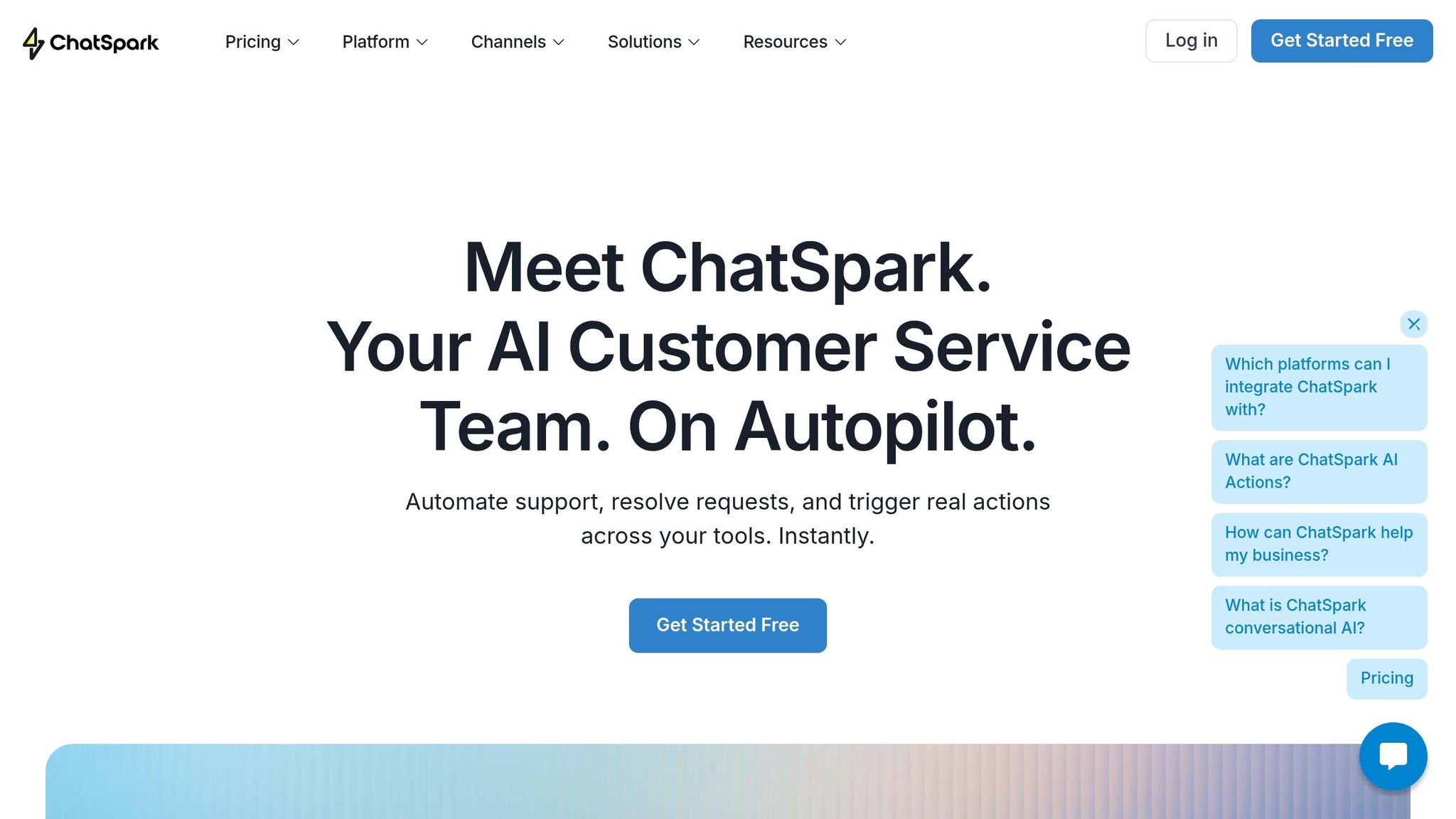
ChatSpark takes AI-driven customer support to a whole new level, combining automation with precision and brand alignment. By leveraging RAG (Retrieval-Augmented Generation) technology, ChatSpark ensures that responses are rooted in your business's actual data - be it website content, PDFs, Google Docs, or YouTube transcripts.
The platform’s 4-step AI engine - intent analysis, multi-pass retrieval, semantic matching, and proprietary reranking using over 10 scoring signals - delivers responses in under 2 seconds. On average, it resolves 80% of customer queries automatically, with enterprise implementations reaching up to 98% resolution rates [36][37].
What makes ChatSpark stand out? Its ability to perform 140+ AI Actions across 40+ platforms. It doesn’t just answer questions - it can check Shopify order statuses, book appointments via Calendly, update Salesforce CRM records, and even create Zendesk support tickets. The ChatSpark CoPilot feature integrates seamlessly with Gmail, Outlook, Zendesk, and Salesforce, saving team members an estimated 2 hours daily [36][38].
"ChatSpark has been managing two of our largest product lines over the past year. It currently handles an average of 1,831 chats per month without any human intervention. Since implementing it on our website, we've realized measurable savings of $119,225." - Lorri G., Customer Service & Technical Support Manager, ITW [36]
ChatSpark supports omnichannel deployment, allowing businesses to interact with customers across six channels - Website, WhatsApp, Instagram, Facebook Messenger, Telegram, and Slack. With automatic language detection, it can respond in over 95 languages [36]. For example, one global construction leader saved over $47,000 in just four months by deploying ChatSpark, handling 10,754 messages with a 98% resolution rate - all on a $4,000 investment [36][37].
ChatSpark Features
ChatSpark is built for businesses that need more than basic canned responses. Its RAG technology ensures responses are grounded in your business's specific data, reducing inaccuracies. You can train the system using various formats, including website URLs, PDFs, CSVs, Google Docs, and YouTube transcripts [39].
The AI Actions layer takes automation to the next level. Instead of merely guiding customers to check their order statuses, ChatSpark retrieves that information directly from platforms like Shopify or BigCommerce. It can also book appointments via Square or Calendly, create Zendesk or Freshdesk support tickets, and update HubSpot or Salesforce contact records - all without human involvement [36][38]. The platform supports:
- 20 actions for support and ticketing systems
- 15 for e-commerce platforms
- 8 for CRM systems
- 6 for payment processors
ChatSpark CoPilot simplifies workflows by providing relevant information and drafting responses without requiring team members to switch tabs or dig through documents [36][38]. Additional features include automated lead capture with embedded forms and natural conversation triggers, as well as suggested prompts - up to 5 clickable options in the chat widget to guide users toward common inquiries [36].
On the security front, ChatSpark offers AES-256 encryption, GDPR compliance, and SOC 2-certified infrastructure. Pro and Enterprise plans also include GA4 integration, enabling businesses to track chat events like session starts, link clicks, and lead captures directly in Google Analytics 4 [36]. When human intervention is necessary, the platform supports live agent handoffs to tools like Intercom, Freshchat, and HappyFox [36].
ChatSpark Pricing
ChatSpark’s pricing is designed to fit businesses of all sizes, from solo entrepreneurs to large enterprises. Each question sent and reply received counts as one message, and advanced AI models on Pro or Enterprise plans consume 20 credits per reply [39]. Annual billing offers a 14% discount, equivalent to nearly two months free [39].
| Plan | Cost | Messages/Month | AI Agents | Training Pages | Key Features |
|---|---|---|---|---|---|
| Basic | $19 | 100 | 1 | 25 | Basic analytics, multiple data sources, website deployment |
| Plus | $59 | 250 | 1 | 50 | 5 AI Actions, ChatSpark CoPilot, REST API, advanced analytics |
| Pro | $129 | 2,000 | 1 | 500 | 40 AI Actions, omnichannel deployment, GA4 tracking, ROI reports, unbranded widgets |
| Enterprise | Custom | Custom | Custom | Custom | Unlimited AI Actions, RBAC, 2FA, audit logs, dedicated account manager |
The Basic plan at $19/month is perfect for small businesses dipping their toes into AI automation. It includes one AI agent, 25 training pages, and basic analytics, with deployment limited to websites [39]. The Plus plan, at $59/month, adds ChatSpark CoPilot for internal productivity, along with 5 AI Actions, REST API access, and advanced analytics - ideal for growing businesses [39].
At $129/month, the Pro plan unlocks omnichannel deployment across platforms like Instagram, WhatsApp, and Slack. It also includes 40 AI Actions, 500 training pages, GA4 tracking, and ROI reporting - great for businesses managing high message volumes [39].
For large-scale operations, the Enterprise plan offers custom pricing and features like unlimited AI Actions, role-based access, two-factor authentication, and dedicated account management [39].
ChatSpark also provides a 14-day free trial on the Basic plan, letting businesses test the platform before committing. You can even stack multiple plans under one account to increase AI agent slots and message limits, with features from the highest active plan applying across all agents. Message limits reset at the start of each calendar month [39].
Conclusion
AI-powered customer support is becoming essential for businesses looking to grow efficiently while keeping costs under control. Current data shows that modern AI systems can now resolve 60–85% of customer inquiries on the first contact without human intervention [1]. By 2025, AI is expected to manage about 95% of all customer interactions [7]. Take Klarna as an example: when they introduced an AI assistant in 2024/2025, it handled the workload equivalent to 700 full-time agents and slashed average resolution times from 11 minutes to just 2 minutes - an impressive 82% reduction [17].
"The goal isn't replacement; it's elevation. AI automates the mundane so your human experts can handle the moments that truly matter" [17].
To see immediate returns, start with high-volume, straightforward tasks like password resets, order tracking, and answering FAQs [1][17]. A well-organized and up-to-date knowledge base is crucial since the quality of AI performance depends heavily on the data it uses [1][5]. Pairing AI with smooth handoffs to human agents ensures seamless customer service, creating a foundation for broader AI adoption across your support operations.
The numbers speak for themselves. The AI customer service market is projected to grow from $12.06 billion in 2024 to $47.82 billion by 2030 [40]. Meanwhile, customer expectations are already evolving. Ninety percent of enterprise buyers now expect instant, 24/7 support [1], and 83% of customers want help as soon as they reach out [17]. These shifts highlight how adopting AI can lead to both happier customers and lower operational costs.
The time to act is now. AI-driven customer support has matured to the point where it can handle everything from 100 to tens of thousands of inquiries with measurable results. Companies that integrate AI into their customer experience strategies today are positioning themselves to thrive in 2026 and beyond. The trends and success stories make one thing clear: adopting AI isn't just an option - it's a necessity for businesses aiming to deliver exceptional customer experiences.
FAQs
How do I choose which support tasks to automate first?
To improve your support operations, begin by diving into your ticket data to pinpoint the most common and well-documented problems. Often, these represent about 20% of tasks but can account for 60-80% of your total support volume. A good starting point is addressing high-frequency, low-complexity issues - things like password resets or checking order statuses.
Once identified, start small by automating these straightforward tasks. Implement self-service tools like FAQs or chatbots to handle them efficiently. However, it’s crucial to have a clear process for escalating more complex queries to human agents. This balance ensures customers get quick answers for simple issues while maintaining satisfaction for more intricate concerns.
What should I do to prevent AI from giving wrong answers?
To minimize mistakes in AI-generated responses, consider employing retrieval-augmented generation (RAG). This approach integrates external, up-to-date information sources to improve accuracy. Enhancing natural language understanding (NLU) is also crucial, as it helps the AI better interpret user intent and context.
Additionally, consistent performance monitoring and retraining the AI with fresh data ensure it stays relevant and effective. For more complex scenarios, incorporating human oversight can be invaluable. Together, these strategies boost the precision and dependability of automated customer support systems.
How do I set up a smooth handoff from AI to a human agent?
To make transitions seamless, it's important to outline clear escalation triggers. These might include situations like handling complex problems, addressing sensitive matters, or responding to visibly frustrated customers. When transferring to a human agent, ensure it's a warm transfer - share vital details such as the conversation history, customer information, prior AI interactions, and any sentiment analysis. This way, the customer won't have to repeat themselves, saving time and reducing frustration.
Additionally, be upfront about wait times. If things are busy, offer alternatives like callback options to give customers more flexibility and improve their overall experience.