Businesses are using AI to meet growing customer demands for immediate, round-the-clock support. Here's why and how they're doing it:
- Customer Expectations Are High: 64% of U.S. customers want real-time responses, and 90% consider fast replies crucial, especially for live chat. Delayed support can lead to lost sales or customer churn.
- Challenges of 24/7 Human Support: Staffing for nights, weekends, and holidays is costly and hard to scale, especially during peak times like product launches or holidays.
- AI as a Solution: AI-powered tools like ChatSpark handle routine inquiries instantly, reducing service costs by 20–40% while improving response speed and consistency.
- Key Benefits of AI: Available 24/7, responds in under 2 seconds, manages high volumes, supports 85+ languages, and integrates with existing systems like CRMs and order trackers.
How It Works: AI tools use natural language processing (NLP) to understand customer queries, even when phrased differently. They learn over time, ensuring accurate and consistent responses.
Getting Started:
- Audit Support Needs: Identify common, repetitive inquiries and after-hours gaps.
- Prioritize Tasks: Automate high-volume, low-complexity tasks like order tracking and FAQs.
- Set Goals: Track metrics like first-response time, containment rate, and customer satisfaction.
Tools Like ChatSpark:
- Plans start at $19/month, scaling to enterprise needs.
- Supports omnichannel deployment (live chat, SMS, email, etc.).
- Customizes responses to match your brand and tone.
Results: AI can resolve up to 80% of routine inquiries, freeing human agents for complex issues. Businesses save costs while ensuring customers get fast, accurate answers anytime.
What AI-Powered Customer Support Is and Why It Works
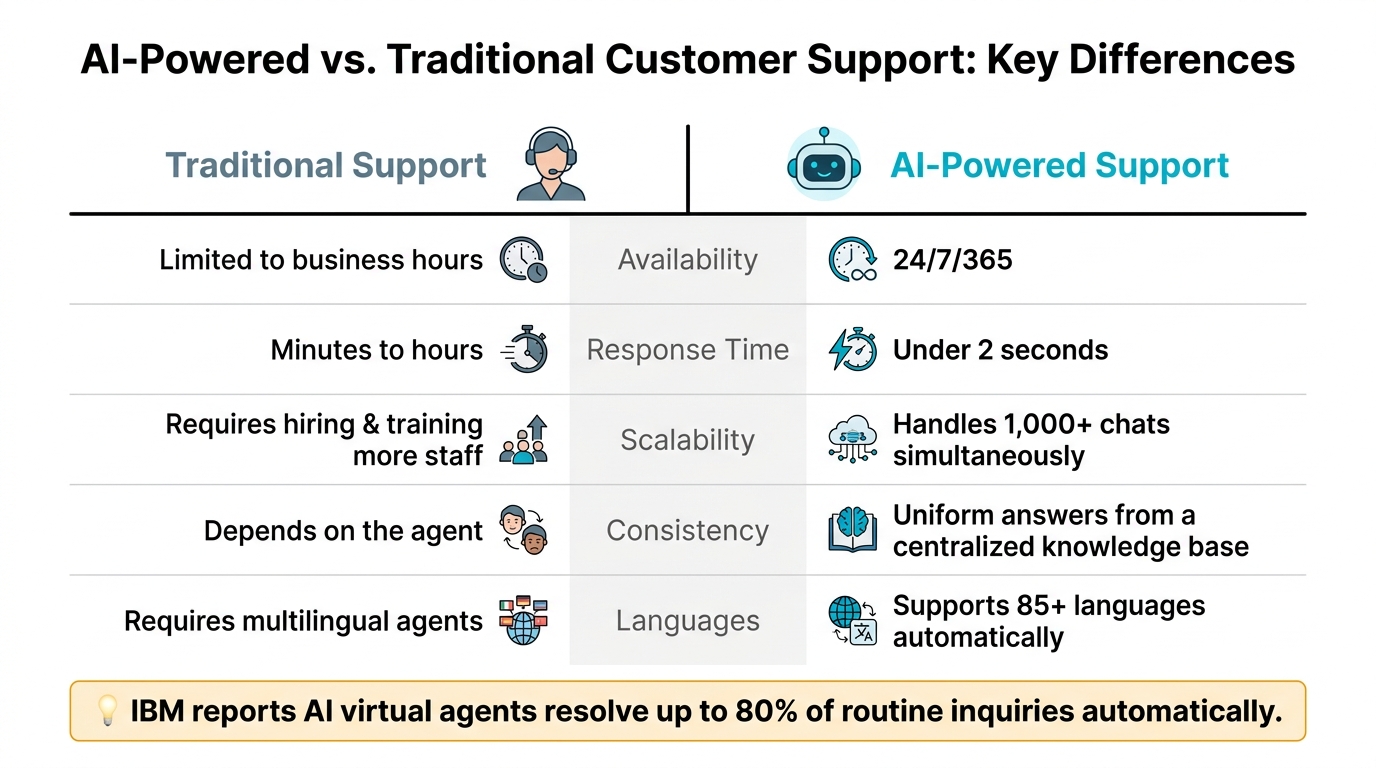
AI-Powered vs. Traditional Customer Support: Key Differences
What AI-Powered Customer Support Means
AI-powered customer support uses chatbots and virtual assistants equipped with natural language processing (NLP) to understand and respond to customer queries, even when phrased differently. For instance, it knows that "Where's my order?" and "Can you track my package?" mean the same thing. By incorporating machine learning, these systems continuously improve, learning from interactions and feedback to deliver better results over time. They also integrate seamlessly with tools like knowledge bases, CRMs, and order management systems, enabling them to handle tasks like tracking orders or updating accounts - all without needing human intervention.
Key Benefits of 24/7 AI Support
AI doesn’t just excel in speed, with response times typically under 2 seconds - it thrives in high-pressure scenarios. Whether it’s Black Friday, the holiday rush, or a major product launch, AI can manage a surge in customer inquiries that would overwhelm human teams. Here’s a quick comparison of AI-powered support and traditional human-only support:
| Factor | Traditional Support | AI-Powered Support |
|---|---|---|
| Availability | Limited to business hours | Available 24/7/365 |
| Response Time | Minutes to hours | Less than 2 seconds |
| Scalability | Requires hiring and training more staff | Handles 1,000+ chats simultaneously |
| Consistency | Depends on the agent | Delivers uniform answers from a centralized knowledge base |
| Languages | Requires multilingual agents | Supports 85+ languages automatically |
According to IBM, companies using AI virtual agents have been able to resolve up to 80% of routine inquiries automatically, depending on how they implement the technology. This reduces the workload for human teams while ensuring that customers get quick answers - even in the middle of the night. [2]
How ChatSpark Delivers 24/7 Support
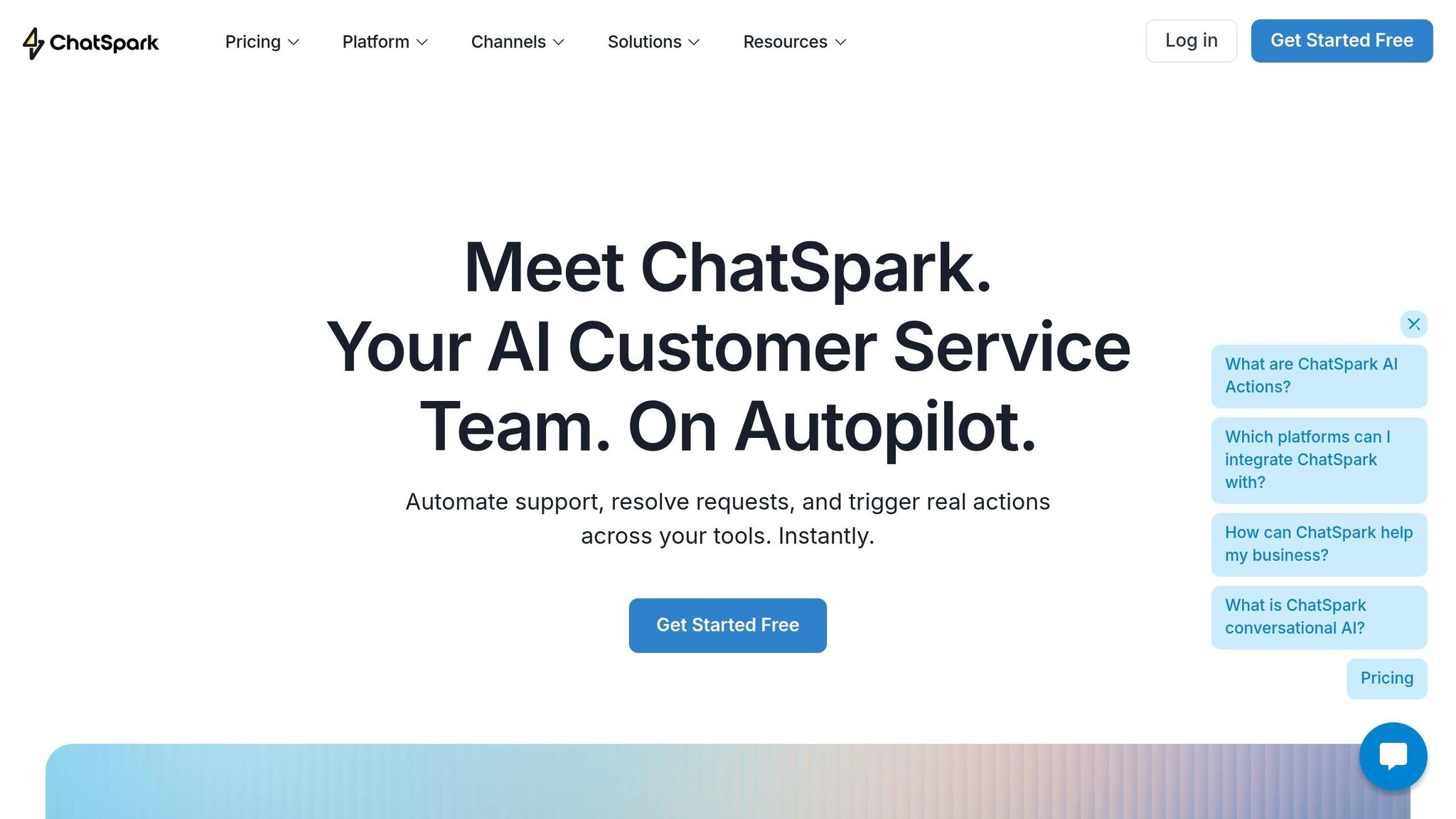
ChatSpark offers these advanced capabilities in a way that’s accessible for businesses of all sizes. Through omnichannel deployment, ChatSpark allows the same AI assistant to operate across your website, live chat, SMS, email, and messaging platforms. This ensures customers receive consistent support no matter how they reach out.
Each ChatSpark AI assistant is trained specifically on your business’s content, including FAQs, policies, product guides, and help articles. This approach, called Retrieval-Augmented Generation (RAG), ensures the AI provides responses that align with your business’s information - not generic answers. With multilingual support in 85+ languages, ChatSpark empowers even small teams to provide seamless, around-the-clock support to a global audience - all without increasing staff. [1]
This setup not only enhances customer service but also creates a strong foundation for evaluating and implementing automation strategies tailored to your needs.
How to Plan and Prioritize AI Automation in Customer Support
How to Audit Your Current Support Needs
A detailed audit is the first step in creating an AI system that provides consistent, round-the-clock support while staying aligned with your customer-focused goals. Start by examining your support workload. Gather 3–6 months of data from all your support channels - email, live chat, phone, SMS, and social media - and categorize it by topic, channel, and time of day.
The aim here is to identify patterns. What are the most common customer questions? When does your ticket volume peak? Are customers reaching out during weekends or late-night hours and experiencing delays in response? By mapping ticket volume to customers' local time zones, you can pinpoint after-hours gaps. According to Zendesk's 2023 CX Trends report, 69% of customers want to resolve as many issues as possible on their own using self-service tools. Unanswered after-hours tickets often indicate unmet demand for these tools.
Focus on frequently recurring inquiries and their volume. Additionally, take note of your current first-response times and CSAT (Customer Satisfaction) scores - these will serve as benchmarks for measuring progress once AI is implemented.
After identifying key issues, prioritize tasks that are both high in volume and low in complexity, as these are prime candidates for automation.
Choosing the Right Tasks to Automate First
Not every customer support task is suited for AI automation. The sweet spot lies in tasks that are high volume and low complexity - those that follow predictable patterns and don’t require nuanced judgment or emotional sensitivity.
Tasks like order status updates, shipping details, business hours, password resets, and basic billing questions are excellent starting points. These types of inquiries have straightforward, well-documented answers that don’t change based on context.
A Deloitte study revealed that companies using AI in customer support achieved a 20–25% reduction in call volume to human agents, primarily by automating simple, repetitive queries.
However, tasks that involve refund disputes, policy exceptions, or require empathy and complex decision-making should remain with human agents. A helpful rule of thumb: if a new agent could resolve the issue using a single help article, it’s likely a good fit for automation. Tasks requiring cross-department collaboration or policy exceptions are better handled by human support staff.
Setting Clear Goals and Metrics
Rolling out AI without clear objectives makes it difficult to measure its success. Before deploying your AI system, establish specific, time-bound goals that address the gaps identified during your audit.
For example, in the first 3–6 months, you might aim to reduce average first-response time for AI-handled chat queries from 10 minutes to under 1 minute, deflect 25–40% of Tier 1 tickets from human agents, or achieve a CSAT score of at least 4.2 out of 5 for automated interactions. If agents currently spend 40% of their time handling FAQs and order-status questions, target reducing that to 15% in the first quarter.
Track AI-specific metrics like containment rate (how often AI resolves an issue without human involvement), escalation rate (how often AI passes issues to a human), and AI CSAT separately from your overall support metrics. This separation allows you to pinpoint where AI is making an impact and where adjustments are needed, laying the groundwork for a smoother transition to AI-powered customer support.
How to Set Up 24/7 Support with ChatSpark
Once you've outlined your automation goals and identified your key metrics, the next step is implementing ChatSpark. This involves three main steps: selecting a plan, integrating your communication channels, and personalizing your AI's tone.
Choosing the Right ChatSpark Plan
Your plan should align with your ticket volume and the channels your customers use.
| Plan | Price/Month | Messages | Training Pages | Best For |
|---|---|---|---|---|
| Basic | $19 | 100 | 25 | Solo entrepreneurs or small businesses testing AI support on one website |
| Plus | $59 | 250 | 50 | Growing businesses needing API access and ChatSpark CoPilot features |
| Pro | $129 | 2,000 | 500 | Businesses requiring omnichannel support on up to six platforms |
| Enterprise | Custom | Custom | Custom | Large organizations needing unlimited actions, webhooks, and dedicated support |
If you're new to AI support, the Basic plan at $19/month is a good way to test the waters. As your business grows and you handle more conversations or expand to platforms like WhatsApp or Facebook, the Pro plan at $129/month offers omnichannel capabilities and removes ChatSpark branding - ideal for creating a polished, professional experience.
Once you've chosen your plan, you're ready to integrate and configure ChatSpark for your business.
Configuring ChatSpark for Your Business
After activating your plan, start by training the AI with relevant business data. ChatSpark supports formats like PDFs, CSVs, website links, and direct text input. Using structured documents with headers and bullet points can improve the AI's accuracy by 2–3 times. Begin with essential resources like FAQs, return policies, and detailed product or service descriptions.
Integrating ChatSpark with your website is simple - just add a JavaScript snippet to your site's header or use the WordPress plugin. For Pro and Enterprise users, the AI can also be deployed across platforms like WhatsApp, Instagram, Facebook Messenger, Telegram, and Slack without needing to duplicate workflows.
To streamline operations, set up keyword triggers (e.g., "refund" or "complaint") and define sentiment thresholds (e.g., below -0.6) to automatically escalate certain conversations to human agents. Proper configuration ensures smooth, uninterrupted support and makes troubleshooting more efficient.
Customizing AI Responses and Tone
Once your channels are integrated, focus on tailoring the AI to reflect your brand's personality. Avoid generic responses by using ChatSpark's customization options. You can adjust the AI's tone to be Formal, Friendly, or Casual, upload a 64x64px avatar for a personal touch, and match the chat widget's colors to your brand using hex codes. These adjustments help maintain consistent communication and enhance customer satisfaction.
For businesses with a diverse customer base in the U.S., enabling multilingual support is a smart move. ChatSpark automatically detects and responds in the customer's language from a library of over 85 options. With its "train once" feature, you only need to upload documentation in English - the AI takes care of translating responses into the customer's preferred language without additional training. This makes it easy to provide seamless support across multiple languages.
How to Monitor and Scale AI-Driven Customer Support
With your ChatSpark system up and running, the key to keeping it effective lies in ongoing monitoring and scaling. This builds directly on the earlier planning and implementation steps.
Tracking Key Metrics and Performance
Once ChatSpark is live, start tracking its performance immediately. Keep an eye on metrics like First Response Time (FRT), Containment Rate, and Customer Satisfaction (CSAT) to ensure the system is meeting expectations.
- FRT measures how quickly the AI responds to customer inquiries. Aim for responses within 15 seconds.
- Containment Rate shows how often the AI resolves issues without needing human intervention, with a target range of 30–70%.
- CSAT, typically collected via post-chat surveys on a 1–5 scale, reflects how satisfied customers are with their interactions. A score of 80% or higher is a good benchmark.
Use ChatSpark's analytics dashboard for daily reviews instead of waiting for monthly reports. For example, if you notice a consistent drop in CSAT scores - say, 10–15 points - after 9:00 PM ET, this could signal a need for better AI support during late hours. Similarly, filtering by channel can reveal specific challenges. If your website chat performs well but SMS struggles, the issue might lie in the flow design for that channel. These insights help pinpoint areas for improvement and guide your next steps.
Using Feedback to Improve AI Accuracy
Customer feedback is a goldmine for refining AI accuracy. After each chat, prompt users with a simple thumbs-up/down or a one-question CSAT survey. Then, make it a habit to review lower-rated interactions weekly. Common issues often fall into one of three categories: misinterpreted customer intent, outdated information, or an inappropriate tone.
For example, if customers frequently complain about unclear shipping updates, the solution might be as simple as updating the FAQ, rephrasing to manage expectations (e.g., "Your order usually arrives within 3–5 business days"), or linking ChatSpark to your shipping provider’s API for real-time updates. Additionally, ask human agents to flag cases where the AI gave incorrect responses. Feeding this data back into training improves future performance.
A 2023 MIT/BCG study found that AI-assisted agents handled 13.8% more issues per hour and boosted customer satisfaction by 9%. This highlights how a feedback loop not only sharpens AI accuracy but also enhances overall efficiency.
Expanding Support Capabilities Over Time
Scaling your AI support system works best when done step by step. Start with your busiest channel - often your website - and expand to others like SMS, WhatsApp, or Instagram only after stabilizing performance on the primary channel. Each new channel will need its own fine-tuning, as customer expectations and communication styles can differ.
Once ChatSpark handles basic tasks like FAQs and order updates reliably, you can move on to automating more complex processes. For instance, IBM reports that well-trained virtual agents can resolve 70–80% of level-1 support issues without human help. Consider integrating ChatSpark with tools like HubSpot, Salesforce, or Zendesk. This allows the AI to perform actions such as updating contact records, creating support tickets, or even confirming appointments. Tracking end-to-end case resolutions will help you gauge how mature and effective your system has become.
Conclusion: Taking the Next Step Toward AI-Powered Customer Support
This guide shows that implementing 24/7 AI support isn't just possible - it’s a smart move for businesses looking to improve efficiency and cut costs.
Virtual agents can significantly reduce expenses while improving customer experience. In fact, a PwC survey revealed that 32% of customers would leave a brand they love after just one bad experience [2]. This highlights how important it is to avoid service gaps, especially during late nights or busy holiday seasons when traditional support might not be available.
The key to success lies in setting clear objectives, maintaining a well-structured knowledge base, and regularly reviewing performance - not just relying on the technology itself. With ChatSpark, you get everything you need to build that strong foundation. Plans start at just $19/month for small operations, with options to scale up to enterprise-level solutions tailored to your business as it grows. ChatSpark’s flexible features make adopting AI support a straightforward process.
If your business is struggling with slow response times after hours, overwhelmed agents handling repetitive questions, or rising support costs, it’s time to act. A focused 30-day rollout targeting your top three high-volume inquiries can deliver noticeable results in just a month.
The goal here isn’t to replace your team but to ensure that customers get fast, accurate answers - whether it’s 2:00 PM or 2:00 AM - so your human agents can dedicate their time to tasks that truly require their expertise.
FAQs
How do I know which support tickets to automate first?
Take a deep dive into your last 90 days of support data. The goal? Identify tasks that pop up over and over again - things like order tracking, password resets, and return policy questions. These types of inquiries are usually predictable and follow a clear structure, making them perfect candidates for automation.
Where to Focus Your Efforts
Look for issues that make up a big chunk of your Tier 1 support workload - typically around 40–60%. These are the straightforward, high-volume tasks that your team spends the most time on.
Here’s a trick to narrow things down: apply the 80/20 rule. This principle suggests that about 20% of your ticket categories are likely driving 80% of your total support volume. For example, if most of your tickets fall into just a few categories, those are your prime targets for streamlining.
Why Automation Matters
Once you’ve pinpointed the repetitive tasks, think about how automation can help. Automating these areas can dramatically cut response times and free up your team to focus on more complex issues. Whether it’s through chatbots, self-service portals, or automated email responses, the right tools can make your support process faster and more efficient.
When should the AI escalate a conversation to a human agent?
AI systems should transfer a case to a human agent under specific conditions. If the AI's confidence in its response falls below 40%, it must escalate immediately. Similarly, if confidence is between 60%-74% and the user explicitly requests escalation, the case should also be routed to a human.
The two-strike rule adds another layer: if the AI fails to resolve a query twice, it should escalate the issue. Additionally, certain topics - such as billing disputes, security concerns, or instances of user frustration or repetitive queries - should always bypass the AI and go directly to a human agent. These measures ensure a better user experience and appropriate handling of sensitive matters.
What data do I need to train an AI support assistant accurately?
To train an AI support assistant effectively, it's crucial to centralize your information into one dependable source. This helps eliminate inconsistencies and ensures the assistant has a solid foundation. Start by collecting resources such as FAQs, product manuals, policy documents, and recent support interactions (covering at least the last 90 days).
Carefully review this material to spot any inaccuracies and identify repetitive questions that could be automated. If you notice any missing information, create new documentation to address those gaps. The key is to ensure the AI is built on structured, verified, and accurate data for optimal performance.