AI is transforming customer support, making it faster, more efficient, and cost-effective. Companies like Klarna, The Home Depot, and Lyft are leveraging advanced AI tools to handle high ticket volumes, reduce wait times, and improve customer satisfaction - all while cutting costs.
Here’s what you need to know:
- High Ticket Volume: AI deflects up to 75% of basic inquiries, saving millions annually for businesses like a Fortune 500 SaaS company and TaskFlow.
- Faster Responses: Tools like AI-powered summaries and automated replies cut resolution times by up to 87%.
- Cost Savings: Businesses like Best Egg save hundreds of thousands annually by automating repetitive tasks.
- Consistent Support: AI ensures uniform responses across channels, helping companies like HelloSugar scale operations without adding staff.
These real-world examples show how AI is solving common support challenges, from automating FAQs to assisting human agents. Businesses are saving time, cutting costs, and improving the customer experience - all while maintaining a balance between AI and human interaction. This is often achieved through a human-in-the-loop approach to ensure accuracy.
AI Customer Support ROI: Real Business Results & Key Metrics
Common Customer Support Problems AI Can Solve
Most customer support teams face the same challenges: an high volume of customer inquiries, limited time to address them, and customers reaching out across multiple channels while expecting consistent, high-quality service. These pain points highlight why AI has become a game-changer for customer support.
High Ticket Volume and Rising Costs
Traditional support models struggle because costs increase directly with ticket volume. More customers mean more tickets, which demands more staff and drives up expenses. AI, however, flips this equation.
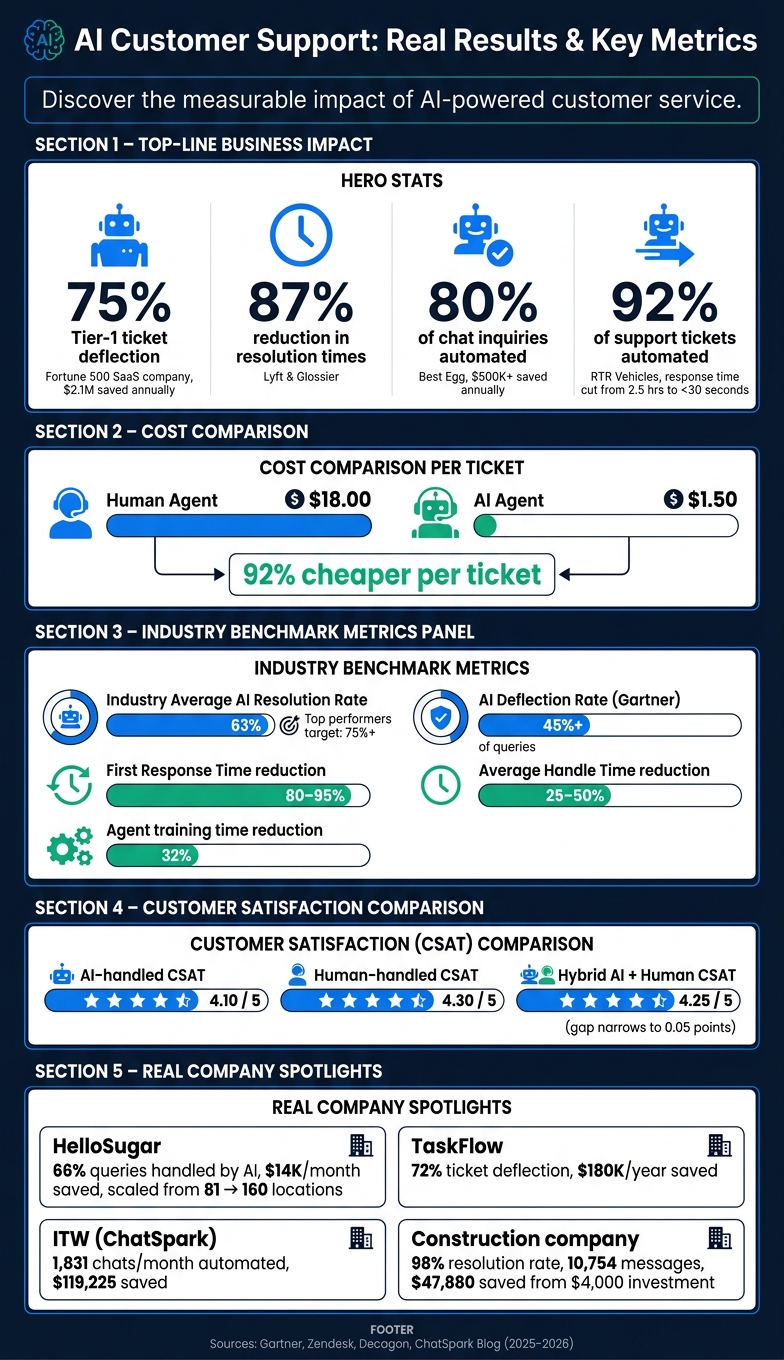
Agents often spend 30–40% of their time switching between various systems - like CRMs, billing tools, and internal wikis - leading to inefficiencies and longer customer wait times [4]. AI can deflect up to 75% of Tier-1 tickets, significantly reducing this burden. For instance, during 2025–2026, a Fortune 500 cloud-collaboration SaaS company managing 140,000 monthly tickets deployed a multi-agent AI system. This initiative resulted in 75% Tier-1 ticket deflection, saving $2.1 million annually within just 12 months [5]. Similarly, TaskFlow, a project management platform serving 15,000 users, deflected 72% of its 1,400 monthly tickets using AI. This approach saved the company $180,000 annually in hiring costs and allowed the human team to focus on more complex, value-driven tasks [6].
Slow Response and Resolution Times
Delayed responses don't just irritate customers - they can damage trust. When someone encounters a billing issue or a broken feature, waiting hours or even days for help sends the message that their concerns aren't a priority.
AI tackles this by resolving common issues instantly and speeding up responses for escalated cases. Tools powered by AI can generate contextual draft responses using prior ticket histories and internal documentation, so agents don’t have to start from scratch. Additionally, during shift changes, AI can summarize lengthy conversations in seconds - a task that used to take up to 15 minutes [1]. Studies indicate that AI-powered summarization alone saves 1.5 to 2 minutes per customer interaction [7]. Multiply those savings across thousands of daily interactions, and the time benefits become enormous.
Inconsistent Support Across Channels
Customers expect seamless and consistent support, no matter the channel they use. Unfortunately, many support teams work in silos, leading to varying experiences depending on the platform or agent handling the ticket.
AI addresses this by relying on a centralized knowledge base, ensuring that the answers provided on live chat are the same as those given via email or messaging apps. AI also maintains context across channels, so customers don’t have to repeat themselves when switching platforms. A great example is HelloSugar, a salon chain. In November 2025, they deployed AI agents that managed 66% of customer queries, saving $14,000 monthly. This efficiency allowed the company to scale from 81 to 160 locations within a year - without increasing their support staff.
These real-world examples demonstrate how AI effectively tackles common support challenges, paving the way for better customer experiences and more efficient operations.
How Businesses Are Using AI for Customer Support: Specific Examples
Here’s a closer look at how companies across different industries - retail, fintech, and industrial - are implementing AI customer support to reshape their operations.
Handling FAQs and Repetitive Requests Automatically
Glossier, the beauty brand with a global reach, tackled a common e-commerce issue: tracking "Where is my package?" inquiries. In March 2026, they rolled out an AI solution that didn’t just spit out tracking numbers. Instead, it opened tracking links, analyzed shipping data, and pinpointed specific issues like customs delays, carrier problems, or lost packages.
"If we were going to use AI for this use-case, we needed an AI solution that wouldn't just say 'Your order is shipped.' The AI would have to open tracking links, parse the details, and figure out what's really going on, just like a human agent would." - Amy Kemp, Director of Omnichannel Customer Experience, Glossier [8]
This system achieved an impressive 91% accuracy rate for shipping-related tickets and slashed response times by 87% [8]. Beyond the numbers, it freed up customer service agents to focus on more intricate issues.
Using AI to Help Human Agents Work Faster
Lyft showed how AI can enhance, not replace, human agents. In May 2026, they introduced Claude, an AI assistant designed to handle routine rider and driver inquiries. For more complex cases, Claude generated quick summaries, providing agents with the context they needed to resolve issues faster.
"Claude's personality is really what stuck out to me. It felt organic. Our customers were conversing more and opening up about the issues they were having, which then enabled us to solve them better." - Elyse Hovanesian, Product Lead for AI in Support, Lyft [3]
The results? A dramatic 87% reduction in resolution times and a 30% improvement in decision-making accuracy [3].
Routing and Prioritizing Tickets with AI
Best Egg, a fintech company based in Delaware, used AI to separate routine questions from sensitive financial matters that required human attention. Led by Corrine Porcaro, Senior Director of Service Quality, they automated 80% of chat inquiries. To stay compliant with strict financial regulations, the AI was limited to pre-approved responses.
"Zendesk AI agents are a game changer. It has turned our agents from widget movers into problem solvers." - Corrine Porcaro, Senior Director of Service Quality, Best Egg [2]
This shift saved the company over $500,000 annually and allowed their U.S.-based agents to focus on tasks that demanded human judgment [2].
Running Omnichannel Support Automation with ChatSpark
Industries with high message volumes and lean support teams have seen measurable results using ChatSpark. For example, Illinois Tool Works (ITW) deployed ChatSpark in 2025 to handle support for two large product lines. Over the course of a year, the AI managed an average of 1,831 chats per month without human involvement, saving the company $119,225 in operational costs (ChatSpark Blog, 2026).
"ChatSpark has been managing two of our largest product lines over the past year. It currently handles an average of 1,831 chats per month without any human intervention. Since implementing it on our website, we've realized measurable savings of $119,225." - Lorri G., Customer Service & Technical Support Manager, ITW (ChatSpark Blog, 2026)
Another success story comes from a global construction products company that used ChatSpark over four months in 2025. Their AI system processed 10,754 messages with a 98% resolution rate, saving 66 days of agent time and generating $47,880 in savings from an initial $4,000 investment [9]. Similarly, RTR Vehicles, a performance automotive brand, automated 92% of its support tickets, including questions about product fitment and order tracking. This cut response times from 2.5 hours to under 30 seconds, allowing the team to scale down from four full-time employees to just one part-time worker, saving $15,000 per month [page 2].
How to Measure the Impact of AI on Customer Support
Implementing AI is just the beginning; the real challenge lies in tracking its effectiveness. The right metrics help determine whether your AI strategy is delivering real value or just adding complexity.
Automation Rate and Cost Reduction
Two key metrics to monitor are the automation rate - the percentage of tickets resolved entirely by AI - and cost per resolution. In 2026, the average AI resolution rate across the industry is 63%, with top performers aiming for over 75% [10]. When it comes to costs, AI significantly outpaces humans, offering several ways to reduce customer service costs. While human resolution costs average around $18 per ticket, AI resolves tickets for roughly $1.50 each [13].
It’s important to distinguish between deflection (preventing tickets from reaching agents) and resolution (actually solving the issue). According to Gartner, AI deflects more than 45% of queries, but only 14% are fully resolved through self-service [11]. For a clearer picture, tracking True Deflection - tickets that don’t reopen within seven days - is essential [14]. Once these efficiencies are measured, consider how they influence customer satisfaction and response times.
Customer Satisfaction and Resolution Time
While cost savings are important, customer satisfaction (CSAT) remains a vital metric. AI-handled tickets typically achieve a CSAT score of 4.10 out of 5, compared to 4.30/5 for human agents. However, when hybrid systems are used - where complex cases escalate to a human - the gap narrows to just 0.05 points [11]. This shows that AI can maintain satisfaction levels with the right escalation protocols in place.
"Companies aiming to deflect customers will lose money in the long run - there should never be a dead end, only an escalation path." - Jesse Zhang, Co-Founder & CEO, Decagon [11]
AI also excels in speed. It can reduce First Response Time by 80–95% and cut Average Handle Time by 25–50% [10][11]. These improvements significantly enhance the customer experience while streamlining operations.
Agent Productivity and Onboarding Time
AI doesn’t just handle tickets - it also boosts agent productivity. By automating workflow summaries, AI reduces agent training time by 32% [12]. This means new hires can get up to speed faster, saving both time and resources.
Another useful metric to track is the number of tickets handled per agent per day. As AI takes over routine tasks, agents can focus on more complex cases that require human expertise. However, to maintain accuracy, it’s crucial to regularly audit the AI’s knowledge base. Studies show that about 40% of help center articles contain outdated information, which can increase AI’s hallucination rates to 30% if not addressed [12]. Monitoring these factors ensures your AI deployment stays efficient and reliable across your support workflows.
How to Implement AI Customer Support: Steps and Best Practices
A Step-by-Step Approach to Deploying AI Support
So, you've identified your key metrics - now what? The first step is diving into your data.
Start by analyzing the last 90 days of customer tickets to identify recurring, straightforward issues. For most businesses, about 20% of topics account for 80% of the total ticket volume. These typically include questions like order status inquiries, password resets, return policies, and store hours. These are perfect candidates for automation. Next, gather all your help articles, macros, and policy documents into a single, up-to-date knowledge base. If your content is disorganized or outdated, it could significantly drag down the AI's initial performance.
Roll out your AI solution in stages. Begin with a 10–14 day testing period where the AI drafts responses for human review, but doesn't interact directly with customers. Once you’re confident in its accuracy, move to a limited pilot phase, handling around 10–20% of web chat traffic. Gradually expand to other channels. To ensure quality, set confidence thresholds (usually 85–95%). This way, low-confidence responses are automatically escalated to human agents, complete with all the necessary context.
With the technical setup in place, it’s time to focus on integrating your team.
Getting Your Support Team on Board
Even the best AI rollout can stumble if your team isn’t on board. Resistance from agents - often rooted in fears of being replaced - can derail the process. To avoid this, involve your team from the start.
Engage frontline agents by having them help define AI intents, review draft responses, and flag ambiguous cases. This not only builds their sense of ownership but also ensures the AI reflects real-world language patterns. Managers should shift their focus from ticket volume to broader goals like improving CSAT scores and refining AI performance. Additionally, emphasize new opportunities, such as roles in AI workflow design or managing the knowledge base, to show how AI can enhance - not replace - their careers.
Empower agents to make the final call on AI-generated responses. When agents can accept, edit, or reject AI drafts, it reinforces their role as decision-makers. For sensitive issues - like billing disputes, security concerns, or complaints - design workflows where the AI collects relevant details and seamlessly hands the case to a human.
Using ChatSpark to Scale Customer Support
ChatSpark takes this structured, team-focused approach and applies it across multiple channels. It allows businesses to scale their support operations without hiring additional staff. Whether customers reach out via websites, WhatsApp, Instagram, Facebook, Telegram, or Slack, ChatSpark ensures consistent responses.
The platform’s centralized analytics make it easy to track automation rates, escalation patterns, and CSAT scores across all channels from one dashboard. This helps teams pinpoint areas for improvement and refine workflows.
For those just starting out, ChatSpark offers a Basic plan at $19/month, which supports solo users with up to 100 messages per month. Growing businesses can opt for the Pro plan at $129/month, which includes 2,000 messages per month, omnichannel deployment, integrations with tools like Zapier and Freshchat, and Google Analytics 4 tracking. Larger organizations can choose the Enterprise plan, featuring custom message limits, unlimited AI actions, SOC 2 compliance, and a dedicated account manager. This tiered pricing structure allows businesses to test the waters, prove their ROI, and scale up as needed.
FAQs
What tickets should I automate first with AI?
Start with tasks that are high in volume but simple to handle - the kind that doesn’t rely on subjective decision-making. Think about the 20/80 rule: roughly 20% of inquiry types often account for 60%-80% of your total support workload. Focus on automating straightforward requests like password resets, order tracking, and basic product-related questions. Other tasks, such as collecting leads or handling privacy requests, are also excellent options. By automating these routine processes, your team can concentrate on resolving more challenging and nuanced issues.
How do I prevent AI from giving wrong answers?
To minimize incorrect AI responses, consider implementing Retrieval-Augmented Generation (RAG). This approach ensures the AI draws on verified content from your knowledge base rather than relying solely on its internal memory. You can also establish strict confidence thresholds, allowing uncertain queries to be escalated to human agents for review. Another key practice is to program the AI to acknowledge when it doesn't have enough information. Finally, using citation-aware formats helps link claims to trustworthy sources, adding an extra layer of reliability.
What metrics prove AI support ROI?
Businesses evaluate the return on investment (ROI) of AI support using several key metrics:
- Cost savings: This includes metrics like lower costs per ticket and reductions in labor expenses.
- Efficiency gains: High ticket deflection rates and shorter handle times are prime indicators of improved efficiency.
- Customer experience improvements: Metrics such as higher CSAT (Customer Satisfaction) scores and quicker response times highlight better customer experiences.
For revenue-focused outcomes, businesses look at reduced churn rates and increased conversions, both of which can benefit from the 24/7 availability that AI support provides.