Most chatbot failures come down to three problems: blocking human help, using weak or old knowledge, and running the bot without clear metrics or support system links. If you fix those three areas early, you cut repeat contacts, lower agent cleanup, and avoid the kind of bot errors that hurt trust.
I’d sum it up like this:
- Don’t trap people in the bot. Give them a clear way to reach an agent.
- Don’t let the bot answer from bad or old content. Review chats, clean up the knowledge base, and watch language quality.
- Don’t run the bot alone. Connect it to your CRM, help desk, and reporting tools so it can use context and so you can spot problems fast.
A few numbers make the point fast:
- 74% of organizations with AI chatbots have rolled them back or shut them down after failures
- 35% saw support queues grow after bot issues
- 87% of customers still need a human to finish some cases
- Bots without clear resolution checks can drive 2.3x more repeat contacts within 48 hours
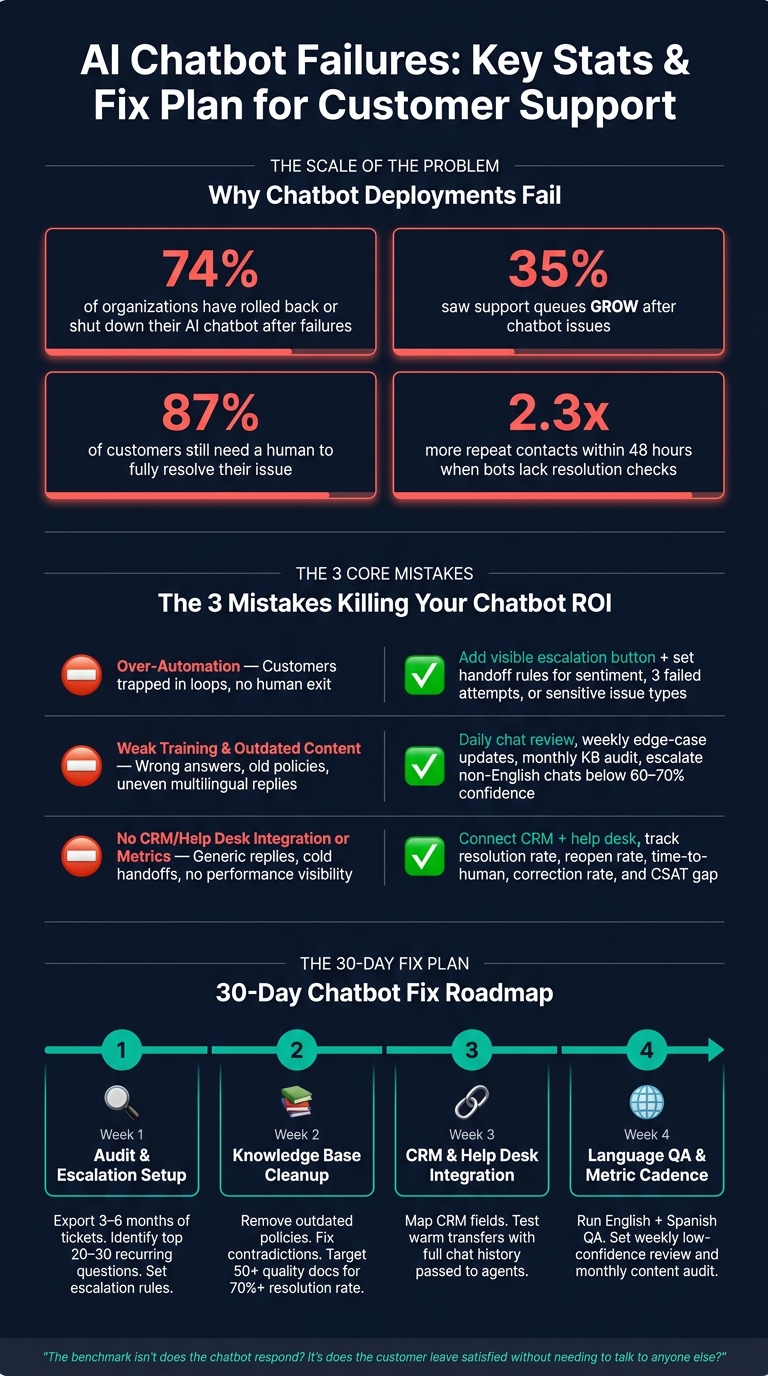
AI Chatbot Failures: Key Stats & Fix Plan for Customer Support
Quick Comparison
| Mistake | What goes wrong | What I’d do instead |
|---|---|---|
| Over-automation | Customers get stuck in loops and can’t reach a person | Add a visible “Talk to an Agent” option and set handoff rules |
| Poor training and old content | Wrong answers, weak policy handling, uneven replies across languages | Review flagged chats, update the KB often, and escalate low-confidence non-English chats |
| No integrations or metrics | Generic replies, weak handoffs, no clear view of bot performance | Connect enterprise CRM and help desk tools and track resolution, reopen rate, time-to-human, and CSAT gap |
The short version: a support bot should answer simple questions, pass hard cases to humans, and give agents context when it hands off. If it can’t do that, it adds work instead of cutting it.
That’s the lens I’d use to read the rest of the article.
2. Mistake #1: Over-Automating and Blocking Access to Human Agents
The first mistake is simple: don’t trap people in the bot.
Over-automation happens when a chatbot tries to do too much and gives customers no clear way to reach a person. That’s where frustration starts. And once frustration kicks in, trust usually drops fast.
What This Looks Like in Real Support Workflows
In day-to-day support, this often looks like a chatbot loop. The bot reads the issue the wrong way, serves up a generic reply, and then asks the same question again. Nothing moves forward, and the case stalls [2][6].
This gets even worse with billing disputes, account lockouts, or service outages. In those cases, people aren’t looking for another canned answer. They need someone who can step in and fix the problem.
The numbers back that up: 80% of consumers say chatbots increased frustration, 87% still need a human to fully resolve the issue, and 44% are frustrated when no human option is offered at the start [7][6].
So the answer isn’t to pull back on automation altogether. It’s to build better escalation into the system.
A 2024 ruling in Moffatt v. Air Canada made that risk hard to ignore. In that case, a chatbot gave false refund guidance, and the airline was held responsible for the loss [8].
How to Set Up Clear Human Handoff Rules
The handoff to a person shouldn’t be treated like some rare backup plan. It needs to be part of the main flow from the start.
Make the human option visible right away, not buried after the bot fails a few times. A persistent "Talk to an Agent" or "Contact Support" button inside the chat widget gives people a clean exit when the bot hits a wall.
It also helps to set plain rules for escalation. Move the conversation to a human when customers use escalation phrases, hit 2 to 3 failed attempts, or show frustration [2][9]. Some issue types should skip the bot almost at once, including:
- Billing disputes
- Refund exceptions
- Legal threats
- Medical advice
- VIP issues
One more thing matters here: pass the agent a summary of the conversation. That way, the customer doesn’t have to repeat the whole story from scratch.
Comparison Table: Automation-Only vs. Hybrid Support Flows
| Factor | Automation-Only Flow | Hybrid (AI + Human) Flow |
|---|---|---|
| Resolution capability | Limited to simple FAQs and routine tasks [6][8] | Handles edge cases, billing issues, and emotional situations [8] |
| CSAT | ~58.8% [3] | ~64.0% [3] |
| Workload | High - agents absorb frustrated customers from failed loops [2] | Lower - agents focus on complex, high-value interactions [4] |
| Sensitive cases | High risk of policy errors or legal exposure [8] | Handled by humans who can apply judgment and empathy [8] |
| Customer trust | Erodes when escalation is unavailable | Maintained through visible, reliable handoff options |
3. Mistake #2: Poor Training, Weak Language Support, and Outdated Content
Once customers can get past the bot, the next problem is what the bot says before the handoff. After over-automation, the next big failure is weak bot knowledge. If the knowledge base is messy, old, or missing key details, the bot doesn't scale support. It scales mistakes.
Why Bad Knowledge Sources Produce Bad Answers
Most failures come from a few plain issues: conflicting content, old pricing or troubleshooting steps, and know-how that lives only in senior agents' heads. If internal discount rules are indexed without clear limits, the bot can surface them to everyday shoppers, like in the EverHelp example [3].
Poor knowledge leads to repeat contacts, more agent cleanup, and avoidable escalations. Policies and pricing often change faster than the docs do. So when a bot cites an old refund rule, you're not just dealing with a bad answer. You're dealing with risk.
The fix is simple, but it takes discipline. Use a clear maintenance rhythm:
- Review flagged chats daily
- Update edge cases weekly
- Audit stale policy content monthly
- Run a quarterly review [9][14][16]
Where Multilingual Support Breaks Down
Multilingual customer support starts to slip when English content gets translated without enough context. Then technical terms turn fuzzy, or worse, misleading in another language. A Spanish-speaking customer should get the same answer as an English-speaking customer, not a weaker version of it.
This is a support consistency problem, not just a localization problem. If answers change by language, support is uneven. In regulated industries, that kind of gap can create compliance risk [13]. A smart rule here is to escalate non-English chats when confidence drops below 60% to 70% [15][9].
Comparison Table: Weak Training Setup vs. Maintained Support Knowledge
| Factor | Weak Training Setup | Maintained Support Knowledge |
|---|---|---|
| Accuracy | High wrong-answer rate; relies on internet training data [11][14] | Grounded in verified, business-specific data [11] |
| Unanswered Basic Questions | Roughly 20% of customers still can't get simple questions answered [12] | Low; curated KB reduces avoidable escalations [16] |
| Trust | 53% of customers lose trust after incorrect policy handling [3] | High; can match top human agent quality at 92% [3][16] |
4. Mistake #3: Running the Chatbot Without CRM, Help Desk, and Metrics Tracking
This problem shows up when the bot works in a silo.
If it can't pull customer history or send results back into support systems, it can't solve issues well or get better over time. A chatbot without CRM, help desk, and analytics links is stuck guessing.
When a bot can't see ticket history, account status, or order history, it usually falls back on the same generic reply for everyone. Then the human agent has to start over from zero. That's why integration matters just as much as bot training and handoff.
The data backs that up. Chatbots that end conversations without checking whether the issue was solved lead to 2.3x more repeat contacts within 48 hours than bots that use clear goal-confirmation steps [17]. On top of that, 34% of businesses say their infrastructure has trouble connecting chatbots to other business tools at all [1].
Which Metrics Support Leaders Should Track
Deflection rate by itself can paint the wrong picture. A bot may look good in a dashboard while customers are still dropping off before they get help.
A better view comes from tracking resolution rate, reopen rate, time-to-human, correction rate, and the CSAT gap between bot-assisted support and overall support. Each one points to a direct outcome:
- Resolution rate shows whether the issue was fixed.
- Reopen rate shows whether the problem came back.
- Time-to-human shows how long the bot slows down access to an agent.
- Correction rate shows how often agents have to clean up bot mistakes.
- CSAT gap shows whether the chatbot experience is pulling down overall satisfaction.
Comparison Table: Standalone Chatbot vs. Integrated, Metrics-Driven Support
| Factor | Standalone Chatbot | Integrated, Metrics-Driven Support |
|---|---|---|
| Response Personalization | Generic, FAQ-based; no access to customer history | Tailored using order history, account tier, and past tickets |
| Handoff Quality | Transfer with no context; customer repeats their issue to the agent | Transfer with transcript and summary |
| Resolution Capability | Limited to answering questions; cannot take action | Can trigger workflows like order tracking or password resets via API |
| Reporting Depth | Tracks basic volume and deflection rates | Tracks resolution rate, reopen rate, time-to-human, and CSAT gap |
Without integration and measurement, the same issues keep bouncing back, and customers leave without a clear fix. That's the mess the final fix plan aims to stop.
5. Conclusion: A Fix Plan for Better AI Support With ChatSpark
These mistakes usually happen when teams treat chatbot support like a one-and-done setup. It doesn’t work that way. Bots get better only when teams keep the knowledge base up to date, fine-tune handoff rules, and maintain the right system connections.
The fix is pretty straightforward: tighten handoff rules, refresh the knowledge base, and connect the bot to the support tools your team already uses.
A lot of chatbot projects fall short because the planning is loose and the rollout gets messy. ChatSpark is built to close those gaps. It improves knowledge grounding, language coverage, and handoff continuity. Its knowledge retrieval system grounds answers in approved content, site sources, and past tickets, which helps fix weak training. Support for 85+ languages keeps multilingual replies consistent. CRM and help desk integrations give agents the context they need for a fast handoff. And deployment across web and social channels helps keep the experience aligned wherever customers reach out.
Here’s how to turn those fixes into a 30-day rollout plan.
30-Day Checklist for Support Teams
Use this 30-day plan to fix the highest-impact issues first.
| Week | Focus Area | Key Actions |
|---|---|---|
| Week 1 | Audit & Escalation Setup | Export 3–6 months of tickets and identify the top 20–30 recurring questions [18][10]. Set escalation rules for negative sentiment, three repeats, or confidence below 60% [9][5][14]. |
| Week 2 | Knowledge Base Cleanup | Remove outdated policies and fix contradictions in the KB [9]. Aim for 50+ quality documents to push resolution rates above 70% [18]. |
| Week 3 | CRM & Help Desk Integration | Map CRM and help desk fields [19][20]. Test warm transfers so agents receive chat history before taking over [19][20]. |
| Week 4 | Language QA & Metric Cadence | Run English and Spanish QA [15][20]. Review low-confidence responses and unanswered questions every week [9][20]. |
After day 30, keep a weekly review cadence and a monthly content audit [9][18].
"The benchmark isn't 'does the chatbot respond?' It's 'does the customer leave satisfied without needing to talk to anyone else?'" - Percee Digital [20]
FAQs
When should a chatbot hand off to a human?
A chatbot should pass the conversation to a human when it stops being helpful or when the situation calls for judgment, empathy, or decision-making that a bot just shouldn't handle on its own.
Some of the most common handoff triggers are:
- The user asks to speak with a person
- The user sounds upset or frustrated
- The bot can't solve the issue or has low confidence in its answer
- The topic is sensitive
- The customer is a high-value account
How often should chatbot content be updated?
Chatbot content needs regular updates. It’s not a set-it-and-forget-it job.
When products, policies, or docs change, the knowledge base and training data need to change too. If they don’t, the bot can start giving wrong answers. And that’s where things go sideways fast.
A simple way to stay on top of it is to use feedback loops, content audits, and support metrics. Those give you a clear view of what’s out of date, what users are struggling with, and where the AI is drifting away from current info.
Use that input to remove old entries, fix weak spots, and keep the AI in line with what’s current.
Which support metrics matter most for chatbot performance?
Focus on resolution-based metrics instead of vanity metrics like conversation volume or plain deflection rates. The big ones are resolution rate and task completion rate.
You should also track customer effort, repeat contact or reopen rates, escalation quality, and intent accuracy. Those numbers give you a much better read on what’s happening day to day: whether the bot actually solves issues, passes context cleanly when it hands off, and keeps customers from getting stuck or annoyed.