If a support chat stays unresolved, it usually points to a task your team should automate next.
I’d sum up the article like this: instead of treating unresolved chats as a support backlog, I’d treat them as a map of broken customer tasks. When first-contact resolution is about 70%, that leaves roughly 30% of contacts at risk of becoming repeat issues. That repeat volume often points to a missing workflow for things like order status, appointment changes, password resets, refunds, or account access.
Here’s the core idea in plain English:
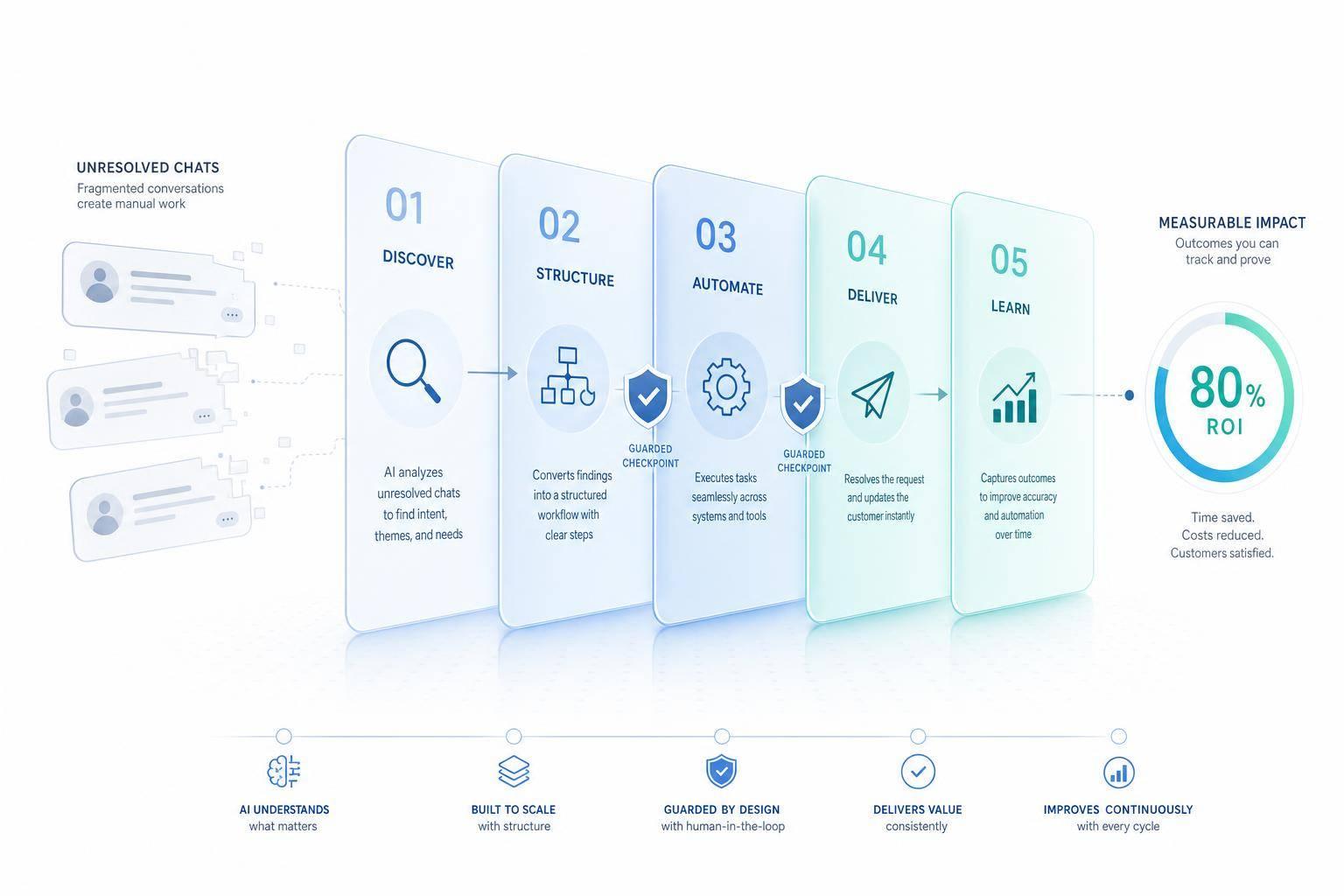
- I start with unresolved chats, not resolved ones
- I group them by intent and by why they stalled
- I break each request into small workflow steps
- I pick the first automations based on volume, low judgment, and low risk
- I build flows with validation, system checks, logging, and agent handoff
- I track results with metrics like:
- Unresolved conversation rate
- Repeat contact rate
- Average handle time
- Automation resolution rate
- reduce customer service costs
A simple example: if a team removes 5,000 refund chats per month and each one takes 6 minutes, that saves about 500 hours. At $25/hour, that’s about $12,500 per month.
What matters most is this: the chat transcript tells you the topic, but the failure point tells you the workflow to build. That’s the main shift.
The article then shows how I’d move from stalled chat patterns to live automated workflows inside ChatSpark, using connected channels, support history, backend systems, and post-launch reporting.
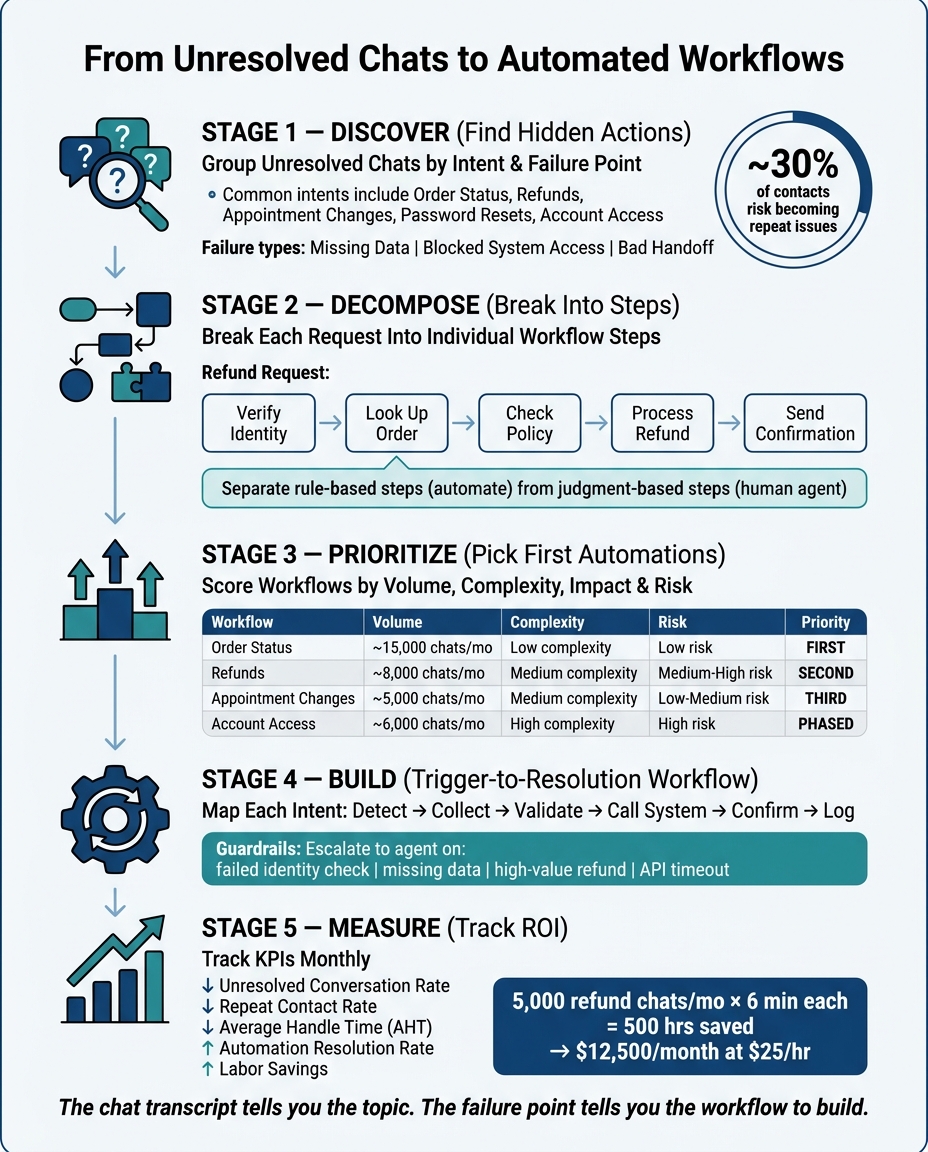
From Unresolved Chats to Automated Workflows: A Step-by-Step Framework
Step 1: Find the action hidden inside unresolved conversations
Group unresolved chats by intent and failure point
Raw chat logs are messy. The first job is to sort them by intent. For many U.S. support teams, the same themes show up again and again: refunds, order status, reschedules, account access, and password resets [3][4][8].
Then tag why each conversation stalled.
Most failed conversations come down to a few issues: missing data, blocked system access, or a bad handoff between teams [6][7][9]. That split matters. If a big chunk of unresolved refund chats happened because agents couldn’t get into the payment system, you’re not looking at a messaging problem. You’re looking at a workflow integration problem [6][7][9].
This is where the pattern starts to show. Use the failure point to separate content gaps from workflow gaps. If customers get mixed refund answers, the policy content likely needs work. If appointment changes keep getting stuck, the system connection is probably the problem [9][7].
Once you know where the breakdown happens, take the request apart into smaller actions.
Break requests into individual actions and workflow steps
A single action is one step, like looking up an order, sending a confirmation email, or checking a refund policy. A workflow is the full path from the first message to the final resolution [10][8].
Take a refund request. The workflow might look like this:
- Verify identity
- Look up the order
- Check the refund policy
- Process the refund
- Send confirmation
Breaking the request into steps makes the next move much easier. You can quickly spot which parts are rule-based vs AI-driven and repeatable, and which parts still need a person to step in. Exceptions, edge cases, and extra verification usually stay with human agents [10][8].
Those repeatable steps are the ones most ready for automation.
Pick the best candidates for automation first
The strongest first use cases tend to share four traits. They happen often, the steps stay mostly the same from one customer to the next, they need little subjective judgment, and the business payoff is easy to see [4][5][8].
Order tracking and appointment changes are strong places to start. The path is predictable, the data is structured, and the workflow is usually simple. Refunds and account access can also be automated, but they carry more risk. It makes more sense to tackle those after you’ve tested the approach on simpler flows.
| Intent | Best fit | Notes |
|---|---|---|
| Order tracking | Good starting point | Structured data and repeatable steps |
| Appointment reschedule | Good starting point | Clear workflow and low judgment |
| Password reset | Good starting point | Repetitive and rule-based |
| Refund request | Add guardrails first | More sensitive and policy-dependent |
| Billing question | Depends on complexity | Simple questions can be automated; disputes should wait |
| Account access | Add verification first | Needs stronger identity checks |
Next, map the highest-value patterns into a trigger-to-resolution workflow.
Step 2: Build automated workflows from repeated failure patterns
Take each repeat problem and turn it into a trigger-to-resolution workflow.
If the same unresolved chats keep showing up for refunds, orders, reschedules, and logins, each one should become its own workflow. From there, map the full path from trigger to resolution.
Map the workflow from trigger to resolution
Most support requests run through the same basic loop: detect intent, collect inputs, validate details, query or update the right system, confirm the result, and log what happened.
| Workflow Step | Order Status | Appointment Change | Password Reset |
|---|---|---|---|
| Detect Intent | Where is my order? | Reschedule my appointment | I forgot my password |
| Collect Inputs | Order ID or email | Current slot, preferred new slot | Account email or username |
| Validate | Match order to customer | Check availability and business hours | Confirm account is active |
| Call System | Order management or carrier API | Scheduling platform | Authentication system |
| Confirm | Delivery status and tracking link | Updated appointment confirmation | Reset link sent to the email on file |
| Log Result | Tag as automated resolution: order status | Update reminders and log the change | Record timestamp and channel used |
Reschedules use that same flow: check availability, update the scheduler, confirm the new time, and log the change.
Password resets work the same way too: verify the account, send a secure reset link, and log the result.
Once the base flow is in place, add rules for edge cases and human handoff.
Add validation rules, guardrails, and escalation paths
Automation should stop when risk shows up and send the case to an agent.[11][12]
Common escalation triggers include:
- Missing or unverifiable data
- A failed identity check
- A high-value refund request
- A system API timeout
When any of those conditions appears, the workflow should stop and pass the agent the customer’s contact details, detected intent, steps already completed, system responses received, and a recommended next action.[11]
That context helps the agent pick up where the workflow stopped, including the steps from the original unresolved chat, without making the customer repeat everything. Handle time stays down, and customer frustration stays low.
Step 3: Set up AI action discovery and workflow automation in ChatSpark
Connect ChatSpark to the channels and systems each workflow needs to run.
Connect channels, knowledge sources, and support data
Start with the places where unresolved refunds, order issues, reschedules, and login problems show up. ChatSpark works across your website, Instagram, Facebook, WhatsApp, Telegram, and Slack, so conversations from each channel feed into one place. When all that data sits together, it's much easier to spot repeat unresolved issues.
Once your channels are live, add your help content and support data as part of your AI customer support implementation. Use knowledge sources to answer questions, and use workflow routing to trigger actions.
If you're moving from another platform, ChatSpark supports history imports from tools like Zendesk, Intercom, Freshdesk, HappyFox, and Help Scout [13]. Bringing in past chats gives AI action discovery more examples of stalled intents and failure points.
Those connections help turn unresolved chat patterns into live automations.
Link business systems to common support actions
Next, connect the systems behind your highest-volume support tasks. ChatSpark has 140+ native integrations, so many common platforms connect without extra middleware [2]. Here's where to focus first based on the support actions you want to automate:
| Category | Business System | Key Support Actions |
|---|---|---|
| E-commerce | Shopify, WooCommerce, BigCommerce | Order status, tracking, inventory checks |
| Payments | Stripe, PayPal | Refund status, payment verification, invoices |
| Booking | Square, Calendly, Google Calendar | Appointment booking, rescheduling, cancellations |
| Helpdesk | Zendesk, Freshdesk, HappyFox | Ticket creation, status checks, live agent handoff |
| CRM | Salesforce, HubSpot | Lead capture, contact updates, account access recovery |
API credentials are encrypted at rest with AES-256 [1].
After these systems are connected, ChatSpark can map each unresolved intent to the right backend action.
Use analytics to find unresolved patterns automatically
Once your channels and systems are connected, ChatSpark's analytics show where automation gaps still exist. That helps you see which workflows to build next. The point is simple: find the next workflow worth automating.
Set baseline resolution times by intent before launch, then compare those numbers after rollout. That gives you a clean before-and-after view instead of guessing.
You can also turn each closed Assist in the AI Inbox into training data with one click [13]. That feedback loop helps the AI get better over time and cut down on future unresolved patterns.
Use those results to rank the next workflows to automate.
Measure results and expand automation coverage
Track the metrics that show ROI
Measure whether unresolved chats are going down because your workflows are fixing them. The key is consistency: track monthly KPIs over the same reporting window each time so you can compare results cleanly from one cycle to the next.[14][15][16][17]
| Metric | What It Measures | Target Direction |
|---|---|---|
| Unresolved conversation rate | % of chats with no confirmed resolution | Down |
| Repeat contact rate | % of customers who contact again within a 7- or 30-day window for the same issue | Down |
| Average handling time (AHT) | Minutes and seconds agents spend per conversation | Down |
| Automation resolution rate | % of eligible chats fully resolved by AI without agent involvement | Up |
| Labor savings | Reduced contacts × average handle time × hourly cost | Up |
Here’s what that looks like in plain numbers: if you remove 5,000 handled refund chats per month and each one takes 6 minutes, that saves about 500 hours. At $25/hour, that comes to about $12,500 in savings each month.[14][15][16][17]
Use these metrics to sort the next workflows by volume, impact, and risk.
Use a simple prioritization table for the next workflows
Once your first automations are live, go back to the same failure clusters you found earlier and use them to decide what to build next. Score each workflow candidate on volume, implementation complexity, customer impact, and risk. In most cases, higher-volume and lower-risk workflows should move up first.[15][17][18]
| Workflow | Monthly Volume | Implementation Complexity | Customer Impact | Risk | Priority |
|---|---|---|---|---|---|
| Order status | ~15,000 chats | Low | Medium | Low | First |
| Refunds | ~8,000 chats | Medium | Very High | Medium–High | Second |
| Appointment changes | ~5,000 chats | Medium | High | Low–Medium | Third |
| Account access | ~6,000 chats | High | Very High | High | Phased |
A pre-launch baseline, compared against post-launch results, helps show which workflows cut unresolved rates, repeat contacts, and handle time.
Once the first workflows show results, use the same data to pick the next set.
Conclusion: Turn missed resolutions into a scalable support system
Unresolved chats show you which automations still need to be built. Every stalled refund request, failed order lookup, or abandoned password reset points to a repeatable failure pattern that can become a workflow. AI action discovery groups those patterns into ranked automation candidates, which helps teams start with the highest-value opportunities and keep adding coverage as new patterns show up. ChatSpark's analytics and intent detection surface new patterns as customer behavior shifts, so automation coverage keeps growing.
FAQs
How does AI action discovery find automation opportunities in unresolved chats?
AI action discovery looks at past conversations and support tickets to find patterns, repeat problems, and gaps in user intent. It uses natural language processing to group similar requests and spot tasks that come up again and again, follow a clear pattern, and don’t take much effort to handle.
When it reviews unresolved chats, it points out where things broke down underneath the surface and suggests turning those trouble spots into structured, automated workflows. Admins can then review those suggestions and decide which ones to tackle first, making future interactions smoother and taking some pressure off support agents.
Which support workflows should teams automate first?
Focus first on high-volume, low-complexity work that follows clear, predictable patterns.
A simple way to do that is to use the 80/20 rule: find the 20 percent of inquiry types that account for 60 to 80 percent of total ticket volume.
Start with straightforward tasks such as:
- Password resets
- Order status updates
- General FAQ questions
Before rolling anything out, make sure the process is documented, system access works as expected, and human escalation is still available for complex or high-stakes issues.
How can I measure ROI after launching automated workflows?
Start by setting a baseline for support costs and ticket volume before deployment. That gives you a clean before-and-after view, so you’re not guessing later.
Then calculate ROI with this formula:
(Total Annual Value − Total Annual Investment) ÷ Total Annual Investment × 100%
Total Annual Value includes savings from fewer human-handled tickets, faster resolutions, and lead generation revenue.
Total Annual Investment includes platform fees, setup, and maintenance.
ChatSpark Analytics can track success rates, resolution rates, and cost per resolution.