I’d choose a real estate AI chatbot only after it proves two things: accurate MLS search and a working lead handoff. Before you commit, check listing permissions and updates, then test whether buyer details reach the right agent and CRM.
Here’s what I’d check:
- MLS access and accuracy: Approved markets, permitted listing details, current prices and status, and working property links.
- Search quality: Budget, location, bedrooms, and features stay intact through follow-up questions. Missing facts stay unknown.
- Lead handoff: Contact details, preferences, buying timeframe, MLS numbers, and conversation notes reach your CRM. A showing request isn’t a confirmed appointment.
- Privacy and answer limits: Clear consent, access and deletion controls, no unsupported claims or housing steering, and human help when needed.
- Results and cost: Pass 4 sandbox tests, then run a 14-day pilot. Track qualified leads, routing, response time, and total cost - not just chat volume.
My bottom line: test the full path from property search to agent follow-up. Measure cost per qualified lead by dividing total pilot costs by qualified leads delivered.
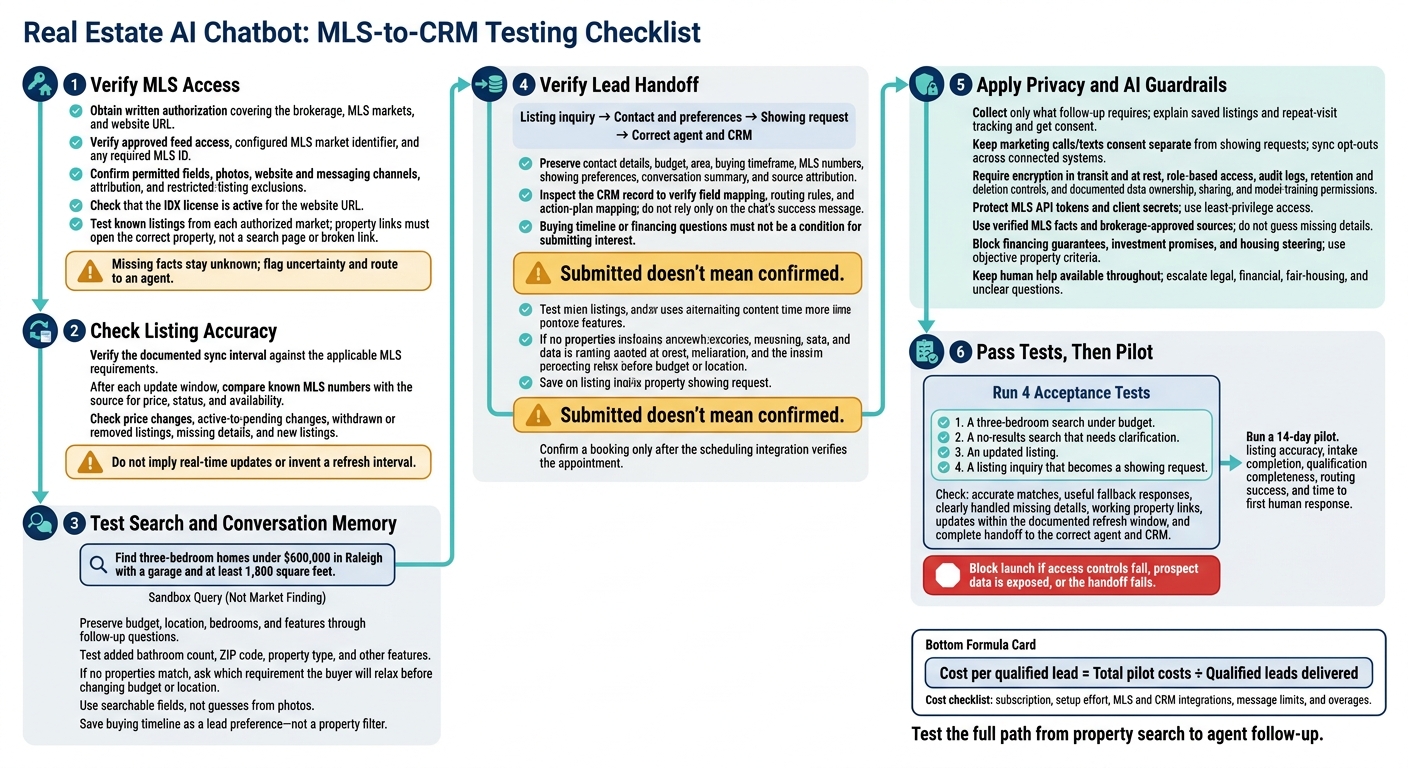
Real Estate AI Chatbot: MLS-to-CRM Testing Checklist
Check MLS Access and Listing Accuracy
Verify MLS Coverage and Data Permissions
Ask for written authorization covering your brokerage, MLS markets, and website URL. If the bot can't legally display a listing, it can't qualify the lead. Gaps in market coverage can hide eligible homes. Working API credentials don't guarantee permission to display every field or photo, either. Confirm that the IDX license is active for your website URL. [5]
| Must verify | Why it matters | Evidence to request |
|---|---|---|
| Brokerage authorization and approved feed | Access must cover how you plan to use listing data. | Written brokerage approval and confirmation that the API application is approved. |
| Local MLS coverage | Incorrect MLS market settings can return unrelated listings or no results. | Configured MLS market identifier and any required MLS ID. |
| Permitted fields and photos | Feed access doesn't make all content public. | Field-level permissions for photos, property details, and restricted agent-only remarks. |
| Authorized website and channels | Website permission doesn't automatically cover messaging channels. | License status for the website URL and confirmation of permitted channel use. |
| MLS/IDX compliance responsibilities | Someone must own the rules for display and excluded data. | A written compliance checklist covering attribution, allowed fields, and restricted-listing exclusions. |
Request a sandbox demonstration with known listings from each authorized market. Check the photos, key details, and property page. Confirm that the configured listing URL uses the identifier, such as {mls_id}, and opens the correct property - not a search page or broken link. [1][2][7] A wrong listing page derails the search before lead capture even begins.
Test Listing Updates and Missing Details
Fast answers still need up-to-date listing data. Ask for the documented sync interval, then check it against your MLS requirements. Don't assume one update schedule meets every MLS's rules. [4]
After each documented update window, use known MLS numbers to check that price, status, and availability match the source. Include withdrawals and removals in these checks.
| Test case | Expected result | Chatbot response to check | Risk | Outcome |
|---|---|---|---|---|
| Known listing and price change | Exact property and current price after the update. | Price, photos, and details match the source. | Buyer receives outdated pricing. | Pass only if matched. |
| Active-to-pending change | Updated status, where display is permitted. | Doesn't describe a pending home as active. | Misleading availability. | Fail if still shown as active. |
| Withdrawn or removed listing | No display without permission or active recommendation. | Indicates unavailable or not found, as appropriate. | Continued display of excluded data. | Fail if still promoted. |
| Missing price or property feature | Missing information is disclosed. | Doesn't invent a price or property feature. | Unsupported property claims. | Fail if guessed. |
| New listing after the update | Listing appears if covered and permitted. | Correct record and working property link. | Missed inventory or feed failure. | Fail if absent without explanation. |
When facts conflict or details are missing, require the bot to flag uncertainty and route to an agent. A no-results answer should offer a broader search. But staff should first rule out incorrect MLS market settings, mismatched IDs, or a failed update. Otherwise, a feed failure can look like zero inventory. [2][5][7] Once access and data recency pass these checks, test whether the bot can filter properties and hand off a lead.
Test Property Search and Lead Handoff
Filter by Location, Budget, and Features
Find three-bedroom homes under $600,000 in Raleigh with a garage and at least 1,800 square feet.
Use this request to test combined filters. Then add a bathroom count, ZIP code, property type, and other features. Check that follow-up questions keep the original budget and features intact. Verify natural-language search and conversation memory in your AI agent setup. [5][1][7][6]
If no properties match, the bot should ask which requirement the buyer is willing to relax before changing the budget or location. [5][1][7] Check that feature searches use searchable fields, rather than guesses based on photos. Save the buying timeline as a lead preference - not a property filter. [6][8]
Turn a Listing Inquiry Into a Showing Request
Once the search passes your checks, test the handoff. Have the bot return listing details, keep the MLS number, collect the buyer’s name and contact details, and ask for preferred showing times. Save relevant preferences so the buyer doesn't have to repeat them. Ask about buying timeline or financing status only when it helps with follow-up - not as a condition for submitting interest. [6][8]
Submitted doesn't mean confirmed. Keep the request marked as submitted until the bot returns a confirmation message naming the property and the next-step contact. Confirm a booking only after the scheduling integration verifies the appointment. Test any proposed Calendly or Google Calendar connection separately. [6][3]
Send Qualified Leads to Agents and the CRM
Check that qualified leads reach the right agent or CRM. Inspect the CRM record, not just the chat’s success message, to confirm correct field mapping and source attribution. Also verify CRM routing rules and action-plan mapping in your setup. [6]
| Evaluation point | Unqualified inquiry | Qualified, routed lead |
|---|---|---|
| Collected information | Name and email; initial interest | Contact details, budget, area, timeframe, and MLS numbers |
| Agent action | Ask basic questions again | Follow up on the property and showing preferences |
| CRM usefulness | Bare contact record | Preferences, conversation summary, MLS numbers, and source |
After routing works, test consent, retention, and response limits.
Protect Buyer Data and Set AI Limits
Once lead routing works, set clear rules for what the chatbot collects, stores, and sends to a human.
Review Consent, Access, and Data Retention
Collect only what follow-up requires: contact details, search preferences, buying timeframe, and financing status. If you save listings or track repeat visits, explain that and get consent. Keep consent for marketing calls and texts separate from showing requests, and sync opt-outs across every connected system. Leave highly sensitive financial details out of chat unless a human needs them to handle an escalation.
Require documented encryption in transit and at rest, role-based access, audit logs, and controls for retention and deletion. Check vendor terms for data ownership, third-party sharing, and permission to use conversations for model training. Allow model training only with approved sources. Confirm how deletion works for both buyer chat records and connected lead systems.
Treat MLS API tokens like passwords to protect MLS access and lead handoff. Rotate exposed tokens, keep API keys and client secrets out of chat responses, and give each connection only the access it needs. [1][2][7]
Block Unsupported Claims and Housing Steering
With storage and consent rules in place, set firm limits on what the bot can claim.
Require the bot to separate MLS facts, brokerage policies, and general guidance. Use only verified listings and brokerage-approved pages, PDFs, and FAQs. Missing property details should stay unknown - not become guesses. Block financing guarantees, investment promises, and claims based on protected characteristics. Base search recommendations on objective property criteria.
Keep human help available throughout search and lead intake, not just after qualification. Send legal, financial, fair-housing, and unclear questions to a qualified person rather than letting the bot invent an answer. Use intent-based escalation to send sensitive chats to a human immediately. [3]
Conclusion: Test Before You Commit
Document your requirements for MLS access, listing accuracy, search filters, lead capture, routing, and data protection. Approve only after a pilot shows those requirements are met.
Before launch, run four sandbox tests to check search results, agent handoff, and feed accuracy.
Run 4 Acceptance Tests
Test these four scenarios:
- A three-bedroom search under budget.
- A no-results search that needs clarification.
- An updated listing.
- A listing inquiry that becomes a showing request.
Check whether matches are accurate, fallback responses work, missing details are handled clearly, and property links work. [5][7][2]
For the updated listing, confirm that it matches the source feed within the documented refresh window. Don’t assume updates happen in real time. [4]
For the showing request, make sure contact details, preferences, timeframe, and MLS numbers reach the correct agent and CRM, along with the conversation context. Block launch if access controls fail, prospect data is exposed, or the handoff fails. [6][3]
If all four sandbox tests pass, run a 14-day pilot to check that the same results hold up with live traffic.
Measure Results and Total Costs
During the pilot, track listing accuracy, intake completion, qualification completeness, routing success, and time to first human response. Use analytics where supported, then check CRM follow-up. [3][6]
Calculate cost per qualified lead by dividing total pilot costs by qualified leads delivered. Count setup effort, MLS and CRM integrations, message limits, and any overages - not just the subscription fee. Use current plan pricing to estimate ROI. [3]
FAQs
Who is responsible if the chatbot violates MLS rules?
The real estate agent or brokerage is responsible for making sure the chatbot and its integrations follow all applicable Multiple Listing Service (MLS) rules.
The chatbot uses your credentials to access listing data. That means its setup - including the Originating System Name and API usage - must follow your local MLS board’s guidelines.
The chatbot supplies the technical framework, but the licensed professional remains responsible for how listing data is displayed and managed.
What happens to captured leads if my CRM goes offline?
If your CRM goes offline, ChatSpark keeps your lead data secure, including the full chat transcript, qualification score, and property context. Depending on your subscription plan, lead information syncs in real time or is processed after the conversation.
When your CRM connection returns, the saved data and context are ready to sync. No lead information is lost, and your team can follow up with the full history.
How many leads do I need for a meaningful pilot?
The provided search results don’t set a required lead count for a meaningful pilot. They focus instead on data quality and adding intent signals - saved searches, repeat visits, and specific buyer preferences - to your CRM [1].
These signals help you prioritize the top 20% of prospects, an approach shown to produce more sales-ready leads, regardless of your total lead volume [1].