AI chatbots are transforming how businesses engage with customers. They’re available 24/7, handle repetitive inquiries, and free up your team for more complex tasks. These tools use natural language processing (NLP) and machine learning (ML) to understand customer intent, provide personalized responses, and even qualify leads in real time. Platforms like ChatSpark make it easy for businesses to deploy chatbots across websites, social media, and messaging apps, ensuring consistent support.
Key Takeaways:
- AI chatbots manage routine tasks like answering FAQs, scheduling, and lead qualification.
- They use conversational methods to collect and qualify leads with frameworks like BANT.
- Tools like ChatSpark integrate with CRMs, provide analytics, and support omnichannel deployment.
- Chatbots reduce response times, improve customer satisfaction, and save costs on support.
For businesses of any size, chatbots are a practical way to improve customer interactions while optimizing resources.
How AI Chatbots Capture and Qualify Leads
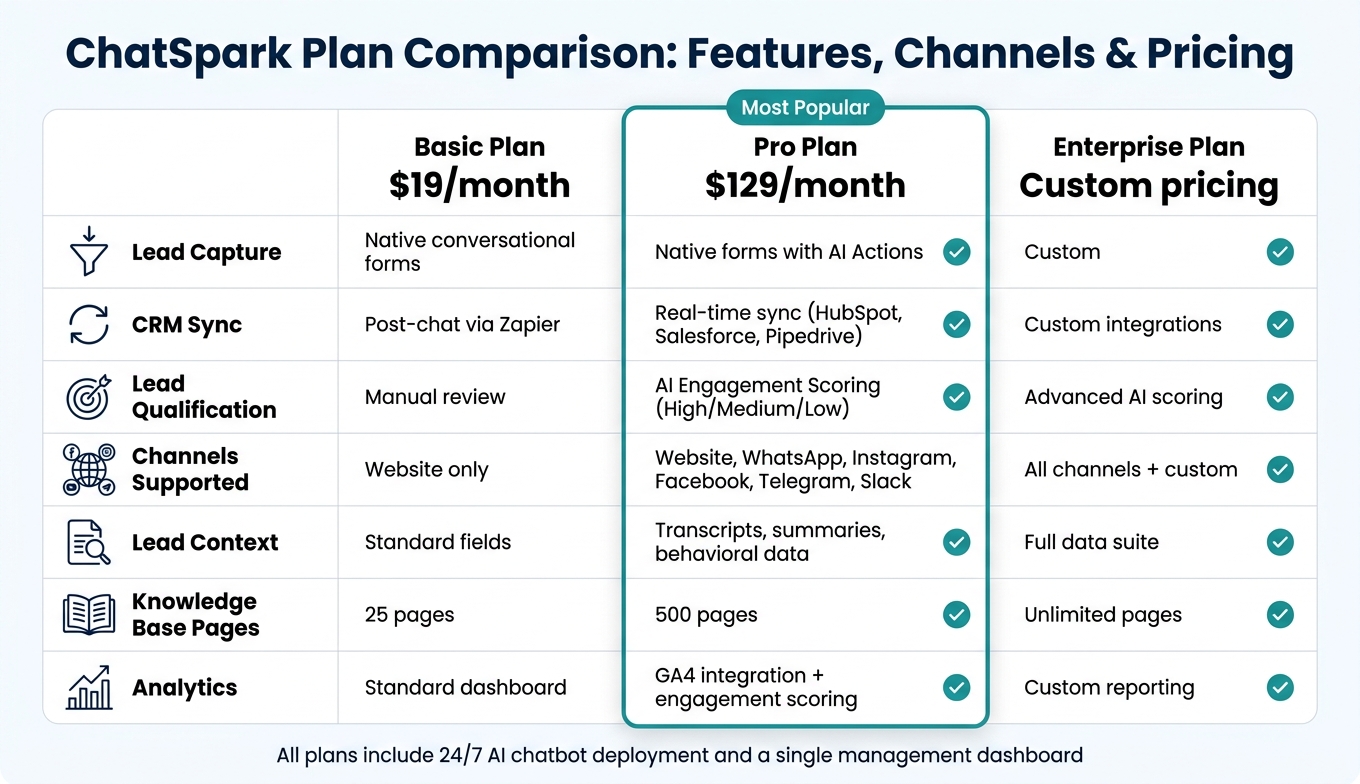
AI Chatbot Plans Compared: Features, Channels & Pricing
How Chatbots Collect Lead Information
Traditional lead forms often ask users to fill out 8–10 fields at once, which can be overwhelming. Studies show that cutting form fields from 11 to just 4 can boost conversions by up to 120%. Chatbots take this concept even further by gathering information in a more conversational and user-friendly way.
Instead of presenting a static form, chatbots start with a simple question and collect details gradually. For example, when a visitor expresses interest - like inquiring about pricing or asking for a product recommendation - the bot follows up with questions about their name and email. By offering value upfront, chatbots make users more willing to share their information.
Chatbots also use progressive profiling, which means they collect additional details over time. A first-time visitor might only share their use case, while a returning user could be asked about their company size or budget. This approach reduces friction while gradually building a more detailed lead profile.
Once the chatbot has collected the necessary details, it can instantly assess the lead's potential using specific qualification methods.
Real-Time Lead Qualification
After gathering basic details, chatbots can immediately determine whether a lead is worth pursuing - no need for manual review. This is where frameworks like BANT (Budget, Authority, Need, Timeline) come into play.
Chatbots apply BANT by asking focused, qualifying questions. For example:
- Budget: "Do you have an estimated monthly budget?" with options like "Under $100/month", "$100–$500/month", or "$500+/month."
- Authority: "Are you the decision-maker for this purchase?"
- Timeline: "When do you plan to implement a solution?" with choices like "ASAP", "1–3 months", or "Just exploring."
The responses are used to calculate a real-time lead score. When a lead meets the threshold, they’re automatically flagged as a Sales Qualified Lead (SQL) and sent to the sales team. Timing is critical here - research shows that contacting a lead within 5 minutes makes you 9x more likely to convert them compared to waiting 30 minutes or longer.
"Chatbots qualify leads by asking predefined questions, engaging in natural conversations with prospects, and providing sales teams with the data they need to make more informed qualification decisions." - Maddy Martin, SVP of Growth, Smith.ai [1]
ChatSpark builds on this fast qualification process by managing the entire lead lifecycle efficiently.
ChatSpark's Lead Management Features
ChatSpark takes automation to the next level by handling the entire lead process - from capturing details to syncing with your CRM. During conversations, it collects structured data like name, email, phone number, company, and role, all formatted to U.S. standards (e.g., area codes, ZIP codes, USD pricing). The bot’s conditional logic keeps the conversation relevant - if the visitor is buying for a team, it asks about seat count; if they’re a solo user, it skips that step.
Each lead is assigned an AI Engagement Score (High, Medium, or Low) based on factors like conversation depth, intent, and site behavior. High-scoring leads can trigger instant Slack or email notifications to sales reps while the prospect is still active on the site.
For CRM integration, the features depend on your subscription plan:
- Basic Plan ($19/month): Uses Zapier to push lead data after the conversation ends.
- Pro Plan ($129/month): Offers AI Actions for real-time CRM updates, creating contacts, deals, or cases directly in platforms like HubSpot, Salesforce, or Pipedrive during the conversation.
Every record includes the full chat transcript, qualification score, and a summary, giving your sales team all the context they need before reaching out.
| Feature | Basic Plan ($19/mo) | Pro Plan ($129/mo) |
|---|---|---|
| Lead Capture | Native conversational forms | Native forms with AI Actions |
| CRM Sync | Post-chat via Zapier | Real-time sync |
| Qualification | Manual review | AI Engagement Scoring |
| Channels | Website only | Website, WhatsApp, Instagram, and more |
| Lead Context | Standard fields | Transcripts, summaries, behavioral data |
How AI Chatbots Answer Customer Questions
Once AI chatbots capture and qualify leads, they continue their role by delivering precise answers to customer questions. Whether it's about pricing, features, policies, or shipping, these chatbots pull responses directly from your business's existing content.
AI-Powered Knowledge Retrieval
The backbone of this capability is Retrieval-Augmented Generation (RAG). Here's how it works: when a customer asks a question, the chatbot converts the query into a vector, searches your business's database, and finds the most relevant answer - all in real time. This ensures every response is based on your actual documentation, not guesswork.
Chatbots can be trained using various content formats, including website pages, PDFs, Word documents, CSV files, and helpdesk integrations. To make retrieval faster and more effective, structure FAQs into concise bullet points - this can improve efficiency by 2–3 times.
With semantic caching, response times drop to around 50ms. This is crucial because even a 100ms delay can negatively impact sales by 1%.
Keeping Chatbot Responses Accurate and Reliable
Quick answers only matter if they're correct. One major challenge with AI is hallucination, where the system confidently provides incorrect information.
To prevent this, you can use strict system prompts, guardrails, and intent detection. Setting a confidence threshold of 0.75 ensures unclear questions are escalated to a human agent. High-performing systems aim for a resolution rate above 75% and a Knowledge Base Hit Rate exceeding 85% [2].
"Real-time AI isn't just about 'fast models' - it's about ensuring the right data gets to the right place instantly." - Michael Cargian, AI Evangelist, SingleStore [2]
Maintaining accuracy over time is critical. Enable automatic re-crawling of your website content daily or weekly to ensure the chatbot reflects up-to-date pricing and policies. Additionally, review the "Unanswered Questions" dashboard weekly and add 2–3 new training items based on real customer inquiries. This proactive approach helps close knowledge gaps before they become recurring issues.
ChatSpark's Q&A and Tone Customization
ChatSpark goes beyond technical accuracy to enhance the overall user experience. By leveraging RAG, every response is rooted in your business's data, not generic AI information. The results? Between October 2025 and February 2026, a global construction products company handled 10,754 messages with ChatSpark, achieving a 98% resolution rate. This saved $47,880 in operational costs and over 66 agent workdays - a 1,097% ROI on a $4,000 investment.
But accuracy isn’t the only focus. ChatSpark allows you to customize your chatbot’s tone to align with your brand identity. Whether you want a formal, casual, or friendly tone, the choice is yours. Plus, with support for 85+ languages and 99.9% detection accuracy, a chatbot trained in English can instantly translate and provide answers for international customers without additional setup.
ChatSpark’s training capacity scales with your needs. The Basic plan ($19/month) supports 25 pages, while the Pro plan ($129/month) covers 500 pages, and the Enterprise plan offers unlimited pages. For small businesses, the Plus plan ($59/month) with 50 pages is often enough to cover FAQs, return policies, and onboarding documentation, with room to expand as needed.
24/7 Omnichannel Customer Support with AI Chatbots
Benefits of Around-the-Clock Automated Support
Customer questions don’t follow a 9-to-5 schedule. Whether someone is checking their order status late at night or trying to reschedule on a Sunday, they expect quick answers. That’s where automated support shines. Tasks like tracking orders, providing shipping updates, answering return policy questions, confirming bookings, resetting passwords, or handling basic troubleshooting are perfect for automation. These quick responses not only reduce the support backlog but also ensure no opportunities are missed outside regular hours. Plus, by handling routine inquiries, automation frees up live agents to tackle more complex issues, like sensitive complaints or situations that need human judgment. This approach ensures consistent reliability across all customer interactions.
Deploying Chatbots Across Multiple Channels
It’s one thing to be available on multiple platforms, but delivering a consistent experience across them is a whole different ballgame. Many businesses have chatbots on their website, Facebook, or mobile app, but if these bots don’t communicate with each other, customers end up repeating their issues every time they switch platforms. That’s the difference between multichannel and omnichannel support.
True omnichannel support keeps the conversation seamless. For instance, if a customer starts tracking their order on a website and later follows up about a refund through a messaging app, the system should retain the context. This eliminates the frustration of starting over and ensures the customer feels genuinely supported. ChatSpark excels in enabling this kind of smooth, cross-platform interaction, making real-time support feel effortless.
When choosing where to deploy chatbots, focus on the platforms your customers already use. Websites are great for detailed, high-intent tasks, mobile apps work well for logged-in user interactions, and messaging platforms like Instagram or Facebook are ideal for quick follow-ups or conversational queries.
ChatSpark's Multichannel Support Options
ChatSpark offers deployment across websites, Instagram, Facebook, WhatsApp, Telegram, and Slack, ensuring consistent responses and tone across all platforms. What’s more, conversation histories follow customers as they switch between channels, so they always feel supported without having to repeat themselves.
The availability of these channels depends on the plan you choose. The Basic plan ($19/month) and Plus plan ($59/month) cover website chatbot deployment. For businesses needing broader reach, the Pro plan ($129/month) includes support across all six channels - WhatsApp, Instagram, Facebook, Telegram, Slack - and integrates with tools like Zapier, Freshchat, Square, and Calendly. For companies with more complex needs, Enterprise plans offer custom configurations and priority support to ensure everything runs smoothly.
Setting Up, Measuring, and Improving Chatbot Performance
Best Practices for Chatbot Planning and Deployment
Start with a friction audit to identify areas where a chatbot can make the biggest impact. Analyze support transcripts, customer surveys, and NPS feedback to uncover repetitive, high-volume questions. These are prime candidates for automation and offer the quickest return on investment.
Once you've pinpointed what to automate, organize your resources. Combine FAQs, product manuals, and internal documents into a clear, structured format with headers and bullet points. Also, define escalation rules based on keyword triggers and sentiment analysis to seamlessly route sensitive or complex queries to human agents. Well-structured content significantly enhances chatbot accuracy - often improving performance by 2–3x compared to unorganized data.
Instead of launching your chatbot to your entire audience immediately, roll it out gradually. Start by routing 10–20% of traffic to the bot. Monitor its performance, address any gaps, and make necessary adjustments before scaling further. To build a solid knowledge base from the start, try the 100-Question Framework: break your product knowledge into 10 categories (like Billing, Troubleshooting, or Shipping) and list 10 common questions for each. This approach ensures your chatbot is well-prepared for a wide range of inquiries.
Once deployed, track its performance using meaningful metrics.
Key Metrics to Track Chatbot Success
Having a chatbot in place is just the beginning. To understand its impact, focus on metrics that reveal its efficiency and effectiveness.
- Containment rate: Tracks the percentage of conversations resolved without human intervention - this is a key indicator of how well your bot is functioning.
- First response time: Measures how quickly the bot replies, which directly influences customer satisfaction.
- CSAT (Customer Satisfaction Score): Reflects how users feel about their chatbot interactions.
- Lead conversion rate: Shows how many conversations turned into qualified leads or sales.
Set realistic goals as you scale. In the first month, aim for a resolution rate of 35–45%, increasing to 50–60% in the second month, and reaching 65–75% by the third. Regularly reviewing these metrics week by week will help you identify areas where the chatbot is excelling and where improvements are needed.
Using ChatSpark Analytics to Improve Performance
ChatSpark's analytics dashboard is a powerful tool for refining your chatbot's capabilities. Focus on conversations the bot couldn't resolve - these unanswered questions highlight opportunities to expand or improve your knowledge base. Addressing these gaps consistently can lead to noticeable performance improvements within 60–90 days.
For Pro and Enterprise users, the Google Analytics 4 (GA4) integration takes this a step further. It tracks chatbot-specific events, such as chat starts, link clicks, and lead captures, alongside broader website data. This integration helps you connect chatbot activity to tangible business outcomes, not just raw conversation numbers.
ChatSpark also includes engagement scoring, which categorizes leads as High, Medium, or Low priority based on the depth and intent of the conversation. This feature ensures your sales team focuses their efforts on the most promising leads first.
To keep improving, review failed or escalated conversations every week and update your knowledge base accordingly. Regular updates like these can significantly enhance your chatbot's performance over time.
Conclusion
AI chatbots have become a game-changer for customer outreach and support. According to IBM, chatbots can manage up to 80% of routine queries, while businesses report a 20–30% decrease in support requests needing human intervention. Their ability to provide instant, 24/7 responses directly impacts conversion rates, making them an essential tool for modern businesses.
ChatSpark offers a scalable solution for everyone - from solo entrepreneurs to large enterprises. Starting at just $19/month, it allows you to deploy multiple AI agents across six major channels: website, WhatsApp, Instagram, Facebook Messenger, Telegram, and Slack. All of this is managed from a single dashboard, ensuring a consistent brand voice across thousands of interactions.
Here’s what customers are saying:
"ChatSpark has been managing two of our largest product lines over the past year. It currently handles an average of 1,831 chats per month without any human intervention. Since implementing it on our website, we've realized measurable savings of $119,225." - Lorri G., Customer Service & Technical Support Manager
What makes ChatSpark stand out is its ability to grow smarter over time. Performance analytics help identify unanswered questions and conversation drop-offs, turning them into opportunities for improvement. This refinement process enhances lead conversion rates, reduces support workload, and boosts customer satisfaction - driving long-term business growth.
The longer businesses delay adopting chatbots, the more they risk falling behind competitors. With seamless integration into your existing tools, ChatSpark starts delivering value from the very first interaction.
FAQs
What should my chatbot say to qualify leads without annoying visitors?
To qualify leads without frustrating your visitors, aim for a conversational tone and stick to asking only the most important questions. Simplify how they provide answers by using buttons or rich cards for details like budget or team size. To keep things interesting, sprinkle in helpful stats or insights throughout the process. The key is to focus on understanding why they’re visiting, what they need, and their timeline - all while ensuring the flow feels smooth and matches the context of the page they’re on.
How do I keep my chatbot from giving wrong or made-up answers?
ChatSpark uses Retrieval-Augmented Generation (RAG) to ensure your chatbot delivers accurate answers. This approach allows the AI to pull information directly from your business-specific data, such as FAQs or product pages, rather than guessing or making things up.
To further maintain reliability, ChatSpark includes built-in safeguards that prevent it from fabricating information. When faced with a question outside its training or knowledge base, the chatbot doesn't try to improvise - it simply acknowledges that it doesn’t have the answer.
You can even tailor fallback messages to align with your brand's voice. This way, when the chatbot encounters a question it can't answer, it can still guide customers in a way that feels consistent and helpful.
Which channels should I launch my chatbot on first?
To get started, take a close look at your inbound traffic data from the last 90 days. This will help you identify where your customers are most active. For many U.S. businesses, website live chat tends to be the go-to channel for handling real-time questions and capturing leads. After that, platforms like Instagram and Facebook Messenger are popular choices for discovery-driven interactions.
Once you’ve got these core channels running smoothly, you can think about branching out. Depending on your customers' preferences and your business goals, you might explore options like WhatsApp, SMS, Slack, or Telegram to further enhance communication.