Sales teams waste nearly 50% of their time chasing unqualified leads. Conversational AI chatbots solve this by automating lead qualification, saving time and improving efficiency. They engage visitors 24/7, ask targeted questions, and route high-potential prospects instantly. For example, MongoDB increased net new leads by 70% using AI chatbots, while RapidMiner’s bot contributed to 25% of its sales pipeline.
Key Benefits:
- Time Savings: Automates 80% of standard SDR tasks, reducing manual vetting time by 83%.
- Higher Conversions: Businesses see a 20% jump in conversion rates with automated lead scoring.
- Self-Service Preference: 67% of B2B buyers prefer self-service tools over speaking with sales reps.
How It Works:
- Set Lead Criteria: Define attributes like budget, company size, and buying timeline.
- Use Frameworks: Apply models like BANT (Budget, Authority, Need, Timeline) to assess leads.
- Data Collection: Chatbots use conversational flows to gather and validate details.
- Score & Segment: Assign scores to prioritize leads as hot, warm, or cold.
- Route to Sales: Send high-priority leads to the right rep with full conversation history.
AI chatbots streamline lead qualification, enabling sales teams to focus on closing deals instead of chasing dead ends.
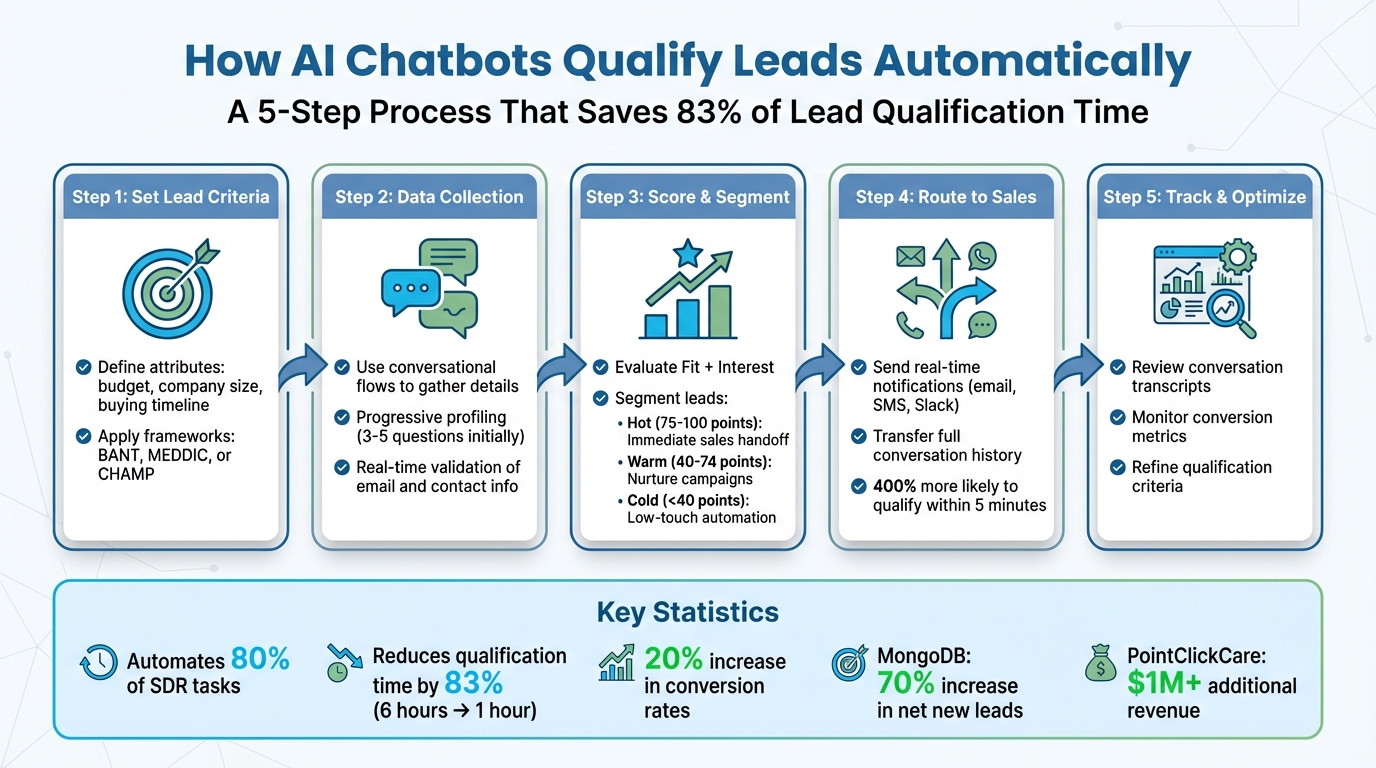
5-Step AI Chatbot Lead Qualification Process
Setting Lead Qualification Criteria
Before deploying your chatbot, it's crucial to establish clear criteria for what makes a qualified lead. Without these guidelines, your bot might spend valuable time on leads that aren't likely to convert.
Start by pinpointing the key attributes that distinguish serious buyers from casual visitors. These typically include firmographics like industry, company size, and location, as well as behavioral indicators such as budget availability or buying timeline. Interestingly, over 60% of companies using chatbots rely on them specifically for lead qualification, and their success often hinges on having well-defined criteria from the outset [1].
"The goal is open doors for sales, not slam them shut. Balanced qualification protects sales time without alienating potential customers." – Younès Benallal [8]
When implemented effectively, chatbots can increase sales conversions by 42% simply by asking the right questions [5]. Think of your qualification criteria as a detailed instruction manual for your chatbot - clear guidelines lead to better outcomes. To get started, define your Ideal Customer Profile (ICP) as a foundation for these criteria.
Creating Your Ideal Customer Profile (ICP)
An Ideal Customer Profile (ICP) acts as a roadmap for prioritizing leads. This profile is shaped by firmographics (like company size and industry), the challenges your product solves, budget capacity, and buying signals such as visits to pricing pages or requests for security documentation [8][9].
Modern chatbots often incorporate IP enrichment tools like Clearbit or ZoomInfo to instantly identify a visitor’s company size and industry when they land on your site [8][9]. This allows the chatbot to skip basic questions and dive straight into specific qualifying topics. For instance, if your ICP focuses on mid-sized SaaS companies, the bot might ask about integration needs instead of starting with generic questions.
Advanced bots also validate information in real time, such as checking if an email address belongs to a business domain rather than a free provider like Gmail or Yahoo [10]. Since 81% of users abandon long, static web forms [8], keeping your ICP-focused questions conversational and progressive can boost form completion rates by 20% [5]. These criteria are essential for determining which qualification framework suits your sales process.
Using Qualification Frameworks
Once your ICP is defined, use qualification frameworks to structure your lead assessment process. Frameworks like BANT (Budget, Authority, Need, Timeline) offer a systematic way to evaluate leads. Instead of directly asking, "What's your budget?" chatbots can phrase it more conversationally: "Are you considering a basic plan or an enterprise solution?"
Each component of BANT helps filter leads effectively. Budget questions assess spending capacity, while Authority questions identify decision-makers ("Will you be the primary decision-maker for this project?"). Need questions use natural language processing to connect a lead’s challenges to your product’s features. Timeline questions measure urgency ("Are you looking to implement a solution this month or just researching?"). Chatbots can assign scores to responses, and high-scoring leads - like those with immediate needs and decision-making authority - are routed to the sales team promptly [8].
Different frameworks work better for different types of businesses. For example:
- BANT is ideal for transactional sales.
- MEDDIC (Metrics, Economic Buyer, Decision Criteria, Identify Pain, Champion) is suited for enterprise-level deals.
- CHAMP (Challenges, Authority, Money, Prioritization) works well for startups and fast-growing SaaS companies [8].
Choose the framework that aligns with your sales cycle and program your chatbot's logic accordingly. For instance, if a lead shows a high budget but a distant timeline, the bot might provide educational content rather than push for an immediate demo.
Real-world examples show how powerful these frameworks can be. PointClickCare used AI-powered lead scoring with their framework to generate over $1 million in additional revenue and saw a 400% increase in their chat-driven sales pipeline [11]. Similarly, Formstack focused on high-intent visitors using AI qualification, achieving a 420% boost in chat-to-lead conversions [11]. Their success underscores the importance of having well-defined qualification criteria before automating the process.
Collecting Data Through Chatbot Conversations
Once you've set your qualification criteria, the next step is gathering lead information through chatbot interactions. The trick? Balancing structure with a conversational tone - your chatbot should collect key data points without making the exchange feel robotic.
Chatbots blend structured elements, like buttons, with AI-driven open responses [12]. For instance, a bot might present predefined options for company size ("1-50 employees", "51-200 employees") but allow free-text input when asking about specific business challenges. This approach keeps things efficient while still capturing the context your sales team needs to personalize follow-ups.
"Chatbots can collect contextual and behavioral data, such as intent, urgency, objections, and preferences, by analyzing how users respond and engage throughout the conversation." – GPTBots.ai [1]
Another helpful strategy is progressive profiling. Instead of overwhelming visitors with too many questions right away, start with 3–5 essential fields (like name, email, and company) and gather more details over subsequent interactions [12]. This method reduces friction and builds trust over time.
To maintain data quality, use real-time validation tools. For example, implement format-sensitive fields for email and phone numbers that check for errors instantly. You can also connect webhooks to services like Mailboxlayer to confirm whether an email is a valid business address rather than a generic one [10].
Once you've nailed down your data collection strategy, the next step is structuring conversations for smooth and effective interactions.
Building Conversational Flows
Designing an effective chatbot flow starts with careful planning of the questions you'll ask and how they fit together. Focus on gathering essential data points like contact information (name, business email, phone number), firmographics (company size, industry), and qualification details (budget, timeline, decision-making authority).
Use conditional logic and branching to adapt the conversation based on user responses [10][9]. For instance, if a lead indicates a high budget and an urgent timeline, the bot can immediately route them to a live sales rep or offer a meeting scheduler. On the other hand, leads with smaller budgets or longer timelines might receive educational content or a self-service demo link.
Your questions should align with your qualification framework. For example, if you're using the BANT framework, you might ask:
- "Are you considering a basic plan or an enterprise solution?" (Budget)
- "Will you be the primary decision-maker for this project?" (Authority)
- "What challenges are you currently facing in your operations?" (Need)
- "How soon are you looking to address these needs?" (Timeline)
Make the questions conversational. Instead of directly asking about "operational pain points", try something like, "What’s keeping you up at night?" - it feels more natural and engaging.
Keep the initial flow concise, limiting it to 3–5 questions to avoid overwhelming users [13]. Reusable templates, like those for email validation, can help maintain consistency [10].
A great example of this in action is RapidMiner's chatbot, "MarlaBot", which was launched in 2023. By using structured conversational flows, it qualified over 4,000 leads and contributed to 25% of the company’s total sales pipeline. The bot systematically gathered data and routed high-value prospects to the sales team [1].
Now that your flow is ready, let’s look at how to kick off conversations effectively.
Starting Conversations with Leads
The way your chatbot initiates conversations can make or break engagement. Instead of popping up as soon as someone lands on your site, use behavioral triggers based on intent signals. For example, deploy the bot after a visitor spends 20–30 seconds on a pricing page, scrolls halfway down a feature comparison page, or visits key pages multiple times [13].
Prioritize placing your chatbot on high-intent pages like pricing pages, demo request forms, and product comparison sections. These areas typically yield better conversions than general blog posts [13].
The bot’s opening message should feel personalized and relevant. Move away from generic greetings like "Hello, how can I help you?" Instead, tailor the message to the user's behavior. For instance, if someone is on your pricing page, the bot could say: "I see you're exploring our pricing options. Can I help you find the best plan for your team? How many people are on your team?"
For high-value leads engaging during business hours, enable a human takeover feature to connect them directly with a sales rep [10]. For after-hours visitors, provide a fallback option like a meeting scheduler through tools such as Calendly or Cal.com [10][6][13]. This ensures no qualified lead slips through the cracks.
Scoring and Segmenting Leads
Once you've gathered lead information, the next step is to assign scores and group leads based on priority. This process helps your sales team focus on the most promising prospects while ensuring no potential opportunity is overlooked.
Lead scoring evaluates two key factors: Fit (how well the lead matches your ideal customer profile) and Interest (the signals they exhibit that indicate purchasing intent). Points are usually split between these two categories. For instance, a lead might earn points for having a director-level title (Fit) and for requesting a product demo (Interest) [14].
Modern chatbots handle lead scoring in two ways. Traditional systems assign predefined point values - like adding 20 points when a lead selects an "enterprise plan" or 15 points for identifying as a decision-maker. Meanwhile, advanced AI-powered bots analyze the entire conversation and compare it to your ideal customer profile, generating a score between 0 and 100 [15]. This score immediately determines how leads are prioritized.
"The chatbot uses this framework model to ask questions from the leads and assign a score to each one based on how they match the ideal customer profile." – GPTBots [1]
Once scored, leads are segmented into groups that guide the next steps for your sales team. Hot leads (75–100 points) receive immediate attention, often through notifications or direct calendar links. Warm leads (40–74 points) are nurtured with targeted content, while cold leads (below 40) are directed to low-touch automation or long-term follow-up strategies [14].
Creating Scoring Criteria
To create an effective scoring system, start by assigning specific point values to the responses that matter most to your business. For example, if you’re using the BANT framework (Budget, Authority, Need, Timeline), you might allocate 25 points to each category.
Here’s how this could look in practice: Assign 25 points for a budget exceeding $10,000 per month, decision-making authority, a timeline within 30 days, and a critical business need.
To fine-tune these values, calculate the conversion rate of leads who meet a specific condition and compare it to your overall lead-to-customer conversion rate [14]. For instance, if 30% of leads with an "urgent timeline" convert compared to a baseline conversion rate of 10%, that response should be worth three times the baseline points.
Negative scoring is equally important. Deduct points for signals that suggest a lead may not be qualified - like using a personal email address in a B2B context or visiting non-product pages such as careers. This ensures your sales team focuses on leads with the highest potential.
Avoid relying too heavily on a single factor. Balance your point distribution across multiple criteria to create a well-rounded scoring system. For example, focusing solely on an "enterprise budget" might cause you to overlook other critical factors like decision-making authority or urgency.
Grouping Leads by Priority
Once scores are assigned, leads are automatically sorted into segments to streamline follow-up actions. Here’s how the segments typically break down:
| Lead Segment | Score Range | Key Criteria | Recommended Action |
|---|---|---|---|
| Hot | 75–100 | Demo requests, pricing page visits, high budget, decision-maker role | Immediate sales handoff or meeting booking |
| Warm | 40–74 | Content downloads, alignment with your ideal profile but lower urgency | Automated email nurture campaigns with case studies |
| Cold | Below 40 | Casual browsing, low budget, outside target industry | Low-touch automation or disqualification |
Your chatbot can trigger workflows tailored to each segment. For example, hot leads might receive an instant calendar link or trigger a notification to alert your sales team. Leads scoring above a certain threshold (e.g., 80) could even be escalated directly to a human representative.
Warm leads can be nurtured through automated email sequences featuring educational content, keeping your solution in their minds without requiring constant sales team involvement. Cold leads, on the other hand, might be directed to self-service resources like FAQs or community forums, allowing your team to focus on higher-priority opportunities.
Between 2020 and 2025, MongoDB implemented a chatbot-driven lead triage system that segmented leads based on intent signals like pricing page visits. This approach led to a 70% increase in net new leads and doubled their total messaging responses [4].
Additionally, the system can dynamically update lead scores as new signals emerge. For instance, if a warm lead revisits your pricing page multiple times in a week, their score can increase, moving them into the hot lead segment and triggering an immediate alert for your sales team.
Routing Leads to Sales Teams
Once a lead has been scored and segmented, the next step is ensuring it gets to the right sales representative - quickly and accurately. Why does speed matter? Companies that respond to leads within 5 minutes are 400% more likely to qualify them compared to those that wait just 10 minutes longer [7].
AI-powered chatbots handle lead routing using methods like round-robin assignments, territory-based rules, skill matching, or predictive algorithms. These approaches help reduce errors, such as assigning leads to the wrong rep or duplicating follow-ups, from 20–25% down to under 2% [7]. Advanced systems even check in real-time to see if a rep is available. If the preferred rep is out of office or at capacity, the lead is automatically routed to the next-best option [7]. This ensures leads don’t sit idle and enables sales teams to follow up with informed, timely responses.
Sending Real-Time Notifications
As soon as a lead meets your qualification criteria, your chatbot should send instant notifications to the assigned sales rep. These alerts can be delivered via email, SMS, Slack, Microsoft Teams, or directly within your CRM as a task notification [7]. Why is this so critical? Without automation, about 40% of leads go uncontacted in the first 24 hours - a missed opportunity [17].
Notifications should include key details like the lead’s name, company, score, pain points, and the action that triggered the alert. For leads with high scores (e.g., above 80), consider sending alerts through multiple channels (email, SMS, Slack, etc.) to prompt immediate and personalized follow-up [7].
Here’s a real-world example: In 2024, healthcare consulting firm Waiver Group implemented an AI bot called "Waiverlyn" to handle scheduling and qualification. The bot not only created Google Calendar events with video links and prospect data but also notified the sales team via email and updated Google Sheets simultaneously. The result? A positive ROI in just three weeks and a 25% jump in leads [18].
"We get a notification - both through email and via text - as soon as a lead comes in. We follow up right away. We just call them. It's helped us book way more calls and meetings", said Matea Vasileski, Co-director at Envyro [18].
With notifications covered, the next step is making sure your sales team has all the background they need for effective follow-ups.
Transferring Conversation History
After alerting the sales team, it’s essential to transfer the full conversation history. This ensures your reps have all the context they need - like the lead’s budget, timeline, pain points, and specific needs - before reaching out [6]. No one wants to frustrate a prospect by asking the same questions the chatbot already covered.
Modern chatbots integrate seamlessly with CRMs, automatically mapping conversational data to fields like a $15,000 monthly budget and attaching the full transcript for reference [16]. This way, sales reps can hit the ground running with tailored responses.
For high-intent leads, your chatbot can take it a step further by offering immediate meeting scheduling through tools like Google Calendar or Calendly. Prospects can book a time slot directly in the chat, and the meeting details - complete with conversation context - are added to the rep’s calendar automatically [6].
Some advanced systems even use a "two-agent" setup. Here, one agent handles the conversation while a second "Assistant Agent" analyzes the transcript in real time, flagging high-intent signals like “team pricing” for immediate action by the sales team [17].
Take Spacelist, a commercial real estate platform with 100,000 monthly visitors, as an example. They replaced static forms with an AI assistant from Envyro. The bot actively engaged users, enriched their profiles, qualified them, and routed them to the right real estate professionals with full conversation history. Within the first month, their engagement-to-lead rate saw a significant boost compared to passive forms [18].
These streamlined processes integrate effortlessly with ChatSpark’s workflows, making lead qualification and routing smoother than ever.
Using ChatSpark for Lead Qualification
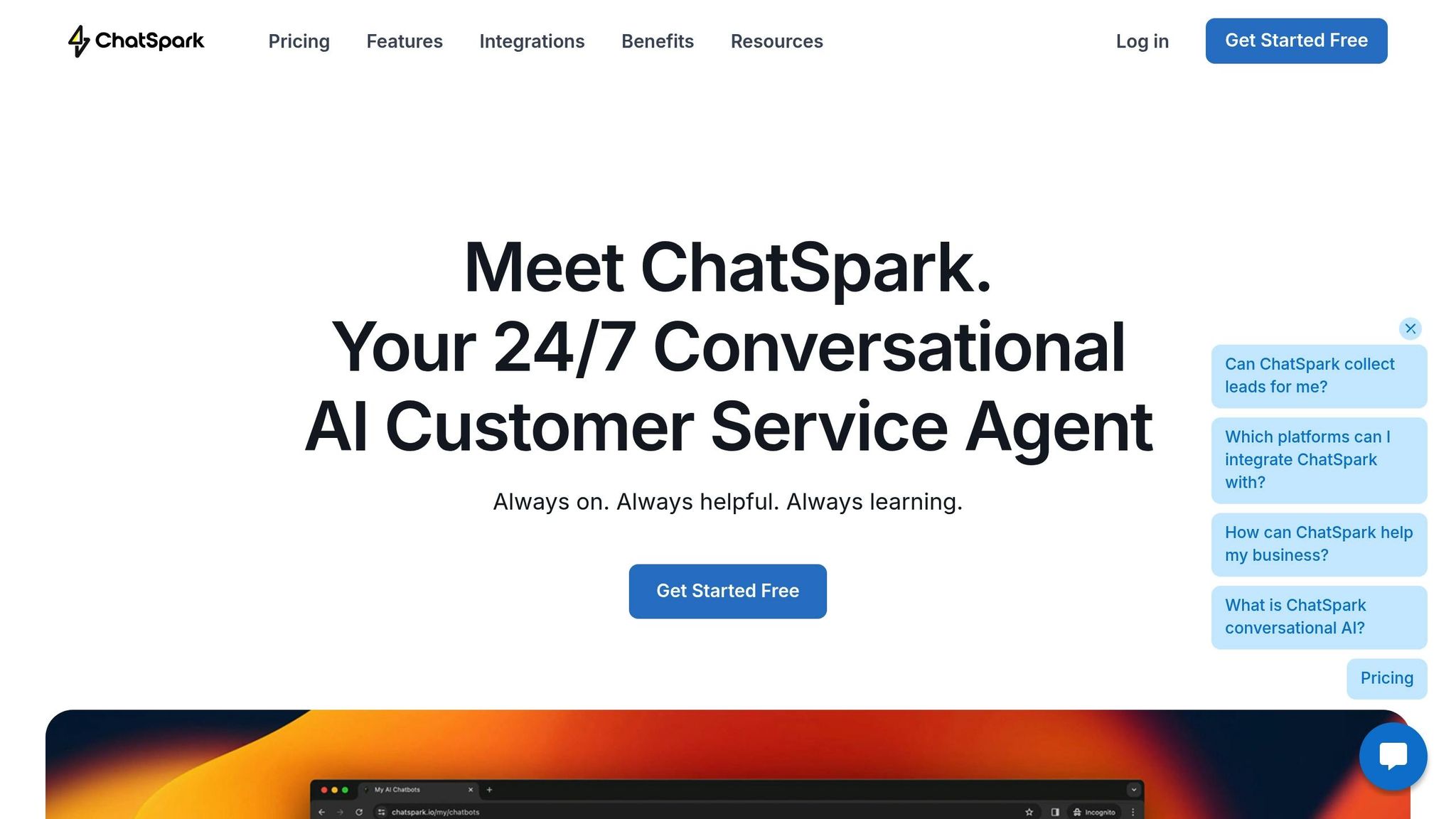
ChatSpark simplifies the lead qualification process with features like customizable workflows, multi-channel deployment, and built-in analytics. Instead of managing multiple tools or manually sorting through leads, this platform automates data collection, scoring, and routing. Plus, it gives you full visibility into performance, helping you identify what works and what needs tweaking.
The platform offers a "Get Started Free" option, so you can test lead capture bots before committing to a paid plan [19]. Businesses using ChatSpark often see a 30% increase in qualified leads entering their pipeline [2]. This boost comes from the AI's ability to filter out low-intent visitors, allowing your sales team to focus on prospects who are genuinely ready to buy. These features integrate seamlessly into your existing lead qualification strategies.
Setting Up and Customizing Workflows
ChatSpark lets you tailor every part of the lead qualification process. You can capture custom data fields that align with your Ideal Customer Profile (ICP), ensuring you gather information that truly matters to your business.
The AI can be trained with your product details and FAQs, enabling it to provide accurate, context-aware responses [19][2]. You can also set automated qualification criteria around factors like budget, company size, or implementation timelines [2].
Using Zapier, ChatSpark connects to over 5,000 applications, including Salesforce, HubSpot, and Zoho [19][2]. This integration ensures that qualified leads flow directly into your CRM without manual data entry. Additionally, ChatSpark tracks each lead's digital footprint, monitoring page views and actions to assess their level of interest [19]. When designing workflows, align your conversational flows and qualifying questions with your ICP’s challenges, and consider frameworks like BANT (Budget, Authority, Need, Timeline) to ensure you're asking the right questions from the start [1][2].
Capturing Leads Across Multiple Channels
ChatSpark works with WhatsApp, Instagram, Facebook, Telegram, and Slack, allowing you to engage leads wherever they prefer to connect [19]. This multi-channel approach is essential since 67% of B2B buyers now favor self-service tools over direct interactions with sales reps [2].
All channels feed into a single system, ensuring that whether a prospect messages you on Instagram or fills out a website form, their information is consistently captured, scored, and routed. The chatbot delivers on-brand responses in over 85 languages, so you never miss a lead due to time zones or language barriers [19]. To get the most out of this setup, use digital footprint tracking to identify which product or pricing pages a lead visited most often, and prioritize follow-ups based on high-intent behaviors [19][2].
Tracking Performance with Analytics
ChatSpark’s AI-powered analytics provide deep insights into engagement and conversation quality [19]. You can review full conversation transcripts to pinpoint where prospects drop off or where the chatbot struggles to respond effectively. This allows you to update the chatbot’s training data to fill any gaps [19][18].
Once a lead is qualified, chat transcripts can be emailed directly to your sales team, giving them detailed context about the prospect's pain points before discovery calls [19][3]. You can also track metrics like the ratio of chatbot interactions to booked meetings or CRM entries to measure the ROI of your automated workflows [18]. Companies leveraging AI for lead generation report up to a 50% increase in leads and 47% higher conversion rates, while AI-based lead scoring can improve lead conversion rates by 51% [18].
Conclusion
AI agents are transforming lead qualification strategies, making processes faster, more efficient, and highly scalable. By automating up to 80% of SDR tasks and cutting lead qualification time by a staggering 83% - from 6 hours to just 1 - they significantly reduce daily workloads [7][1].
But it’s not just about saving time. AI chatbots bring consistency to the table. Unlike human reps, who might rely on varying standards and evaluate only 5–10 factors, chatbots analyze hundreds of data points - like website activity and email engagement - using the same criteria every time [7]. This eliminates subjective bias and ensures fair evaluations across the board.
When it comes to scalability, chatbots are unmatched. They can handle an unlimited volume of inquiries without breaking a sweat, delivering responses in seconds while maintaining quality [3][7].
The numbers speak for themselves. Companies leveraging AI for lead qualification have seen a 20% increase in conversion rates [2]. Additionally, implementing chatbots can result in a 50% uptick in leads and 47% higher conversion rates overall [18]. As Forrester puts it:
"AI-driven chatbots allow sales reps to focus on closing deals, not chasing dead ends" [2].
FAQs
How do AI chatbots identify and prioritize high-value leads?
AI chatbots excel at identifying and prioritizing high-value leads by analyzing real-time data such as user behavior, engagement patterns, and the details shared during conversations. Using this information, they assign scores to leads based on their likelihood to convert, ensuring the most promising prospects are flagged for follow-up or directed to the right team.
This automated approach simplifies lead qualification, saving time and ensuring no opportunities are overlooked. By focusing on leads that have the highest potential, businesses can improve efficiency and increase their chances of turning prospects into customers.
What makes a lead qualification process effective?
An effective lead qualification process hinges on a few essential elements that help businesses zero in on the most promising prospects. It all starts with predefined questions designed to gather critical details about a lead - things like their needs, budget, and purchase intent. This step ensures the sales team has the right information to determine whether the lead is worth pursuing.
From there, AI-driven automation takes the reins, engaging prospects through conversational interactions that feel natural. These tools don’t just collect responses - they analyze them, along with behavioral cues, to assign a score. This scoring helps businesses focus their efforts on the leads most likely to convert, saving time and resources.
Finally, routing mechanisms step in to ensure that qualified leads are swiftly passed on to the right sales team or follow-up channel. This minimizes delays and helps businesses act on opportunities while they’re still hot.
Platforms like ChatSpark simplify this entire process by automating data collection, lead scoring, and routing. The result? A more efficient sales pipeline and a higher chance of turning prospects into customers.
How do AI chatbots help boost lead conversion rates?
AI chatbots help businesses improve lead conversion rates by taking over the task of qualifying leads and interacting with potential customers in real time. They ask specific questions to gather key details, such as budget, needs, and decision-making authority, to evaluate the quality of each lead. This means sales teams can concentrate their efforts on the most promising prospects, ultimately saving time and increasing the chances of closing deals.
What’s more, AI chatbots are available 24/7, ensuring no lead slips through the cracks - even after business hours. They respond instantly, meeting the growing demand for quick replies, while also filtering out leads that are less likely to convert. This efficient process helps businesses drive better sales results and get more value from their marketing investments.