If I want fewer wrong bot answers in support, I need four things: approved sources, strict checks, clear handoffs, and regular testing.
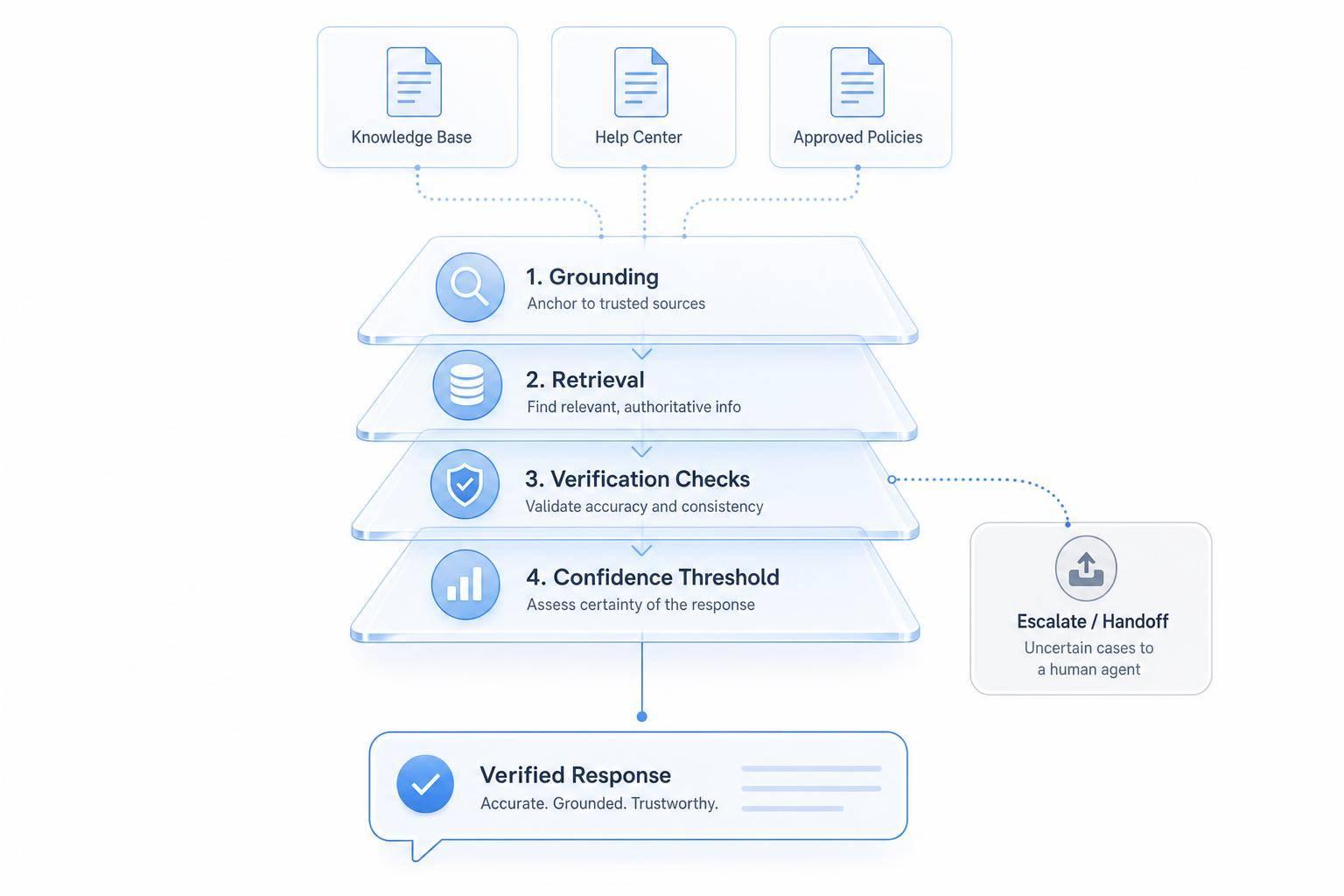
A support bot should answer from documents and live systems, not from guesses. In this article, I focus on the risk areas that cause the most damage: refunds, billing, order status, and troubleshooting. The fix is simple in theory: ground the bot, verify high-risk replies, block weak answers, and send uncertain cases to a human.
Here’s the full framework in plain English:
- Build one clean support knowledge base for policies, billing rules, product docs, and SOPs
- Connect the bot only to approved sources
- Use RAG so answers come from retrieved evidence
- Add guardrails for refunds, billing, orders, and tech issues
- Check live data before stating things like $ amounts, dates, fees, or order updates
- Set confidence thresholds, starting at 60% for new setups
- Escalate after two failed attempts or right away for fraud, hacked accounts, or legal threats
- Pass full chat context to agents during handoff
- Follow a complete guide to AI customer support implementation to test before launch and after launch with cases that try to make the bot invent answers
- Track refusal rate, citation use, and handoff quality to spot risk early
A few details stand out:
- For billing disputes and refunds, the bot should not state a result unless it matches live records
- For order status, it should pull updates from an API instead of guessing
- For troubleshooting, it should stop when the fix is not in approved guidance
- For account security and fraud, I would skip AI and route to a person
One useful rule from the article: use a 3-month audit cycle for the knowledge base, and use full U.S. dates like July 29, 2026 to avoid policy confusion.
This comes down to one idea: if the bot can’t prove it, it shouldn’t say it.
Step 1: Ground the Chatbot in Approved Knowledge Sources
Start with a clean knowledge base. Then tighten retrieval controls. Hallucinations drop when support replies come ONLY from approved sources.
Build one approved support knowledge base for refund policies, pricing, billing rules, product documentation, and support procedures before the bot says a word to a customer.
Build a Clean and Current Support Knowledge Base
Old documents and conflicting policies can throw the model off. A smart first move is to audit recent tickets and fill the highest-volume content gaps. Those are the spots where the bot is most likely to guess.
Then clear out stale content. That includes old pricing pages, expired return deadlines, and any document that clashes with your current policy. When you write policies, use full U.S. dates - for example, "This policy applies to orders placed after July 29, 2026" - so there’s no room for confusion.
Each article should focus on one task. For example, use How to Request a Refund instead of a broad Returns & Exchanges page. That small shift makes retrieval much more precise.
Use clear headings like:
- Eligibility
- Steps
- Exceptions
This helps the retrieval system line up customer questions with the right content. Also, give every article a clear owner and schedule a full knowledge audit every 3 months or after any product release.
Once the content is clean, connect only those approved sources to the bot.
Configure ChatSpark to Answer Only From Trusted Sources
Connect approved FAQs, help center pages, and SOPs to ChatSpark's enterprise-grade retrieval layer. When answers stay tied to those sources, refund, billing, and order-status mistakes tend to drop.
For billing, cancellations, and refunds, stick to exact approved wording. Use a strict system prompt that tells the bot never to invent URLs or features, to say you will escalate when confidence is low, and to cite sources with titles and URLs [1].
After that, require source labels. It makes unsupported answers much easier to spot.
Require Source-Aware Responses for Verifiable Answers
Set up ChatSpark to include the source title or document ID on verifiable answers. This makes audits much less painful. Your team can look at a flagged reply and quickly trace it to the document behind it - or confirm that no document backs it up.
Before launch, run the knowledge base in draft-only mode, also called shadow mode. The bot drafts replies, but human agents review them before customers see them. It’s a simple way to catch unsupported claims early and lower risk before launch.
After the source layer is stable, add retrieval and policy checks for higher-risk requests.
Step 2: Add RAG, Guardrails, and Validation for High-Risk Questions
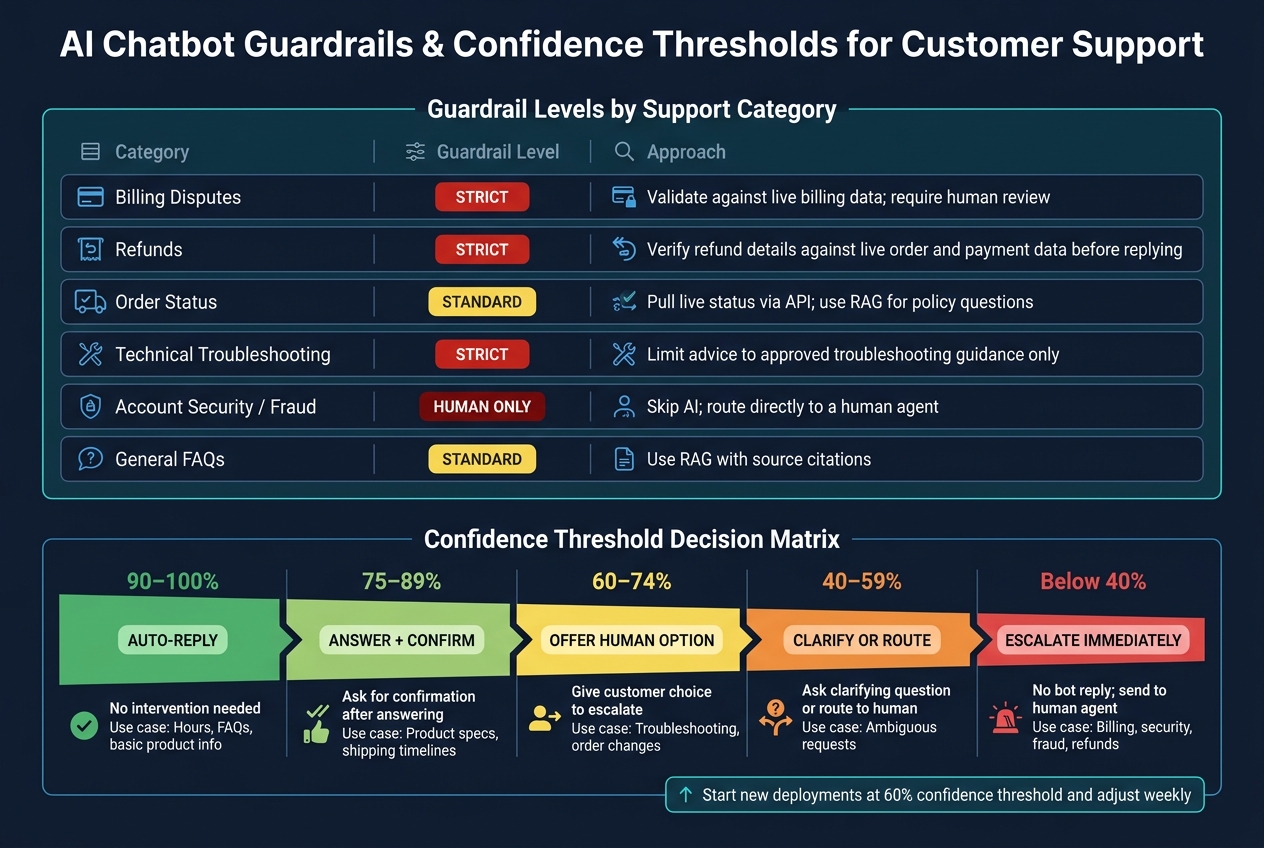
AI Chatbot Confidence Thresholds & Guardrail Levels for Customer Support
Once your approved sources are set, the next step is making sure the model uses them the right way. That means adding retrieval, guardrails, and output checks before any reply reaches the customer.
Use Retrieval-Augmented Generation to Keep Answers Evidence-Based
Use RAG to pull approved passages first. Then have the bot answer only from that evidence. The system prompt should be strict: if the bot can't find a detail in the retrieved content, it shouldn't guess.
Put simply: no supported answer means no customer-facing answer.
If the evidence doesn't support a clear reply, the bot should refuse the request and hand it off to a human.
Apply Guardrails to Refunds, Billing, Orders, and Troubleshooting
Not every support question carries the same level of risk. A basic FAQ is one thing. A refund, billing dispute, or fraud report is a different ball game.
Billing disputes, refunds, order status, account security, fraud reports, and technical issues need tighter checks than general FAQs.
| Category | Guardrail Level | Approach |
|---|---|---|
| Billing Disputes | Strict | Validate against live billing data; require human review |
| Refunds | Strict | Verify refund details against live order and payment data before replying |
| Order Status | Standard | Pull live status via API; use RAG for policy questions |
| Technical Troubleshooting | Strict | Limit advice to approved troubleshooting guidance only |
| Account Security / Fraud | Human Only | Skip AI; route directly to a human agent |
| General FAQs | Standard | Use RAG with source citations |
For refunds, never state an amount without checking the order or payment record first. For troubleshooting, stop when the fix isn't documented in the approved guidance.
Use Structured Outputs and Policy Checks Before Sending Replies
If a reply includes a dollar amount, date, or account detail, use schema-bound outputs, usually JSON, and validate them before sending. Think of this as the last checkpoint before the message goes out.
If the schema doesn't match, or the live data check fails, block the reply and send it for human review.
Once the bot can retrieve, verify, and validate answers, the next step is setting confidence thresholds and handoff rules for anything that still isn't clear.
Step 3: Set Confidence Thresholds and Human Handoff Rules
Some support questions sit in a gray area. That’s where confidence thresholds come in. They help you decide when the bot should answer, when it should ask for more detail, and when it should send the case to a person.
This matters most for refunds, billing disputes, order changes, and troubleshooting. In those cases, a wrong answer isn’t just annoying. It can create extra work, upset customers, and turn a small issue into a bigger one.
Set Confidence Thresholds Based on Support Risk Level
For new ChatSpark deployments, start with a 60% confidence threshold and adjust it based on weekly review of risky transcripts. [1] Use stricter thresholds for billing disputes, refunds, and account access than for general FAQs.
| Confidence Level | Bot Behavior | Typical Use Case |
|---|---|---|
| 90–100% | Auto-reply without intervention | Hours, FAQs, basic product info |
| 75–89% | Answer, then ask for confirmation | Product specs, shipping timelines |
| 60–74% | Offer the option to connect with a human | Troubleshooting, order changes |
| 40–59% | Ask a clarifying question or route to a human | Ambiguous requests |
| Below 40% | Escalate immediately | Billing, security, fraud, refunds |
Those numbers help, but they only do the job if the handoff path is just as clear. A bot that knows when to step back is useful. A bot that steps back cleanly is much better.
Create Clear Human Handoff Paths in ChatSpark Workflows
Once a reply crosses the risk threshold, the transfer should keep the full context and send the case to the right place. Customers shouldn’t have to repeat themselves, and agents shouldn’t have to piece the story together from scratch.
Use live handoffs that pass the full conversation context to the receiving agent: transcript, customer identity, transactional details, detected intent, AI confidence score, and reason for escalation. For longer conversations, add a short AI-generated summary that covers the main issue, steps already attempted, and customer sentiment.
Routing rules should send:
- Billing disputes to finance or billing specialists
- Account access problems to security or Tier-2 support
- General FAQs to the bot
High-risk terms like lawsuits, hacked, and fraud should skip the bot and escalate right away. If agents are offline, offer a support ticket or email follow-up instead of saying a live handoff is happening when it can’t. During the transfer, tell the customer they are being connected to a specialist and that the full chat history will follow.
When the bot can’t give a sure answer and there isn’t a smooth transfer path, it needs a safe fallback.
Design Safe Failure Behavior Instead of Letting the Bot Guess
If the bot doesn’t have enough evidence, it should ask a clarifying question or escalate. Don’t let it fill in the blanks.
For example, if a customer says “my order” but doesn’t say which one, the bot should ask for that detail before moving ahead. That small pause can stop a lot of confusion.
Set one more guardrail as a backup: escalate after two failed attempts to resolve the same query. That keeps customers from getting trapped in a loop of vague or unhelpful replies.
Step 4: Monitor, Test, and Improve the System Over Time
Once confidence thresholds and handoff rules are set, the next job is simple: watch the bot in live traffic and see if it actually follows them.
That matters because a system that looks fine in staging can still go off course when real customers start asking messy, high-stakes questions. Monitoring helps you see whether grounding, guardrails, and handoffs still hold up under day-to-day support load. After launch, this is what keeps hallucinations from showing up again. Start with the same support cases that carry the most risk.
Test Real Support Scenarios Before and After Launch
Before you go live - and on a regular schedule after launch - run test cases based on the scenarios most likely to trigger unsupported replies. That includes refund eligibility, invoice disputes, order tracking, account cancellations, and technical troubleshooting.
These tests help surface cases where the bot may answer beyond what the knowledge base supports.
Some test prompts should ask for information that does not exist in the knowledge base. The goal is to check that the bot refuses unsupported requests instead of making something up. Tools like LangSmith, OpenAI Evals, and Humanloop make this easier to run at scale. They log prompts, retrieved passages, outputs, and retrieval and generation latency, and redact PII such as payment details and passwords before storage. [1]
Those logs are useful for more than one-off checks. Over time, they show where failures repeat and which scenarios keep pushing the bot into weak answers.
Track Metrics That Reveal Hallucination Risk
Use the logs to spot patterns over time. Focus on a few plain questions:
- Is the bot relying on supported material?
- Does it refuse when evidence is missing?
- Does it hand off cleanly when it should?
If those three things start slipping, that's usually where hallucination risk shows up first.
Conclusion: A Practical Framework for Safer AI Support
Monitor, test, and redact data on a steady basis so the bot refuses or hands off when the evidence is weak.
FAQs
How do I know if my bot is grounded enough to go live?
Use a staged testing process. Start by testing common inquiries in the preview feature. Then run shadow mode for one to two weeks so human reviewers can check and approve AI drafts.
Before launch, aim for a 90% approval rate. After that, roll things out slowly to 10% to 20% of traffic and watch escalation rates and customer satisfaction closely.
What should my bot do when live data and the knowledge base don't match?
When live data and the knowledge base don't line up, or the AI doesn't have enough information, it should pick reliability over guesswork.
Use strict prompts so it says when it can't answer. Set confidence thresholds - usually 85% to 95% - for automatic escalation. And make sure the handoff is smooth, with the full conversation history, detected intent, and customer records passed along to the next person.
Which metrics best show whether hallucinations are getting worse?
Track your hallucination rate with a simple weekly review process.
Manually check at least 50 random AI responses each week, and aim to keep hallucinations under 2%. On top of that, review 20 to 50 conversation logs every week. Rate each response as correct, partially correct, or incorrect, and target an accuracy score of 90% or higher.
It also helps to keep an eye on support patterns that can hint at deeper issues. For example:
- Escalation rates above 30%
- Customer frustration signals, like repeated rewording of the same question
- Sudden shifts in tone during the conversation
These patterns can flag cases where the AI sounds confident but misses the mark.