AI trained on your business’s data outperforms generic AI for customer support. By using company-specific resources like FAQs, policies, and support tickets, AI delivers accurate, tailored responses, reducing costs and improving customer satisfaction.
Key takeaways:
- 38% higher deflection rates and 84% CSAT scores with domain-trained AI (vs. 75% for generic AI).
- Cost per resolution drops from $18 to $14.
- Companies like Qover and TestGorilla achieve 95% response accuracy and 80%+ ticket deflection rates.
- Domain-specific AI minimizes errors with hallucination rates below 2% (vs. 9.2% for generic AI).
Steps for AI customer support implementation using domain data:
- Collect data: Use FAQs, product manuals, and recent support logs (last 3–6 months).
- Clean and organize: Remove duplicates, redact sensitive info, and standardize terminology.
- Train with RAG: Use Retrieval-Augmented Generation for fast updates without retraining.
- Regular updates: Sync with platforms like Google Drive or Confluence to keep data current.
Why it matters: Domain-trained AI saves time, reduces agent workload, and aligns responses with your brand. Tools like ChatSpark make this process efficient by integrating data, supporting multiple languages, and tracking performance metrics. For example, a construction company saved $47,880 and handled 10,754 messages in four months using AI.
Bottom line: Domain-specific AI transforms customer support, delivering precise, cost-effective solutions tailored to your business.
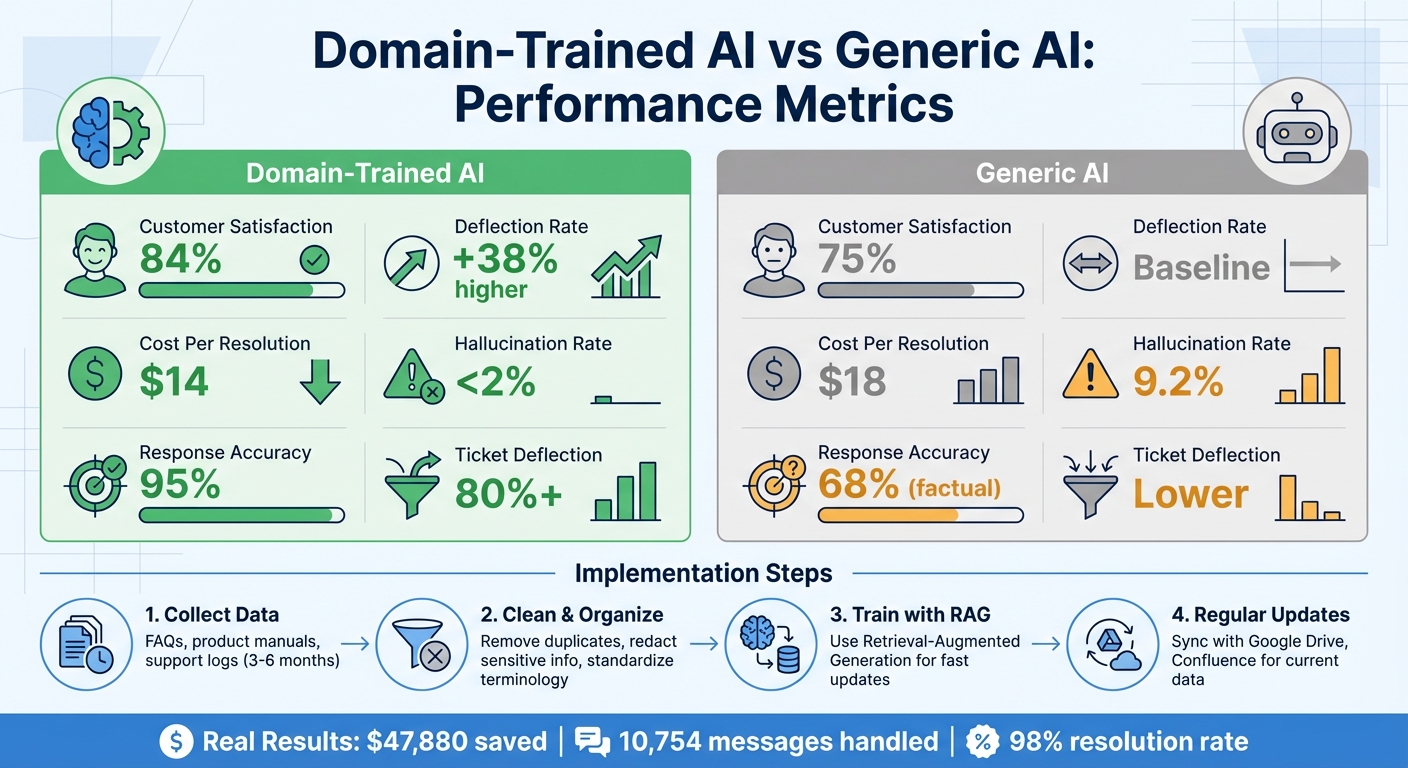
Domain-Trained AI vs Generic AI Performance Comparison
What Is Domain-Specific Data in AI?
Defining Domain-Specific Data
Domain-specific data refers to the unique information that’s central to how your business operates. This includes assets like product catalogs, service manuals, standard operating procedures (SOPs), troubleshooting guides, FAQs, internal knowledge bases, and historical customer interactions such as support tickets and chat logs [4]. On the other hand, general data comprises publicly available information used to train foundational AI models like GPT-4 or Claude [3]. While 92% of Fortune 500 companies utilize tools like ChatGPT, these models don’t automatically include your company’s specific data unless costly fine-tuning is performed [3].
An industry expert highlights the issue:
"Generic models can be pretty intelligent-sounding, but they lack the necessary context. Consequently, they dish out hallucinations, leave the users frustrated, and cause unnecessary escalations" [4].
By integrating your business’s actual data, AI can generate responses that reflect your workflows, terminology, and policies, making interactions more aligned and effective. Let’s take a closer look at how AI leverages this specialized data to understand and respond to customer needs.
How AI Processes Domain Data
AI doesn’t just rely on keywords; it analyzes the structure of a query to determine whether it’s related to support, information, or sales [1]. Advanced systems apply the "Intent, Context, and Action" (ICA) framework to handle complex processes [2]. This involves identifying the user’s intent, considering relevant contextual details, and then determining the best course of action. For instance, ChatSpark’s AI engine evaluates more than 10 signals - such as product codes and document layouts - to deliver resolution rates exceeding 80% [1].
How to Use Domain Data for Customer Support AI
Step 1: Gather Business Data
Your training data is likely scattered across various systems, so the first step is to map out all the places where customer knowledge resides. This could include cloud drives, websites, internal documents, and chat logs [6]. Focus on sources that address common customer questions [4]. To ensure your AI reflects current practices, prioritize data from the last 3–6 months, capturing recent product updates and customer interactions [4][7]. Research shows that companies using historical support tickets for training can boost deflection rates by 38%, achieving an average customer satisfaction score of 84% compared to 75% when relying on generic data [3].
To create a well-rounded training set, connect platforms like Zendesk or Salesforce for help center data, Google Drive for stored documents, and communication tools such as Slack or WhatsApp [6][10]. Once you've mapped your data sources, the next step is to streamline and prepare this information for training.
Step 2: Clean and Organize Data
Before training your AI, clean up the data to ensure it's accurate and relevant. Remove duplicates and outdated drafts [11][4]. Protect customer privacy by redacting sensitive details like names, emails, and order numbers [4][12]. Break larger documents into smaller, focused chunks - this improves the AI's ability to retrieve relevant information [4]. Consistency is key, so standardize terminology across all sources. For example, avoid using "workspace" in one context and "account" in another, as this can confuse the AI [11].
Adding metadata such as titles, dates, and source URLs helps provide context and ensures the AI understands the freshness of the data [4]. When creating custom question-and-answer sets, include variations of common phrases to improve the AI's ability to recognize different intents [8]. With your data cleaned and organized, you're ready to train models that can deliver precise and helpful responses.
Step 3: Train AI Models with Domain Data
Retrieval-Augmented Generation (RAG) is a great approach for keeping your AI updated with minimal effort. Unlike traditional fine-tuning, which requires time-intensive retraining, RAG allows for instant updates through re-indexing [6]. This means your AI stays current as your policies or products change, without long downtimes.
To improve the AI's performance, include examples of edge cases and negative scenarios so it learns to recognize uncertainty [4]. Additionally, train it with data that includes typos, slang, and abbreviations, making it better equipped to handle casual customer language [12]. For ongoing improvements, consider using an "Agent-in-the-Loop" framework. In one production pilot, this approach boosted recall accuracy by 11.7% and precision by 14.8% [5].
Step 4: Update AI Regularly
Regular updates are essential to keep your AI effective. Auto-reindex content from web-crawled sources and help centers to ensure your knowledge base stays up-to-date [10]. Connect your AI to platforms like Confluence, SharePoint, or Google Drive with auto-sync enabled so it always accesses the latest versions of your documents [6][9].
Monitor the questions your AI struggles to answer - these gaps can highlight areas where your knowledge base needs improvement [13][9]. During live interactions, support agents can verify the relevance of AI-generated snippets, creating a feedback loop that has been shown to improve helpfulness by 8.4% in one study [5]. As you add new data, clean it to remove duplicates and redact personal information [13][4]. Regular updates not only maintain the AI's accuracy but also ensure it aligns with your evolving business needs, ultimately improving customer satisfaction [4].
Industry Examples of Domain Data in Customer Support
E-commerce
Online retailers are using domain-specific data like product catalogs, support tickets, and customer reviews to tackle complex issues using conversational AI automatically [14]. When AI is trained on this type of information, it can handle tasks like compatibility checks, troubleshooting, and processing returns - all without needing human involvement [14]. This has led to some impressive results: first-contact resolution rates have increased by 28%, and user satisfaction levels have hit 89% in many cases [14]. These advancements not only enhance efficiency but also reduce costs significantly [1]. For example, AI can quickly identify which accessories work with a specific device or instantly pull up order histories to guide customers through troubleshooting steps [14]. Other industries are taking similar approaches to solve their own unique challenges.
Insurance
Insurance companies are another example of how domain data can transform customer support. Customers often have detailed questions about coverage, claims, and policies that require precise, fact-based answers [14]. By using AI trained on policy documents, claims histories, and coverage rules, insurers can deliver highly accurate and personalized responses [14]. While generic AI models might occasionally provide incorrect information, systems enriched with structured knowledge graphs achieve a 91% factual accuracy rate compared to 68% for standard models [14]. This also benefits support agents, who report spending 34% less time on manual fact-checking. The AI can quickly cross-reference policies, clarify claim procedures, and determine coverage for specific scenarios, making the process smoother and faster.
Healthcare
In the healthcare sector, domain-specific AI ensures compliance with strict regulations while significantly improving patient support. By leveraging secure data from biomedical databases, triage protocols, and patient logs, these systems can differentiate between urgent and routine symptoms, guide patients to the right care, and provide accurate treatment advice - all while safeguarding sensitive information [14]. For instance, in September 2025, Cult.fit launched a GPT-4–powered support assistant that automated 80% of queries, reduced response times by 90%, and achieved a 90% resolution accuracy rate [15]. This system adhered to strict privacy and ethics standards, ensuring it met healthcare regulations [14].
Measuring AI Performance with Domain Data
Performance Metrics to Track
To confirm that domain-specific data enhances AI performance, it's essential to focus on key metrics. Start with accuracy and precision, paying close attention to intent recognition, response relevance, and factual correctness when evaluated against your company's data sources [16]. Another critical area is resolution and deflection rates, which measure how effectively the AI handles queries without requiring human intervention [16][3].
Operational metrics also provide valuable insights. Keep an eye on response time, average handling time, and first-contact resolution rates to assess how efficiently the AI operates [16]. Additionally, tracking knowledge coverage - such as identifying frequently unanswered questions - can help refine your training data [1]. Financial impact is another angle to consider: compare the cost of AI interactions (roughly $0.50 per interaction) to human agent costs (around $6.00). Companies applying thorough AI accuracy frameworks have reported impressive returns on investment, ranging from 148% to 200%, and have saved over $300,000 annually on average [16].
These metrics provide a solid foundation for comparing generic AI systems to those trained with domain-specific data.
Generic AI vs. Domain-Trained AI
Once you’ve established key performance metrics, evaluate how domain-specific training enhances AI outcomes. For instance, companies that train their AI using historical support tickets often see higher deflection and customer satisfaction rates compared to generic models [3]. On average, domain-trained systems achieve 84% customer satisfaction, outperforming generic systems, which average 75%. Additionally, domain-specific AI reduces the cost per resolution to approximately $14, compared to $18 for generic models [3].
Another significant advantage is the reduction in hallucination rates. Generic AI models tend to have average hallucination rates of about 9.2%, while domain-trained systems maintain rates below 2% [16][3]. Case studies consistently highlight the benefits of domain-trained AI, including improved accuracy, fewer hallucinations, and better cost efficiency [3].
Using Domain Data with ChatSpark
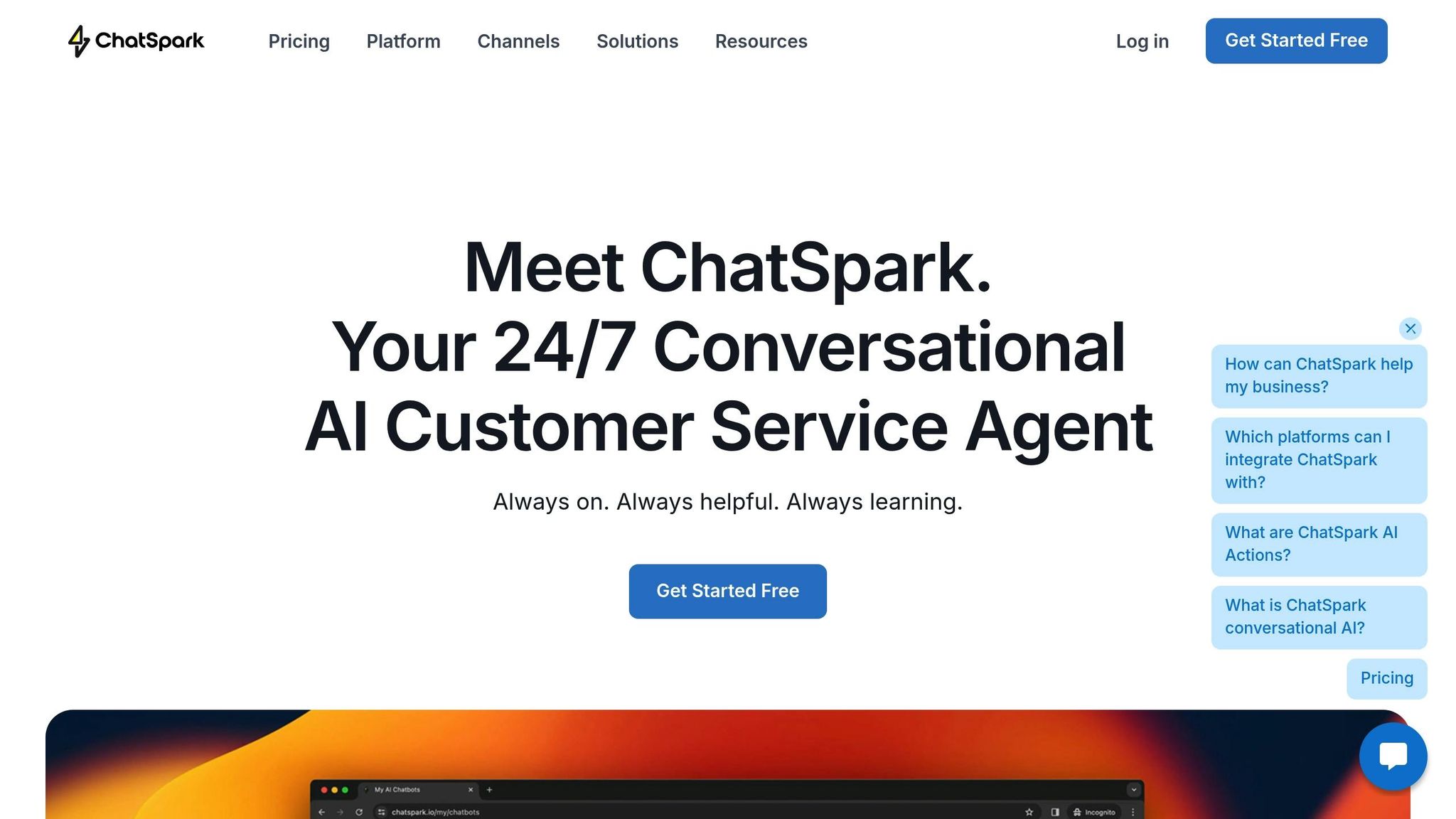
ChatSpark takes customer support to the next level by integrating your domain-specific data across multiple channels.
Adding Business Knowledge to AI
ChatSpark supports a wide range of file formats, including PDF, CSV, DOCX, and PPTX, while also connecting seamlessly with Google Docs and YouTube transcripts. It even crawls websites automatically to build and maintain an up-to-date knowledge base [1]. For added flexibility, a rich text editor lets you fine-tune content manually.
But it doesn’t stop there. ChatSpark integrates with over 5,000 apps via Zapier, allowing businesses to sync lead data and automate tasks like support ticket creation. Most AI agents are ready to go in under 10 minutes, thanks to a streamlined four-step process: decoding intent, conducting semantic searches, reranking results, and delivering responses aligned with your brand [1]. This tight integration ensures smooth, reliable support across all platforms.
Multi-Platform and Multi-Language Support
Once trained, the same AI powers interactions across platforms like websites, Instagram, Facebook, WhatsApp, Telegram, and Slack [1]. ChatSpark also supports over 85 languages with automatic detection, making it a great fit for businesses catering to global audiences.
Monitoring Performance with Analytics
ChatSpark includes an analytics dashboard that tracks critical metrics, such as "Top Unanswered Questions" and "Knowledge Coverage", helping you spot gaps in your knowledge base and improve it strategically [1]. The dashboard also highlights "Top Rated Responses", giving you insights into which answers are working best for your customers.
Here’s a real-world example: Between August and December 2025, a global leader in construction products used ChatSpark for one of their flagship brands. In just four months, the AI handled 10,754 messages, achieved a 98% resolution rate, and captured 153 new leads. This saved over 66 days of agent time and cut costs by $47,880 - all from an investment of about $4,000 [1].
Conclusion
Domain-specific data takes customer support AI from basic, generic replies to delivering expert-level precision. By leveraging your policies, product details, and support history, AI achieves near-flawless accuracy, aligns perfectly with your documentation, and handles up to 70% of routine questions without needing human involvement [17]. This isn't just about automating tasks - it's about empowering your team to focus on the tough challenges that require human insight.
With these benefits, domain-trained AI delivers measurable results: a 38% increase in deflection rates, customer satisfaction climbing to 84% (compared to 75%), a drop in resolution costs from $18 to $14, and the potential to save billions in support expenses [3][17].
ChatSpark makes this transformation seamless. It pulls data from various sources, supports multiple channels and languages, and provides analytics to refine your AI over time. This well-rounded approach not only automates routine tasks but also equips your team to tackle the more nuanced issues.
"AI doesn't replace your support team. It amplifies their expertise by handling the mundane so humans can tackle complex problems." - Rohan Rajpal [17]
The key? Start with clean, structured domain data and track performance closely. Treat your AI like a dynamic knowledge base that evolves and improves with every interaction.
FAQs
How does domain-specific AI help lower customer support costs?
Domain-specific AI is a game-changer for reducing customer support costs. It takes on repetitive, high-volume inquiries that typically demand a lot of time and resources from human teams. By training AI models with data tailored to a company’s products, services, and policies, businesses can ensure more accurate automated responses. This reduces the need to escalate issues to human agents, keeping ticket volumes lower.
On top of that, AI trained on specific company data delivers faster and more precise support. It’s especially effective for handling common issues like troubleshooting or clarifying policies. Tools like ChatSpark make this process smooth by integrating across communication channels and staying updated with the latest company details. The result? Lower staffing and training costs, 24/7 support that stays true to the brand, and happier customers - all while saving money.
What are the steps to implement domain-specific AI for customer support?
Implementing AI tailored to a specific domain requires a structured approach to ensure it delivers precise and relevant responses for your business needs. Start by collecting domain-specific data - this can include support tickets, product manuals, internal guidelines, or any other relevant resources. The goal is to gather information that reflects the unique needs and challenges of your business.
Next, organize and clean this data. This step involves removing irrelevant information, standardizing formats, and identifying key patterns like common customer intents or critical entities. Proper preparation ensures the AI can process and learn effectively.
Once your data is ready, train the AI using Natural Language Processing (NLP) techniques. This enables it to interpret and respond to customer inquiries in a way that aligns with your domain's requirements. After the initial training, fine-tune the AI by testing its responses, identifying any shortcomings, and refining the data to address those gaps.
Finally, establish a system for continuous improvement. Keep the AI updated with new data, retrain it periodically, and monitor its performance to ensure it stays accurate and relevant over time.
By following these steps, you can create an AI solution that streamlines customer support, delivers faster resolutions, and improves the overall user experience.
What is Retrieval-Augmented Generation (RAG), and how does it improve AI in customer support?
Retrieval-Augmented Generation (RAG) takes AI to the next level by enabling it to access real-time, external sources like knowledge bases, documents, or databases. Instead of relying only on pre-existing training data, RAG allows AI to provide responses that are more accurate, relevant, and current. This is especially useful in industries that change rapidly, such as customer support.
With RAG, conversational AI becomes better equipped to handle specific domains, minimize errors, and deliver answers that are rich in context. This approach not only enhances the user experience but also enables AI systems to tackle customer questions more effectively and reliably, all while supporting ongoing learning and domain-specific adjustments.