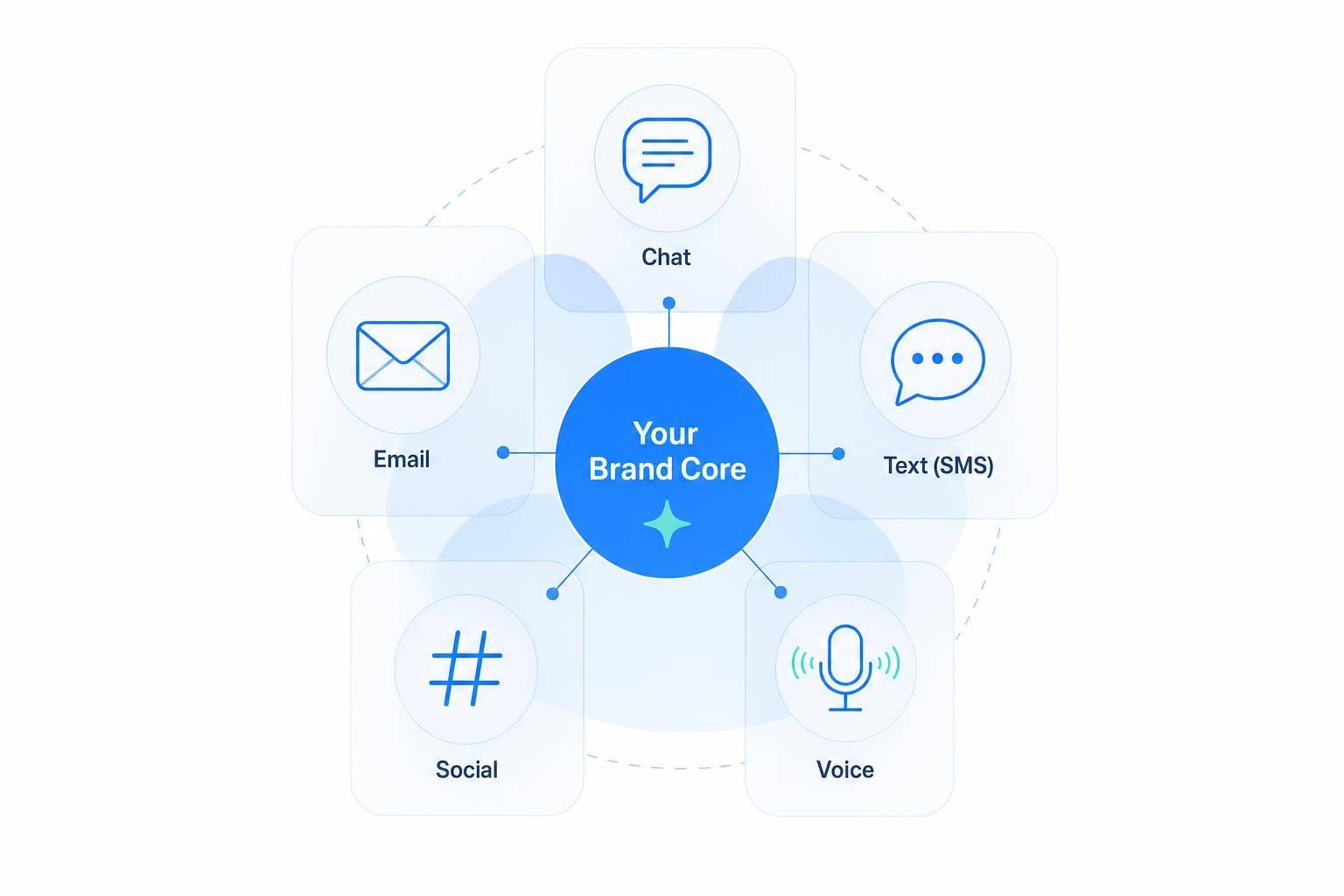
If your AI support agent sounds different on chat, email, SMS, and voice, customers will notice. And that hurts trust fast: 90% of customers want a consistent experience, but only 29% of businesses deliver it.
If I wanted to keep an AI agent on-brand across every channel, I’d focus on a few simple rules:
- Set one source of truth for voice, tone, wording, and policy details
- Keep policy answers accurate across channels, including dates, prices, time zones, and return rules
- Use prompts and templates so the AI follows the same rules every time
- Change the format by channel, not the brand voice
- Review transcripts often to catch tone drift, old policy text, and weak fallback replies
In plain English: the brand should stay the same, even when the message shape changes. A billing issue may need a calmer tone. An outage may need a more direct one. But the AI should still sound like your company, not a different one on each channel.
I’d also keep hard limits in place. That means the AI should know when to hand off to a person, what it can explain, what it cannot approve, and what topics need an immediate escalation. A polished answer with the wrong policy is still a bad answer.
Here’s the core idea in one line: use one brand guide, one set of prompt rules, channel-specific formatting, and a fixed QA schedule.
That’s the full playbook this article covers.
Define Clear Brand Guardrails Before You Automate
Write your rules down in a shared doc or spreadsheet that the support team can update. That file becomes the source of truth for prompts, workflows, and review.
Document voice, tone, and vocabulary rules
Start with 3–5 core voice traits that describe how your brand sounds. For example: friendly, plain-language, solution-focused, and respectful. For each trait, add one short “do” example and one “don’t” example. That makes the difference clear fast.
Then match tone to the moment. Use a warmer tone for updates, a calm tone for billing, and a direct tone for outages. The brand’s personality stays the same. What changes is the emotional register.
Vocabulary matters just as much. Create two short lists:
- Phrases to use: “Here’s what I can do,” “We’re on it”
- Banned phrases: “Dear Sir/Madam,” “User error,” “You must”
Also set formatting rules so the AI sticks to U.S. conventions every time, or follow a multilingual customer support setup guide for global markets:
| Element | On-Brand (U.S.) | Off-Brand |
|---|---|---|
| Currency | $49, $1,249.50 | 49 USD |
| Date | September 1, 2026 | 1 September 2026 / 2026-09-01 |
| Time | 3:30 PM PT | 15:30 |
| Numbers | 1,250 points | 1.250 points |
Last, define contraction rules and length limits. Use contractions like “we’re,” “you’ll,” and “can’t” to keep the tone natural, unless legal or compliance requires a more formal style. For length, keep chat and SMS to 1–2 sentences. Email works best at 2–3 short paragraphs. Use bullets only when the steps are actually a bit tricky.
Set values, compliance limits, and banned phrases
Turn brand values into plain behavior rules. If empathy matters, make the rule specific: always acknowledge the customer’s situation before offering a fix. Don’t use blame-heavy phrasing like “you should have” or “you forgot.” If clarity matters, ask for sentences under about 20 words and plain English throughout. If transparency matters, the AI should say when details are approximate, like “estimated delivery,” and it should never hide a limit.
Brand consistency also shows up when risk enters the picture. Compliance rules need to be spelled out just as clearly. One smart way to do this is with authority limits: what the AI can explain, and what it cannot decide. For example: the AI may explain the refund policy and eligibility criteria, but must not approve refunds or credits above a threshold such as $50; those go to a human agent. The same goes for legal, medical, or financial topics. The AI should not give advice in those areas. It also must never ask for full credit card numbers or other sensitive data in chat, SMS, or social.
For high-risk cases like self-harm, discrimination, safety issues, legal threats, or regulatory complaints, require immediate escalation with a scripted, empathetic handoff line. No guesswork. No improvising.
Build a library of on-brand and off-brand reply examples
Rules on their own can feel abstract. Sample replies make them easy to check. Build a shared doc by scenario - order status, cancellation, refund denial, outage notice - and give each one an on-brand and off-brand version. Add a short note that explains the gap.
Here’s what that looks like:
Scenario: Order status (chat)
On-brand: "Hi Alex, thanks for reaching out! I see your order #12345 shipped on September 1, 2026 and is expected to arrive by September 4. You can track it here: [tracking link]."
Off-brand: "Dear Customer, your shipment has been processed. ETA: 2026-09-04. For more info, refer to ticket 12345."
The on-brand reply uses a first name, a friendly opening, a clear U.S. date format, and plain language. The off-brand version feels stiff, uses an ISO date, and leans on internal jargon like “ticket,” which most customers don’t use.
Review this library every month. Add fresh examples from real transcripts. If something slips through, tag it as “don’t copy” so the team can spot the pattern next time. This library can also help train reviewers and tighten prompts and review standards.
Next, turn these rules into prompts, workflows, and channel settings.
Turn Brand Rules Into Prompts, Workflows, and Channel Settings
Once your brand rules are written down, turn them into instructions the AI can follow as part of your AI customer support implementation. The main tools here are a system prompt, reusable templates, and one place for channel settings. Start with the system prompt because it shapes the agent’s default behavior from the very first reply.
Write a system prompt that acts as a brand contract
The system prompt is the hidden instruction set the customer never sees. It runs before every conversation and sets how the AI behaves from the first word. Pull voice, tone, vocabulary, and escalation rules straight from the brand guide.
A strong system prompt should have six clearly labeled sections:
- Agent identity: Who the agent is, who it serves, and what it handles. Example: You are Spark, the virtual support specialist for a U.S.-based retail brand. You help customers with orders, shipping, returns, and basic troubleshooting.
- Voice and tone rules: 5–10 plain-language rules tied to your brand traits. Example: Sound friendly and professional. Use plain U.S. English with U.S. spelling and formats. Acknowledge customer feelings briefly. Be concise. Use "we" and "you", not corporate language.
- Vocabulary controls: Your preferred phrases and banned phrases list, pulled right from your brand guide. Preferred: We've got you covered; Here's what I can do. Never say: Calm down; That's not my problem; Per our policy...
- Response structure: A default flow such as acknowledge, answer, add context if needed, then give the next step.
- Escalation rules: Escalate legal, regulatory, high-risk distress, exceptions beyond policy, or anything the AI still can’t answer after two clarifying questions, plus a scripted handoff line.
- Forbidden content: A short, firm list of what the AI must never do - make up refund approvals, offer legal, medical, or financial advice, or promise response times the business hasn’t documented.
Keep policy content separate from tone instructions.[1][2] Put refund windows, billing terms, and SLAs in a separate config block or knowledge doc. Version both layers - for example, Voice v1.3 and Policy v2.7 - so if something goes off-brand, you can track where it came from fast.
After that, use templates to shape how the agent handles common support cases.
Create reusable prompt templates for common support scenarios
A system prompt sets the ground rules. Templates handle the details.
For each high-volume case - billing questions, refund requests, shipping updates, appointment changes, and account access - build a structured template that tells the AI what to cover and in what order. This keeps replies steady even when the channel changes.
Each template should follow the same basic pattern: an empathetic opening that names the issue, a plain-language explanation, step-by-step resolution or options, a timeline if it matters, and a closing that fits your brand voice.
The format can shift by channel without changing the tone. A shipping update in email might use a subject line and a short paragraph. The same update in SMS can be as simple as: Your order #12345 is on the way and should arrive by September 1, 2026. Tracking: [link]. Same message. Same voice. Different wrapper.
Store templates by scenario and by channel.
Then make sure those templates and rules stay in sync across every customer touchpoint.
Use ChatSpark to centralize brand settings across channels
This matters most when teams are running several channels at once. Without one source of truth, drift happens fast. One team sounds warm on chat, another sounds stiff on SMS, and social replies end up doing their own thing.
ChatSpark puts guardrails, approved knowledge, and escalation rules in one place, so one update carries across website chat, social messaging, SMS, and voice.
Adapt the Same Brand Voice for Chat, Email, Social, SMS, and Voice
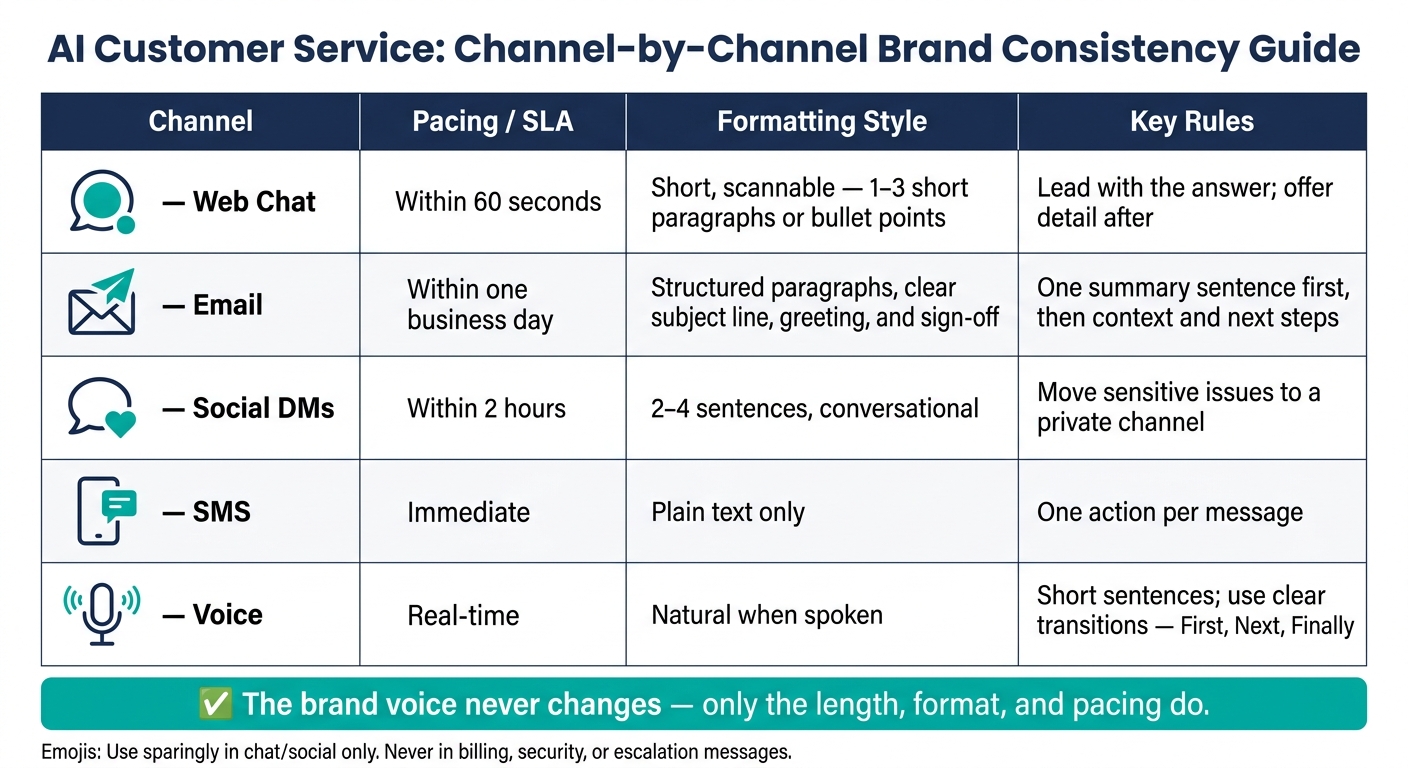
AI Customer Service: Channel-by-Channel Brand Consistency Guide
Once your brand rules live in one place, the next step is simple: adjust how you deliver them for each channel using AI agent capabilities. The brand doesn't change. The wrapper does.
That means channel differences should change length, structure, and pacing - not policy, voice, or escalation rules.
Adjust length, formatting, and pacing by channel
Every channel has its own rhythm, and customers expect you to meet it. A reply that works in email can feel way too long in SMS. A voice reply that looks fine on a screen can sound stiff when spoken out loud.
The goal is to adapt delivery without changing your core brand identity.
| Channel | Pacing / SLA | Formatting Style | Key Rules |
|---|---|---|---|
| Web Chat | Within 60 seconds | Short, scannable, 1–3 short paragraphs or bullet points | Lead with the answer; offer detail after |
| Within one business day | Structured paragraphs, clear subject line, greeting, and sign-off | One summary sentence first, then context and next steps | |
| Social DMs | Within 2 hours | 2–4 sentences, conversational | Move sensitive issues to a private channel |
| SMS | Immediate | Plain text | One action per message |
| Voice | Real-time | Natural when spoken | Short sentences; use clear transitions like "First", "Next", and "Finally" |
Length and format aren't the whole story. Small visual cues matter too. A single 🙂 or ✅ can make a chat reply feel warmer or show that an issue is resolved. But those same symbols don't belong in a billing dispute, a security alert, or any escalation.
A simple rule works well here: keep a short approved emoji list, and set a hard rule that emojis never appear in the first sentence of a message or in anything related to payments or account security.
That kind of consistency comes from matching each channel's format, speed, and level of detail.
Keep localization and multilingual support consistent
Channel consistency also depends on local formatting and tight translation control.
Across U.S. channels, keep formatting the same: USD, mm/dd/yyyy or spelled-out dates, and 12-hour time. Use spelled-out dates in email and formal notices. Use mm/dd/yyyy in chat and SMS when space matters.
For multilingual support, the hard part isn't just translating words. It's keeping the same brand personality across languages. Translation should preserve approved phrasing, escalation language, and brand personality.
A centralized glossary of approved terms - product names, support phrases, and escalation wording - helps prevent translation drift.
For non-English conversations, be explicit in the prompt:
Maintain the same brand personality as in English: clear, empathetic, and solution-oriented. Use the approved glossary and escalation phrases provided for each language.
Human review still matters for high-stakes content like billing notices or legal disclosures, even when AI handles most translation at scale. To streamline this process, you can use training suggestions to review and approve AI-drafted responses before they go live.
Review, Approve, and Improve Brand Consistency Over Time
Once prompts and templates are live, governance keeps them accurate. It also keeps responses lined up with product updates and policy changes. If you review live conversations on a set schedule, you can see whether those guardrails still hold up when customers are using them every day.
Set up QA scorecards and approval workflows
A QA scorecard gives teams a simple way to review the stuff that matters most:
- Clarity
- Inclusivity
- Missed intents
- Tone drift
- Vocabulary
- Accuracy
- Effectiveness
Approval should be required for brand changes, prompt updates, and new templates. Keep triggers, templates, and intents in version control, and review changes before release [3].
Monitor performance and fix off-brand patterns quickly
Use a fixed review cadence so drift doesn't spread quietly across channels.
Review cadence:
| Review Activity | Frequency | Focus Area |
|---|---|---|
| Transcript Review | Weekly | Clarity, inclusivity, and missed intents |
| Random Log Audit | Monthly | Tone drift and vocabulary alignment |
| Scenario Testing | Monthly | Accuracy and effectiveness of responses |
| Native-Language Audit | Quarterly | Regional nuances, formality, and slang |
When you spot a pattern, treat it like a prompt or template problem. Update the right material, test it again, and only then roll it out. That's how teams keep responses on-brand instead of patching the same issue over and over.
Conclusion: One core brand, channel-specific delivery
Governance keeps brand voice steady as products, policies, and channels change. You still need one core brand, but the delivery should shift by channel. Write the guardrails, turn them into prompts and templates, and adjust format and pacing based on where the interaction happens.
Keep one source of truth. Review it on a fixed cadence. Assign clear ownership and use a review schedule that changes with the business. That helps support stay consistent across chat, email, SMS, social, and voice.
FAQs
How do I audit brand consistency across channels?
Use both automated checks and human review to see if your AI sounds like your brand across every channel.
Track a weekly consistency score based on:
- classifier confidence
- rule violations
- readability scores
Then run monthly quality audits on at least 50 random chat logs. Review them for tone, vocabulary, and style.
Also test at least 25 realistic scenarios each month to see how well responses hold up and whether they stay within your brand guardrails.
That mix matters. Automated scoring helps you spot patterns at scale. Human review catches the stuff numbers miss, like whether a reply feels off, too stiff, or just not like you.
What should my AI always escalate to a human?
Your AI agent should hand things over when the issue is high-stakes, sensitive, or hard to sort out without human judgment. That includes legal inquiries, billing disputes, fraud claims, and complaints.
It should also escalate when it picks up negative sentiment, when confidence is low (usually below 40%), when a user asks for a human, or after it has failed more than once to solve the problem.
How do I keep multilingual replies on-brand?
Use one English-language knowledge base as your single source of truth. Then translate for meaning, not line by line. That helps the message stay clear while keeping the original intent intact.
Add custom glossaries and brand lexicons so product names and technical terms stay consistent and correct.
For billing or legal content, stick to pre-approved wording. Have native speakers review translations, tune them for regional details like formality and MM/DD/YYYY date formatting, and check them on a regular basis for quality.