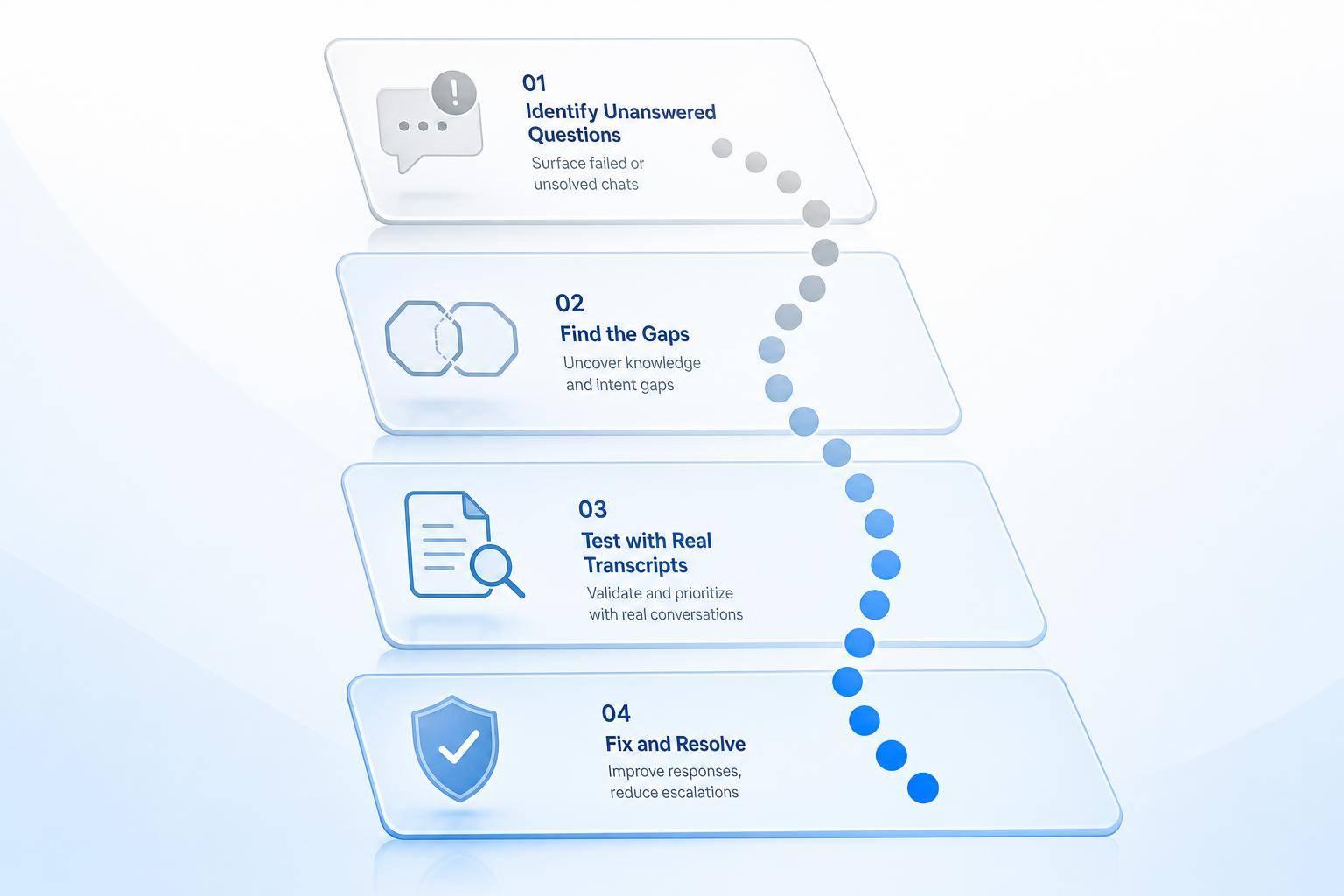
If your AI support bot answers but doesn’t solve the issue, that still counts as a miss. The fix is simple in concept: I look at failed chats, group the causes, fix the source, test against past failures, and track the numbers after launch.
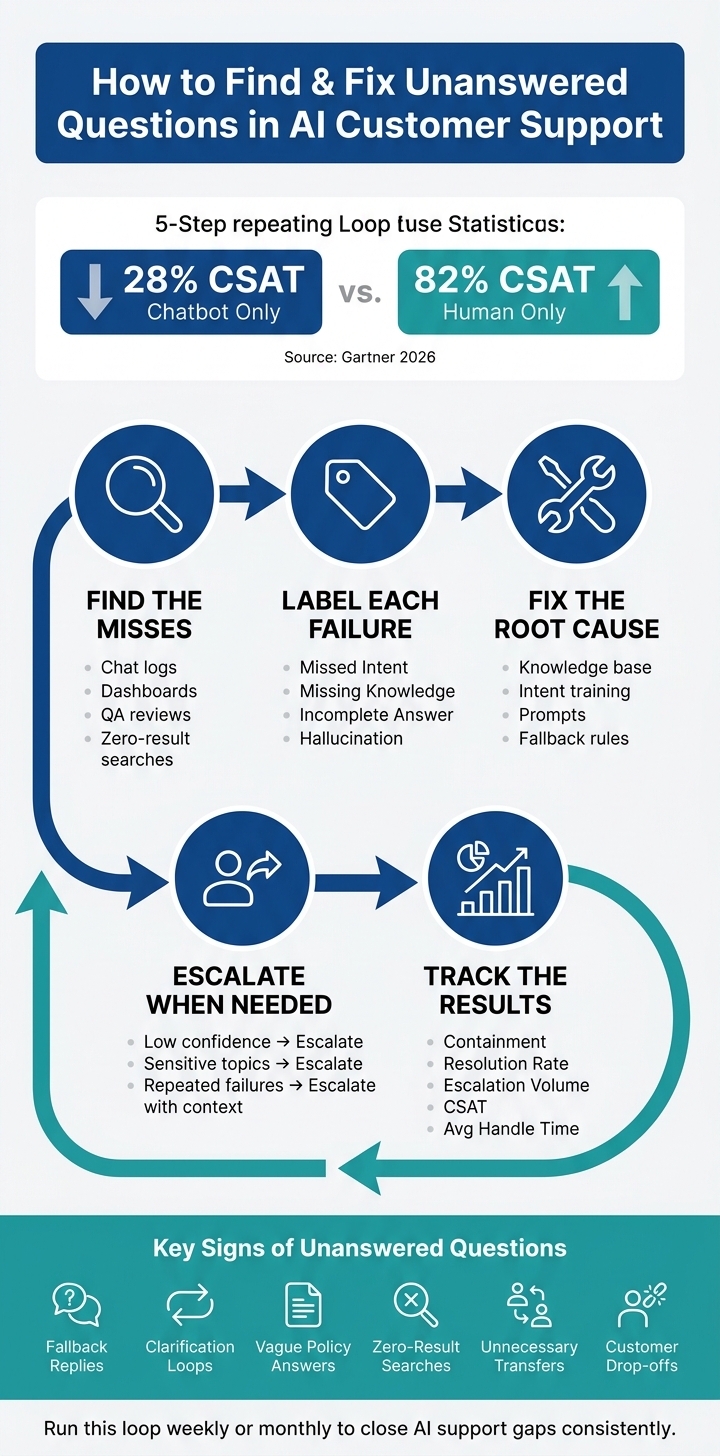
One stat stands out: Gartner’s 2026 research puts chatbot-only customer satisfaction at 28%, versus 82% for human-only interactions. That gap often shows up in more tickets, more handoffs, and more support spend.
Here’s the short version of what matters:
- Find the misses in chat logs, dashboards, QA reviews, and zero-result searches
- Label each failure by cause: missed intent, missing knowledge, incomplete answer, or false answer
- Fix the right layer: knowledge base, intent training, prompts, or handoff rules
- Escalate sooner for low-confidence, sensitive, or repeated-failure cases
- Test with past failed chats, not made-up examples
- Track results like containment, resolution rate, escalation volume, CSAT, and average handle time
A few signs usually point to unanswered questions fast:
- fallback replies
- repeated clarification loops
- vague policy answers
- zero-result help-center searches
- transfers that should not have happened
- customers dropping out of the chat
What I like about this process is that it stays simple. Find the pattern. Fix the cause. Test the fix. Watch the outcome. That gives you a clear way to cut unresolved chats without sending every hard case to an agent.
The article below walks through that loop in plain terms so you can use it on a weekly or monthly review cycle.
How to Find & Fix Unanswered Questions in AI Customer Support
How to find unanswered questions in logs, dashboards, and QA reviews
Logs, dashboards, and QA reviews can help you find unanswered questions FAST.
The goal is simple: spot where the AI gets stuck, see why it happened, and fix the right thing first.
Use conversation logs and analytics to spot failure patterns
Start with the obvious trouble spots in your logs and dashboards.
Look for fallback replies, repeated clarifications, and low-confidence responses. These patterns usually show the same pain point from different angles. A fallback reply says, “I don’t know.” Repeated clarifications often mean the AI didn’t understand the question the first time. Low-confidence responses can point to shaky matches or weak prompt behavior.
It also helps to check zero-result help-center searches. If people keep searching for something and get nothing back, that’s a strong sign the topic is missing.
Review transcripts manually to find root causes
Analytics show where failures happen. Transcripts show why they happen.
Read through failed conversations by hand and tag each case. Keep the labels simple: missed intent, missing knowledge, weak retrieval, or unclear prompt. That gives you a clean way to group problems instead of treating every bad answer like a one-off issue.
| Failure Type | What to Look For in Transcripts | Root Cause |
|---|---|---|
| Missed Intent | Customer repeats the question; AI answers a different issue. | Training data lacks phrasing variations or synonyms. |
| Missing Knowledge | AI falls back; search returns no result. | Topic is not covered in the knowledge base. |
| Incomplete | Customer asks follow-up questions; answer lacks steps. | Knowledge base articles are too broad or lack specific technical detail. |
| Hallucination | AI provides a confident but factually incorrect answer. | AI is answering from memory instead of verified documentation. |
These labels point straight to the fix.
Rank issues by frequency, severity, and business impact
Once you’ve tagged the issues, sort them by frequency, severity, and business impact.
That way, you’re not just fixing what looks annoying. You’re fixing what shows up often, creates risk, or affects revenue, support load, or customer trust. High-frequency, high-risk gaps should go first.
Use that priority list to decide what needs work in your knowledge base, intents, prompts, or fallback behavior.
How to fix the root cause: knowledge, intents, prompts, and fallback behavior
Use the failure cluster to choose the fix: missing content, weak intent coverage, vague prompts, or weak fallback rules.
Expand and fix the knowledge base
Start by mapping each unanswered question to the exact article that's missing or in conflict. Pull your unanswered-questions log, then group repeat topics like pricing, return windows, business hours, and account steps. After that, check what already exists in your knowledge base for each group.
Conflicting content can hurt just as much as missing content. If one article says returns are free and another says the customer pays shipping, the AI will give mixed answers even when it finds something. Fix those conflicts first. Then fill in the gaps. In most cases, it's best to have one main article for each topic.
Structure plays a big role too. An article called Returns is harder to match than one called How to Return an Online Order. Break articles into tight sections with headings like Eligibility, Steps, and Exceptions. That makes it easier for the AI to pull the right part instead of dumping a big wall of text.
If the topic is already there but the bot still misses it, the issue probably isn't content anymore. That's when intent coverage becomes the next place to look.
Retrain intent coverage using real customer language
Customers don't write like policy docs. They use shorthand, misspellings, and casual phrasing. They say things like where's my stuff?, cancel my order pls, or Is the Black Friday deal still on? If those phrases aren't in your training set, the model may not know what they're asking.
Go back to your transcript clusters and pull the exact wording customers used when the AI failed. Use those lines as training examples for current intents, or add new intents if whole topic areas are absent. Make sure you cover common variants, misspellings, abbreviations, and channel shorthand.
Retrain based on your message volume and how often policies change as part of your AI customer support implementation. At a minimum, review performance every quarter.
If intent matching looks fine but the answer still falls flat, the problem usually sits in the prompt or fallback behavior.
Refine prompts and fallback responses to avoid vague answers
Weak prompts often lead to vague or overconfident replies, like yes, we offer refunds with no conditions or timeline, or circular answers like Can you ask that another way?
Tighten the system prompt so scope, tone, and policy limits are plain. A good support prompt should tell the bot to:
- use only approved knowledge base content
- say when the answer isn't known and offer a next step
- include key conditions, like time limits and exceptions, when describing policies
- avoid making up fees, timelines, or eligibility rules
Fallback responses need work too. Generic apologies don't help much. Replace them with language that admits the gap and points the customer somewhere useful. For example:
I'm not fully sure I have the right information. I can connect you to a support specialist or point you to our Help Center.
A strong fallback should do one of two things: answer safely or hand off cleanly.
Add escalation paths and test fixes with real conversations
Once you’ve fixed knowledge gaps, intent misses, and fallback problems, decide where automation should stop. Some unanswered questions just shouldn’t stay in the bot. Push those to a human agent instead.
The key is to set clear handoff rules. Low-confidence questions, sensitive topics, and chats that keep failing should move to support without friction.
Set clear escalation rules for low-confidence and sensitive cases
| Confidence Level | Sensitive Topics | Action |
|---|---|---|
| High | No | Keep in automation |
| High | Yes | Escalate to a human agent |
| Low | No | Escalate to a human |
| Low | Yes | Escalate immediately |
| Any | Repeated failure | Escalate with context |
A handoff should include the transcript, the detected intent, and the next step. That way, the customer doesn’t have to ask the same thing twice. Use the same transcript clusters that exposed the failure in the first place to decide when escalation should happen.
Test changes against real unanswered queries before rollout
Before rollout, test your handoff logic with the same failed transcripts that led to the review. Don’t test with made-up prompts if the problem came from live traffic. Test the fix against the exact unanswered questions from your logs.
This helps you confirm that the updated system improves answer quality and containment.
You’ll also want to check phrasing variation. Customers rarely ask the same question the same way twice. If the fix only works for one wording, it’s too narrow and will miss live traffic.
Track containment, resolution rate, and escalation volume after each update
After rollout, watch the numbers closely. Look for fewer unresolved chats without a jump in handoffs that didn’t need to happen.
Focus on a few core metrics:
- Containment: the share of resolved chats handled without escalation
- Resolution rate: how often the issue gets solved
- Escalation volume: how often chats get passed to human support
Keep the update only if unresolved chats drop and containment goes up. If not, adjust the handoff rule or rework the fix.
Conclusion: Build a repeatable process for closing AI support gaps
Use a simple loop you can run again and again: find failures, fix the root cause, test the fix against real transcripts, and watch the results. The goal isn’t complexity. It’s consistency.
A short weekly or monthly review goes a long way. Use the same dashboard each time, along with a prioritized backlog, so you can spot what changed and what still needs work. Analytics and conversation logs help you flag transcripts, track trends, and measure the impact of each update.
After every change, track:
- containment
- resolution
- escalation volume
- CSAT
- average handling time
If containment goes up without hurting resolution, that’s a good sign the fix worked. If it doesn’t, go back to the root cause and make another adjustment. It also helps to work through your top unanswered question clusters one at a time instead of trying to redo everything at once.
Repeat that cycle, and each update closes more support gaps.
FAQs
How many failed chats should I review first?
Start with the top 10 unhandled topics each week. That gives you a fast read on patterns that may need content updates or routing changes.
At the same time, keep a broader Golden Dataset of 100–200 verified customer inquiries for testing. Looking at these high-impact gaps on a steady basis helps teams decide where the knowledge base needs work and can cut fallback rates by 30%–50% per cycle.
What confidence score should trigger escalation?
It depends on your needs and how much risk you're willing to take.
Many teams use 0.75–0.78 as the cutoff for automated handoffs. If they want the system to act with tighter control on its own, they may push that threshold as high as 0.90.
On the other end, some teams escalate anything below 0.40–0.60 so weak or shaky answers don't slip through.
The goal is simple: pick a threshold that balances containment with support quality, then fine-tune it using testing and performance data.
How often should I update my bot’s knowledge base?
Review performance metrics and update your knowledge base weekly so your AI stays accurate. Each week, audit failed or escalated conversations to find common gaps in what the system couldn’t answer, then add new training items to fix them.
For mature systems, layer in broader monthly or quarterly reviews to track trends and remove outdated content. And when products, policies, or promotions change, update the knowledge base right away.