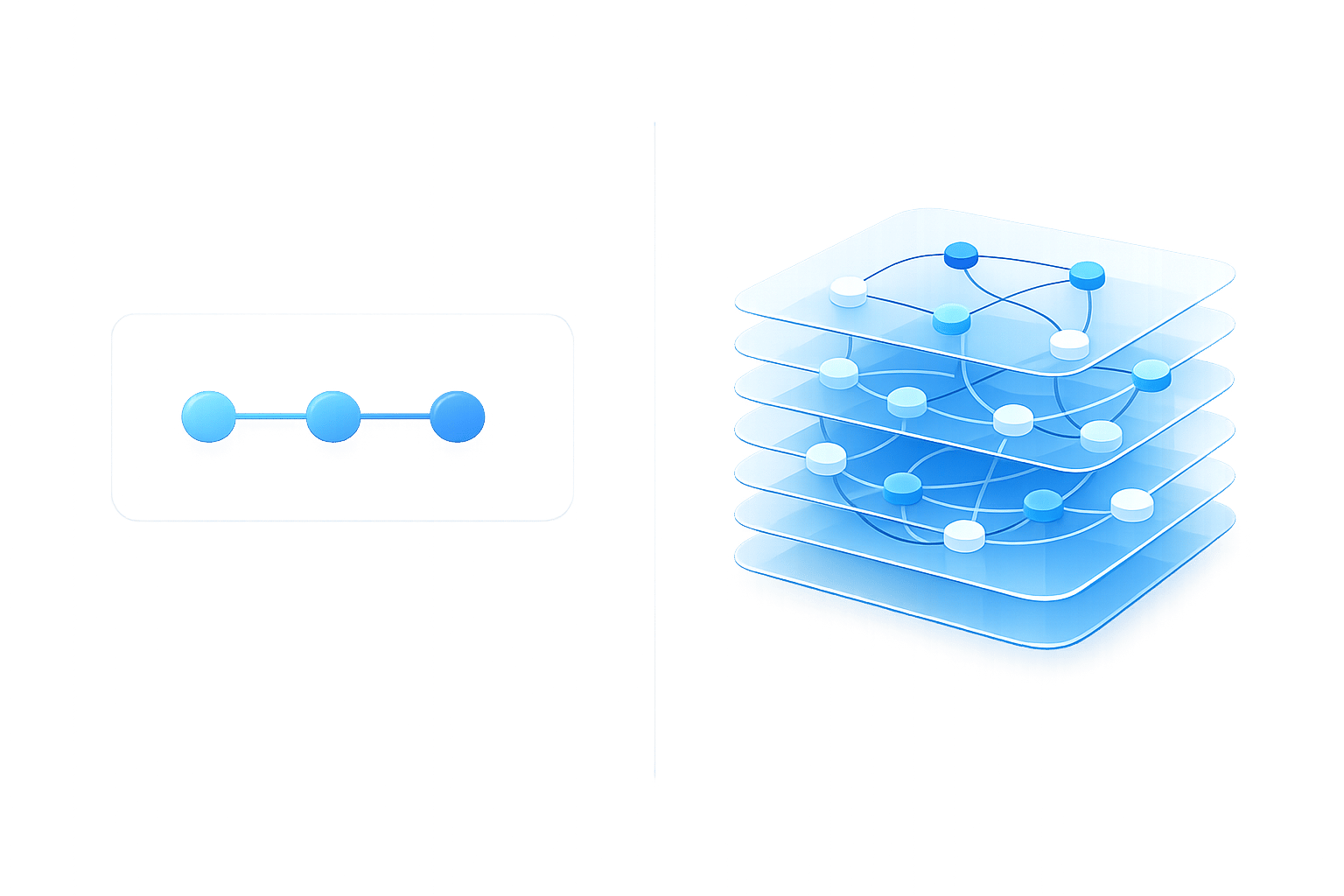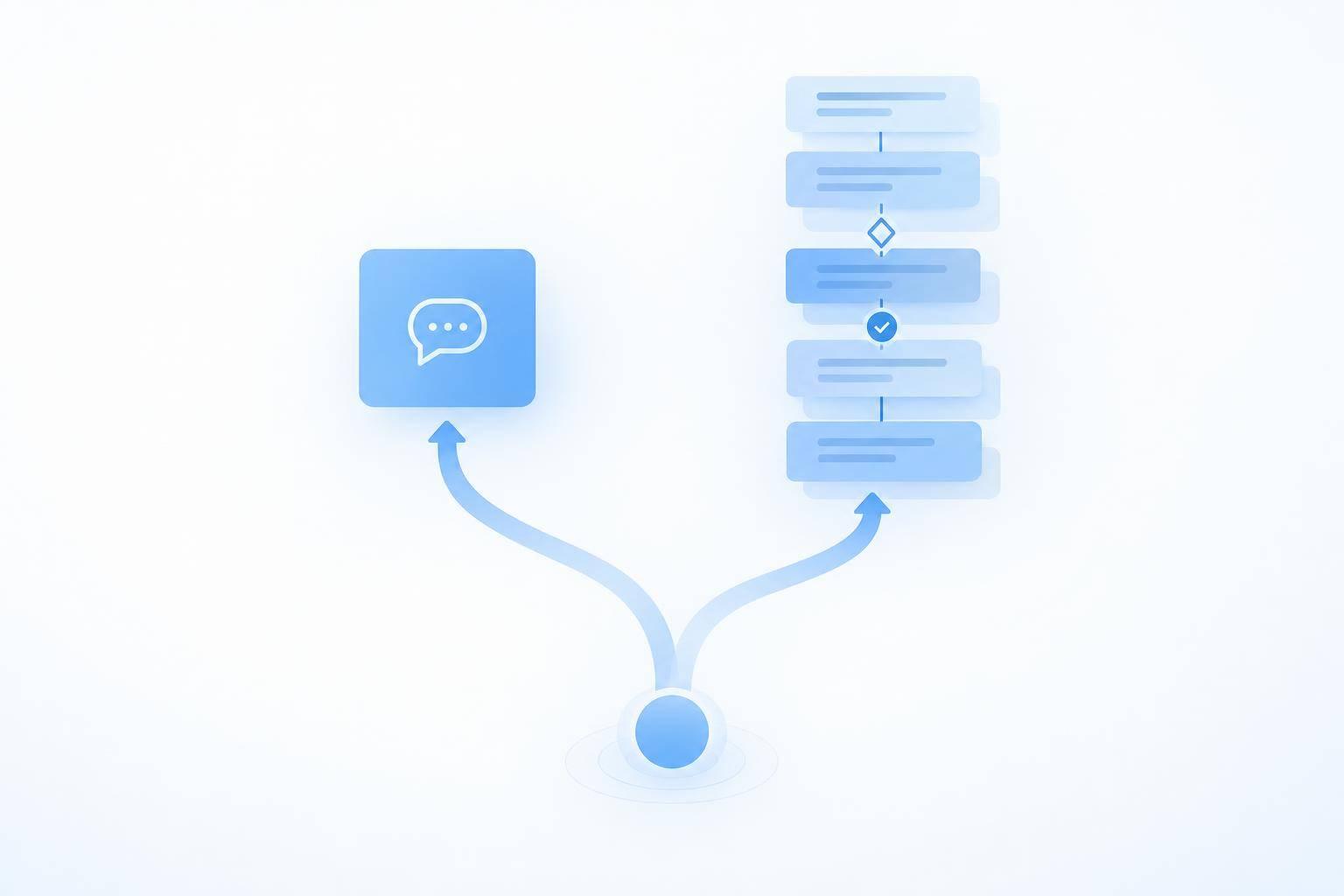
My rule: use a chatbot for answers and fixed steps; consider an AI agent when the next action depends on what it finds. Start with 1 support workflow - not your entire support queue - to automate customer support without losing quality.
For policy questions, order lookups, and intake, I’d start with a chatbot. For delayed orders, return problems, or billing disputes, I’d check whether fixed rules can finish the job before adding an agent.
Here’s what I’d compare:
Quick Comparison
| Criterion | Chatbot | AI agent |
|---|---|---|
| Steps and exceptions | Follows set branches | Chooses next steps from results |
| Data and actions | Retrieves data; makes preset changes | Coordinates permitted changes |
| System connections | Follows a known sequence | Selects and sequences tools |
| Permissions and risk | Narrow access and set handoffs | Strict limits, approvals, and recovery checks |
| Volume and cost | Fits repeatable requests | Must justify added cost for variable tasks |
| Human review | Check answers and handoffs | Review actions, logs, and escalations |
More steps don’t automatically mean you need an agent. A standard return can still use a fixed workflow.
Before either tool changes an order, payment, or account, I’d <u>verify identity, set permissions, and define when a person must approve</u>. Then I’d test failed connections and handoffs, confirm results in system records, and compare total cost in U.S. dollars per resolved issue, repeat contacts, and net staff time saved before expanding.
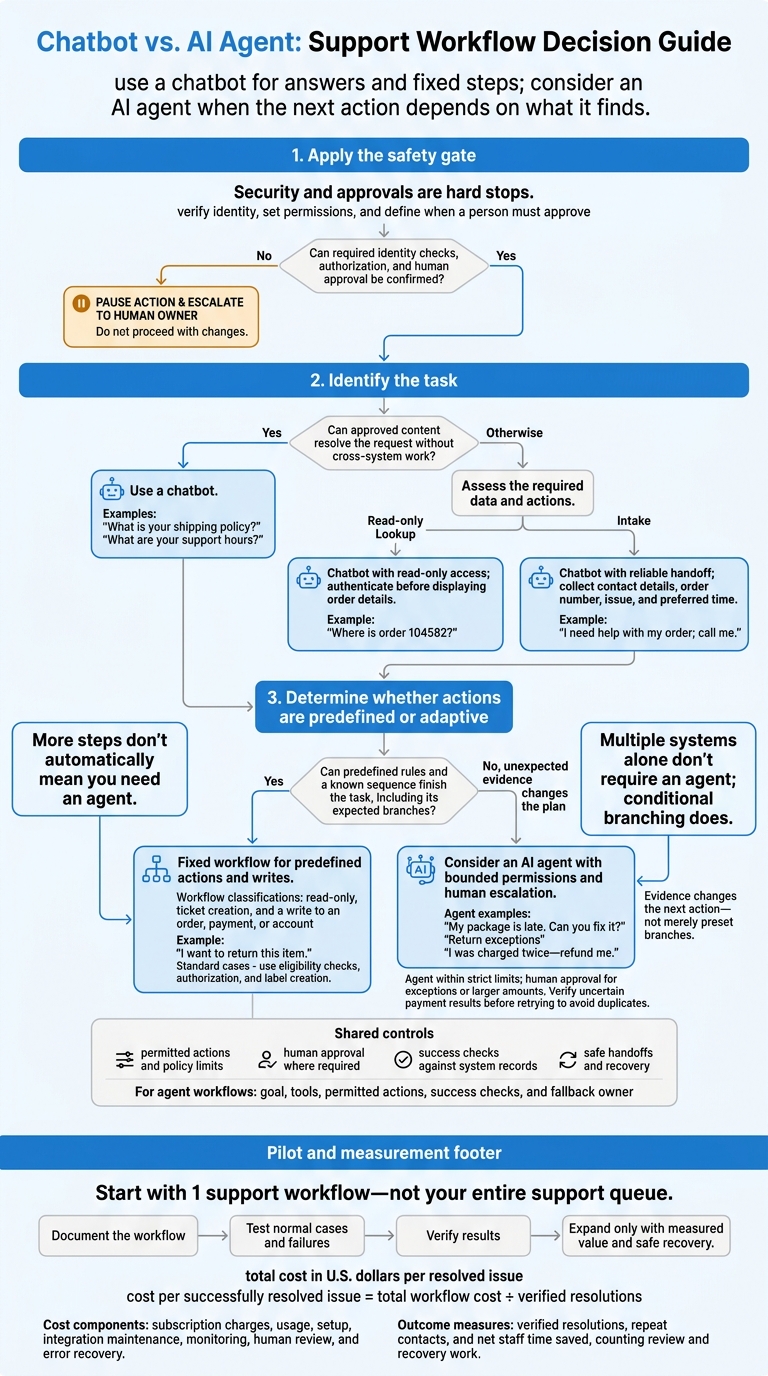
Chatbot vs. AI Agent: Support Workflow Decision Guide
Which Support Tasks Need a Chatbot or an Agent?
Use this matrix to match common support requests with the simplest workflow that can handle them.
Task bucket Hypothetical customer request Required data Actions Systems involved Risk Suitable approach Information retrieval “What is your shipping policy?” Approved policy Retrieve and explain Knowledge base Low Chatbot Information retrieval “What are your support hours?” Business hours Show business hours Knowledge base or calendar Low Chatbot Information retrieval “Where is order 104582?” Customer and order number Retrieve status Order management, shipping Low to moderate; data privacy Chatbot with read-only access Intake/handoff “I need help with my order; call me.” Contact details, order number, issue, preferred time Collect details, create or update a case, route CRM, ticketing Moderate; intake errors Chatbot with reliable handoff Resolution work “My package is late. Can you fix it?” Order, fulfillment, carrier events, promised date, customer history, delay policy Check fulfillment and carrier records, apply policy, choose an allowed remedy, update the order or ticket, notify the customer, verify success Order management, fulfillment, carrier, CRM, notifications Moderate to high; incomplete records, remedy choices Agent with bounded permissions and human escalation Resolution work “I want to return this item.” Order, eligibility, purchase date, policy, customer identity Validate eligibility, authorize return, generate label, update records, send instructions E-commerce, returns, carrier, CRM, email or SMS Moderate; policy or inventory errors can create loss Fixed workflow for standard cases; agent for exceptions Resolution work “I was charged twice - refund me.” Transactions, order, account identity, refund policy Verify duplicate, determine remedy, issue or request refund, update records, notify customer, verify completion Payments, order management, CRM, accounting High financial and compliance risk Agent within strict limits; human approval for exceptions or larger amounts
Policy Questions, Order Lookups, and Intake
Start with AI-powered customer service for these tasks. The work involves retrieving information, collecting details, and handing off a request - not making decisions.
Use the approved policy that applies to the customer’s purchase. For business hours, include the time zone and holiday exceptions. Authenticate customers before displaying order details.
A chatbot can collect contact details, an order number, an issue description, and a preferred resolution. When handing off the request, pass along the transcript, collected fields, authentication state, and retrieved records. Tell the customer when a human will respond.
Order Problems, Returns, and Billing Exceptions
These cases go beyond answering questions. They require decisions, so the agent’s ability to act matters.
Hypothetical delayed-order case: An order promised for September 28 remains undelivered on October 5. The workflow checks fulfillment records and carrier events, applies the delivery policy, checks replacement inventory, and selects a permitted remedy. It then updates the order or ticket, notifies the customer, and verifies that the action succeeded. Conflicting records or unavailable inventory may require a different next step - not simply another status message.
A multi-step task doesn't always need an agent. A standard return can follow fixed rules for eligibility checks, authorization, and label creation. An agent is more useful when unexpected evidence changes the plan.
Require human approval for refunds outside preset limits. If a payment result is uncertain, verify it before retrying to avoid duplicates.
How to Decide: Complexity, Cost, and Risk
When a support workflow goes beyond a simple FAQ or intake flow, use this checklist to choose the simplest safe option. It applies to FAQ, lookup, intake, and resolution workflows.
Security and approvals are hard stops. Cost and volume never override permissions, identity checks, or approval rules.
| Criterion | Chatbot fit | Agent fit | Evidence to collect |
|---|---|---|---|
| ☐ Steps and exceptions | Predictable, single-step flows | Multi-step workflows with changing exceptions | Workflow diagram, step count, exception rate |
| ☐ Required actions | Reads information or performs predefined actions | Reads and writes to records | API docs; share of cases that require writes |
| ☐ Integration depth | Known sequence of system calls | Coordinates deeper systems such as CRM, billing, or ERP | System map, dependencies, permissions |
| ☐ Authority | Narrow, fixed permissions | Limited transaction authority | Access roles, policy limits, approval thresholds |
| ☐ Error impact | Errors are easy to detect and correct | Errors carry higher financial, legal, or compliance risk | Risk assessment, recovery cost, compliance |
| ☐ Volume | Frequent, repetitive requests | Complex, variable requests | Monthly ticket counts by intent and complexity |
| ☐ Total cost | Simpler workflow meets the need within budget | Measured resolution gains justify added expense | Subscription, usage, setup, maintenance, review costs |
| ☐ Oversight | Periodic answer and workflow checks | Regular action review and human escalation | Audit logs, quality checks, review time |
Reading Data vs. Changing Records
Start with one distinction: does the workflow only read data, or does it write back to a system?
Classify each workflow as read-only, ticket creation, or a write to an order, payment, or account. Record its allowed permissions, policy limits, success checks, and escalation conditions. Check what each endpoint actually does - not just whether it uses GET or POST.
Multiple systems alone don’t require an agent; conditional branching does. A predefined workflow can follow a known sequence across systems. Consider an agent when the evidence determines the next action. Neither approach should act if customer identity, authorization, or required human approval cannot be confirmed.
Total Cost and Measured Results
Once you’ve checked permissions and risk, compare each option’s total cost against measured results.
Set a total budget in U.S. dollars, rather than budgeting only for a subscription. Include subscription charges, usage, setup, integration maintenance, monitoring, human review, and error recovery. Neither approach removes maintenance work: changing policies and connected systems still need attention.
Compare both approaches against a measured baseline. Calculate cost per successfully resolved issue by dividing total workflow cost by verified resolutions. Track verified resolutions, repeat contacts, and net staff time saved, counting review and recovery work.
Put the Simplest Suitable Workflow in Place
Once you’ve chosen the simplest safe option, test it in one narrow workflow before rolling it out more broadly.
Group frequent support requests by volume, handling time, escalation rate, and risk. Then choose a steady, low-impact use case for the pilot. For each unresolved case, identify the cause: missing information, unclear policy, or work that needs coordinated actions. That tells you whether to fix content, tighten rules, or move to agent execution.
Start With Approved Answers and Limited Actions
Check your current limits and available integrations before setting the scope. Start with approved answers, read-only access, and narrowly defined actions. Use these to share approved information and collect handoff details - not to push the system into autonomous multistep execution.
Assign an owner and a review date to each knowledge source.
Set Permissions for Agent Workflows
Document the agent’s goal, tools, permitted actions, success checks, and fallback owner. Allow access only to the records and operations the workflow needs.
Limit customer data shared between systems and keep action logs. Require human approval for sensitive or unusual changes. If approval isn’t available, pause the action and send the case to its named owner.
Test Failures and Measure Resolution Quality
Test normal requests alongside ambiguous instructions, missing records, policy exceptions, failed integrations, and failed handoffs. Check that the workflow stops safely, preserves completed work, and gives staff enough context to pick up where it left off. Verify outcomes against system records.
Expand only when the pilot shows that coordinated execution is needed and the workflow can recover safely.
Conclusion: Match the Tool to the Task
Choose by task, not label. Use a chatbot for approved answers and fixed flows. Choose an AI agent when resolving a request takes multiple coordinated steps and requires checking the outcome. Keep a human owner for high-risk or sensitive exceptions. Apply this rule to FAQs, lookups, intake, and exception handling.
Start with one documented workflow and measure its results before expanding [1]. Use the checklist below to turn the earlier criteria into a final go/no-go decision. Focus on read-only help, write access, risk, and measurable return.
| Decision question | Evidence needed | Recommended next step |
|---|---|---|
| Can approved content resolve the request without cross-system work? | Documentation review | Use a chatbot. |
| Does the task require writing to a system record? | Audit of read-only vs. read/write actions | Use a fixed flow for predefined writes. Consider an AI agent when actions need coordination and adjustment. |
| Is the task high-risk or sensitive? | Policy review and exception history | Keep a human owner and set automatic escalation rules. |
| Have you measured resolution quality and total cost? | Verified resolutions, escalations, and total cost | Expand only when the workflow delivers clear, measured value. |
FAQs
Can a chatbot and an AI agent work together?
Yes, chatbots and AI agents can work together in a tiered support model. Chatbots handle large volumes of repetitive requests, such as FAQs and basic order tracking. When a request needs a complex, multistep workflow - like processing a refund or updating records across business systems - the system can pass it to an AI agent.
This setup balances efficiency and cost: chatbots give fast answers to simple questions, while AI agents use autonomous reasoning and system integration to handle more complex tasks.
How do I know my systems are ready for an AI agent?
Review support tickets from the past 90 to 120 days to spot repetitive tasks that account for a large share of requests. Bring your documentation into a structured knowledge base, and check that real-time API integrations work with your CRM and billing platforms.
Set clear governance rules, define workflows, and record baseline metrics, including cost per ticket and churn rate. Before deploying an agent that carries out multistep tasks, confirm that you meet applicable compliance requirements, such as SOC 2 or HIPAA.
When should I upgrade a chatbot workflow to an agent?
Upgrade when support moves beyond scripted FAQs into complex, multistep tasks that require autonomous decisions, coordination across systems, or deep CRM or billing integrations. Chatbots are enough for high-volume, repetitive requests, such as sharing store hours or basic order tracking.
Consider upgrading if more than 40% of inquiries require external data, or if your workflows include partial refunds, identifying upsell opportunities, or complex troubleshooting.