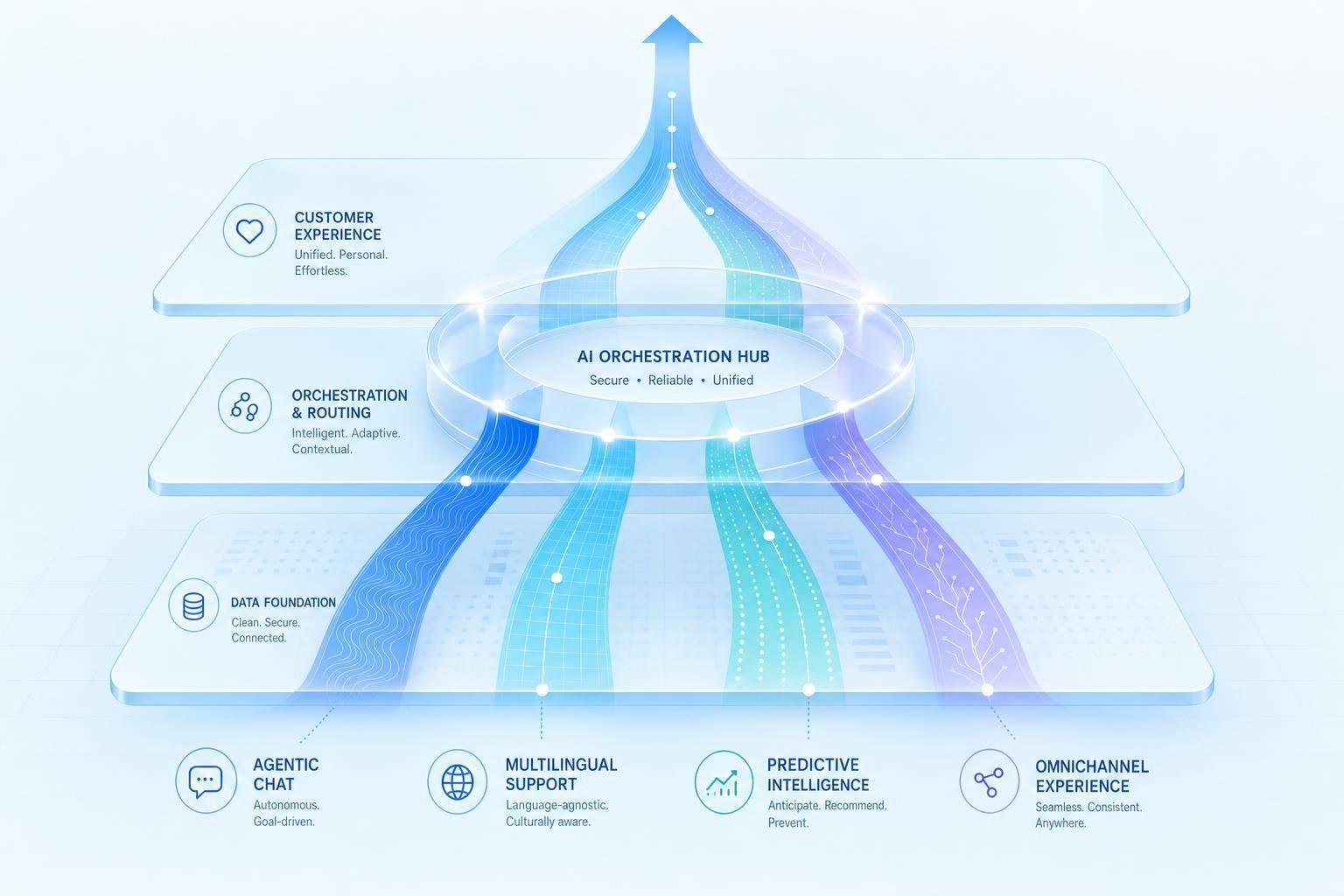
AI is no longer just a ticket deflection tool. Over the next five years, I expect it to handle more routine work, support more languages, spot issues earlier, keep context across channels, and work side by side with human agents.
Here’s the short version:
- Conversational AI agents do more than old chatbots. They can solve routine requests, not just route people to help docs.
- Multilingual AI helps teams support more markets without building a full language team in each one.
- Predictive support shifts service from “wait for a complaint” to “spot the problem early.”
- Omnichannel AI keeps the conversation history connected across chat, email, SMS, social, and voice.
- Hybrid human-AI support is where most teams are heading, because AI is strong on routine work, while people still do better with emotion, judgment, and edge cases.
The core message is simple: the next five years are less about adding more bots and more about fixing data, channel history, and handoffs. That’s where support teams win or lose.
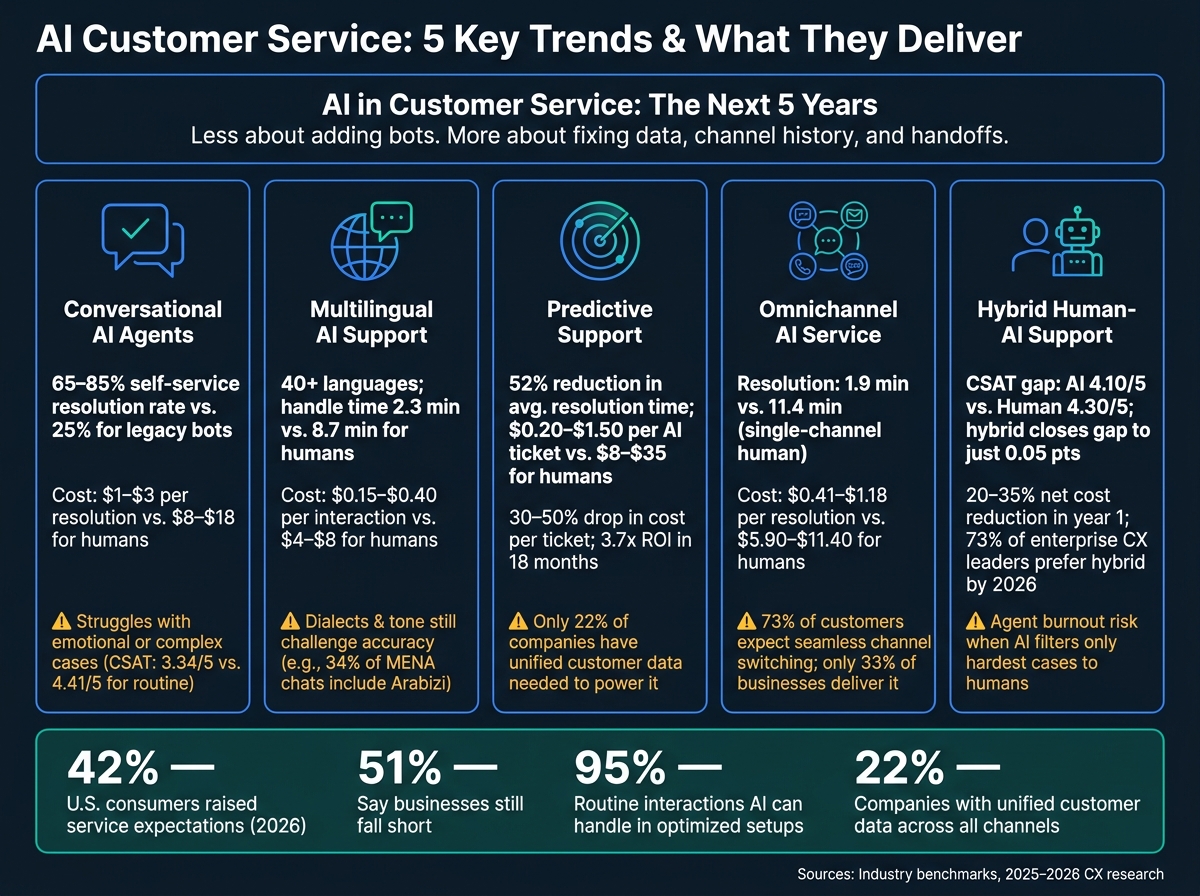
AI Customer Service Models: Key Stats & Trade-offs (2026)
Quick Comparison
| Trend | Main Shift | Best Fit | Main Limit |
|---|---|---|---|
| Conversational AI agents | From scripted replies to issue resolution | High-volume routine requests | Struggles with emotional or messy cases |
| Multilingual AI | From local hiring to software-led language coverage | Multi-market support | Dialects, tone, and local phrasing |
| Predictive support | From reactive service to early issue detection | Churn prevention and account health | Weak customer data setup |
| Omnichannel AI | From siloed channels to shared context | Customers who switch channels often | Systems that don’t share data |
| Hybrid human-AI support | From full automation goals to shared workload | complex support teams | Poor handoffs and agent overload |
A few numbers show why this shift matters:
- In 2026, 42% of U.S. consumers said their service expectations had gone up.
- 51% said businesses still fall short.
- AI already handles up to 95% of routine interactions in some setups.
- Yet only 22% of companies have unified customer data across all channels.
So if I had to sum it up in one line, it would be this: AI will do more of the work, but the teams that get the best results will be the ones that connect data, channels, and human support the right way.
1. Conversational AI Agents vs. Legacy Chatbots
The first shift is simple: older bots try to deflect tickets, while newer AI agents aim to solve them.
Legacy chatbots usually depend on rigid decision trees and keyword matching. Conversational AI agents use NLP to infer intent even when people phrase the same request in different ways [9]. In practice, older bots tend to steer customers toward FAQs and canned replies. Modern AI-powered agents go further. It can process refunds, check inventory, or reschedule appointments without a human stepping in [1][10].
Resolution Impact
This gap becomes clear in resolution rates.
Agentic AI platforms can deliver a 65% to 85% self-service resolution rate for routine questions. Legacy keyword-matching bots sit closer to 25% [7][11][12]. That’s not a small lift. It’s the difference between a bot that stalls the customer and one that gets the job done.
Klarna’s AI system handled 2.3 million conversations per month, or 67% of total volume, and cut resolution time from 11 minutes to under 2 minutes [7]. WeightWatchers hit about a 70% resolution rate in its first week and posted a 4.6/5 CSAT score [11].
Cost Efficiency
Better resolution rates also change the math.
Human-handled support usually costs $8 to $18 per resolution, while agentic AI can cut that to $1 to $3 [7]. Teams also report 3.7x ROI within 18 months, with payback arriving in 3 to 6 months after migration [6][11].
Scalability and Operational Readiness
Legacy chatbots also run into limits fast. Adding new intents often means manually rebuilding decision trees, and that can take months [6]. Conversational AI agents can go live in days to weeks by using existing knowledge bases [7][6]. They can also absorb traffic spikes of up to 800% above baseline without a drop in performance [13].
That matters when demand jumps and customers want answers right away.
There is still a catch. AI performs best on process-driven, high-structure tasks like password resets and billing questions, where it reaches a 4.41/5 CSAT. More emotion-heavy cases, like complaints, lag behind at 3.34/5 [11]. So the smart move is pretty clear: let AI handle clean, repeatable work, and set up solid escalation paths for the rest.
Once systems can resolve issues at scale, language coverage becomes the next limit.
2. Multilingual AI Support vs. Human-Only Language Operations
For human-only teams, adding support in a new language usually means hiring native speakers one market at a time. That takes time, and it gets expensive fast. AI changes the setup. Language coverage becomes an operations problem, not just a hiring problem.
Resolution Impact
The speed gap is hard to ignore. AI cuts average handle time to 2.3 minutes, compared with 8.7 minutes for human agents. First response time also drops from about 11 minutes to under 30 seconds [13].
There’s another big shift here: consistency. Modern AI can keep service quality steady across 40+ languages, without the drop-off that often shows up when human teams stretch across many markets [13]. And performance in harder language settings has improved a lot. By 2026, intent recognition in Arabic hit 91%, up from 71% in 2023, while Japanese reached 92% [16].
Cost Efficiency
The cost difference is just as stark. AI chat resolutions usually land between $0.15 and $0.40 per interaction, while human agents cost $4.00 to $8.00 for the same job [17]. For voice support, AI runs at $0.12 to $0.25 per minute versus $0.85 to $1.50 for human agents [17].
That pricing gap gets even more useful in multilingual support. Most AI platforms include many languages in one package instead of adding separate fees for each one [15]. So the more markets a team supports, the more the math starts to shift.
Scalability and Operational Readiness
Human teams often need months to recruit, train, and onboard for a new language market. AI can expand into places like LATAM, MENA, or Southeast Asia in days or weeks [18]. That changes launch speed in a big way. Following a structured AI customer support implementation guide can help ensure these deployments remain stable as they scale.
It also helps on the knowledge side. One knowledge base can support many languages through RAG, without relying on manual translation workflows [15][18]. In plain terms, the same source material can serve many regions without rebuilding everything from scratch.
But language accuracy by itself doesn’t solve the whole problem. AI still has trouble with local fit, like choosing the right formality level for Japanese customers [16]. In MENA, 34% of analyzed chats include Arabizi or multiple dialects, which is a reminder that native-language understanding still matters [17].
A common safeguard is confidence-based routing. The AI only sends replies when it’s confident in the answer, and anything less clear gets passed to a human [15].
"The AI will never answer 100% of questions, so what they needed was an AI who is only handling the tickets that it's confident to handle, and all the other ones, leave them alone." - CX Lead, DTC Supplements Brand [15]
Once language coverage is handled, the next issue is whether support can predict and prevent problems before customers even ask.
3. Predictive Support vs. Reactive Ticket Handling
Reactive support kicks in after a customer runs into trouble. Predictive support tries to spot the trouble first by looking at behavior, product usage, and past interactions. But there’s a catch: it only works when those customer signals live in one place.
Resolution Impact
The speed gap is hard to ignore. Reactive email support averages more than 12 hours for SMBs. By contrast, AI-powered predictive systems can get first response times under 30 seconds, and AI-augmented operations cut average resolution time by 52% [6].
There’s also a tradeoff on resolution quality. Within 72 hours, repeat-contact rates are 11.3% for AI-resolved tickets and 8.7% for human-resolved tickets [11]. So yes, AI can move fast, but human support still has an edge in some cases when it comes to keeping customers from coming back with the same issue.
Cost Efficiency
The cost difference is just as sharp. Human-handled reactive tickets average $8.00 to $12.00 each, and that climbs to $25.00 to $35.00 for B2B SaaS. AI-handled tickets, on the other hand, cost about $0.20 to $1.50 each [20][11][6].
That gap shows up in team budgets fast. Organizations report a 30% to 50% drop in cost per ticket and an average 3.7x ROI within 18 months when AI takes on more of the support load [20][11][6].
Scalability and Operational Readiness
This is where predictive AI starts to look less like a nice add-on and more like a serious ops tool. It can monitor every session and handle 1,000+ conversations at once without adding headcount [19].
The bigger problem isn’t volume. It’s data. Predictive support works best when purchase history, behavior signals, and interaction logs are unified. Right now, only 22% of companies have unified customer data across all channels [3].
And even with strong automation, some moments need a person. High-emotion cases still need clear escalation paths so they can move to a human who has the full story in front of them [14][19]. That same shared data layer is also what makes omnichannel continuity possible.
4. Omnichannel AI Service vs. Single-Channel Support
That shared data layer is what makes omnichannel service work. Single-channel support breaks down when context gets stuck in separate systems. A customer starts on chat, moves to email, then calls in - and suddenly they have to explain the same issue all over again. That's where things fall apart.
Resolution Impact
Omnichannel AI responds fast, but speed isn't the whole story. The bigger win is that it keeps the conversation history together across channels.
AI-powered customer service agents delivers first responses in about 4 seconds for chat and answers voice calls within one ring, compared with human averages of 9 minutes 12 seconds for chat and 2 minutes 41 seconds for voice [12]. Average resolution time drops from 11.4 minutes for single-channel human support to 1.9 minutes with blended omnichannel AI [12].
When a customer moves from chat to voice, the agent can see the full transcript and conversation history right away. No repeat explanations. No backtracking. That setup alone cuts agent handle time by 35–45% [21][12].
Cost Efficiency
The cost gap is hard to ignore.
AI costs $0.41 to $1.18 per resolution across chat, email, and voice, versus $5.90 to $11.40 for human support. A blended hybrid model averages $2.10 per resolution, compared with $7.40 for human support [12]. Put simply, omnichannel AI brings support costs down.
Scalability and Operational Readiness
The business case gets stronger as support volume climbs, because omnichannel AI doesn't need headcount to grow at the same rate. But there's a catch: the setup has to be done right.
73% of customers expect to switch channels mid-conversation without repeating themselves [3]. But only 33% of businesses deliver that experience today [3]. That's a big gap, and customers notice. In fact, 63% of customers say they'd switch to a competitor with a smoother multi-channel experience [3].
Closing that gap takes more than adding chat, email, and voice to the menu. Those channels need to connect at the data layer. That's the part that changes performance. Systems that can only access a knowledge base tend to level off at around 28% deflection, while systems tied into CRM and order platforms can reach 50%+ [12].
The next question is when AI should solve the issue on its own - and when it should pass the conversation to a human.
5. Hybrid Human-AI Support vs. Full Automation
As support spreads across channels, the big question isn't whether AI can reply. It's where it should stop, and where a person should step in. Once customer context carries over from one channel to the next, the next call is simple: what should AI handle on its own, and what still calls for human judgment?
Resolution Impact
Full automation works best for structured, repetitive tasks. Hybrid support works better for emotional situations, cases that need image review, and issues that lean heavily on judgment [21][23].
The numbers make that pretty clear. AI-handled tickets average a 4.10/5 CSAT, while human agents average 4.30/5. Hybrid escalation cuts that gap down to just 0.05 points [11].
Klarna is a good example of where this gets tricky. Its AI handled 67% of volume - about 2.3 million conversations per month - before the company moved back toward a hybrid setup after finding that speed-first optimization hurt CSAT on more complex issues [7].
Cost Efficiency
On simple cases, the math leans hard toward automation. Human-handled contacts cost about $13.50 per ticket, compared with $1.84 for AI self-service [11][23].
That said, support leaders shouldn't expect the sky-high savings vendors like to pitch. Across a full support organization, a hybrid setup can deliver a 20%–35% net cost reduction in the first year. That's solid, but it's a long way from the 60%–80% savings often advertised [11].
Scalability and Operational Readiness
When AI runs into its limits - sentiment spikes, policy disputes, or VIP accounts - hybrid systems pass the case to a human with the full conversation history attached [7][8]. That handoff matters. No one wants to repeat the same issue three times just because the system changed lanes.
By 2026, 73% of enterprise CX leaders prefer a hybrid model, while only 6% favor full automation [24]. In practice, that means:
- Use AI for routine work
- Use AI-assisted agents to speed up handling
- Use humans for escalation
The real operating choice isn't AI or humans. It's how to divide routine work, assisted work, and escalation.
Pros and Cons of Each AI Service Model
These models solve different support problems. The big trade-offs come down to speed, accuracy, coverage, and control. The table below shows where each model shines, where it can go wrong, and what tends to slow adoption.
| AI Service Model | Upside | Risks | Best Uses | Adoption Barriers |
|---|---|---|---|---|
| Conversational AI Agents | High cost savings; 24/7 instant replies [22] | Hallucinations; runaway actions without guardrails [5] | Best for high-volume routine tasks [1][5] | Outdated knowledge bases; CRM/ERP integration gaps [7][22] |
| Multilingual AI Support | Global scale without local hiring; faster response across 20+ languages [2][22] | Loss of specialized customer intents [5] | Best for fast market expansion [22] | Training data for rare dialects; data residency requirements [7][22] |
| Predictive Support | Lower churn; fewer inbound tickets [3] | Privacy concerns; intrusive outreach [3] | Best for churn reduction [3][8] | Data silos; only 22% of companies have unified customer data [3] |
| Omnichannel AI Service | 93% CSAT when channels align; higher loyalty [3] | Context loss during channel switches; fragmented UX [5] | Best for channel continuity [3] | Legacy systems that don't share data; only 33% currently integrated [3] |
| Hybrid Human-AI Support | 15%–20% efficiency gain; strong handling of complex cases [7][3] | Agent burnout when AI filters out all but the hardest cases [7] | Best for complex cases with escalation [8] | Staff upskilling; designing seamless context handoffs [7][8] |
One pattern stands out fast: the more automation you add, the more you depend on clean data, tight integrations, and smart escalation paths.
The best ROI usually comes from routine, high-volume work. That’s where AI can save time and trim support costs without much friction. The biggest risk, though, comes from poor data and weak handoffs. If the knowledge base is out of date or systems don’t talk to each other, even a strong model starts to fall apart. Predictive support leans hardest on unified customer data, which is a problem when only 22% of companies have it in one place [3].
Omnichannel support shows the same gap in plain terms. Customers expect context to follow them from chat to email to phone without making them repeat the whole story. For digital-native customers, that’s no longer a nice extra. It’s the baseline. But most companies still aren’t there, and only 33% have integrated systems today [3]. That disconnect is where frustration starts.
The human side has its own trade-off. Hybrid Human-AI Support can balance efficiency with trust, which is why it works well for harder cases. But it’s also the trickiest model to run well day to day. If AI sends agents only the most difficult issues, burnout becomes a real problem. And if the handoff is clumsy, the time saved by automation disappears fast [5][7][8].
"The 2026 benchmark is resolution quality, not resolution speed." - Ehab Al Dissi, Managing Partner, AI Vanguard [7]
Those trade-offs shape which model should come first in your support stack.
Conclusion
All of these trends point in the same direction: faster support, more proactive service, and less manual work. At this point, the question isn’t whether to automate. It’s how fast you can build the data and handoff layers that make automation dependable.
Start with the basics. Clean up the knowledge base and bring CRM and channel data into one view. AI works best when the documentation is accurate and the customer record is complete [8][4]. Once that groundwork is in place, you can roll things out step by step.
The safest path is a phased rollout. Begin with high-volume, low-complexity tasks like order status checks and password resets. That’s where top teams are already seeing 60%–80% automated resolution [5]. From there, add AI copilots. After that, move into predictive and agentic workflows as your data gets stronger.
Governance matters just as much as the tech itself. Set clear rules for when AI should hand off to a human based on sentiment, account value, or topic sensitivity. And make sure the full conversation history moves with every handoff. If people have to repeat their issue, frustration builds fast - and 48% of customers abandon a brand when that happens [10]. That’s the balance: use AI to move fast, but keep trust intact.
The model that wins isn’t full automation. It’s AI for speed and scale, humans for judgment and trust.
FAQs
How do I know which support tasks to automate first?
Start with your top three repeat queries, like order tracking, password resets, or subscription changes.
Keep the focus on routine tasks with known, fixed answers. These are the requests that don’t need human judgment, back-and-forth negotiation, or deep access to internal systems.
Use intent classification to spot high-volume, low-complexity requests. Then train an autonomous agent around those intents, set clear confidence thresholds, and spell out when it should hand the conversation off to a human agent.
What data do we need before adding AI to customer service?
Before rolling out AI, businesses need unified customer data.
That means pulling demographics, purchase history, behavior signals, and service interactions into one customer profile instead of scattering them across different systems. If that data lives in silos, AI has to work with an incomplete picture, and the results usually fall short.
Teams should also take a close look at their tech stack and make sure it connects cleanly with their CRM. That setup gives AI the context it needs to deliver more personal, proactive support and manage complex workflows without dropping the ball.
When should AI hand a case to a human agent?
AI should pass a case to a human agent when the situation calls for more than rules and canned replies.
That usually means cases involving complex problem-solving, high-stakes issues, or emotionally sensitive interactions where human judgment, empathy, or careful thinking matter.
A handoff also makes sense when the case involves:
- Edge cases
- Major complaints
- Billing errors
- Policy exceptions
- Any issue the AI can't resolve
The key is simple: the customer shouldn't have to start over.
When AI escalates a case, it should send the full customer history and all prior interactions to the human agent. That way, the agent has the context they need, and the customer doesn't have to repeat themselves.