AI customer service works best when I use it to solve repeat questions, route tickets fast, and pass hard cases to people with full context. In this article, I’d boil the whole plan down to this: start with the top Tier-1 contacts, follow an AI customer support implementation plan, track resolution and CSAT, and scale one channel at a time. That matters because human-handled tickets often cost $8 to $12, while AI-handled contacts can cost $0.20 to $1.50, and strong setups can resolve 60% to 75% of Tier-1 volume without agent help.
Here’s the short version:
- Start with repeat issues first: FAQs, order status, account updates, and scheduling
- Keep people in the loop for hard cases: billing disputes, fraud, cancellations, policy exceptions, and emotional complaints
- Set clear rules: low confidence, upset tone, or risk-related keywords should trigger transfer
- Measure the right numbers: deflection, first response time, CSAT, and especially resolution rate
- Build around your knowledge base: if the source content is wrong or old, the AI answer will be too
- Expand slowly: get one channel working well before adding Instagram, Facebook, WhatsApp, or other channels and configuring multilingual customer support for global users
- Put controls in place: limit data access, review transcripts, log decisions, and let customers reach a human at any time
If I had to sum it up in one line, it would be this: use AI to take care of routine support, and use humans where judgment still matters.
Build Your Strategy Before You Automate
Once you know where AI fits, turn that demand into a deployment plan. The big step here is simple: decide what AI should handle and where a person needs to step in.
Audit Your Support Volume, Channels, and Repeat Issues
Start with your ticket data from the last 90 days. Check your top contact reasons, busiest hours, peak seasons, and the channels customers use most: email, live chat, social DMs, or phone.
Then look for repeatable, low-complexity contacts. Those are usually the best place to begin. Think FAQs, order status, account updates, and appointment scheduling. That’s where automation often does the most work with the least friction.
| Query Type | Automation Potential | Complexity Score (1-5) |
|---|---|---|
| FAQs / General Info | 70–85% | 1 |
| Order Status | 80–90% | 1 |
| Refunds / Returns | 60–75% | 2 |
| Technical Support | 25–40% | 4 |
| Billing Disputes | Low | 5 |
Some issues should stay human-led from the start. Billing disputes, cancellations, fraud, compliance issues, policy exceptions, and emotional complaints fall into that group. AI can acknowledge the message and route it fast, but a person should handle the fix. These are the contacts AI should solve first.
Use those top-volume issues to build your first automation backlog.
Set KPIs and Define Clear Human Handoff Rules
Once the backlog is set, put guardrails around it. Before launch, define success in terms you can measure. Track first response time, first-contact resolution, deflection rate, CSAT, after-hours coverage, and cost per resolved ticket.
Without a baseline, it’s hard to tell what’s happening. Is automation helping, or is it just shifting the mess from one place to another?
Human handoff rules matter just as much. Be specific about when AI should transfer the conversation. Good triggers include sentiment analysis that flags frustration or distress, confidence scores below your set threshold, and keywords tied to cancellations, refunds, fraud, or policy exceptions.
When a handoff happens, keep the context intact. Pass the full transcript, intent, and any collected data to the agent. Customers should never have to repeat themselves after a transfer.
Match Your Business Needs to the Right ChatSpark Plan
Pick a plan based on the ticket volume and integrations you found during your audit.
| Plan | Price | Capacity | Best For |
|---|---|---|---|
| Basic | $19/month | 100 messages/month, 1 agent, 25 pages/agent, 1 website | Solo entrepreneurs or very low-volume sites validating AI support for the first time |
| Plus | $59/month | 250 messages/month, 1 agent, 50 pages/agent, 1 website | Growing teams handling steady daily inquiries on a single website |
| Pro | $129/month | 2,000 messages/month, 1 agent, 500 pages/agent, 1 website, integrations with Zapier, Freshchat, Square, and Calendly, unbranded widgets | Larger operations that need integrations and more customization |
| Enterprise | Custom | Custom message limits, agents, pages, integrations, priority support, dedicated account management | High-volume businesses with custom support requirements |
A simple way to think about it: start with Basic if you're testing core use cases. Move to Pro when you need more volume, integrations, and unbranded widgets.
The Core AI Use Cases That Cut Support Load
Once the audit is done, start with the tasks that show up most often. That first layer of automation is where AI can cut support volume fast.
Handle FAQs, Order Updates, Scheduling, and Lead Capture with AI
FAQ and policy questions are usually the easiest place to start. AI can resolve 70%–85% of them on its own [4]. That makes sense. Customers ask the same questions again and again: return windows, shipping costs, store hours, and subscription terms. AI can handle those without pulling in an agent.
After that, plug AI into your live systems for order status and scheduling. About 72% of customers want instant answers for transactional questions like order tracking [4]. So if your AI can connect to your order system, customers can get updates right away across your main support channels. The same idea works for appointments too. Real estate agents and other service providers can let people book, reschedule, or cancel in chat when calendar and booking tools are connected.
Lead capture does more than cut costs. It can also help bring in revenue. A well-set-up agent can ask for contact details and qualification info in a short chat flow, then send that data to your CRM or sales team through Zapier. That keeps lead capture consistent across your supported channels and moves qualified leads straight into CRM or sales.
Automate Ticket Classification, Routing, and Handoffs
AI can tag incoming conversations by topic, urgency, and sentiment in under 3 seconds [4][1]. From there, routing rules can send tickets to the right queue based on those tags, the customer’s language, or their tier [1][2]. For example, a billing dispute can go straight to a senior agent instead of sitting in a general queue.
That matters because not every issue needs the same path. Simple requests can be solved automatically, while more involved cases go to the person best equipped to handle them. And when agents get pre-tagged tickets, they work faster: AI-augmented agents handle 13.8% more inquiries per hour than agents without that support [1].
Routing deals with the exceptions. Self-service depends on what’s behind it.
Build Self-Service and Multilingual Support Around a Strong Knowledge Base
AI answers are only as good as the knowledge base feeding them. Keep each article focused on one topic. Use consistent US English spelling and formatting. Update policy pages whenever something changes. If an article is out of date, the AI can give the wrong answer. Put simply: the cleaner the source material, the more dependable the response across channels.
With a structured knowledge base in place, you can deliver consistent support in 85+ languages across your channels.
Measure Results and Scale Across Channels
AI vs. Human Customer Service: Cost, Speed & Performance Compared
After launch, use performance data to check whether automation is fixing problems or just moving them around. Once your chatbot is live, measurement shows if it’s cutting support load or simply pushing customers into another path.
Track the Metrics That Show Whether Automation Is Working
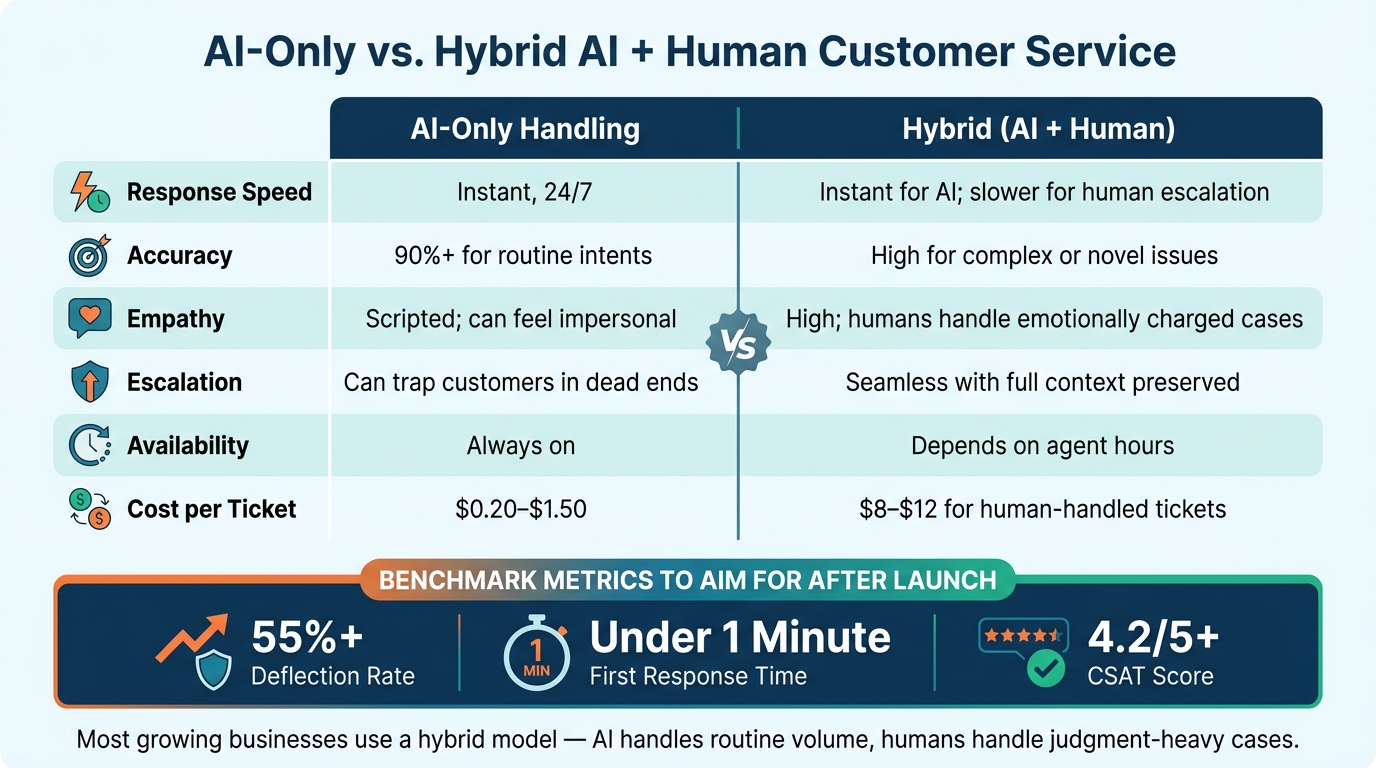
Watch deflection rate, first response time, CSAT, and resolution rate. Early benchmarks to aim for are 55%+ deflection, under one minute first response, and 4.2/5+ CSAT [4].
One metric deserves extra attention: resolution rate, not just deflection rate. Deflection tells you how many tickets AI kept from reaching support. Resolution rate tells you how many issues were solved without the customer coming back again. If deflection is high but resolution is low, the bot isn’t fixing the issue - it’s just blocking tickets [1][3].
ChatSpark’s built-in analytics can help you compare results by channel and language. That makes it easier to spot where automation is doing well and where your knowledge base still has gaps. Those numbers also show when automation can handle things on its own and when a human backup is still needed.
AI-Only vs. Hybrid AI and Human Support: A Side-by-Side Comparison
Use the handoff rules from your launch plan to decide where automation stops and human support takes over. AI-only support works best for routine requests like FAQs and order status. But it has limits when a conversation gets emotional or slips into an edge case the AI hasn’t handled before [3].
A hybrid model lets AI handle the bulk of requests while people step in for the moments that need judgment, care, or problem-solving.
| Criteria | AI-Only Handling | Hybrid (AI + Human) |
|---|---|---|
| Response Speed | Instant, 24/7 | Instant for AI; slower for human escalation |
| Accuracy | 90%+ for routine intents [4] | High for complex or novel issues [3] |
| Empathy | Scripted; can feel impersonal [2] | High; humans handle emotionally charged cases [3] |
| Escalation | Can trap customers in dead ends [3] | Seamless with full context preserved [5] |
| Availability | Always on | Depends on agent hours |
| Cost per Ticket | $0.20–$1.50 [1] | $8–$12 for human-handled tickets [1] |
Most growing businesses end up somewhere in the middle. AI takes care of the routine volume, and human agents focus on the cases that need a person.
Expand from One Channel to a Full Omnichannel Workflow
Start with your highest-volume channel, which is often website chat, and get the flows working there first. Once deflection rates are stable and CSAT stays steady, you have a model you can reuse in the next channel.
From there, moving into Instagram, Facebook, or WhatsApp is mostly a setup step inside ChatSpark. As you expand, connect the same workflow to your support, payments, and scheduling tools.
The goal isn’t to be everywhere all at once. It’s to add each new channel only after your core setup is solid enough to support it without creating a messy experience. A weak setup across five channels is worse than a strong one across two. Stable channel coverage also makes oversight, privacy, and escalation easier to manage. Once omnichannel performance is stable, lock in those rules before scaling further.
Governance, Quality Control, and Next Steps
Set Privacy, Oversight, and Transparency Standards
After launch, scaling AI support calls for tighter controls, not looser ones. As volume grows, governance helps keep support safe, auditable, and compliant.
Data handling. Start with data minimization. Give your AI access only to the customer details it needs to answer the question in front of it. Payment card numbers, Social Security numbers, and health data should be tokenized or masked before they reach the AI. Your setup should also support deletion requests under CCPA/CPRA, including purging older transcripts and removing identifying details from logs used to improve the system.
Access control. Be clear about what the AI can do and where the line stops. High-risk actions, like changing billing details without verification, should stay blocked. Agents, supervisors, and admins should each have separate permissions. API access should stay limited to the minimum required.
Review and transparency. A weekly transcript review can catch a lot before small issues turn into bigger ones. Review 2%–5% of chats across key queues and score them for accuracy, tone, and escalation. Keep audit trails of prompts, responses, model versions, and escalation decisions so you can trace how the AI reached a given outcome. If a case includes complaints about legal action, high-value orders, or signs of customer distress, send it for mandatory human review. Confidence thresholds also help here by routing low-certainty replies to humans before mistakes spread.
Be upfront about AI use at the start of every conversation. Explain what it can do, and make it simple for the customer to reach a human at any point. Trigger phrases like "agent" or "representative" should route straight to a human via Freshchat handoffs. And when that handoff happens, the human agent should get a full conversation summary so the customer doesn’t have to repeat themselves.
Choose the Right ChatSpark Plan for Your Current Support Volume
Once your controls are set, pick the plan that fits your current volume and integration needs. The right choice comes down to current message volume, required integrations, and expected growth.
Review your plan every quarter. As AI handles more intents and more channels, message volume will increase. At the same time, your governance needs may increase too.
Key Takeaways for Building an AI Customer Service Strategy That Scales
The goal is simple: scale without losing response quality. Build AI support in stages. Start with repetitive, low-risk work. Keep human handoffs clear. Then expand only after accuracy, CSAT, and resolution stay strong.
FAQs
How do I decide what AI should handle first?
Use a three-step approach: start with knowledge-based questions, then move to data-driven tasks, then to system actions.
Begin with documented topics like return policies, shipping times, or pricing. Then add customer-specific tasks like order tracking or account lookups. Finally, automate actions like refunds or subscription changes.
A smart way to roll this out is to start with AI-assisted drafting before giving the system full control. That gives your team time to build confidence, check accuracy, and protect the customer experience.
When should AI hand off a customer to a human?
AI should pass the conversation to a human when the issue goes past what it can handle or calls for human judgment.
That usually means cases with higher stakes, such as legal or regulatory compliance, possible fraud, security issues, or serious personal distress. In those moments, a human needs to step in and make the call.
A handoff also makes sense when the customer is still upset, uses aggressive language, hints that they may leave, or has already tried to fix the same problem and gotten nowhere.
How can I tell if AI is actually resolving issues?
Focus on resolution rate, not just deflection rate. Deflection tells you only whether a bot kept a ticket out of the queue. That can make things look better than they are, especially when customers simply give up and leave.
A better read on performance comes from looking at what happened after that first interaction. Track:
- First-contact resolution
- Reopen rates
- Whether customers confirm the issue was solved
Then go one step deeper. Review the reason behind each CSAT score to see what actually happened. Did the AI give the right answer? Or did it send the customer down a dead end and push them to escalate?