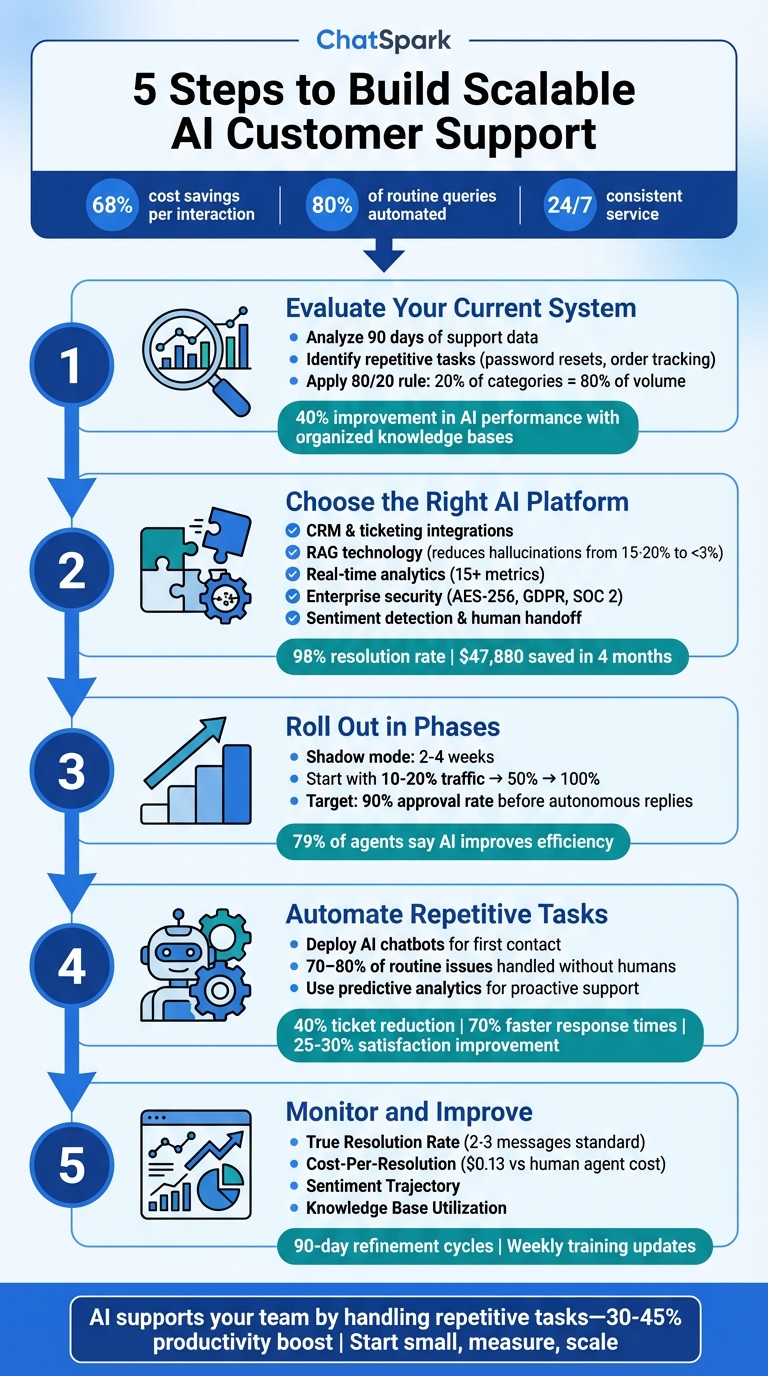
AI customer support can reduce costs, handle thousands of interactions, and deliver consistent service 24/7. Companies using AI-powered systems save up to 68% per interaction, while chatbots manage 80% of routine queries. But success depends on proper setup and continuous improvement. For a deeper dive, see our guide to AI customer support implementation. Here’s how to do it:
- Evaluate Your Current System: Analyze support data to identify repetitive tasks like password resets or order tracking. Map workflows and pinpoint problem areas like long response times or frequent escalations.
- Choose the Right AI Platform: Look for integrations with your tools, a knowledge base for accurate responses, and features like analytics and security. Platforms like ChatSpark offer multilingual, cross-platform support.
- Roll Out in Phases: Start small with test projects, train your team, and gradually increase the AI’s role. Use shadow mode to fine-tune responses before full deployment.
- Automate customer support without losing quality: Let AI handle routine inquiries, send proactive updates, and reduce ticket volume by 40%. Use chatbots and predictive analytics to anticipate customer needs.
- Monitor and Improve: Track metrics like resolution rates, sentiment changes, and cost-per-resolution. Regularly update the knowledge base and refine the system.
Key takeaway: AI doesn’t replace your team - it supports them by managing repetitive tasks, so they can focus on complex issues. Start small, measure performance, and scale over time.
5 Steps to Build Scalable AI Customer Support System
Step 1: Review Your Current Support System
Before diving into AI solutions, it’s essential to take a hard look at your existing support system. Skipping this step often results in AI implementations that miss the mark. After all, AI can’t solve problems you haven’t pinpointed yet.
Start by exporting your recent support data - covering at least the last 90 days. Organize this data by ticket category, response time, and resolution type. This will help you spot patterns and identify areas for improvement. The 80/20 rule is a helpful guide here: around 20% of ticket categories often generate 80% of your total volume. Common, repetitive requests like password resets, order status updates, or refund inquiries are perfect candidates for automation.
Document Your Support Workflow
Take the time to map out how customer requests move through your system, from the moment they’re submitted to when they’re resolved. Every process should have a clear starting point (the trigger) and a defined end state (when the customer considers the issue fully resolved).
Document this journey step by step in plain, straightforward language. Be sure to include every role and decision point along the way. For example, if your agents frequently ask managers, "Can I handle this?" for the same type of issue, that decision should be clearly outlined with specific criteria.[4] This level of clarity is crucial. Companies that maintain well-organized, regularly updated knowledge bases report a 40% improvement in AI performance.[1]
Identify Problem Areas
Now, dig into your system’s pain points by analyzing key metrics. Here are a few to focus on:
| Metric | What It Reveals |
|---|---|
| First Response Time | How long customers wait for an initial reply |
| First Contact Resolution | The percentage of issues resolved in one interaction |
| Escalation Rate | How often tickets require human intervention |
| Average Handle Time | The time agents spend resolving each ticket |
For example, long first response times might signal the need for 24/7 support. Low first contact resolution rates could highlight gaps in your knowledge base or overly complicated workflows. If 40% of escalations revolve around the same issue, this points to a need for better documentation.[7]
Don’t overlook after-contact tasks like ticket summarization, CRM updates, and categorization. These activities can eat up 15–25% of an agent’s time and are ripe for automation.[1] Studies show that well-trained AI can handle up to 80% of routine support tickets on its own,[5] but this only works if you’ve correctly identified which requests are genuinely routine.
Once you’ve thoroughly assessed your current system, you’ll be in a strong position to select an AI platform that meets your specific needs.
Step 2: Select and Set Up Your AI Platform
Once you've mapped out your support workflow, the next step is choosing an AI platform that fits your needs. The right platform should integrate effortlessly with your existing tools and maintain your brand's voice.
Required Platform Features
Your AI platform must work seamlessly with the tools you already use. Look for direct integrations with CRMs like Salesforce or HubSpot, ticketing systems such as Zendesk or Freshdesk, e-commerce platforms like Shopify, and payment processors like Stripe [8]. These integrations allow the AI to perform tasks like processing refunds, updating customer records, or checking inventory - without the need for custom development.
Another must-have is Retrieval-Augmented Generation (RAG). This feature ensures the AI bases its responses on your specific documentation - like FAQs, SOPs, or product manuals - rather than generating generic answers. RAG can significantly reduce hallucination rates, bringing them down from 15–20% to under 3% [2]. As John V. Akgul, Founder & CEO of PxlPeak, emphasizes:
The knowledge base isn't optional. It's the whole point. [2]
Analytics are equally important. Choose a platform with real-time dashboards that track at least 15 metrics like AI resolution rates, messages handled, and cost savings. Automated monthly ROI reports are also essential for evaluating the platform's performance and justifying your investment [8].
Security is non-negotiable. Look for enterprise-grade platforms offering AES-256 encryption, GDPR compliance, SOC 2 Type II standards, and role-based access control [8]. Additionally, ensure the platform includes human handoff features, such as sentiment detection and confidence thresholds, to seamlessly escalate conversations to human agents with full context [2].
For example, ChatSpark offers integrations with over 140 business systems, supports 95+ languages, and works across multiple channels. A global construction products company deployed ChatSpark for one of its flagship brands. Over four months, the AI handled 10,754 messages with a 98% resolution rate, captured 153 leads, and saved $47,880 - all on an investment of about $4,000 [8].
| Feature | What to Look For |
|---|---|
| Integrations | Connections to CRMs, ticketing systems, e-commerce platforms, and payment processors |
| Knowledge Base | RAG technology to ground responses in your documentation |
| Analytics | Real-time dashboards with 15+ metrics and automated ROI reports |
| Security | AES-256 encryption, GDPR compliance, SOC 2 Type II standards |
| Escalation | Sentiment detection and smooth handoffs with full conversation context |
Match the AI to Your Brand
After tackling routine queries in Step 1, it's time to ensure your AI mirrors your brand's tone and personality. Whether your brand voice is formal or casual, the AI should reflect that consistently. Start by cleaning up your knowledge base - remove outdated pricing, unnecessary marketing language, and internal jargon [2]. A well-organized knowledge base with accurate, up-to-date data will outperform even the most advanced AI model fed messy information.
If your business operates multiple brands, consider creating separate AI agents for each product line. This approach helps maintain unique brand voices and ensures training data stays relevant [8].
Before going live, test the AI in shadow mode for one to two weeks. Compare its responses to those of your human agents to fine-tune its performance [2].
Lorri G., a Customer Service & Technical Support Manager, shared her success with AI implementation:
ChatSpark currently handles an average of 1,831 chats per month without any human intervention. Since implementing it on our website, we've realized measurable savings of $119,225. [8]
Focus your initial setup on high-volume, low-complexity queries like password resets, order tracking, and basic FAQs. A well-designed AI agent can deflect 40–70% of support tickets without involving human agents [2]. This creates a solid base for further expansion and improvement, setting you up for success in the next steps.
Step 3: Roll Out Gradually and Train Your Team
Once your AI platform is ready, the next step is a careful, phased rollout. Jumping into a full-scale implementation too quickly can backfire, potentially damaging customer trust. A gradual approach not only minimizes risks but also gives your team the time they need to adjust. By 2025, Gartner estimates that 85% of customer service leaders will experiment with or pilot conversational GenAI for customer interactions [10][11]. To succeed, it’s crucial to start small and expand thoughtfully.
Think of implementing AI like onboarding a new team member rather than flipping a switch. This mindset helps you avoid “pilot purgatory,” where AI systems get stuck in endless testing, and prevents overwhelming both staff and customers with a rushed launch. Start by piloting the system, then focus on preparing your team for a seamless integration.
Begin with a Test Project
Kick things off by running your AI in shadow mode for two to four weeks. During this time, the AI drafts responses that human agents review, edit, or approve before they’re sent to customers [11][13]. Start with simple, high-volume tasks like password resets, order status updates, and FAQs [11][2]. Don’t enable the AI to send autonomous replies until it consistently achieves a 90% approval rate from your team.
Test the system rigorously by presenting it with challenges like poor grammar, unexpected topic changes, or frustrated customer scenarios. This will help uncover potential failure points [2]. Set clear confidence thresholds to dictate when the AI can respond independently or when it should escalate to a human. For example, if its confidence score drops below 0.78 cosine similarity, the AI should automatically hand the conversation off to a human agent [14][2].
Start small by routing only 10–20% of incoming traffic through the AI. After monitoring its performance for a week, gradually increase the traffic to 50% and eventually 100% [2]. Regularly review failed interactions, misrouted tickets, and situations where the AI couldn’t provide a response. These reviews will help you identify knowledge gaps and refine the system [15][14].
Prepare Your Support Staff
Getting your support team on board is essential. When implemented correctly, AI becomes a helpful assistant rather than a replacement. In fact, 79% of support agents say AI tools improve their efficiency [14], and only 20% of customer service leaders report AI-driven reductions in staffing [10]. This highlights AI’s role as a tool for augmentation, not elimination.
Provide thorough training on the AI features your team will use daily. This should include monitoring sentiment analysis to spot frustrated customers, reviewing suggested responses in real time, and understanding when and how to escalate issues [14][2]. Agents need to know when to trust the AI’s recommendations and when to step in manually.
Define clear escalation protocols, such as automatically routing conversations about large refunds, low sentiment scores, or unfamiliar topics to a human agent [10][12]. When the AI hands off a conversation, ensure it transfers all relevant information - like the full transcript, identified intent, and any collected data - so customers don’t have to repeat themselves [2].
Establish weekly feedback sessions where agents review the AI’s errors in real time. Use these insights to update the knowledge base and fine-tune the AI’s prompts [14][16]. Over time, this iterative process can improve accuracy from an initial 60–70% to 90–95% [16]. According to McKinsey, generative AI has the potential to boost customer care productivity by 30–45% [13], but this kind of improvement happens when teams actively collaborate to refine the system.
Lastly, remember that 63% of organizations have introduced formal training programs to help their teams work effectively with AI tools [16]. Investing in training not only smooths the transition but also sets the stage for better results in the long run.
Step 4: Automate Repetitive Tasks
Now that your AI platform is up and running and your team is prepared, it’s time to let automation take the reins on repetitive tasks. The idea here isn’t to replace human judgment but to give your team more time to focus on meaningful work. Research shows that employees can spend up to 40% of their day on repetitive tasks [17]. Meanwhile, AI agents can handle 70% to 80% of routine customer service issues without needing human involvement [17]. By automating these processes, you can streamline support and speed up operations significantly.
To begin, identify which tasks are eating up the most time. Look for activities that are high in volume but low in complexity - tasks that follow clear, predictable patterns and don’t need human nuance. Establish baseline metrics to measure current performance, as this will help you spot areas for improvement and calculate the return on investment after automation is implemented [1]. Once you’ve pinpointed these time-consuming tasks, you’re ready to automate.
Deploy AI Chatbots
One of the most effective ways to automate is by introducing AI chatbots. These bots act as the first point of contact for customer inquiries, offering instant responses 24/7. By reducing wait times, they free up your human agents to tackle more complex problems that require creativity or empathy. In fact, companies using AI chatbots have reported 70% faster response times [19], and small teams have automated up to 80% of recurring questions [18].
Start by programming your chatbot to handle a few specific topics or keywords, such as “track my order” or “reset password.” Gradually expand its capabilities as you refine its performance [18]. Adding structured buttons like “Track Order,” “Update Billing,” or “Speak to a Human” can guide users toward quick resolutions. Test the bot with real-world inputs, including incomplete sentences, emojis, and typos, to ensure it handles messy or unexpected queries effectively [18]. And when the bot can’t provide an answer, it should seamlessly escalate the issue to a human agent.
The impact of AI chatbots is clear. For instance, Only Tourism, a travel company, introduced an AI agent trained on verified visa information. This bot automated 80% of visa-related questions, allowing the team to process six times more monthly leads and double their daily conversations [20]. Similarly, JU Productions used AI agents to filter spam and qualify leads through WhatsApp broadcasts, leading to a 718% increase in sales and a 47.2% reduction in cost per qualified lead [20].
Use Data to Predict Customer Needs
Automation isn’t just about answering questions - it’s about anticipating them. By analyzing customer data, AI can predict potential issues before they arise. Predictive analytics uses machine learning to examine historical data, such as purchase behavior, support tickets, and real-time usage patterns, to forecast future needs or problems [21][23]. For example, if the system detects a potential service disruption or product issue, it can automatically send troubleshooting tips, offer solutions, or escalate the issue to a human agent [21].
This proactive approach can significantly reduce incoming support tickets - by as much as 40% - and improve customer satisfaction scores by 25% to 30% [23]. AI can even identify at-risk customers by analyzing factors like reduced product usage, engagement drops, or changes in payment patterns. This gives you a 30- to 60-day window to take action and retain those customers [23].
Robotic Process Automation (RPA) can handle routine follow-ups like sending satisfaction surveys, order updates, or appointment reminders without requiring human involvement [22][23]. For instance, if a customer’s subscription is nearing its expiration date, the AI can send a personalized renewal reminder through their preferred channel, whether that’s email, SMS, or a push notification [23].
To get started, focus on high-volume, straightforward queries like order tracking, password resets, or billing issues [9]. Consolidate your knowledge bases into a single, centralized vector database with up-to-date FAQs, product details, and company policies. This ensures your AI has accurate information to predict and resolve customer needs [9]. Always set up safeguards for critical actions, like refunds, requiring customer confirmation before proceeding [9].
Platforms like ChatSpark make this process easier by integrating with tools like Zapier, Freshchat, and Calendly. These platforms allow you to automate workflows across multiple channels - whether it’s your website, WhatsApp, or Slack - while maintaining context and delivering instant, polished responses in over 85 languages.
Step 5: Track Performance and Grow
Once your AI is live, the next step is to monitor its performance and scale its use strategically. Evaluating AI performance involves two key areas: technical proficiency (like speed and accuracy) and customer experience (helpfulness and ease of use) [24]. Instead of focusing on surface-level metrics like "total messages sent", prioritize metrics such as True Resolution Rate, which tracks how often inquiries are resolved without human intervention [25].
Measure What Matters
Start by focusing on metrics that highlight how effectively your AI resolves customer issues. For example, industry standards suggest that most resolutions should take 2–3 messages [25]. If your AI requires more exchanges, it may be giving unclear responses or struggling to understand customer intent. Keep an eye on escalation quality to ensure that when interactions are handed off to human agents, the full context is provided. This avoids customers having to repeat themselves, which can lead to frustration.
Pay attention to "no-solution" conversations, where the AI fails to provide an answer. These missed opportunities can guide updates to your knowledge base. For instance, if customers frequently ask about a specific return policy and the AI doesn’t have an answer, it’s a clear signal to update your content [25]. Another key metric is Knowledge Base Utilization, which shows whether the AI is effectively using internal resources like FAQs and documentation to deliver accurate responses [24].
You should also monitor the confidence level of resolutions and look for patterns in repeated queries. If users rephrase the same question multiple times, it may indicate that the AI’s replies are unclear or incomplete [27]. Additionally, track Sentiment Trajectory, which measures how customer sentiment shifts during the interaction (e.g., from “Frustrated” to “Neutral”). This provides a more dynamic view of success than a simple post-chat satisfaction score [27]. And since 90% of consumers consider an immediate response "important" or "very important" [24], speed is critical - but only if it’s paired with accurate, helpful answers.
To quantify the return on investment, calculate Cost-Per-Resolution. Divide your monthly platform cost by the number of AI-resolved tickets, and compare this to the cost of human agents. For example, if your AI resolves 1,000 tickets per month at a platform cost of $129, that’s $0.13 per resolution - a fraction of what it would cost a human agent to handle the same workload [25].
Once you’ve established these metrics, you can focus on continuous improvement.
Improve and Expand Over Time
Using these insights, adopt a 90-day refinement plan. Start with two weeks of gathering baseline data on support volume, then spend the first month analyzing failed conversations. Use months two and three to optimize your documentation and retrain the AI as needed [25]. Treat your AI as an evolving tool by updating its training data weekly based on recurring issues and conversation trends [27]. Collaborate with your human support team during handoffs to identify knowledge gaps [1][19].
As your customer base grows, consider implementing a Tiered Support Model. In this setup, AI handles high-volume, straightforward tasks (like password resets or order updates) while complex or sensitive issues are escalated to human agents [28][6]. Use Intelligent Ticket Routing to automatically assign tickets based on urgency, customer priority, or agent expertise. This helps prevent bottlenecks as ticket volume rises [1][28][29]. Companies that have adopted AI for support report a 30% decrease in ticket volume and a 45% reduction in customer service costs [29].
To scale further, extend your AI’s capabilities by adding support for new channels or increasing its message capacity. Platforms like ChatSpark simplify this process by consolidating support across email, chat, social media, and voice into a single interface. This eliminates the need for agents to switch between tabs, which becomes increasingly important as your business grows [28][29]. Schedule monthly knowledge audits to review escalation logs and identify new questions to include in the AI’s training [2]. And if a customer requests a human agent, ensure the AI transfers them immediately - along with the full conversation history - to avoid frustration [2].
"That's the real automation win – when bots handle the repetitive so humans can do the remarkable." - Maya Rodriguez, CX Director, StellarCommerce [26]
Conclusion
Building AI-powered customer support that can scale is not a one-and-done task. It requires thoughtful planning and ongoing refinement. The five steps discussed - evaluating workflows, choosing the right platform, rolling out in phases, automating tasks using a customer service automation checklist, and tracking performance - lay the groundwork for a system that adapts as your business grows.
Think of deploying AI as the beginning of a continuous journey. Regular reviews, monthly audits, and incorporating customer feedback are key to steady performance gains [1][3][28]. A strong knowledge base and phased implementation help ensure that improvements are measurable and sustainable.
As your support system scales, adopting a tiered model becomes crucial. AI can handle repetitive, high-volume queries, while more complex issues are escalated to human agents equipped with all the necessary context. The aim here isn’t to replace your team but to let them focus on tasks that genuinely need human expertise.
Once your system is up and running, the next step is to use scalable, brand-aligned technology. For example, ChatSpark (https://chatspark.io) offers a solution that integrates seamlessly across platforms like websites, WhatsApp, Instagram, Facebook, Telegram, and Slack. It provides instant, localized responses in over 85 languages. With pricing that starts at $19/month for solo entrepreneurs and scales to custom enterprise packages, ChatSpark is designed to grow with your business - whether you’re managing 100 messages or over 2,000 every month.
FAQs
What should I automate first with AI support?
Start by automating routine, repetitive tasks such as answering FAQs, handling basic troubleshooting, checking order statuses, managing billing inquiries, and resolving login issues. These level-1 support tasks typically involve high-volume requests that automation can handle quickly and efficiently. This not only lightens the load for your human support team but also speeds up response times, creating a better experience for your customers. Meanwhile, your team can dedicate their energy to tackling more complex issues that require a personal touch.
How do I stop an AI bot from giving wrong answers?
To improve accuracy and minimize incorrect responses, it's essential to invest in proper training, strong safeguards, and consistent monitoring. Start by training the AI with real conversations and high-quality data to ensure it understands context and nuances effectively.
Introduce fail-safes to handle situations where the AI is unsure. For example, design it to escalate complex or ambiguous queries to human agents, ensuring users always receive accurate information.
Testing the AI in real-world scenarios is another critical step. This helps identify gaps in its understanding and allows for regular updates to its training data. Additionally, setting confidence thresholds ensures the bot only provides answers when it's reasonably certain, further improving reliability over time.
When should a chatbot hand off to a human agent?
When a chatbot encounters complex issues, situations requiring emotional support, or sensitive topics like billing disputes, it should hand the conversation over to a human agent. Common triggers for escalation include:
- High complexity: Problems that go beyond the chatbot's capabilities.
- Repeated failures: When the chatbot can't resolve the issue after multiple attempts.
- Low confidence levels: For instance, when confidence drops below 40%.
- Negative sentiment: Detecting frustration or dissatisfaction in the customer's tone.
- Explicit customer requests: When the user directly asks to speak with a human.
To make the transition smooth, the chatbot must pass along the entire conversation history to the human agent. This ensures the customer doesn't have to repeat themselves, saving time and reducing frustration.