The pricing model often changes your support bill more than the feature list does. I’d pick per message for variable AI usage, per resolution when the bot closes simple tickets end to end, and per seat when a human team stays at the center of support.
Here’s the short version:
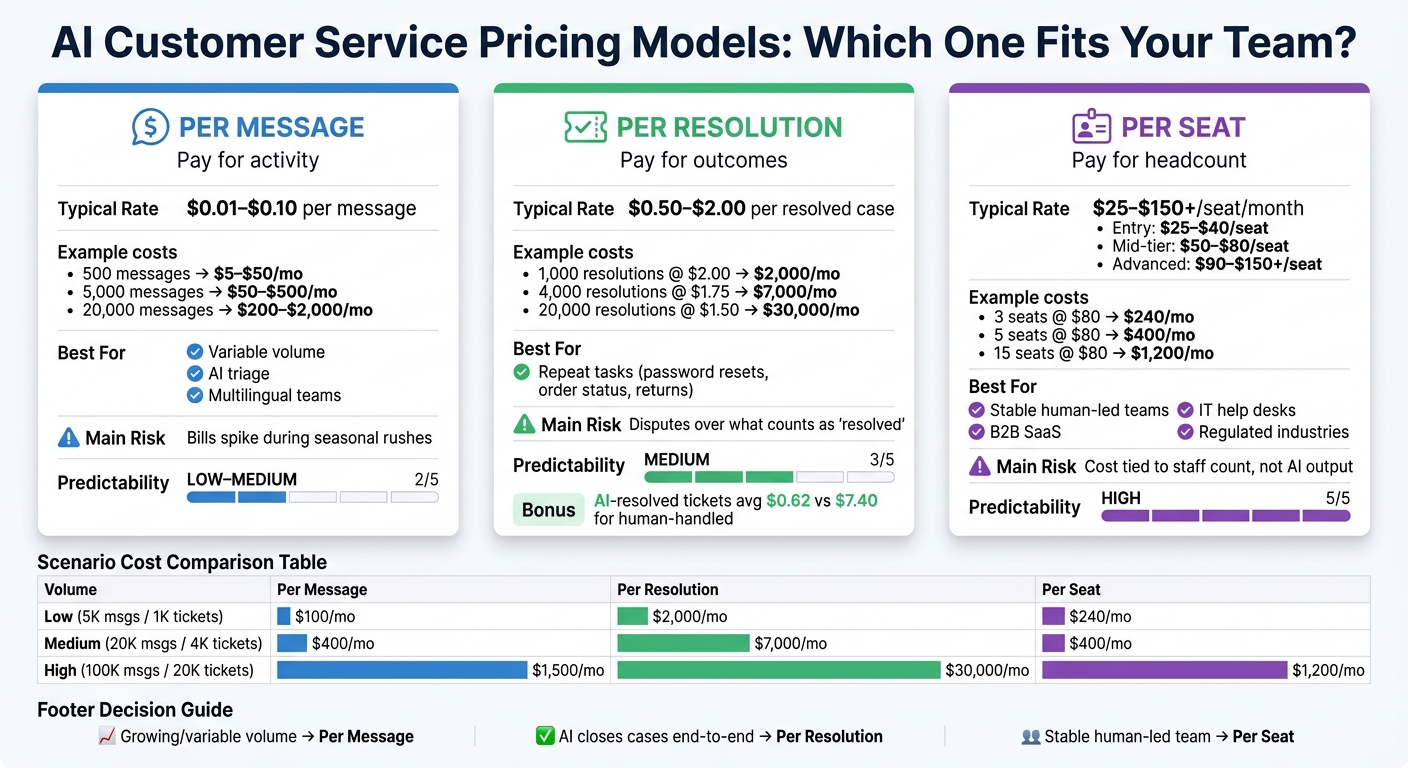
- Per message charges for each AI interaction, often around $0.01 to $0.10 per message. Cost starts low, but spikes can push the monthly bill up fast.
- Per resolution charges for closed outcomes, often around $0.50 to $2.00 per resolved case. This can make sense when the AI handles repeat tasks like password resets or order-status questions.
- Per seat charges a flat monthly fee per agent, often around $25 to $150+ per seat. Cost is easier to forecast, but it doesn’t track how much work the AI is doing—you can estimate your potential savings to see which model fits best.
If I boil the article down to one point, it’s this: you’re not just picking a tool - you’re picking what you want to pay for: activity, closed cases, or headcount.
AI Customer Service Pricing Models Compared: Per Message vs. Per Resolution vs. Per Seat
Quick Comparison
| Model | You Pay For | Best For | Main Risk |
|---|---|---|---|
| Per Message | Each message | Teams with variable volume and AI triage | Bills can jump during busy periods |
| Per Resolution | Each case the AI closes | Repeat issues with a clear end point | Disputes over what counts as “resolved” |
| Per Seat | Each agent license | Stable, human-led teams | Cost stays tied to staff, not AI output |
A few numbers show the gap fast:
- At 5,000 messages, per-message cost might be about $100/month at $0.02 per message
- At 20,000 messages, that could be about $400/month
- A 5-seat setup at $80 per seat would be $400/month
- But 4,000 resolutions at $1.75 each could hit $7,000/month
So if I were choosing, I’d start with one question: Do you want pricing tied to volume, outcomes, or staffing? That answer usually makes the choice much easier.
Per Message Pricing: Flexible for Volume, Less Predictable During Spikes
Per-message pricing means you pay based on the number of individual messages in a conversation. More inquiries usually lead to more messages, and that leads to a higher bill. It scales in a simple, natural way. But when traffic jumps out of nowhere, monthly costs can get harder to pin down.
How Per Message Billing Affects Monthly Cost
Vendors usually charge in one of a few ways: per message, through bundled credits, or with tiered caps plus overages. Each option gives you a different mix of flexibility and budget control. Industry benchmarks put typical per-message rates between $0.01 and $0.10 per message[2]. So the math can move fast:
- 500 messages: $5–$50/month
- 5,000 messages: $50–$500/month
- 20,000 messages: $200–$2,000/month
And that's just usage fees.
This is where things can get tricky during seasonal rushes or product launches. Say a SaaS company rolls out a major update. Support volume can jump from 500 to 3,000 messages in a single week as users ask setup and configuration questions as part of their AI customer support implementation. The demand makes sense. The bill does too. But it can still catch a finance team off guard if they planned for a slower month.[2][3]
Where ChatSpark's Message-Based Plans Fit
ChatSpark deducts one message credit for each AI reply.[1] Its plans use subscription tiers with fixed monthly message limits[1], which gives teams a ceiling for normal-month spending while still linking cost to actual AI use. And when a team uses the full allowance, the effective cost per message drops as volume goes up.
| Plan | Monthly Cost | Message Limit | Effective Cost per Message |
|---|---|---|---|
| Basic | $19 | 100 messages | $0.19/message |
| Plus | $59 | 250 messages | $0.24/message |
| Pro | $129 | 2,000 messages | ~$0.065/message |
| Enterprise | Custom | Custom | Varies |
The Pro plan cuts the effective per-message cost the most. If a team uses all 2,000 messages, it pays about $0.065 per message. That's about one-third of the Basic plan's effective rate. Smaller plans can work for pilots or very light usage. But if your team expects a few thousand messages per month, Pro is the better place to start from a cost angle.
This model also works well for multilingual, multichannel support. Cost stays tied to message volume, not language or channel. So if AI handles first-pass triage and human agents step in for harder cases, it's easy to see what the AI part of support is costing each month.
When payment shifts from messages to outcomes, the cost picture changes again.
Per Resolution Pricing: Pay for Outcomes, Not Every Interaction
Per-resolution pricing moves cost away from message count and toward finished results. Instead of paying for every back-and-forth, you pay only when the AI solves the issue without sending it to a human agent. On many platforms, that lands at about $0.50 to $2.00 per resolved ticket or conversation.[4] Simple idea on paper. The catch is that it only works well when both sides agree on what resolved means.
When Per Resolution Pricing Improves ROI
This setup fits high-volume, repeatable tasks with a clear finish line. Think order-status checks, return-policy questions, password resets, and basic account updates.
For those routine tickets, the math can look strong. AI-resolved tickets average about $0.62, compared with about $7.40 for tickets handled by people. In chat, AI costs can fall to about $0.41.[5]
It can work even better in hybrid teams. AI-powered agents take the simple cases, while agents step in for the messy ones. In that setup, you pay the AI only for tickets it finishes before any human handoff. So each billed resolution lines up with a clear cut in labor cost.
Where Resolution-Based Pricing Gets Complicated
Things get messy fast if resolved isn't nailed down. Abandoned chats, half-answered questions, and multilingual conversations - where AI accuracy may shift - can all lead to billing disputes. In some cases, you can even end up paying twice: once for the AI interaction and again for the human follow-up.
Set the rule at the start. A resolution should mean the issue is solved, any needed back-end work is done, and the customer does not reopen the ticket during the agreed window, which is often 7 to 30 days.[6] That's also why per-seat pricing can feel easier to manage, even if it says less about what your automation is actually doing.
Per Seat Pricing: Predictable for Teams, Less Tied to Automation Output
Per-seat pricing is pretty simple: you pay a fixed monthly fee for each licensed agent. So even if ticket volume doubles, your bill stays the same as long as your team size doesn’t change.
Best Use Cases for Per Seat Pricing
This model makes the most sense when your support team is stable and still led by people. It’s a strong fit for B2B SaaS customer success teams, internal IT help desks, and regulated fields like fintech and healthcare tech. In those setups, agents usually manage complex, high-touch cases, while AI helps in the background with reply suggestions, ticket routing, and conversation summaries.
That link between headcount and cost is easy to explain internally. If AI is there to support agents instead of taking over a big chunk of the work, per-seat pricing often feels like a clean, easy-to-defend option.
Typical U.S. per-seat plans usually land in three tiers:
| Plan Tier | Typical Price Range | Typical Inclusions |
|---|---|---|
| Entry-level | $25–$40/seat/month [7] | Core ticketing, email and chat, basic reporting, limited AI features |
| Mid-tier | $50–$80/seat/month [7] | Workflow automation, routing rules, multilingual UI, stronger AI capabilities, integrations |
| Advanced/enterprise | $90–$150+/seat/month [7] | Advanced AI, conversation summarization, auto-resolution for some issue types, custom SLAs, security and compliance features |
Why Per Seat Pricing Can Fall Short for Growing Support Teams
The weakness of this model tends to show up when support teams scale fast, add new channels, or move into multilingual support. Each new agent needs a seat, so costs climb with headcount no matter how much work AI is taking on.
That can get frustrating fast. If AI handles a big share of routine questions, agents may deal with less volume per person, but your per-seat bill doesn’t change to reflect that shift. You’re still paying for seats, not for what the system is producing.
For teams where AI is doing more of the heavy lifting, per-resolution or per-message pricing may line up better with output.
Those tradeoffs stand out more when you compare per-message, per-resolution, and per-seat pricing side by side on cost, scale, and ROI.
Per Message vs. Per Resolution vs. Per Seat: Cost, Scalability, and ROI Compared
Each pricing model changes your costs in a different way as support volume grows and automation gets better. The clearest way to see the tradeoffs is to compare cost, scale, and automation side by side.
| Dimension | Per Message | Per Resolution | Per Seat |
|---|---|---|---|
| Cost driver | Conversation volume | Successful outcomes | Headcount |
| Cost predictability | Low to medium; harder during seasonal spikes | Medium; predictable if resolution rates are consistent | High; simplifies annual planning |
| Scalability | Scales well with automation; costs may spike at peak | Scales with AI success rate; strong upside when automation is high | Tied to headcount; adding languages or channels often means more seats |
| Multilingual support | Cost-effective; adding languages increases usage, not seat count | Good when resolution rates are trackable per language | Often requires more seats or multilingual agents as languages expand |
| Best fit for hybrid teams | Works well for AI triage and FAQ deflection; every message is billable | Best when AI closes cases end-to-end; humans handle edge cases | Optimized for stable human-led teams using AI as a background tool |
Volume changes the math fast. That’s why it helps to look at a few practical support scenarios instead of staying in the abstract.
How Each Model Performs at Low, Medium, and High Support Volume
| Scenario | Per Message | Per Resolution | Per Seat | Notes |
|---|---|---|---|---|
| Low volume - 5,000 messages, 1,000 tickets/month | $100/mo ($0.02/msg) | $2,000/mo ($2.00/resolution) | $240/mo (3 seats × $80) | Per message is cheapest; per resolution is expensive at low scale |
| Medium volume - 20,000 messages, 4,000 tickets/month | $400/mo ($0.02/msg) | $7,000/mo ($1.75/resolution) | $400/mo (5 seats × $80) | Per message and per seat cost the same; per resolution is higher but outcome-focused |
| High volume - 100,000 messages, 20,000 tickets/month | $1,500/mo ($0.015/msg) | $30,000/mo ($1.50/resolution) | $1,200/mo (15 seats × $80) | Per seat is slightly cheaper here, but it scales with headcount, not ticket volume |
Per resolution can get expensive as volume climbs. That said, it can still pay off if each resolved case helps prevent churn or cuts repeat contacts. The model works best when a completed case has clear business value.
Seasonal spikes make the gap even more obvious. During Black Friday or a major product launch, order-status checks and shipping questions can pour in, which pushes per message costs up fast [8]. Per seat works differently: the monthly bill stays flat even if ticket load jumps.
A Simple Framework for Choosing the Right Pricing Model
The right choice depends on how your support team runs and what you want pricing to reward. In plain terms, you’re deciding whether to pay for activity, closed cases, or staffing.
- Variable or growing ticket volume: Per message or per resolution ties spend to actual usage instead of assuming a fixed team size.
- High escalation rate or complex, regulated issues: Per resolution can get costly fast without the ROI you expected. Per message or per seat may be the safer pick.
- Stable, human-led team: Per seat gives you a steady monthly cost that’s easier to explain in budget planning.
For multilingual scale, usage-based pricing tends to make the most sense. If you add Spanish or French support through AI, you increase message volume, not seat count. A message-based setup like ChatSpark’s AI-powered agents, with clear monthly message limits and defined overage rates in USD, suits teams that want a fast launch and space to grow without renegotiating contracts every time volume shifts [8].
Conclusion: Match Your Pricing Model to Your Support Goals
Per message fits activity-based automation with room to grow. Per resolution lines up best when AI is expected to close cases on its own. Per seat makes the most sense for stable, human-led support teams where predictable spend matters more than linking cost to output. The better your pricing model matches what you’re paying for - activity, results, or people - the easier it is to keep support costs in line with your goals for cost control, scalability, and ROI.
FAQs
How do I estimate my monthly AI support cost?
Estimate monthly AI support cost with this formula: TCO = platform base fee + (interactions × per-unit price) + human agent costs + integration fees + any overage charges.
To compare that against what you spend today, divide total monthly support expenses by the number of tickets resolved. That total should include salaries, benefits, and overhead.
Also factor in implementation costs like setup and data preparation, especially in year one.
What counts as a resolved case?
A resolved case is an inquiry the AI handles fully without human intervention.
To keep this metric accurate, many businesses check whether the customer comes back with the same issue or needs follow-up within a set window, such as 7, 14, or 30 days.
That’s why teams often track True Resolution Rate or Net Ticket Deflection. These metrics help filter out cases that looked solved at first, but weren’t actually finished.
Which pricing model is best for a hybrid support team?
For a hybrid support team, the best setup usually scales well across both human work and automated workflows. Hybrid pricing models - a steady base fee plus usage-based charges - are often a good fit.
This gives teams a way to handle changing workloads without losing control of costs. It also makes it easier to automate routine questions, cut spend where it makes sense, and keep room for more complex support issues. Focus on a plan that fits your automation strategy and growth goals without surprise charges during high-volume periods.