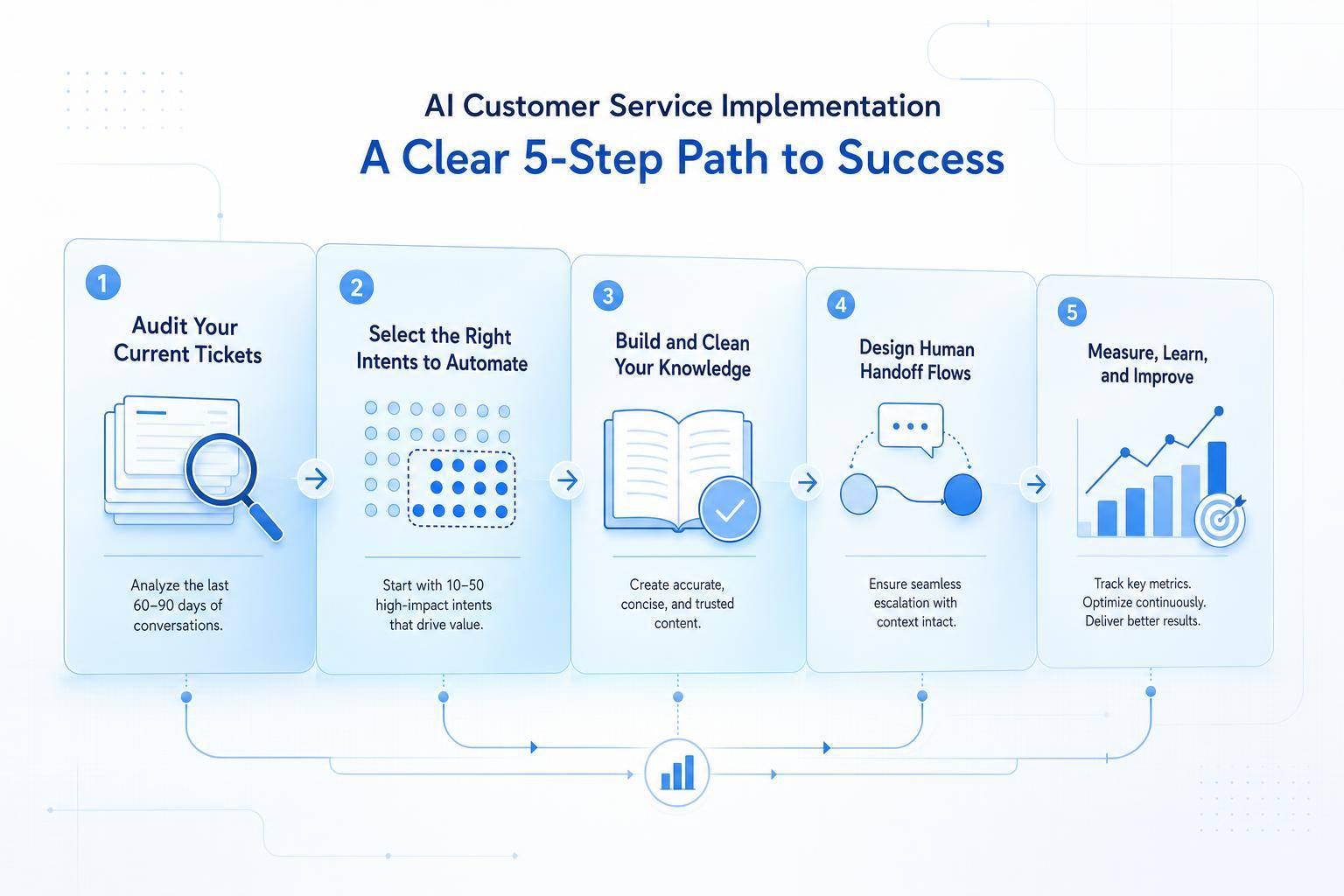
Most AI support rollouts fail before launch, not after. From what I see in this article, the first win comes from doing the prep work first: checking the last 60–90 days of tickets, picking only 10–50 low-risk intents, fixing messy help content, setting human handoff rules, and tracking baseline numbers like FRT, TTR, FCR, CSAT, and cost per contact.
If I were starting, I’d keep the plan simple:
- Audit ticket volume and timing so I know where AI can help first, especially after-hours demand
- Start with rule-based vs AI chatbot requests like order status, password resets, and return questions
- Clean the knowledge base so the system pulls from one current answer instead of old or conflicting articles
- Connect systems in the right order: knowledge first, then CRM and help desk, then channels
- Set handoff and privacy rules before launch, not after
- Pilot on one channel and judge results by numbers, not guesswork
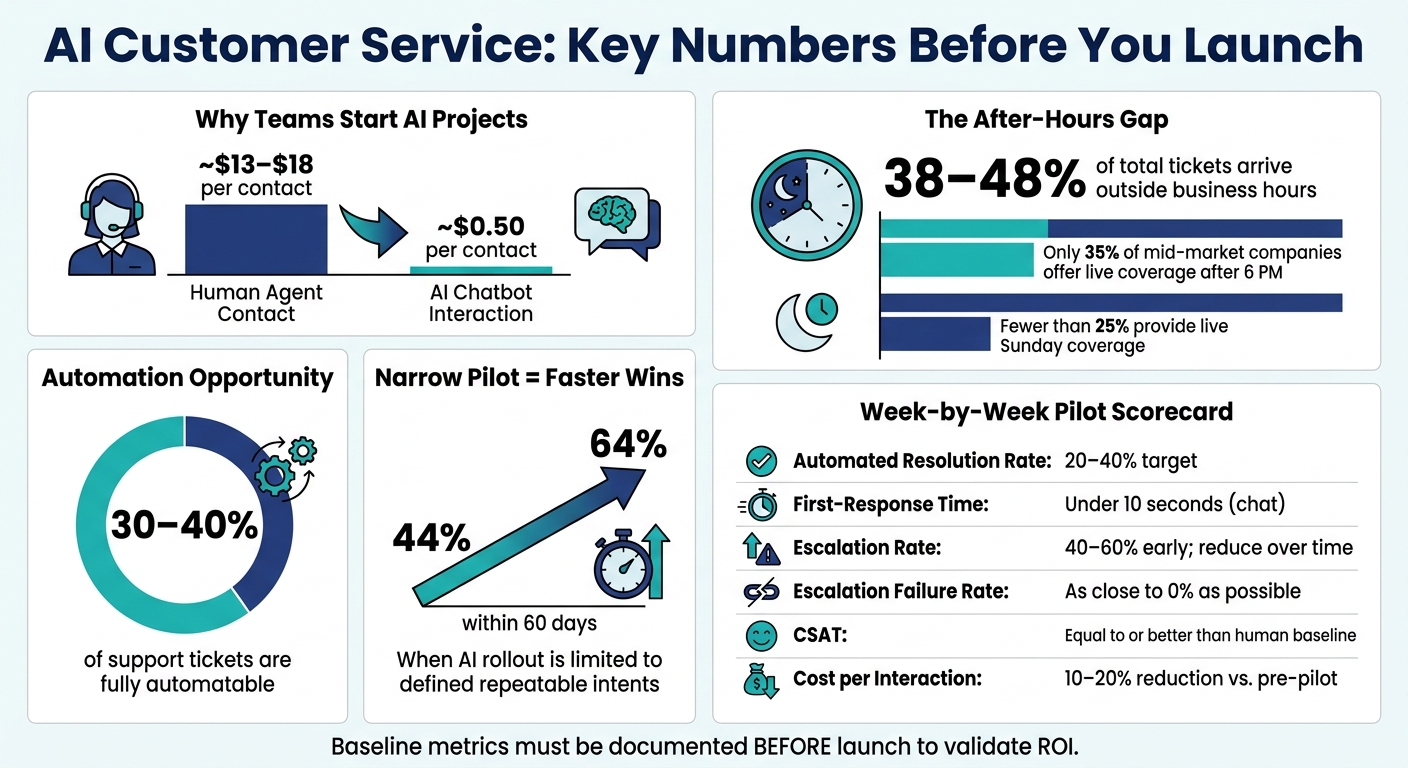
A few numbers stand out. The article notes that about 30–40% of support volume may be fully automatable, off-hours demand can reach 38–48% of total tickets, and AI interactions may cost around $0.50 compared with roughly $13–$18 for agent-assisted contacts. That gap is why teams start these projects. But I’d only trust the ROI story if the baseline was documented first.
In short: don’t start with the hardest tickets, don’t skip content cleanup, and don’t scale before the pilot proves itself. The article’s main point is simple: pilot first, measure weekly, fix weak spots fast, then expand only when the numbers hold up.
AI Customer Service ROI: Key Stats Before You Launch
1. Assess Readiness Before You Automate
Start with the last 60–90 days of support tickets. Break them out by channel, issue type, and time of day. That gives you a fact-based starting point before you pick a tool or set up a workflow.
Review ticket volume, complexity, and channel demand
Not every ticket should go to automation.
The best early use cases are high-volume, rule-based requests like order status checks, shipping updates, password resets, store hours, appointment changes, and return-policy questions. These tend to follow simple rules, need little judgment, and often rely on structured data such as order IDs or account numbers. Industry data suggests that about 30–40% of total volume falls into fully automatable work.[3][5]
More complex cases should stay with human agents at the start. That includes billing disputes with multiple exceptions, technical issues with lots of edge cases, and emotionally sensitive situations. A simple way to sort this out is to score each ticket type from 1–5 based on how much judgment it needs:
- Automate 1–2
- Route 4–5 to human queues
Those scores give you a clear first batch of use cases.
Set baseline metrics before launch
If you don’t document your starting point, you can’t show whether AI made a difference.
Before launch, track these five metrics for at least one main channel:
| Metric | What to Measure | Why It Matters |
|---|---|---|
| First-response time (FRT) | Minutes or hours from inquiry to first reply | Shows where AI can cut wait times |
| Time to resolution (TTR) | Hours or days from ticket open to close | Tracks efficiency gains |
| First-contact resolution (FCR) | % of issues solved in one interaction | Measures containment |
| CSAT score | Customer satisfaction rating | Tracks experience quality over time |
| Cost per contact | Total monthly support spend ÷ tickets handled | Benchmarks ROI against AI deployment costs |
Pay close attention to cost per contact. Assisted-channel support often costs about $13–$18 per contact, while AI chatbot interactions can average around $0.50.[4][6] That difference is where the ROI story starts - but only if you’ve recorded your baseline before rollout.
Use these numbers to judge the pilot, not to guess at targets.
Map staffing coverage and U.S. time zones
Document your current support hours across Eastern, Central, Mountain, and Pacific Time. Then compare agent availability with when tickets actually come in. Many U.S. companies are well staffed during normal business hours but thin overnight and on weekends. When that happens, first-response times can slip from minutes to hours.
Historical ticket data shows that 28–35% of volume arrives between 6 p.m. and 9 a.m., and off-hours volume can account for 38–48% of total volume.[1] Fewer than 35% of mid-market companies offer live coverage after 6 p.m., and less than 25% provide live Sunday coverage.[2]
That gap tells you where AI can help first.
Also look at peak periods like Black Friday or tax season, using at least one past surge as your baseline. Those demand spikes usually make the first automation targets pretty obvious.
2. Define the Right Use Cases and Clean Up Your Knowledge
Once you know your team is ready, the next step is simple: keep the first rollout tight and clean up the information your AI will use.
Start with narrow, repeatable customer intents
Begin with 10 to 50 high-volume, low-risk requests that already have a clear answer path in your help center. Good early use cases include shipping status updates, billing FAQs, password resets, return instructions, subscription changes, appointment scheduling, and basic order changes.
These are good starting points for a reason. The answers are predictable. The path to resolution is short. And if something goes wrong, the downside is usually limited.
One reported deployment found that beta users increased ticket resolution rates from 44% to 64% within 60 days after limiting their AI rollout to a defined set of repeatable intents.[8] That kind of narrow start gives you room to test accuracy, spot weak points early, and help the team get comfortable before you expand.
Leave out requests that need judgment, manual approval, or lots of exception handling. Those are often better sent to human agents or handled with intent-routing tools until the groundwork is in place.
Fix outdated, duplicate, or inconsistent source content
Before launch, audit your FAQs, product specs, troubleshooting guides, return policies, warranty terms, and billing instructions.
Each topic should have:
- One approved article
- A named owner
- A visible review date
Then clean house. Remove old articles, combine overlap, and rewrite vague guidance into clear step-by-step answers the AI can pull from with confidence.
Use consistent U.S. formatting throughout: $X.XX, MM/DD/YYYY, inches, pounds, °F, and (XXX) XXX-XXXX. For example, a return policy should spell out the eligible time window, refund method, exclusions, and the steps to start a return. It shouldn't rely on fuzzy wording like "most items are eligible."
After launch, check unmatched or failed conversations every week. If a question shows up three or more times without a solid answer, that's a clear sign the content needs to be added or rewritten.[7]
Clean, narrow knowledge is what makes tool choice and system integration much easier later.
Comparison table: poor knowledge inputs vs. AI-ready content
| Knowledge Condition | Poor Input | AI-Ready Content | Result |
|---|---|---|---|
| Accuracy | Outdated pricing, expired policies | Current, human-verified facts with review dates | More accurate answers |
| Consistency | Duplicate or conflicting answers across articles | One approved answer per issue | Fewer escalations |
| Structure | Dense paragraphs, buried policy details | Short sections, clear headings, direct Q&A format | Faster retrieval, more trust |
| Scope | Broad topics mixed into single documents | Narrow, repeatable intents with one article per problem | Faster speed to value |
| Policy detail | Vague language, missing exceptions or fees | Explicit terms, exclusions, and escalation paths | Less compliance risk |
| Formatting | Mixed date formats, inconsistent units | Standardized U.S. formats (USD, MM/DD/YYYY, °F, lbs, in) | Consistent, trustworthy responses |
3. Choose AI Tools and Integrations That Fit the Workflow
Once your use cases are clear and your knowledge is cleaned up, it's time to pick tools that fit how your support team already works.
The key idea is simple: choose tools to support the workflow you have, not tools that force your team into a new one.
Match AI capabilities to real support tasks
Different AI tools do different jobs, so map each one to an actual support task.
Chatbots and virtual agents handle self-service interactions. They can answer questions, walk customers through steps, or complete transactions. In some cases, virtual agents can finish a request end to end, like processing refunds.
Intent routing sends each request to the right queue or workflow. That cuts down on tickets landing in the wrong place.
Knowledge-base automation pulls approved answers from your content sources, which helps keep replies consistent.
Analytics platforms track performance metrics and point out gaps, so you can see what's working and where things break down.
You don't need all four on day one. Start with the capability that fixes the biggest gap in your current workflow.
Connect channels, CRM, and help desk systems in the right order
The order of your integrations matters more than people think.
Start by connecting knowledge sources first. That way, the system can pull approved answers from the beginning.
Then sync your CRM and help desk. This gives the AI access to customer history, open tickets, and account status in context.
After that, connect your website and messaging channels. Once those are in place, you can layer in advanced automation rules - but only after you've checked that the data moving through the system is clean and complete.
A unified customer history helps stop one of the most annoying support problems: making customers repeat themselves across channels.
Comparison table: AI tool categories and their business role
| Tool Category | Primary Function | Typical Integrations | Expected Outcome |
|---|---|---|---|
| Chatbots / Virtual Agents | Self-service resolution for repetitive requests | Website, messaging channels, help desk | Faster responses, lower agent workload |
| Intent Routing | Direct incoming requests to the right queue or workflow | Help desk, CRM, ticketing systems | Fewer misrouted tickets |
| Knowledge-Base Automation | Surface approved answers from content sources | CRM, help desk, knowledge base | More consistent answers |
| Analytics Platforms | Monitor performance metrics and surface gaps | CRM, help desk, channels | Clearer visibility into what to improve |
Next, set rules for handoff, privacy, and multilingual customer support.
4. Build Safe Workflows for Escalation, Privacy, and Multilingual Support
Once your workflow is mapped, the next step is to lock in the rules for escalation, privacy, and language support. The tools may run the system, but these guardrails are what keep it safe.
Create clear rules for human handoff
Your AI should know where it needs to stop. Set clear triggers that move a conversation to a human agent automatically.
When that handoff happens, send the full transcript, detected intent, and any customer details the agent needs. That way, the agent can pick up the conversation without making the customer start over.
That part matters more than many teams think. A handoff without context is almost as frustrating as no handoff at all.
Protect customer data and meet compliance expectations
Before launch, review what personal, payment, or health-related data your AI touches and where that data goes. Look closely at what ends up in conversation logs, and store as little as possible.
You’ll also want clear retention rules for:
- how long logs are kept
- who can access them
- when they’re deleted
Review your own compliance duties before going live, not after. If a workflow deals with sensitive data, lock it down with tighter access controls and tougher pre-launch testing than you’d use for a basic FAQ bot.
For internal reports and audit logs, stick to en-US formats so compliance checks and performance reviews stay consistent. Do the same for multilingual responses. Answers should stay accurate, fit the local context, and match across every supported language.
Comparison table: weak escalation design vs. governed escalation design
| Feature | Weak Escalation Design | Governed Escalation Design |
|---|---|---|
| Escape options | Customer must find a way out on their own | Clear agent contact option available at any point |
| Context transfer | Agent starts from scratch; customer repeats everything | Full transcript, intent, and relevant details passed automatically |
| Multilingual routing | Non-English conversations handled without language-specific rules | Approved wording, clear ownership, and consistent logs applied across all supported languages |
Conclusion: Pilot First, Measure Closely, Then Scale
Once your workflow and guardrails are set, the pilot tells you if the plan holds up in live traffic. This is where you check the rollout before going bigger - carefully, with clear numbers tied to response time, cost, and CSAT.
Start small. Pick one channel, like web chat, and keep the pilot focused on 3–5 high-volume, low-risk intents such as order status, password resets, or basic account questions.
Only scale when the metrics move in the right direction.
What to track during the first 30 days
From day one, run weekly reviews and compare current performance against the baseline you recorded before launch. Track the same outcomes you defined at the start. During the first 30 days, watch these six metrics each week:
| Metric | What It Measures | Early Target |
|---|---|---|
| Automated resolution rate | % of conversations fully resolved by AI | 20–40% for selected intents |
| First-response time | Time from customer message to first AI reply | Under 10 seconds for chat |
| Escalation rate | % of conversations handed off to a human | 40–60% is normal early on; aim to reduce over time |
| Escalation failure rate | % of handoffs that are delayed, dropped, or misrouted | As close to 0% as possible |
| CSAT | Customer satisfaction for AI-handled vs. human-handled interactions | Equal to or better than human-only baseline |
| Cost per interaction | Total operating costs ÷ total interactions handled (in USD) | 10–20% reduction vs. pre-pilot cost per ticket |
Don’t stop at the dashboard. Read transcripts too.
A small batch of conversations where the AI struggled can reveal issues the numbers miss: a missing knowledge article, an intent that’s too broad, or a handoff that left the customer confused. Mark those issues, fix them before the next review, and keep a record of what changed.
When results stay steady or improve for several weeks, that’s a good sign you can expand - by adding new intents or opening a second channel.
FAQs
How do I know if my support team is ready for AI?
Start with a data-driven audit. Review at least 90 days of ticket history to spot repetitive, low-complexity requests, like password resets or order tracking, that take up a big chunk of support volume.
You’ll also want to make sure your documentation lives in one structured knowledge base. On top of that, check that your stack can handle real-time CRM and billing integrations.
Before moving forward, have a few baseline metrics in place, including:
- Cost per ticket
- Churn rate
Without that groundwork, it’s hard to judge what’s working and what’s just shifting the workload around.
Which customer requests should I automate first?
Review support data from the last 90 to 120 days and sample 100 to 200 tickets. That gives you enough history to spot the requests that show up again and again.
Focus on issues that are high-volume, repetitive, and easy to predict.
A good starting point includes:
- Order status
- Password resets
- Basic troubleshooting
- FAQ responses
Stay away from sensitive or messy cases at the start, such as legal complaints, billing disputes, or high-value interactions.
Keep the rollout small. Start with one or two tasks, check performance, and then expand.
What should I fix before launching an AI support pilot?
Before you launch an AI support pilot, get your baseline in place. Track current metrics like cost per ticket and churn rate, review at least 90 days of support history, and pull your docs into a centralized knowledge base.
You’ll also want to confirm your CRM and billing integrations ahead of time. On top of that, check privacy and compliance needs, including SOC 2, GDPR, and HIPAA.
Finally, set clear escalation triggers so the system knows when to hand things off. Common examples include negative sentiment and low confidence scores.