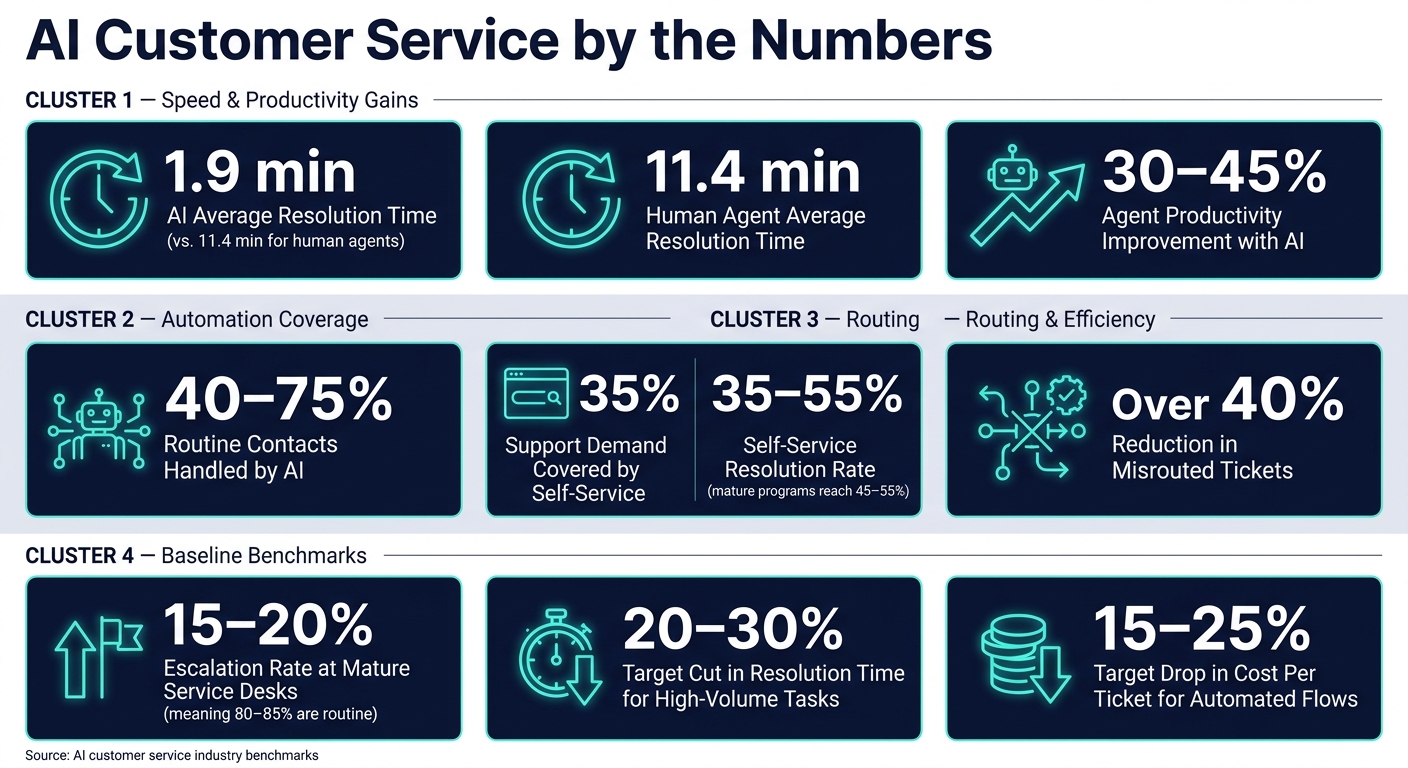
AI can cut support time fast when I use it for the right jobs. In the article, routine issues were resolved in 1.9 minutes on average with AI vs. 11.4 minutes for human agents, and agent productivity improved by 30%–45% in some cases.
If I want faster support without hurting quality, the playbook is simple:
- Start with ticket data from the last 3–6 months
- Automate high-volume, low-risk requests first
- Build a clean knowledge base from approved content
- Set chatbot, routing, and handoff rules
- Connect CRM and help desk tools
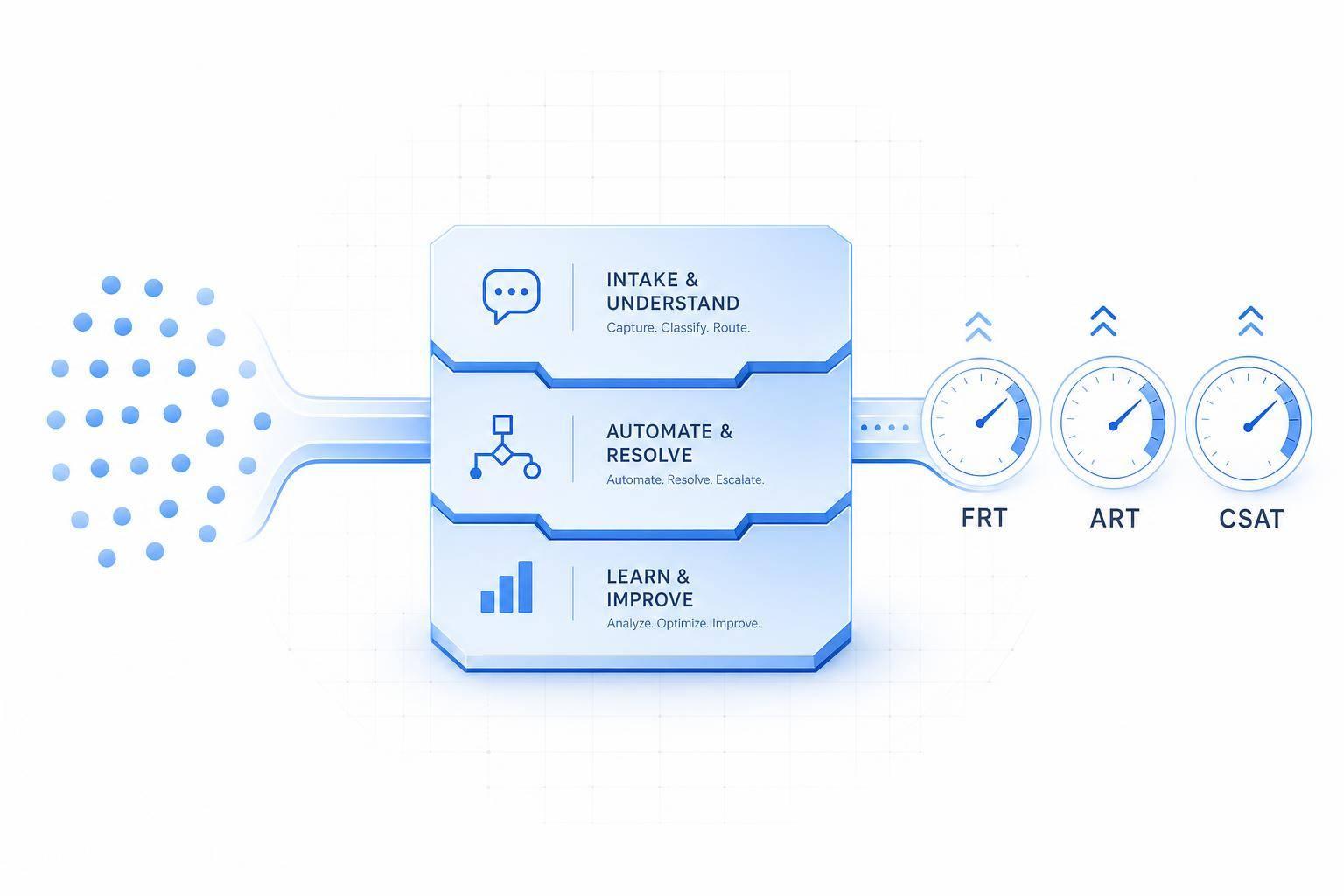
- Track response time, resolution time, escalation rate, CSAT, and first contact resolution
A few numbers stand out. AI often handles 40%–75% of routine contacts, self-service can cover about 35% of support demand at many companies, and strong routing setups have cut first-response time by up to 30% while reducing misrouted tickets by over 40%.
The main point: I should keep automation focused, measurable, and tied to human handoff. That’s how businesses move faster, lower cost per ticket, and keep answers steady across chat, email, and other channels.
AI Customer Service by the Numbers: Key Stats & Benchmarks
Assess Your Support Workload and Find Automation Targets
Start with 3–6 months of help desk or CRM data. Pull issue type, channel, time stamps, and agent notes. That gives you a clear view of where support demand stacks up and which tasks are best to automate first.
The goal isn't to automate everything. It's to spot the repeat work that eats up time and follows the same path over and over.
Find the Best Issues to Automate First
A good place to start is the 80/20 rule: about 20% of issue types drive roughly 80% of total ticket volume.[1] In plain English, a small group of support requests usually creates most of the workload.
Look for issue categories that make up more than 5% of total ticket volume and get the same answer each time. Common examples include:
- Order status checks
- Password resets
- Billing address updates
- Basic subscription changes[1]
Next, review each candidate across three factors: frequency, complexity, and business risk.
- Frequency: How often does it show up?
- Complexity: How many steps or judgment calls does it take?
- Business risk: What happens if it goes wrong financially, legally, or for your brand?
Your safest first picks are high-frequency, low-complexity, low-risk issues. In other words, tasks AI can answer, route, or escalate without making gray-area decisions. Disputes, legal matters, and policy exceptions should stay with human agents.
Only automate workflows that already have a documented process, steady policies, and dependable system access. If agents still answer the same issue in different ways, pause there and fix the process first.
The highest-volume, lowest-risk issues are usually the best fit for self-service articles, chatbot flows, and routing rules. And here's the nice part: the same top issues you find in this step should also become your chatbot answers, knowledge base articles, and routing rules.
Set a Baseline Before You Deploy
Before launch, set a baseline so you can measure what changed after automation goes live. Capture these six metrics by channel first:
| Metric | What It Measures | How to Calculate |
|---|---|---|
| First Response Time (FRT) | Speed of initial reply | Total response time ÷ number of tickets |
| Average Resolution Time (ART) | Time from ticket open to close | Total resolution time ÷ number of tickets |
| Escalation Rate | Share of tickets requiring escalation | Escalated tickets ÷ total tickets × 100 |
| Ticket Volume by Channel | Contact load across email, chat, phone, social media | Raw count per channel per period |
| Cost per ticket | Operating cost per resolved interaction | Total support costs ($) ÷ number of tickets resolved |
| CSAT Score | Customer satisfaction post-interaction | Average rating from post-interaction surveys |
These numbers show whether automation is lowering workload without dragging down service quality.
Benchmarks help put your targets in context. Mature service desks often see escalation rates of 15–20%, which means 80–85% of tickets are already routine and may be good automation candidates.[2][3] For live chat, many U.S. teams aim for first response times under one to two minutes. Common goals also include a 20–30% cut in resolution time for high-volume tasks and a 15–25% drop in cost per ticket for automated flows.
Set numeric targets before launch. For example, you might cut chat response time from 90 seconds to under 15 seconds, or push self-service resolution to 30%.
Those baseline numbers give you a simple test: are chatbots, routing, and escalation rules making support better, or just moving work around?
Build a Knowledge Base for Self-Service
Build your knowledge base from approved, customer-facing content. That part matters more than most teams think. AI can only answer from what it finds, so if the source material is old, messy, or says two different things, the output will be off too.
Start with the highest-volume issues from your workload review. In plain terms: build your first articles around the same top issues you found in the workload audit. That gives you the best shot at reducing contact volume early. One benchmark says self-service handles about 35% of total support contacts at companies with a customer portal or knowledge base, and that climbs to 45–55% in more mature programs.[7]
Feed the system approved help-center articles, FAQs, policies, PDFs, and SOPs.
Structure Content So AI Returns the Right Answer
Create one article per task. A page called "How to Update Your Billing Address" will work much better than a broad page like "Account Settings" where the answer is buried halfway down.
Use plain-language titles that match the way customers ask questions. Add a short summary at the top. Then split the body into tight sections with headings like "Eligibility", "Steps," and "Exceptions." If timing affects the policy, write the date in full U.S. format - for example, "This policy applies to orders placed after July 29, 2026" - so there’s no room for confusion.
Keep each section short and easy to scan. That makes it easier for retrieval systems to match the right article to the right question. It also cuts down the chance that the AI mixes two separate policies into one answer.
Implementing AI customer support requires more than just structure. Upkeep matters just as much. Remove duplicate content, fix conflicting guidance, retire old articles, assign an owner, and add review dates to every article. Freshworks recommends reviewing help content every 3 months and updating it after any product release or policy change.[6]
Pick the Right Source Content for Accuracy and Easy Maintenance
Use the source that fits the job. Help center content works best for customer answers. SOPs fit policy-heavy workflows. Historical tickets are useful for spotting gaps. More content doesn’t automatically mean better answers. Clean source material wins.
| Content Source | Speed to Deploy | Answer Accuracy | Maintenance Effort | Best Use Case |
|---|---|---|---|---|
| Help center articles / FAQs | Fast | High, if approved and current | Moderate | First-line self-service for common customer questions |
| Internal SOPs | Moderate | Very high for process detail | Higher | Policy-heavy workflows, exception handling, agent guidance |
| Historical tickets | Fast to mine, slower to clean | Medium - includes edge cases and informal language | High | Finding recurring questions and uncovering content gaps |
Start with help center articles and FAQs. They’re already written for customers, easier to control, and the safest option for a public-facing AI. Internal SOPs can add more exact guidance for complex or policy-driven answers, but they usually need editing first. They should also stay behind permission controls so internal procedures don’t end up in customer replies.
Pull 90 days of resolved tickets, group them by topic, and use that set to spot content gaps.[5]
Some topics should go straight to a person. Route refunds, billing disputes, privacy questions, and legal issues to a human agent. Mark those topics in the knowledge base and send them to an agent when the AI’s confidence is low.[4] That guardrail helps protect service quality without letting speed get in the way of correct answers.
Use this approved content to power chatbot answers, routing rules, and escalation triggers. In practice, this becomes the answer layer for chat, routing, and escalation.
Set Up AI Workflows for Chat, Routing, and Escalation
Once your knowledge base is clean and organized, it’s time to make it do some actual work.
Start with AI chat for the requests you see all the time. Then add more languages. After that, automate how tickets get sorted and passed to the right team.
Launch AI Chatbots for Repetitive Requests
Use the same approved answers from your knowledge base to power your first bot flows. Start small: focus on 10 to 20 high-volume, low-risk intents like order status, password resets, shipping questions, and basic account updates. Skip low-volume or high-risk issues at the start.
For each intent, write the approved response in plain language that fits your brand voice. Then set up the bot so it pulls only from approved knowledge-base articles and stops when it can’t find a match. ChatSpark lets you use that same core logic across your website, mobile app, and social messaging channels from one setup, so you don’t have to run separate bots for each channel.
Set clear fallback rules before launch. After three failed attempts, send the chat to a human agent with the full transcript, detected intent, and customer record. You should also define immediate-escalation keywords like "lawsuit", "hacked", or "cancel" that trigger handoff no matter how sure the AI seems. Use review-only mode for 10 to 14 days so the bot drafts replies for human review before it goes live. That gives you time to check answer accuracy and tone.
Once the core English flows are working, extend them into other languages instead of building separate bots from scratch.
Expand Support in More Languages
After the English flows are stable, add Spanish first. Then add one or two more high-demand languages based on support volume. Keep one English source of truth, and localize approved answers into each new language. Use approved translations, and have a fluent reviewer check samples before launch.
For high-risk content like billing terms or cancellation policies, lock replies to pre-approved wording. Track escalation rates and satisfaction scores by language on their own. That makes it easier to spot quality gaps early.
Automate Ticket Routing and Escalation Rules
Once chat is handling the easy work, route the rest of your tickets by topic, urgency, sentiment, and customer value. Manual triage slows everything down. AI routing classifies each incoming ticket in seconds and sends it to the right queue without manual handling. A Zendesk AI routing case study found that this cut first-response time by up to 30% and reduced ticket misrouting by over 40%.[8]
The table below shows when each signal should trigger automated assignment and when a person should review it first.
| Routing Signal | When It Should Drive Automated Assignment | When Human Review Is Recommended |
|---|---|---|
| Topic / Intent | Confidence is high (above 0.8) and the topic is low-to-medium risk - shipping, basic tech support, FAQs. Route directly to specialized queues. | Confidence is moderate or the topic is high risk (legal, compliance, security). Confirm before assignment. |
| Urgency / Severity | Clear urgency phrases ("cannot access account", "system down") or system signals like outage flags. Auto-assign to priority queues or on-call teams. | Urgency is inferred from unclear language. Review helps prevent over-prioritizing issues that aren’t actually critical. |
| Sentiment / Emotion | Sentiment is clearly very negative and matches a real problem - repeated prior tickets, recent outage. Route to experienced agents or a retention team. | Sentiment is extreme but context is unclear (sarcasm, cultural nuance). Review avoids misreading the message and helps keep the tone right. |
| Customer Context / Value | Firmographic data is reliable - plan type, contract size, SLA level. Automatically route high-value or SLA-bound customers to dedicated queues. | Customer data is missing, outdated, or conflicts across accounts. Review helps make sure important customers aren’t misclassified. |
Here’s what that looks like in practice:
If topic = payment failure, urgency = high, and customer = Enterprise, route to Priority Billing and notify the on-call specialist.
That kind of combined logic is what separates strong AI triage from simple keyword matching.
Keep escalation visible from the first message so customers can always reach a human. Every routing rule should point to a clear owner or a clear escalation path.
Connect CRM and Help Desk Tools, Then Measure Results
Once your routing rules are set, connect your CRM and help desk tools so every escalation includes the customer’s full history. If those systems don’t talk to each other, agents end up asking for information the customer already shared. That adds friction and slows resolution.
Keep Context Intact With CRM and Help Desk Integrations
The four integration points that matter most are conversation history sync, CRM profile sync, workflow triggers, and automatic status updates.[9]
When a chat moves to a human agent, the full transcript should attach to the ticket right away, including timestamps, detected intent, and any actions the bot already took. That lets agents skip the classic “can you explain the issue again?” moment and get straight to the problem.
Bringing CRM data into the help desk also helps routing match what’s happening in the business. Fields like account type, SLA tier, lifetime value, recent orders, and preferred language give both the AI and the agent context at a glance, without extra digging. Say a customer’s CRM record shows an Enterprise plan and a payment failure. In that case, the system can send the ticket to a priority billing queue before a human even opens it.
When the bot can’t solve the issue, it should auto-create a ticket, attach the transcript, tag the intent, and send it to the right queue. And when the ticket closes, the system should update the CRM, assign a follow-up task to the account owner, and trigger a CSAT survey without manual work. That leads to better assignment, faster follow-up, and cleaner CSAT tracking.[9][12]
Of course, these integrations only count if they improve speed and quality. So that’s what you need to measure.
Track Speed and Quality Metrics After Launch
Track a short list of speed and quality metrics from launch.
| Metric Type | Key Metrics | What It Tells You |
|---|---|---|
| Speed | First response time, resolution time, containment rate, escalation rate, agent workload change | Whether automation is cutting delays, handling simple requests end-to-end, and reducing routine work |
| Quality | Reopen rate, CSAT, NPS, first contact resolution | Whether faster responses still deliver accurate, complete answers that customers do not need to follow up on |
Keep your core set tight: first response time, resolution time, escalation rate, CSAT, and first contact resolution.[10] Put that list somewhere visible in the CRM so teams can spot issues and act fast.[11]
Check dashboards every week during the first 30 days, then move to monthly reviews once the patterns settle down.[13] If first response time improves but reopen rate goes up, that’s a clear warning sign. Usually, it means bots are closing cases too early or knowledge base answers aren’t complete - not that automation is doing its job well.
Conclusion: Start Small, Connect Systems, and Improve Over Time
Start with one or two high-volume use cases, connect CRM and help desk systems early, and use weekly metrics to refine answers, routing, and escalation.
FAQs
How do I choose the first support tasks to automate?
Review the last 90 days of support tickets and use the 80/20 rule to spot the small set of inquiry types causing most of the load. The goal is simple: find the 20% of request types that account for 60%–80% of total ticket volume.
Start with requests that are high in volume and low in complexity. These are the repeat questions that show up again and again and usually follow the same path to resolution. Good examples include password resets, order tracking, and FAQ-style questions.
A simple gut check helps here: if a new agent could handle the request using one help article, it’s probably a strong fit for automation.
Focus first on issues that are:
- Predictable
- Easy to solve
- Low risk
- Not dependent on nuanced judgment
- Not emotionally sensitive
That gives you the best place to start without making the customer experience feel cold or careless.
When should AI hand a customer off to a human agent?
AI should hand off to a human agent when the issue goes past what it can handle or answer.
Common triggers include:
- Low confidence - usually in the 40% to 60% range
- Negative sentiment
- A direct request to speak with a person
- High-stakes legal, security, or financial issues
- Repeated failed attempts to solve the problem
When that handoff happens, the system should pass along the full conversation context to the agent, so the customer doesn’t have to start over.
How long does it take to see results from AI customer service?
Businesses can start seeing noticeable results within 30 days when AI customer service is used for high-volume questions. For most teams, ROI shows up in about 4.7 months.
To help those results stick, follow a structured 90-day refinement plan. It also helps to set aside 8 to 12 hours per week to update the knowledge base and improve responses using performance data.