If your support team is slow to reply, AI can help cut wait time, keep answers consistent, and send hard cases to a person faster.
I’d sum it up like this: AI works best when I use it for high-volume, low-risk questions first, connect it to my help docs and systems, and set clear rules for when it must hand off to a human. Done right, that can lower first response time, shorten resolution time, improve CSAT, and reduce repeat contacts.
Here’s the core of it:
- Start with routine requests like order status, password resets, billing questions, and policy lookups
- Use AI on chat, email, and messaging to reply right away and tag or route tickets
- Set handoff rules for refunds outside policy, fraud risk, legal issues, strong negative sentiment, or any request for a human
- Keep one approved source of truth so answers stay aligned across channels
- Track results with first response time, time to resolution, CSAT, deflection, and repeat contact rate
- Roll out in phases and review failed conversations each week
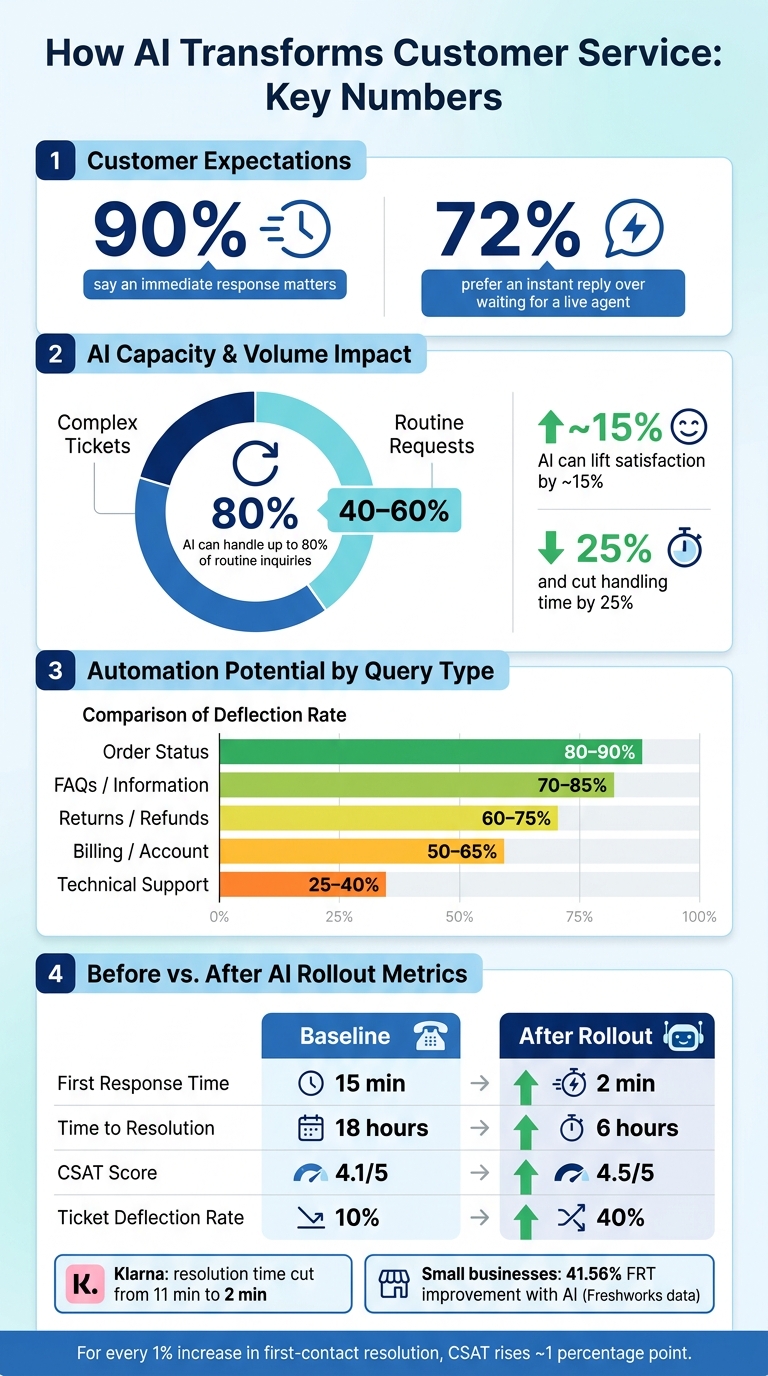
A few numbers make the case clear: 90% of customers say an immediate response matters, 72% would rather get an instant reply than wait for a live agent, and AI can handle up to 80% of routine inquiries. In many teams, common requests make up 40% to 60% of support volume, so that’s where I’d begin.
This article comes down to one simple idea: use AI for the work that is repetitive and clear, and keep people focused on the cases that need judgment and empathy.
AI Customer Service: Key Stats, Metrics & Impact at a Glance
Step 1: Identify the Support Tasks AI Should Handle First
Start with a simple audit of the last 30–90 days of tickets, chats, and emails. Group requests by topic, then rank them by volume, handling time, complexity, and risk. The goal is to spot the requests that do the most damage to wait times and customer patience.
Once you see which issues fill up your queue, split them into two buckets: requests AI can handle on the spot and requests that still need a person.
Find High-Volume Questions That Slow Down Your Team
In many organizations, shipping updates, return status checks, password resets, business hours, and invoice requests make up 40–60% of support volume. Even so, they often sit in the same queue as harder issues, which drags out response times for everyone.[3][7]
After you sort your tickets, focus first on categories that account for 10–20% of total volume. These repeat questions are usually low in complexity, which makes them the best place to start with AI. You get the fastest wins there, and customers feel the difference fast.
Separate Instant-Answer Requests From Human-Only Cases
A simple rule works well here: if the answer is clear, low-risk, and low-emotion, automate it. That keeps AI from getting stuck on situations that call for judgment.
| Query Type | Automation Potential | Typical Deflection Rate |
|---|---|---|
| Order Status | 85–95% | 80–90% |
| FAQs / Information | 60–80% | 70–85% |
| Returns / Refunds | 60–80% | 60–75% |
| Billing / Account | 50–65% | 50–65% |
| Technical Support | Low | 25–40% |
Human-only cases sit on the other side of the line. Think complaints with strong negative sentiment, refund requests outside normal policy, suspected fraud or identity theft, and anything involving HIPAA-related health information. Those cases need judgment, empathy, and accountability that only a person can provide.[2][4][5]
Prepare Approved Answers and Knowledge Sources
Once you know which tasks AI should handle, build the approved answer set behind it. Before launch, make sure your knowledge base is current, accurate, and written in clear U.S. English. Use U.S. date, currency, and measurement formats. Assign owners, and review policies, product details, and workflows on a regular schedule.
It also helps to keep one approved source of truth, so chat, email, and messaging replies all say the same thing. That base keeps responses fast and consistent as support volume grows.[1][5][6]
Step 2: Use AI to Cut Response Time Across Channels
With your task list and knowledge base in place, put AI on the front line to speed up first replies and lift CSAT. Start with the questions customers ask most.
Answer Common Questions Instantly on Chat and Messaging Channels
Start with the highest-volume requests you found in Step 1. When an AI agent connects to your order management system, CRM, or billing platform through API connections, it can pull live data and reply in seconds instead of making customers wait in a queue for several minutes.
That same answer can show up across web chat and messaging apps, so customers get a consistent reply no matter where they contact you. Using one platform also helps you avoid duplicate workflows across channels.
Live-chat replies in 5–10 seconds correlate with CSAT above 84%.[12]
Automate Ticket Triage, Tagging, and Routing
AI triage helps move tickets out of the general queue fast. The moment a message or email comes in, AI can detect the topic, urgency, sentiment, and language, then tag and route it in seconds.
Here’s what that looks like in practice:
- A billing complaint with negative sentiment can go straight to your escalation team.
- A simple FAQ can be solved automatically.
That means better first response time and faster resolution time.
Freshworks data shows businesses using AI for ticket triage can see up to a 50% reduction in first-response time.[9] DevRev also reports that AI-powered routing helped one customer resolve tickets 54% faster without adding headcount, and another cut average resolution time from 129.8 hours in February 2024 to 62.7 hours in January 2025.[10] The same workflow also works after hours and across languages.
Deliver 24/7 and Multilingual Support Without Adding Headcount
A lot of customer contacts come in after hours. With always-on AI coverage, common issues can still be solved right away, and even more complex issues can at least get an immediate acknowledgment. That matters more than many teams expect. Silence feels long when a customer needs help.
AI agents can detect a customer’s language from the first message and reply in that preferred language, supporting 85+ languages from one deployment.[11] For U.S.-based companies, that can mean helping customers who prefer Spanish, Chinese, or Tagalog without building separate language teams. It also helps when serving customers outside the United States.
Next, use those same workflows to escalate complex cases to the right agent faster.
Step 3: Improve Customer Satisfaction With Smart Escalation and Consistent Service
Once AI takes care of fast first replies, the next big CSAT factor is what happens with harder cases. Fast response time helps, sure. But satisfaction usually comes down to two things: clean handoffs and steady answers. AI tends to help most when it knows where to stop - handling simple requests on its own, then passing tougher issues to a human with the right context.
Escalate Complex Issues to the Right Human Agent Faster
Not every problem should stay with a bot. Billing disputes, legal concerns, high-value accounts, and tense conversations need a person. The goal is simple: escalate before the customer has to repeat the whole story.
Here’s a practical guide for when to hand off:
| Escalation Trigger | Why It Matters | Action |
|---|---|---|
| Negative sentiment detected | Flags frustration before it becomes a complaint | Priority routing to a human agent |
| AI confidence below threshold | Stops the system from guessing on unclear or nuanced issues | Immediate handoff |
| Two failed resolution attempts | Prevents loops and cuts customer fatigue | Automatic escalation |
| Sensitive topic | Covers billing disputes, legal, security, or compliance cases | Direct human handoff |
| Explicit request for a human | Respects what the customer wants | Instant transfer |
What makes this work is context transfer. The human agent should get the transcript, detected intent, account details, prior attempts, and the next step right away. When all of that arrives with the ticket, the agent can jump in without wasting time. And the customer doesn’t have to say everything twice.
Research shows that satisfaction is much higher when AI fully resolves the issue, and that failures often happen at the human handoff step because of context loss.[13] That’s where a lot of support teams stumble. The bot may do its part, but the switch to a person falls apart.
Keep Answers Accurate and On-Brand Across Every Interaction
A well-set-up AI agent should give the same answer each time: same policy, same tone, same next step. When answers shift from one interaction to another, people start to doubt what they’re hearing.
This shows up most when customers move between support channels. If chat says one thing, email says another, and a live agent says something else, trust starts to slip. And accuracy by itself doesn’t carry the whole load. Tone matters too. A technically correct answer that sounds cold or robotic can still drag down satisfaction.[14]
That’s why it helps to review AI transcripts for more than correctness. Look at tone. Look at emotional context. Look at whether the response sounds like something your team would actually say. When answers stay steady across channels, customers spend less time fixing the conversation and more time getting help.
Reduce Customer Effort With Shorter, Cleaner Support Journeys
Every extra transfer, repeated question, or fuzzy next step adds friction. And friction chips away at loyalty fast. AI helps by resolving simple issues on the spot, sending tougher ones to the right place the first time, and making the next step clear.
AI agents can resolve up to 80% of routine inquiries, lift satisfaction by about 15%, and cut handling time by 25%.[15] On top of that, for each 1 percentage-point increase in first-contact resolution, customer satisfaction rises by roughly 1 percentage point as well.[8]
Lower effort usually means fewer repeat contacts, less back-and-forth, and a smoother path to help.
Step 4: Measure Results and Build a Stronger AI Support Workflow
Track the Metrics That Show Response-Time and CSAT Gains
Once AI is live, don’t just assume it’s helping. Check the numbers and see if wait times are dropping and CSAT is moving up.
At this stage, AI should already be taking routine tickets and passing tougher cases to the right people. Now the job is simple: prove the lift in your own support data.
| Metric | What It Measures | Baseline | After Rollout |
|---|---|---|---|
| First Response Time (FRT) | Time from first contact to first reply | 15 min | 2 min |
| Time to Resolution (TTR) | Total time from first contact to issue closed | 18 hours | 6 hours |
| CSAT Score | Post-interaction satisfaction rating | 4.1 / 5 | 4.5 / 5 |
| Ticket Deflection Rate | % of issues resolved before reaching a human | 10% | 40% |
The gains can be dramatic. Klarna cut resolution time from 11 minutes to 2 minutes, and AkzoNobel cut response time from 5 hours 42 minutes to 70 minutes.[16] Freshworks data shows small businesses using AI see a 41.56% improvement in FRT and a 36.39% improvement in resolution time.[16]
It also helps to look at deflection and automation next to CSAT and repeat contact rate. A high deflection rate may look good on paper, but it only counts if customers don’t have to come back again for the same issue. If deflection goes up and repeat contacts stay flat or drop, that’s a strong sign AI is helping both speed and service quality.
Roll Out in Phases and Improve From Real Conversations
Don’t try to flip everything on at once. Start small with one or two low-risk, high-volume workflows, like order status checks or password resets, on a single channel such as website chat.
Then review failed conversations every week. Look for wrong answers, loops, and repeat escalations. In plain terms, where is the bot getting stuck? Where is it sending people in circles? That review usually points to the same trouble spots:
- old knowledge content
- intent misreads
- weak routing
- confidence thresholds that are too loose or too strict
- escalation triggers that fire too late or too often
Fix those first. Then use that same review process to add new topics and new channels without making a mess of the workflow.
Conclusion: Key Ways AI Agents Improve Support Outcomes
AI helps support teams when it handles routine questions right away, sends harder issues to the right place, and gets better from actual customer conversations.
FAQs
How do I know which support tasks to automate first?
Review three to six months of support data across all channels. Group requests by topic, volume, and time of day so you can spot patterns, busy windows, and after-hours gaps.
Start with high-volume, low-complexity tasks that follow clear patterns and don’t call for emotional sensitivity or nuanced judgment. Good examples include order status updates, password resets, shipping inquiries, and billing FAQs.
When should AI hand a customer over to a human agent?
AI should pass the conversation to a human when the situation gets complicated, sensitive, or calls for empathy and careful judgment. That includes things like refund disputes or requests for policy exceptions.
It can also escalate the chat right away if it picks up signs of frustration or urgency. And when that handoff happens, the agent gets the full conversation history, so the customer doesn’t have to repeat themselves.
How long does it usually take to see results from AI support?
Businesses often see fast gains after rolling out AI customer service agents, and those gains often show up within the first 3 to 6 months.
The best way to track progress is to set clear goals with a deadline. For example, you might cut first-response time from 10 minutes to under 1 minute or deflect 25% to 40% of tier-one tickets. Then review those metrics on a regular basis so you can keep improving.