
If you only review 1%–2% of support conversations, you’re guessing. I’d sum this up in one line: score every chat, email, call, SMS, and social message with the same core rubric, then check those scores against human QA each week.
Here’s the short version:
- I’d score each conversation on accuracy, empathy, customer effort, context, flow, resolution, and compliance
- I’d use a weighted 0–100 scorecard, with accuracy and resolution counting the most
- I’d mix rule-based checks, ML models, and an LLM judge instead of forcing one system to do it all
- I’d track business results like CSAT, FCR, escalation rate, and repeat contact
- I’d review score quality every week, fix false positives and false negatives, and update training data
A few numbers stand out:
- Many teams still review only 1%–2% of conversations
- A healthy AI resolution rate often lands around 70% to 85%
- A simple weekly QA baseline can start with 10 manual reviews
- A weekly tuning loop can take just 20–30 minutes
What matters most is simple: one bad handoff, one wrong answer, or one missed detail can shape the whole customer experience. So instead of relying on team averages, I’d measure conversations one by one, connect those scores to outcomes, and keep tuning the model over time.
The Core Metrics to Score in Every Conversation
Focus on the metrics that show help quality, emotional handling, and customer effort. Those are the core signals you need to score every interaction across chat, email, voice, and messaging. From there, you can build a scorecard around the main dimensions each conversation should be judged on.
How to Score Sentiment, Empathy, and Customer Effort
Sentiment scoring tracks the emotional direction of a conversation. Empathy scoring looks at whether the agent or bot recognizes emotion and responds in the right way. Customer effort shows the flip side: if someone has to repeat themselves, gets bounced between teams, or receives confusing steps, getting help took too much work.
Put together, these metrics show two things: how the customer felt and how hard it was to get the issue handled.
How to Score Response Quality, Resolution, and Intent Accuracy
Response quality should be scored by separate dimensions: answer accuracy, completeness, tone, context retention, and flow. That split matters. A reply can sound polite but still miss the point. It can be accurate but incomplete. These dimensions don’t always move in sync.
Resolution quality measures whether the customer’s goal was met without repeat contact. Intent accuracy checks whether the system understood what the customer wanted and routed or answered the request the right way. Low intent confidence is often a warning sign for misrouting, loops, or weak automation coverage. [1]
How to Flag Escalation Risk and Compliance Issues
Some conversations need human review before things get worse. AI can spot escalation risk by looking for terms like "refund", "cancel", or "legal", repeated frustration signals, or behavior such as long dwell times. [6] Compliance scoring runs as a separate check. It looks for missing disclaimers, prohibited claims, or replies that could create legal or regulatory risk. [1]
Use these dimensions as the base of your QA scorecard.
| Scoring Dimension | Measures | Value | Source |
|---|---|---|---|
| Empathy & Tone | Alignment with brand voice and emotional resonance | Builds trust in sensitive cases | AI Scorecard (LLM Judge) [1] |
| Customer Effort | Repeated explanations, transfers, confusing steps | Shows where the customer had to work too hard to get help | Conversation flow |
| Intent Accuracy | Correctness of routing and topic classification | Prevents bot loops and misrouting | Confidence scores [1] |
| Resolution Quality | Whether the customer's goal was met without a repeat contact | Improves CSAT and lowers support cost | Scorecards and outcome tags [1] [3] |
| Compliance Adherence | Required disclaimers present; prohibited claims absent | Reduces legal liability and regulatory risk | Rule-based checks [1] |
| Escalation Risk | Frustration patterns, high-risk keywords, unresolved loops | Supports proactive handoff before a conversation worsens | Keyword triggers & behavioral signals [6] |
A healthy AI resolution rate usually falls between 70% and 85%. [3]
How to Build an AI QA Scorecard and Scoring Model
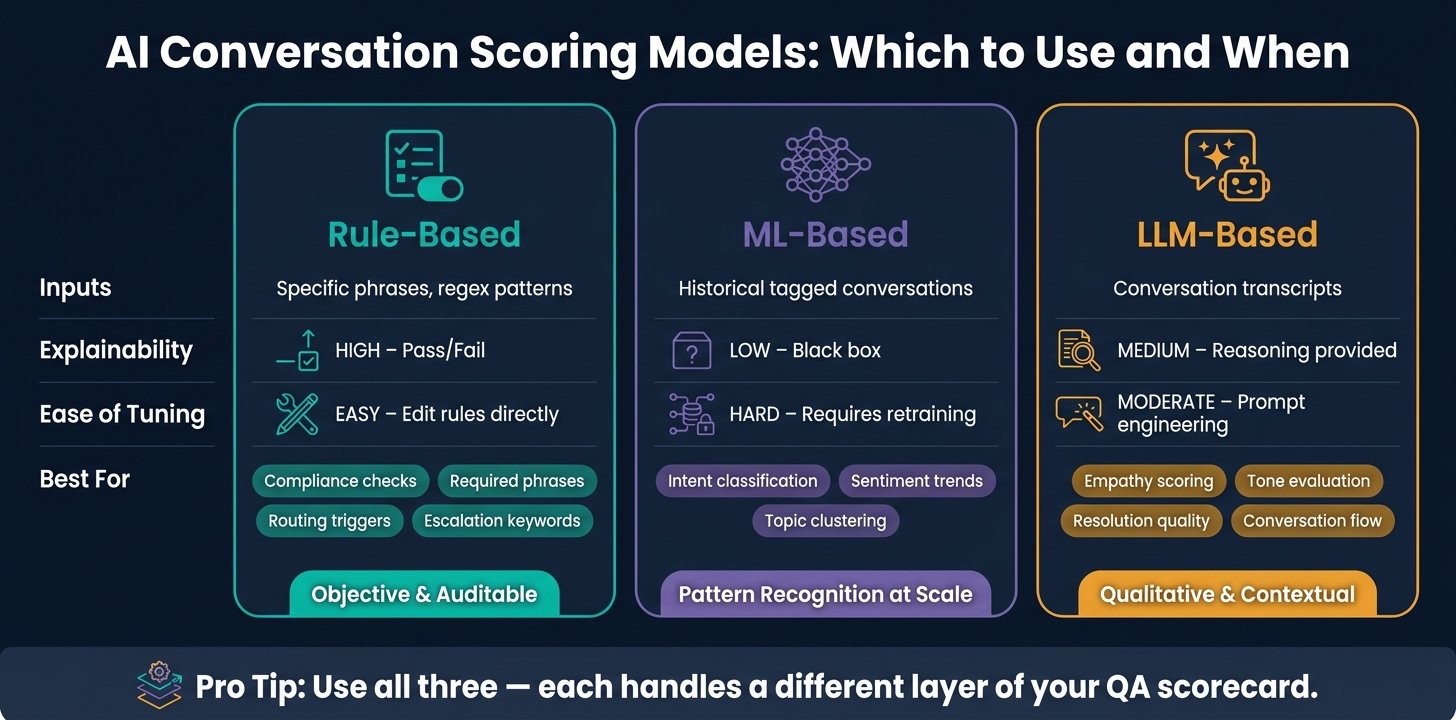
AI Scoring Models Compared: Rule-Based vs ML vs LLM
Build one scorecard that evaluates every conversation with the same logic. The goal is simple: get one comparable score across chat, email, voice, and messaging. From there, use those metrics to create a weighted QA scorecard.
Build a Conversation Scorecard with Weighted Criteria
Start with six core categories: Answer Accuracy, Tone and Empathy, Completeness, Context Retention, Conversation Flow, and Resolution Quality. Together, these can roll up into a total score from 0 to 100 [1].
The weights matter. If every category counts the same, the final score may not reflect what customers care about most. Some parts of a conversation do more damage when they go wrong. A polite reply that doesn't fix the problem isn't much of a win.
Put the most weight on the categories that have the biggest effect on trust, resolution, and repeat contact. In most cases, accuracy and resolution should carry the most weight. Empathy and tone still matter, but they shouldn't count more than whether the issue was actually solved.
Add Compliance Adherence as a separate rule-based check for required phrases, prohibited claims, and disclosures [1].
Adjust the Scorecard for Chat, Email, Voice, and Messaging
The same core categories can work across chat, email, voice, and messaging, but the scoring rules should shift a bit so each channel is judged fairly.
Use the same tags across all channels. Start timing on the first customer message, and end it when the outcome tag is set. Then use those tags to connect scores to things like resolution, repeat contact, and escalation outcomes. That setup keeps the scoring aligned across channels instead of turning each one into its own little world.
Rule-Based, ML-Based, and LLM-Based Scoring Models Compared
The right scoring model depends on what your team wants to measure and how much data you have. Each model fits a different part of the scorecard [1]. The smart move is to use each one where it performs best, not force a single model to do everything.
| Model Type | Inputs | Explainability | Ease of Tuning | Common Use Cases |
|---|---|---|---|---|
| Rule-Based | Specific phrases, regex patterns | High (Pass/Fail) | Easy (Edit rules directly) | Compliance, required phrases, routing triggers |
| ML-Based | Historical tagged conversations | Low (Black box) | Hard (Requires retraining) | Intent classification, sentiment trends, topic clustering |
| LLM-Based | Conversation transcripts | Medium (Reasoning provided) | Moderate (Prompt engineering) | Empathy, tone, resolution quality, conversation flow |
Most teams need all three, with each handling a different layer of the scorecard.
- Use rule-based checks for objective items like compliance phrases, escalation keywords, and required disclosures.
- Use an LLM-based judge for qualitative areas like empathy and flow, where the model can return both a score and the reasoning behind it.
- Use ML-based models for trend analysis across larger conversation sets, like tracking intent patterns or spotting new topics [1].
Sample 10 conversations each week and score them manually on a 1–5 scale across accuracy, tone, speed, and compliance. That small manual baseline gives you a way to compare automated scoring against human QA.
How to Set Up Conversation Scoring Across Channels with ChatSpark
Once the scorecard is set, the next step is to connect it to ChatSpark's data, tags, and alerts.
Centralize Transcripts, Metadata, and Outcome Signals
Every score starts with clean, steady records. Add the channel, transcript, timestamps, and key customer details like location, plan tier, trial length, and account age. Do the same for source data from chat, email, voice, and messaging conversations [4][6].
Outcome signals fill in the rest. Each record should include resolution status, CSAT ratings, lead capture success, and escalation triggers. That way, you can read a score alongside what actually happened in the conversation [4][6].
Once that data is in place, tags make it much easier to compare scores across channels.
Use ChatSpark Tagging, Confidence Scores, and Analytics
Use one tag taxonomy across every channel. ChatSpark supports a uniform tag structure with lowercase, hyphenated namespaces like intent:support, topic:billing, outcome:resolved, and stage:trial [4]. Use confidence scores to spot uncertain intent matches, then send low-confidence conversations to review.
ChatSpark's dashboards bring themes, score trends, and escalation patterns into one place [2].
From there, those scores can feed dashboards, alerts, and coaching queues.
Turn Scores into Dashboards, Alerts, and Coaching Queues
When scores start coming in, use them to bring the right conversations to the surface. The goal isn't just to log activity. It's to spot weak areas, trigger review, and guide coaching. ChatSpark's Proactive Coaching feature generates ranked advice cards tied directly to specific training or knowledge gaps [2].
CoPilot Briefings can send daily inbox summaries and recurring briefings straight to Slack, WhatsApp, or Telegram [8]. Weekly gap reports can also help you add the top issues to training data, so the scoring model stays in step with current issues [3].
How to Review Results and Improve the Scoring System Over Time
Once scores start feeding dashboards and alerts, the job shifts from setup to review. A dashboard is only as good as the scores behind it, so the next step is simple: check the model against human QA and keep tightening the system.
Calibrate AI Scores Against Human QA Reviews
Use the same score dimensions already built into your scorecard. Review AI and human evaluations each week on a shared 1–5 rubric for clarity, accuracy, empathy, and resolution [7]. That gives you a clean side-by-side view instead of two teams judging with different standards.
Pay close attention to two failure points:
- False positives: unresolved conversations marked as resolved
- False negatives: actual problems the model fails to flag
When those patterns show up, adjust thresholds before the bad calls start bending your reports.
Set aside 20–30 minutes each week to review unanswered questions and add 2–3 training items [3][10]. On the same weekly rhythm, audit intent tags so you can merge duplicates and fix scoring drift [9].
Track the Business Impact of Scoring Changes
Every scoring update should be checked against business results. Look at CSAT, FCR, escalation rate, and coaching impact. If calibration gets better, you should start to see movement in resolution, escalations, and coaching metrics next.
Compare results:
- Week over week after each scorecard change
- Month over month to spot patterns that take longer to show up
If one intent category keeps driving escalations, fix the training data before the volume gets out of hand. You can also use Agent Health Score to see whether gains stick across resolution, answer quality, and knowledge coverage [2].
A simple review cadence helps:
- Weekly: Add 2–3 training items; audit and merge redundant intent tags [3][9]
- Monthly: Compare month-over-month resolution and cost savings; adjust scoring thresholds [5]
If your AI resolution rate drops below 70%, go straight to the "Top Unanswered Questions" report. It's the fastest place to look because it shows, in plain terms, what training data needs to be added next [3].
Conclusion: Start Small, Cover Every Conversation, and Refine as You Go
Once the scorecard is calibrated, keep tuning it as conversation patterns shift. Start with 2–3 high-value metrics - CSAT, FCR, and escalation rate - then build a weighted scorecard and stick to the loop: score, review, adjust, repeat.
FAQs
How do I choose score weights?
Pick score weights based on what your business cares about most, whether that’s resolution accuracy, brand voice, or customer satisfaction. Put more weight on the categories that have the biggest effect on your main outcomes, such as resolution quality or empathy.
Then use the scorecard to find weak spots. The goal is to balance the weights so great performance in one area doesn’t cover up serious issues in another.
What data do I need to score every conversation?
You need three main data types:
- Full conversation logs across chat, email, voice, and messaging
- Operational metadata, like response times, resolution status, and escalation triggers
- Sentiment signals to track customer emotion
It also helps to keep a golden dataset of 100 to 200 verified interactions. Think of it as your baseline for accuracy and quality scoring.
How often should I calibrate AI scores with human QA?
Perform human QA every week to keep AI scoring quality high. A simple way to do this is to randomly review 10 conversations per client or agent each week, then score them for accuracy, tone, and process compliance.
It also helps to review solution failures weekly so you can spot knowledge gaps early. That gives you a strong feedback loop without having to check every single conversation.