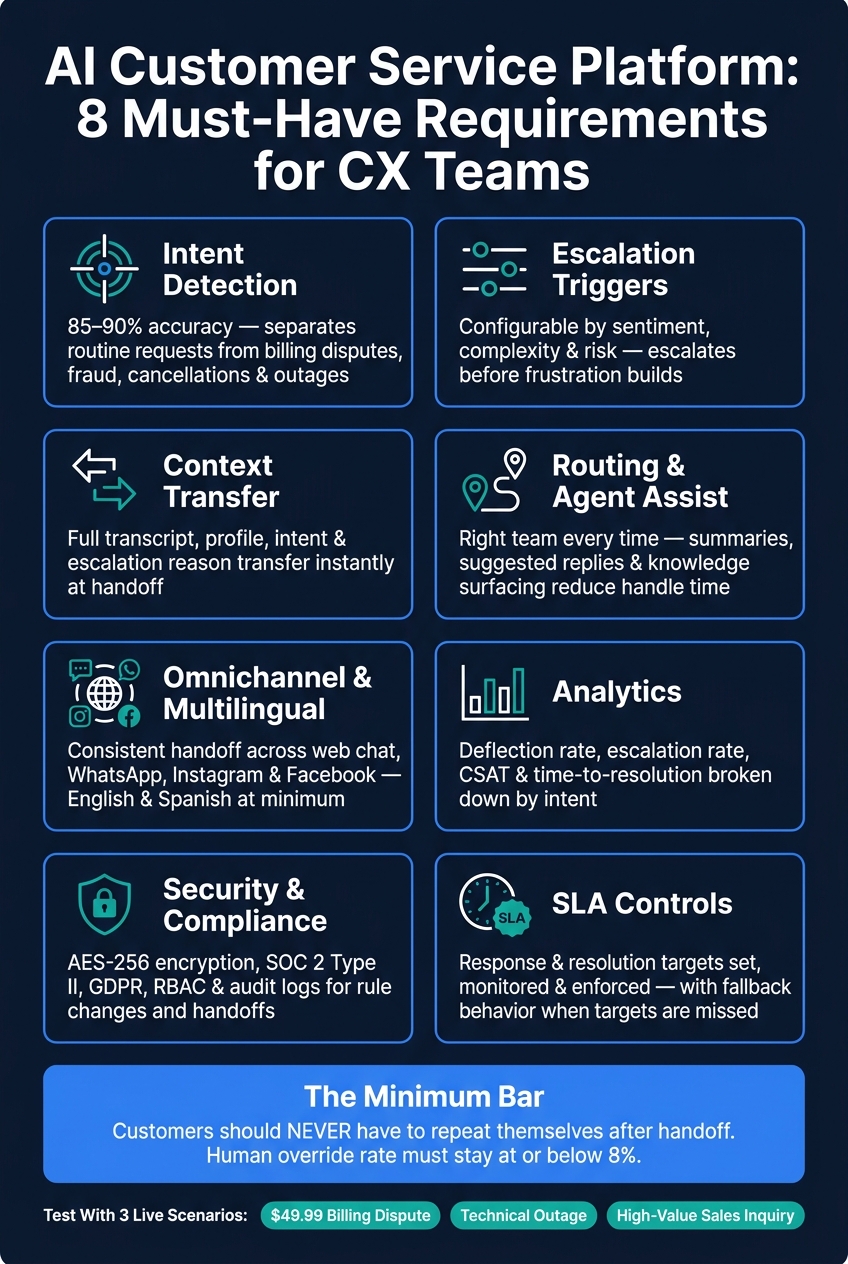
If your AI support tool can’t pass a customer to the right person with the full story attached, it’s not ready. I’d judge any platform on eight checks: intent detection, escalation rules, context transfer, routing, agent tools, omnichannel support, multilingual support, analytics, and security/SLA controls.
Here’s the short version:
- AI should sort simple requests from risky ones like billing disputes, fraud, cancellations, and outages
- Escalation rules should be based on confidence, sentiment, complexity, and repeat failure
- Agents should get the full transcript, customer details, issue summary, and escalation reason right away
- Routing should send each case to the right team, language queue, and priority level
- Support should stay consistent across web chat, WhatsApp, Instagram, and Facebook
- Reporting should show containment rate, handoff rate, CSAT, time to resolution, deflection rate, and true resolution rate
- Security should include AES-256, SOC 2 Type II, RBAC, audit logs, and GDPR-ready handling
- SLA controls should set response targets and trigger a fallback if the system misses them
A few numbers stand out. The article sets a target of 85%–90% intent accuracy and says human override rate should stay at or below 8%. It also gives three test cases every team should run: a $49.99 billing dispute, a technical outage, and a high-value sales inquiry.
| Area | What I’d require |
|---|---|
| Intent detection | Sort routine vs. risky requests with 85%–90% accuracy |
| Escalation | Rules based on confidence, sentiment, and issue type |
| Handoff | Instant transfer of transcript, profile, and summary |
| Routing | Match by skill, language, urgency, tier, and hours |
| Channels | Shared history across chat and social channels |
| Language | Detection, mid-thread switching, and agent translation view |
| Reporting | By-intent views for handoff, CSAT, and resolution |
| Security/SLA | Clear controls, audit trails, and fallback paths |
My takeaway is simple: customers should never have to repeat themselves after handoff. That’s the standard I’d use before I trust any AI customer service platform.
AI Customer Service Platform: 8 Must-Have Requirements for CX Teams
Checklist 1: Intent detection and escalation rules
Intent rules decide when AI should keep going and when a person needs to step in. Before a chat reaches a human agent, the platform has to read what the customer is actually asking for - and spot when the issue is too complex, too sensitive, or too risky for automation alone. After those escalation rules are in place, the next job is simple: keep the context intact for the agent.
Intent detection must separate simple requests from complex or risky ones
A strong platform uses Natural Language Understanding (NLU) to understand meaning behind different ways people say the same thing. It should also pull out key details like order numbers and dates.
Just as important, the platform needs to follow context across several messages. If it treats every reply like a brand-new chat, intent classification falls apart fast. Good intent detection looks at the full exchange, not just one line at a time.
Escalation triggers must be configurable and auditable
One trigger set won’t work for every business. CX teams need to set thresholds based on their own risk profile, then review those rules over time to make sure they still make sense.
Use confidence thresholds to handle the flow:
- Keep routine requests in AI when confidence is high
- Confirm borderline cases before moving ahead
- Escalate low-confidence or high-risk cases right away
- Escalate any case where the AI fails to resolve the same query twice in a row
Confidence scores are only part of the picture. The platform should also catch behavior and language signals that hint something is going off the rails. All-caps messages, frustration phrases like "this is ridiculous", or repeated questions after weak answers are all worth flagging. Some topics should skip AI altogether, including billing disputes, legal matters, account security concerns, and regulated approvals.
| Category | Target Department | Priority |
|---|---|---|
| Legal/Compliance | Compliance / Security | Immediate |
| Sales/Revenue | Sales / Account Exec | High |
| Retention | Success Manager | High |
| Technical | Technical Support / Engineering | Medium/High |
| General/Frustration | Support Lead | Medium |
Auditability is non-negotiable. Review escalated chats every week to find dead-end loops and high human override rates. The human override rate - the share of AI responses agents must rewrite - should stay at or below 8%. That weekly review helps teams catch repeat failures and missed handoffs before they pile up.
Fallback behavior must protect the customer experience
If AI still can’t solve the issue, route the case with the full history, a summary, and a clear next step, such as a callback, ticket, or response window. That sets up the handoff cleanly and gives the agent what they need to pick up without making the customer start over.
Checklist 2: Handoff context transfer and agent tools
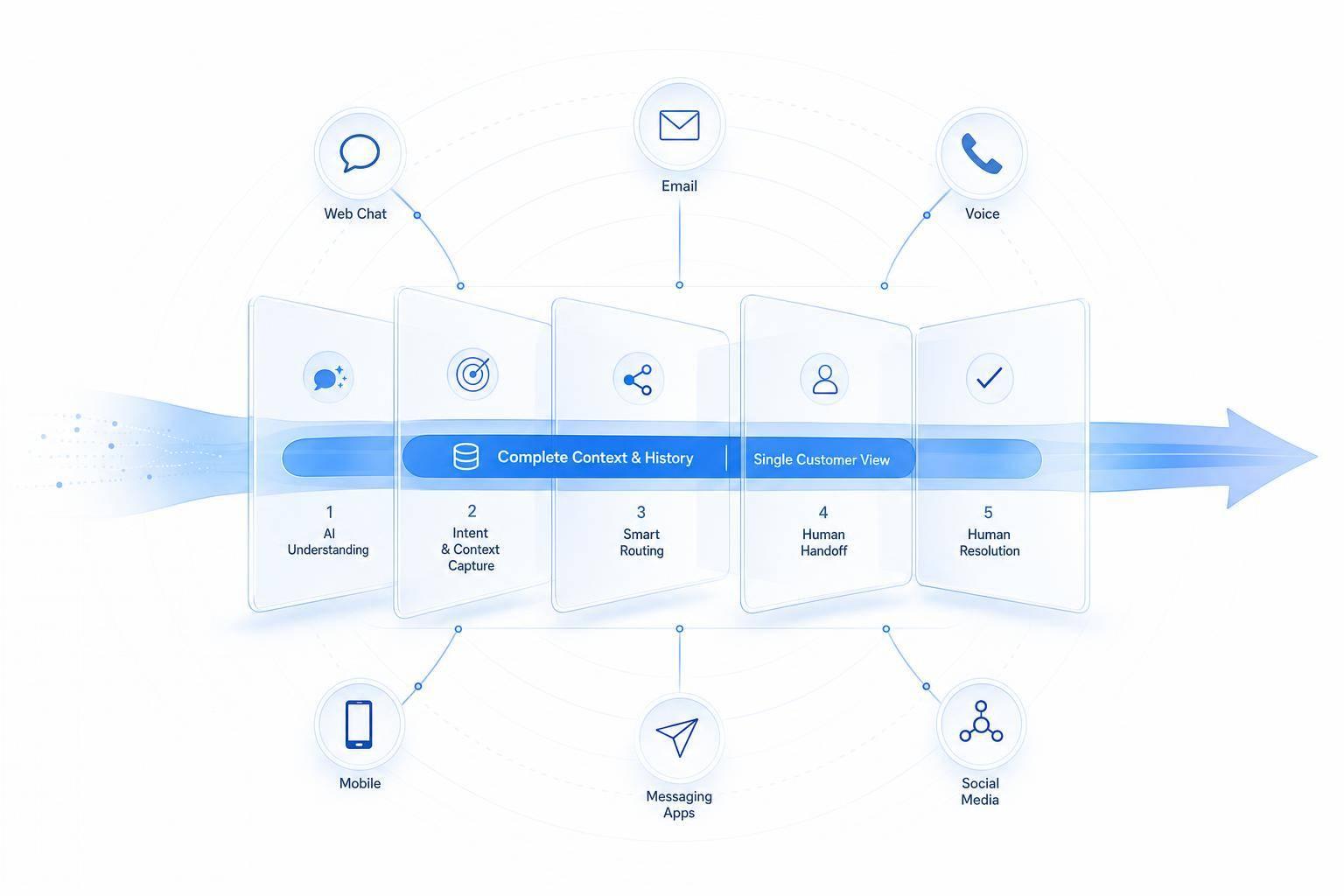
After escalation, the handoff needs to keep the full story intact and send the customer to the right place. This is where a support flow either feels smooth or falls apart. When automation passes someone to a human, the agent should pick up with full context already in front of them, not start over from zero.
Conversation history must transfer completely and immediately
The full transcript and key metadata should move over at once.
| Context Category | Specific Data Points to Transfer |
|---|---|
| Conversation History | Full transcript, timestamps, referenced KB articles |
| Customer Identity | Name, email, account ID, authentication status |
| Issue Context | Detected intent, sentiment, escalation reason, AI confidence score |
| Transactional Data | Order numbers, tracking IDs, purchase history, attempted actions |
| Technical Metadata | Detected language, browser/device info, session ID |
If any of this is missing during handoff, the agent has to ask the customer to repeat details. That’s the kind of friction a good platform is supposed to remove.
Once the context transfers, the next thing to check is where it lands.
Routing and queue logic must match customers to the right team
Getting context to an agent is only half the job. It also has to reach the right agent. Skill-based routing should account for issue type, language, customer tier, channel, urgency, and business hours. A billing dispute from an enterprise account shouldn’t end up in the same general queue as a password reset from a free-tier user.
Priority handling matters just as much. Technical outages, high-value sales inquiries, and accounts flagged as at risk for churn should move to the front of the line on their own.
And even that isn’t enough if the agent can’t act fast once the conversation starts.
Agent assist must speed up resolution without adding noise
When the agent joins, the platform should help them do the job, not pile on more tabs and screens. Context-rich transfers, where agents get the full conversation history, can cut average handle time, but that only happens when assist tools show the right details at the right time.
Useful support here includes:
- Real-time AI summaries
- Suggested replies
- Knowledge surfacing
- Next-best actions
- Clear escalation notes
The point is simple: faster resolution, with no need for the customer to repeat themselves.
Checklist 3: Omnichannel, multilingual, and brand-consistent service
Getting context transfer and routing right is only part of the job. The platform also needs to deliver the same level of automation and handoff no matter which channel the customer uses, which language they speak, or where the conversation began. The real test is simple: can a conversation move from one channel to another without losing context or tone?
Omnichannel support must keep automation and handoff consistent across channels
If a customer starts on Instagram and picks things up later on web chat, they shouldn’t have to repeat the whole story. That means you need shared conversation history, two-way CRM sync, and the same escalation rules across channels.
At a minimum, the platform should support:
- Website chat
The same handoff rules should follow the customer across every channel. If escalation works one way on web chat and another way on WhatsApp, the experience falls apart fast.
Multilingual coverage must support both customers and agents
That same continuity needs to hold up in every language. Customers switch languages mid-thread all the time. The platform should detect the language in the first message and also handle language changes during the conversation without losing context.
On the agent side, a Show English option matters. It lets agents see the original message alongside the translation, which helps them check meaning and avoid mistakes. Routing should also factor in agent language skills, so a Spanish-speaking customer can be matched with a Spanish-speaking agent when one is available.
Brand voice and AI disclosure must be configurable
Tone matters, but only if disclosure and policy controls are clear. Every AI-led conversation should start with clear AI disclosure so the customer knows they’re speaking with an AI.
Use persona settings, glossaries, and blocklists to keep tone and policy in line across channels.
Checklist 4: Analytics, security, integrations, and SLA controls
A platform that automates conversations also needs to show exactly where things work and where they fall apart. That means treating it like a governed system: something you can measure, secure, connect to your current stack, and manage without calling IT every time a rule needs to change.
Analytics must show where automation works and where handoff breaks down
Track the metrics that tell you if automation is helping or getting in the way: containment rate, handoff rate, transfer quality, time to resolution, and CSAT. Those numbers shouldn't live in one top-line dashboard with no detail. You need views by intent so teams can spot where performance drops.
Dashboards should also surface low-confidence answers and sentiment below your threshold. If billing questions or other sensitive intents keep showing low confidence, the system should flag them so CX teams can tighten escalation rules or add new ones before small issues turn into support headaches.
Built-in dashboards should also show True Resolution Rate, Deflection Rate, and KB Hit Rate. Otherwise, it's hard to tell whether automation is doing useful work or just moving problems around.
Security and SLA controls must be explicit and enforceable
Security controls can't be vague. Require AES-256 encryption, SOC 2 Type II, GDPR-compliant handling, RBAC, and audit logs. RBAC and audit logs should apply to both rule changes and data access, not just one or the other.
On the SLA side, response targets need to be spelled out. Triggers should be configurable based on confidence scores and sentiment thresholds. If the platform misses SLA targets, it should fall back to a FAQ or circuit-breaker flow instead of leaving the user stuck.
It also needs to be tested under traffic spikes. A system that works fine on a normal Tuesday but struggles during peak volume can break handoff performance right when your team needs it most.
Integrations and administration must support day-to-day operations
Once reporting shows where automation breaks, those signals need to flow into the systems your CX team already uses. In plain terms: the platform should plug into your current tools cleanly, not force your team into side work and patchy manual steps.
Operational controls matter most when admins can use them inside daily workflows. Here are the integration categories worth requiring, along with the actions admins should be able to handle:
| Integration Category | Supported Platforms | Admins should be able to perform these actions: |
|---|---|---|
| CRM | Salesforce, HubSpot | Create/update leads, sync contact history |
| Help Desk | Zendesk, Freshdesk | Create tickets and route escalations |
| Payments | Stripe, PayPal | Process refunds, check invoice status |
| Booking | Calendly, Google Calendar | Check availability, book/reschedule appointments |
| Automation | Zapier, Webhooks | Connect to 5,000+ apps for custom workflows |
If admins can't manage routing, policy changes, and workflow updates without heavy IT involvement, the platform won't save time. It'll slow the team down.
Conclusion: The minimum requirements every CX team should put on the list
The bar is simple: AI must cut cost and response time without making customers repeat themselves. That’s the minimum. If it can’t do that, it’s not doing the job.
Here’s the pass list.
| Requirement | Pass Standard |
|---|---|
| Intent detection | Correctly identifies intent 85–90% of the time; separates routine requests from billing disputes, fraud, cancellations, and outages |
| Escalation triggers | Configurable by sentiment, complexity, and risk; escalates before frustration builds |
| Context transfer | Full transcript, profile, intent, and escalation reason transfer instantly |
| Routing and agent assist | Escalations reach the right team; summaries, suggested replies, and knowledge surfacing reduce handle time |
| Omnichannel and multilingual | Consistent handoff across web chat, SMS, email, and social; English and Spanish at minimum |
| Analytics | Show deflection, escalation, CSAT, and time-to-resolution by intent |
| Security and compliance | RBAC, encryption in transit and at rest, PII protection, and audit logs for rule changes and handoffs |
| SLA controls | Response and resolution targets set, monitored, and enforced, with fallback behavior when targets are missed |
Then test the list where it matters: in live customer situations, not just demos.
Use three cases:
- A $49.99 billing dispute
- A technical outage
- A high-value sales inquiry
In each case, the human agent should jump in at once with the full story: what the customer asked, what the system detected, what happened before the handoff, and why the case was escalated.
If the agent has to say, “Can you explain that again?” the platform fails. Continuity is the minimum bar.
FAQs
How do I test handoff quality before buying?
Test handoff quality with live simulations, not just vendor demos. Ask for a sandbox that uses actual production data, and make sure the platform connects with your CRM so identity and context stay intact.
Use a golden dataset of 100 to 200 real customer questions, then run shadow-mode testing for 10 to 14 days. Check that full conversation history, metadata, and sentiment move over correctly, so customers don't have to repeat themselves.
What should trigger a human handoff?
Trigger a human handoff when the AI’s confidence is low - usually below 40% - when it picks up customer frustration, or when the customer plainly asks to speak with a person.
You should also escalate right away for sensitive or high-risk issues, such as:
- Billing disputes
- Legal concerns
- Fraud reports
- Medical issues
And if the AI keeps missing the mark, hand the conversation over after multiple failed attempts to fix the problem. A simple two- or three-strike rule works well here.
Which metrics best prove the AI is helping?
Track metrics across three areas:
- Operational: Automated Resolution Rate (60%–80%), First Contact Resolution (85%–95%), First Response Time, and Time to Resolution.
- Experience: CSAT (85% or higher), AI-only vs. handoff-assisted results, escalation rate (10%–15%), and post-chat feedback on handoff smoothness.
- Context use: whether agents need customers to repeat information, and whether AI handoff summaries get 80% positive agent feedback.