
The short answer: I train AI-powered customer service agents by giving it one clean set of approved docs, clear policy rules, and strict handoff limits. If the source content is old, vague, or split across too many places, the agent will give mixed answers.
Here’s the process in plain English:
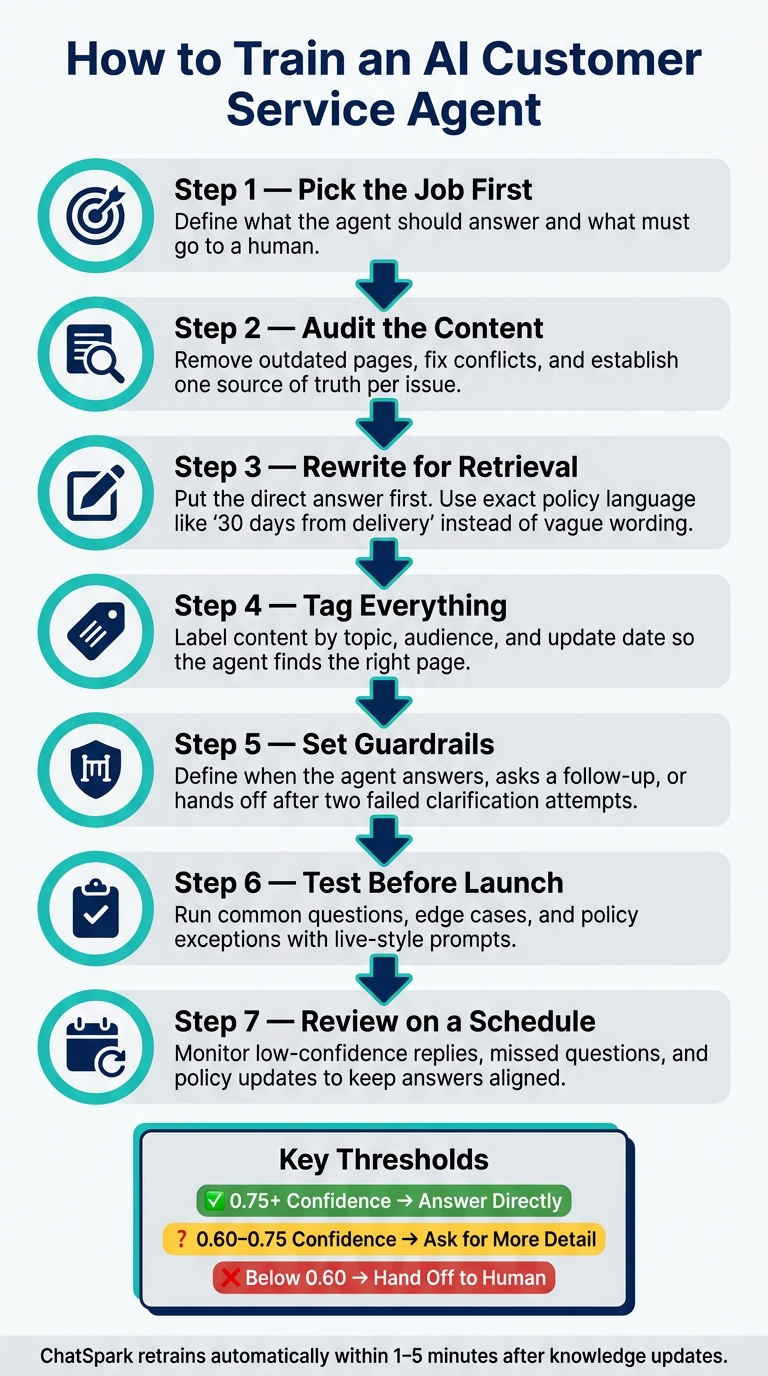
- Pick the job first. I decide what the agent should answer and what must go to a human.
- Audit the content. I remove old pages, fix conflicts, and set one source of truth for each issue.
- Rewrite for retrieval. I put the direct answer first and use exact policy language like “30 days from delivery” instead of vague wording.
- Tag everything. I label content by topic, audience, and update date so the agent can find the right page.
- Set guardrails. I define when the agent should answer, ask a follow-up, or hand off after two failed clarification attempts.
- Test before launch. I check common questions, edge cases, and policy exceptions with live-style prompts.
- Review on a schedule. I watch low-confidence replies, missed questions, and policy updates to keep answers aligned.
A few numbers stand out in the workflow:
- 0.75+ confidence: answer directly
- 0.60–0.75 confidence: ask for more detail
- Below 0.60: hand off if the issue stays unclear
- 1–5 minutes: retraining window after knowledge changes in ChatSpark
- 30 days: example of policy wording that works better than loose phrasing
The core idea is simple: clean inputs, clear rules, and regular testing lead to better support replies.
How to Train an AI Customer Service Agent: 7-Step Process
Audit and organize the knowledge your agent should use
Review your current content before you upload anything. The goal is simple: remove old information, cut duplicates, and fix conflicts before they turn into bad answers.
A good place to start is your recent support tickets. Look for patterns and group issues by how often they show up. In most cases, a small number of topics drives a big share of tickets. Returns, shipping timelines, billing questions, and warranty coverage should usually come first.
That audit helps you decide what your agent should treat as the source of truth. If the input is messy, the output will be messy too.
List every approved source and assign an owner
Pull together every approved source your team uses to answer customer questions. That often includes:
- Help center articles and FAQs
- Internal SOPs and escalation guides
- Historical tickets for issue analysis and gap detection
The aim is a simple inventory: one place where you can see what exists, who owns it, and when it was last updated.
Give each source a clear owner. Otherwise, updates slip, old pages hang around, and nobody knows who is supposed to fix what. This inventory also makes it easy to spot content that needs work before training starts.
Map each customer issue to one clear source
Assign each common issue one primary source so retrieval stays consistent. If the same topic appears in multiple places, keep the current source and retire the rest.
Be specific with policy wording. Write "returns accepted within 30 days of delivery" instead of "returns accepted within a reasonable timeframe." That kind of vague language leads to fuzzy agent replies.
The same rule applies to product terms. If your interface calls something a Dashboard, every article should call it a Dashboard - not Home. Small naming gaps can throw retrieval off and lead to answers that don't match what customers see.
Catching a conflict between an old PDF and a live policy page before launch is far easier than untangling mixed agent responses after customers have already seen them.
Prepare docs and policies for reliable AI retrieval
Once you’ve mapped each issue to a single source, the next step is to rewrite those sources so the agent can find the right answer fast.
Rewrite articles with direct answers and clear policy rules
An AI agent doesn’t skim the way a person does. It pulls the passage that looks most relevant and uses that to form an answer. If the answer is buried halfway down the page or phrased in fuzzy terms, the agent may fill in the gaps or respond in general terms.
That’s the core problem: you may already have approved content, but it still isn’t answer-ready.
The fix is simple. Put the direct answer at the top of each article, then follow with supporting detail. Keep each article focused on one topic. If a page covers too much ground, split it into separate articles by task.
This matters even more for policy content. Swap vague wording for clear rules. For example, write returns accepted within 30 days of delivery instead of something open to guesswork. Do the same for fees, order cutoffs, eligibility rules, and exceptions. Use exact dollar amounts, dates, and deadlines.
Structure helps too. Use H2s for main topics and H3s for steps, eligibility, and exceptions. Keep the title, headings, and body copy closely aligned so the agent can match the way customers phrase their questions.
Tag content by topic, product area, and policy area
Once the copy is ready for retrieval, tag each article so the agent can narrow in on the right source. This matters when a single question could match more than one article.
Start with broad categories that reflect how support requests for small businesses are usually sorted. Product Overview, Pricing & Plans, Technical/How-To, Troubleshooting, and Billing & Account are a solid place to begin. Then organize the knowledge base in a Category → Subcategory → Article structure so every piece of content has a clear home. Consistent tags help speed up deployment and make policy updates easier to manage.
Within each category, add metadata tags to every article so the agent can tell what it’s looking at right away.
| Metadata Field | Purpose | Example Value |
|---|---|---|
doc_type |
Identifies the content format | troubleshooting_guide, policy, faq |
audience |
Defines who the content is for | admin, end_user, internal_agent |
risk_level |
Flags articles that require human review | high (requires human review) |
last_updated |
Tracks content freshness | 05/20/2026 |
Consistent tagging also makes maintenance much easier. When a policy changes, tags let you find every affected article fast instead of digging through the whole knowledge base. That becomes more important as the knowledge base gets larger and policies change over time.
Connect sources in ChatSpark and set answer guardrails
Once your content is tagged, connect only approved sources and set clear rules for how the agent can use them. Upload one current version of each source, and check that every file matches your latest approved content before you add it.
Keep customer-facing content separate from internal guidance
Split customer-facing content from the internal guidance your team uses behind the scenes.
Customer chats should not pull from escalation scripts, refund workflows, or internal SOPs. Public chats should use customer-facing knowledge only, while team workflows can rely on internal guidance. For fixed legal, safety, and compliance language, use canned responses.
Define which cases the agent can answer, clarify, or escalate
Set clear routing rules so the agent knows when to answer on its own, when to ask for more detail, and when to hand the case to a person.
If you skip this step, the agent may reply to cases that should have been escalated. That’s where things can go sideways. Escalate after two failed clarification attempts [2][3][4]. The table below covers the most common scenarios.
| Case Type | Action | Trigger / Guardrail |
|---|---|---|
| Routine FAQs | Answer directly | Confidence > 0.75; matches approved knowledge base |
| Missing details | Ask a follow-up question | Confidence 0.60–0.75; missing order number, email, or product variant |
| Policy exceptions | Escalate to human | Refund request outside the return window |
| High-risk or negative sentiment | Immediate handoff | Keywords: "legal", "fraud", "hacked", "dispute", "security"; detected anger |
| Complex technical | Escalate to human | Confidence < 0.60 after two clarification attempts |
Before training on imported ticket data, redact names, emails, and phone numbers [4][1].
Test, launch, and maintain the agent
Testing shows whether your docs, policies, and escalation rules actually hold up in live replies. Once your sources and guardrails are set, put them in front of real customer questions before rollout.
Run policy and accuracy tests before going live
Use real customer questions in testing. Run each one through the agent, then check the answer, the policy handling, and the handoff path.
Give extra attention to warranty, shipping, and return edge cases. These are often the spots where source conflicts show up first. You should also test questions that need a human handoff so you can make sure the escalation path works the way it should.
If an answer is wrong, fix the source document first.
Start with common issues and review gaps on a set schedule
Start with the most common, lowest-risk issues: order status, return eligibility, shipping timelines, and basic product questions. After that, move into more complex cases.
Once the core test cases pass, launch with only the highest-volume questions. Then use a simple review loop to spot drift as content changes over time.
| Review Type | Frequency | Review Focus |
|---|---|---|
| Low-confidence answers | Ongoing | Responses the agent cannot answer with confidence |
| Missed or unanswered questions | Ongoing | Questions it could not match to a source |
| Policy changes | When updates ship | Check that live answers match the revised rule |
| New or updated product content | Before launch | Product documentation, FAQs, policy details |
| Full knowledge base audit | Ongoing | Outdated content, broken links, ownership gaps |
ChatSpark retrains automatically within 1–5 minutes after you add, update, or delete training data [1].
Regular review helps keep answers in line as your product and policies change.
FAQs
How much content do I need to start training an AI support agent?
Start with quality and relevance, not volume. You don't need a huge content library. A small, well-picked set of clear, accurate articles usually works better than a big pile of messy or conflicting documents.
A solid place to begin is 10 to 20 high-volume, low-risk topics like:
- Order status
- Shipping questions
- Password resets
You can also use the 100-Question Framework: 10 major categories with 10 key questions in each.
What documents should stay out of a customer-facing AI agent?
Keep internal procedures, legal documents, sensitive security details, and PII out of customer-facing replies.
Leave out anything outdated, conflicting, messy, or off-topic too. And when a case calls for human judgment - like billing disputes, legal issues, or tricky policy exceptions - it should go to a human agent, not the AI.
How often should I review and update the agent’s knowledge base?
Review it on a regular schedule, not as a set-it-and-forget-it job. Check analytics and recent customer transcripts every week, add human-agent resolutions that worked well, and update the content as soon as pricing, product features, or company policies change.
It also helps to flag any content older than 90 days for manual review. Then run a full audit every quarter to stop knowledge decay before it starts causing bad answers.