Most support chatbots start at about 60% answer accuracy, then move toward 85%–95% after a few months of human review and fixes. That jump usually comes from doing a few basic things well: keeping the bot’s job narrow, training it on clean support content, testing it with past customer questions, and reviewing weak chats every week.
If I had to boil the process down, I’d put it like this:
- Pick a small support scope first, such as order status, returns, shipping, and billing basics
- Train from one approved knowledge source instead of scattered docs
- Group customer questions into intents and collect the details each answer needs
- Set score rules for replies vs. handoff, especially for refunds and disputes
- Test with past chats, including typos, vague requests, and multi-step questions
- Review failed chats every week and retrain only what changed
A few numbers matter from the start:
- Intent accuracy goal: 90%+
- First 90 days containment: 60%–75%
- Month 3 containment target: 85%+
- Weekly review time early on: 8–12 hours
This article shows a simple training loop: scope the bot, clean the content, map questions, test hard, and keep fixing what fails after launch.
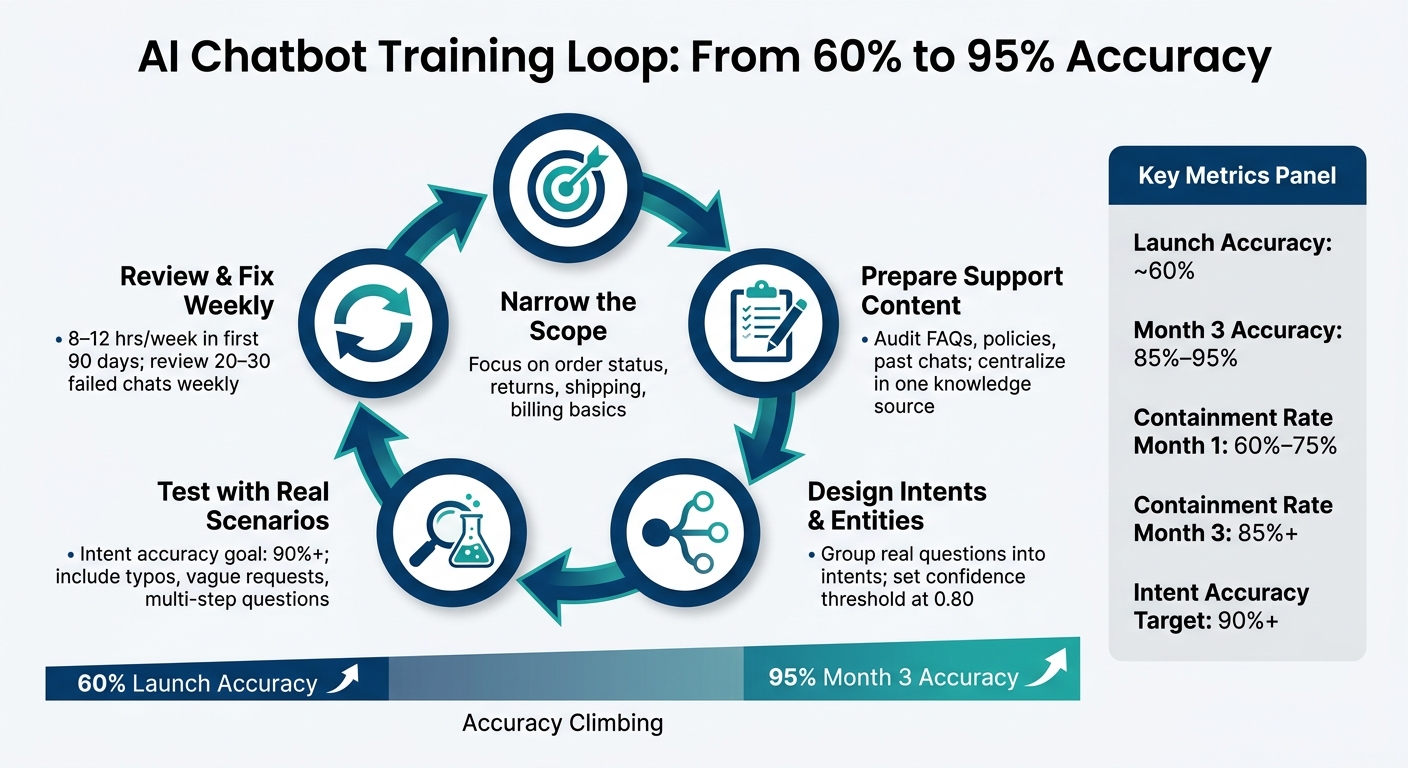
AI Chatbot Training Loop: From 60% to 95% Accuracy
1. Prepare the right support content for training
Train the bot on clean, current support content before you tune anything else. If the source material is messy, the bot will be messy too.
That means gathering, reviewing, and organizing the content your team already relies on. Clean, well-structured material helps cut wrong answers and uneven replies. It also makes the next step - defining intents and answer logic - a lot more dependable.
Audit and clean FAQs, policies, and past conversations
Start by pulling together every support asset your team uses:
- FAQ pages
- Policy pages
- Product documentation
- Pricing details
- Resolved chat logs
Then clean it up. Remove duplicate entries, old details, conflicting rules, and uneven terminology. If one page says “refund,” another says “return credit,” and a third says “store credit,” that can trip up the bot fast.
Review the knowledge base quarterly for duplicates and seasonal exceptions [1].
Structure content into short, retrievable answers
Long policy pages are tough for chatbots to work with. A bot does better when content is broken into focused Q&A pairs and short articles with clear headings.
Keep the language short and direct. For example:
"Returns must be initiated within 30 days." [1]
Tag each asset with doc_type, audience, risk_level, and last_updated.
| Metadata Field | Purpose | Example Value |
|---|---|---|
doc_type |
Identifies the content format | troubleshooting_guide, policy, faq |
audience |
Defines who the content is for | admin, end_user, internal_agent |
risk_level |
Determines escalation triggers | high (requires human review) |
last_updated |
Tracks content freshness | 2026-05-20 |
This kind of structure makes retrieval much easier. It also gives your team a cleaner way to spot stale content before it causes trouble.
Centralize support knowledge in ChatSpark
Once the content is cleaned up, put it in ChatSpark so the bot pulls from one approved source. That matters because scattered docs lead to mixed answers. One source keeps replies aligned across each customer touchpoint.
In ChatSpark, make sure you:
- centralize content
- remove contradictions
- fill content gaps
- define escalation triggers
- set tone rules
With the source content ready, the next step is mapping customer questions to intents and entities.
2. Design intents, entities, and answer logic
Once your content is clean, the next step is teaching the bot what customers mean and what info it needs to give a useful reply.
Create intents from real customer questions
An intent is a category of customer request. It should come from actual support transcripts, chat logs, email history, and search queries, not from assumptions. The goal is simple: group questions by what the customer is trying to do.
For example, phrases like "where is my order", "hasn't shipped", and "still processing" can all point to the same intent. Instead of treating those as separate cases, roll them into one intent: WISMO (Where Is My Order) [1]. Include misspellings too, because customers don't type like templates. Someone may write "where's my order" with no punctuation at all [1].
Keep intents separate from each other. Each one should point to a clear customer need, with as little overlap as possible.
Once you've mapped the main intents, move to the data each answer needs.
Capture key entities that make answers specific
Intent by itself won't get you far. To give a useful answer, the bot often needs details like an order number, ZIP code, product name, plan type, or purchase date. Those details are called entities. They're what turn a generic reply into a specific one.
Say a customer asks about a return. That may trigger a return flow right away. But if the bot doesn't know the purchase date or product name, it can't check whether the item qualifies. Tools like Dialogflow and Rasa support this setup. And when an entity is missing, the bot should ask a direct follow-up instead of taking a wild guess.
After that, you need rules for when the bot should answer on its own and when it should pass the case along.
Use confidence thresholds and escalation rules
Use a confidence score to decide whether the bot should answer. A common threshold is 0.80. If the score is above that line, answer directly. If it's below, ask a clarifying question or escalate [1].
One thing should be off-limits: the bot should never guess about refunds or billing disputes. Some cases need automatic escalation no matter what the confidence score says [1]:
| Escalation Trigger | Recommended Action |
|---|---|
| Confidence < 40% | Immediate human handoff |
| Repeated negative sentiment | Transfer to senior agent |
| Customer asks for an agent | Immediate transfer |
| Billing/Refund Dispute | Escalate to finance |
Use these rules to build your test set next.
3. Test accuracy with realistic customer scenarios
Test before rollout so you catch the kinds of failures that show up in real chats. The best way to do that is simple: use real cases, then check whether the bot handles them the right way.
Build a test set from real support cases
Build your test set from your actual support history: chat transcripts, email threads, and FAQ search logs. Real customer language is messier, shorter, and more varied than anything a team is likely to write on its own.
Spread those test cases across your main intents. Then add edge cases, such as vague phrasing, typos, multi-part requests, and follow-up questions that depend on earlier context. It also helps to use gold-standard cases: tickets that were resolved correctly and matched your brand tone [1].
Measure intent accuracy, answer quality, and context handling
Run the full test set and score it across the main checks that matter. Intent recognition accuracy should be at least 90%. If it drops below that, replies can start to feel off, even when they seem technically close [1].
The table below shows what each test type checks and what kind of problems it can catch:
| Test Type | What It Evaluates | What It Catches |
|---|---|---|
| Intent Classification | Whether the bot recognizes the user's goal (e.g., "pricing" vs. "refund") | Misunderstandings caused by slang, typos, or varied phrasing |
| Answer Accuracy | Whether the response is grounded in your knowledge base | Hallucinations, outdated info, or incorrect citations |
| Multi-turn Context | The bot's ability to remember details from earlier in the chat | Bot asking for info the user already provided, like an order number |
| Fallback & Escalation | Behavior when confidence is low or a human is requested | Wrong answers the bot gives with high confidence or loops where the bot won't hand off |
| Sentiment Testing | Response to frustrated or angry language | Failure to escalate high-emotion cases to a human agent |
Run regression tests before each update to make sure new training data doesn't weaken capabilities that already work [2].
Then use what fails to tighten the bot before it reaches live customers.
Review fallback and escalation behavior
Test every low-confidence, ambiguous, and agent-request case to confirm the bot escalates instead of guessing. Include misspellings, slang, and vague queries in those checks [1][2]. If the bot guesses instead of handing the chat off, treat that as a clear failure before launch.
The issues you find here become the watchlist for live conversations.
4. Improve the chatbot continuously with live conversations
Once testing wraps up, the next step is simple: learn from real customer chats.
Your test set will catch a lot, but it won’t catch everything. After launch, review live conversations every week, fix failed answers, and retrain the bot. That’s how the chatbot gets better over time instead of staying stuck with day-one mistakes.
Review failed and low-confidence conversations every week
Start with the chats where the bot clearly missed the mark. Then trace each problem back to its source. Was the answer missing? Was the intent setup too weak? Did the handoff rule fail?
Set aside at least two hours each week to review 20–30 failed or escalated conversations [3]. For each failed chat, figure out whether the issue came from:
- missing content
- weak intent design
- bad escalation rules
Then send the fix to the right owner.
During the first 90 days, spend 8–12 hours per week reviewing live chats [3]. That early window needs the most attention.
Update content and retrain for new policies and products
Your knowledge base needs updates whenever prices, shipping windows, return policies, or business hours change. If the source material is old, the bot’s answer will be old too. It’s that simple.
Stick to the same short format when you publish updates. Use headers and bullet points because they make answers easier to retrieve.
Use U.S. formats for dates, currency, and hours. After any major policy or product update, rerun your verified test set to make sure the change didn’t break something that was already working. After each content update, retrain only the affected intents.
In ChatSpark, retraining typically takes just 1–5 minutes after adding new data or re-crawling a website, so updates can move fast.
Track performance in ChatSpark analytics
Reporting helps you check whether each fix actually worked. Look at whether repeats, fallbacks, and low-confidence replies went down after changes were made.
Use ChatSpark's reporting dashboard to monitor volume, top topics, unresolved questions, and fallback rate on a regular basis. Volume, fallback, and unresolved-topic trends will show you what to fix first.
| Metric | Month 1 Target | Month 3 Target | Purpose |
|---|---|---|---|
| Resolution Rate | 35–45% | 65–75% | Measures overall effectiveness [3] |
| Containment Rate | 60–75% | 85%+ | Percentage of queries resolved without humans [1] |
| Intent Accuracy | 90%+ | 95%+ | Measures if the AI understood the question [1] |
Also pay attention to channel-specific patterns across your connected channels. A bot may do well on one channel and struggle on another. Those metric trends should guide the next round of fixes.
Conclusion: The simplest path to more accurate chatbot answers
After launch, the job changes. It’s no longer about training from scratch. It’s about refining what’s already there.
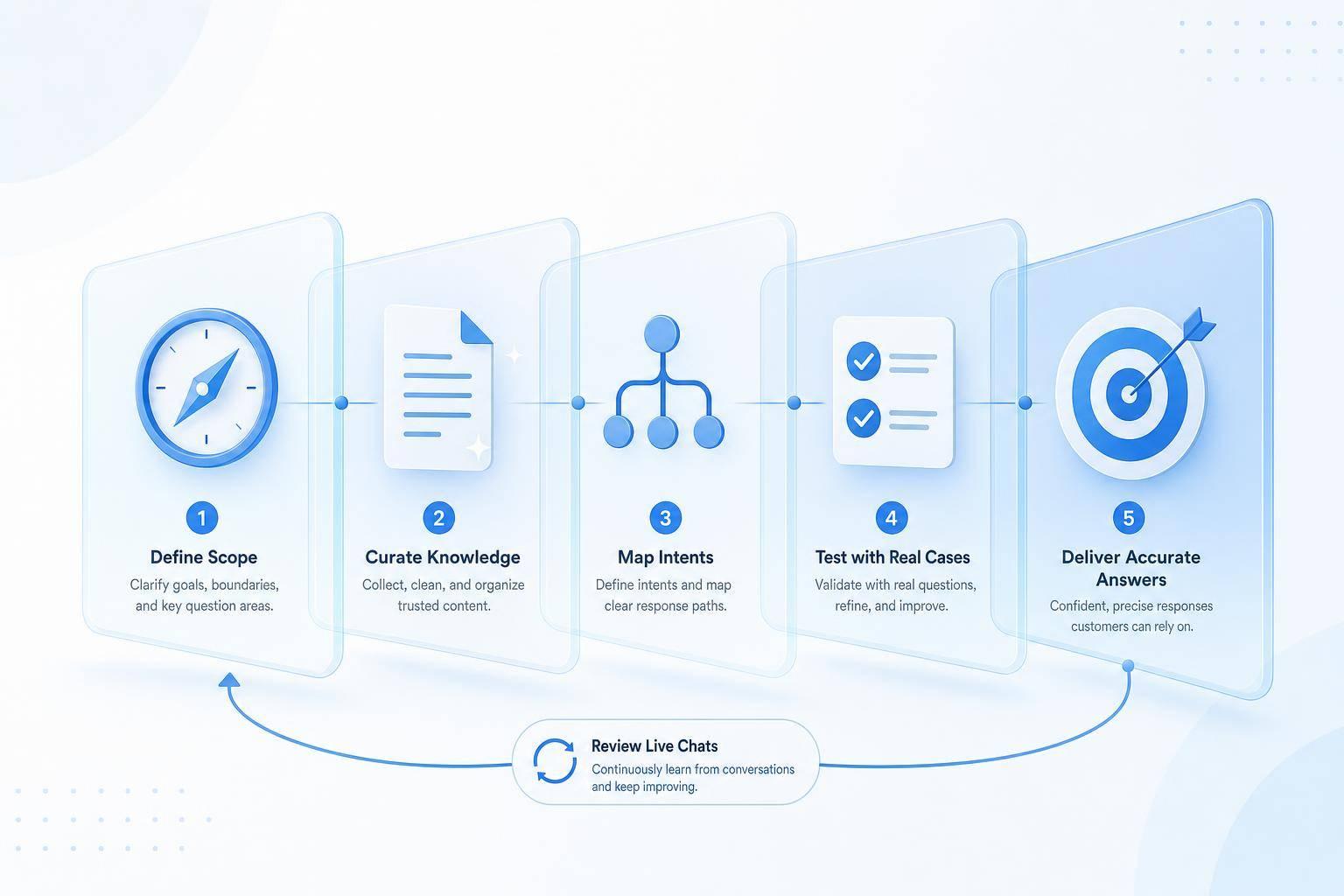
Accurate chatbot training works like a loop: narrow the scope, clean up the source content, map real customer intents, test against real cases, and review live failures every week. That steady rhythm matters more than a one-time setup.
Chatbot accuracy often starts near 60% at launch and can climb to 85%–95% after a few months of steady human feedback and tuning [1]. As that happens, wrong answers drop, support replies stay more consistent, and customers get help faster.
The aim is simple: better answers, fewer escalations, and faster resolution for customers. That’s the simplest path to more accurate customer support.
FAQs
How much training data do I need to start?
Start with quality over quantity. Build your base from the FAQs, product manuals, and help articles that matter most.
For a solid starting point, export 90 days of resolved support tickets and turn them into a golden dataset of 100–200 verified question-and-answer pairs. Begin with the five highest-volume question types first. In many cases, those alone can account for up to 80% of support volume.
What should I automate first?
Start with high-volume tasks that come up again and again, especially the ones with one clear answer. A smart way to do this is to focus on the 20 percent of customer questions that account for 80 percent of your support volume.
Strong first use cases include:
- FAQs
- Order tracking
- Return status
- Shipping cutoffs
- Password resets
That way, the AI can take care of the routine requests, and your team can spend more time on the tougher support cases that need a human touch.
How often should I retrain the chatbot?
Start with weekly reviews right after launch. That gives you a clear way to catch low CSAT, spot escalation trends, and find new questions early.
Once performance levels out, move to monthly reviews.
Retrain on new data every 2 to 4 weeks. And if you launch a new product or change policies, pricing, or marketplace rules, update the system right away.