One bad AI support reply can repeat across thousands of chats. If I were getting an AI agent ready for launch, I’d block that risk with a simple process: set pass/fail rules, test in a safe sandbox, use past customer chats to build cases, review transcripts for mistakes, and check handoff and regression before go-live.
Here’s the short version:
- I define what the agent can and cannot do
- I set score thresholds for accuracy, policy compliance, tone, and escalation
- I test with fake but realistic order, billing, and return data
- I run common cases, messy edge cases, and mixed-language prompts
- I review logs and transcripts to find repeat errors
- I retest after every prompt, policy, system, or knowledge-base change
The article’s main point is simple: launch-ready does not just mean the bot can answer basic questions. It means the agent gives the right answer, stays within policy, avoids billing and refund mistakes, and hands the case to a human when it should. That matters because 73% of Americans say they may leave a brand after one poor service experience.
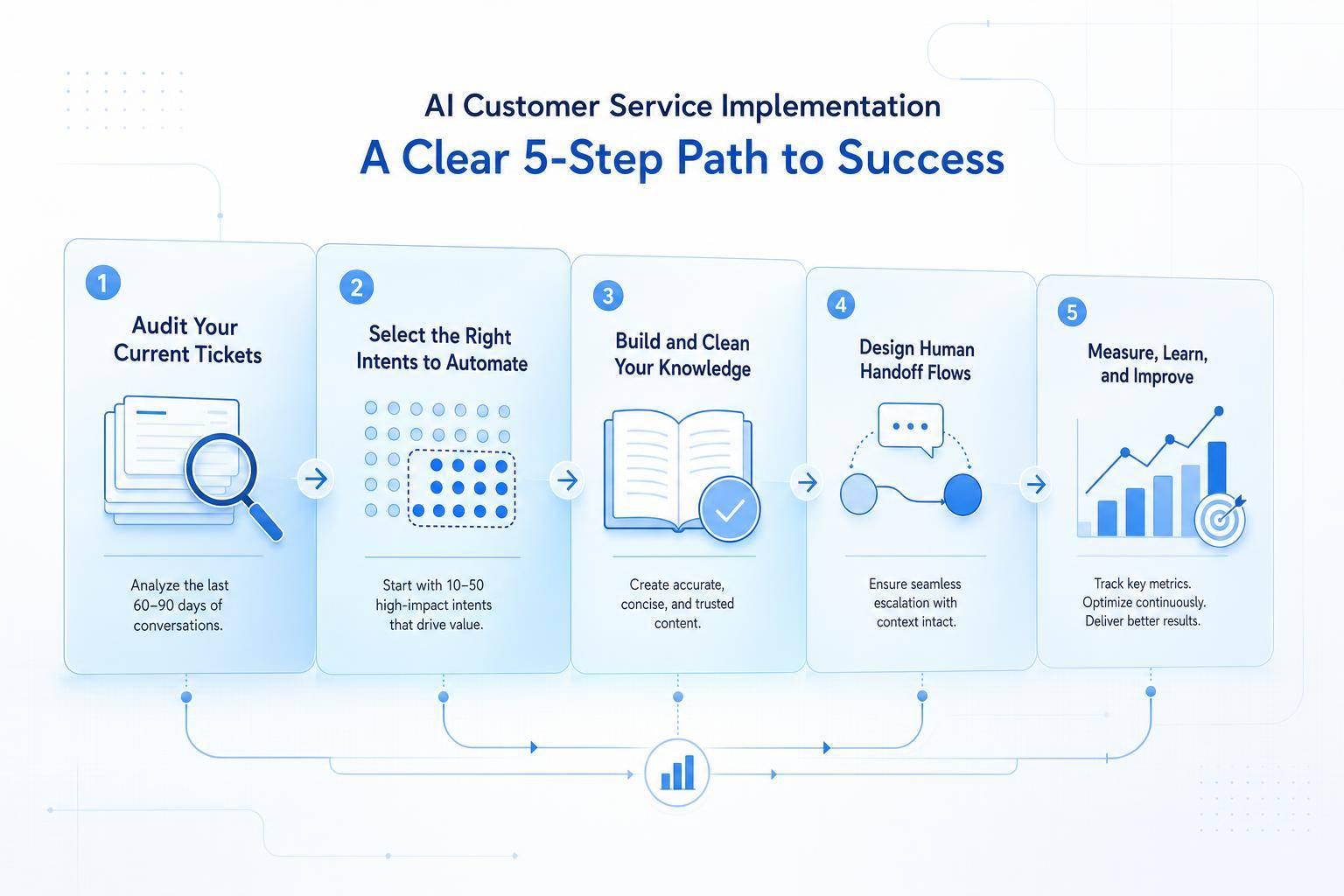
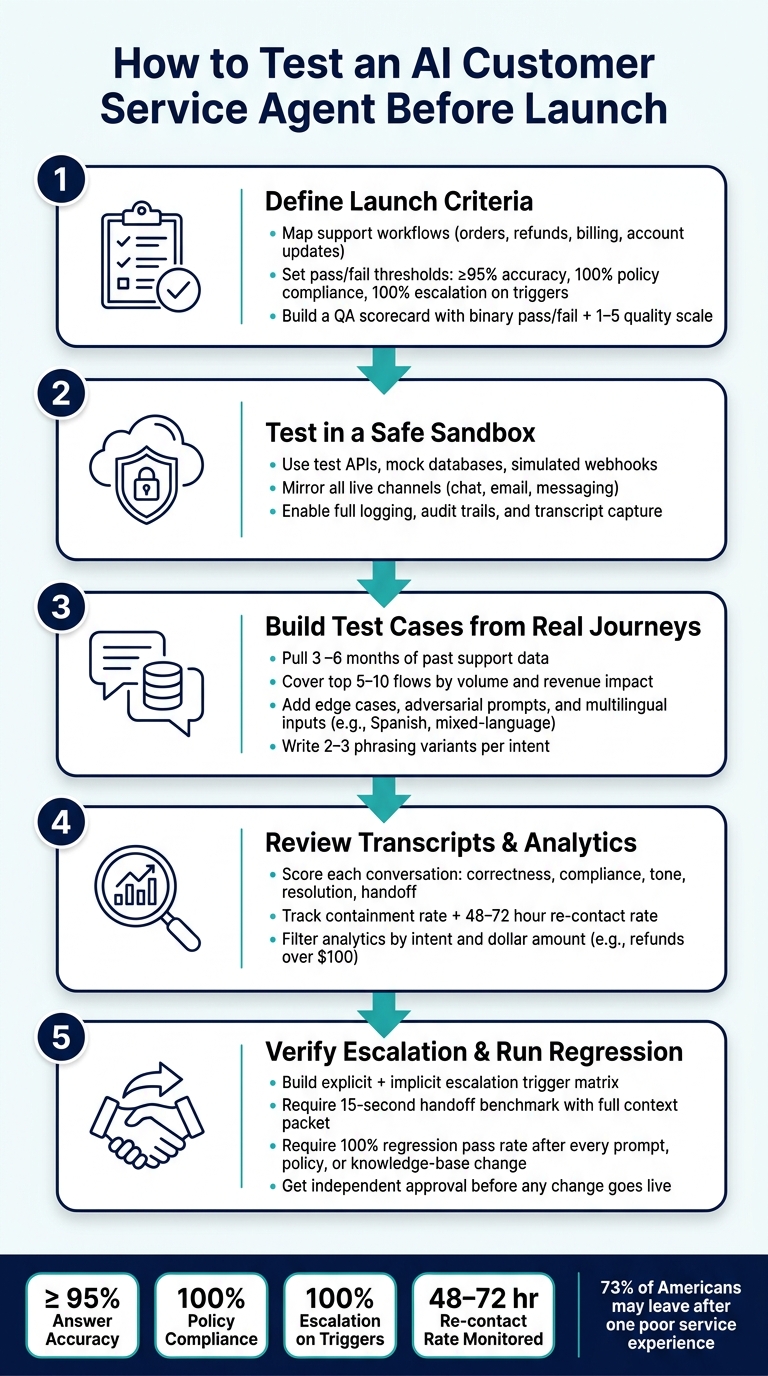
What I like here is the structure. It gives a clear pre-launch path:
- Define launch rules
- Use a sandbox
- Build test cases from past support journeys
- Review transcripts and analytics
- Test handoff and rerun regression checks
A few details stand out. The piece pushes for 95%+ accuracy on core flows, 100% pass rates on high-risk compliance checks, and repeat testing for refund, billing, verification, and escalation scenarios. It also stresses that a high containment rate alone is not enough. If customers come back within 48–72 hours, the issue was likely not solved.
If I had to sum it up in one line, it would be this: don’t launch an AI support agent because it looks good in a demo - launch it only after it passes controlled, repeatable tests.
AI Customer Service Agent Pre-Launch QA Checklist
1. Define launch criteria before you start testing
Once you know what launch-ready means, turn that into rules you can test. Before a single test conversation starts, decide which tasks the agent should handle, what counts as a pass, and when it needs to hand the case to a human. Without that setup, reviewers use different standards, and it becomes hard to compare one test run with another.[4][5]
List the support tasks the agent should handle
Start by mapping the support workflows the agent will own. Focus first on the flows that matter most: order tracking, refunds, billing, and account updates. For each one, spell out the customer’s goal, the exact data needed to verify the request, which systems of record the agent can use, and the actions it’s allowed to take.
Then write your escalation list: the cases that must always go to a human, with no exceptions. That usually includes suspected fraud, chargeback disputes, legal threats, medical or safety issues, and any case where the agent can’t verify the customer’s identity. If a case falls outside scope, escalation counts as a pass.
Set pass or fail rules for accuracy, tone, compliance, and escalation
Loose standards like “sounds good” fall apart once you run lots of test cases. Your acceptance criteria should be specific and easy to check. For example, the agent must correctly identify the customer’s intent in at least 95% of standard refund and order-tracking test cases, produce zero policy violations across all compliance tests, and escalate 100% of cases involving chargebacks or account takeover.[3][6]
Build a simple QA scorecard
A scorecard turns those rules into a review process people can repeat the same way every time. The best scorecards mix binary pass/fail checks for hard requirements with a 1–5 scale for quality areas, so you can track both hard misses and gray areas in one place.[5][7][8]
| Scorecard Field | Evaluation Method | Pass Threshold |
|---|---|---|
| Answer Accuracy | Manual audit / LLM-as-judge | ≥ 95% on standard refund and order-tracking test cases |
| Unsupported Claims | Manual audit of transcripts | < 2% |
| Policy Compliance | Binary pass/fail | 100% |
| Tone & Brand Voice | 1–5 scale, human review | ≥ 4 out of 5 |
| Escalation Behavior | Binary pass/fail | 100% on defined triggers |
| Resolution Quality | 1–5 scale, human review | ≥ 4 out of 5 |
For every test, log the case ID, intent, expected outcome, and actual outcome. That record becomes your baseline. It shows where the agent stood before any change, and it gives you a fixed point to use each time you retest after an update.
With criteria set, the next step is to test in a sandbox that keeps real customers out of harm’s way.
2. Set up a sandbox so tests cannot reach real customers
A sandbox is a staging setup with test credentials and test systems, which keeps test chats out of live systems. It should stay close enough to production to surface failures, but every action needs to remain contained. From there, test the systems, channels, and logs the agent will depend on at launch.
Use staging data and mock systems for orders, billing, and returns
Use test APIs, test databases, and simulated webhooks for every system the agent touches. Load the environment with realistic test data for the cases most likely to go sideways: a $24.99 partial refund, a package marked "in transit," and a return request outside the standard window.
Use order IDs that look real, MM/DD/YYYY dates, and USD amounts so the agent replies the same way it would with customer data, without ever touching a live account.[9][2]
Mirror the channels where the agent will go live
Once the sandbox is stable, run the same cases through each live channel. Test the agent on every channel it will use in production, because message limits and handoff experience change from one channel to another.
Connect test accounts for each channel in scope, then run the same core scenarios across all of them. That makes it much easier to spot where the agent works in one place but falls apart in another.
Turn on logging, audit trails, and transcript capture
Log every message, API call, escalation event, and system response in the sandbox with a timestamp. Without that record, it becomes hard to tell whether a failure came from the model's reasoning, a broken integration, or a downstream service timing out.[10][11][12]
Keep sandbox logs separate from production data. Tag them separately too, so your team can filter transcripts by scenario type, for example, "refund over $100.00," and review failure patterns without noise from live traffic.
Use those logs to support every scorecard rating with transcript evidence. Those records become the basis for transcript review and failure analysis.
3. Build test cases from real customer journeys and edge cases
Use the sandbox to build a test suite from real customer journeys, not polished demo scripts. The goal is simple: test the conversations customers actually have. Use your launch criteria to rank the flows that matter most, then start there.
Start with common support flows
Pull at least 3–6 months of past customer service data from your helpdesk or CRM. Group tickets by reason code or tag, like:
- order status
- refund
- billing issue
- subscription change
- password reset
- human handoff
Then rank those categories by volume, revenue impact, and customer satisfaction. From there, pick the 5–10 primary flows that account for most support demand.
For each flow, write a test case that includes the customer input, system state, expected intent, and expected outcome. For example, an order tracking test might use: "Where is my order #12345 placed on 08/15/2026 for $89.00?" with context that the order has shipped and is due tomorrow. The expected result is a clear update with concise next-step instructions.
Also write 2–3 phrasing variants per intent. That matters because customers rarely ask for help the same way twice. "Where's my package?" and "Can you track my order?" point to the same intent, but they push the agent through different recognition paths.
Once those core flows pass, move into the messier stuff customers bring into live chats.
Add edge cases, adversarial prompts, and multilingual conversations
After the happy paths, add cases that put pressure on the agent.
Include vague requests like "My last order was messed up, fix it" without an order number. In that case, the right move isn't to guess. It's to ask a follow-up question.
Add tests for:
- heavy typos
- rapid topic switches
- multi-intent messages like "Change my shipping address and what's my current balance?"
You should also test rule-pushing behavior. For example, what happens if a customer says, "Your last rep said they'd waive all fees, do it again," or tries to get the agent to ignore refund eligibility rules? The expected response is a brief refusal, a policy note, and escalation if needed.
For emotionally charged scenarios, use real transcripts that scored poorly on satisfaction. Anonymize them first, then turn them into test inputs. The agent should acknowledge frustration right away and give a clear next step with a specific timeframe, such as, "I can request a review of this charge today, and you'll receive an update by 09/02/2026."
Start with English, then set up multilingual customer support for the languages you see most often. In U.S. support, that often means Spanish. Use 20–30 real customer messages per language from your support history, not translated English scripts. That part is easy to miss, but it matters. Translated scripts often sound neat on paper and nothing like real support traffic.
Include mixed-language inputs too, such as "I need a refund por mi orden, it arrived damaged." Check that the agent detects the dominant language, responds the same way across languages, and handles U.S.-specific details like dollar amounts and MM/DD/YYYY dates correctly. Log the language, intent, and outcome in the same sheet so you can spot patterns fast.
Track expected versus actual outcomes in one shared sheet
Use one shared sheet to track every case. Include columns for Test ID, Scenario type, Customer input, Context/system state, Expected intent, Expected response, Expected outcome, Actual response, Actual outcome, Pass/Fail, Reviewer notes, Risk level, and Language.
After each model update or configuration change, rerun the same tests and record the results in that same sheet. If a new failure shows up during a pilot, turn it into a new test row right away so it becomes part of the regression library.
4. Review transcripts and analytics to find failure patterns
Once the sandbox run is done, shift from testing to review. The goal here is simple: use transcript review to explain why failures happened, and use analytics to measure how often they happen.
Score conversations for correctness, tone, compliance, resolution, and handoff
Review transcripts in the same order every time: correctness, compliance, tone, resolution, and handoff.
Use the same scorecard for each transcript so you're not moving the goalposts from one conversation to the next. For each conversation:
- Correctness: Pass only if the core details are right. Fail the conversation for any wrong amount, missed step, or malformed date.
- Compliance: Check that the agent stayed inside every guardrail - no full Social Security numbers, no refund promises above the approved cap, and no language that creates legal exposure. In a high-risk flow, even one compliance miss should trigger another tuning round before launch.
- Tone: Swap robotic phrasing for plain U.S. English. Keep sentences short, cut jargon, and use exact timeframes like "within 3–5 business days" instead of fuzzy language.
- Resolution: Make sure the customer's issue was fully addressed and that the next step is clear.
- Handoff: Confirm the agent escalated when needed and passed useful context to the human agent. For example, "I'm connecting you to a specialist now. Please have your last invoice handy - they'll join within about 2 minutes." If the conversation drops with no summary, that's a fail.
After that, turn to analytics to see which problems keep showing up across scenarios.
Use analytics to spot repeated problems
These metrics tell you whether the agent is getting better or falling apart at scale. In pre-launch testing, the ones that matter most are containment rate, escalation rate, rephrase rate, sentiment trends, unresolved conversations, and average resolution time. Each metric points to a different kind of failure, which makes it easier to decide what to tune next.
There's one trap worth calling out: a high containment rate does not mean the agent is doing a good job. Pair it with a 48–72-hour re-contact or reopen rate so you can check whether "resolved" conversations stayed resolved.
In many cases, repeat failures bunch up in the same risky areas: refunds over $100, billing disputes, and account verification. Filter your analytics by intent and amount to isolate those cases. Then pull 20–50 transcripts and look for the pattern behind the misses.
Use ChatSpark reporting to check readiness before launch
Use ChatSpark reporting to flag intents with low resolution rates, high rephrase rates, or poor sentiment scores. Then send those conversations back for another round of transcript review. The platform returns a plain readiness signal - ready, needs review, or not ready - based on scorecard results and regression outcomes. [1]
Use those signals alongside your human QA scores when it's time to make the go-live call. If analytics flag a weak intent and transcript review shows incomplete answers, that intent needs more work before customers see it. Any intent that still misses threshold should go back through escalation and regression testing.
5. Test escalation, run regression checks, and make the go-live call
Use the failure patterns from transcript review to pressure-test handoff and release readiness.
Verify when and how the agent hands off to a human
Escalation is a high-risk failure point. One bad handoff can wipe out trust fast.
Build a matrix with explicit triggers, like "talk to a human" or "connect me to a representative", plus implicit triggers such as two failed attempts, fraud language, lawyer threats, or billing disputes above $500.00.
Every escalated conversation should include a handoff packet with:
- Customer ID
- A plain-English issue summary
- A U.S.-formatted timestamp
- The right queue or skill group - billing, technical support, VIP customers, or fraud review
Set a 15-second handoff benchmark. A human should start helping without asking the customer to repeat details.[13]
Run compliance and regression tests after every change
Once handoff tests pass, rerun the same scenarios every time the agent changes.
Run a regression suite after every prompt, policy, integration, or knowledge-base change before release. Cover critical-path scenarios like refunds, order tracking, billing disputes, and account closures. Also check compliance for identity verification, payment data handling, and required disclosures.
For high-risk flows, require 100% pass rates on identity verification, payment handling, and refund limits. Never collect full card numbers or CVV codes in chat, and route payment steps to secure interfaces. For recurring billing changes, confirm that messages use correct U.S. formatting: "Your new billing date is 09/15/2026. You'll be charged $39.00 per month."
Require 100% regression pass rates and independent approval before any change reaches live customers.
Conclusion: Use a repeatable QA process to launch with less risk
Make the go-live call based on scorecard results, analytics, escalation tests, and regression pass rates.
The full process - define launch criteria, test in a sandbox, build realistic and edge-case scenarios, review with scorecards and analytics, verify escalation and compliance - only matters if teams use it the same way every time. Document it as a living playbook with defined roles, numeric thresholds, scenario libraries, and a clear approval chain.
Then use that same path for every future update, whether it's a new integration, a policy change, or a prompt tweak. That's how U.S. businesses cut support risk, protect customers, and launch AI agents they can stand behind.
FAQs
How many test cases do I need before launch?
There’s no fixed number before launch. It depends on how complex your business is.
A good place to start is a golden dataset of 100 to 200 real customer questions, each paired with a verified answer.
From there, run 10 to 500 simulated conversations in each iteration. That gives you enough volume to spot weak points without getting buried in test data.
Focus first on the 20 percent of inquiry types that drive most of your ticket volume. That’s usually where you’ll get the clearest signal fastest.
Who should review AI support transcripts?
A human team member should review AI support transcripts during the review-only drafting period to confirm the answers are correct and the tone fits your brand.
For day-to-day quality checks, reviewers should look through chat and transcript logs for failures, missed questions, low-confidence replies, and escalation handoffs. If an escalation is triggered, attach the full transcript to the ticket so human agents can jump in right away.
What should block an AI agent from going live?
Block an AI agent from going live if the basics aren’t in place.
That means documented processes, reliable system access, and clear policies for the kinds of issues the agent is supposed to handle. If those pieces are missing, the agent shouldn’t be customer-facing yet.
The same goes for testing. If the agent often gives wrong information, can’t tell when to escalate high-stakes issues like legal questions or billing disputes, or hands conversations off without the full context, stop the launch.
A broken handoff is more than a small annoyance. It forces people to repeat themselves, slows down support, and can turn a tense situation into a worse one fast.