Struggling to keep up with customer support in multiple languages? Multilingual AI chatbots are transforming how businesses handle global customer interactions. These tools can manage over 95 languages, detect language switches mid-conversation, and deliver fast responses - all from a single knowledge base. The result? Lower costs, faster resolutions, and happier customers.
Here’s why this matters:
- 40% of users avoid websites not in their native language.
- Companies offering support in local languages see a 75% increase in repeat purchases.
- AI chatbots can cut support costs by up to 95% compared to hiring native-speaking agents.
For example, Jackpots.ch used an AI chatbot to manage a pandemic-driven surge in inquiries across four languages, saving hundreds of thousands of dollars without expanding their team.
Key benefits include:
- 24/7 support: AI chatbots handle up to 80% of queries instantly.
- Cost savings: Support in 10 languages for as little as $19 per month.
- Consistent brand voice: A single knowledge base ensures uniform messaging across languages.
Businesses using platforms like ChatSpark report resolution rates above 80% and annual savings exceeding $100,000. Ready to scale your global support without breaking the bank? Let’s dive into how to set up multilingual AI chatbots for your business.
Benefits of Multilingual AI Chatbots for Customer Support
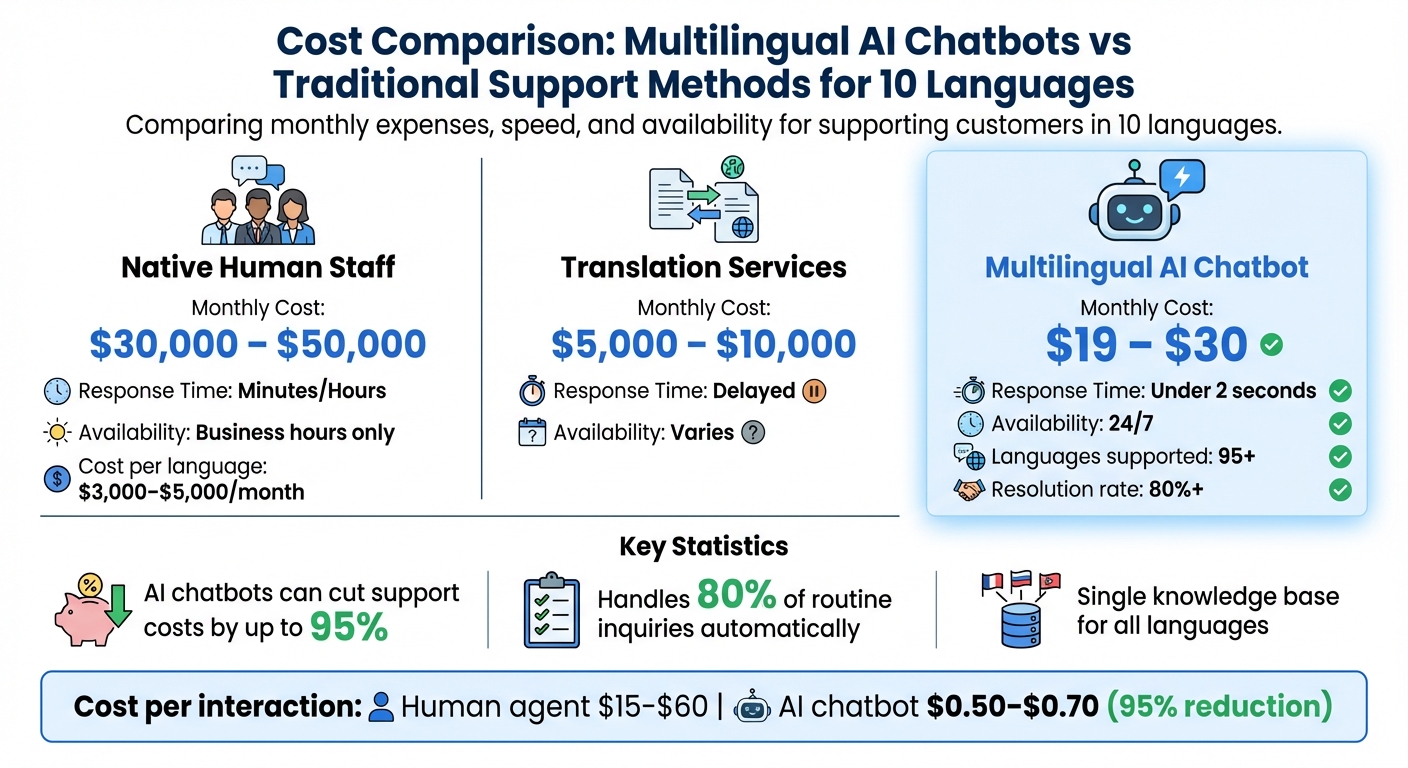
Cost Comparison: Multilingual AI Chatbots vs Traditional Support Methods
Addressing the challenges highlighted earlier, these benefits demonstrate why multilingual AI chatbots are a game-changer for scalable customer support.
24/7 Support and Lower Operating Costs
Multilingual AI chatbots offer a cost-effective way to provide continuous support. They can handle high-volume routine inquiries efficiently - such as order tracking or return policies - without human involvement, all while operating 24/7 [7][2]. Now, compare that with hiring native-speaking staff, which costs $3,000–$5,000 per month per language and typically only covers business hours [3]. The savings speak for themselves.
Here's a side-by-side cost breakdown:
| Language Support Strategy | Monthly Cost (10 Languages) | Response Time |
|---|---|---|
| Native Human Staff | $30,000 – $50,000 | Minutes/Hours |
| Translation Services | $5,000 – $10,000 | Delayed |
| Multilingual AI Chatbot | $19 – $30 | Under 2 seconds |
Modern AI platforms simplify the process by allowing you to train the chatbot once in your primary language. From there, it can handle customer interactions in over 95 languages, eliminating the need for multilingual teams or duplicate content maintenance [7][2]. This centralized "single knowledge base" approach ensures updates are seamless and cost-efficient [3]. For a deeper look at the setup process, see our guide to AI customer support implementation.
Breaking Down Language Barriers
Language plays a crucial role in consumer behavior. Studies reveal that 60% of customers rarely or never purchase from English-only websites [8], and 56% prioritize information in their native language over price [3]. By addressing these preferences, businesses have seen tangible results: companies using multilingual AI chatbots report a 70% boost in international conversion rates [3].
These chatbots go beyond basic translation. They identify a customer’s language right away and adapt responses to include appropriate tone, date formats, and regional expressions [1][2][5]. This ensures interactions feel natural and personalized. For instance, when AgentiveAIQ deployed an AI chatbot for a global e-commerce brand in Spanish, French, and Arabic, they noticed French-speaking customers were confused by specific shipping terms. After fine-tuning the localized content, support tickets from that market dropped by 15% [5].
Maintaining Brand Voice Across Languages
Consistency in brand voice is critical, and managing separate scripts for each language can create inconsistencies. Multilingual AI chatbots address this by using a single knowledge base. This means you update your content once, and the AI translates it in real-time while preserving your brand’s tone and intent [1][2][3].
Advanced language models focus on meaning rather than literal word-for-word translation. This ensures your brand voice remains consistent, whether customers are communicating in German, Japanese, or Arabic. As AgentiveAIQ explains, "Translation is not localization. A direct word-for-word translation can miss idioms, tone, and regional nuances - leading to confusion or even offense" [5]. Additionally, you can integrate industry-specific glossaries to ensure technical terms and product names are accurately translated across all languages [3][5].
Setting Up Multilingual AI Chatbots with ChatSpark
ChatSpark is designed for quick setup, taking care of the technical heavy lifting so you can focus on delivering seamless multilingual support to your customers. This streamlined process ensures you maintain consistent 24/7 service and align with your brand’s tone across all interactions.
Once integrated, your next step is to fine-tune the chatbot to reflect your brand’s personality and voice.
Connecting ChatSpark to Your Communication Channels
ChatSpark works across six major platforms: your website, WhatsApp, Instagram, Facebook Messenger, Telegram, and Slack [9]. The best part? You only need to train your chatbot once, and it can be deployed on all these channels simultaneously.
Start with your website - this is often the fastest way to engage visitors. Simply paste a code snippet before the closing </body> tag, or use the WordPress plugin for an even easier setup [10]. From there, expand to other messaging platforms based on where your audience is most active. For instance, WhatsApp connects you to over 2 billion users [9], while Instagram is ideal for e-commerce brands handling product-related inquiries.
To connect with messaging and social platforms, link your business accounts, such as your WhatsApp Business API or Facebook Page [9]. Multi-channel deployment is available with Plus, Pro, and Enterprise plans [11]. Use the dashboard’s preview feature to test your chatbot’s responses to common queries and ensure accuracy before going live [10].
| Channel | Connection Method | Best For |
|---|---|---|
| Website | Paste embed script or use WordPress plugin | Lead capture and general visitor support |
| Connect via WhatsApp Business API | Mobile-first markets and high engagement | |
| Connect to a managed Facebook Page | Broad social media reach | |
| Connect to Instagram Business account | E-commerce and visual brand inquiries | |
| Telegram | Deploy as a Telegram bot | Tech-savvy and privacy-focused audiences |
| Slack | Add to workspace as a bot | Internal team support and B2B workflows |
Configuring Responses to Match Your Brand
In the Instruction field of the bot settings, you can define your chatbot’s personality - whether that’s “professional and friendly” or “casual and solution-driven.”
Train your chatbot in English, and ChatSpark takes care of translating into over 95 languages while preserving meaning [7]. For specialized terms, legal jargon, or phrases that don’t translate well, you can add content in the native language directly to your knowledge base for better accuracy.
Set clear response guidelines to match your brand’s tone. For example, adjust formality levels in languages like French (where "tu" vs. "vous" is important) and incorporate local greetings and date formats. To ensure quality, create a 10-prompt test set covering various scenarios, such as customer support replies or product descriptions, and save the best outputs as reference examples for the AI. Regularly review chat transcripts to spot gaps in automated translations, and update your training data as needed.
Once your chatbot’s tone is aligned with your brand, you can rely on AI knowledge retrieval to deliver accurate, data-backed responses.
Using AI Knowledge Retrieval
ChatSpark uses a Retrieval-Augmented Generation (RAG) system to ensure responses are grounded in your business’s data, not just general AI knowledge [14]. Here’s how it works: the system analyzes user intent, retrieves relevant content through semantic matching, ranks the results based on multiple factors, and delivers precise, brand-aligned answers [14].
For example, between August and December 2025, a global construction products company resolved 10,754 messages using ChatSpark. The AI achieved a 98% resolution rate, saved over 66 days of agent time, and delivered $47,880 in savings - all from a $4,000 investment [12]. Impressively, the average response time was under 2 seconds [12].
"ChatSpark has been managing two of our largest product lines over the past year. It currently handles an average of 1,831 chats per month without any human intervention."
- Lorri G., Customer Service & Technical Support Manager [12]
You can upload training data from various sources, including website URLs, PDFs, DOCX files, CSVs, PowerPoint presentations, text files, and even YouTube transcripts [13]. Use the analytics dashboard to identify unanswered questions and update your knowledge base to fill those gaps [13]. Most users see an AI resolution rate of 80% or higher [12].
Best Practices for Scaling Multilingual Support
Start with Your Most Important Languages
Begin by offering support in 2–3 key languages that align with your customer base. During the first 15 days, take time to map out your top customer intents and create glossaries for product names and technical terms [15]. Communicating with customers in their native language can significantly boost repurchase rates and foster stronger relationships [4].
After localizing your primary languages, prioritize smooth escalation pathways to human agents for handling more complex issues.
Enable Smooth Handoffs to Human Agents
With ChatSpark's conversation tracking capabilities, ensure that your chatbot retains the full conversation history, detected language, and sentiment context when transferring an issue to a human agent. Instead of relying solely on keywords, set up handoff triggers based on the complexity of the issue. For high-stakes situations - like legal inquiries, billing disputes, or emotionally sensitive concerns - escalate directly to native-speaking human agents.
Use the chatbot to gather essential details (e.g., order numbers, account information, or issue descriptions) before the handoff, so human agents can step in without delay. Test the handoff process thoroughly in each language before launching to guarantee a smooth transition.
Keep Your Knowledge Base Updated and Organized
Maintain a single, central source of truth in English and use ChatSpark's AI to translate content into other languages. This approach eliminates the hassle of managing multiple, unsynchronized versions. Start by auditing your help center analytics to identify the top 20 articles that resolve 80% of customer tickets, and update these first [16]. Any updates to the original article will automatically be reflected across all translated versions, ensuring consistency.
Write in clear, straightforward sentences, avoiding idioms or slang that may not translate effectively [6]. For critical content - such as legal disclaimers, pricing details, or safety instructions - have a native speaker review the AI translations before publishing. Keep an eye on your chatbot’s performance metrics by language in your analytics dashboard to pinpoint areas that need fine-tuning.
Measuring ROI from Multilingual AI Chatbots
Calculating Cost Savings and Efficiency Improvements
To understand the financial benefits of multilingual AI chatbots, compare the costs of automated resolutions against those of human agents. ChatSpark uses a standard benchmark of $30 per hour for a support agent, which includes salary, benefits, and overhead. Each automated resolution saves about 10–12 minutes, cutting the cost per interaction from $15–$60 down to $0.50–$0.70 - a reduction of around 95%[18].
For example, over a year ending in late 2025, Camping World implemented ChatSpark for two major product lines. The chatbot managed an average of 1,831 chats per month without requiring human intervention, resulting in $119,225 in savings[17].
To measure efficiency, track your AI Resolution Rate, which is the percentage of conversations handled entirely by the chatbot. Industry benchmarks for this rate typically range between 70% and 85%[19]. Additionally, calculate your Containment Rate using this formula:
(1 − [Escalated Interactions / Total Interactions]) × 100.
Regularly review reports like the "Unanswered Questions" list on your dashboard to identify and address knowledge gaps. While cost savings are critical, it’s equally important to automate customer support without losing quality to maintain high satisfaction levels.
Monitoring Customer Satisfaction Metrics
Cost efficiency is only part of the equation - customer satisfaction plays a major role in determining the success of a multilingual chatbot. One useful metric is Knowledge Coverage, which measures the percentage of customer questions the AI can confidently answer based on its training data. A coverage rate exceeding 80% is considered strong[19].
Also, track response times and resolution speeds for each language. This can help pinpoint markets where the chatbot might need additional training data or supplemental human support. Reports like "Top Unanswered Questions" allow you to focus on updates that will have the biggest impact on the customer experience.
Balancing cost savings with high customer satisfaction ensures that your chatbot not only saves money but also reinforces your brand’s reputation for quality support.
Using ChatSpark's Analytics for Performance Tracking
While cost and efficiency gains are measurable, real-time analytics provide deeper insights into your chatbot’s performance. ChatSpark’s dashboard tracks over 15 key performance indicators, including metrics like Cost Savings (calculated by multiplying automated resolutions by the $30/hr agent rate) and Time Saved. It also integrates with GA4 for more comprehensive analytics[11][18].
ChatSpark’s features are accessible starting at just $19 per month with the Basic Plan[18]. For those needing advanced insights, the Pro Plan - priced at $129 per month - offers automated monthly ROI reports. These reports calculate time and cost savings, removing the need for manual spreadsheets[17][18].
For businesses managing multiple product lines, creating separate AI agents allows you to generate per-agent ROI reports. This makes it easy to compare performance across different segments and refine your strategy accordingly[20].
Conclusion
Multilingual AI chatbots are now a game-changer for businesses aiming to expand customer support without the steep costs of hiring native-speaking agents for every market. ChatSpark makes this process seamless with its instant language detection from the very first message. You only need to train the AI in English, and it can naturally communicate in over 95 languages.
The numbers speak for themselves: businesses report saving more than $119,225 annually while achieving resolution rates above 80%. Research also highlights that 72% of consumers are more likely to buy when information is presented in their native language, and 75% are more inclined to become repeat customers when support is offered in their preferred language.
Starting at just $19 per month, ChatSpark makes global customer support affordable for businesses of all sizes. It even accounts for regional differences - like formality levels and local expressions - ensuring responses feel natural and appropriately tailored. This combination of cost-efficiency and personalized communication enhances customer satisfaction at every touchpoint.
From setup to ongoing improvements, ChatSpark enables businesses to deliver scalable multilingual support while keeping costs low and maintaining the consistency and quality customers expect.
FAQs
How do I choose which languages to launch first?
When deciding which languages to roll out first, start by digging into your customer data and understanding market demand. Look at details like where your customers are located and the languages they prefer.
Focus on the languages spoken by the majority of your current or target audience. For instance, languages like Spanish, Chinese, or Arabic often cover large audience segments. Additionally, think about the regions where your business already operates or plans to grow. Aligning your language choices with your business goals ensures you're reaching the right people effectively.
When should the chatbot hand off to a human agent?
Chatbots should seamlessly transfer conversations to a human agent in certain situations. These include handling complex or sensitive issues, detecting low AI confidence (below 40%), identifying negative sentiment, responding to user-initiated transfer requests, or after repeated failures to address the user's needs. This approach helps maintain smooth support interactions and ensures a better customer experience.
What data do I need to train a multilingual chatbot?
To create a multilingual chatbot, having a variety of data in each target language is essential. This includes examples of customer questions, common phrases, and regional expressions. Developing a multilingual knowledge base is equally important - this involves localizing content, using detailed glossaries, and ensuring precise translations.
Accurate language detection models play a big role, too. They help identify the user's language and direct conversations appropriately. Tools like ChatSpark make this process easier by offering support for more than 85 languages and leveraging advanced natural language processing features.