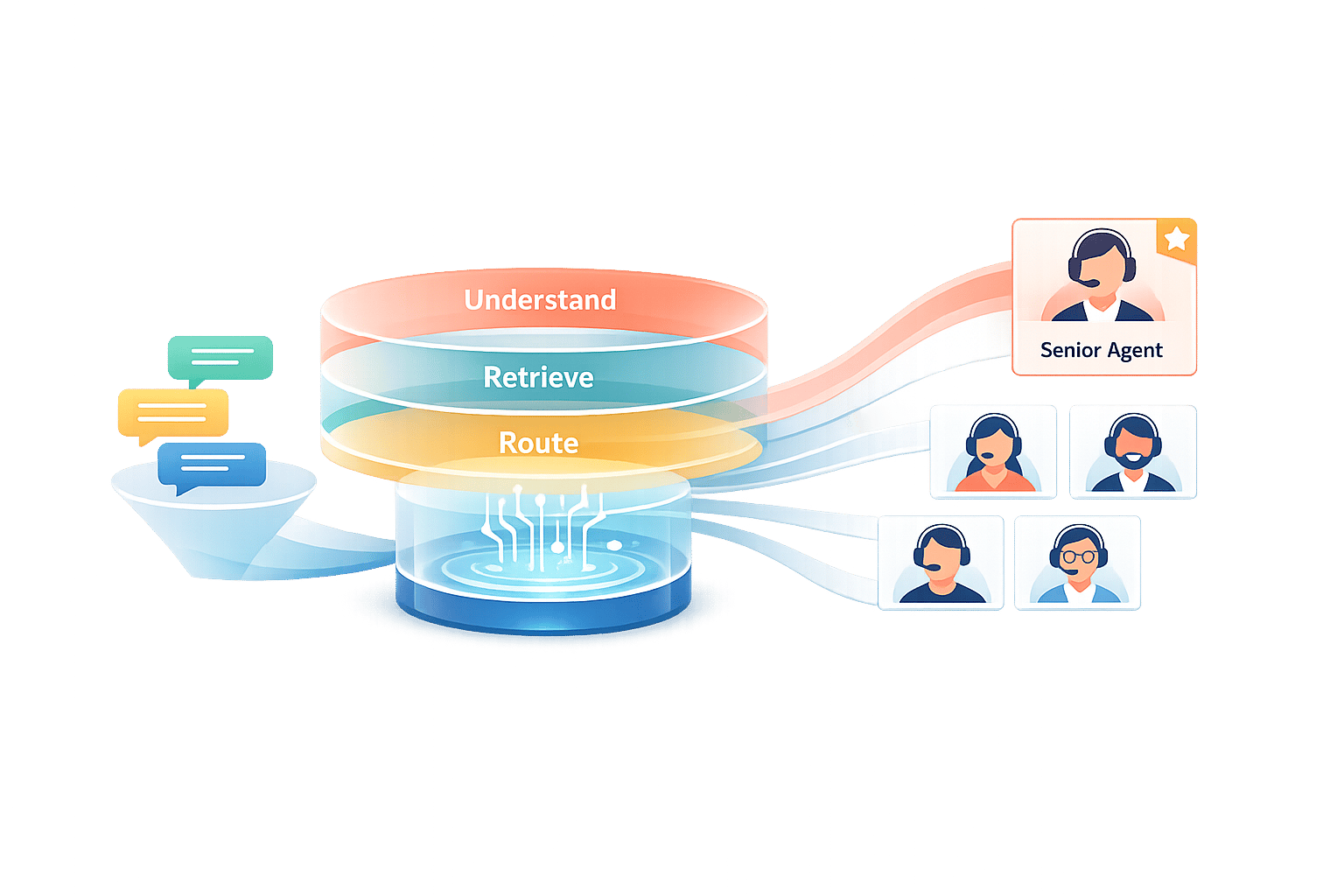
You can cut bot handoffs without trapping people in a bad chat. The play is simple: improve intent matching, fix weak fallback flows, set clear handoff rules, and review failure paths every week.
Here’s the short version:
- Track the right numbers first: escalation rate, containment rate, self-service resolution, fallback rate, CSAT, first-response time, and overall resolution.
- Fix the top causes of avoidable handoffs: missed intent matches and thin help content.
- Use a 3-step fallback flow: clarify, show buttons, then hand off with context.
- Set handoff rules with more than one signal: confidence, repeat failures, customer tone, topic risk, and direct requests for a person.
- Make every transfer a warm handoff: send the transcript, customer details, and what already failed.
- Review the worst paths each week: tag the cause, ship a few fixes, and watch whether CSAT and resolution move in the right direction.
A few numbers stand out. One 2025 case study reported a 30% drop in human escalations after AI self-service was tied to a structured knowledge base. And while early bots often send 30%–50% of chats to agents, tighter bots can get that down to 5%–15%. At the same time, customer expectations keep climbing: 42% of customers reported higher expectations in 2026, up from 19% in 2024.
My takeaway: if I want fewer escalations, I shouldn’t focus on blocking agent access. I should make the bot more useful, make exits clear, and hand off at the right time.
This article lays out that process in plain terms.
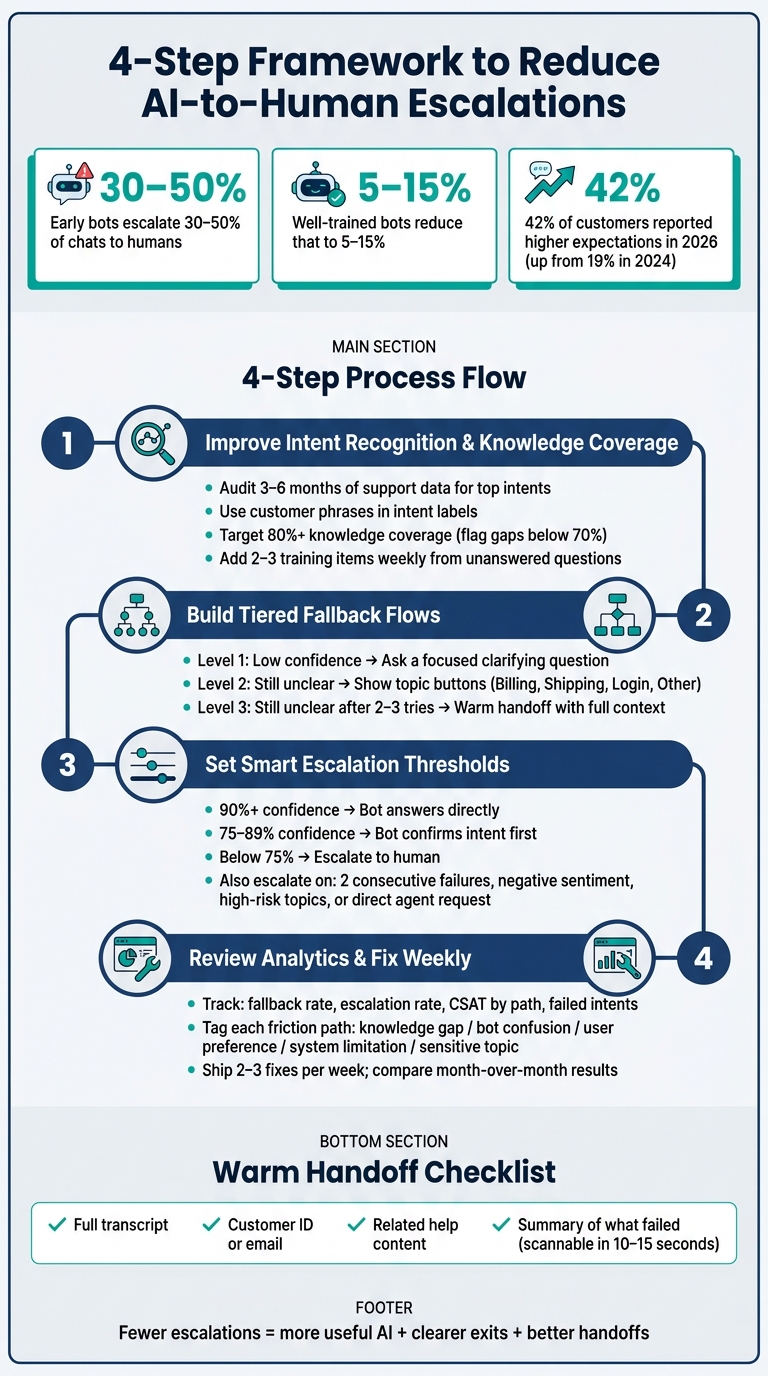
4-Step Framework to Reduce AI-to-Human Escalations
Step 1: Improve intent recognition and knowledge coverage
A lot of avoidable escalations happen for two simple reasons: the bot doesn't catch the customer's intent, or it doesn't have the right help content to answer. The good news is that both problems are fixable without starting from scratch. When intent recognition gets better, fewer conversations get handed off, and more customers stay on track to an actual answer.
Audit 3 to 6 months of support data to find your top intents
Look at 3 to 6 months of support records to spot repeat questions and common transfer points. Start with high-volume, low-risk intents first, such as:
- FAQs
- Order status
- Refunds and returns
Once the bot can spot the request, the next step is simple: does it have enough content to answer it?
Use customer phrases in intent labels
Name intents using the words customers use, along with clear actions. Pull exact phrases from chat logs, including common variations, so the bot learns how people actually ask for help. That small shift can make a big difference.
Keep intent categories separate enough that matching stays steady. If knowledge coverage falls below 70%, go back and review your intent labels and training data. Aim for 80%+.[1]
Fill gaps with short, single-topic help content
A missing article can turn a correct intent match into a dead end. In plain English: the bot may know what the customer wants, but still have nothing useful to show.
Split mixed-topic articles into short, one-topic pieces. Then check unanswered questions every week. Review unanswered questions weekly and add 2–3 training items based on what you find.[1]
Weekly content updates help stop small gaps from piling up into avoidable escalations. Once coverage gets better, the next issue is usually how the bot responds when it still doesn't know the answer.
Step 2: Build fallback and clarification flows that keep conversations moving
After you improve intent coverage, the next place things usually break is uncertainty handling. A bot can recognize intent pretty well and still create extra escalations if its fallback flow is weak. When it gives the same useless reply two or three times with no clear next step, people lose patience and ask for an agent, even for simple requests.
Use a tiered fallback sequence instead of repeating the same error message
The fix is a simple three-step fallback flow that helps narrow down the issue instead of letting the chat stall.
First, ask a focused clarifying question. For example, the bot might ask whether the customer needs help with an order, a subscription, or account login.
Second, if the reply is still unclear, show topic buttons like Billing and payments, Shipping and delivery, Login and password help, or Something else. That gives customers a way to choose instead of trying to rewrite the same message.
Third, if the issue is still unclear after two or three tries, offer a warm handoff and pass along what the customer has already shared so the agent doesn’t have to start from scratch.
| Fallback Level | Trigger | Bot Action |
|---|---|---|
| Level 1 | Low confidence on first message | Ask a focused clarifying question |
| Level 2 | Still unclear after clarification | Show topic buttons |
| Level 3 | Still unclear after 2–3 tries | Transfer with context |
Collect missing details one field at a time
Sometimes the bot understands the task but is missing one key detail, like an order number, email address, or shipping ZIP code. In that case, it should ask for that item directly instead of sending the customer to an agent.
Keep it simple. Briefly say why the detail is needed, then ask only for the next required piece of information. Ask for the order number first, then the account email. Don’t dump a whole form into the chat at once. That’s where people drop off.
One question at a time works better. A short acknowledgment after each reply also helps. It shows the customer that the bot is making progress, not just collecting data for no reason.
Always give customers a clear way out and avoid dead ends
Every fallback path needs an exit: a resolution, a self-service next step, or a clean transfer.
Be direct about what the bot can handle. For example, it can help with order status, refunds, and password resets. For billing disputes, it should connect the customer to an agent. That kind of honesty sets expectations early and cuts down on frustration when a handoff is needed.
Keep a persistent Talk to an agent option available throughout the conversation. It also helps to add a global escape command like agent or representative so customers can leave the flow from any step.
Once fallback flows keep the conversation moving, the next step is to set clear rules for when the bot should escalate and hand off.
Step 3: Set escalation thresholds and warm handoff rules
Good fallback flows help keep a conversation on track. But they only get you so far. When fallback stops helping, escalation rules need to step in. If those rules aren't clear, you'll either send too many chats to agents or wait too long. Both can hurt agent output and customer satisfaction.
Combine confidence, failure count, sentiment, and topic risk to trigger the right action
The safest way to handle escalation is to look at four signals together: confidence score, failure count, customer sentiment, and topic risk. Don't let just one signal make the call on its own.
Use three confidence tiers instead of one hard cutoff:
- At 90% or above, the bot answers directly.
- Between 75% and 89%, the bot confirms what it thinks the customer means before it responds.
- Below 75%, the bot escalates or offers a human handoff.
Then add the other signals on top:
| Trigger Type | Example Signals | Recommended Threshold | Action |
|---|---|---|---|
| Confidence Score | High intent match | 90–100% | Answer directly |
| Confidence Score | Moderate intent match | 75–89% | Confirm or clarify |
| Confidence Score | Low intent match | < 75% | Escalate now |
| Failure Count | Repeated unhelpful responses | 2 consecutive failures | Escalate now |
| Sentiment | ALL CAPS messages, phrases such as this is ridiculous or useless | Negative sentiment detected | Escalate now |
| Topic Risk | Billing disputes, legal or compliance issues, account security, breaches, fraud, lawsuits | High-risk topic detected | Escalate now |
| Direct Request | Customer asks for an agent | Any keyword match | Escalate now |
For fields like healthcare or financial services, set a higher bar for auto-answers: 90% to 95% confidence at a minimum. For general retail or e-commerce, 80% to 85% is often enough. The rule is pretty simple: the cost of a wrong answer should decide where you set the line.
Know when to hand off the full conversation versus just one step
Once the bot hits the escalation threshold, the next call is whether to hand off the full case or only a single step.
Not every escalation means the whole conversation has to move to an agent. In some cases, the bot only needs help with one blocked action, like approving a refund exception or handling a manual override, while it keeps the rest of the workflow moving. In that setup, the bot stays in the thread and routes just that one step to a person.
A full handoff makes more sense when the issue carries more risk, like a security breach, legal complaint, or major billing dispute. It also makes sense when the customer's tone has gone sharply negative or when they plainly ask to speak with a person.
Send agents the full context so customers do not have to repeat themselves
A warm handoff falls apart if the agent shows up cold. Send the full transcript, the customer ID or email, any related help content, and a short note on what didn't work.
That summary should be short enough for the agent to scan in 10 to 15 seconds before replying. If you get that part right, the customer doesn't have to start over and repeat the whole story.
Step 4: Use analytics to find escalation hotspots and fix them weekly
Once the bot is live, don't just let it run. Check where it still breaks down and fix those paths every week.
Track where escalations happen and why they happen
The fastest way to find trouble is to review each conversation path on its own. Look at fallback rate, escalation rate, messages before handoff, CSAT by path, and failed intents at the path level, not just in one overall view. A blended rate can hide the paths that are clearly broken.
When possible, segment the data by channel and time of day. That helps you see if the issue is tied to one experience or one usage window.
Flag any path with high fallback, high escalation, or low CSAT. Then tag the reason in a consistent way:
- knowledge gap
- bot confusion
- user preference
- system limitation
- sensitive topic
Those tags matter more than they may seem at first. Over 3 to 6 months, patterns start to show up. And once they do, it's much easier to see what to fix first.
Match each high-friction path to the right fix
After a path is tagged, match the fix to the type of failure. If refund-related paths keep getting a knowledge gap tag, and transcripts show customers asking follow-up questions about eligibility, the issue probably isn't the bot alone. The fix may be rewriting the policy article in plain English and adding concrete examples.
In one retail example, that kind of rewrite cut escalation rates from 60% to around 35% within a month and pushed CSAT above 4.2.
The same logic applies to fallback replies. If generic fallback messages are causing avoidable escalations, the answer is not always a new integration. Sometimes the bot just needs better prompts that give people real next steps instead of a dead end.
Tie each fix back to the systems already in place: intent coverage, fallback flow, or escalation rules.
Use outcome data to decide whether to tighten or loosen automation
Next, check whether the fix improved both resolution and satisfaction. The pattern should be pretty clear:
- Bot-resolved chats should be the fastest and have the highest CSAT.
- Escalated chats should take longer.
- Abandoned chats should be the weakest outcome.
If the bot-resolved share goes up but CSAT drops hard, that's a warning sign. In that case, you may need to loosen escalation thresholds for certain topics, not make them stricter.
A lower escalation rate paired with more complaints usually means the bot is getting in the way of help, not solving the problem.
Review the top 3 to 5 high-friction paths each week, sample transcripts, assign fixes, and compare month-over-month results. Ship 2 to 3 fixes that week. Small weekly changes add up fast.
Conclusion: Lower escalations by making AI more useful
Reducing escalations isn't about blocking customers from reaching a human. It's about making the bot useful enough that, most of the time, customers simply don't need to ask for one.
When intent coverage gets better, fallback triggers happen less often. When fallbacks are written well, fewer chats get handed off for no good reason. And when thresholds are set with care, agents spend their time on the cases that actually need human judgment. That's why these numbers matter.
The payoff shows up in plain terms. Early-stage bots often escalate 30%–50% of chats to humans, while well-trained bots with a tight scope can bring that down to 5%–15%.[2] That difference means real time saved for support teams and a better experience for customers.
The pressure is only growing. 42% of customers reported higher expectations in 2026, up from 19% in 2024.[3] A bot that stalls, loops, or misses the point doesn't just annoy people. It creates more tickets and chips away at trust.
The smart way to handle this is to treat escalation reduction as an ongoing process, not a one-time fix. Small improvements add up fast: better labels, tighter articles, cleaner fallbacks. Put together, they lead to faster resolutions, less repeated effort for customers, and a lighter workload for agents across every channel.
FAQs
How do I know if my bot is escalating too often?
Keep a close eye on your escalation rate and the quality of your handoffs. In most cases, a healthy escalation rate sits around 10%–15%, although some setups still perform well at up to 30%. If that number stays above 20%, or your CSAT falls below 80%, it’s a strong sign your escalation logic needs work.
A few warning signs tend to show up fast:
- High fallback rates
- Customers having to repeat their information
- Conversations that take more than 2–3 messages to sort out
- Frequent requests like “speak to a person”
It also helps to review 5–10 escalations each week. Pair that with agent feedback, and you can fine-tune your triggers based on what’s actually happening in live conversations.
Which support topics should I automate first?
Start with the 20% of inquiries that drive 60% to 80% of ticket volume. Focus first on high-frequency, low-complexity tasks with complexity scores of 1 or 2.
That usually means things like:
- Password resets
- Order status updates
- Return policy questions
- Common FAQs
Keep sensitive or high-complexity topics out of that first wave. Send issues like billing disputes, legal matters, and account security straight to human agents.
How often should I review and update escalation paths?
Review and update escalation paths weekly. Block off 30 minutes each week to audit escalated cases where the AI missed its confidence threshold or the handoff broke down.
That weekly check gives you a clear view of what’s going wrong. You can spot patterns, adjust routing rules, fine-tune escalation triggers or keywords, and compare AI-generated customer satisfaction scores with human agent performance to see where your thresholds may need tuning.