AI escalation and routing are game-changers for customer support, ensuring inquiries are handled efficiently while reserving human expertise for complex situations. Here's the core idea:
- AI escalation: Automatically transfers complex or sensitive issues to human agents when automation isn't enough.
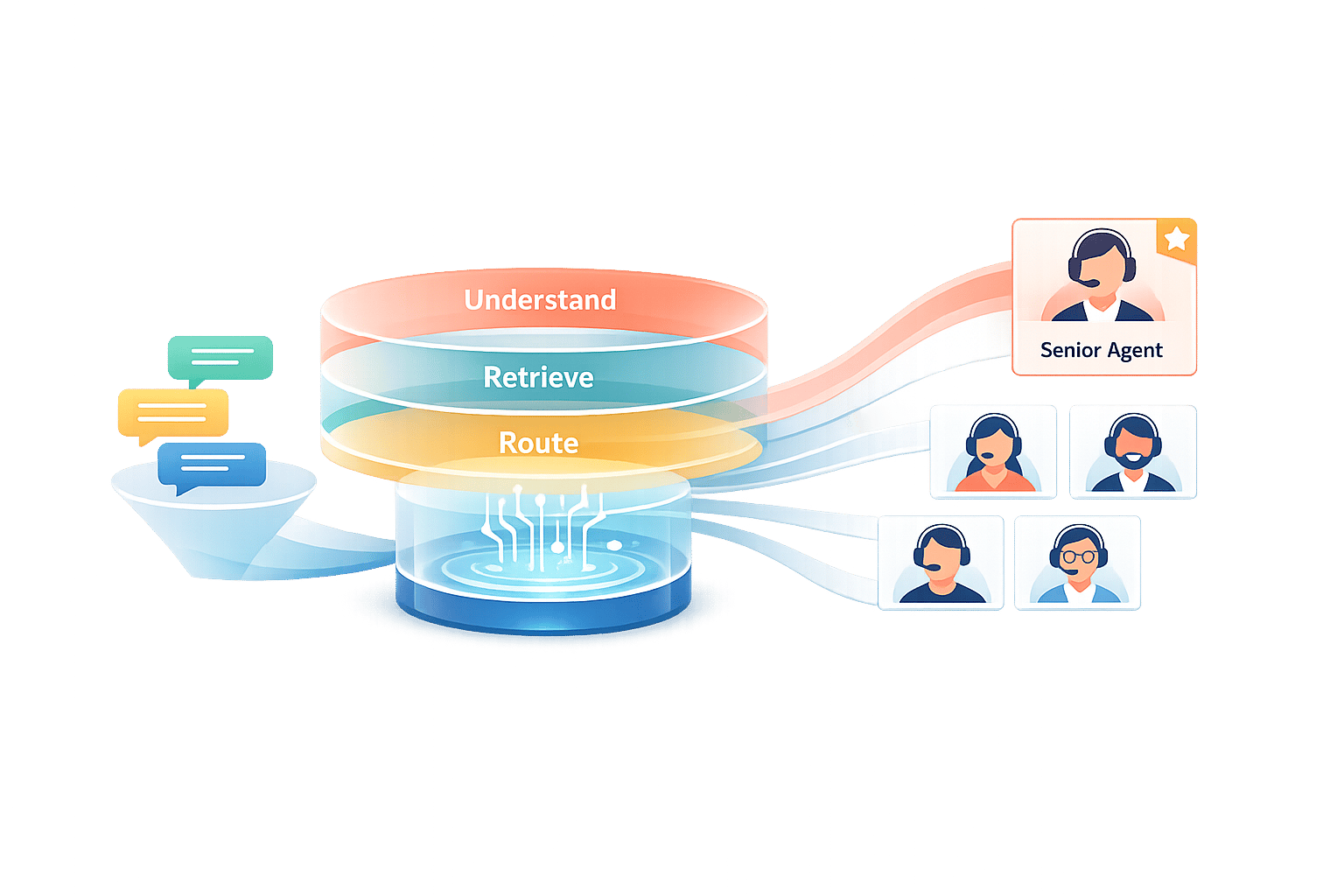
- AI routing: Directs inquiries to the most suitable agent or department using advanced language models to analyze context, tone, and intent.
These systems improve response times, reduce manual transfers, and enhance customer satisfaction. By automating routine tasks and prioritizing critical cases, businesses can manage higher volumes without overwhelming staff. Key technologies like NLP, machine learning, and knowledge retrieval systems power these solutions, enabling accurate decision-making in under 200 milliseconds.
Adopting AI escalation and routing isn't just about efficiency - it’s about creating smooth handoffs, reducing frustration, and improving first-contact resolution. Companies using these systems report faster resolution times, better customer experiences, and significant cost savings. Ready to dive deeper? Let’s explore how these systems work, what powers them, and how to implement them effectively.
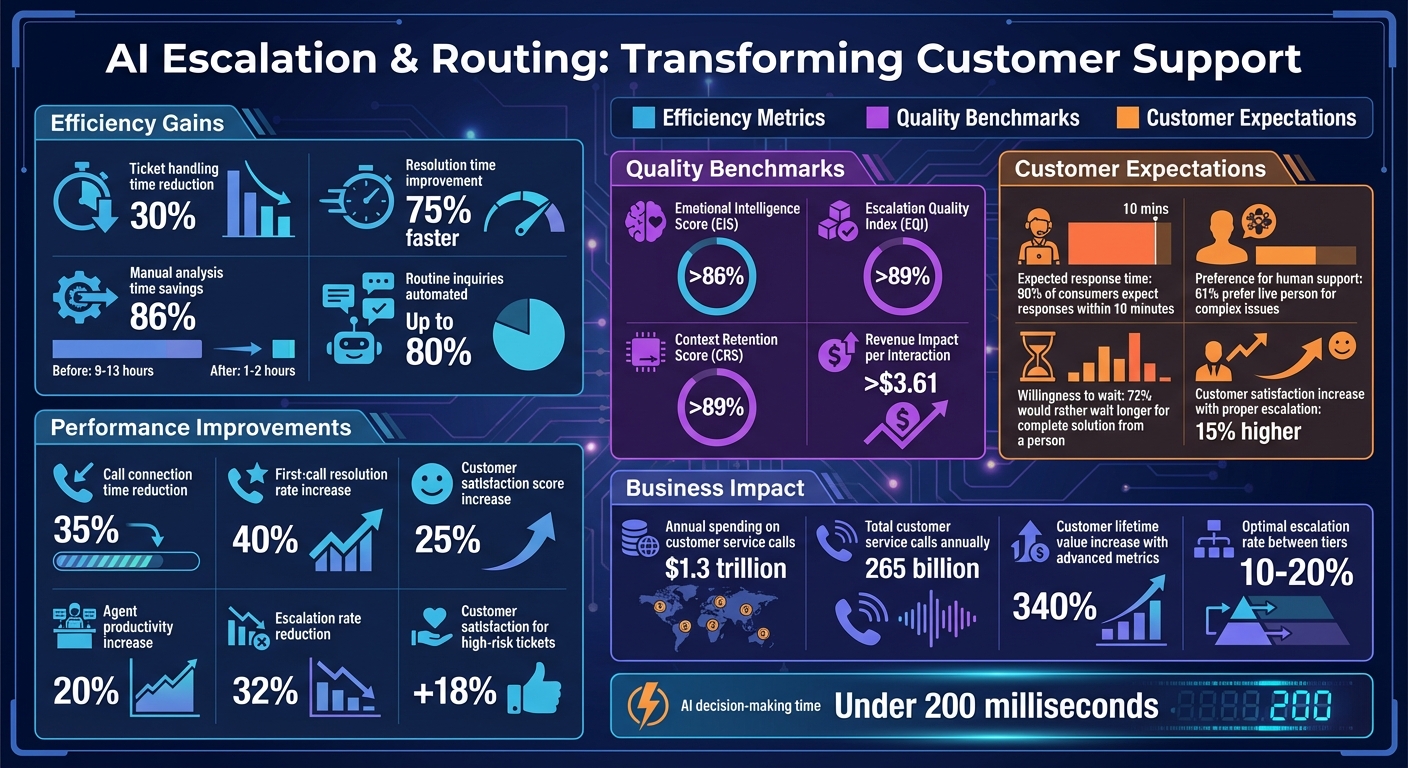
AI Escalation and Routing Impact: Key Performance Metrics and Business Outcomes
Technologies That Power AI Escalation and Routing
Every seamless escalation and accurate routing decision relies on a sophisticated AI system that deciphers customer messages and delivers the right solutions instantly.
Natural Language Processing (NLP)
NLP allows AI systems to understand customer messages beyond basic keyword recognition. Instead of merely spotting words like "refund" or "cancel", modern NLP identifies intent regardless of how it's phrased. For example, whether a customer says, "I've been waiting forever for my package" or "Can you check my shipping status?" - NLP recognizes both as requests related to order tracking.
What sets today’s NLP apart is its ability to gauge sentiment and urgency. AI tools powered by NLP and machine learning can slash ticket handling times by up to 30%. Companies using AI-driven escalation management have even reported resolution times that are 75% faster [9].
Advanced systems, often utilizing large language models (LLMs), also excel at detecting multiple intents within a single message. For instance, if a customer says, "I can't log in AND my invoice shows the wrong amount", the system identifies both issues and routes them to the appropriate agents, eliminating the need for the customer to submit separate tickets.
Machine Learning and Predictive Analytics
While NLP focuses on interpreting messages, machine learning (ML) predicts escalation risks and prioritizes routing. By analyzing historical data, these algorithms can pinpoint tickets likely to escalate before it happens. Factors like sentiment changes, response delays, and customer history are evaluated in real time to assess escalation risk [10].
The impact is impressive: AI-driven escalation prediction reduces manual analysis time from 9–13 hours to just 1–2 hours - a time savings of 86% [10]. Companies adopting predictive AI have seen a 32% drop in escalation rates and an 18% boost in customer satisfaction for high-risk tickets [10].
Unlike static rule-based systems, ML-powered routing continuously improves through feedback. When agents resolve, reopen, or transfer tickets, the outcomes are fed back into the model, refining its future decisions [10][6].
Knowledge Retrieval Systems
Even the most advanced AI needs accurate, real-time information to perform effectively. Knowledge retrieval systems, especially those using Retrieval-Augmented Generation (RAG), solve this by linking AI to up-to-date company policies, documentation, and historical resolutions.
Instead of relying on outdated training data, RAG systems employ semantic vector search to retrieve the most relevant information. For example, when a customer inquires about return policies, the system pulls the latest documents and past case resolutions, ensuring responses align with current business rules.
These systems also streamline escalations by providing agents with a complete package of information. When a ticket is handed off, the agent receives the full conversation transcript, identified intent, customer profile, and suggested next steps - all drawn from unified knowledge sources [6]. Tools like ChatSpark use these capabilities to deliver accurate, instant responses in over 85 languages by accessing your knowledge base in real time.
Up next: Discover how to implement these technologies to create effective escalation and routing workflows.
How to Set Up AI Escalation and Routing
Implementing AI customer support through escalation and routing means defining clear triggers, organizing teams effectively, and building workflows that ensure smooth handoffs between AI and human agents.
Creating Escalation Rules and Triggers
To start, identify the situations where human intervention is necessary. These triggers can be based on factors like team workload, inquiry complexity, or customer behavior signals. For example, if a customer says, "Talk to a human" or expresses frustration with phrases like, "This is ridiculous," it's a clear sign for escalation. Similarly, AI-detected patterns, such as repetitive response loops or technical failures, should automatically trigger escalation. Data-driven thresholds, like high-value orders (over $1,000), VIP accounts, or negative sentiment scores, also play a key role in prioritizing escalations [1][2][3].
Time-based triggers tied to service level agreements (SLAs) ensure issues are addressed promptly. For instance, a critical P1 issue might escalate after 30 minutes of inactivity, while less urgent P3 tickets could escalate after eight hours. It's also important to respect operating hours - if it's outside business hours, route the issue to email or a ticketing system instead of live escalation [1][3][14].
"Escalation isn't a failure. It's a signal of maturity." - Replicant [2]
Automation thresholds can help manage AI interactions. For instance, limit email AI to two exchanges before escalating to a human to prevent delays in resolving complex issues. Similarly, high-risk actions like approving large refunds or handling sensitive regulatory matters should always trigger immediate escalation [1][6][11].
Organizing Your Team Structure
A tiered support structure ensures inquiries are handled by the right level of expertise. Level 1 (L1) agents handle common questions, Level 2 (L2) specialists address technical issues, and Level 3 (L3) experts manage complex cases requiring advanced knowledge or policy exceptions. Typically, only 10–20% of cases should escalate between tiers [13][14].
Different types of escalations - functional (lateral moves to specialists) and hierarchical (involving decision-makers for approvals) - should be clearly defined. Maintain real-time skill matrices to track agent certifications, language skills, and product expertise. These metrics help configure smart routing systems that match inquiries to the best-fit agent. For example, prioritizing metrics like CSAT scores or Average Handle Time (AHT) ensures agents are selected based on performance. This approach leads to better outcomes, such as a 20% increase in handled interactions and a 40% improvement in first-call resolution rates [7][8].
To avoid overloading top-performing agents, distribute workloads based on capacity rather than rank. If a high-performing agent is already managing several conversations, route the next inquiry to another qualified team member. This helps reduce wait times and prevents burnout [1][7].
Building Routing Workflows
Once escalation triggers and team structures are in place, the next step is creating workflows that connect customer inquiries to the right agents.
Routing workflows can be customized based on skills, urgency, or customer priority. For example, rule-based routing might direct Spanish-speaking customers to bilingual agents, while skills-based routing ensures technical issues go to certified specialists. Sentiment-based routing can identify frustrated customers and prioritize their cases for faster handling [8].
AI can also streamline the handoff process by tagging context variables (like BotHandoffTopic) and routing escalations to the appropriate queue. For instance, a billing-related issue could be flagged and sent directly to the finance team. Warm handoffs, where case details are automatically transferred to the agent's dashboard, eliminate the need for manual lookups and speed up resolution times. AI should also use reassuring language during transfers, such as, "Let me connect you to the best person to assist with this," to maintain trust [2][6][12].
Fallback rules are essential for edge cases. If queues are full, offer a callback. If sentiment analysis fails, default to round-robin routing. And if no agents are available, route the issue to general support. Tools like ChatSpark integrate with platforms like Zapier and Freshchat, checking agent availability across multiple channels (e.g., WhatsApp, Telegram, Slack) before routing [8].
Before going live, test your workflows using past support tickets to simulate scenarios, predict automation rates, and identify weak points. Tagging escalations with outcomes (e.g., resolved, reopened, or transferred) supports continuous learning, allowing the system to improve routing decisions over time [5][6].
| Trigger Category | Specific Examples | Recommended Action |
|---|---|---|
| Customer Signals | "Talk to a human", "This is ridiculous", "I need more help" | Immediate Escalation |
| AI-Initiated | Repetitive loops (3+ turns), technical API failures, off-script queries | Immediate Escalation |
| Data-Driven | VIP status = True, Order Value > $1,000, Sentiment = Negative | Priority Routing to Senior Agent |
| Operational | Outside business hours, no agents available in specific queue | Route to Email/Ticket |
How to Improve Your AI Escalation and Routing
Once your AI system is live, the work doesn’t stop. Monitoring its performance, addressing weaknesses, and incorporating human expertise are essential steps to ensure it functions smoothly.
Measuring Performance with KPIs
To truly understand how well your AI is performing, focus on metrics that reflect actual problem-solving rather than surface-level success. For instance, while the containment rate might look good on paper, it can hide unresolved issues where customers abandon their efforts in frustration. Instead, prioritize the True Resolution Rate, which confirms that problems are genuinely solved. Complement this by tracking the Repeat Contact Rate - if customers reach out again within 48 hours, it’s a red flag that the issue wasn’t resolved properly [16][17].
For a deeper dive, advanced KPIs can provide critical insights:
- Escalation Quality Index (EQI): This measures how effectively context - like intent, conversation history, and sentiment - is passed to human agents. High-quality escalations (EQI above 89%) can speed up resolutions by 73% [15].
- Context Retention Score (CRS): Tracks how well the AI retains conversation details, reducing the need for customers to repeat themselves.
- Emotional Intelligence Score (EIS): Evaluates how well the AI detects and responds to customer emotions, enabling proactive escalations before frustration peaks [15].
- Triage and Routing Accuracy: Assesses how often tickets are routed to the right teams. When the AI gathers information effectively, it should lead to shorter Agent Handle Times (Post-Escalation) [16].
Companies that track advanced metrics like EIS and CRS often report a 340% increase in customer lifetime value compared to those focusing solely on basic metrics. Interestingly, longer conversations (4–6 minutes) tend to yield 67% higher satisfaction scores for complex issues than shorter, rushed interactions [15].
| Metric Category | Key KPI | Target Benchmark |
|---|---|---|
| Quality | Emotional Intelligence Score (EIS) | > 86% [15] |
| Routing | Escalation Quality Index (EQI) | > 89% [15] |
| Routing | Context Retention Score (CRS) | > 89% [15] |
| Business Impact | Revenue Impact per Interaction | > $3.61 [15] |
These benchmarks help pinpoint areas for improvement and guide your system toward better outcomes.
Using Data to Make Improvements
Your performance data is like a roadmap, revealing where adjustments are needed. For example, if your escalation rate exceeds 15%, it might indicate gaps in your AI training or knowledge base [14]. By analyzing recurring escalation triggers, you can identify content gaps and create resources to address them [16][5].
Real-time sentiment analysis can also be a game-changer. Set thresholds for automatic escalation when negativity rises - like a sentiment score dropping below -0.2 per minute [15]. Similarly, use alerts to flag delays, such as response times exceeding 1.5 minutes, or when sentiment scores fall outside acceptable ranges.
To continuously improve, run simulation tests using historical tickets. Tag escalations with outcomes (e.g., resolved, reopened, or transferred) and feed this data back into your AI system using closed-loop learning. This approach ensures the AI gets smarter over time [6][5].
When measuring response times, rely on median values instead of averages to avoid skewed results from outliers. Start by automating simple, high-volume queries - like "Where is my order?" - and expand to more complex tasks gradually. Tools like ChatSpark can integrate with platforms like Zapier and Freshchat, syncing context across channels to maintain a seamless customer experience.
By leveraging data insights, you can refine automation while ensuring human expertise is available for high-stakes situations.
Keeping Humans in the Loop
No matter how advanced your AI becomes, human involvement remains crucial for handling complex or sensitive issues. While AI excels at managing high volumes, humans bring empathy, creativity, and judgment to the table. In fact, 72% of customers would rather wait longer for a complete, accurate solution from a person than get a quick but incomplete response from a bot [14].
Every escalation is an opportunity for your AI to learn. When human agents resolve issues, their actions provide valuable training data to improve automation and routing logic through closed-loop learning [6][5]. Regularly reviewing escalation trends can help pinpoint whether the issue stemmed from a technical glitch, a knowledge gap, or a situation requiring human empathy [14][5].
Human oversight is also critical for managing risks. Tasks like processing refunds, handling account changes, or ensuring regulatory compliance should always involve human approval [6][4]. For high-value or VIP customers, direct escalation to human agents ensures top-tier service, protecting both revenue and brand reputation [6][2].
To make transitions seamless, implement warm handoffs where AI transfers complete conversation context to human agents, so customers don’t have to repeat themselves [6][2]. Set confidence thresholds - if the AI’s confidence in its response drops below a certain level, it should automatically pass the case to a human to avoid misinformation [4]. Empower frontline agents to make quick decisions during escalations to enhance the customer experience [14].
Conclusion
AI escalation and routing have become foundational for modern customer support. By automating up to 80% of routine inquiries, these systems allow human agents to dedicate their time to more complex, high-priority cases that require empathy and creative thinking. This balance enables teams to handle more interactions efficiently, while customers benefit from quicker, more accurate resolutions. The result? A win-win scenario that drives measurable performance improvements.
The numbers back this up. Companies leveraging AI-driven routing report impressive gains: 35% reductions in call connection times, 40% improvements in first-call resolution rates, and 25% increases in customer satisfaction scores. Additionally, agent productivity rises by 20% - a clear boost to operational efficiency and profitability[19].
What's Next for AI in Customer Support
The next evolution in AI escalation focuses on moving from reactive to predictive systems. Instead of waiting for customers to voice frustration, advanced tools will analyze conversation trends, past interactions, and behavioral cues to anticipate escalation needs before issues escalate. Sentiment-based routing is already making strides, using natural language processing to identify urgency or dissatisfaction in real time, ensuring that critical cases are prioritized for senior agents[5].
"Escalation isn't a failure. It's a signal of maturity"[2].
Forward-thinking companies are embracing hybrid support models, treating the transition from AI to human agents as a key feature rather than a backup plan. These models often incorporate closed-loop learning systems, where every escalation outcome is tagged and fed back into the AI, continuously improving its performance over time[6].
These advancements highlight the importance of acting now to stay ahead of the curve.
Why You Should Implement These Systems Now
Customer expectations are at an all-time high - 90% of consumers expect responses within 10 minutes[8]. Traditional support systems struggle to meet this demand without significantly increasing costs. With businesses spending over $1.3 trillion annually on approximately 265 billion customer service calls[18], AI escalation and routing provide a cost-effective solution to handle rising volumes without sacrificing quality.
Organizations that adopt robust escalation systems experience 15% higher customer satisfaction rates compared to those relying solely on chatbots[18]. This is because these systems preserve the human touch where it matters most: 61% of consumers prefer speaking with a live person for complex or sensitive issues[18]. Platforms like ChatSpark make adoption seamless, offering 24/7 automated support with smooth escalation paths and integrations with tools like Zapier and Freshchat to ensure consistent context across all channels.
The time to act is now. As The Pedowitz Group aptly puts it:
"Automation where it helps, and human expertise where it matters most"[6].
FAQs
How does AI escalation make customer support more efficient?
AI escalation takes customer support to the next level by handling routine inquiries quickly and ensuring that more complex problems are directed to the right human agent without a hitch. Tools like ChatSpark are designed to grasp customer intent, deliver instant responses, and lighten the load for support teams by automating repetitive tasks.
When a situation calls for human intervention, AI steps in smartly, escalating the conversation based on specific cues like issue complexity or customer sentiment. This approach ensures that customers get prompt, tailored assistance without unnecessary delays. By simplifying workflows, businesses can allocate human resources to higher-priority cases, improving both operational efficiency and customer satisfaction.
How does Natural Language Processing (NLP) improve AI routing systems?
Natural Language Processing (NLP) takes AI routing systems to the next level by enabling them to truly understand user requests. Instead of just matching keywords, NLP digs deeper - it analyzes the structure of a query, pinpoints key terms, and, most importantly, identifies the intent behind a customer's words. This means requests are routed to the right AI tool or human agent, making the entire process smoother and more efficient.
What’s even better? NLP can handle variations in phrasing and pick up on subtle contextual clues. This allows the system to manage complex or unclear inquiries with ease. The result? Fewer misrouted requests, happier customers, and faster resolutions - whether the response comes from an automated system or a live support agent.
What’s the best way for businesses to implement AI escalation and routing?
To make AI escalation and routing work well, businesses need to start by setting clear guidelines for when and how customer inquiries should move from AI to human agents. Focus on pinpointing situations that demand human attention, like complex, urgent, or sensitive issues. A well-organized escalation process is key - this ensures smooth transitions, reduces delays, and keeps the customer experience frustration-free.
Take into account factors such as agent availability, business hours, and the overall volume of conversations when determining automation limits. Let AI manage routine questions to keep things efficient, while prioritizing escalations for high-stakes issues. Tools like ChatSpark can help streamline this process with customizable escalation triggers and integrations with communication platforms, ensuring responses are timely and accurate. Combining thoughtful planning with the right technology can boost both customer satisfaction and operational efficiency.