When chatbots fail to understand users, fallback logic steps in to keep the conversation on track. Here's how to design effective fallback strategies:
- What is Fallback Logic? It's a safety net for when chatbots can't process user input, often triggered by low confidence scores (below 50-60%). Instead of generic responses, it includes clarifying questions, menu options, or escalation to human agents.
- Why It Matters: Poor fallback design frustrates users, leading to bot abandonment and increased support calls. For example, BMO Assist reduced fallback rates by 4% and improved user satisfaction by redesigning its fallback system.
- Key Strategies:
- Use fall-forward patterns: Offer clear options when the bot is unsure.
- Implement the 3-Strikes Rule: Escalate to human support after three failed attempts.
- Analyze logs to identify weak spots and improve intent recognition.
- Track metrics like fallback rate (<5%) and user recovery rate (>50%).
ChatSpark simplifies this process with tools for analyzing failed conversations, tracking metrics, and refining fallback responses across platforms like WhatsApp, Slack, and Instagram. The goal? Turn chatbot failures into opportunities to guide users toward solutions.
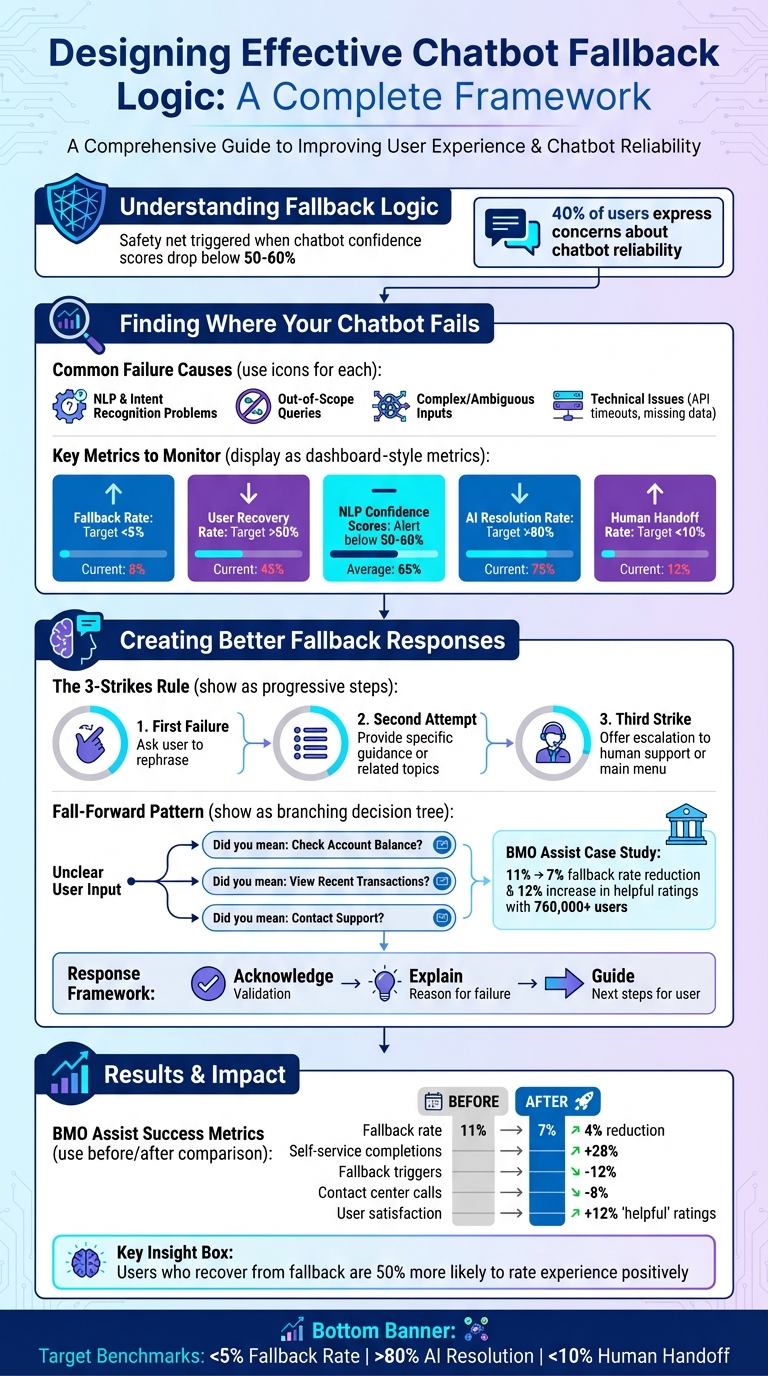
Chatbot Fallback Logic Design Framework: From Failure Detection to Optimization
Finding Where Your Chatbot Fails
To improve your chatbot's fallback logic, it's essential to understand where and why it falters. By analyzing conversation data, you can uncover recurring patterns, pinpoint weak spots, and figure out what's causing users to hit dead ends.
Common Causes of Chatbot Failures
Chatbots often fail due to a few primary issues:
- NLP and intent recognition problems: These arise when the bot struggles to match user input to a known intent. Overlapping intents, vague phrasing, or single-word inputs can confuse the bot. For example, if a user types "Flight", the bot may not know whether they want to book, check the status, or cancel a flight [6][7][8].
- Out-of-scope queries: Sometimes users ask about topics outside the bot's domain. For instance, a bot designed for billing inquiries might fail when asked about technical support [6][8].
- Complex or ambiguous inputs: Multi-part questions, slang, typos, or nuanced language can challenge even advanced NLP systems [6][7].
- Technical issues: Problems like API timeouts, missing data, or overly rigid responses can derail the conversation, even when the bot understands the user's intent [7].
Recognizing these issues is the first step toward refining your chatbot's fallback mechanisms.
How to Audit Chatbot Performance
Start by analyzing your chatbot logs. Review a sample of failed conversations from the past week and categorize them by failure type - such as intent mismatch, missing data, or unclear policies [10]. This will help you identify overlooked trends.
Next, evaluate your intent mapping. Compare the top 15 intents your bot predicts with the main reasons users contact human support [10]. This comparison can reveal gaps in your bot's coverage. Also, monitor the confidence gap between the top two predicted intents. If the difference is less than 0.1, the bot may be guessing, making a clarifying prompt necessary [2].
Another useful approach is to examine the sentiment trajectory of conversations. If user sentiment shifts from curiosity to frustration, it can highlight exactly where the conversation flow breaks down [9]. Lastly, check your data integrations. Missing fields or timeouts in systems like your CRM or billing software can disrupt transaction flows, even if the conversation itself seems smooth [10].
Once you've identified these patterns, you can shift your focus to tracking key performance metrics.
Key Metrics to Monitor
Monitoring the right metrics can help you understand both the frequency and impact of fallback events, enabling targeted improvements:
- Fallback frequency: How often does the bot trigger fallback responses?
- User recovery rate: What percentage of users successfully complete their task after encountering a fallback? Studies show that users who recover are 50% more likely to rate their experience positively [6].
- NLP confidence scores: Scores below 50–60% usually indicate uncertainty [1][2].
- Misclassification rate: How often does the bot assign the wrong intent? [1]
- Number of clarifications: How many times does the bot need to ask for more input before resolving the issue? [10]
Tracking these metrics can reveal areas that need attention. For instance, redesigning fallback logic into a "fall-forward" approach - where the bot uses fallback events as opportunities to guide users more effectively - can significantly improve task completion rates and reduce repeat fallback loops [1].
| Metric | What It Measures | Why It Matters |
|---|---|---|
| Resolution Confidence | Was the query clearly resolved? | Unresolved chats may indicate hidden friction [9] |
| Repeat Query Risk | Is the user rephrasing their question? | Suggests confusion or unclear bot responses [9] |
| Sentiment Trajectory | Emotional tone from start to finish | Negative shifts highlight experience gaps [9] |
| Escalation Pattern | How often users request human support | Shows where the bot's capabilities fall short [9] |
This groundwork prepares you to take actionable steps to improve your chatbot's fallback responses in the next section.
Creating Better Fallback Responses
Once you've pinpointed the areas where your chatbot struggles, the next step is to craft fallback responses that steer users from confusion toward a solution.
Types of Fallback Responses
Not all fallback scenarios are the same, so your responses shouldn’t be one-size-fits-all. Tailor them to fit the situation: use generic messages for queries outside the bot’s scope, ask clarifying questions when the intent is somewhat clear, reference prior conversation context to guide users, or transfer them to human support when necessary [4][6].
One effective approach is the fall-forward pattern. Instead of saying, “I don’t understand,” the bot presents two or three likely user intents as clickable options. This lets users choose the best match for their needs. For example, the Bank of Montreal revamped its BMO Assist chatbot using this method. Instead of vague error messages, users were offered specific options related to their query. Catherine Bryce, a Content Strategist at BMO, shared that this redesign - used by over 760,000 users - lowered the fallback rate from 11% to 7% and boosted “helpful” ratings by 12% [1].
Another reliable strategy is the 3-Strikes Rule. Here’s how it works:
- On the first failure, the bot asks the user to rephrase.
- On the second attempt, it provides more specific guidance or suggests related topics.
- By the third strike, it offers buttons to escalate to human support or return to the main menu, helping users avoid frustrating loops [5].
To keep the experience feeling natural, rotate the phrasing of fallback responses. This prevents the interaction from becoming repetitive or robotic [6].
Beyond choosing the right fallback strategy, the tone and clarity of your responses play a huge role in how users perceive them.
Using Empathetic and Clear Language
The way you phrase a fallback response is just as important as the logic behind it. Start by acknowledging the confusion in a natural, human way - steer clear of overly technical language or excessive apologies. For instance, saying “Hmm, I’m not quite sure what you meant” feels much more approachable than “Error: Intent not recognized” [6].
A helpful framework to follow is Acknowledge, Explain, Guide:
- Acknowledge the issue: Recognize the user’s situation.
- Explain briefly: Provide a simple reason for the confusion.
- Guide them forward: Clearly outline the next step [1].
"What separates high-performing bots from frustrating ones isn't perfection - it's how gracefully they handle failure." – ChatNexus.io [6]
Always include an actionable next step, whether that’s suggesting topics, presenting a menu of options, or connecting the user to a human agent. Interestingly, users who recover successfully from a fallback scenario are 50% more likely to rate their experience positively, even if there was initial confusion [6].
Once you’ve nailed down your fallback language, ensure it’s consistent across all platforms.
Keeping Responses Consistent Across Platforms
Your chatbot might operate on multiple platforms - your website, WhatsApp, Facebook Messenger, Instagram, Slack, and more. Despite the variety of channels, users expect a consistent and seamless experience.
ChatSpark simplifies this process by centralizing fallback logic across 85+ supported languages and platforms. This ensures that whether a user contacts you via Telegram or your website, they receive the same clear, on-brand guidance.
To maintain consistency, set up a Default Fallback in your bot’s core settings. This acts as a universal safety net, ensuring that even if a specific module or platform lacks a tailored response, users will still see a pre-approved, cohesive message [3][11]. Keep the tone, style, and personality uniform across channels. For example, if your bot is friendly and casual on Instagram, it shouldn’t sound formal and stiff on your website. Consistency like this builds trust and minimizes confusion [12].
Catherine Bryce, who spearheaded the redesign of BMO Assist, highlighted the importance of this approach:
"Fallback design was never just a patch. It was a way to align user needs with business goals in the moments when AI fell short - and to show that designing chatbots for failure is ultimately a way of designing for trust" [1].
Advanced Fallback Techniques
Once you’ve established effective fallback responses, the next step is to take them up a notch with advanced techniques. These approaches focus on guiding users toward solutions rather than leaving them stuck.
The 'Fall-Forward' Pattern
The fall-forward pattern builds on basic fallback responses by turning confusion into a chance to guide users. Instead of offering a dead-end reply, this method presents tailored options that align with the user’s intent. It’s about using moments of uncertainty to steer users in the right direction rather than seeing them as failures [1].
Here’s how the fall-forward pattern works: the bot sequentially offers 2–3 intent options, provides examples of supported tasks, asks a clarifying question, and, if necessary, escalates to a human agent [12]. The trick is to translate internal intent labels into clear, user-friendly language [2].
For instance, in 2023, the Bank of Montreal implemented this pattern using confidence-based triggers and intent-matching buttons. The result? A 34% reduction in user drop-offs and a 12% increase in self-service task completions [1].
To craft effective fall-forward responses, follow this three-part messaging framework:
- Acknowledge confusion with empathy.
- Clarify what the bot can do.
- Action by offering buttons or suggestions for the next steps [1].
You can also configure confidence-based triggers to adjust responses based on confidence levels. For example, auto-escalate when confidence drops below 40%, offer escalation options between 40–60%, and respond as usual above 80% [13].
When to Escalate to Human Support
Knowing when to transfer a user to a human agent is just as critical as handling fallback scenarios. Escalation triggers can include user requests like “talk to a person,” low AI confidence scores, negative sentiment, complex issues (e.g., billing disputes or security concerns), and repeated failures to resolve a query [13].
A smooth handoff ensures the human agent receives the full conversation history, customer profile, and a summary of the issue. This avoids the dreaded “Can you repeat that?” experience [13]. Once escalation is triggered, it’s essential for the chatbot to stop responding to prevent mixed messages [14][15].
A well-designed chatbot typically maintains an escalation rate between 20–35%, with over 90% of those escalations being appropriate for human intervention [13]. To make this work, configure your system to recognize trigger phrases like “agent,” “representative,” or “manager,” and always let users know they’re being transferred, including an estimated wait time [13].
"An escalation isn't a sign your bot failed; it's a feature of a well-thought-out, customer-focused support strategy." – Stevia Putri, Marketing Generalist, eesel AI [16]
For after-hours situations, the bot should acknowledge its limitations, collect contact details, and create a priority ticket instead of leaving users in the dark [13]. Some systems even use sentiment analysis to detect frustration - like ALL CAPS, profanity, or rapid-fire messages - and proactively involve a human before the user explicitly asks [16][17].
Beyond escalation, focusing on error prevention can further reduce fallback triggers.
Preventing Errors Before They Happen
Moving from reactive to proactive, error prevention techniques can significantly lower the chances of failures. This starts with ongoing NLU (Natural Language Understanding) training using real-world conversation data. For example, teaching your bot that “freeze my card” and “lock my card” mean the same thing improves its ability to handle variations in phrasing.
Adopt a guidance pattern that identifies signs of user struggle - like repeated intents, long pauses, or visible frustration - and intervenes with help or suggestions before the user reaches a dead end. Progressive disclosure can also help by breaking down complex tasks into smaller steps, reducing the cognitive load and minimizing input errors.
Real-time input validation is another powerful tool. By checking data formats (e.g., dates in MM/DD/YYYY, email addresses, or phone numbers) as users type, the bot can provide specific correction prompts instead of generic error messages. Additionally, train your bot to recognize out-of-scope intents and respond transparently about its limitations rather than defaulting to a vague “I don’t understand.”
For example, at BMO, addressing a 50% misclassification rate through improved NLU training and fall-forward logic led to an 8% reduction in calls to the contact center. This shows how prevention strategies can directly improve operational efficiency [1].
Platforms like ChatSpark support error prevention by continuously learning from customer interactions in over 85 languages across multiple platforms. Their analytics identify patterns in failed conversations, helping you strengthen your bot’s understanding before users experience frustration.
Measuring and Improving Fallback Performance
Creating fallback logic is just the first step - tracking its performance and making data-driven adjustments are where the real improvements happen.
How to Track Fallback Effectiveness
Start by logging every fallback event with three key details: the query that triggered it, the identified intent, and the outcome - did the user recover and complete their task, or did they escalate to a human agent? [20]. This creates an audit trail that’s invaluable for later analysis.
One critical metric to monitor is your fallback rate - the percentage of messages your bot couldn’t process. You can calculate it with this formula:
(Fallback Messages / Total Messages) * 100 [19].
A well-performing chatbot keeps this rate below 5% [19]. Exceeding that threshold often points to gaps in your training data or limitations in your bot’s natural language understanding.
Beyond numbers, pay attention to warning signs like ALL CAPS messages or urgent phrases such as "AGENT NOW" [19][21]. Another important area to watch is conversation breakpoints - moments when users abandon the chat or request human help. Tools like heatmaps or session replays can help you identify where your bot’s flow is breaking down [19][21].
To gather user feedback in real time, add a "Was this helpful?" button after fallback responses [20]. For a more advanced approach, consider using AI to classify whether a query was genuinely resolved, offering a clearer picture of your bot’s success rate [20].
| Metric | Target Benchmark | Purpose |
|---|---|---|
| Fallback Rate | < 5% | Tracks how often the bot responds with "I don't understand" [19] |
| AI Resolution Rate | > 80% | Measures conversations resolved without human intervention [18] |
| Knowledge Coverage | 89%+ | Shows how much of your content covers user intents [18] |
| Human Handoff Rate | < 10% | Tracks the percentage of chats escalated to live agents [19] |
These metrics form the foundation for identifying weaknesses and improving your fallback design.
Using Data to Improve Your Fallback Logic
Once your metrics reveal areas for improvement, it’s time to act. Set up a weekly process to review unresolved intents and focus on filling knowledge gaps [19]. Export your "Unanswered Questions" list and look for trends. For instance, if multiple users are asking about a specific feature or policy, that’s a clear training opportunity [18].
Tie these improvements to measurable business outcomes. For example, calculate the savings from automating a previously unanswered query. If a support agent spends 10 minutes per query at a cost of $15, and you automate 100 of these queries monthly, that’s $1,500 saved every month [22].
Also, watch for negative successes - cases where users eventually complete their task but only after multiple failed attempts or frustrating loops [21]. Even if the task is completed, these scenarios can harm user satisfaction. Interestingly, research shows that users who recover from a fallback and successfully complete their task are 50% more likely to rate the experience positively, despite the initial hiccup [6].
By addressing these insights, you can refine your bot’s logic and keep conversations flowing smoothly.
Using ChatSpark for Fallback Optimization
ChatSpark makes it easier to act on these insights with its specialized analytics tools. ChatSpark offers a built-in "Unanswered Questions" list that automatically highlights gaps in your bot’s training, saving you the hassle of manually reviewing logs [18].
The platform’s AI Resolution Rate metric excludes lead capture fallbacks, giving you a more accurate view of how well your bot handles real conversations [18]. It also tracks Knowledge Coverage, showing how much of your business content is being utilized effectively by the AI [18].
If you’re on a Pro or Enterprise plan, you’ll receive automated monthly ROI reports that break down fallback trends and suggest actionable improvements [18]. These reports simplify raw data into clear insights, even if you’re not a data expert. Additionally, ChatSpark provides "Training Suggestions", automatically prioritizing high-impact updates based on unanswered queries [18].
With support for over 85 languages and seamless integration across platforms like websites, Instagram, Facebook, WhatsApp, Telegram, and Slack, ChatSpark ensures you can monitor fallback performance across all your customer touchpoints. This unified approach helps eliminate blind spots and ensures consistent fallback logic, no matter where your users interact with your bot.
Key Takeaways for Designing Fallback Logic
Crafting effective fallback logic isn't just about addressing errors - it’s about ensuring a seamless user experience while maintaining trust and reliability. Here’s a closer look at the practical benefits and actionable steps for improving fallback design.
Benefits of Well-Designed Fallback Logic
Good fallback logic does more than just prevent user frustration - it actively guides users toward solutions. For example, the Bank of Montreal adopted a "fall-forward" approach, leading to a 28% increase in successful self-service interactions and a 12% drop in fallback triggers[1]. These results highlight how thoughtful fallback strategies can directly impact user satisfaction and operational efficiency.
Consumer confidence in chatbots remains a challenge, with over 40% of users expressing concerns about their reliability[1]. However, when bots acknowledge uncertainty and offer clear recovery options, users are 50% more likely to view the experience favorably[6]. As Catherine Bryce from UX Content Collective explains:
"Fallback design was never just a patch... it was a way of designing for trust."[1]
Beyond improving user experience, effective fallback systems can lighten the load on support teams by redirecting routine inquiries away from human agents. Advanced fallback mechanisms, such as model-level fallbacks that switch AI providers during outages, can ensure 99.9%+ uptime[23]. This level of reliability keeps your service accessible when customers need it most.
Next Steps for Your Business
To start improving your chatbot’s fallback logic, identify performance gaps and refine its training data. Apply the strategies discussed in this guide: set confidence thresholds, introduce multi-stage fallback tiers, and replace generic error messages with more helpful "fall-forward" patterns that suggest likely intents through buttons. Follow the "3 Strikes Rule" - allow users three attempts to rephrase before escalating to human support[5].
Tools like ChatSpark can simplify this process. ChatSpark offers built-in analytics to pinpoint training gaps, track AI resolution rates, and deliver monthly ROI insights. With support for over 85 languages and seamless integration across platforms like Instagram, Facebook, WhatsApp, Telegram, Slack, and websites, you can oversee and optimize fallback performance across all customer touchpoints - all from one centralized dashboard.
FAQs
What confidence score should trigger a fallback?
A confidence score under 51% is generally suggested as the threshold to activate a fallback. This approach ensures the chatbot provides a fallback message when it’s uncertain about a user’s input. Doing so helps keep the conversation on track and prevents potential confusion.
How do I stop users from getting stuck in fallback loops?
To avoid frustrating fallback loops, incorporate escalation and clarification steps into your strategy. If multiple attempts fail, escalate the issue to a human agent. Additionally, use clarification questions to steer users back on track and address their needs effectively.
Set a limit on fallback retries within a single session. Once that limit is reached, either escalate the issue or end the conversation in a polite and considerate manner. Responses that show empathy - such as suggesting rephrasing or offering support contact options - can help preserve trust and keep users engaged.
Which fallback metrics should I track first?
Tracking the fallback rate is a great starting point. This metric shows how often your chatbot fails to provide a meaningful response. Pair this with the percentage of fallback messages compared to the total number of messages. Together, these numbers give you insight into how effectively the chatbot manages unclear or unexpected inputs. By monitoring these, you can pinpoint problem areas, refine responses, and ensure the bot maintains user trust and engagement.